
Security Upgrade Guide for Existing Homes in India
How to retrofit real security into a home you already live in — wireless-first, minimal construction, and a phased budget that starts with quick wins before big spends.
Securing a home you already live in is a different problem from securing one on the drawing board. The walls are up, the wiring is buried, the family has habits, and every hour of construction is dust and disruption in a space you occupy tonight. That is exactly why the retrofit mindset matters: you do not need to tear the house apart to make it meaningfully safer. You need to work in the order of best-value-first, choose wireless where cabling would mean chasing walls, and climb a sensible ladder from cheap quick wins to bigger integrated systems.
This guide gives you that ladder. It sits inside the Security Knowledge Hub alongside the ground-up view in Security Planning for New Homes; read that one if you are still building. If you want to know how a burglar actually reads your home before you spend a rupee, run the Home Security Risk Scorecard and skim the Risk Assessment Guide first — an upgrade aimed at your real weak points beats a random shopping spree every time.
Scope & safety. This guide helps you assess, plan and choose. Fitting a mortice deadbolt correctly, wiring mains-powered cameras or lights, installing electric or electronic locks, and any grille, gate or structural work are jobs for a licensed locksmith, electrician or fabricator. Specify and supervise; do not treat life-safety hardware as a weekend DIY project.
The retrofit mindset: five rules
Before any product, adopt the posture that makes retrofitting cheap and painless:
1. Wireless-first. Every metre of conduit you avoid is money and mess saved. Battery or Wi-Fi cameras, sensors and locks let you secure a finished home without breaking a single wall. Reserve wired work for the few things that genuinely need it (a gate motor, an outdoor flood light on mains).
2. Quick wins before big spends. A stronger main-door lock and a motion light stop far more real-world break-ins than a fourth camera. Spend the first rupees where the burglar meets the most resistance for the least money.
3. Layers, not gadgets. Deter at the boundary, delay at the door and window, detect with sensors, and only then record. A single expensive camera watching an easily forced door is a weak chain.
4. Fix the weakest link, not the loudest feature. The utility-area window nobody thinks about beats the front door as an entry point in most Indian break-ins. Upgrade in order of vulnerability, not in order of shopfront appeal.
5. Test after every phase. A camera that records but never alerts you, or an alarm nobody hears, is decoration. Make each addition prove itself before you climb the next rung.
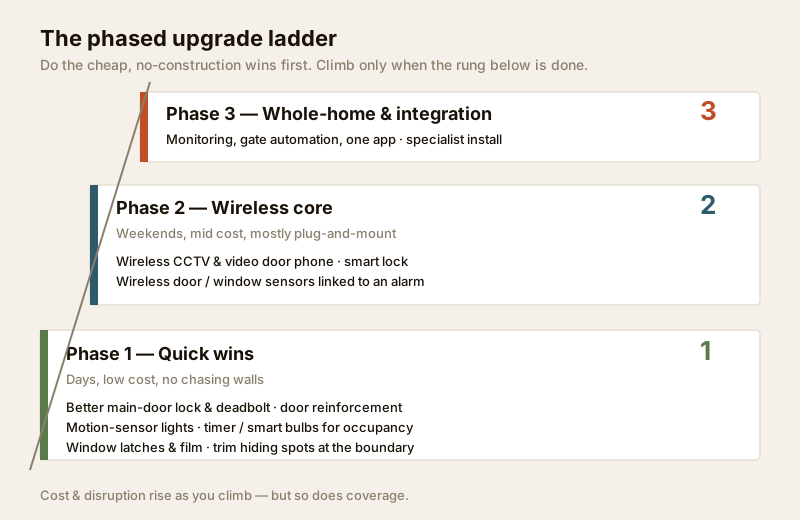
Phase 1 — Quick wins (days, low cost, no chasing walls)
This is the phase that pays back fastest and needs the least construction. Most of it is done in a weekend, and much of it moves with you if you rent.
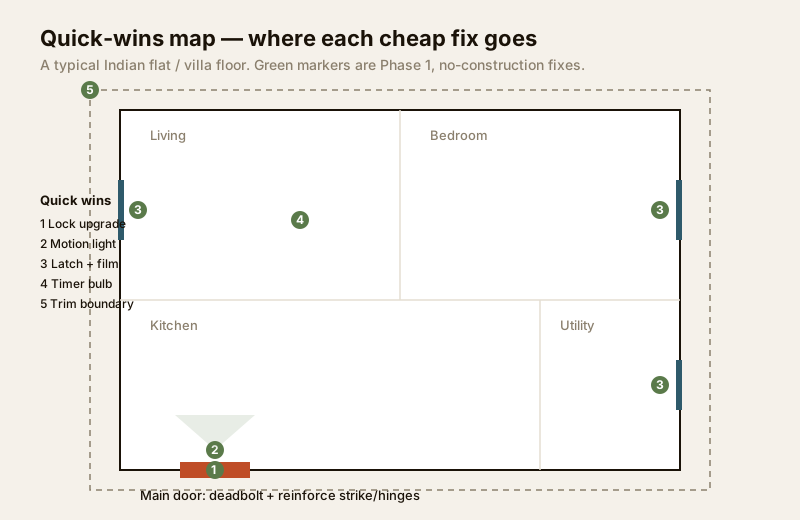
Upgrade the main door lock and add a deadbolt. The cylinder night latch on many Indian flat doors is the single softest point in the whole home. A good mortice deadbolt with a hardened, anti-drill cylinder throws a solid bolt deep into the frame. Have a locksmith fit it — a deadbolt that is poorly seated in a weak strike is barely better than what you had.
Reinforce the door itself, not just the lock. A strong lock in a weak frame is theatre. Add a metal strike-box or a longer strike plate fixed with long screws into the wall stud, and reinforce the hinges. A wide-angle door viewer or a video door phone lets you see who is there without opening.
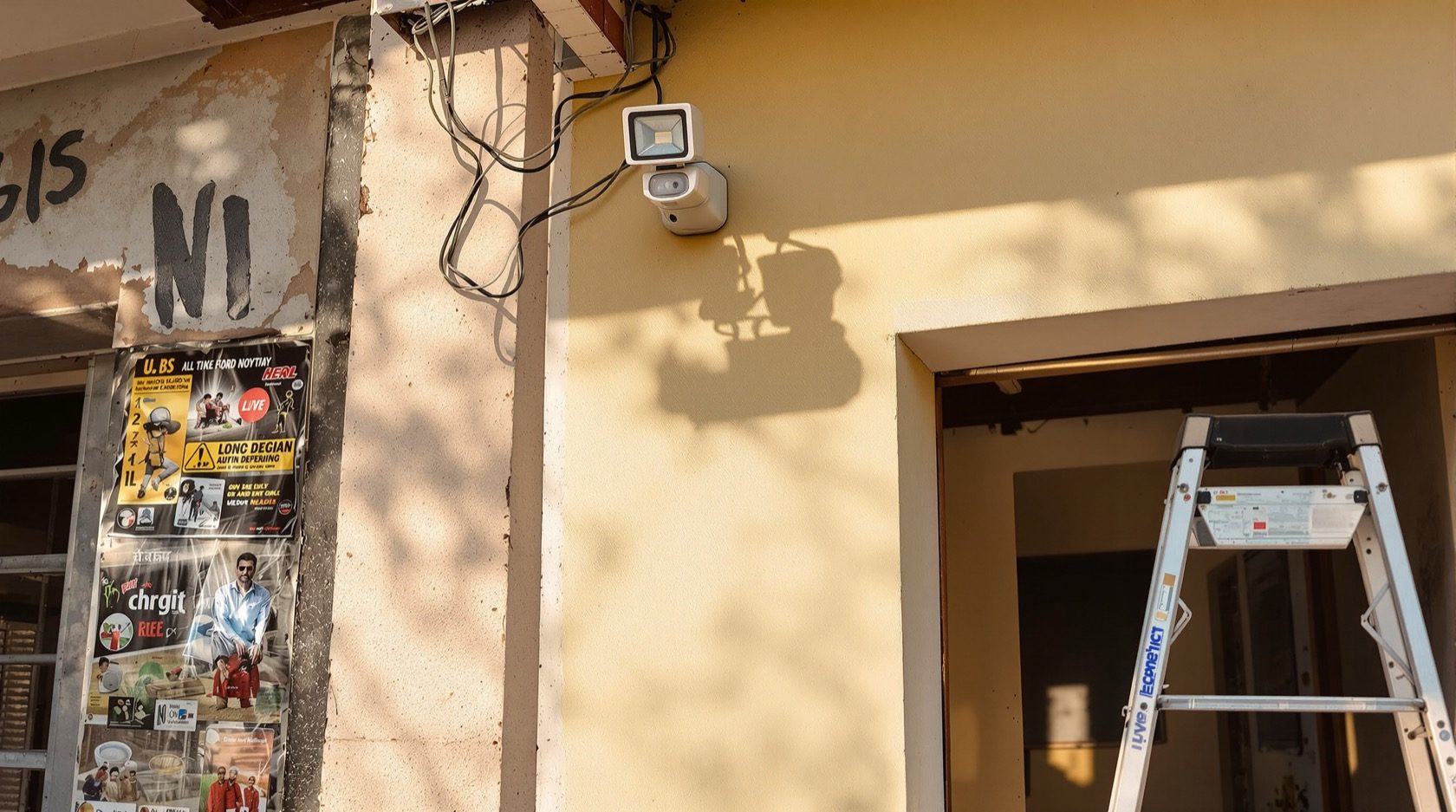
Motion-sensor lighting at every dark approach. Nothing is cheaper or more off-putting than a light that snaps on when someone crosses the porch, side passage or stair landing. Battery PIR lights need no wiring; hard-wired flood lights on the mains should go to an electrician. Coordinate with your RWA for shared corridors and compound lighting — see how the whole building layers up in the Building Security Systems Guide.
Simulate occupancy with timers and smart bulbs. An empty-looking home is a target. Cheap plug-in timers or Wi-Fi smart bulbs that switch lights on and off to a natural pattern make the house read as lived-in while you are at work or travelling. This is the highest deterrence-per-rupee trick there is, and it fits neatly with a broader smart-home setup.
Secure the windows. Add or upgrade latches on every openable window, especially on the ground floor, near drainpipes, and in the utility and bathroom areas people forget. Anti-shatter security film makes glass much harder to break through quietly. Where grilles are needed, that is fabrication work for a professional.
Trim the hiding spots. Cut back the overgrown hedge, move the ladder and the stacked drums away from the boundary wall, and light the blind corner. You are removing the cover and the climbing aids that make a break-in easy and unseen.
Phase 2 — The wireless core (weekends, mid cost, mostly plug-and-mount)
With the basics hardened, add the electronic layer — and this is where wireless-first really earns its keep, because you are mounting devices, not rewiring a finished home.
Wireless CCTV and a video door phone. Battery or Wi-Fi cameras cover the main gate, the front door and any blind side. Prioritise cameras that alert you — a person-detection push notification you actually see beats a silent recorder you review after the fact. A video door phone at the main door lets anyone in the family vet a visitor from a handset or phone.
Wireless door and window sensors linked to an alarm. Stick-on magnetic contacts on the main door and the vulnerable windows trigger a hub siren and a phone alert the instant something opens when it should not. This is the layer that turns cameras from passive footage into active warning.
A smart lock — chosen and fitted with care. A retrofit smart lock adds keyless entry, remote locking and a log of who came and went, and most fit over an existing mortice without new holes. Because a lock is life-safety and access-control hardware, have it installed by a professional and insist on a mechanical key or backup so a flat battery never locks you out. For an apartment or a gated community, coordinate with the association — the design view for managed access is in the Access Control System Designer.
Phase 3 — Whole-home monitoring and integration (specialist install)
Only when the core works do the bigger, costlier, more disruptive pieces make sense.
- Whole-home monitoring. Tie sensors, cameras and alarm into a single monitored system, optionally with a professional monitoring subscription that escalates to a response service or your emergency contacts.
- Integration into one app. Bring lights, locks, cameras and sensors under one interface with sensible automations (arriving home disarms; everyone out arms). Keep it robust — see the privacy and hardening notes in the Smart Home Privacy & Security Guide.
- Gate automation and perimeter. Automatic gates, boom barriers and boundary sensing are genuine construction and electrical work. Specify them with a professional and route the mains and motor wiring through a licensed electrician — the Electrical Hub explains what safe power provision looks like.
The phased upgrade table
Indicative India figures for a typical flat or small villa. Ranges vary widely by brand, room count and city; treat them as planning anchors, not quotes.
| Phase | Upgrade | Typical cost (₹) | Effort | Disruption | Wired? |
|---|---|---|---|---|---|
| 1 | Mortice deadbolt + strike/hinge reinforcement | 2,500–8,000 | Half a day | Low | No |
| 1 | Motion-sensor lights (battery PIR) | 800–2,500 each | An hour | None | No |
| 1 | Timers / Wi-Fi smart bulbs (occupancy sim) | 300–1,500 each | Minutes | None | No |
| 1 | Window latches + security film | 1,500–6,000 per window | Half a day | Low | No |
| 1 | Boundary trimming + clearing hiding spots | 0–2,000 | An afternoon | None | No |
| 2 | Wireless CCTV (2–4 cameras) | 8,000–35,000 | A weekend | Low | No |
| 2 | Video door phone | 6,000–20,000 | Half a day | Low | Partly |
| 2 | Wireless door/window sensors + alarm hub | 6,000–25,000 | A weekend | Low | No |
| 2 | Retrofit smart lock (pro-fitted) | 8,000–30,000 | Half a day | Low | No |
| 3 | Whole-home monitoring + integration | 25,000–1,00,000+ | Days | Medium | Some |
| 3 | Gate automation / boom barrier | 40,000–2,00,000+ | Days | High | Yes |
Quick wins vs cost — where the value is
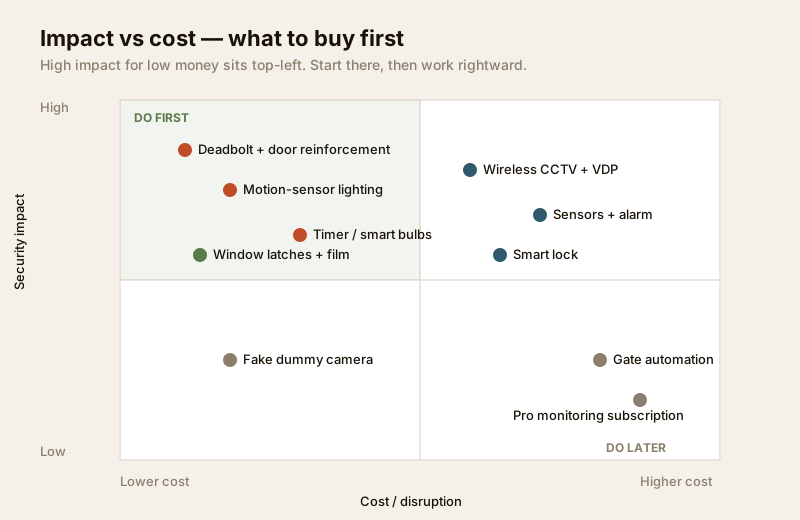
The point of phasing is that value is front-loaded. The cheapest changes stop the most common intrusions.
| Upgrade | Rough cost | Deterrence / impact | Best for |
|---|---|---|---|
| Deadbolt + door reinforcement | Low | Very high | Every home, first spend |
| Motion-sensor lighting | Low | High | Dark approaches, side passages |
| Timer / smart bulbs | Very low | High (deterrence) | Homes left empty by day or on travel |
| Window latches + film | Low–medium | High | Ground floor, utility, bathroom windows |
| Wireless CCTV with alerts | Medium | Medium–high | Evidence + real-time warning |
| Sensors + alarm | Medium | High | Turning cameras from passive to active |
| Smart lock | Medium | Medium | Keyless convenience + access log |
| Gate automation | High | Medium | Villas and standalone plots |
Common retrofit pitfalls
Retrofits fail in predictable ways. Avoid these and you are ahead of most homes on your street.
- Wi-Fi dead zones. Wireless-first only works where the signal reaches. A camera at the far gate or a sensor in the utility corner that keeps dropping off Wi-Fi is worse than none, because you trust it and it is not there. Map coverage first; add a mesh node or extender before you mount devices in weak-signal spots.
- No power backup, so it all dies in a cut. India has power cuts, and a break-in during one is not a coincidence. Cameras, the alarm hub and the router should sit on a small UPS or have battery backup, or your whole electronic layer goes dark exactly when it matters most.
- Cheap locks and cheap everything. A bargain padlock or a flimsy lock body is a false sense of safety. Buy the lock, the strike and the hinges to a real standard and have them fitted properly — this is the one place not to economise.
- Cameras that record but never alert. Footage you only watch after a theft solves nothing in the moment. Insist on real-time person-detection alerts, and actually test that they reach your phone.
- Ignoring the boundary. People spend on the front door and leave the compound wall, the back gate and the ground-floor windows wide open. Security is a perimeter, not a doorway. Walk the outside of your home and fix the softest point, wherever it is.
Renting versus owning
If you own, you can drill, fabricate and automate freely. If you rent, you still have a strong, entirely non-permanent kit:
- Portable and adhesive: door-security bars and portable door locks, stick-on window and door sensors, battery cameras on adhesive or clamp mounts, and plug-in timers all leave no marks and move house with you.
- No-modification lock security: a portable travel deadbolt or a door-jammer adds real resistance without touching the landlord's door. For anything more, ask permission in writing before changing the cylinder.
- Occupancy simulation costs nothing structural: smart bulbs and plug timers are pure plug-in.
- Talk to the landlord and the RWA: many permanent upgrades (grilles, a video door phone, corridor lighting) are things a landlord will happily approve or share the cost of, and gated-community security is often an RWA matter you can raise rather than solve alone.
When to bring in a professional
Assess, plan and choose yourself — but hand the hardware to the right trade. A licensed locksmith fits mortice deadbolts, smart locks and reinforced strikes so they actually hold. A licensed electrician does all mains wiring — flood lights, wired cameras, gate motors — and provides safe power and backup. A fabricator makes and fixes grilles and gates. Fire detection, electronic access control and any structural perimeter work are specify-and-supervise jobs, never DIY. Coordinate shared and boundary security with your RWA or society, and keep your local police station's number and your society's protocol handy.
Key takeaways
- Retrofit in phases, cheapest-impact first: harden the door and lock, add motion lights and timers, then the wireless core, then integration.
- Go wireless-first so a finished, lived-in home never needs its walls chased open.
- Value is front-loaded — a deadbolt, a motion light and a timer bulb stop more real break-ins than another camera.
- Design out the classic failures: Wi-Fi dead zones, no power backup, cheap locks, record-only cameras, and a forgotten boundary.
- Renters have a full non-permanent kit — portable locks, adhesive sensors and plug-in timers — plus an RWA and landlord to coordinate with.
This is an educational overview. Fitting locks, mains electrical work, electronic access control and any grille, gate or structural work are qualified professional jobs — engage a licensed locksmith, electrician or fabricator, and follow your local municipal bye-laws and society rules.
Export this guide
Related Guides — Deep-dive reading
Anti-Theft Door Guide India: Affordable Ways to Burglar-Proof Your Entry (2026)
A practical, layered checklist of low-cost upgrades — deadbolts, strike-plate reinforcement, hinge bolts, viewers, grill doors and smart alerts — to make any Indian home door far harder to force.
Home Doors & EntrancesSecurity Fire Alarm Integration in India (2026): Smart Alerts, Certified Systems, Fail-Safe Egress
The most important sentence a smart-home designer can say about fire is also the least profitable: a smart-home smoke sensor or fire notification is a helpful add-on, not a substitute for a certified fire-alarm system. This guide draws the line hard — life-safety detection and alarm belongs to the NBC-governed certified system — and then covers the genuinely useful, correctly-scoped automations the smart layer can add on a verified fire signal: unlock for egress, open the gate for the fire tender, light the escape path, stop the away-scene, and notify everyone loudly. All of it fail-safe. None of it in the way of the system that actually saves lives.
SecurityHow to Choose a Burglar Alarm in India (2026): Sensors, Alerts and What Actually Matters
A homeowner's guide to selecting an intruder alarm that fits your flat, villa or shop and alerts you the way you want — matching the sensor mix, control panel and the big siren-versus-monitored decision to your real risk, and dodging the false-alarm traps that make people switch systems off.
SecurityRelated Tools — Try Free
Home Security Risk Scorecard
Score your home across six security layers — perimeter, entry points, lighting, detection, alarm and habits — and get a prioritised action plan.
Security ScorecardAccess-Control Battery-Backup Calculator
Size the standby battery so an access system keeps running through a power cut, with an egress life-safety note.
Battery BackupApartment Video Door System Planner
Enter flats, entrances, floors and guard desk for a first-pass building intercom plan — door stations, indoor monitors, guard station, the right architecture and an indicative cost band.
Building Planner