
The Software Stack — A Working Learning Path
Module 2 of the Student Foundations Track — AutoCAD to Revit to Rhino to V-Ray, the Five-Tier Learning Path, Indian Licensing Discipline, Hardware Requirements, File-Format Ecosystem, Generative-AI Architecture Tools in 2026, and the Pitfalls Every B.Arch and B.Des Student Must Avoid
Software is a tool. It is not architecture, it is not design, and it is not the architect. The student who confuses fluency in software with competence in architecture has, by Year 5, a thinner architectural vocabulary than the student who treats software as the production layer — the layer that turns architectural thinking into communicable, buildable artifacts. Module 1 of this track established that drawing is the cognitive instrument; this module covers the production stack on top of which drawing is digitally articulated, developed, coordinated, and rendered.
That said, software fluency in 2026 is no longer optional for the Indian B.Arch / B.Des graduate. Internships expect AutoCAD by Semester 2, SketchUp by Semester 3, Revit awareness by Semester 5, and a working portfolio in InDesign or Figma by Semester 6. A graduate who applies to internships without these is at a measurable disadvantage in the Indian architecture-internship market. The five-year window of B.Arch is, among other things, the window in which to acquire this stack.
This module is the learning-path curriculum for that stack — deeper than the brief overview in the Resources Hub. The orientation is the same: B.Arch / B.Des students in India in 2026, learning the software stack on a 5-year (or 4-year) horizon, with explicit attention to Indian student licensing (which differs from US and EU pricing), Indian hardware budgets (which constrain what students can run), cracked-software risk (which has career consequences), and the rapidly-evolving AI tool landscape (which is the genuine 2026 disruption).
"The architect's tool is not the pencil; it is also not the laptop. The architect's tool is the architect's eye, trained to use whichever instrument the project demands. Software fluency is the cost of admission to contemporary practice. Architectural judgment is what justifies that fluency." — Common observation in architecture-pedagogy mentorship
1. Why Software Mastery Matters in 2026 — Without Overstating It
The argument for software fluency in 2026 has shifted in two directions:
- Software is now table-stakes for internships. A B.Arch student in 2010 could, with strong drawing skills, secure a residential internship without CAD fluency. In 2026, even small-firm Indian internships routinely require AutoCAD + SketchUp + Photoshop fluency, and increasingly Revit. The student who graduates without the stack is the student whose internship pool shrinks dramatically.
- AI tools have shifted the lower bound of "production fluency." Generative-AI tools (Veras, Spacely, Midjourney for architecture, ChatGPT for studio research) now produce in minutes what once took hours of skilled rendering work. The student who masters AI-tool direction — knowing what to ask, how to evaluate output, how to integrate AI generation into the architectural workflow — has a 2026-specific advantage that did not exist in 2020.
What has not shifted: software does not produce design; it produces production. A student who attempts to design directly in CAD, BIM, or AI tools — without the hand-drawing groundwork from Module 1 — will produce technically clean drawings of mediocre architecture. The discipline this module rests on: hand for thinking, software for production. Module 1 established the thinking; Module 2 establishes the production.
The five-year B.Arch is enough time to acquire the full stack — but only if the learning is structured. Random YouTube tutorial-watching is the slowest path; a deliberate semester-by-semester curriculum is the fastest. This module is that curriculum.
2. The Five-Tier Learning Path — A Semester-by-Semester Curriculum
The path below is the recommended order. Each tier builds on the previous. Skipping tiers is possible but produces predictable gaps that surface in studio reviews and internships.
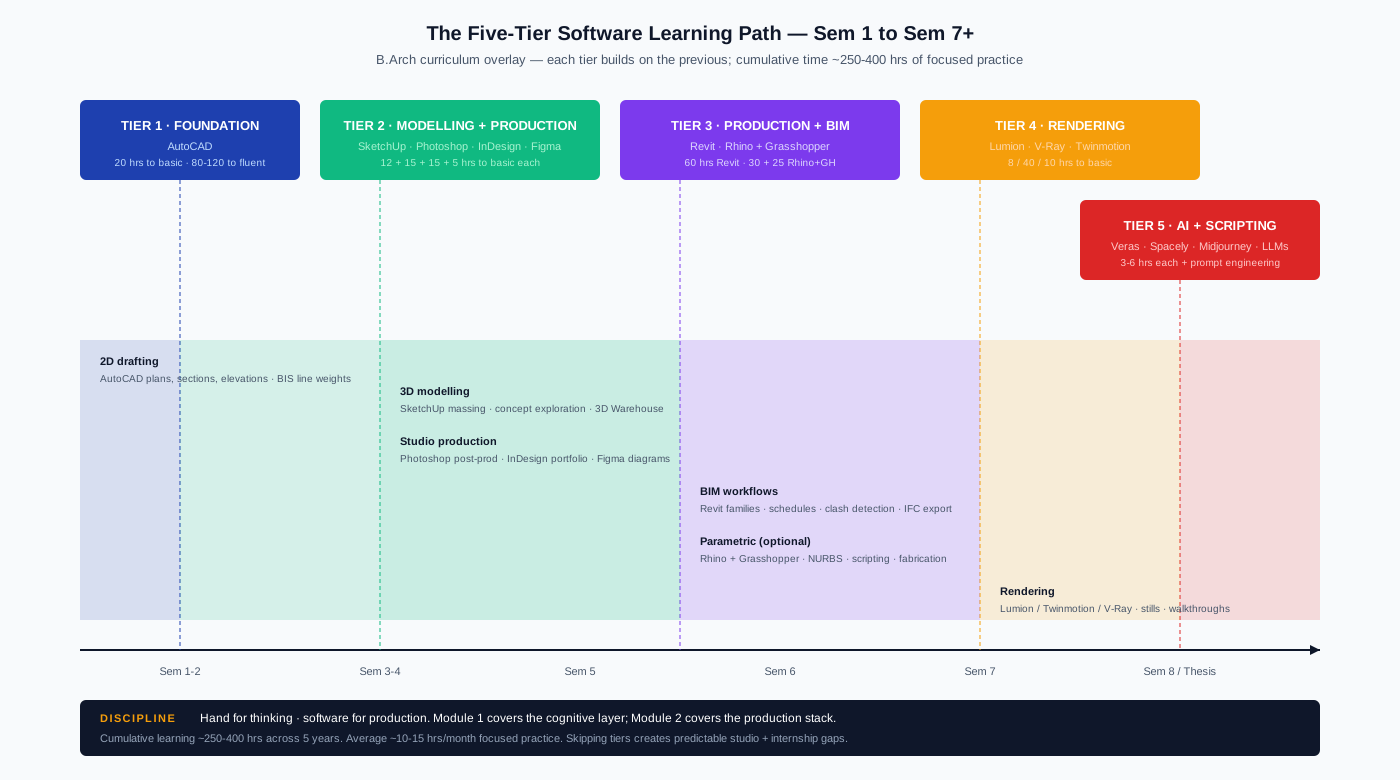
Tier 1 — Foundation (Semester 1-2)
AutoCAD — the foundational 2D drafting tool. The 4-decade-old industry standard for working drawings, plan/section/elevation, and dimensioned construction documents. Indian Standards Organisation (BIS) drawing conventions assume CAD-quality precision; AutoCAD is the standard environment for them.
| AutoCAD | Detail |
|---|---|
| Indian student licence | 3 years, free, via student.autodesk.in |
| Time to basic | 20 hours |
| Time to fluent | 80–120 hours |
| Free alternative | LibreCAD (open-source, limited but workable for 2D) |
| File format | .DWG (proprietary) and .DXF (interchange) |
| Hardware minimum | 8 GB RAM, integrated GPU sufficient for 2D |
| Common mistake | Trying to do 3D in AutoCAD (use SketchUp/Revit instead) |
| First five commands to learn | LINE, OFFSET, TRIM, EXTEND, DIMENSION |
The student's discipline: AutoCAD before any other software. Sem 1-2 is the time to commit 20-40 hours to it. Once you are comfortable with line, layer, and dimension discipline in AutoCAD, every subsequent CAD-style tool feels familiar.
Tier 2 — Modelling and Production (Semester 2-4)
Three tools to learn in parallel during Semester 2-4. Each addresses a different production layer.
SketchUp — quick 3D modelling, intuitive interface, ideal for early concept and massing studies.
| SketchUp | Detail |
|---|---|
| Indian student licence | Free Web version (browser-based) ; ~₹40,000/yr Pro for desktop |
| Time to basic | 12 hours |
| Time to fluent | 30–50 hours |
| Free alternative | Blender (free, open-source, more powerful but steeper curve) |
| File format | .SKP |
| Plugin ecosystem | V-Ray for SketchUp, Skatter, Profile Builder, Curic Sun |
| Common mistake | Using SketchUp for working drawings (it is for modelling, not drafting) |
| First five tools to learn | Push/Pull, Move, Rotate, Components, Scenes |
Adobe Photoshop + InDesign — render post-production, portfolio layout, presentation panels.
| Photoshop + InDesign | Detail |
|---|---|
| Indian student rate | ~₹880/month Creative Cloud All Apps (verify .edu.in or college email) |
| Time to basic | 15 hours each |
| Time to fluent | 60–80 hours each |
| Free alternative | Affinity Photo + Affinity Publisher (one-time ~₹6,000 each — strong alternatives) |
| File format | .PSD (Photoshop), .INDD (InDesign), .PDF (output) |
| Common mistake | Using Photoshop for layout (use InDesign); using Word for portfolio (use InDesign) |
| First five tools to learn | Layers, Selection, Layer masks, Levels/Curves, Smart objects |
Figma — diagrams, panel layouts, portfolio prototyping. Free for education.
| Figma | Detail |
|---|---|
| Indian student licence | Free Education plan (verify with .edu.in email) |
| Time to basic | 5 hours |
| Time to fluent | 15–20 hours |
| Free alternative | Inkscape (open-source vector editor) |
| File format | .FIG (cloud-native) ; export to .PNG, .SVG, .PDF |
| Common mistake | Using Figma for raster image editing (use Photoshop) |
| First five tools to learn | Frames, Components, Auto-Layout, Constraints, Plugins |
The student's discipline: layer Photoshop, InDesign, and Figma into Sem 2-4 in parallel with SketchUp. By Sem 4 you should be producing portfolio-quality outputs from these four tools combined.
Tier 3 — Production and BIM (Semester 5-7)
Revit — Building Information Modelling (BIM). The industry standard for coordinated multi-disciplinary architecture projects. Steeper learning curve; greater long-term payoff.
| Revit | Detail |
|---|---|
| Indian student licence | 1 year, free, via student.autodesk.in |
| Time to basic | 60 hours |
| Time to fluent | 200–400 hours (Revit is deep) |
| Free alternative | Blender + add-ons (limited BIM); FreeCAD (open-source, niche) |
| File format | .RVT (project), .RFA (family) ; export to .IFC for interchange |
| Hardware | 16 GB RAM minimum; 32 GB for medium projects ; dedicated GPU (NVIDIA recommended) |
| Common mistake | Starting Revit before mastering AutoCAD (the layer/family discipline is harder if CAD foundation is weak) |
| First five concepts to learn | Levels, Families (System / Loadable), Schedules, Worksets, View Templates |
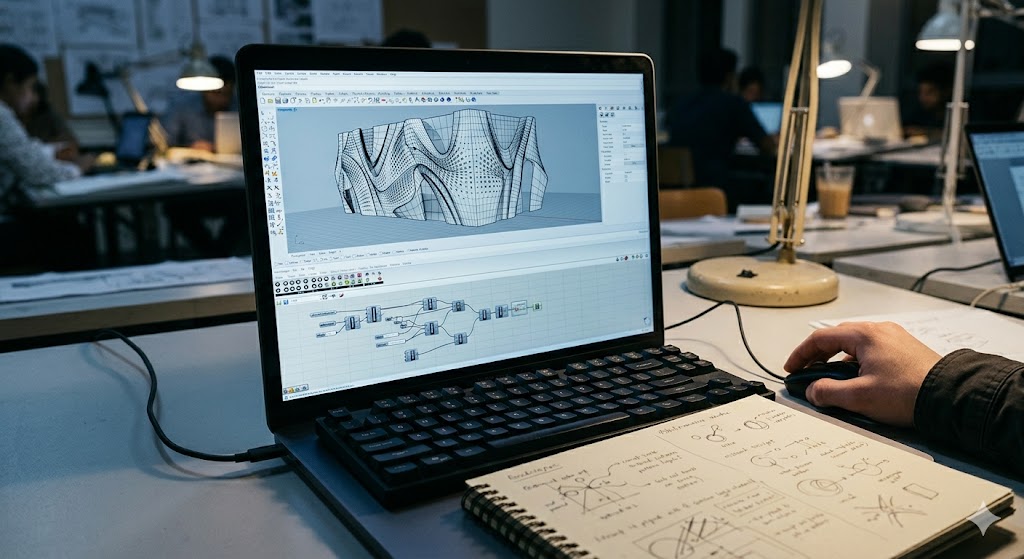
Rhino + Grasshopper — NURBS-based modelling and parametric scripting. Essential for projects with complex geometry, computational design, and form-finding.
| Rhino + Grasshopper | Detail |
|---|---|
| Indian student licence | ₹15,000 student educational licence (perpetual) ; 90-day free trial |
| Time to basic | 30 hours (Rhino) + 25 hours (Grasshopper) |
| Time to fluent | 80–120 hours combined |
| Free alternative | Blender + Sverchok (parametric add-on); FreeCAD |
| File format | .3DM (Rhino), .GH (Grasshopper) ; export to .OBJ, .STL, .DAE |
| Hardware | Mid-tier GPU recommended; 16 GB RAM |
| Common mistake | Using Grasshopper for everything (some problems are better solved in Revit) |
| First five Grasshopper components | Number Slider, List Item, Move, Loft, Surface |
The student's discipline: Revit by Sem 5, Rhino by Sem 6 (if the project warrants). Not every B.Arch student needs deep Rhino fluency; if your studio path is residential / commercial / institutional, AutoCAD + Revit covers most of it. If your interest leans towards parametric, fabrication, or computational design, Rhino + Grasshopper is essential.
Tier 4 — Rendering (Semester 4-7)
Three rendering paths, each with different trade-offs.
Lumion — real-time rendering; quickest path to portfolio-quality renders.
| Lumion | Detail |
|---|---|
| Indian student licence | 1 year, free, Educational version (lumion.com) |
| Time to basic | 8 hours |
| Time to fluent | 25–40 hours |
| Free alternative | Twinmotion (free for individuals, see below) |
| File format | .LS10/11/12 ; imports SketchUp, Revit, Rhino |
| Hardware | NVIDIA GPU strongly recommended; 16 GB RAM |
| Common mistake | Over-relying on Lumion's stock library (looks generic) |
| Output | Static images, walkthrough videos, panoramas |
V-Ray (for SketchUp / 3ds Max / Rhino) — photoreal rendering; longest learning curve, highest quality ceiling.
| V-Ray | Detail |
|---|---|
| Indian student licence | 1 year, free, Educational version (chaos.com) |
| Time to basic | 40 hours |
| Time to fluent | 120–200 hours |
| Free alternative | Cycles (Blender's renderer, free, comparable quality) |
| File format | Lives within host app (.SKP, .MAX, .3DM) |
| Hardware | Strong GPU (NVIDIA 30/40 series for current versions); 32 GB RAM ideal |
| Common mistake | Skipping the lighting fundamentals (HDRI, sun/sky, area lights) and then chasing post-processing tricks |
| Output | Photoreal stills; ray-traced animations |
Twinmotion — Unreal-based real-time rendering; free for personal/student use.
| Twinmotion | Detail |
|---|---|
| Indian student licence | Free for personal / student / non-commercial use |
| Time to basic | 10 hours |
| Time to fluent | 30–50 hours |
| Free alternative | Lumion student version (above) |
| File format | .TMA ; imports SketchUp, Revit, Rhino, Archicad |
| Hardware | Strong GPU; 16 GB RAM minimum |
| Common mistake | Using only the default lighting (Twinmotion's strength is its weather + time-of-day system) |
| Output | Real-time walkthroughs, VR-ready, video, stills |
The student's discipline: learn Lumion or Twinmotion first (lower learning curve, immediate portfolio output). Add V-Ray in Sem 6-7 if your portfolio aims need photoreal stills. Most B.Arch students do not need both Lumion and V-Ray.
Tier 5 — AI Tools and Specialisation (Semester 6+)
The 2026 landscape includes a meaningful set of AI tools that have entered architectural practice. The student's discipline: learn the AI tool stack as a complement to, not a replacement for, the foundational stack above.
Veras — Stable Diffusion-based AI render plugin for SketchUp / Revit / Rhino. Generates photoreal interpretations from massing models.
| Veras | Detail |
|---|---|
| Pricing | Free starter tier; paid plans from ~₹1,000/month |
| Time to basic | 4 hours |
| Use | Quick render iteration; "what does this massing look like as built?" |
| Common mistake | Treating Veras output as final (it is a starting point for V-Ray / Lumion finishing) |
Spacely.ai / similar — AI architectural massing and floor-plan generation.
| Spacely | Detail |
|---|---|
| Pricing | Free starter; ~₹800/month |
| Time to basic | 3 hours |
| Use | Concept-stage exploration of layout options |
| Common mistake | Letting AI dictate the design (use as exploration, not generation) |
Midjourney / DALL-E / Stable Diffusion (general image generators) — for moodboards, atmospheric studies, exterior context, conceptual material studies.
| General image AI | Detail |
|---|---|
| Pricing | Midjourney ~₹800-2,400/month ; DALL-E via ChatGPT Plus ₹1,800/month ; Stable Diffusion free (local install) |
| Time to basic | 6 hours of prompt engineering |
| Use | Moodboards, atmospheric studies, illustration, concept comm |
| Common mistake | Submitting AI-generated imagery as your own design (academic-integrity issue at every B.Arch institution) |
ChatGPT / Claude / Gemini (LLMs for studio research) — research, writing assistance, code generation for parametric work.
| LLMs | Detail |
|---|---|
| Pricing | Free tiers available ; paid ~₹1,800-2,000/month |
| Use | Studio brief research, IS-code lookup assistance, Grasshopper script debugging, thesis writing assistance |
| Common mistake | Using LLM-generated text without verification (LLMs hallucinate Indian-context citations frequently) |
The discipline for AI tools: use them for exploration and iteration, not for design substitution. Studio juries in 2026 are increasingly attuned to AI-generated work; submission of unattributed AI output is treated as plagiarism at most Indian institutions. The architect-with-AI is the future; the AI-as-architect is not.
3. Indian Hardware Spec Recommendations
The single most-asked question from B.Arch students in India: what laptop should I buy? The answer depends on your budget tier and your software ambitions.
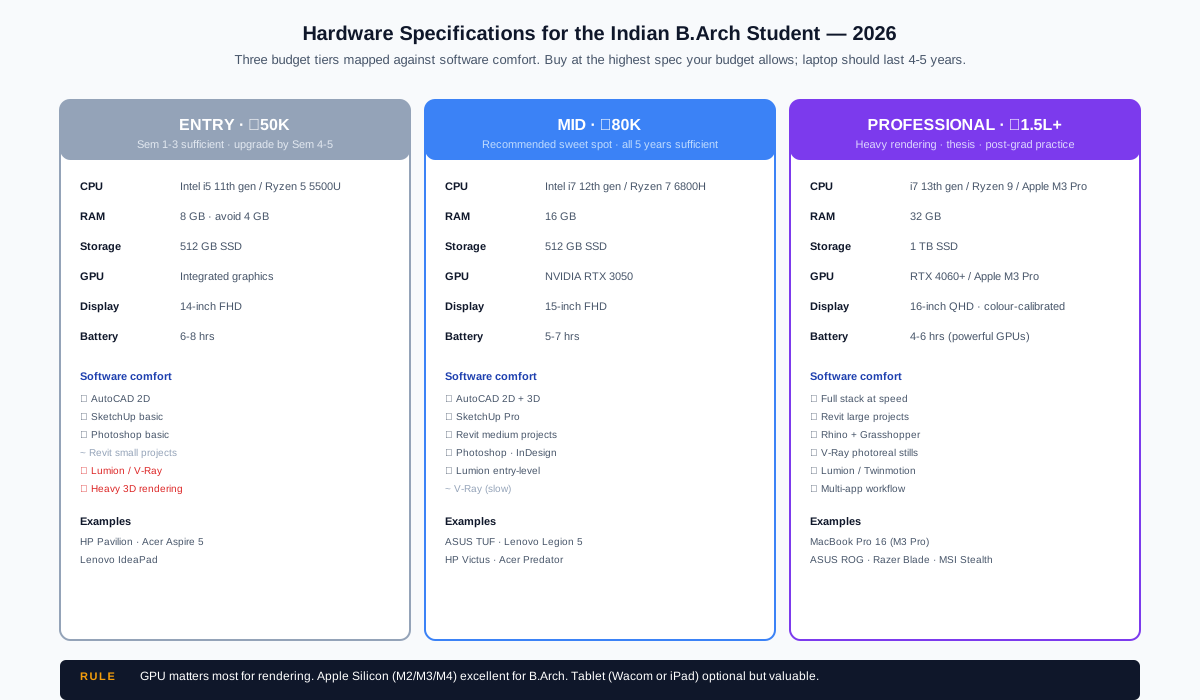
| Component | ₹50K Entry tier | ₹80K Mid tier | ₹1.5L Professional tier |
|---|---|---|---|
| CPU | Intel i5 11th gen / AMD Ryzen 5 5500U | Intel i7 12th gen / AMD Ryzen 7 6800H | Intel i7 13th gen / AMD Ryzen 9 / Apple M3 Pro |
| RAM | 8 GB (avoid 4 GB at all costs) | 16 GB | 32 GB |
| Storage | 512 GB SSD | 512 GB SSD | 1 TB SSD |
| GPU | Integrated graphics | NVIDIA RTX 3050 / equivalent | NVIDIA RTX 4060 / Apple M3 Pro integrated |
| Display | 14-inch FHD | 15-inch FHD | 16-inch QHD or higher; calibrated for colour |
| Software comfort | AutoCAD 2D · SketchUp basic · Photoshop basic | AutoCAD 2D · SketchUp Pro · Revit medium · Photoshop · InDesign · Lumion entry | Full stack: AutoCAD · Revit · Rhino · V-Ray · Twinmotion · 3D rendering at speed |
| Battery life | 6-8 hours | 5-7 hours | 4-6 hours (powerful GPUs cost battery) |
| Examples (2026 prices) | HP Pavilion · Acer Aspire 5 · Lenovo IdeaPad | ASUS TUF · Lenovo Legion 5 · HP Victus | Apple MacBook Pro 16 · ASUS ROG · Razer Blade · MSI Stealth |
Three Pragmatic Notes
1. GPU matters most for rendering. AutoCAD, Photoshop, Revit, and Rhino run on integrated graphics; Lumion, V-Ray, and Twinmotion need a dedicated NVIDIA GPU. If your budget is tight and you do not need rendering, the ₹50K-₹65K range is sufficient for the first 3 years.
2. Apple Silicon (M2/M3/M4) is excellent for B.Arch students — runs everything except a few specific Windows-only Revit plugins. Long battery life, excellent display, good resale value. Consider a M3 Pro MacBook Pro if you can stretch to ₹1.5L+.
3. Tablet (Wacom Intuos / iPad Pro) is optional but valuable. A Wacom Intuos Small (~₹6,000) integrates with Photoshop and SketchUp for natural sketching. An iPad Pro (~₹85,000) with Procreate is more expensive but acts as a digital sketchbook. Both are extras, not essentials.
The student who is starting B.Arch in 2026 should buy at the highest spec they can afford within their budget. The laptop will need to last 4-5 years; investing 20-30% more upfront usually pays back through avoided mid-degree replacement.
4. The File-Format Ecosystem
Architecture is a multi-software discipline. Files move between AutoCAD, SketchUp, Revit, Rhino, rendering tools, and presentation software. Understanding the ecosystem prevents the most common technical pain — "the file won't open" or "the model came in wrong scale".
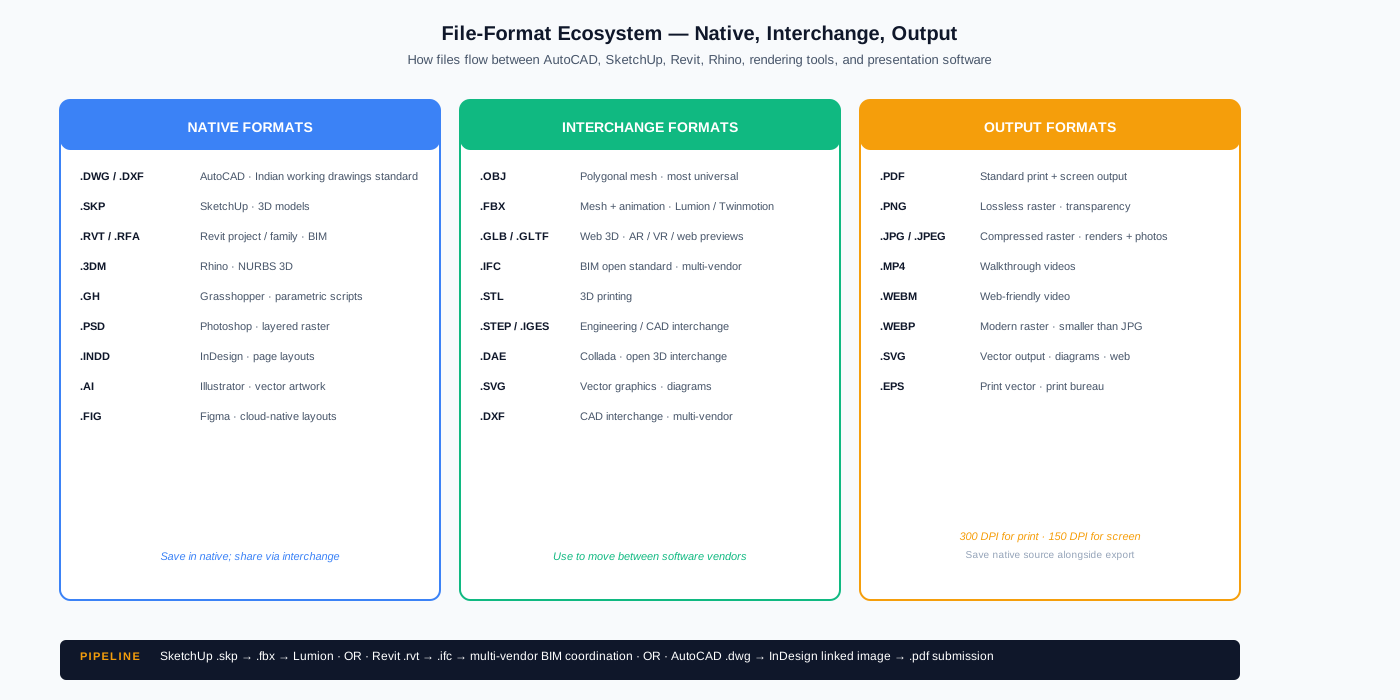
Native Formats
| Format | Software | Use |
|---|---|---|
| .DWG | AutoCAD (proprietary) | 2D drafting, working drawings |
| .DXF | AutoCAD (interchange variant) | CAD interchange between any vendor |
| .SKP | SketchUp | 3D models |
| .RVT / .RFA | Revit (project / family) | BIM projects |
| .3DM | Rhino | NURBS 3D models |
| .GH | Grasshopper | Parametric scripts |
| .PSD | Photoshop | Layered raster images |
| .INDD | InDesign | Page layouts |
| .AI | Illustrator | Vector artwork |
| .FIG | Figma | Cloud-native page layouts and prototypes |
Interchange Formats
| Format | Use |
|---|---|
| .OBJ | Geometry interchange — moves polygonal mesh between most 3D tools |
| .FBX | Animation + mesh interchange — used for Lumion, Twinmotion imports |
| .GLB / .GLTF | Web-friendly 3D — used for AR/VR and web previews |
| .IFC | Building Information Modelling interchange — open BIM standard |
| .STL | 3D printing |
| .STEP / .IGES | Engineering / CAD interchange |
| .SVG | Vector graphics — diagrams, panel layouts |
Output Formats
| Format | Use |
|---|---|
| Final printable output ; most studio submissions | |
| .PNG | Lossless raster output ; transparency support |
| .JPG | Compressed raster ; renders, photos |
| .MP4 | Video walkthroughs |
The student's discipline: export at 300 DPI for print submissions, 150 DPI for screen presentation. Save native files alongside the export — the studio reviewer often asks to see the source file.
5. The Cracked-Software Warning
A genuine career risk that needs explicit naming. Cracked or pirated software (downloaded from torrent, KAT, or "free" sites) carries three concrete risks for B.Arch students:
- Future commercial-licence eligibility. Autodesk, Chaos (V-Ray), Adobe, McNeel (Rhino), and others run telemetry that tracks installation patterns. A student who runs cracked software on a personal laptop can face complications when applying for student licences (Autodesk verifies "first-time-student" status) or commercial licences after graduation.
- Malware risk. Cracked software is a primary delivery vector for keyloggers, cryptominers, and ransomware. Indian B.Arch students lose project files to ransomware infections every year because the "free V-Ray" or "free Lumion" was bundled with malicious code.
- Academic integrity. Many Indian institutions (CEPT, SPA, IIT, NIT) explicitly prohibit cracked software in their honour codes. Submissions traceable to cracked software (via metadata) can attract academic discipline.
The discipline: always use legitimate student licences. Every major architecture vendor offers free or low-cost (₹15,000 or below) student licensing in India. There is no scenario in which cracked software is the right choice for a B.Arch student.
| Concern | Legitimate path |
|---|---|
| AutoCAD / Revit / Maya / Inventor | Autodesk Education portal — student.autodesk.in (3-yr free) |
| V-Ray (for any host) | Chaos Education portal — chaos.com/education (1-yr free) |
| Lumion | Lumion Educational version — lumion.com/education (1-yr free) |
| SketchUp Pro | SketchUp Education plan — ~₹4,000/yr or free Web version |
| Rhino + Grasshopper | McNeel Education licence — ₹15,000 perpetual |
| Twinmotion | Free for personal / student use — twinmotion.com |
| Adobe Creative Cloud | Adobe Indian Student Plan — ~₹880/month for All Apps |
| Microsoft Office | Microsoft 365 Education — free for verified students |
If your institution does not have an institutional licence pool, contact your faculty or the institution's IT department. Most Indian B.Arch institutions in 2026 maintain Autodesk and Adobe pools that cover students.
6. The AI Tool Landscape — A 2026 Snapshot
Generative AI for architecture is the most rapidly-changing area of the software stack. The list below is current as of mid-2026; expect significant additions and consolidations over the next 24 months.
| Category | Tools | Use case | Watch for |
|---|---|---|---|
| Massing + plan AI | Spacely, Maket, ARK | Concept-stage layout exploration | Output is starting-point only; humans still drive the design |
| Render AI (image-to-image) | Veras, ARC, LookX | Photoreal interpretation of massing models | Best with strong massing input; weak with vague concepts |
| Text-to-image | Midjourney, DALL-E (ChatGPT), Stable Diffusion | Moodboards, atmospheric studies, illustration | Prompt-engineering skill is the differentiator |
| 3D model generation | Luma, Spline AI, Meshy | Text-to-3D for quick assets | Quality varies; not yet at architectural-detail level |
| LLM research assistants | ChatGPT, Claude, Gemini | Studio brief research, IS-code lookup, thesis writing assistance | Verify Indian citations; LLMs hallucinate Indian sources |
| Drawing extraction AI | Mansion, BIMPlugins | OCR + extraction from scanned drawings | Useful for site-survey / heritage projects |
| Rendering acceleration | NVIDIA Canvas, Topaz Photo AI | Render upscaling and post-production | Strong for portfolio polish |
The student's discipline for AI tools is transparency, judgement, and integration. Disclose AI-tool usage in studio submissions where required. Use AI for exploration; use your own architectural judgement for selection. Integrate AI output with hand-drawing and traditional rendering — do not submit raw AI as final.
The relevant ethical discussion is well-articulated in Carpo (2017) The Second Digital Turn and the 2024 RIBA AI in Architecture statement, both cited in the references below.
7. The Eight Most Common Student Software Mistakes
| Mistake | Consequence | Fix |
|---|---|---|
| 1. Skipping AutoCAD foundation; jumping straight to Revit | Revit's family + worksets discipline is much harder without CAD foundation | Spend Sem 1-2 on AutoCAD even if institution moves directly to Revit |
| 2. Modelling in software too early in studio process | Slow ideation; "commitment cost" of digital model prevents iteration | Hand-sketch first; model only after concept is settled |
| 3. Render-first design (designing to look good in Lumion) | Mediocre architecture with polished renders | Design for the building, render the design — never the reverse |
| 4. Using cracked software | Career, malware, and academic risk | Always use legitimate student licences |
| 5. No file management discipline | "Lost the file before submission" | Project folder per studio project; date-stamped versions; cloud backup (Google Drive, OneDrive, or institutional storage) |
| 6. Ignoring keyboard shortcuts | 3-5x slower workflow than peers | Learn the 20 most-used shortcuts in each tool early |
| 7. Choosing software based on "what looks impressive" | Time spent on Rhino + Grasshopper when AutoCAD + Revit would have served the project | Match tool to project; complex geometry warrants Rhino, ordinary projects do not |
| 8. Submitting AI-generated output without disclosure | Plagiarism / academic-integrity issue | Always disclose AI tool usage; use AI as exploration, not as final output |
Students who internalise these eight by Sem 4 have a substantial 2026 advantage over peers who do not.
8. Twelve-Test Software-Readiness Self-Diagnostic
Before any major studio submission or internship application, run the following twelve tests. Failing more than four suggests a systematic gap.
| Test | Question | Pass criterion |
|---|---|---|
| 1 | Can you produce a complete plan, section, and elevation set in AutoCAD with BIS line weights? | Yes — at least one studio project demonstrates this |
| 2 | Can you produce a 3D model in SketchUp from your AutoCAD drawings? | Yes — model + AutoCAD drawings of the same project on file |
| 3 | Have you produced a portfolio in InDesign or Figma? | Yes — minimum 6 spreads |
| 4 | Can you produce a Lumion or Twinmotion render of your studio project? | Yes — at least one non-default lighting setup demonstrated |
| 5 | Have you used legitimate student licences for all software? | Yes — Autodesk education account active; Chaos / Adobe accounts verified |
| 6 | Is your file management organised (project folders, date-stamped versions, cloud backup)? | Yes — random project file located in <30 seconds |
| 7 | Can you import / export between SketchUp and AutoCAD without scale issues? | Yes — workflow demonstrated |
| 8 | Do you know 20+ keyboard shortcuts in your primary CAD tool? | Yes — produces drawings faster than non-shortcut peers |
| 9 | Have you used at least one AI tool in a studio project (with disclosure)? | Yes — Veras / Midjourney / LLM used and disclosed in submission |
| 10 | Can you produce a 1080p video walkthrough of your project? | Yes — Lumion / Twinmotion video output |
| 11 | Is your laptop spec sufficient for your tool choices? | Yes — software runs without lag |
| 12 | Have you backed up project files in two separate locations? | Yes — local + cloud, or local + external drive |
Students who pass 10+ tests by Year 3 have a strong software foundation for thesis and post-graduation practice.
9. Companion Resources at Studio Matrx
- Module 1 — Architectural Drawing & Representation Fundamentals — the prerequisite cognitive foundation
- Architecture Academy — Student Resources Hub — software stack overview, downloadable templates
- Student Foundations Track — full 8-module curriculum
- Essential Digital Skills for Architects & Interior Designers — practitioner-side counterpart for working architects
- Working Drawings Documentation in India — the AutoCAD output discipline once you have the software fluency
10. References
Software Vendor Documentation (Indian Student Portals)
- Autodesk Education — student.autodesk.in — AutoCAD, Revit, Maya, 3ds Max, Inventor (3-year free licences for verified students).
- Chaos Education — chaos.com/education — V-Ray for SketchUp, 3ds Max, Rhino, Maya, Revit (1-year free licences).
- Lumion Educational Version — lumion.com/education — 1-year free licence.
- McNeel Educational Licence — rhino3d.com — Rhino + Grasshopper at ₹15,000 perpetual student rate.
- Twinmotion — twinmotion.com — free for personal / student / non-commercial use.
- Adobe Creative Cloud Indian Student Plan — adobe.com/in — ~₹880/month for verified students.
- SketchUp Education — sketchup.com/education — free Web version + Pro at student rates.
- Microsoft 365 Education — microsoft.com/en-in/education — free for verified students.
Foundational Pedagogy Texts
- Ching, F. D. K., & Adams, C. (2018). Building Construction Illustrated (6th ed.). Wiley. — The CAD-translation reference for working-drawing conventions.
- Pottmann, H., Asperl, A., Hofer, M., & Kilian, A. (2007). Architectural Geometry. Bentley Institute Press. — The mathematical foundation for parametric (Rhino + Grasshopper) work.
- Carpo, M. (2017). The Second Digital Turn: Design Beyond Intelligence. MIT Press. — On AI and computational design's effect on architectural authorship.
- Reas, C., & McWilliams, C. (2010). Form+Code in Design, Art, and Architecture. Princeton Architectural Press. — Visual-computing foundations for parametric work.
Peer-Reviewed Academic References — BIM and Computational Design
- Eastman, C., Teicholz, P., Sacks, R., & Liston, K. (2018). BIM Handbook: A Guide to Building Information Modeling for Owners, Designers, Engineers, Contractors, and Facility Managers (3rd ed.). Wiley. — The standard BIM reference.
- Burry, M. (2011). Scripted by Purpose. Routledge. — On the discipline of computational scripting for architectural form.
- Krish, S. (2011). A practical generative design method. Computer-Aided Design, 43(1), 88–100.
- Aish, R., & Woodbury, R. (2005). Multi-level interaction in parametric design. Smart Graphics: 5th International Symposium, 151–162.
- Oxman, R. (2006). Theory and design in the first digital age. Design Studies, 27(3), 229–265.
Peer-Reviewed Academic References — AI in Architecture
- Carpo, M. (2023). Beyond Digital: Design and Automation at the End of Modernity. MIT Press.
- As, I., & Basu, P. (Eds.). (2021). The Routledge Companion to Artificial Intelligence in Architecture. Routledge.
- Steinfeld, K. (2017). Dreams may come. ACADIA 2017: Disciplines & Disruption, 590–599. — Early ML-in-architecture work.
- Chaillou, S. (2022). Artificial Intelligence and Architecture: From Research to Practice. Birkhäuser.
- RIBA. (2024). AI in Architecture: Position Paper and Practice Guidance. Royal Institute of British Architects.
Indian Academic and Industry References
- CIDC India (Construction Industry Development Council). Building Information Modeling Implementation in India — periodic policy briefs.
- NICMAR (National Institute of Construction Management and Research) — Indian BIM Survey annual report.
- CEPT University, Faculty of Architecture — published software-curriculum frameworks for the Indian B.Arch context.
Companion Studio Matrx Guides
See §9 above for the full cross-reference list.
Author's Note: Software fluency is the cost of admission to contemporary architectural practice in India in 2026. It is also, increasingly, the cost of admission to architectural school internships and to the kinds of studios that produce ambitious work. The student who acquires the five-tier stack on a deliberate Sem 1-7 timeline graduates with a substantial advantage over peers who acquired tools randomly. The student who treats software fluency as a substitute for architectural thinking, however, graduates with the inverse — clean drawings of mediocre architecture. The discipline this module rests on, returning to Module 1's core premise: hand for thinking, software for production. The five tiers, Indian licensing map, hardware specs, and AI-tool landscape above are the working production layer. The architectural thinking remains the architect's, and the architect's alone.
Disclaimer: Software pricing and licensing terms change frequently; this module reflects publicly-available pricing as of mid-2026. Students should verify current pricing and licence terms directly with each vendor before purchase. Hardware specifications and recommendations reflect 2026 product availability in the Indian market. Studio Matrx, its authors, and contributors accept no liability for outcomes based on this guide.
Export this guide
Related Guides — Deep-dive reading
AI Render Generator — Photoreal AI Rendering for Indian Architects + Designers (2026)
Sketch/photo/white-box → photoreal · 12 min vs V-Ray 4 hr · Studio Matrx + Lumion + D5 + Twinmotion + Enscape
Design StylesArchitectural Drawing & Representation Fundamentals
Module 1 of the Student Foundations Track — Orthographic Projection, Axonometric, Isometric, Perspective, BIS Line-Weight Standards, Material Hatching Conventions, the Sketchbook Discipline, and the Hand-to-Software Translation for Indian B.Arch and B.Des Students
Student FoundationsB.Des Interior Design — The Student Track
The 2026 Reference for the Indian B.Des Interior Aspirant — How It Differs from B.Arch, the Top Schools (NID · Pearl · Symbiosis · NIFT · Sushant), the Four-Year Curriculum, the Software Stack, FF&E and Materials Vocabulary, Studio Discipline, Portfolio Building, Internship Pathways, Career Trajectories, and the Long-Horizon Practice Map
Student FoundationsRelated Tools — Try Free
Cross-Ventilation Analyzer
Estimate airflow and air changes per hour (ACH) from room size, window areas, layout, and local wind — with NBC 2016 Part 8 compliance check.
Ventilation CalculatorConcept Generator
Get 3 AI-generated design concepts for any room with style, materials, and cost estimate.
DesignAIBefore & After Studio
Generate AI before-and-after renders to preview how your redesign could look.
DesignAI