
Architectural Visualization for Indian Students — A Working Reference
V-Ray, Enscape, Lumion, D5, Twinmotion, Vantage + AI Tools · Five-Stage Pipeline · 12-Month Path · Five Career Tracks
Architectural visualization in 2026 is no longer one tool or one workflow. It is a multi-stage pipeline where AI-aided ideation, real-time renderers, and traditional ray-traced engines each have a specific role. Mastering the pipeline matters more than mastering any single tool.
This guide is the working reference for Indian B.Arch and M.Arch students taking up architectural visualization. It covers the tool landscape across real-time, ray-traced, and AI categories, the five-stage pipeline, six disciplines that separate good viz from amateur output, a 12-month learning path, and five career pathways.
Match the tool to the stage. AI viz for concept ideation. Real-time renderers for schematic. Ray-traced for final viva-grade. Post-production discipline is where the last 10% of quality lives. The student who masters the pipeline rather than chasing the latest tool ages well in this field.
This is a 6-month-refresh guide. Tool pricing, AI viz tools, and integration features evolve very fast. Last verified: May 2026 · Next verify: November 2026.
For complementary toolchain depth see Parametric Architecture in India, BIM Architecture in India, Architecture Software Learning Path. For thesis applications see Architecture Thesis Topics in India.
The 2026 Tool Landscape
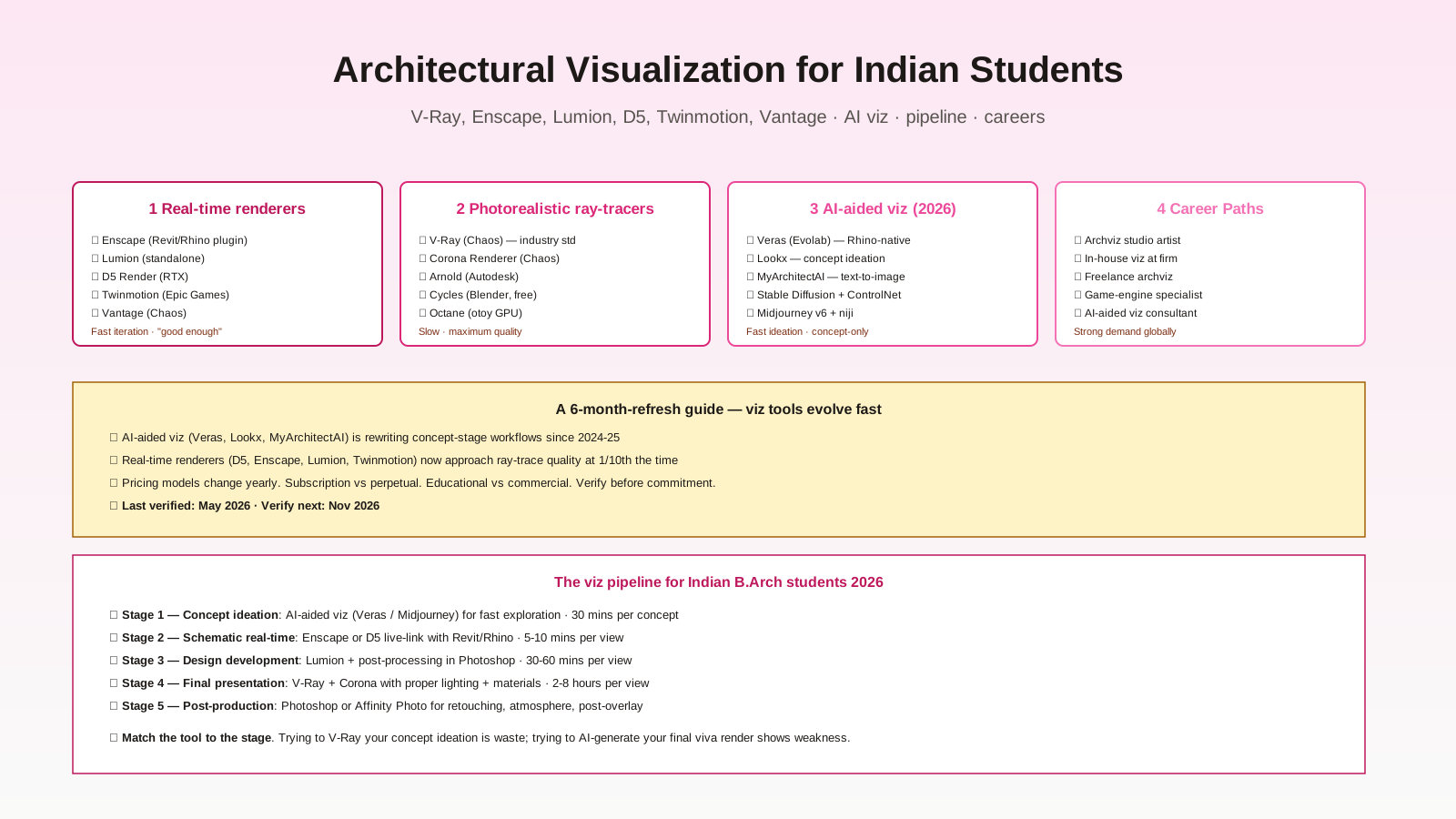
Three tool categories now coexist in any serious viz workflow:
1. Real-time renderers — Enscape, Lumion, D5, Twinmotion, Vantage. Fast iteration, "good enough" quality. Best for schematic + design development.
2. Photorealistic ray-tracers — V-Ray (industry standard), Corona, Arnold, Cycles (Blender free), Octane. Slow, maximum quality. Best for final presentation.
3. AI-aided viz — Veras, Lookx, MyArchitectAI, Stable Diffusion + ControlNet, Midjourney. Concept ideation in seconds. Best for early-stage exploration.
The misframing that hurts students: thinking "I need to learn one renderer." You need to learn the pipeline. Different stages, different tools.
Tool-by-Tool Comparison
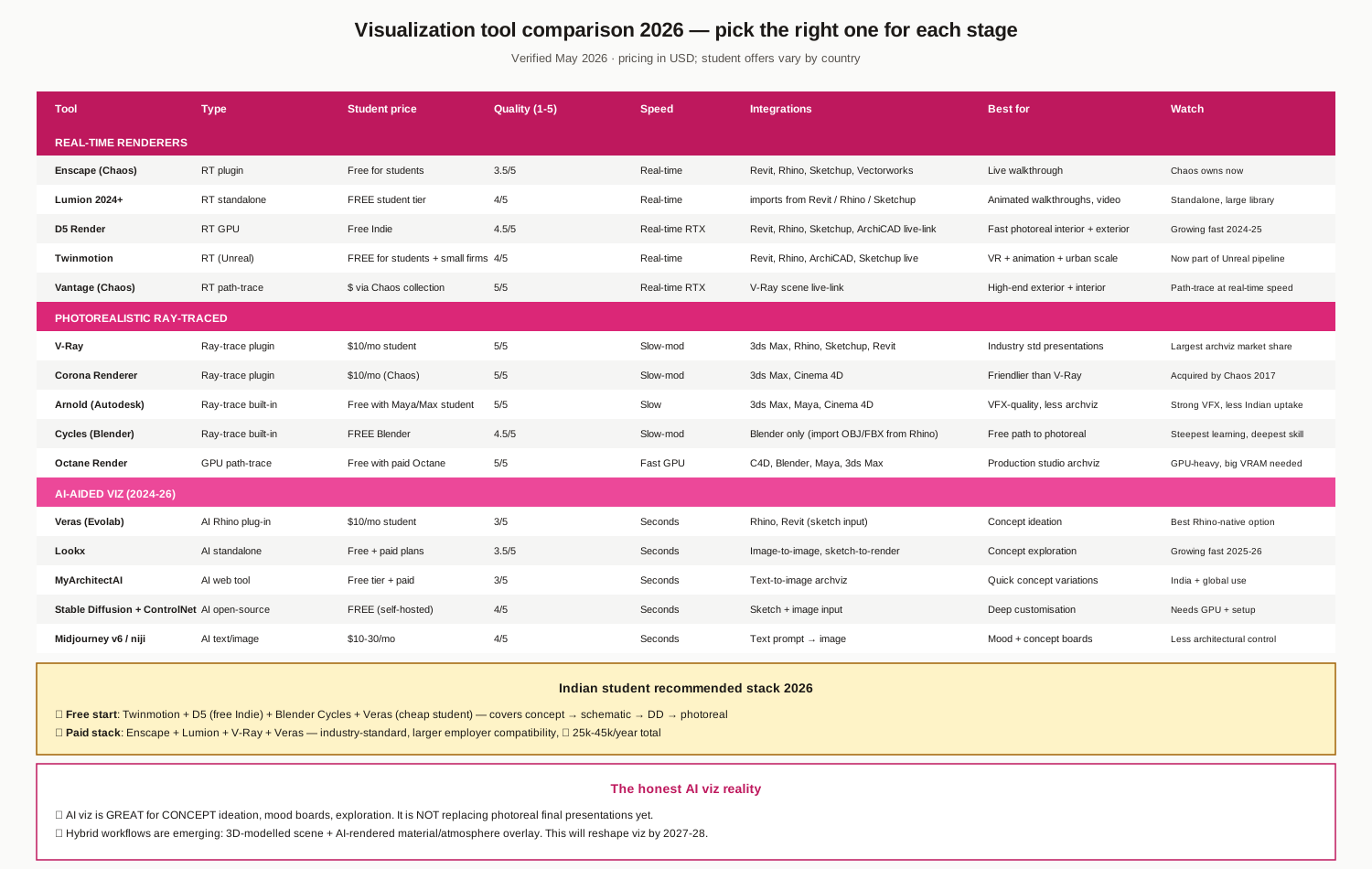
Real-time renderers
- Enscape (Chaos) — Free for students, free at small firm tier. Live link with Revit/Rhino/Sketchup/Vectorworks. Best for live walkthroughs during design.
- Lumion — Free student tier; commercial $1500-3000/year. Standalone application. Largest material/vegetation library. Strong for animation + video walkthroughs.
- D5 Render — Free Indie tier (commercial revenue threshold). RTX-accelerated path tracing. Growing fast 2024-2025. Live link with Revit/Rhino/Sketchup/ArchiCAD.
- Twinmotion (Epic Games) — Free for students + small firms. Unreal-engine based. Strong for VR + urban scale.
- Vantage (Chaos) — Bundled with Chaos collection. Path-traced at real-time speed. Premium real-time output.
Ray-traced renderers
- V-Ray (Chaos) — $10/month student, ~$1200/year commercial. Industry standard. Largest archviz market share. Steepest learning curve.
- Corona Renderer (Chaos) — $10/month student. Friendlier than V-Ray. Acquired by Chaos 2017.
- Arnold (Autodesk) — Free with Maya/Max student license. VFX-quality, less archviz uptake in India.
- Cycles (Blender) — FREE. Path-tracing. Steepest learning curve but deepest skill.
- Octane Render — Free with paid Octane. GPU-heavy, big VRAM needed.
AI-aided viz (the new category)
- Veras (Evolab) — $10/month student. Rhino-native plugin. Sketch-to-render in seconds. Best Rhino-native AI viz option.
- Lookx — Free + paid plans. Sketch-to-render web app. Growing fast 2025-26.
- MyArchitectAI — Free tier + paid. Text-to-image archviz. India + global use.
- Stable Diffusion + ControlNet — FREE (self-hosted) but requires GPU + setup. Maximum control + customisation.
- Midjourney v6 / niji — $10-30/month. Text-prompt → image. Less architectural control but great for mood + concept boards.
Indian student recommended stacks
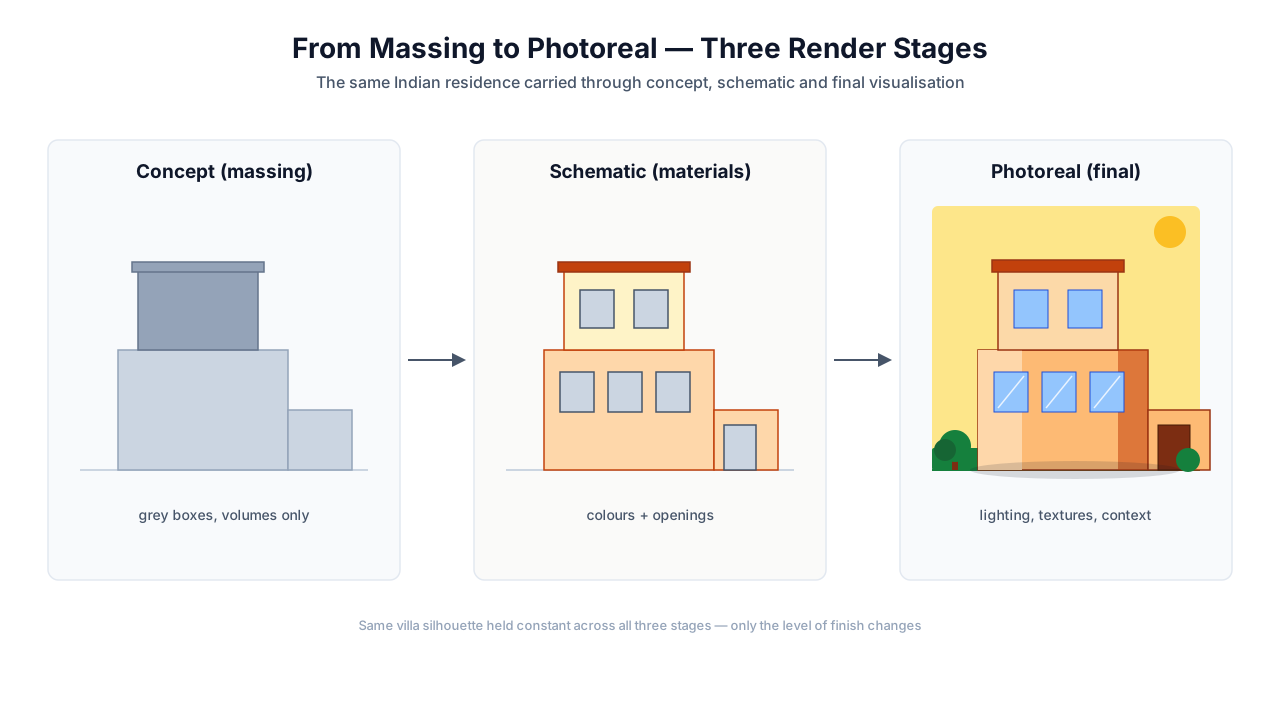
Free start: Twinmotion + D5 (free Indie) + Blender Cycles + Veras (cheap student) — covers concept → schematic → DD → photoreal.
Paid stack: Enscape + Lumion + V-Ray + Veras — industry-standard, larger employer compatibility, ₹ 25k-45k/year total student investment.
The Five-Stage Pipeline
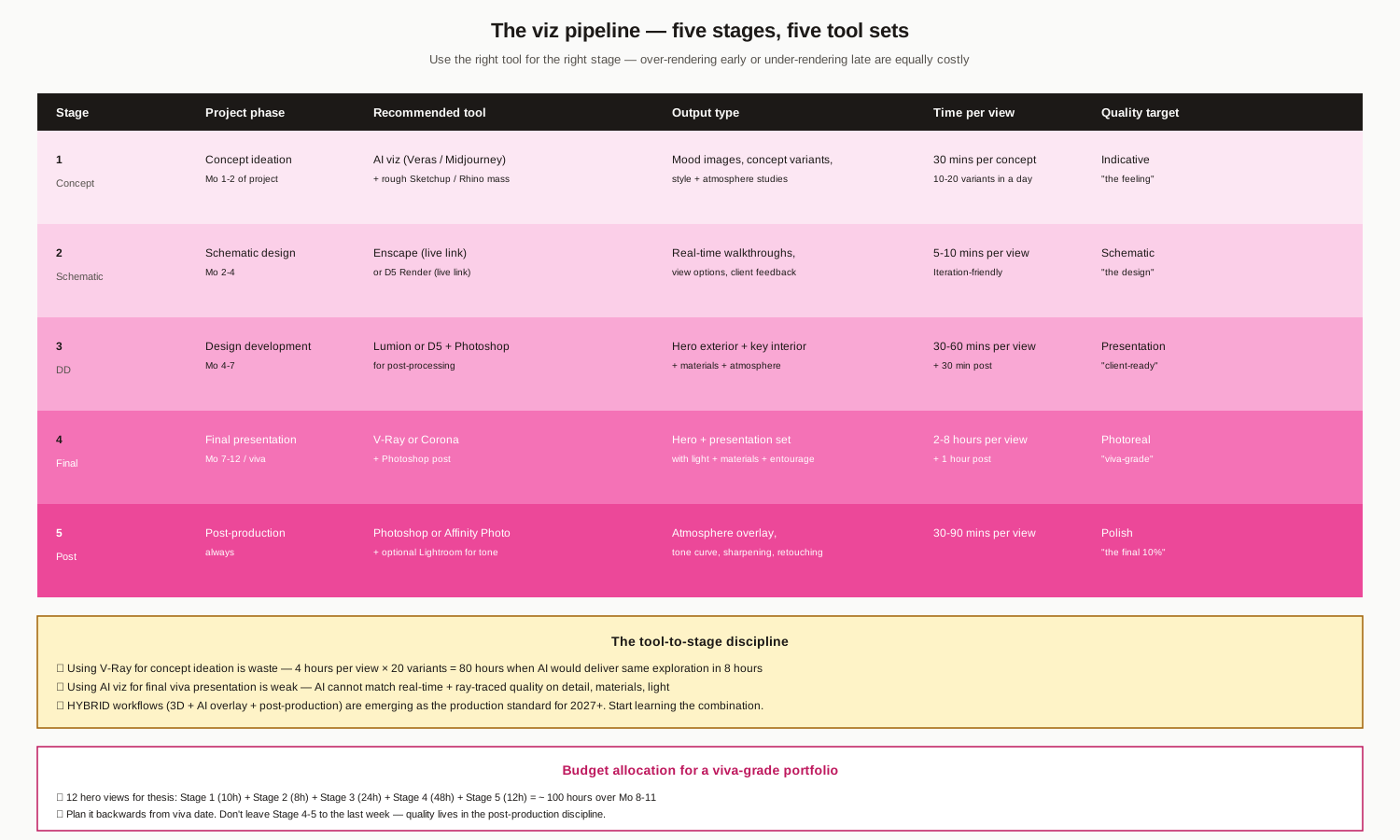
| Stage | Phase | Tool | Time per view | Quality target |
|---|---|---|---|---|
| 1 Concept | Concept ideation (Mo 1-2) | AI viz (Veras / Midjourney) + Sketchup mass | 30 min | Indicative — "the feeling" |
| 2 Schematic | Schematic design (Mo 2-4) | Enscape or D5 (live link) | 5-10 min | Schematic — "the design" |
| 3 DD | Design development (Mo 4-7) | Lumion or D5 + Photoshop post | 30-60 min + 30 min post | Presentation — "client-ready" |
| 4 Final | Final presentation (Mo 7-12 / viva) | V-Ray or Corona + Photoshop post | 2-8 hours + 1 hour post | Photoreal — "viva-grade" |
| 5 Post | Post-production (always) | Photoshop or Affinity Photo + optional Lightroom | 30-90 min per view | Polish — "the final 10%" |
The tool-to-stage discipline
- Using V-Ray for concept ideation is waste — 4 hours per view × 20 variants = 80 hours when AI delivers same exploration in 8 hours
- Using AI viz for final viva presentation is weak — AI cannot match real-time + ray-traced quality on detail, materials, light
- Hybrid workflows (3D + AI overlay + post-production) are emerging as the production standard for 2027+. Start learning the combination.
Budget for viva-grade portfolio
12 hero views for thesis: Stage 1 (10h) + Stage 2 (8h) + Stage 3 (24h) + Stage 4 (48h) + Stage 5 (12h) = ~100 hours over Mo 8-11. Plan backwards from viva date. Don't leave Stage 4-5 to the last week — quality lives in post-production discipline.
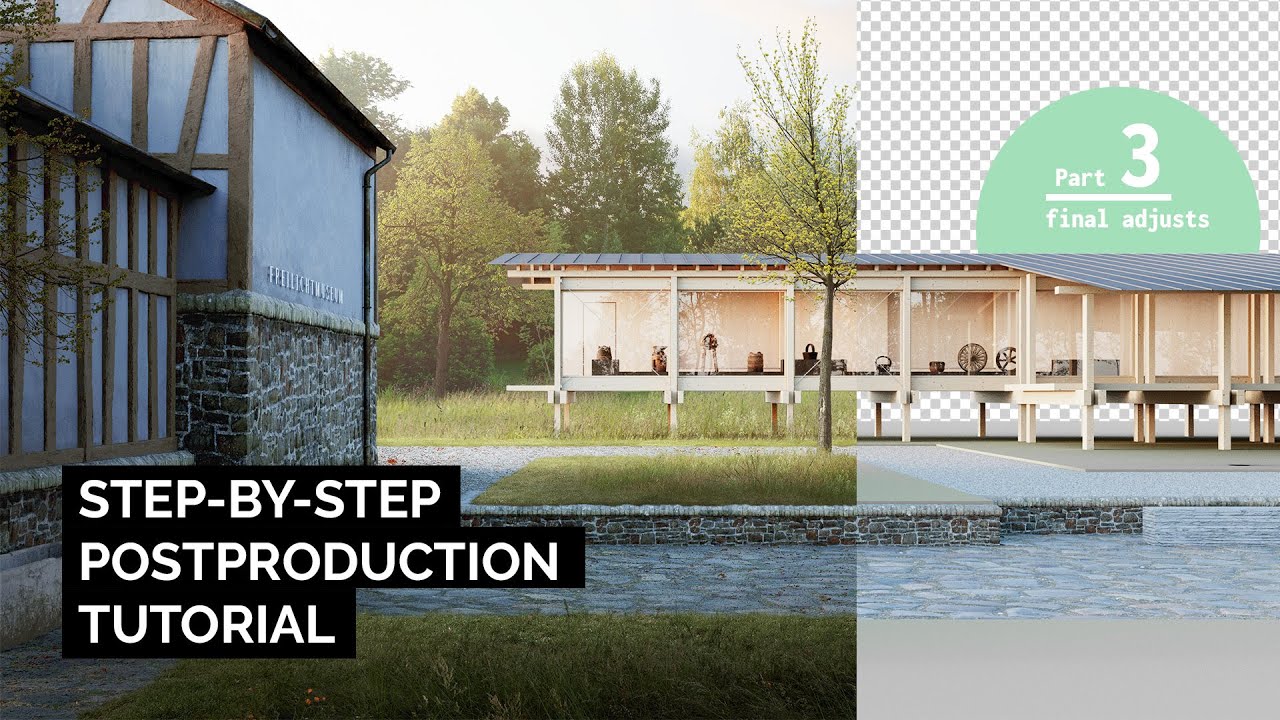
Six Rendering Disciplines
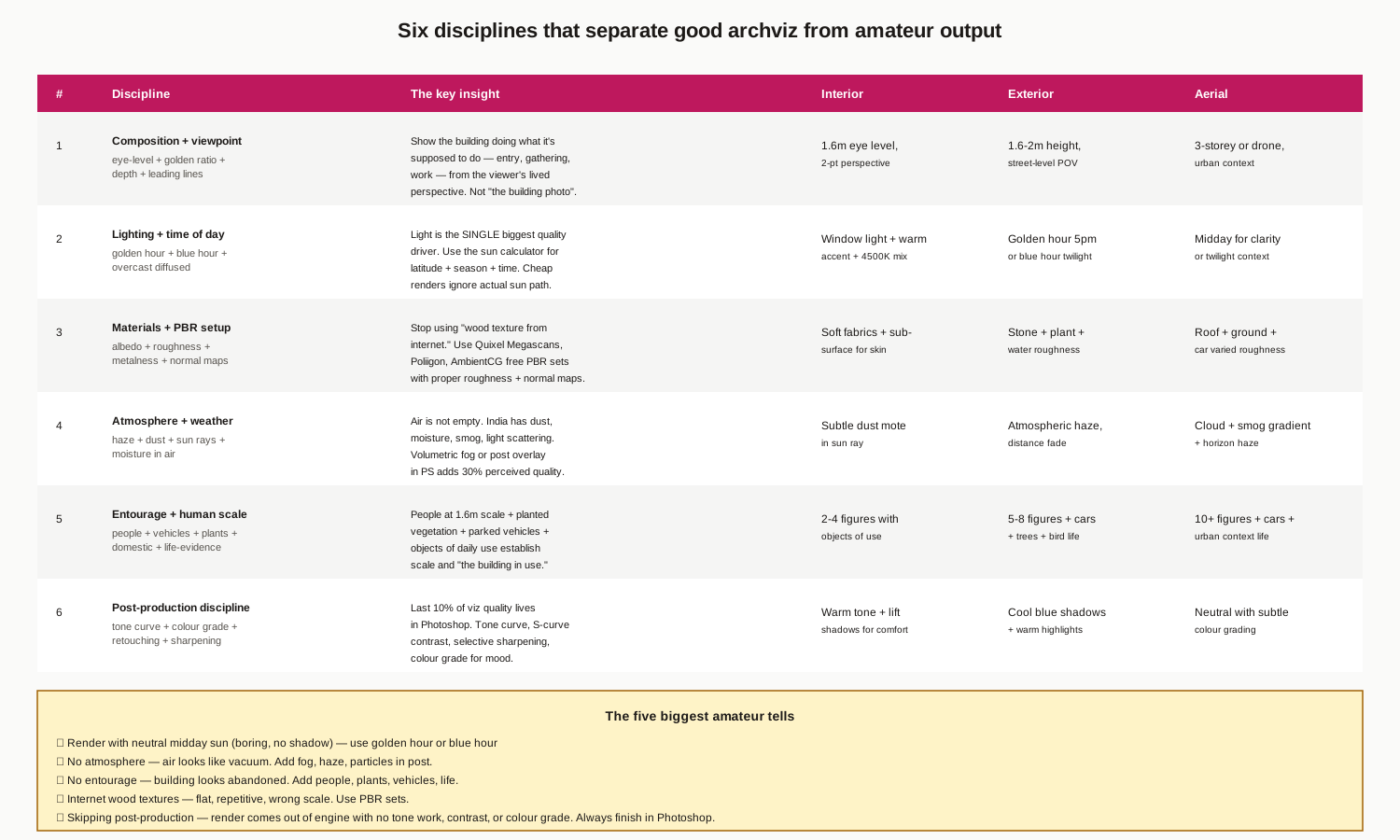
1. Composition + viewpoint — eye-level (1.6m), golden ratio, depth, leading lines. Show the building doing what it's meant to do.
2. Lighting + time of day — golden hour or blue hour or overcast diffused. Light is the single biggest quality driver.
3. Materials + PBR setup — albedo + roughness + metalness + normal maps. Stop using internet wood textures. Use Quixel Megascans, Poliigon, AmbientCG.
4. Atmosphere + weather — air is not empty. India has dust, moisture, smog. Volumetric fog or post overlay adds 30% perceived quality.
5. Entourage + human scale — people at 1.6m + planted vegetation + parked vehicles + objects of daily use establish scale and "the building in use."
6. Post-production discipline — last 10% of viz quality lives in Photoshop. Tone curve, S-curve contrast, selective sharpening, colour grade for mood.
Five biggest amateur tells
1. Neutral midday sun (boring, no shadow) — use golden hour
2. No atmosphere — air looks like vacuum. Add fog, haze, particles in post
3. No entourage — building looks abandoned. Add people, plants, vehicles, life
4. Internet wood textures — flat, repetitive, wrong scale. Use PBR sets
5. Skipping post-production — render comes out of engine with no tone work. Always finish in Photoshop
The 12-Month Learning Path
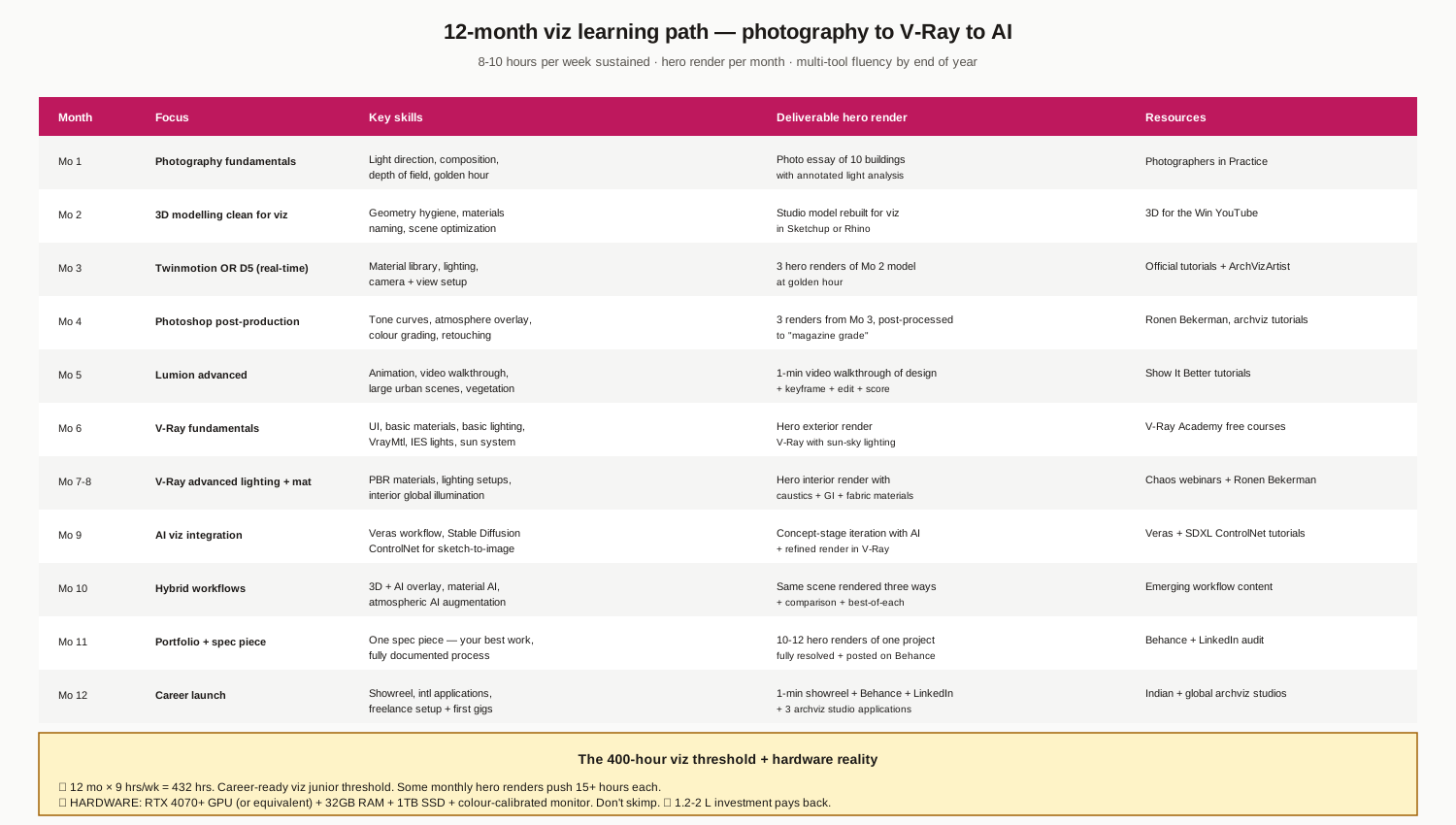
12 months × 9 hours/week = ~432 hours = career-ready viz junior. Some monthly hero renders push 15+ hours each — budget accordingly.
Hardware reality
RTX 4070+ GPU (or equivalent) + 32GB RAM + 1TB SSD + colour-calibrated monitor. Don't skimp. ₹ 1.2-2 L investment pays back in 12-18 months of viz work.
Progression principle
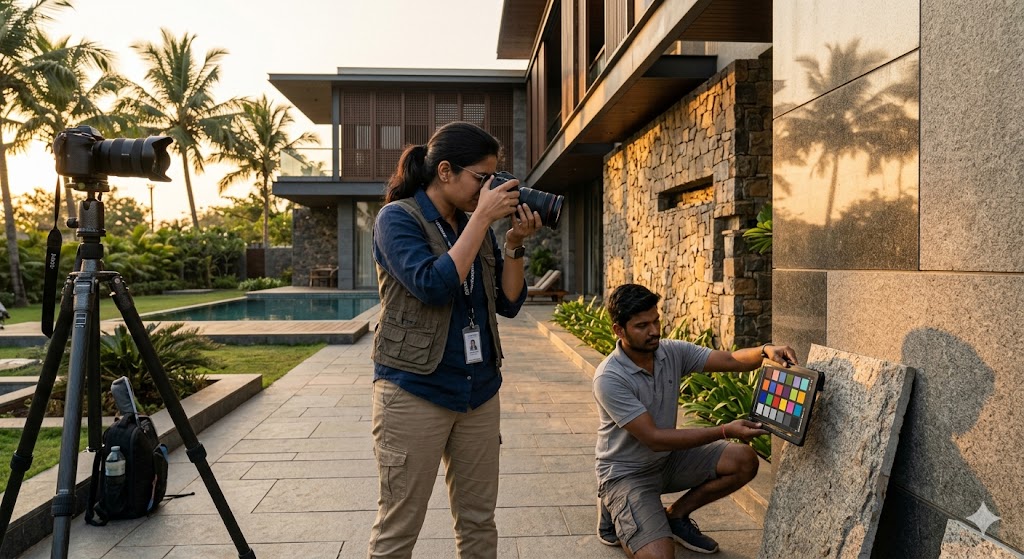
Photography fundamentals before tools. Real-time before ray-traced. Free Blender + Cycles before paid V-Ray. Hybrid (AI + 3D + post) by end of year. The order matters — most beginners skip photography and lighting fundamentals, then their V-Ray output looks technically competent but aesthetically thin.
Five Career Pathways
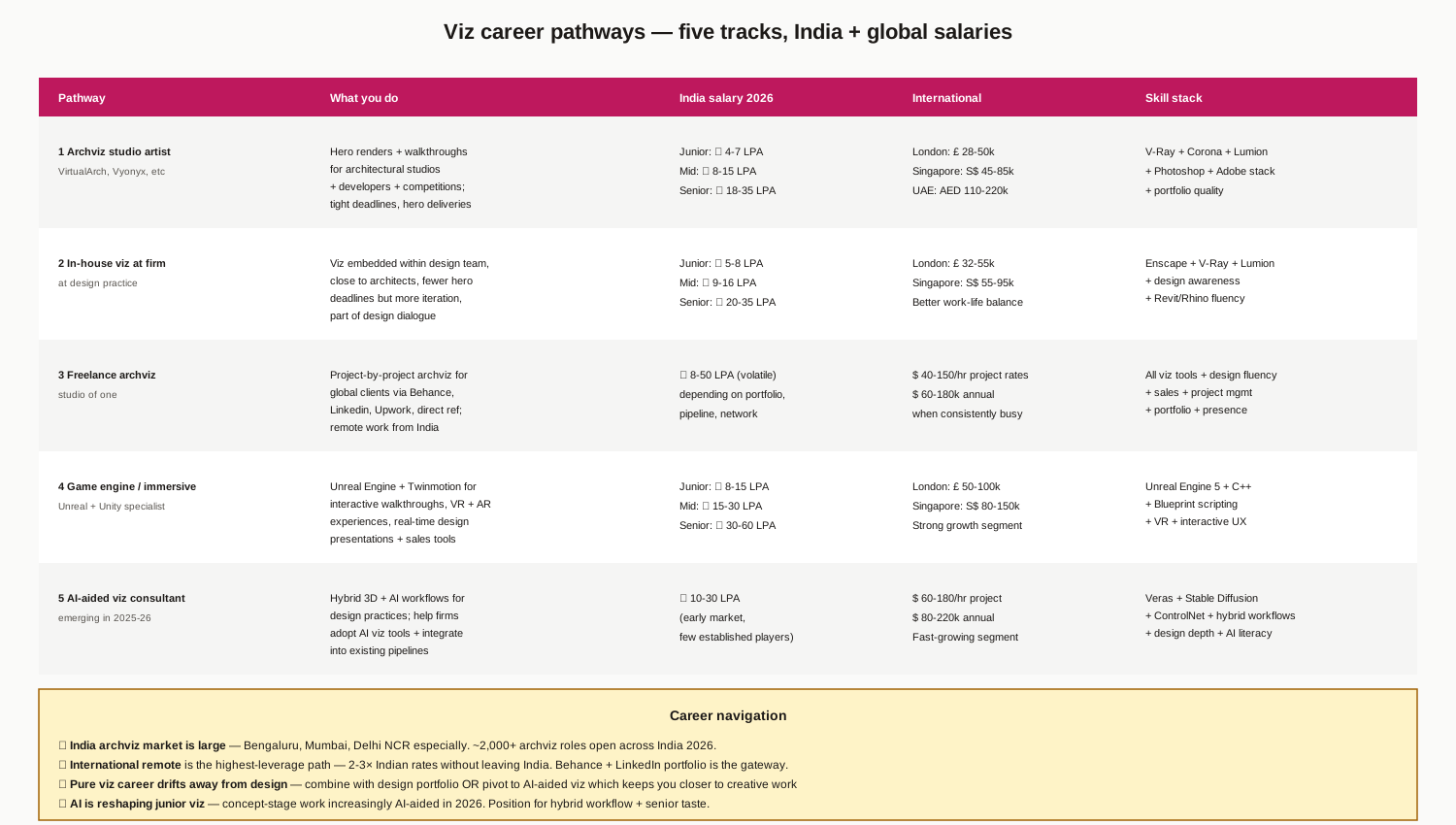
| Pathway | India salary (2026) | International |
|---|---|---|
| 1 Archviz studio artist | ₹ 4-35 LPA | London £28-50k, Singapore S$45-85k, UAE AED 110-220k |
| 2 In-house viz at firm | ₹ 5-35 LPA | London £32-55k, Singapore S$55-95k, better WLB |
| 3 Freelance archviz | ₹ 8-50 LPA (volatile) | $40-150/hr; $60-180k annual when busy |
| 4 Game engine / immersive (Unreal) | ₹ 8-60 LPA | London £50-100k, Singapore S$80-150k |
| 5 AI-aided viz consultant (emerging) | ₹ 10-30 LPA | $60-180/hr; $80-220k annual |
Career navigation
- India archviz market is large — Bengaluru, Mumbai, Delhi NCR especially. ~2,000+ archviz roles open across India in 2026
- International remote is the highest-leverage path — 2-3× Indian rates without leaving India. Behance + LinkedIn portfolio is the gateway
- Pure viz career drifts away from design — combine with design portfolio OR pivot to AI-aided viz which keeps you closer to creative work
- AI is reshaping junior viz in 2026. Position for hybrid workflow + senior taste
Six Common Viz Mistakes
1. Learning one tool deeply, others shallowly. The pipeline matters more than tool mastery. Learn 3-4 tools at competent level across stages, then deepen one.
2. Skipping photography fundamentals. No amount of V-Ray skill compensates for not understanding light direction, composition, and viewing angle.
3. Over-engineering materials. Default V-Ray materials look fine. Spending 4 hours on a custom procedural marble material that ends up in shadow is waste.
4. No post-production. Render direct from engine to portfolio. Always finish in Photoshop — at minimum tone curve + sharpening.
5. Avoiding AI viz. AI viz is reshaping the field. Architects who refuse to engage with it will be left behind by 2027-28.
6. Pure-AI career bet. AI viz alone is not a career — it's a tool. Combine with traditional 3D viz skills + design depth + post-production. Senior taste is what AI can't replace.
Pre-Career Viz Checklist
1. 400+ hours of cumulative viz practice (confirmed by 8+ portfolio renders)
2. One real-time + one ray-traced renderer at competent level
3. One AI viz tool at competent level with sample workflows
4. Photoshop discipline — show before/after of every render
5. Photography fundamentals — at least one photo essay project documented
6. Behance portfolio — 10-15 best renders, fully documented process
7. LinkedIn presence — first-degree connections in target studios
8. Spec piece — one complete project from concept to final render, fully showcased
Where to Go Next
- For BIM-driven viz integration: BIM Architecture in India
- For Rhino + parametric integration: Parametric Architecture in India
- For broader software learning: Architecture Software Learning Path
- For thesis applications: Architecture Thesis Topics in India
- For portfolio + viva: Architecture Portfolio Building, Studio Jury Survival
- For career pathways: Career Pathways After B.Arch
References
1. Chaos Group. V-Ray + Corona + Enscape + Vantage documentation (2024-2026 updates).
2. Lumion + Twinmotion. Real-time visualization documentation.
3. Pixar. Renderman + PBR shading guidelines.
4. Allegorithmic + Adobe Substance. PBR material guidelines and workflows.
5. Quixel Megascans + Poliigon + AmbientCG. PBR material library standards.
6. Ronen Bekerman. 3D Architectural Visualization workflows (industry blog + tutorials).
7. Show It Better. Architectural representation + post-production (educational platform).
8. The Gnomon Workshop. Photorealistic rendering + lighting tutorials.
9. Stable Diffusion + ControlNet research papers (2023-2025).
10. Veras + Lookx + MyArchitectAI product documentation and tutorials.
Author's note: Architectural visualization is the most volatile sub-discipline of architectural practice in 2026 — AI is reshaping concept-stage work, real-time renderers are approaching ray-trace quality, hybrid workflows are emerging as the new standard. The student who masters the PIPELINE (not just one tool) is positioned to ride these shifts rather than be displaced by them. Build the skill of seeing — composition, light, atmosphere, materials. Build the discipline of post-production. Stay engaged with the AI viz tools. Combine viz with design depth so your career has resilience beyond the tool churn.
Disclaimer: This guide reflects the architectural visualization ecosystem as of 2026-05-21 and is refreshed every 6 months because visualization tools, AI-aided tools, and pricing evolve very rapidly. Tool versions, license terms, and pricing should be verified directly with publishers before commitment. AI viz tooling is changing fastest — what is cutting-edge in May 2026 may be standard by November 2026 and outdated by May 2027. Salary benchmarks are 2026 indicative and shift with market conditions. Studio Matrx, its authors and contributors are not responsible for career, learning, or hiring decisions made on the basis of this guide.
Interactive · Render pipeline
Stage 1 of 5 · Massing · 1-3 days
What happens at this stage
Volumes, scale, sun studies, neighbour fit. No detail — just the form against context.
Typical tools
Pitfall
Approve massing before any rendering; reshaping at later stages is 10× the cost.
Export this guide
Related Guides — Deep-dive reading
The Software Stack — A Working Learning Path
Module 2 of the Student Foundations Track — AutoCAD to Revit to Rhino to V-Ray, the Five-Tier Learning Path, Indian Licensing Discipline, Hardware Requirements, File-Format Ecosystem, Generative-AI Architecture Tools in 2026, and the Pitfalls Every B.Arch and B.Des Student Must Avoid
Student FoundationsAI Render Generator — Photoreal AI Rendering for Indian Architects + Designers (2026)
Sketch/photo/white-box → photoreal · 12 min vs V-Ray 4 hr · Studio Matrx + Lumion + D5 + Twinmotion + Enscape
Design StylesModel-Making for Architecture Students
The 2026 Working Reference for B.Arch Studios in India — Five Model Types, Scale-to-Material Map, Tool Kit, Indian Material Sources, Workshop Discipline (Including Laser-Cutter and 3D-Printer Access), Lighting and Photography for Jury Showings, Storage & Transport, Five-Year Skill Build, and Common Failure Modes
Student FoundationsRelated Tools — Try Free
Window Material Comparison Tool
Compare uPVC, aluminium, wood, steel and composite windows on cost, life, upkeep and insulation.
CompareBefore & After Studio
Generate AI before-and-after renders to preview how your redesign could look.
DesignAIConcept Generator
Get 3 AI-generated design concepts for any room with style, materials, and cost estimate.
DesignAI