
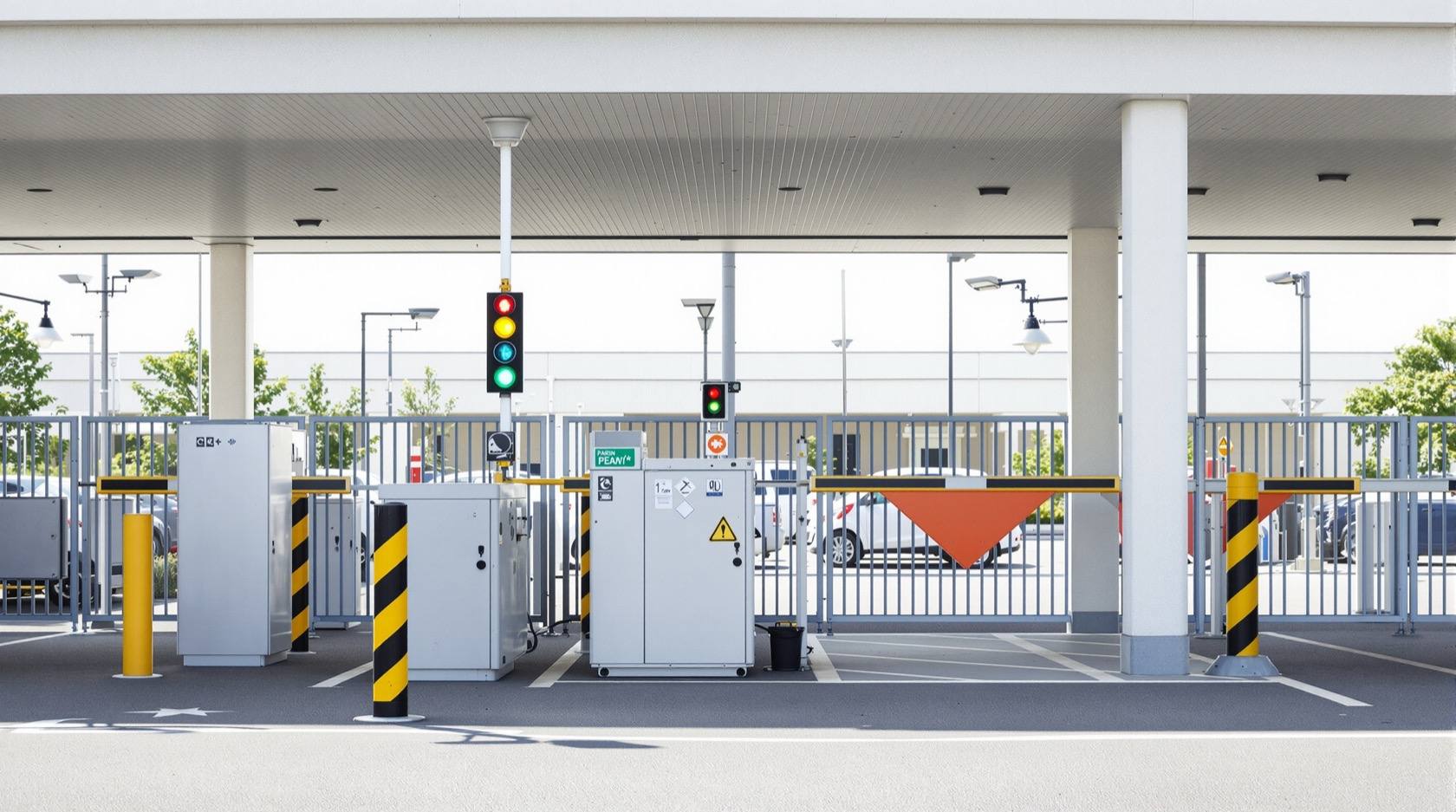
Boom Barrier Not Operating (2026): Diagnose a Stuck or Dead Parking Gate Arm
A calm, ordered diagnostic path for a facility or security team when an apartment, office or parking boom barrier will not raise or lower, is stuck up or down, or will not respond — starting with the manual release so a jammed arm never traps a vehicle or blocks a fire lane, then power, trigger, safety loop and mechanical causes, and a clear line between safe checks and technician-only work.
The queue is building at the gate. The arm will not lift, or it lifted and will not come down, or it sat dead when the resident waved a card that worked yesterday. A boom barrier that stops working is one of the most visible faults a facility runs — it strands vehicles in a lane, backs traffic onto the road, and pulls a guard away from the gatehouse to wrestle with it. The good news, as with most access faults, is that the common causes are simple and cheap: no power, a dead trigger, or a safety sensor doing exactly its job. The dramatic mechanical failures are the rare end of the list.
This is a diagnostic guide for a facility manager, security supervisor or estate maintenance team working an apartment, office or paid-parking gate arm. The plan is the plan every good technician follows: first make the site safe and the lane clear, then find out whether the barrier even gets power and tries to move, then split the fault into the barrier itself versus whatever is supposed to trigger it. For the whole family of access and alarm faults this sits inside the security system troubleshooting pillar; for how a barrier is meant to be specified and installed in the first place, see boom barriers.
Scope & safety. This is a diagnostic and coordination guide for a facility or security team, not a repair manual. The safe checks below — power and MCB, the manual release, the wall push-button, the loop and photocell, a remote battery, clearing an obstruction — are things a competent facility person can do. The spring balance, motor and gearbox, limit and loop-detector settings, and the control board and its mains wiring are strictly for a qualified technician or your AMC. Above everything: know and use the manual release so a stuck arm never traps a vehicle or blocks a fire-tender lane — a barrier across an escape route is a life-safety problem, not just an inconvenience. Gate logs and reader records hold personal data under the DPDP Act 2023. This is not a price or buying guide; for repair-versus-replace economics defer to the cost and lifecycle guides.
First, before anything: the manual release
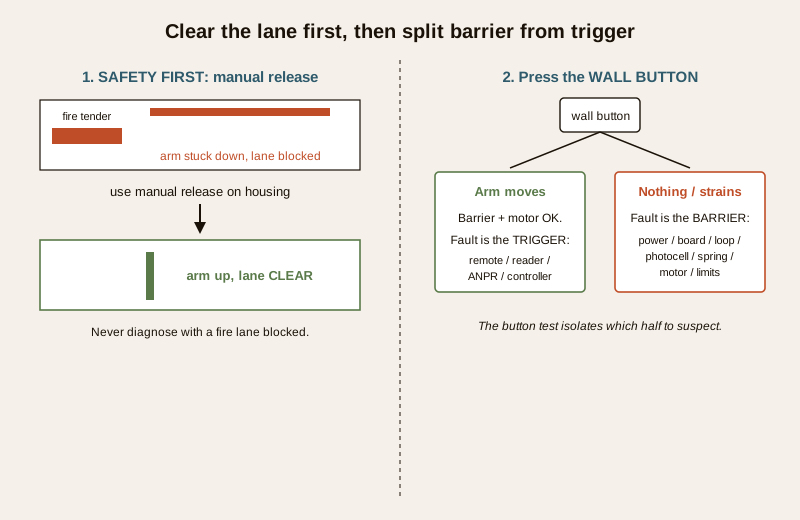
A boom barrier sits on the one road a fire tender, an ambulance or an evacuating crowd may need. So the very first thing a facility team does when the arm jams is not diagnose it — it is to clear the lane.
Every automatic barrier has a manual release (usually a keyed lock or lever on the barrier housing) that de-clutches the arm from the motor so it can be swung by hand. Know where yours is, keep the key on the gatehouse board, and make sure every shift of guards has been shown it. If the barrier is stuck across the road:
- Release the arm manually and raise it, so the lane is open, before you troubleshoot anything.
- If the arm is stuck up and there is no security reason to keep it down, leaving it up is usually the safe interim state — traffic flows and nothing is trapped.
- Never leave a barrier jammed down across the only vehicle exit while you wait for a technician. Clear it first, then diagnose.
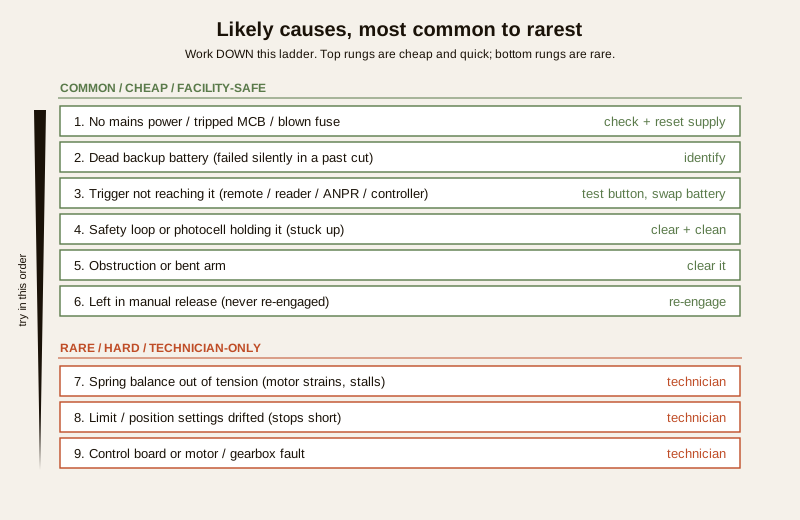
Likely causes, most common to rarest
Work down this list, not up it. The top entries are cheap and quick; the hardware failures at the bottom are genuinely uncommon.
| Cause (common to rare) | Why the barrier stops | Who fixes it |
|---|---|---|
| No mains power / tripped MCB / blown fuse | Barrier is simply unpowered; often the whole gate feeder has tripped | Facility: check and reset supply |
| Dead backup battery | The barrier failed silently in an earlier power cut and never came back | Facility: identify; technician: replace |
| Trigger not reaching it (dead remote, RFID reader, push-button, ANPR/controller) | The barrier is fine; nothing is telling it to open | Facility: test button, swap remote battery |
| Safety loop or photocell holding it | A vehicle-detection loop or beam thinks something is under the arm, so it will not close (or holds up) | Facility: clear the loop area; technician: recalibrate |
| Obstruction or bent arm | Something under or against the arm, or a knocked arm fouling its travel | Facility: clear it; technician: straighten/replace arm |
| Left in manual release | Someone de-clutched the arm and never re-engaged it | Facility: re-engage the release |
| Spring balance out of tension | The counter-spring has slackened, so the motor strains and stalls | Technician only |
| Limit / position settings drifted | Barrier will not fully raise or lower; stops short | Technician only |
| Control board or motor/gearbox fault | The electronics or the drive itself has failed | Technician only |
The single most common "the barrier will not open" call is not a broken barrier at all — it is the trigger not reaching it: a dead remote, a reader that has lost power or its link, a push-button gone faulty, or the access controller or ANPR camera simply not sending the open signal. Diagnosing the reader and controller side is its own subject; here we isolate whether the trigger is the fault, then hand that half off.
The diagnostic path
Follow this in order. Each step tells you which half of the system to stop suspecting.
Step 1 — Does it have power and try to move, or is it dead?
Press the gatehouse wall button (or use the operator's own key-switch) and watch and listen.
- The motor hums, a light blinks, the arm twitches or moves partway — it has power and is trying. Skip to Step 3 (a safety sensor, a mechanical bind, a limit setting or the arm itself).
- Completely dead — no lights, no sound, no reaction to anything — treat it as a power problem first. Go to Step 2.
Step 2 — Restore power
- Check the barrier's own MCB or fuse in the gate distribution board, and the feeder that supplies it. A tripped MCB is the single commonest dead-barrier cause; reset it once. If it trips again immediately, stop and call a technician — a repeat trip means a fault in the wiring, board or motor, and repeated resetting is unsafe.
- Confirm the socket or supply is actually live (the whole gate area may be off).
- If mains is present but the barrier still will not power up and it has a backup battery, the battery may have died in an earlier cut so the barrier never recovered — a technician replaces it. Note this as a maintenance finding, because a barrier that failed silently in a past power cut is a classic hidden fault.
- Mains wiring, a dead board and the internal battery are technician work — do not open the mains side of the housing.
Step 3 — The wall button test: barrier versus trigger
This is the most useful single test on the gate. Operate the barrier from its hard-wired wall push-button or the operator key-switch, bypassing every remote, card and camera.
- The barrier raises and lowers cleanly from the button — the barrier, motor and board are fine. The fault is in the trigger chain: the remote, the RFID or long-range reader, the push-button at the entry post, the loop-based auto-open, or the ANPR and access controller not sending the command. Move to Step 5.
- The button also does nothing, or the arm strains, stalls or stops partway — the fault is in the barrier itself: a safety sensor, a mechanical bind, a limit setting or the drive. Move to Step 4.
Step 4 — If the barrier itself will not move properly
- Is a safety loop or photocell holding it? A boom barrier will refuse to close (and may sit up) if its under-arm photocell is misaligned or dirty, or if a vehicle loop detector in the road is faulting and permanently "sees" a car. This is a very common cause of a barrier stuck up. Clean and clear the beam path and make sure nothing metal is sitting on the loop. If the loop or photocell keeps faulting with the area clear, its calibration is a technician job.
- Clear any obstruction. Look for a vehicle, a stone, packaging or a knocked-out arm section fouling the swing. Check the arm is not bent — a bent arm both jams and is a sign it was struck.
- Re-engage the manual release. If someone de-clutched the arm earlier and left it in manual, the motor turns but the arm does not. Re-engaging is a safe facility check.
- If it still strains, stalls, over-runs or stops short — this points at the spring balance out of tension, the limit settings drifted, or the motor and gearbox. All three are technician only. A slack counter-spring makes the motor labour and stall; drifted limits leave the arm half-raised or half-lowered. Do not attempt spring adjustment — a boom spring is under load and is a hazard.
Step 5 — If the trigger is the fault (barrier is fine)
You have proved the barrier works from the button, so nothing here involves opening the barrier.
- Swap the remote's battery and re-test — a flat remote is the most trivial and most common "it stopped working". Test a second known-good remote or card.
- Check the reader post has power and a link. A reader that has lost supply or its connection to the controller will read nothing.
- The push-button, loop-based auto-open, ANPR camera and the access controller are where a "won't open that is really the trigger" usually lives. Diagnosing the reader, controller and ANPR in depth is a separate access-control exercise and is out of scope here — hand it to whoever maintains your access system, and see parking and garage security for how the barrier, reader and loop are meant to work together as one entry control.
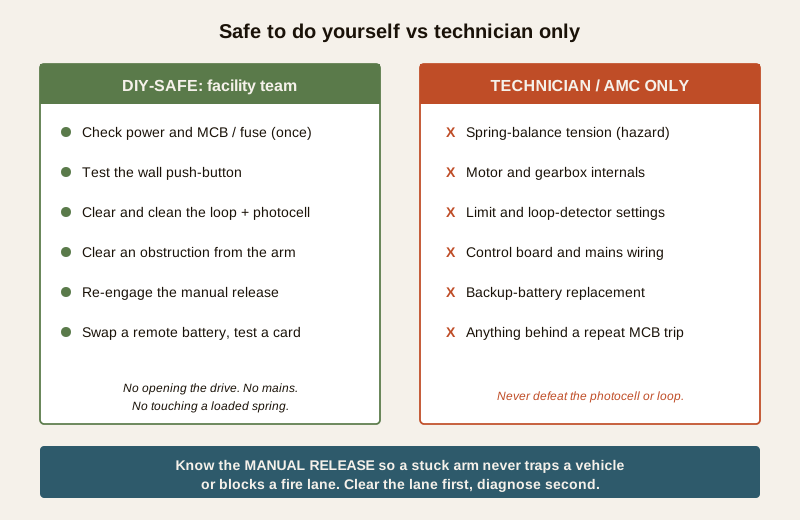
Safe to do yourself versus call a technician
The line is the same as for any powered gate: anything you can do without opening the drive housing or touching mains, and without adjusting a loaded spring, is fair game. Everything else is a technician or your AMC.
Safe for a facility or security team:
- Use the manual release to clear the lane, and re-engage it afterwards.
- Check and reset the barrier MCB or fuse once (never repeatedly).
- Test the wall push-button to isolate barrier from trigger.
- Clear the loop area and clean the photocell beam path; remove any obstruction from under or against the arm.
- Swap a remote battery and test a known-good card or remote.
- Confirm the reader post and gatehouse controls have power.
Technician or AMC only:
- Spring-balance tension — a loaded spring is a genuine hazard.
- Motor, gearbox and drive internals.
- Limit and position settings, and loop-detector calibration.
- The control board and any mains wiring, and the backup battery replacement.
- Anything behind a repeat-tripping MCB, or a barrier that arcs, smells hot or sparks.
Call a technician — and never bypass safety. A boom that stalls, strains, over-runs, or trips its breaker again on reset has a fault that needs a competent person, not another reset. Never disable, tape over or disconnect the safety photocell or loop to force a stuck barrier to close — those sensors exist so the arm does not come down on a vehicle or a person. Clear the fault; do not defeat the safety. If your barrier is one where the arm is also part of the fire or emergency egress route, keep the manual release working and tested at all times.
This is the point where the barrier fault meets the broader gate-drive picture. If the motor or drive itself has failed — the barrier is powered, triggered and unobstructed but simply will not turn — that is a motor problem, and the diagnosis continues in gate motor failure. For how a modern arm, its automation and its access integration are meant to be composed, see automatic gate systems.
Prevention — so the gate does not strand traffic again
Most barrier emergencies are avoidable maintenance findings that surfaced at the worst moment. A boom barrier is a high-cycle machine on a critical lane; treat it like one.
- A service schedule with your AMC. A barrier that opens and closes hundreds of times a day wears — lubrication, spring-tension checks, limit and loop verification, and a photocell alignment check belong on a periodic visit, not a breakdown call.
- Test the backup battery. The classic hidden failure is a barrier that died in a power cut months ago and nobody noticed until the next cut. Have the battery load-tested on the service visit and replaced on schedule.
- Keep the arm and the loop clear. No parking, stacking or planting under the arm's swing; keep the road loop and the photocell path clean and unobstructed. A knocked arm is both a fault and a warning that the approach geometry invites strikes.
- Train every shift on the manual release. The single most valuable thing on the gate is a guard who can clear the lane in ten seconds. Put the release key on the board, label it, and brief every new guard.
- Log faults, do not just reset them. A repeat-tripping MCB or a barrier that stalls "sometimes" is telling you something; record it so the technician sees the pattern.
Quick checklist when the arm will not move
1. Clear the lane with the manual release if traffic or a fire route is blocked.
2. Wall button: works — trigger fault (Step 5); dead or straining — barrier fault (Step 4).
3. Power: check and reset the MCB or fuse once; a repeat trip means stop and call.
4. Loop and photocell: clear and clean the area; a barrier stuck up is usually this.
5. Obstruction and manual release: clear anything fouling the arm; re-engage if left de-clutched.
6. Remote: swap the battery; test a known-good card.
7. Still stalling, over-running or dead: technician or AMC — spring, motor, limits or board.
A boom barrier that will not operate is, nine times out of ten, an unpowered, un-triggered or safety-held machine rather than a broken one — and the first move is always to clear the lane, not to fight the arm. For the full family of access, gate and alarm faults, keep the security troubleshooting hub to hand.
Export this guide
Related Guides — Deep-dive reading
Boom Barrier Maintenance in India (2026): Keeping a High-Cycle Entrance Barrier Working
A facility and security team's upkeep routine for the boom barrier at an apartment, office or parking entrance — the arm, spring balance, drive, safety photocell and loop, controller and backup battery, and triggers — with the DIY-safe versus technician split and the manual release that must never trap a vehicle or block a fire lane.
SecurityGate Motor Failure (2026): Why Your Automatic Gate Won't Move and How to Fix It
Your automatic sliding or swing gate stopped, hums but won't move, or opens but won't close. A calm, ordered diagnostic path for Indian homes — the safe checks you can do yourself, the manual release that keeps you from ever being stuck, and exactly when to call the technician.
SecuritySecurity Fire Alarm Integration in India (2026): Smart Alerts, Certified Systems, Fail-Safe Egress
The most important sentence a smart-home designer can say about fire is also the least profitable: a smart-home smoke sensor or fire notification is a helpful add-on, not a substitute for a certified fire-alarm system. This guide draws the line hard — life-safety detection and alarm belongs to the NBC-governed certified system — and then covers the genuinely useful, correctly-scoped automations the smart layer can add on a verified fire signal: unlock for egress, open the gate for the fire tender, light the escape path, stop the away-scene, and notify everyone loudly. All of it fail-safe. None of it in the way of the system that actually saves lives.
SecurityRelated Tools — Try Free
Access-Control Battery-Backup Calculator
Size the standby battery so an access system keeps running through a power cut, with an egress life-safety note.
Battery BackupGate Access Planner
Size a vehicle gate or boom barrier — lanes needed at peak and the right credential speed (RFID, ANPR, manual).
Gate FlowApartment Video Door System Planner
Enter flats, entrances, floors and guard desk for a first-pass building intercom plan — door stations, indoor monitors, guard station, the right architecture and an indicative cost band.
Building Planner