
Security Risk Assessment Template for India (2026): Scoring What Could Go Wrong
A ready-to-adapt fillable risk register that lists your assets and threats, rates likelihood and impact, derives a Low, Medium or High risk level, and points the design at the priorities that matter most.
A security design is only as good as the priorities behind it. Spend the budget on the loudest salesperson's product and you protect the wrong things; spend it against a clear, written picture of what could go wrong and you protect what actually matters. The security risk assessment template on this page is that written picture — a structured, fillable document that lists your assets, names the threats against them, records the controls already in place and the gaps that remain, rates each risk, and turns the whole thing into a short, ordered list the design can answer.
This is the practical, copy-ready companion to the explainer in our security risk assessment guide. That guide explains the thinking; this page hands you the form. It belongs in Studio Matrx's professional security resources library alongside the brief, the schedules and the audit checklist.
Scope & how to read this. This is a ready-to-adapt professional template, not authoritative, legal or contractual wording. The risk bands here are a common working convention, not an official standard — adapt them to your project and, where a real requirement applies, defer to the code, the AHJ and a qualified security professional. Where a register holds personal data (names, incidents, camera locations), handle it under the Digital Personal Data Protection (DPDP) Act, 2023.
What it is and where it sits
A risk assessment sits at a precise point in the project: right after the brief and before the design. The brief captures what the client wants and what they will spend; the design commits money to cameras, barriers, lighting and people. Between the two, the risk assessment is the reasoning that connects them — it is the reason a given control appears in the design at all.
Produced by the security consultant, architect or PMC and reviewed with the client, it does three jobs at once. It creates a shared, evidence-based view of what is being protected and against what. It ranks those concerns so a limited budget goes to the biggest risks first. And it becomes the audit trail — a year later, anyone can see why a decision was made, and re-rate it when the site or the threat picture changes.
The method in plain terms
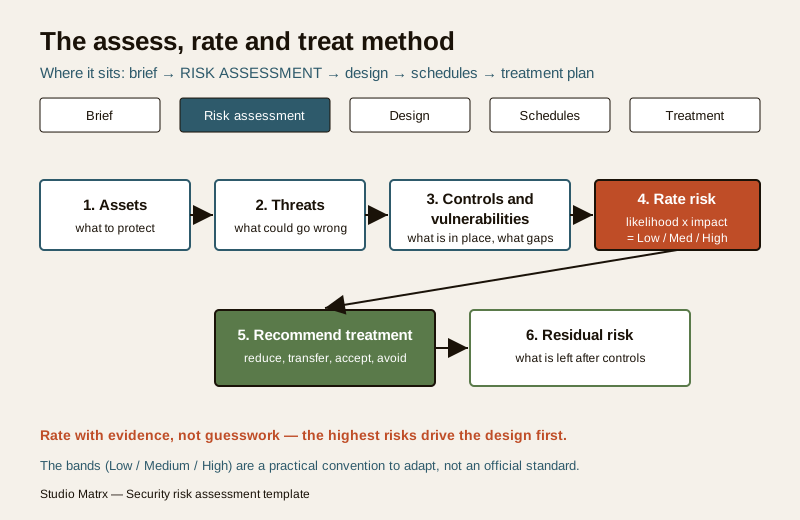
The template runs the same six moves for every line of the register. Keep them in this order and the ratings stay honest.
1. List the assets. What are you protecting — people first, then property, information, operations and reputation. Be specific: "main gate", "ground-floor server room", "cash room", "children at play area", not a vague "the building".
2. Identify the threats and hazards. For each asset, what could realistically go wrong — intrusion after hours, tailgating, theft, vandalism, a fire blocking an exit, loss of footage. Include insider and life-safety risks; these are the ones most often skipped.
3. Note existing controls and vulnerabilities. What is already in place (a wall, a guard, a lock, a camera), and where it falls short — the gate is unmanned at night, the lock is easily forced, the camera does not cover the blind corner. The gap between threat and control is the vulnerability.
4. Rate likelihood. How probable is this, given the controls that already exist — described in words as Low, Medium or High. Rate the situation as it is today, not as it would be after improvements.
5. Rate impact. If it happened, how bad — to safety first, then to property, operations and reputation. Again Low, Medium or High.
6. Derive the risk level, then treat. Combine likelihood and impact into an overall Low, Medium or High (a simple matrix, below). Then record the recommended treatment and, once controls are agreed, the residual risk that remains.
Rate with evidence, not gut feel. A rating you can defend points to something you saw — a forced lock, an unlit approach, a log of past incidents, the neighbourhood context. If two people would rate the same row very differently, you have not gathered enough evidence yet.
Turning likelihood and impact into a risk level
There is no single official scoring standard for property security; a likelihood-by-impact matrix is simply a widely used convention you adapt to the project. The version below uses three words on each axis and keeps the highest combinations as High so the worst cases surface first. Describe your bands in words in the register so nobody mistakes a made-up number for a certified score.
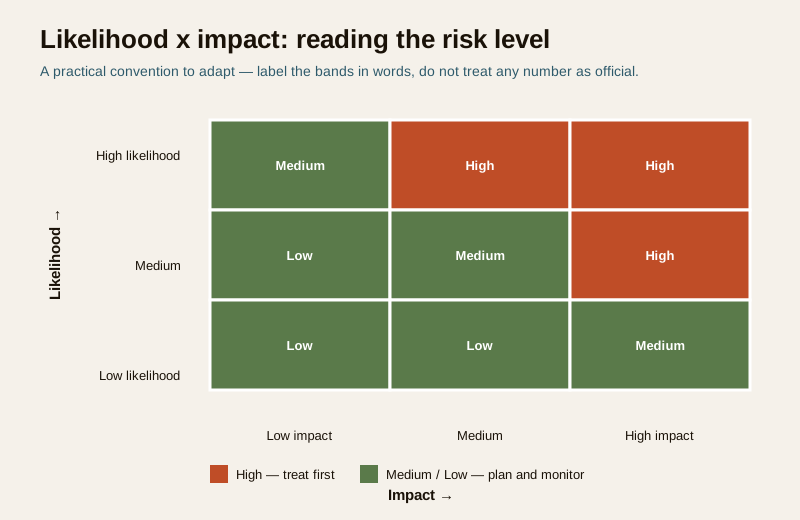
| Likelihood \ Impact | Low impact | Medium impact | High impact |
|---|---|---|---|
| High likelihood | Medium | High | High |
| Medium likelihood | Low | Medium | High |
| Low likelihood | Low | Low | Medium |
The bands are a convention, not a law. These pairings are a sensible default, not a standard issued by any authority. A life-safety impact (an injury, a blocked exit) should pull a rating upward regardless of likelihood — never let a "low chance" argument talk down a risk to people. Adapt the grid and record your reasoning.
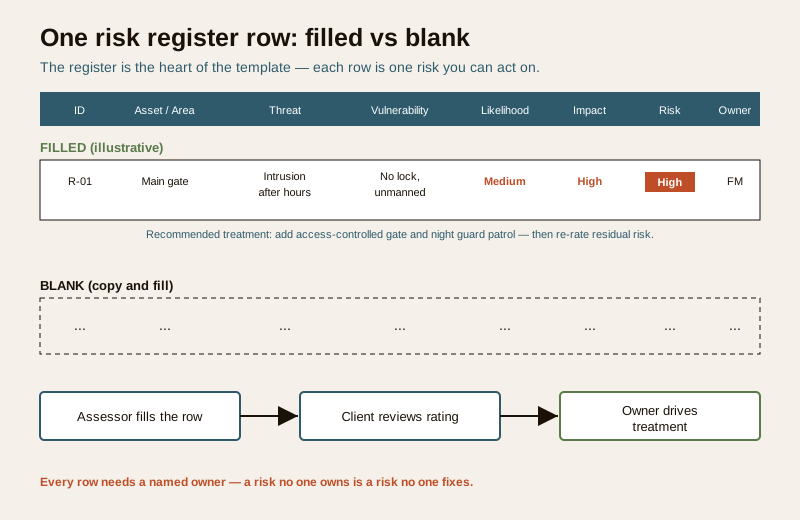
Worked example: a filled risk register
Below is a short, clearly illustrative register for a mid-size site, to show how the columns work together. The values are generic examples — your ratings come from your own site walk and evidence.
Example only — adapt to your project. Assets, ratings and treatments below are illustrative. Do not copy them as findings; run the assessment on your own site.
| ID | Asset / Area | Threat | Existing control | Vulnerability | Likelihood | Impact | Risk level | Recommended treatment | Owner |
|---|---|---|---|---|---|---|---|---|---|
| R-01 | Main gate | Intrusion after hours | Boundary wall only | Gate unmanned at night, no lock | Medium | High | High | Access-controlled gate and night patrol, re-rate residual | Facility Manager |
| R-02 | Ground-floor server room | Theft of equipment and data | Door with standard lock | No access log, weak door | Medium | High | High | Access control on door, CCTV cover, entry log | IT Lead |
| R-03 | Parking / basement | Vehicle theft, tailgating | Boom barrier, guard by day | Blind corners, no cover at night | Medium | Medium | Medium | Add lighting and camera to blind corners | Facility Manager |
| R-04 | Fire-escape route | Exit blocked by stored goods | Signage present | Route used for storage | Low | High | Medium | Keep route clear, verify against code and fire officer | Safety Officer |
| R-05 | Reception / front desk | Aggressive visitor, insider misuse | Visitor register | No panic alert, no duress plan | Low | Medium | Low | Panic button, visitor policy, staff briefing | Admin |
Notice how R-01 and R-02 both land on High and would be designed for first, while R-05 sits at Low and can wait — that ordering is the entire point of the exercise. Row R-04 shows the life-safety habit: a blocked exit is only "sometimes" likely, but because the impact is high the risk stays Medium, and the treatment defers the actual requirement to the code and the fire officer.
Blank template: copy and adapt
Paste this into your sheet or document and fill one row per risk. Keep the columns; add project-specific ones (target date, cost band, status) as needed.
| ID | Asset / Area | Threat | Existing control | Vulnerability | Likelihood | Impact | Risk level | Recommended treatment | Owner |
|---|---|---|---|---|---|---|---|---|---|
| R-01 | ... | ... | ... | ... | ... | ... | ... | ... | ... |
| R-02 | ... | ... | ... | ... | ... | ... | ... | ... | ... |
| R-03 | ... | ... | ... | ... | ... | ... | ... | ... | ... |
| ... | ... | ... | ... | ... | ... | ... | ... | ... | ... |
Likelihood / impact legend (adapt the wording):
| Band | Likelihood means | Impact means |
|---|---|---|
| Low | Unlikely given current controls and context | Minor or easily recovered; no harm to people |
| Medium | Plausible; has happened nearby or conditions allow it | Notable loss or disruption; possible minor harm |
| High | Expected sooner or later without action | Severe loss, injury, or serious life-safety consequence |
Field and column guide
- ID — a short unique tag (R-01, R-02) so a risk can be referenced in the brief, schedules and treatment plan without ambiguity.
- Asset / Area — one specific thing you protect. Split a big area into rows if the threats differ.
- Threat — the event, not the fear. "Intrusion after hours", not "we feel unsafe".
- Existing control — what is already there, honestly stated, including "none".
- Vulnerability — the specific gap that lets the threat through this control.
- Likelihood / Impact — Low, Medium or High, each backed by something you observed.
- Risk level — read off the matrix; the sort key for the whole document.
- Recommended treatment — reduce, transfer, accept or avoid; name the control, not the brand.
- Owner — a named role accountable for acting. A risk with no owner does not get fixed.
Common mistakes to avoid
- Rating without evidence. A register full of confident Highs and Lows with nothing behind them is guesswork in a nicer font. Tie each rating to something seen — walk the site with the site security assessment guide and, for the boundary, the perimeter vulnerability assessment.
- Ignoring insider and life-safety risk. The dramatic outsider intrusion gets all the attention while the propped fire door, the shared password and the disgruntled contractor go unrated. Put them in.
- No owner. Every row needs a named role. Unowned risks stall.
- Rating the future, not the present. Rate the risk as it stands today. The improved rating is the residual risk, recorded after treatment is agreed.
- A fabricated scoring standard. Do not present your matrix as an official or certified score. It is a working convention; say so, and keep it defensible.
- Never revisiting it. A register is a living document. Re-rate when the site, the tenants or the threat picture changes, at least at the review interval in your brief.
How it feeds the brief, schedules and treatment plan
The register is not the end of the paperwork — it is the spine the rest hangs on.
- The brief carries the High and Medium risks forward as the objectives the design must answer, so scope and budget line up with real priorities. See the security design brief template.
- The schedules (camera, device and equipment lists) exist to deliver the treatments this register recommends — every item should trace back to a risk row.
- The treatment plan tracks each recommended control to done, then records the residual risk, closing the loop.
- The audit checklist later tests whether those controls are actually working; the security audit checklist and this register should reference each other.
Kept current, the register lets anyone — a new committee, an incoming facility manager, an auditor — see at a glance what the site is protecting, how bad each exposure is, and who owns the fix.
Completion checklist
| Check | Confirm |
|---|---|
| Every asset that matters has at least one row | Yes / No |
| Insider and life-safety risks are included, not just outsiders | Yes / No |
| Each likelihood and impact rating cites evidence | Yes / No |
| Risk level derived consistently from the matrix | Yes / No |
| Every row has a named owner | Yes / No |
| Recommended treatment names a control, not a brand | Yes / No |
| The matrix is labelled as an adaptable convention, not a standard | Yes / No |
| Personal data in the register is handled per DPDP Act, 2023 | Yes / No |
Start from the professional security resources library to pick up the brief, schedules and audit checklist that pair with this register, and read the security risk assessment guide for the reasoning behind each step.
References
- Digital Personal Data Protection (DPDP) Act, 2023 — where a risk register records names, incidents or camera locations it holds personal data; keep access controlled and retention limited.
- Bureau of Indian Standards catalogue — for any structural, electrical, fire or life-safety standard a treatment relies on, verify the current edition at https://www.services.bis.gov.in/
- Your project's fire officer and AHJ — the authoritative source for any life-safety requirement a risk row touches; the template records the need, it does not set the standard.
This is an educational, ready-to-adapt template, not legal, contractual or professional advice. Engage a qualified security professional for a formal assessment, and defer life-safety and code specifics to the AHJ and the applicable standards.
Export this guide
Related Guides — Deep-dive reading
Parking Security Audit in India: A Walk-the-Park Method
Most parking areas were never audited honestly. This is the capstone method that ties the whole parking-security library together: walk the park by day and after dark, grade every layer Good / Weak / Absent, gate it on life-safety, and turn the gaps into a prioritised action plan before a thief or an incident finds them first.
SecurityBasement Parking Security in India: A Professional Guide
The basement is the hardest parking to secure and the highest personal-safety risk in the building — fully enclosed, out of sight, full of blind corners, and used at odd hours. Here is the layered response, kept honest about people-safety and non-negotiable about life-safety.
SecurityVisitor Vehicle Management in India: A Professional Guide
The everyday weak point of every society and office gate is not the resident's car — it is the visitor, the cab, the delivery rider and the contractor who must be let in without opening the whole park to anyone. This is the process, not just the hardware: verify at the gate before the boom lifts, park visitors away from resident bays, and never jam the gate a fire tender needs.
SecurityRelated Tools — Try Free
CCTV Camera Coverage & Count Calculator
Estimate how many CCTV cameras you need, the NVR channels, storage in TB for your retention period, and an indicative all-in cost with GST.
CCTV CalculatorClient Brief Generator
8-section questionnaire that produces a professional design brief PDF with signature lines.
Brief GeneratorContract Studio
AI generates professional architecture service agreements with milestones and scope.
ArchitectAI