

Professional Security Resources for India (2026): The Documents Behind a Secure Project
The overview and map of the whole professional-deliverable toolkit — the brief, schedules, BOQ, checklists, handover pack and logs a consultant, designer, PMC or facility manager produces across a security project, and how each document connects to the next.
Two buildings buy the same cameras, the same locks and the same alarm. One is genuinely secure; the other has blind spots nobody noticed, a recorder no one can log into, and no proof of what was installed when a claim finally lands. The difference is almost never the hardware. It is the professional security resources behind the project — the brief, the schedules, the specification, the checklists and the handover pack that turn a shopping list into a designed, verifiable, defensible system.
This page is the front door to that toolkit. It is the overview and the map: what each document is, where it belongs in the project lifecycle, who produces and receives it, and how the templates in this library connect into one coherent set. Read this first, then reach for the individual deliverables from the Professional Security Resources sub-hub.
Scope & how to read this. This is a professional overview and a library of ready-to-adapt templates, not authoritative, contractual or legal wording. Get professional or legal review for contract documents (tender, specification, BOQ), and take the actual requirements — clauses, frequencies, pass criteria — from your project, the applicable code (NBC = SP 7:2026) and the Authority Having Jurisdiction (AHJ). Where a document holds video, names or access records, that is personal data under the Digital Personal Data Protection (DPDP) Act, 2023 — handle it accordingly.
Why the paperwork is the project
"Security" that lives only in a vendor's proposal and a WhatsApp thread is not a project — it is a purchase. The document set is what makes security real work, because a documented project is:
- Designable. A brief and a risk assessment say what the system must achieve and against what threats, so choices follow reasoning rather than a salesperson's default package.
- Tenderable. A specification and a Bill of Quantities (BOQ) let several vendors quote the same scope, so you compare like with like instead of guessing what a lump sum includes.
- Auditable and verifiable. Coverage schedules and commissioning checklists let anyone confirm the built system matches the design — every camera, door and sensor accounted for.
- Maintainable. An asset register, warranty record and maintenance log let a future technician or facility manager run and repair the system long after the installer has gone.
- Defensible. When an incident, a claim or a data request arrives, the records show what was decided, installed, tested and handed over — and by whom.
The templates in this library exist to do exactly that: turn intent into a buildable, verifiable system that survives people changing.
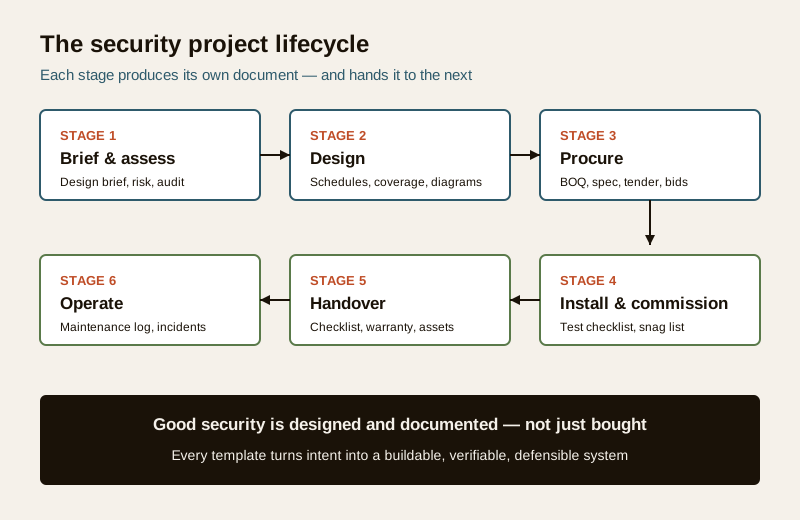
The lifecycle — and which document belongs where
A security project moves through the same stages whether it is a shop, a villa or a campus. Each stage has a natural deliverable, and each deliverable feeds the next. Skip a stage and the gap shows up later as a blind spot, a dispute or an unmaintainable system.
Stage 1 — Brief and assessment
Before any camera is chosen, decide what the system is for. Three documents set the frame: a design brief that captures objectives, assets, users, constraints and budget intent; a risk assessment that names the threats and ranks them; and, for an existing site, a security audit that records what is already there and where the gaps are. Start with the security design brief template, the security risk assessment template and a security audit checklist. Everything downstream inherits the vocabulary and priorities set here.
Stage 2 — Design
Now the brief becomes a system. Design deliverables are mostly schedules and diagrams: device schedules for cameras, doors and sensors; a coverage and zoning plan showing what each device watches and which areas are controlled; and architecture, network, and cable, power and UPS schedules that show how it all connects and stays powered. The CCTV coverage schedule is a good model for how a schedule ties a device number to a location, a purpose and a verifiable field of view.
Stage 3 — Procurement
Design intent becomes a purchasable, comparable scope. A specification defines the required performance vendor-neutrally; a BOQ lists quantities so quotes are comparable; a tender and vendor prequalification invite the right bidders; and a bid comparison table turns several quotes into a defensible recommendation. This is where a clear specification pays for itself — it stops "cheapest" from quietly meaning "least".
Stage 4 — Install and commission
The system goes in and is proven to work. The control-room and cabling get built to the design, then a commissioning and testing checklist verifies every device against the schedule, and a snag list tracks what must be fixed before acceptance. Commissioning answers one question: does the built system match the design and do its job today?
Stage 5 — Handover
Ownership transfers. A handover checklist, warranty register and asset register ensure the owner receives the as-built records, credentials, warranties and training — and can run, prove and repair the system without the installer. The CCTV handover documentation guide shows the depth a proper handover deserves, including changing every default password and treating footage as personal data.
Stage 6 — Operate
The system earns its keep over years. A maintenance log records servicing, tests and part changes; an incident report captures events consistently so patterns and evidence are preserved. These close the loop and, when it is time to expand or replace, become the starting brief for the next cycle.
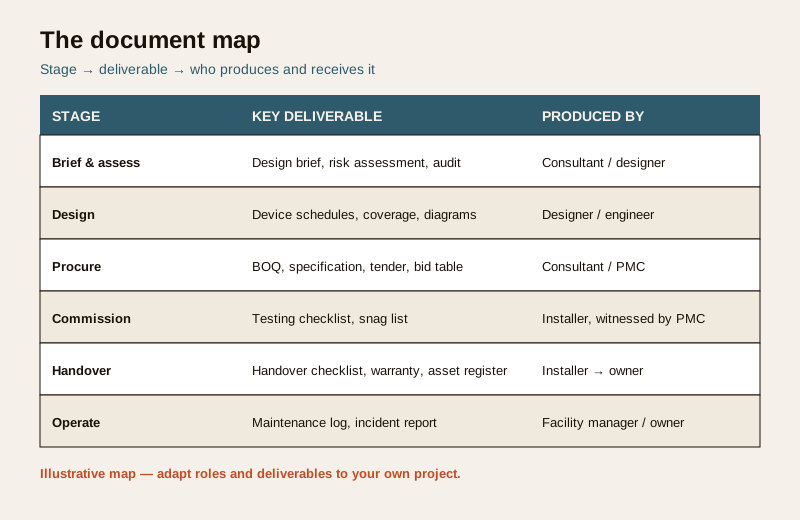
The document map
The table below is the worked artifact of this overview: it maps each lifecycle stage to its key deliverable and to who typically produces and receives it. Treat it as a checklist of what a fully documented project contains.
Example only — adapt to your project. Roles and deliverables vary with project size and contract. On a small job one person may wear several hats; on a campus each row may be its own document with its own owner. Use this as a map, not a mandate.
| Stage | Key deliverable(s) | Produced by | Received by |
|---|---|---|---|
| Brief and assess | Design brief, risk assessment, audit | Consultant / designer | Client, project team |
| Design | Device schedules, coverage and zoning, network and cable/power/UPS diagrams | Designer / engineer | Client, tenderers |
| Procure | Specification, BOQ, tender, prequalification, bid comparison | Consultant / PMC | Client, vendors |
| Install and commission | Control-room build, commissioning and testing checklist, snag list | Installer, witnessed by PMC | Client, consultant |
| Handover | Handover checklist, warranty register, asset register, as-built records | Installer | Owner / facility manager |
| Operate | Maintenance log, incident report | Facility manager / owner | Management, auditors |
The blank map to fill for your project
Copy this and list the actual documents your project will produce, who owns each and where it lives. If a row is blank, you have found a gap to close before it costs you later.
| Stage | Document (name it) | Owner | Status / location |
|---|---|---|---|
| Brief and assess | ... | ... | ... |
| Design | ... | ... | ... |
| Procure | ... | ... | ... |
| Install and commission | ... | ... | ... |
| Handover | ... | ... | ... |
| Operate | ... | ... | ... |
How to use this library
Each page in this section is a ready-to-use deliverable — a template, schedule, checklist, register or diagram-spec you fill in and hand over. Use them as a set, not in isolation.
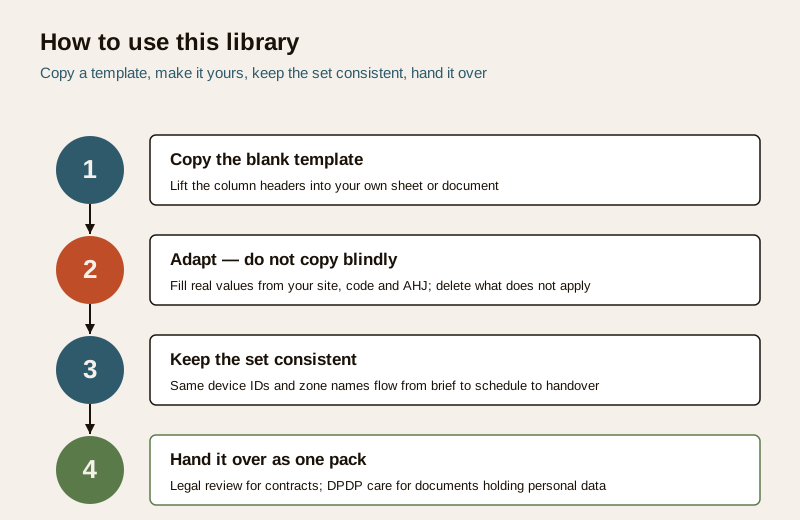
1. Copy the blank template. Every page carries a copy-ready table you can lift into your own sheet or document.
2. Adapt — do not copy blindly. Fill real values from your site, code and AHJ; delete rows that do not apply; add what your project needs. A template is a starting point, never a finished document.
3. Keep the whole set consistent. Carry the same device IDs and zone names from the brief into the schedules and on into the handover, so "Camera C-01" or "Zone Main Gate" means the same thing in every document. Consistency is what makes the set auditable.
4. Hand it over as one pack. At handover, the owner should receive the coherent set — brief, design, as-builts, warranties, registers — not a scatter of files. That pack is the project's memory.
The professional principles
Whatever the project, five principles keep the documentation trustworthy:
- Stay vendor-neutral. Specify performance and outcomes, not a brand. Vendor-neutral documents keep competition honest and let you compare bids fairly. Naming a product should be the exception, justified in writing.
- Adapt, do not copy blindly. These are templates to reason from. The site, the threats, the budget and the code decide the content — copying another project's numbers into yours defeats the purpose.
- Get legal review for contracts. Tender, specification and BOQ documents create obligations. Have a professional review contractual wording; nothing here is legal advice.
- Apply DPDP care to personal data. Camera schedules, coverage plans, incident reports and footage records hold personal data under the DPDP Act, 2023. Limit access, keep signage where cameras operate, define retention, and do not hoard footage or logs beyond a sensible cycle.
- Defer specifics to the code and the AHJ. For anything touching fire, life-safety or statutory approval, the template is a record and an aid — the actual requirements, frequencies and pass criteria come from the code (NBC = SP 7:2026), the manufacturer and the fire officer. Verify; the template does not set the standard.
A note on quality. A vendor who can produce a clean brief, an itemised BOQ, a coverage schedule and a proper handover pack is telling you something about how they work. Missing paperwork is itself a finding — use the security vendor and installer evaluation guide to weigh it during selection.
Where to go next
This overview is one of six connected parts. The rest of the toolkit — the briefs, risk and audit tools, the design schedules, the procurement and BOQ templates, the commissioning and handover packs, and the operating logs — lives on the Professional Security Resources sub-hub. Start at the stage your project is in, copy the blank template, and adapt it.
Key takeaways
- Good security is designed and documented, not just bought. The paperwork is what makes a project designable, tenderable, auditable, maintainable and defensible.
- Each lifecycle stage has its deliverable — brief and assessment, design, procurement, install and commission, handover, operate — and each feeds the next.
- The document map links stage to deliverable to owner; fill the blank version to expose gaps before they cost you.
- Use the library as a set: copy, adapt (never blindly), keep it consistent, and hand it over as one pack.
- Stay vendor-neutral, get legal review for contracts, and apply DPDP care to any document holding personal data; defer life-safety and code specifics to the AHJ.
References
- Digital Personal Data Protection Act, 2023 — treat camera schedules, coverage plans, incident reports and footage records as personal data; control access, define retention and keep purpose legitimate.
- National Building Code of India (SP 7:2026) and the relevant Authority Having Jurisdiction — the authoritative source for fire, life-safety and statutory requirements referenced in any deliverable; verify the current edition and local amendments.
- Bureau of Indian Standards catalogue — confirm the current edition of any standard cited in a specification or schedule at https://www.services.bis.gov.in/
This is an educational, vendor-neutral overview, not legal or contractual advice. Get professional and legal review for contract documents, and defer life-safety and code specifics to the applicable standard and the Authority Having Jurisdiction.
Export this guide
Related Guides — Deep-dive reading
Security Design Brief Template for India (2026): Capturing What the System Must Do
A ready-to-adapt security design brief template — the very first deliverable a consultant and client agree on, capturing objectives, threats, scope, users, subsystems, performance intent, constraints and privacy before anyone designs or buys anything.
SecurityAccess Control Testing Checklist for India (2026): Every Door Opens and Locks as Designed
A ready-to-adapt per-door and system checklist to verify an access-control installation at commissioning and as a periodic check, with the egress and fire-to-release life-safety tests that must always pass before sign-off.
SecuritySecurity Specification Template for India (2026): Defining What Good Looks Like
A ready-to-adapt technical specification template for security systems: the document that sits beside the BOQ in your tender and tells every bidder the required standard, performance and quality, so they quote the right thing and the installer builds to a known bar.
SecurityRelated Tools — Try Free
Interior Contract Clause Checklist
16 sections and 98 checkboxes covering scope, BOQ, milestones, penalties, warranty, and disputes.
Contract ChecklistCCTV Commissioning & Handover Checklist
An interactive go/no-go checklist to run at handover — cameras day and night, recording, alerts, passwords and documents — before you clear the final bill.
Handover ChecklistSecurity Vendor Evaluation Scorecard
Rate a CCTV/security installer or guarding agency across eight weighted criteria for a hire / negotiate / walk-away verdict.
Vendor Scorecard