

Security Audit Checklist for India (2026): Is the System Actually Working?
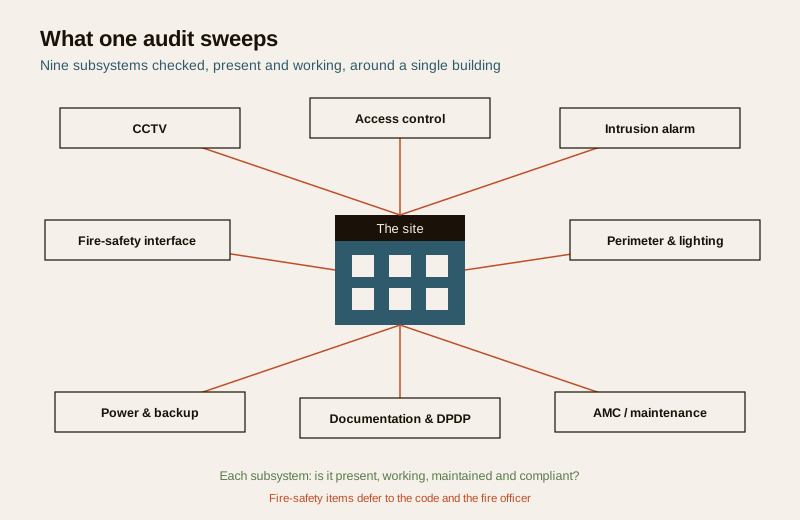
A ready-to-adapt, fill-in security audit checklist that walks an installed system subsystem by subsystem — CCTV, access control, intrusion alarm, the fire-safety interface, perimeter and lighting, power and backup, documentation and DPDP, and AMC status — and turns every finding into a scored, prioritised action list.
A security system that was signed off a year ago and never checked since is not a working system — it is a hopeful assumption. Cameras drift out of view, a drive quietly stops recording, an egress door gets propped and its fail-safe never tested, an extinguisher slips past its service date. The security audit checklist on this page is the structured tick-list you use to periodically prove — not assume — that an installed system is present, working, maintained and compliant, and to convert whatever you find into a ranked list of things to fix.
This is the fillable companion to the explainer guides. Where the security maintenance and audit guide explains why and how you review a system over its life, this page gives you the actual sheet to carry round the building. It sits in the practitioner toolkit alongside the other deliverables in professional security resources and the wider security resources library.
Scope & how to read this. This is a ready-to-adapt professional template, not authoritative, contractual or legal wording, and not a substitute for a statutory inspection. Fire and life-safety pass criteria, test frequencies and clearances come from the National Building Code, the manufacturer and your fire officer or AHJ — this checklist only records that they were checked. Get professional and legal review for anything you rely on. Specifics come from your project, the code and the authority having jurisdiction. Verify.
What it is and when you use it
A security audit checklist is a repeatable inspection sheet. You walk the site with it, look at each subsystem in turn, and mark whether each item is present and working, needs attention, or has failed — with a note and an action against every problem. It answers one blunt question: is the security you paid for actually doing its job today?
There are two common occasions:
- Periodic review of an existing site. A quarterly, half-yearly or annual health check of a system you already run — usually led by the facility manager, the RWA committee, the in-house security lead or a retained consultant.
- Due-diligence audit of a building. A one-off assessment when someone takes over, buys, leases or insures a property and needs to know what is really installed and whether it works — usually led by an independent security consultant, PMC or the incoming operator.
Who runs it depends on the setting, but the discipline is the same: one owner of the checklist, a fixed date, every row addressed, and a signed record kept. It complements — it does not replace — the deeper diagnostic tools: a security risk assessment sets what the system is supposed to protect against, and a security and privacy assessment covers the DPDP and data-handling side in depth. The audit checks that what was decided there is real on the ground.
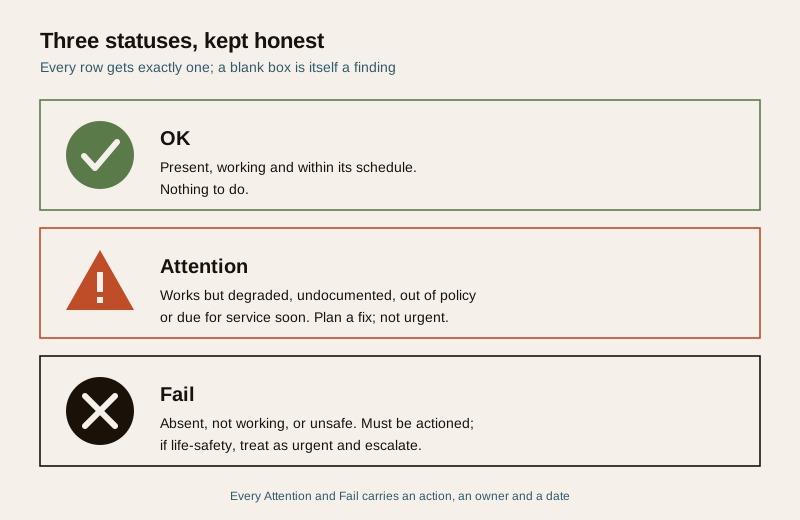
The status codes: OK, Attention, Fail
Every row gets one of three statuses, so the sheet stays honest and the summary is instantly readable:
- OK — present, working and within its schedule. Nothing to do.
- Attention — works but is degraded, undocumented, out of policy or due for service soon. Plan a fix; not urgent.
- Fail — absent, not working, or unsafe. Must be actioned; if it is life-safety, treat it as urgent and escalate.
Keep the wording tight and factual in the Notes column — what you saw, not what you assume. A photo reference or a location tag makes the finding far easier to fix later.
Worked example: a filled audit checklist
Below is a realistic, illustrative extract of a completed audit for a small commercial building, grouped by subsystem. It shows how the sheet is used — a handful of rows per area, not every possible check. The values are generic examples, not findings for any real site.
Example only — adapt to your project. Camera numbers, door names, statuses and actions here are illustrative. Your rows, your subsystems and your pass criteria will differ. Nothing below is a fabricated standard, price or clause.
| # | Subsystem | Item | Check | Status | Notes / Action |
|---|---|---|---|---|---|
| 1 | CCTV | Camera C-01, Main Gate | Powered, live image, view matches intended coverage | OK | Clear view of gate line |
| 2 | CCTV | Camera C-07, Rear Yard | Recording and retained per policy | Attention | Records, but retention shorter than policy — check storage settings |
| 3 | CCTV | Recorder / storage health | Drives healthy, no error, clock correct | Fail | One drive flagged failing on the recorder — replace before it drops recording |
| 4 | Access control | Reader, Server Room | Reader reads, door locks, event logged | OK | Log entry confirmed on test badge |
| 5 | Access control | Egress door, Fire Exit A | Fail-safe on egress: door releases on alarm / power loss | Attention | Verify fail-safe behaviour with fire officer at next drill — do not assume |
| 6 | Intrusion alarm | Zone 3 PIR, Store | Sensor triggers, panel shows zone, signal received | OK | Walk-test triggered correct zone |
| 7 | Intrusion alarm | Panel and response | Panel arms/disarms, alerts reach the agreed responder | Fail | Test alert did not reach monitoring contact — reconfigure and retest |
| 8 | Fire-safety interface | Fire alarm to security link | Alarm state visible to security; egress releases | Attention | Interface present; confirm test scope and frequency with fire officer |
| 9 | Fire-safety interface | Extinguishers in date, exits clear, signage | Service date current, exit routes unobstructed, signage lit | Attention | Two exit routes partly obstructed — clear; confirm service dates with fire officer |
| 10 | Perimeter / lighting | Boundary lighting, North side | Lights working, no dark gaps on camera at night | OK | Night image adequate along boundary |
| 11 | Power / backup | UPS / battery backup | Backup carries key devices through a mains cut for the design duration | Attention | Battery age unknown — schedule a load test; confirm design runtime |
| 12 | Documentation / DPDP | Footage retention and access policy | Written policy exists, access restricted and logged | Fail | No written retention/access policy on file — draft per DPDP |
| 13 | AMC / maintenance | AMC status and last service | AMC active, last service logged, next due recorded | Attention | AMC lapses next quarter — renew; last service log incomplete |
The mix of statuses is the point. A real audit is rarely all-OK or all-fail; the value is in surfacing the handful of things that quietly stopped working.
Blank template: copy and adapt
Copy the table below into your own sheet, print it, or paste it into a spreadsheet. Add rows per subsystem for your site, delete what does not apply, and keep the four working columns — Item, Check, Status, Notes / Action — plus the subsystem grouping.
| # | Subsystem | Item | Check | Status (OK / Attention / Fail) | Notes / Action |
|---|---|---|---|---|---|
| 1 | CCTV | ... | Camera powered, live image, view correct | ... | ... |
| 2 | CCTV | ... | Recording, retention and storage health | ... | ... |
| 3 | Access control | ... | Reader, lock, and event logged | ... | ... |
| 4 | Access control | ... | Fail-safe / fail-secure correct on egress | ... | ... |
| 5 | Intrusion alarm | ... | Sensor, panel and response verified | ... | ... |
| 6 | Fire-safety interface | ... | Alarm, detectors, extinguishers, exits, signage (defer to fire officer) | ... | ... |
| 7 | Perimeter / lighting | ... | Boundary integrity and lighting at night | ... | ... |
| 8 | Power / backup | ... | UPS / battery backup carries key devices | ... | ... |
| 9 | Documentation / DPDP | ... | Retention, access control to data, written policy | ... | ... |
| 10 | AMC / maintenance | ... | AMC active, last service, next due | ... | ... |
| ... | ... | ... | ... | ... | ... |
Fire and life-safety defer to the code and the fire officer. The fire-safety rows are a prompt to check that alarms, detectors, extinguishers, exit routes and signage were inspected — not a statement of pass criteria. What counts as in-date, how often each item is tested, and what clearance an exit needs are set by the National Building Code, the manufacturer and your fire officer or AHJ. This checklist records that they were checked; it does not define the requirement. Do not invent frequencies. Verify.
The column and field guide
- # and Subsystem — a stable row number and the group it belongs to, so you can sort, count and refer back to a finding.
- Item — the specific device, door, zone or document, named the way it is labelled on site (Camera C-01, Fire Exit A). Vague items produce vague fixes.
- Check — the exact test you performed, phrased so anyone repeating the audit does the same thing. Prefer a verifiable action ("recording and retained per policy") over a feeling ("looks fine").
- Status — one of OK, Attention or Fail. No blanks; an unchecked item is itself a finding.
- Notes / Action — what you saw and what must happen. For every Attention or Fail, write an action, an owner and ideally a due date. This column becomes your action list.
Documentation and footage are personal data. CCTV footage and access logs that identify people are personal data under the DPDP Act, 2023. The documentation rows should confirm a written retention and access policy exists, that access to recordings is restricted and logged, and that old footage is deleted on a sensible cycle rather than hoarded. Treat the audit sheet itself carefully — it maps your weak points.
How to use it: scoring and turning fails into an action list
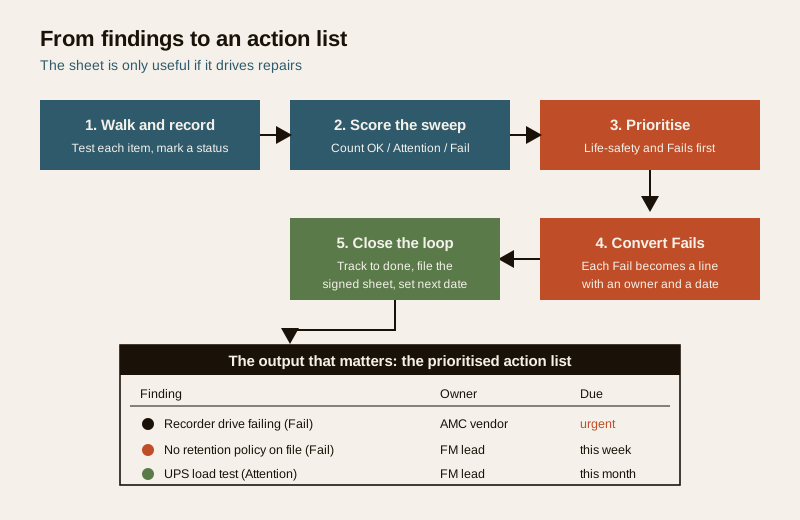
The checklist is only useful if it drives repairs. A simple, honest workflow:
1. Walk and record. Go subsystem by subsystem, test each item, mark a status, write a note. Do not skip a row because it is inconvenient — mark it Attention and move on.
2. Score the sweep. Count OK, Attention and Fail per subsystem and overall. This gives a quick health picture across visits — a rising Attention count in one subsystem is an early warning. Keep scoring proportionate; the counts guide effort, they are not a certification.
3. Prioritise. Sort the findings: life-safety and Fail first, then Attention, then documentation. A camera not recording and an untested egress fail-safe outrank a cosmetic signage note.
4. Convert Fails to an action list. Every Fail and Attention becomes a line with an owner and a target date. This action list — not the raw sheet — is what you hand to the facility manager, the AMC vendor or the committee.
5. Close the loop and re-audit. Track actions to done, keep the signed sheet on file, and set the next audit date. Log recurring problems and service events in a running record such as the security maintenance logbook, so patterns show over time.
For the fire and life-safety side specifically, the audit is a coordination aid, not the inspection itself — pair it with a proper fire-safety audit run to the code and signed off by the fire officer.
Common mistakes
- Ticking OK without testing. "The camera is on" is not "the camera records and the view is right." Perform the check, do not eyeball the box.
- No action against a Fail. A finding with no owner and no date is a finding that will still be there next audit. Every Fail needs a line on the action list.
- Treating fire items as your call. Do not set your own pass criteria or frequencies for extinguishers, exits or alarms. Record that they were checked and defer the standard to the fire officer and the code.
- Losing the sheet. An audit with no signed, dated record is hard to act on and impossible to trend. File it, and set the next date before you leave.
Key takeaways
- A security audit checklist proves an installed system is present, working, maintained and compliant — used for periodic review of a site or due-diligence on a building.
- Group it by subsystem — CCTV, access control, intrusion alarm, fire-safety interface, perimeter and lighting, power and backup, documentation and DPDP, and AMC status — with columns for Item, Check, Status and Notes / Action.
- Use three statuses — OK, Attention, Fail — and give every Attention and Fail an action, an owner and a date.
- Fire and life-safety pass criteria and frequencies come from the code and the fire officer — this checklist is an aid that records the check, not the standard. Verify; do not fabricate.
- The output that matters is the prioritised action list, closed out and re-audited on a set cycle.
References
- National Building Code of India — the authoritative source for fire and life-safety provisions, egress and inspection; confirm the current edition and defer specifics to your fire officer and AHJ.
- Digital Personal Data Protection Act, 2023 — CCTV footage and access logs identifying people are personal data; keep access controlled, purpose legitimate and retention limited.
- Manufacturer documentation for your specific recorders, panels, readers and detectors — the authoritative source for how each device is tested and serviced.
- Bureau of Indian Standards catalogue — verify the current edition of any standard referenced in your install at https://www.services.bis.gov.in/
This is an educational template to adapt, not authoritative, legal or contractual wording, and not a statutory inspection. Fire and life-safety criteria and frequencies come from the code and your fire officer; consult qualified professionals and your AHJ, and get legal review for anything you rely on.
Export this guide
Related Guides — Deep-dive reading
Access Control Testing Checklist for India (2026): Every Door Opens and Locks as Designed
A ready-to-adapt per-door and system checklist to verify an access-control installation at commissioning and as a periodic check, with the egress and fire-to-release life-safety tests that must always pass before sign-off.
SecurityAccess Control Maintenance in India (2026): Readers, Locks and Fail-Safe Egress
How to keep a card, keypad, fingerprint or face access-control system reading reliably and locking securely — and, above everything, how to test that its doors still release on a fire alarm and on power loss, so an access-controlled door never becomes a life-safety trap.
SecurityCCTV Recording Failure in India (2026): Live View Works but Nothing Was Saved
You open the recorder to pull footage of an incident and there is nothing there, even though every camera shows a crisp live picture. A calm, ordered guide to why an Indian CCTV system records live but saves nothing, and how to fix it before the next incident.
SecurityRelated Tools — Try Free
Access-Control Battery-Backup Calculator
Size the standby battery so an access system keeps running through a power cut, with an egress life-safety note.
Battery BackupCCTV Camera Coverage & Count Calculator
Estimate how many CCTV cameras you need, the NVR channels, storage in TB for your retention period, and an indicative all-in cost with GST.
CCTV CalculatorHome Security Risk Scorecard
Score your home across six security layers — perimeter, entry points, lighting, detection, alarm and habits — and get a prioritised action plan.
Security Scorecard