

Security Design Brief Template for India (2026): Capturing What the System Must Do
A ready-to-adapt security design brief template — the very first deliverable a consultant and client agree on, capturing objectives, threats, scope, users, subsystems, performance intent, constraints and privacy before anyone designs or buys anything.
Every good security project starts with a short document almost nobody photographs and almost everybody skips: the design brief. Before a single camera is positioned, a door lock chosen or a price quoted, someone has to write down what the security system is actually supposed to do — and get the client to agree it. That document is the security design brief template in action, and it is the first deliverable on the job.
The brief is not the design. It is the statement of intent the design must satisfy. A security consultant produces it with the client — the facility manager, the RWA committee, the promoter or the architect — capturing objectives, the assets to protect, the threats that worry them, the boundaries of the work and how everyone will know it succeeded. Everything downstream — the risk assessment, the coverage schedules, the tender, the commissioning tests — cites the brief. Skip it, and the project spends months and lakhs of rupees delivering a system nobody agreed the shape of.
This page sits in Studio Matrx's professional security resources toolkit. For how the deliverables fit together, start with the professional security resources guide.
Scope & how to read this. This is a ready-to-adapt professional template, not authoritative, legal or contractual wording. It structures a conversation with your client; it does not set standards or make decisions for you. Specifics — camera counts, retention periods, budget figures, applicable codes — come from your own project, the design stage, and the authority having jurisdiction. Get professional and legal review before a brief becomes a contract deliverable. Where the system records identifiable people, personal data obligations under the Digital Personal Data Protection (DPDP) Act, 2023 apply — capture that in the brief, do not bolt it on later.
What the brief is and where it sits
Think of the brief as the target the whole project aims at. It is agreed at kickoff, signed by both sides, and then referenced at every later stage as the thing the design is measured against.
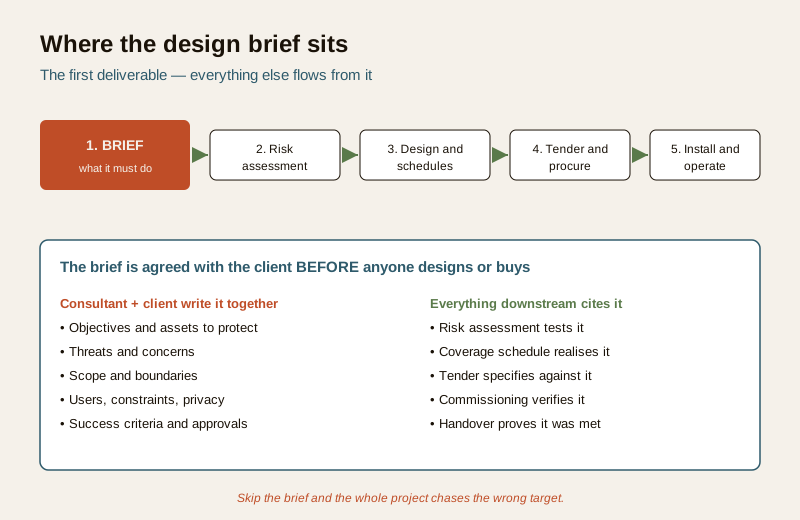
- Who produces it: the security consultant or lead designer, in a working session with the client and, where relevant, the architect, PMC and facilities team.
- Who receives it: the client signs it; the design team, quantity surveyor and eventual tenderers all work from it.
- Why it matters: it converts a vague wish ("we want the building to be secure") into agreed objectives, scope and success criteria — so the design solves the right problem and the tender buys the right thing.
Crucially, the brief captures intent, not specifications. At brief stage you do not know how many cameras, what retention or which product — those come from design. So you write what the system must achieve: capture faces at the entry, deter intrusion at the boundary, let staff move freely while restricting visitors. The numbers get filled in later, against the brief.
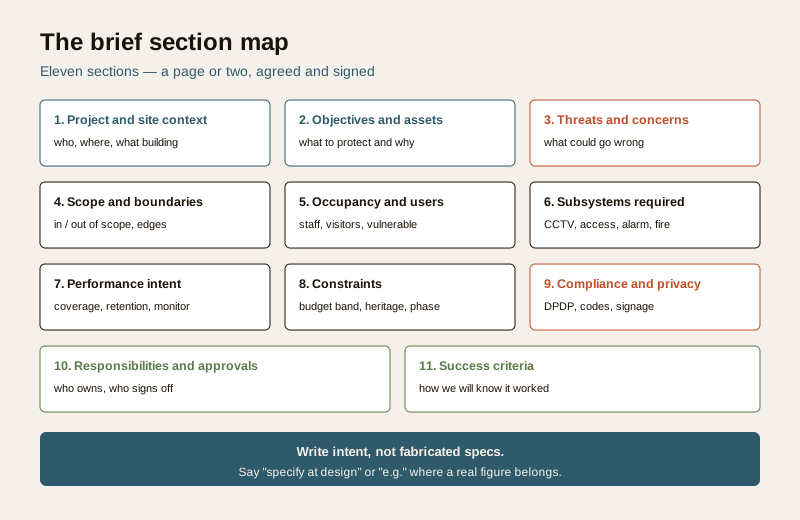
The eleven sections
A workable brief fits on a few pages under eleven headings. You will not fill every box on every project — a single shop needs far less than a gated township — but the headings are the checklist that stops you forgetting something that matters.
Worked example: a mid-rise residential brief
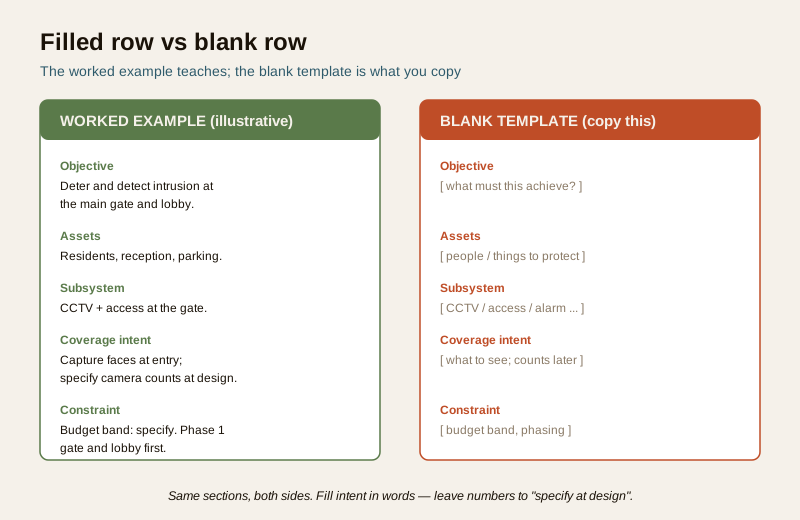
Below is an illustrative brief for a fictional mid-rise apartment building, so you can see how each section reads when filled. It uses intent language and placeholders on purpose.
Example only — adapt to your project. Values here are generic and illustrative. They are not recommendations, prices or specifications. Replace every row with your own project reality, and let the design stage fill in the numbers.
| Section | Example entry (illustrative) |
|---|---|
| 1. Project and site context | 8-storey residential building, 32 flats, single gated entry plus a service gate; adjoining commercial road on one side. New build, security to be ready before handover. |
| 2. Objectives and assets | Protect residents and their vehicles; deter and detect unauthorised entry at the gates and lobby; keep a reliable visual record of who enters. Assets: people, parking, lobby, common areas. |
| 3. Threats and concerns | Tailgating at the main gate; theft from parking; unknown visitors reaching lift lobbies; disputes with no footage to resolve them. |
| 4. Scope and boundaries | In scope: main gate, service gate, lobby, parking, lift lobbies. Out of scope: inside private flats; the neighbouring plot. Boundary: coverage stops at the property line. |
| 5. Occupancy and users | Residents (24x7), guards (shift), domestic staff and delivery riders (daytime), visitors (escorted). Note: children and elderly residents; guard welfare and reasonable working conditions to be respected. |
| 6. Subsystems required | CCTV at gates, lobby, parking; visitor and gate access management; intrusion alarm to be evaluated; interface with the fire system so security never blocks egress. |
| 7. Performance intent | Capture recognisable faces at each gate (specify camera intent and counts at design); retain footage for a period to be specified against need and DPDP; monitoring intent: guard-viewed with recorded playback, not a manned control room. |
| 8. Constraints | Budget band: specify; phase 1 gates and lobby, phase 2 parking and lift lobbies; cameras must not be visually intrusive on the elevation; power and network routes to suit the base build. |
| 9. Compliance and privacy | Footage of identifiable people is personal data under the DPDP Act, 2023: put up signage, define retention and access, never point cameras into flats or the neighbour's property. Follow applicable codes; verify with the AHJ. |
| 10. Responsibilities and approvals | Consultant drafts brief and design; RWA and promoter approve; PMC coordinates; two committee custodians will hold system access after handover. |
| 11. Success criteria | Every gate and the lobby covered as intended; footage retrievable and exportable; two custodians trained; signage up; sign-off against this brief at handover. |
Notice what the example does not do: it names no prices, no exact camera models, no wattages, no code clause numbers and no fixed retention days as facts. Where a real figure belongs it says "specify" or "e.g." — because at brief stage those are design decisions, and inventing them here would mislead the tender.
The blank template — copy this
Here is the same document empty, with placeholder prompts. Copy it into your own sheet or letterhead, delete the prompts as you fill each row, and keep it to a few pages.
| Section | What to capture (delete the prompt as you fill it) |
|---|---|
| 1. Project and site context | ... type of building, size, entries, neighbours, new-build or retrofit, target date ... |
| 2. Objectives and assets | ... what the system must achieve, in plain words; the people and things being protected ... |
| 3. Threats and concerns | ... what the client is worried about; what has gone wrong before or could ... |
| 4. Scope and boundaries | ... what is in scope, what is explicitly out; where coverage stops (the property line) ... |
| 5. Occupancy and users | ... staff, residents, visitors, contractors; vulnerable users; staff dignity and welfare ... |
| 6. Subsystems required | ... CCTV, access control, alarm, perimeter, fire interface — list what is needed, not products ... |
| 7. Performance intent | ... coverage intent, retention intent, monitoring intent — as intent; numbers specified at design ... |
| 8. Constraints | ... budget band, aesthetics, heritage limits, phasing, power and network limits ... |
| 9. Compliance and privacy | ... DPDP obligations, signage, applicable codes; verify specifics with the AHJ ... |
| 10. Responsibilities and approvals | ... who drafts, who approves, who signs off, who holds access after handover ... |
| 11. Success criteria | ... how everyone will know the system met the brief; the sign-off basis at handover ... |
Keep it intent, not specification. If you catch yourself writing an exact camera count, retention in days, or a price in the brief, stop — that is a design or costing decision. Write the intent ("capture faces at each entry"; "retain long enough to resolve typical disputes, within DPDP limits") and let the risk assessment and design stages turn it into numbers.
Field guide: how to fill each section well
- Project and site context grounds everyone in the same building. A retrofit brief reads very differently from a new build; say which it is.
- Objectives and assets is the heart. If you write nothing else well, write this well. Vague objectives ("make it secure") produce vague designs; specific ones ("deter and detect intrusion at the two gates; keep a retrievable record of entry") produce testable ones.
- Threats and concerns should come from the client's real fears and, ideally, a site security assessment — not a generic threat list. It is what the risk assessment will test.
- Scope and boundaries prevents the two commonest disputes: scope creep, and cameras pointed where they should not be. State the property line and what is out of scope explicitly.
- Occupancy and users is where dignity lives. Name vulnerable users, and note that staff, domestic workers and tenants are people with rights, not subjects to be surveilled. This shapes ethical, proportionate design.
- Subsystems required lists what, not which product. The building security systems overview helps frame the subsystem choices; the design stage selects models.
- Performance intent is the section people get wrong by over-specifying. Write coverage, retention and monitoring as intent. The CCTV coverage schedule is where that intent becomes camera-by-camera detail later.
- Constraints is where budget bands, heritage limits and phasing live — capture them now so the design is realistic, not a wish list that gets value-engineered to nothing.
- Compliance and privacy must never be an afterthought. One line here that names DPDP, signage and retention saves a great deal of trouble later.
- Responsibilities and approvals decides who can say yes. Name the approver and the post-handover custodians.
- Success criteria closes the loop: it is what you will sign off against at handover.
Common mistakes
| Mistake | Why it hurts | Fix |
|---|---|---|
| No objectives, straight to a camera count | The design solves an unstated problem; nobody can test it | Write objectives first, in the client's words |
| No boundaries stated | Scope creep, and cameras aimed at neighbours or private spaces | State in-scope, out-of-scope and the property line |
| No privacy line | DPDP obligations discovered late; signage and retention retrofitted | One compliance-and-privacy row, filled at the start |
| Fabricated specs in the brief | Locks the tender to guesses, not design | Use intent, "specify", "e.g." — decide numbers at design |
| Skipping vulnerable users and staff | Disproportionate, undignified surveillance | Name users and their rights in section 5 |
How the brief feeds everything else
The brief is only worth writing if the rest of the project actually uses it. It does, at every stage:
- Risk assessment takes the objectives, assets and threats from the brief and tests them systematically — see the security risk assessment template. The brief says what matters; the risk assessment says how exposed it is.
- Design and schedules turn the performance intent into real counts and placements. The CCTV coverage schedule is the brief's coverage intent made specific, camera by camera.
- Tender and procurement quote against the scope and subsystems in the brief, so bids are comparable and nobody prices a different job. When the client is weighing options, how to choose a security system works directly from the brief's objectives and constraints.
- Commissioning and handover sign off against the success criteria written in the brief — closing the loop that the very first document opened.
Completion checklist
Before you send the brief for sign-off, confirm each row is a genuine yes:
| Check | Confirmed? |
|---|---|
| Objectives stated in the client's own words | Yes / No |
| Assets to protect listed | Yes / No |
| Threats and concerns captured (not a generic list) | Yes / No |
| Scope, out-of-scope and the property line stated | Yes / No |
| Users named, including vulnerable users and staff | Yes / No |
| Subsystems listed as needs, not products | Yes / No |
| Performance written as intent, no fabricated specs | Yes / No |
| Constraints, budget band and phasing captured | Yes / No |
| DPDP, signage and retention line present | Yes / No |
| Approver and post-handover custodians named | Yes / No |
| Success criteria and sign-off basis agreed | Yes / No |
Key takeaways
- The brief is the first deliverable — agreed with the client before any design or purchase, and the thing everything downstream is measured against.
- Capture intent, not specifications. Objectives, threats, scope and performance as intent; numbers come at design. Use "specify" and "e.g." where a figure belongs.
- Never skip objectives, boundaries or the privacy line — those three omissions cause the most rework and the most disputes.
- Name your users honestly, including vulnerable users and staff, so the design is proportionate and respects dignity and rights.
- The brief feeds the risk assessment, schedules, tender and handover — write it once, cite it everywhere.
References
- Digital Personal Data Protection Act, 2023 — where a security system records identifiable people, the footage is personal data; the brief should capture signage, access control and retention intent from the start.
- National Building Code of India (SP 7) and applicable local rules — for any life-safety, egress or fire-interface requirement; verify the current edition and specifics with the authority having jurisdiction. This template does not set standards.
- Bureau of Indian Standards catalogue — for any product or installation standard referenced during design; verify the current edition at https://www.services.bis.gov.in/
This is an educational template to adapt, not legal, contractual or authoritative wording. Get professional and legal review before a brief becomes a contract deliverable, and defer all specifics to your project, the design stage and the authority having jurisdiction.
Export this guide
Related Guides — Deep-dive reading
Access Control Testing Checklist for India (2026): Every Door Opens and Locks as Designed
A ready-to-adapt per-door and system checklist to verify an access-control installation at commissioning and as a periodic check, with the egress and fire-to-release life-safety tests that must always pass before sign-off.
SecurityProfessional Security Resources for India (2026): The Documents Behind a Secure Project
The overview and map of the whole professional-deliverable toolkit — the brief, schedules, BOQ, checklists, handover pack and logs a consultant, designer, PMC or facility manager produces across a security project, and how each document connects to the next.
SecuritySecurity Specification Template for India (2026): Defining What Good Looks Like
A ready-to-adapt technical specification template for security systems: the document that sits beside the BOQ in your tender and tells every bidder the required standard, performance and quality, so they quote the right thing and the installer builds to a known bar.
SecurityRelated Tools — Try Free
CCTV Placement Compliance Checker
A quick DPDP-grounded privacy and safety self-check for where a camera is pointed — flags the items to fix.
ComplianceCCTV Camera Coverage & Count Calculator
Estimate how many CCTV cameras you need, the NVR channels, storage in TB for your retention period, and an indicative all-in cost with GST.
CCTV CalculatorCCTV Camera Quantity Calculator
How many cameras a site needs from boundary length, coverage width per lens and key points — plus the recorder channel count.
Camera Count