
Home Security System Cost in India (2026): The Honest Budgeting Guide
There is no single price for a home security system — it is a stack of choices. This pillar gives you the mental model to budget the whole home: the cost drivers, the split between one-time capex and ongoing opex, wide indicative tier bands, a five-year total-cost lens, and how to read and compare quotes.
The first honest answer to "what does a home security system cost in India" is that there is no single number, and anyone who gives you one without asking about your home is guessing or selling. A home security system is not a product you buy off a shelf at a fixed price. It is a stack of choices — how many cameras, at how many doors, wired or wireless, stored locally or in the cloud, installed by you or by a professional, watched by nobody or by a monitoring service — and each choice moves the money up or down. Two families on the same street, in homes of the same size, can honestly spend very different amounts and both be right, because they are buying different things.
That is why this guide is a budgeting framework rather than a price list. Its job is to give you the mental model to plan the whole home: to see what drives the cost, to separate the one-time spend from the running spend that quietly outlasts it, to place yourself in a sensible tier band, and to read a quote well enough to know what a cheap one is hiding. The sibling guides in this library drill into each component — the CCTV installation cost guide, the IP camera cost guide, and the cloud CCTV cost guide among them. This pillar is the map they sit inside.
Scope & how to read the numbers. Every rupee figure here is a wide indicative band to help you plan and sanity-check quotes — not a price, not an estimate for your home. Prices move constantly with time, city, brand, spec and installer, so treat any band as a starting point and get at least three written, itemised quotes before you decide. Throughout, capex (one-time hardware and installation) is kept separate from opex (the subscription, monitoring, maintenance and electricity that recur every year), because ignoring the running cost is the single most common budgeting mistake. GST applies to equipment and services on top of these figures. And where life-safety is involved — fire detection, smoke alarms, a clear escape route — cost-cutting is never acceptable; that is the one line you do not shop down.
What "a home security system" even means
Before any number makes sense, it helps to see that "a home security system" is really a shopping list of independent parts, each of which you can include or skip, and buy cheap or buy well:
- A video door phone or doorbell camera — who is at the gate or door, and a record of it.
- Cameras (CCTV) — coverage of the approaches, entries and, sometimes, the interior. Usually the largest single line.
- A recorder and storage — a DVR or NVR with a hard disk locally, a cloud plan, or both.
- Smart or electronic locks — controlled, logged entry at the main door.
- An intrusion alarm — sensors on doors and windows, a siren, and optionally a panel that calls out.
- Wiring, power, networking and mounting — the unseen half of the job that a cheap quote loves to leave vague.
- Installation and commissioning — the labour to fit it, aim it, wire it and set it up so it actually works.
You do not need all of it, and few homes should buy all of it at once. The art of budgeting is right-sizing this list to your home and its real risks — which is exactly what the cost drivers below decide.
The cost drivers — what actually moves the price
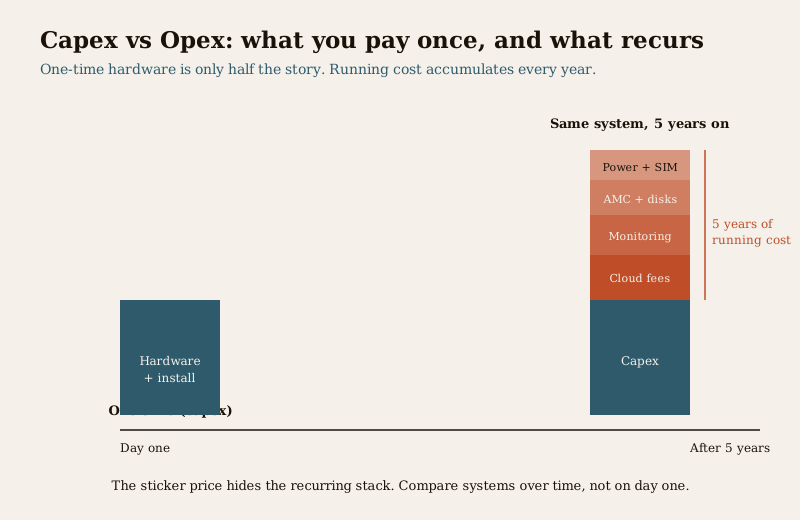
A band is meaningless without the levers that move a buyer up or down it. Before you look at any tier figure, understand what is pulling on it. These are the drivers that explain almost the entire spread between a modest and a heavy quote:
| Driver | Pulls cost DOWN | Pulls cost UP |
|---|---|---|
| Home size and type | Compact flat, one entry, few approaches | Large villa, independent plot, long boundary, multiple gates and floors |
| Scope — cameras, doors, zones | 2 to 3 cameras, one door, one alarm zone | Many cameras, several doors, multiple alarm zones, full perimeter |
| Wired vs wireless | Wireless, fewer cabling runs, retrofit-friendly | Wired runs through finished walls, conduit, structured cabling |
| Local vs cloud storage | Local recorder and disk, no monthly fee | Cloud storage and clips, a recurring subscription per camera |
| DIY vs professional install | Self-fit plug-and-play kit | Professional survey, install, aiming, commissioning and warranty |
| Brand and quality tier | Budget or unbranded gear | Established brand, BIS/ISI-marked, longer warranty, better night image |
| How much you monitor | Self-monitored on your phone, no service | Professional monitoring, verified response, guard tie-up |
Two of these deserve a flag because buyers routinely miss them. First, the choice between local and cloud storage, and whether you take a monitoring service, is really a choice about opex — it changes what you pay every month for years, not just what you pay on day one. Second, the wired-versus-wireless decision is mostly about labour and disruption, and it is far cheaper to make before your walls are finished than after; if you are renovating or building, planning the runs now saves a great deal later.
Capex vs opex — the split that changes everything
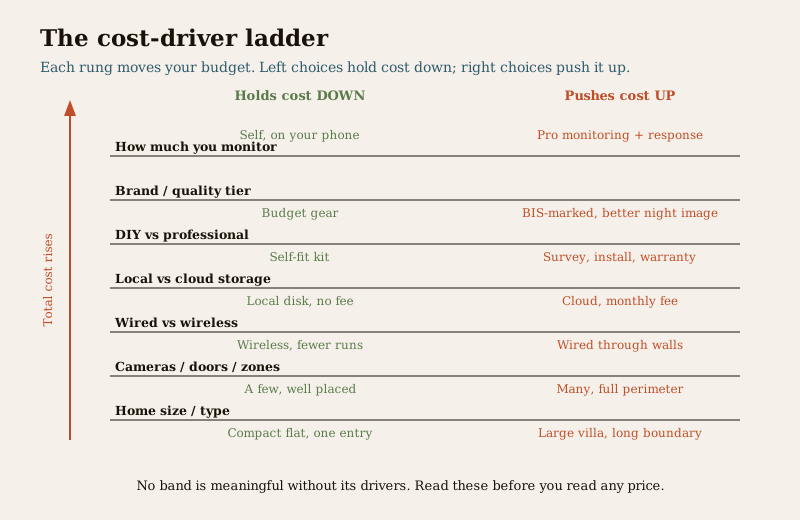
The most expensive misunderstanding in home security is treating it as a one-time purchase. It is not. It is a thing you buy once and then feed every month. Getting this split clear is the whole point of budgeting well.
Capex — the one-time spend:
- Cameras, video door phone, smart locks, alarm sensors and siren
- The recorder (DVR or NVR) and the initial hard disk
- Cabling, conduit, power supplies, mounts and networking gear
- Professional installation, aiming and commissioning
Opex — the recurring spend that outlives the purchase:
- Cloud subscription — per-camera or per-plan monthly fees for storage and clips, if you go cloud
- Monitoring — a service that watches alarms and coordinates a response
- AMC and maintenance — an annual maintenance contract, cleaning, re-aiming, firmware, and the fact that a hard disk and a battery are consumables that fail and get replaced
- Storage renewal — disks wear out; expect to replace them over a system's life
- Electricity — a recorder and several cameras run continuously, twenty-four hours a day
- SIM or data — for any camera or alarm that phones home over a mobile network
The trap is real: a system that looks cheap on day one because it leans on cloud storage and a monitoring plan can, over five years, cost more in fees than a slightly dearer local system that has almost no running cost. Neither is wrong — cloud buys convenience and off-site safety, local buys low running cost — but you cannot compare them by their sticker price alone. You have to compare them over time.
Indicative tier bands — wide ballparks, not prices
With the drivers and the capex-opex split in mind, here are three broad tiers to place yourself in. Treat these as very wide indicative bands to sanity-check quotes, not as prices for your home — your real number depends on every driver above, and the only way to know it is three itemised quotes.
| Tier | Roughly who it fits | Typical capex band | Typical annual opex band | What it buys |
|---|---|---|---|---|
| Starter | A flat or small home, essentials only | Roughly ₹15,000 to ₹40,000 | Roughly ₹0 to ₹4,000 | A doorbell or a few cameras, local recording, a basic lock; mostly self-monitored |
| Standard | A typical independent home wanting solid coverage | Roughly ₹40,000 to ₹1,20,000 | Roughly ₹3,000 to ₹15,000 | Several good cameras, VDP, smart lock, an alarm, professional install, some cloud or an AMC |
| Comprehensive | A large villa or plot wanting layered security | Roughly ₹1,20,000 upward | Roughly ₹12,000 upward | Many cameras, full perimeter, multi-zone alarm, cloud, professional monitoring and AMC |
Read these bands honestly. They are wide because homes genuinely differ, and the boundaries blur — a modest home that chooses a monitoring service can have Starter capex and Standard opex. The bands exist to tell you whether a quote is roughly sane, not to price your job. A quote far below the relevant band is not a bargain to celebrate; it is a prompt to ask what has been left out.
Get three itemised quotes — always. No band on this page substitutes for a written, line-by-line quote from at least three installers for your actual home. Ask each to itemise every camera, the recorder and disk, every metre of cabling, the labour, the warranty, and — critically — the monthly fees. Quotes that match make you confident; quotes that diverge wildly teach you what the cheap one omitted.
The five-year lens — total cost of ownership
Because opex compounds, the fairest way to compare two systems is not their purchase price but their total cost over five years: the capex once, plus the opex every year. When you do this, a striking thing happens. A system that was cheaper to buy but leans on monthly cloud and monitoring fees keeps climbing year after year, while a slightly dearer system with local storage and minimal fees stays nearly flat. Somewhere in the first few years, the "cheap" line crosses above the "balanced" one and stays there.
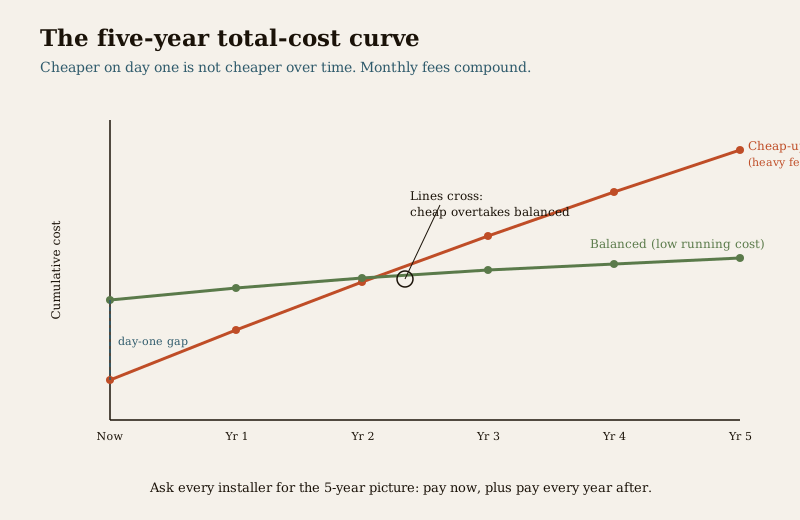
This is not an argument against cloud or monitoring — both buy genuine value, and off-site footage that a burglar cannot smash is worth paying for. It is an argument for comparing over time, not on day one. When an installer quotes, ask them to lay out the five-year picture: what you pay now, and what you pay every year after. The system that wins on a five-year view is usually the one to choose.
How to read a quote, and what a cheap one hides
A suspiciously cheap quote is rarely cheap because the installer is generous. It is cheap because something is missing, and the gap surfaces later as a surprise bill or a system that disappoints. When you compare quotes, look hard for what the low one has quietly dropped:
- The recorder and the disk. A camera price with no NVR and no hard disk is not a system — the storage is where the "cheap" often hides.
- Cabling, conduit and labour. "Wiring extra" or "as per site" on a quote is an open cheque. The unseen half of the job — the runs, the power, the mounting — is real cost.
- Night image and resolution. The gap between a camera that gives a usable face at night and one that gives a grey smear is exactly the gap between a cheap sensor and a good one.
- Warranty and AMC. A quote with no warranty terms and no maintenance path is cheaper because it stops caring the day it is installed.
- The monthly fees. The most important omission. A quote that hides the cloud and monitoring cost is comparing its day-one price against a rival's five-year price.
The CCTV installation cost guide breaks the camera-specific line items down in detail, and the choice between an analog CCTV system and an IP camera system, or a wireless CCTV setup, each carries its own cost profile worth reading before you sign.
Where to spend, and where not to
Right-sizing means spending where it changes outcomes and holding back where it does not:
- Spend on the cameras that cover your real entry points, on decent night image, on the recorder and storage, and on a clean professional install that aims and commissions everything properly. These are what determine whether the system does its job when it matters.
- Go easy on camera count for its own sake — a handful of well-placed cameras beats a dozen scattered ones — and on premium features you will never use.
- Never cut life-safety. Fire and smoke detection, a clear and unlocked escape route, and doors that a person can always open from inside in an emergency are governed by the National Building Code (NBC = SP 7:2026) and are not a place to save money. A lock or a system that traps a family in a fire is a fatal false economy, not a saving.
A note on GST, data and licensing
Three practical realities to budget around. GST applies to security equipment and installation services and sits on top of the bands above — factor it in, and ask whether a quote is inclusive or exclusive of it. Under the DPDP Act 2023, home CCTV and access records are personal data; if your cameras can see a neighbour's property or the street, be considerate and lawful about it. And if you ever add guards to the picture, they must come through a PSARA 2005-registered agency, which is an opex line of its own.
Putting it together
Budget a home security system the way you would budget any system you live with for years, not a gadget you buy once. Start from your home and its real risks, not from a catalogue. Right-size the shopping list. Separate what you pay once from what you pay every month, and compare options over five years, not on day one. Place yourself in a sensible tier band, then get three itemised quotes to turn that band into a real number — and read those quotes for what the cheap one leaves out. Spend where it changes the outcome, hold back where it does not, and never, ever shop down life-safety.
From here, the component guides in the security cost sub-hub drill into each line — cameras, video door phones, smart locks, alarms and cloud. When you want to see how the money translates into an actual protective composition rather than a bill, the CCTV hub and the main security hub show what a well-planned home actually layers, so your budget buys real security rather than a pile of boxes.
Key takeaways
- There is no single price for a home security system — it is a stack of choices, and each choice moves the money; anyone quoting one number without seeing your home is guessing.
- Cost drivers explain almost the whole spread — home size and type, number of cameras and doors, wired vs wireless, local vs cloud, DIY vs professional, brand tier, and how much you monitor.
- Separate capex from opex — the one-time hardware and install is only half the story; the cloud, monitoring, AMC, storage renewal and electricity recur every year and often decide the real cost.
- Use the tier bands as sanity checks, not prices — Starter, Standard and Comprehensive are wide indicative ballparks; the only real number comes from three itemised quotes.
- Compare over five years, not on day one — a cheap-upfront system leaning on monthly fees can overtake a dearer balanced one within a few years.
- A cheap quote hides something — usually the recorder, the disk, the cabling and labour, the night image, the warranty, or the monthly fees; read for the gap.
- GST is extra, data is regulated, and life-safety is never cut — fire, egress and an always-openable escape route come before any lock, per NBC (SP 7:2026).
Where to go next
- The security cost sub-hub — every component cost guide in one place.
- CCTV installation cost, IP CCTV cost, analog CCTV cost, wireless CCTV cost and cloud CCTV cost — the camera-side detail behind this budget.
- The CCTV hub and the main security hub — how the spend becomes an actual layered protective composition for your home.
References
- National Building Code of India (SP 7), Bureau of Indian Standards — means of egress, escape routes, exit doors and fire-safety provisions that take priority over any security measure. Verify the current edition (SP 7:2026) via the BIS catalogue: https://www.services.bis.gov.in/
- Digital Personal Data Protection Act, 2023 — home CCTV, doorbell cameras and access logs hold personal data; be lawful and considerate about what your cameras can see beyond your boundary.
- Private Security Agencies (Regulation) Act, 2005 (PSARA) — any guard added to a home's security must be supplied through a PSARA-registered agency, an ongoing cost of its own.
- Goods and Services Tax (GST) — applies to security equipment and installation services; confirm whether a quote is inclusive or exclusive before comparing.
This is an educational budgeting overview for homeowners, not a price list, a quotation or professional advice. Every rupee band is a wide indicative ballpark that moves with time, city, brand, spec and installer; verify locally and obtain at least three written, itemised quotes before deciding. Life-safety, egress and fire provisions take priority over any cost saving; engage a licensed installer for design and fitting, and verify any standard's current status via the BIS catalogue before relying on it.
Export this guide
Related Guides — Deep-dive reading
Wireless CCTV Cost in India (2026): Cheap to Buy, Read the Running Costs First
What Wi-Fi and wire-free CCTV really costs an Indian home — a low, DIY-friendly install price that hides a subscription, battery and reliability bill. An honest, capex-versus-opex look at where the money actually goes over three to five years, with indicative bands and the drivers that move them.
SecurityHow to Choose a Security System (2026): The Master Buying Guide for Indian Homes and Buildings
The mental model that ties the whole buying decision together: start from your own risk, not a product; build the layers your situation actually needs; make the big architecture choices (wired vs wireless, local vs cloud, DIY vs professional); tell real product quality from marketing; and choose a vendor you can trust.
SecurityData Storage Cost for CCTV in India (2026): Local Disks vs Cloud, and How to Size It
The running cost people forget when they buy cameras. Where the footage actually lives — a one-time surveillance hard disk in the recorder, or a recurring per-camera cloud plan — and how camera count, resolution, frame rate, recording mode and retention days decide how many terabytes, and how much money, you really need.
SecurityRelated Tools — Try Free
CCTV Camera Coverage & Count Calculator
Estimate how many CCTV cameras you need, the NVR channels, storage in TB for your retention period, and an indicative all-in cost with GST.
CCTV CalculatorCCTV Cloud vs Local Cost Calculator
Compare cloud CCTV subscription against a local NVR + HDD — upfront, 5-year total, monthly fee and break-even.
Cloud vs LocalSecurity System Cost Estimator
Estimate the all-in capex with GST, annual running cost and 5-year total cost of ownership of a home or building security system.
Cost Estimator