

Cloud CCTV Cost in India: The Per-Camera Subscription, Understood (2026)
What cloud CCTV (cloud video recording / VSaaS) actually costs in India, honestly: the recurring per-camera monthly plan that is the defining cost, what pushes it up, how the annual bill stacks against a one-time hard disk, and when the never-ending subscription is worth it.
Most CCTV costs are a thing you buy once. Cloud CCTV is a thing you rent forever. That single difference is the whole story of what it costs, and it is the part most homeowners discover only when the second year's bill arrives. The camera on the wall may be cheap, even free with the plan; the money is in the small recurring line that keeps your footage sitting on someone else's server, month after month, for as long as you want to be able to look back at it.
Cloud CCTV, sold under names like cloud video recording or VSaaS (video surveillance as a service), stores your footage off-site over the internet instead of, or alongside, a local recorder in a cupboard at home. There is no hard disk to be stolen with the DVR, no box to fail silently, and the video is there in an app wherever you are. In exchange you sign up to a per-camera subscription that never ends, and that subscription, not the camera, is where nearly all the lifetime cost lives.
This guide is about seeing that clearly before you sign. It explains what cloud CCTV is, why the recurring per-camera plan is the defining cost, exactly what pushes that plan up or down, and how the annual total stacks against the one-time cost of a local hard disk. Every figure here is an indicative 2026 band, not a quote — a way to sanity-check a plan, never a fixed rate. It is the cloud-storage piece of a wider picture: for the choice of camera and cabling itself, see IP CCTV cost and wireless CCTV cost, which is the type most often sold bundled with a cloud plan.
Scope & how to read the numbers. This is a budgeting guide, not a shopping list or a fitting manual. Every price here is an indicative 2026 band that moves with the provider, the plan, your city and how many cameras and days you want kept — treat it as a way to read a quote, never a rate to hold anyone to. Get at least three written, itemised plan comparisons before you commit, and read exactly what each one includes. GST applies on top of subscription and hardware. Separate the one-time (capex) hardware from the ongoing (opex) subscription in your own head — with cloud, the opex is the real cost. Your footage is personal data under the DPDP Act 2023; where it is stored and who can reach it is part of the price. This is educational guidance, not legal or security advice.
What cloud CCTV actually is, in money terms
A traditional CCTV system records to a box in your home: a DVR (for analog cameras) or an NVR (for IP cameras), with a hard disk inside it. You buy that disk once. It holds a rolling window of footage — a few days to a few weeks — and then overwrites the oldest. The recording is free after the disk is bought, but the footage lives in your house, which means it can be stolen, burnt or fail with the box.
Cloud CCTV moves that recording off-site. The camera streams to a data centre over your internet connection, and the footage sits on the provider's servers. You reach it through an app. There may still be a local disk as a backup, but the defining feature is the off-site copy — and the defining cost is the subscription you pay per camera, per month, to keep it there.
So the money splits very differently from a local system:
- A modest one-time hardware cost — the camera (sometimes free or discounted with the plan) and basic setup. Often lower upfront than a full local system because there is no recorder to buy.
- A recurring per-camera subscription that never stops — this is the cost. It is what you are really buying, and it scales with how many cameras you have and how much footage you keep.
That inversion is the single most important thing to understand. With local storage you pay a lot once; with cloud you pay a little, forever, and the forever is the trap for the unwary.
The defining cost: a per-camera subscription that never ends
Cloud plans are almost always priced per camera, per month. Add a camera and you add a monthly line; keep it for years and you pay that line for years. As a wide, honest 2026 band, a per-camera cloud plan in India runs roughly ₹150 to ₹800 per camera per month, and it can sit above that for high-retention, high-resolution or AI-heavy plans on a commercial site. That is a broad band on purpose — where you land inside it is decided entirely by the drivers in the next section, so never read the band without them.
Turn that into an annual figure and the shape of the decision appears. At the low end, one camera on a light plan is roughly ₹1,800 to ₹3,600 a year; at the higher end, one camera on a long-retention, high-resolution plan is roughly ₹6,000 to ₹10,000 a year or more. Now multiply by cameras. A four-camera home on a mid plan is easily ₹12,000 to ₹25,000 every year, indefinitely — and next year it is that again, and the year after.
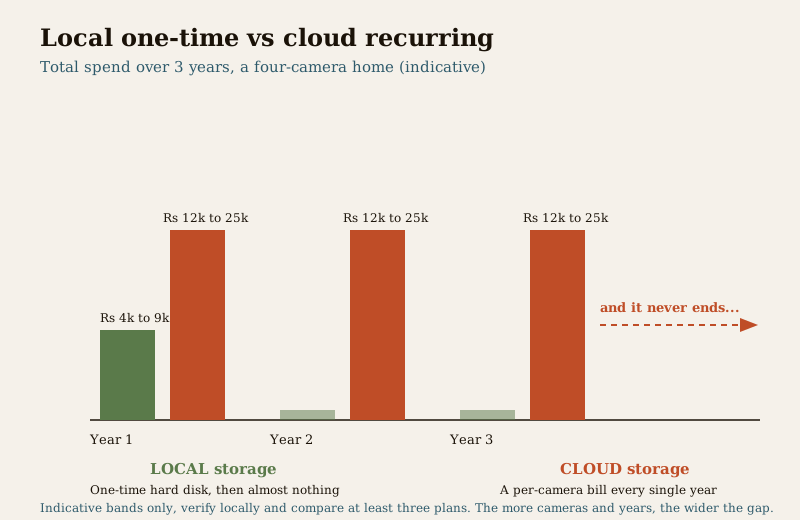
Set that against a local hard disk. A surveillance-grade disk sized for a few cameras is broadly a one-time ₹4,000 to ₹9,000, and once bought the recording is free. Over three years, the four-camera home above might spend that once on local storage, against ₹36,000 to ₹75,000 on cloud for the same period — and the gap only widens the longer you keep both running. Cloud is not automatically expensive; for one or two cameras on a light plan the numbers are modest. But the direction is clear: cloud is a forever monthly bill, local is a one-time hard disk, and the more cameras and the longer the horizon, the more that matters.
What drives your monthly per-camera bill
The band is wide because four things move it, and a plan is really a set of choices about each. Understanding them lets you read why one quote is triple another — and where you can cut without losing what you actually need.
| Driver | Cheaper plan | Costlier plan | Why it moves the price |
|---|---|---|---|
| Retention days | 3 to 7 days kept | 30, 60, 90 days or more | Every extra day is more storage the provider holds for you, every day, forever — the single biggest lever. |
| Resolution / bitrate | 2MP / 1080p | 4MP, 8MP / 4K | Higher-resolution footage is far larger to store and stream, so it costs more per day kept. |
| Number of cameras | 1 to 2 | 4, 8, 16+ | Per-camera pricing means the bill scales linearly — every camera is another monthly line. |
| Recording mode | Event / motion-only | Continuous 24x7 | Continuous recording stores vastly more than motion-triggered clips, pushing storage and price up. |
| AI / smart features | Basic motion alerts | Person, vehicle, face, licence-plate detection | Analytics run on the provider's servers and are usually a premium tier or add-on. |
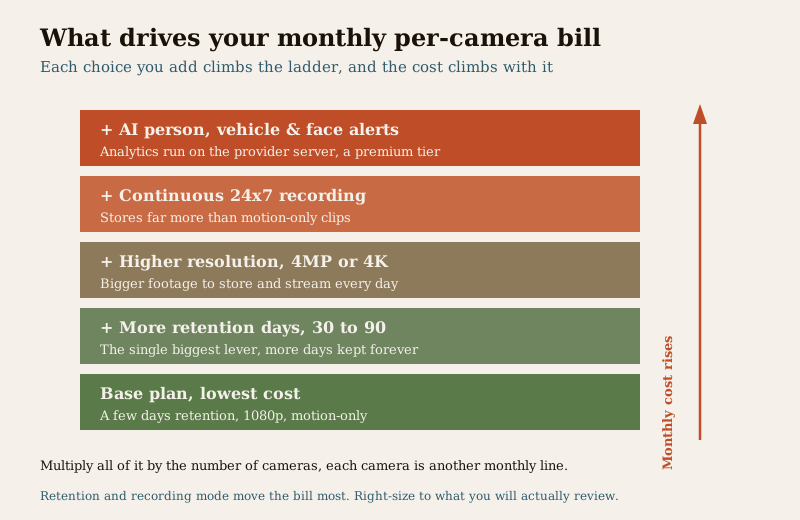
The practical takeaway: retention and recording mode move the bill most. Keeping 7 days of motion-only clips costs a fraction of keeping 60 days of continuous 4K, for the same camera. Most homeowners genuinely need far less retention than they instinctively pick — you review footage within days of an incident, not months. Right-sizing retention is the biggest saving in cloud CCTV, and it costs nothing but honesty about what you will actually use.
Capex versus opex: where opex is the whole story
For most purchases in this hub, we tell you to weigh a one-time cost against a running one. Cloud CCTV is the case where the running cost simply is the story. Here is the split, laid out honestly.
| Cost type | Cloud CCTV | Local storage (DVR/NVR + disk) |
|---|---|---|
| One-time (capex) | Camera and setup; often lower, sometimes camera free with plan | Camera plus recorder plus hard disk; higher upfront |
| Ongoing (opex) | The per-camera subscription — the defining, unavoidable, never-ending cost | Almost none; a disk replacement every few years and some electricity |
| What you are really paying for | Access to keep footage off-site, billed monthly | The hardware you already own |
| What happens if you stop paying | You typically lose cloud recording and stored footage | Nothing; it keeps recording locally |
That last row is the one to sit with. With local storage, once you have bought the box you own your surveillance. With cloud, the day you stop paying is the day the recording — and often the footage already stored — goes away. You are not buying a system; you are renting a service, and the rent is the cost. That is not a reason to avoid cloud, but it is a reason to be clear-eyed that the subscription is a permanent line in your household budget, like a phone or broadband plan, not a one-off spend.
The honest trade-offs
Cloud CCTV earns its subscription for real reasons. It also has real costs beyond the bill. Weigh both.
What the subscription buys you:
- Off-site safety. If a burglar rips out the DVR — the classic move — your footage still exists, because it is not in the house. For footage-theft risk, this alone can justify cloud.
- Convenience and remote access. Live view and playback in an app from anywhere, with nothing to maintain and no disk to fail silently on you.
- Lower upfront cost and no recorder. No NVR/DVR to buy or house, which suits a small home or a rental where you cannot install a box.
- Automatic updates and scaling. The provider maintains storage and adds cameras with a click.
What it costs you beyond money:
- A bill that never ends. The defining downside. Cancel and you generally lose recording and stored footage.
- Dependence on your internet and the provider. No broadband, no cloud recording — footage during an outage may simply not exist. And if the provider raises prices, changes terms or goes out of business, your surveillance and your archive go with them.
- Bandwidth cost. Continuous uploading of video eats your internet upload, which matters on a modest home connection.
- Privacy and DPDP. Your footage lives on someone else's server — possibly outside India. Where it is stored, how it is encrypted, and who at the provider can access it are part of the true cost.
Privacy, DPDP and where your footage lives
Cloud CCTV changes not just what you pay but where your footage goes, and that is a cost you pay in trust rather than rupees. Under the DPDP Act 2023, CCTV footage is personal data, and moving it to a provider's servers hands a copy of everyone your cameras see to a third party. Before you sign, ask the questions the price tag hides:
- Where is the footage stored — in India or abroad — and is that acceptable to you?
- Is it encrypted in transit and at rest, so an insider or an intruder cannot casually browse it?
- Who can access it at the provider, under what controls, and what is their retention and deletion policy when you cancel?
- Can you export your own footage if you leave, or is it locked to their app?
A cheap plan that stores unencrypted footage on an opaque server abroad is not cheap; it is a risk with a low sticker price. Weigh the provider's data practices as seriously as the monthly figure. See CCTV and the main security hub for the wider privacy discipline.
When cloud is worth it, and when local or hybrid is cheaper
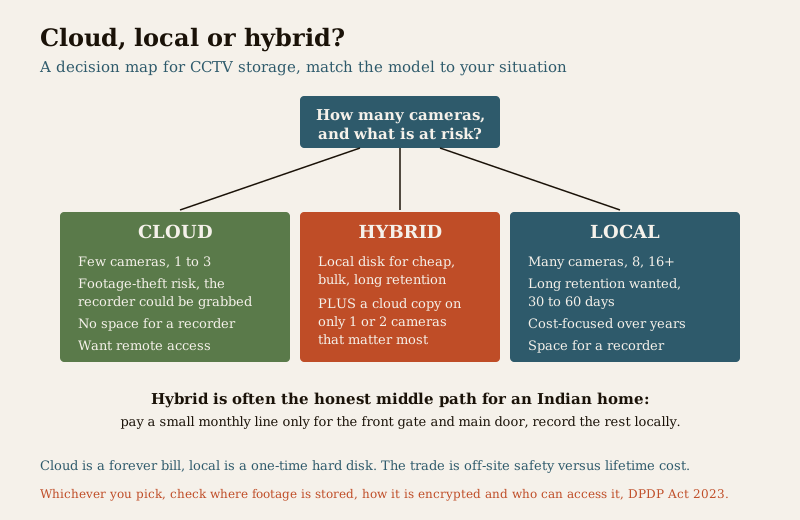
The decision is not cloud-good, local-bad. It is a matter of matching the storage model to your situation. As a rule of thumb:
Cloud tends to win when:
- You have few cameras — one to three — so the per-camera bill stays modest.
- Footage-theft risk is real — an exposed entry where the recorder could be grabbed, so off-site safety matters.
- You have no space or no wish for a recorder — a small flat, a rental, a shop.
- You value remote access and zero maintenance over long-term cost.
Local or hybrid tends to win when:
- You have many cameras — the per-camera subscription multiplies painfully at eight or sixteen.
- You want long retention — keeping 30 or 60 days on cloud is expensive; a local disk does it once.
- You have reliable space and are cost-focused over years — the one-time disk beats the forever bill.
A hybrid approach often gives the best of both: record locally to a disk for cheap, long, bulk retention, and put a cloud copy on only the one or two critical cameras — the front gate, the main door — where footage-theft protection is worth the subscription. You pay a small monthly line for the cameras that matter most, not for every camera in the house. It is frequently the honest middle path for an Indian home.
How to read a cloud CCTV quote
When a quote or plan lands in front of you, the sticker figure is the least useful part. Read it like this:
- Find the per-camera monthly price and the retention days together — a low price at 3 days is a different product from the same price at 30 days.
- Check the resolution and recording mode the plan assumes; continuous 4K on a cheap headline price usually means the headline is for motion-only 1080p.
- Total the annual cost across all your cameras, then across three years, and compare it with a one-time local disk for the same coverage. That is the real comparison.
- Read what happens on cancellation — do you keep stored footage, and can you export it?
- Confirm the data practices — storage location, encryption, access. If a plan will not answer, that is your answer.
- Get three plans side by side. Providers price retention and features very differently; the cheapest headline is rarely the cheapest three-year total.
For the camera and cabling side of the budget that sits underneath any storage choice, see CCTV installation cost, and for the overall household security picture the home security system cost pillar and the security cost sub-hub.
Key takeaways
- The recurring per-camera subscription is the defining cost of cloud CCTV — the camera is cheap, the forever monthly bill is the real spend, and it scales with cameras, retention, resolution and features.
- A per-camera cloud plan runs a broad indicative ₹150 to ₹800 per camera per month in 2026 — never read that band without its drivers, and get three plans side by side before signing.
- Retention days and recording mode move the bill most — right-sizing retention to what you will actually review is the biggest saving, and it is free.
- Opex is the whole story — with cloud you rent your surveillance; stop paying and you generally lose recording and stored footage, unlike a one-time local disk you own outright.
- Cloud wins for few cameras, footage-theft risk and no recorder space; local or hybrid wins for many cameras, long retention and long-term cost — hybrid, a cloud copy on only the critical cameras, is often the honest middle path.
- Your footage lives on someone else's server — under the DPDP Act 2023, check where it is stored, how it is encrypted, who can access it, and whether you can export it before you sign.
Where to go next
- IP CCTV cost and analog CCTV cost — the local-storage alternatives whose one-time disk you are weighing cloud against.
- Wireless CCTV cost — the camera type most often bundled with a cloud plan.
- CCTV installation cost — the camera and cabling budget underneath any storage choice.
- The home security system cost pillar and the security cost sub-hub — where cloud CCTV fits in the whole household budget.
- The CCTV device hub and the main security hub — for choosing and siting cameras and the wider privacy discipline.
References
- Digital Personal Data Protection Act, 2023 — CCTV footage stored on a cloud provider's servers is personal data; agree in writing where footage is stored, whether it is encrypted in transit and at rest, who may access it, the retention and deletion policy, and your right to export or erase footage on cancellation.
- Bureau of Indian Standards (BIS) — prefer BIS/ISI-marked cameras and equipment; verify any product standard's current status via the BIS catalogue: https://www.services.bis.gov.in/
- Goods and Services Tax (GST) — applies on top of both subscription plans and hardware; confirm whether a quoted figure is inclusive or exclusive of GST before comparing plans.
This is an educational, right-sizing overview for homeowners planning a CCTV storage budget in India — not legal advice, a fixed price list or an installation manual. Every figure is an indicative 2026 band that varies by provider, plan, city and specification; get at least three written, itemised plan comparisons, verify data-storage and DPDP practices before signing, and treat the subscription as a permanent line in your budget.
Export this guide
Related Guides — Deep-dive reading
Local Storage vs Cloud CCTV in India (2026): Where Your Footage Should Live
A homeowner's honest head-to-head on where CCTV footage is kept — on a hard disk in the recorder at home, or uploaded to a per-camera cloud plan — across cost, theft resilience, internet dependence, retention, remote access and DPDP privacy, ending in a clear which-suits-whom, with hybrid usually the smartest answer.
SecurityData Storage Cost for CCTV in India (2026): Local Disks vs Cloud, and How to Size It
The running cost people forget when they buy cameras. Where the footage actually lives — a one-time surveillance hard disk in the recorder, or a recurring per-camera cloud plan — and how camera count, resolution, frame rate, recording mode and retention days decide how many terabytes, and how much money, you really need.
SecurityHome Security System Cost in India (2026): The Honest Budgeting Guide
There is no single price for a home security system — it is a stack of choices. This pillar gives you the mental model to budget the whole home: the cost drivers, the split between one-time capex and ongoing opex, wide indicative tier bands, a five-year total-cost lens, and how to read and compare quotes.
SecurityRelated Tools — Try Free
CCTV Camera Coverage & Count Calculator
Estimate how many CCTV cameras you need, the NVR channels, storage in TB for your retention period, and an indicative all-in cost with GST.
CCTV CalculatorCCTV Cloud vs Local Cost Calculator
Compare cloud CCTV subscription against a local NVR + HDD — upfront, 5-year total, monthly fee and break-even.
Cloud vs LocalCCTV Storage & Bitrate Calculator
Cameras, resolution, frame rate, codec and retention days to per-camera bitrate, daily footage size, total NVR storage and a suggested disk.
Storage & Bitrate