
Analog CCTV Cost in India (2026): HD-over-Coax Prices, DVR Kits and Running Costs
What a modern HD analog CCTV system (AHD, HDCVI or TVI cameras on coax with a DVR and hard disk) really costs in India, honestly: where the money goes, indicative per-camera and 4-camera-kit bands, capex versus opex, and the exact limits you are buying at the low price.
Analog CCTV is the system most Indian homes actually end up with, and it is usually the cheapest honest way to put four cameras on a small house. But "analog" carries an out-of-date reputation: people picture the grainy, black-and-white footage of a decade ago. The analog you buy in 2026 is not that. Modern HD-over-coax — the AHD, HDCVI and TVI formats — sends a clean 2-megapixel (1080p) or even 5-megapixel image down the same cheap coaxial cable the old low-resolution cameras used. You get a usable, recognisable picture for a fraction of what a networked system costs.
This guide breaks the analog cctv cost into the parts a quote is actually made of — the cameras, the DVR, the coax and power cable, the SMPS power supply, the hard disk, and the install labour — and gives wide, indicative 2026 rupee bands for a single camera and for a typical four-camera home kit. Every figure here is a ballpark to sanity-check a quote against, never a fixed rate; prices move with your city, the brand, the camera resolution and how much cable your walls demand. It sits alongside Studio Matrx's CCTV installation cost guide and the home-security system cost pillar as the budget-end option.
The honest headline: analog buys you real coverage cheaply, but it buys it with a lower resolution ceiling, distance limits on the coax, fewer smart features and no native network power. Whether that trade is right for you is the whole point of this guide — and if it is not, the IP CCTV cost guide is the upgrade path.
Scope & how to read the numbers. This is a budgeting guide, not a fitting manual. Every price here is an indicative 2026 band that varies by city, brand, camera resolution and cable length — treat it as a way to sanity-check a quote, never as a rate to hold anyone to. Get at least three written, itemised quotes before deciding, and read them line by line. Prices are shown as one-time capex (hardware plus installation) separate from ongoing opex (electricity, hard-disk replacement, optional AMC), because ignoring the running cost is the commonest budgeting mistake — though for local-recording analog the opex is genuinely small. GST applies to both equipment and services and should appear on the invoice. CCTV footage is personal data under the DPDP Act 2023 — position cameras to cover your own property, not a neighbour's window or the shared corridor without consent. This is educational guidance, not legal advice.
What "analog CCTV" means in 2026
An analog CCTV system has four essential pieces, and understanding them is how you read a quote:
- The cameras send their image as an analog HD signal — AHD, HDCVI or TVI are the three common HD-over-coax standards — down a coaxial cable. A cheap set is 2MP (1080p); a step up is 5MP. These are the same familiar bullet and dome shapes as any other CCTV.
- The coax plus power cable — usually a combined "3+1" cable carrying the video on coax and the power on a pair of wires — runs from each camera back to a central point. This cable is the reason analog is cheap: it is inexpensive and forgiving to run.
- The DVR (Digital Video Recorder) is the brain. Every camera plugs into it by a BNC connector; the DVR digitises, records to a hard disk, and serves the footage to a monitor or phone app. A 4-channel DVR suits four cameras; 8- and 16-channel units cost more.
- The power supply and hard disk. An SMPS power box feeds all the cameras from one point; a surveillance-grade hard disk inside the DVR stores the recordings.
The crucial difference from IP CCTV is that analog keeps the intelligence in the DVR rather than in each camera, and runs on coax rather than network cable. That is exactly why it is cheaper — and also why its ceiling is lower. For the full device picture, the CCTV hub and the main security hub sit above this cost guide.
Where the money goes — the bill of materials
A four-camera analog quote is really six line items. Here is what each contributes, as an indicative 2026 band.
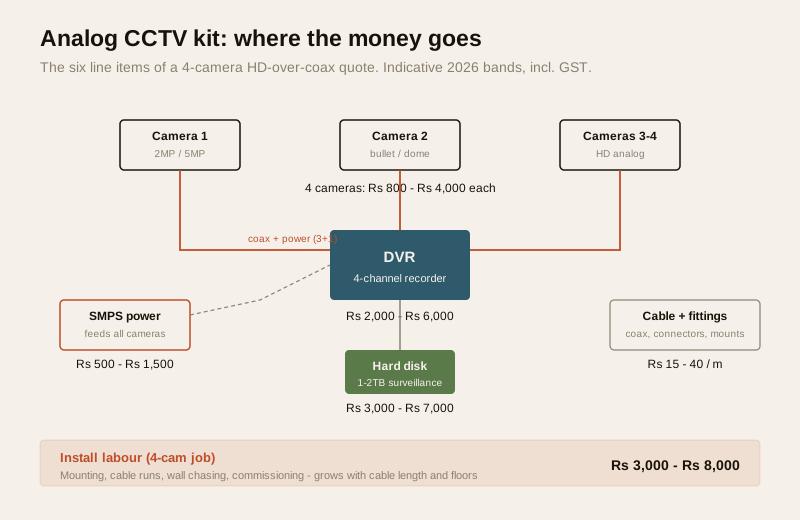
| Component | What it does | Indicative 2026 band (incl. GST) | What moves it |
|---|---|---|---|
| HD analog camera (each) | Captures the image; 2MP or 5MP, bullet or dome | Rs 800 – Rs 2,500 (2MP); Rs 1,500 – Rs 4,000 (5MP) | Resolution, brand, night-vision range, metal vs plastic body |
| DVR (4-channel) | Records and serves all cameras | Rs 2,000 – Rs 6,000 | Channel count, brand, app quality, 5MP support |
| Coax + power cable | Carries video and power to each camera | Rs 15 – Rs 40 per metre | Cable quality (pure copper vs CCA), total run length |
| SMPS power supply | Powers all cameras from one point | Rs 500 – Rs 1,500 | Number of channels, quality |
| Surveillance hard disk | Stores the recordings | Rs 3,000 – Rs 5,000 (1TB); Rs 4,500 – Rs 7,000 (2TB) | Capacity, surveillance-grade vs desktop drive |
| Connectors, boxes, mounts | BNC, DC pins, junction boxes, brackets | Rs 500 – Rs 1,500 for a small kit | Number of cameras, weatherproofing |
| Install labour | Mounting, cable runs, wall chasing, commissioning | Rs 3,000 – Rs 8,000 for a 4-camera job | Cable length, wall type, floors, access difficulty |
Two things dominate the total. The first is how many cameras — each camera drags its own cable, connectors and a share of labour with it. The second is cable length and labour, which is why the same four-camera kit can cost very differently in a compact flat versus a two-storey house where cable has to be chased through finished walls. A cheap quote often hides a thin cable (copper-clad aluminium instead of pure copper, which degrades the image over distance) or skimps the labour that keeps water out of an outdoor junction. Ask what cable and what hard disk are being used — those are the two places a low quote quietly cuts.
Indicative bands: one camera, and a 4-camera home kit
Rolling the bill of materials up, here is the honest spread. These are fully installed bands — hardware plus labour, GST included where noted.
| Scope | Typical make-up | Indicative all-in band (2026) |
|---|---|---|
| Per camera (added to an existing DVR) | One 2MP–5MP camera, cable, connectors, labour | Rs 2,000 – Rs 5,000 |
| 4-camera home kit | 4 cameras, 4-channel DVR, 1–2TB disk, SMPS, cable, labour | Rs 12,000 – Rs 30,000 |
| 8-camera home/small-shop kit | 8 cameras, 8-channel DVR, 2TB disk, SMPS, cable, labour | Rs 25,000 – Rs 55,000 |
Where you land inside the four-camera band comes down to a handful of drivers: resolution (a 5MP set costs more than a 2MP set), brand (a known brand with a real datasheet and a working phone app costs more than a no-name box, and is usually worth it), cable length and wall type (long runs and chased walls add labour), and storage (a bigger disk for longer retention). Do not read the low end of the band as a target — the cheapest four-camera "offer" is often a plastic-bodied 2MP set on copper-clad-aluminium cable with a desktop hard disk, and it shows in the footage and the failure rate.
The three-quote rule, in practice. Get three written quotes and lay them side by side. Insist each one lists, as separate lines: the camera model and resolution, the DVR channel count, the cable type (say "pure copper" explicitly), the hard-disk capacity and whether it is surveillance-grade, the labour, and the GST. Two quotes that look far apart on price usually differ on exactly these hidden lines. A quote with a single lump sum and no component list is not comparable to anything — send it back for an itemised one. The CCTV installation cost guide covers reading the labour side of a quote in detail.
Capex versus opex — analog's quiet advantage
The reason analog is the budget baseline is not only the low hardware price. It is that, done with local recording to a hard disk, its ongoing cost is genuinely small. There is no camera subscription, no cloud bill.
| Bucket | Item | Indicative cost | Notes |
|---|---|---|---|
| Capex (one-time) | Cameras, DVR, cable, power, disk, labour | Rs 12,000 – Rs 30,000 (4-cam) | The bulk of the spend, paid once |
| Opex (ongoing) | Electricity | Roughly Rs 300 – Rs 700 / year | A DVR plus four cameras draw modestly; small on any bill |
| Opex (ongoing) | Hard-disk replacement | Rs 3,000 – Rs 7,000 every 3–5 years | Disks recording 24×7 wear out; budget one replacement in five years |
| Opex (ongoing) | AMC (optional) | Rs 1,500 – Rs 5,000 / year | Optional yearly service; many small homes go pay-per-visit instead |
| Opex (occasional) | Pay-per-visit repair | Rs 300 – Rs 1,000 per visit | The alternative to an AMC for a small kit |
The contrast worth noting: a cloud CCTV system trades a lower hardware price for a monthly per-camera subscription that never stops, and a wireless CCTV kit adds battery replacement or charging over its life. Analog's opex, by comparison, is close to just the electricity plus a hard disk every few years. Over five years, that quiet running cost is where a locally-recorded analog system often wins on total cost of ownership even against a "cheaper to buy" subscription camera.
The one honest opex trap: the hard disk. A surveillance drive recording continuously will eventually fail, and when it does the system keeps showing live video while silently recording nothing — so people discover a dead disk exactly when they need footage. Budget a replacement inside five years and check the DVR's disk-health status occasionally.
What you save, and what you give up
This is the section that keeps a cost guide honest. You are not buying an IP system at a discount; you are buying a different system with a lower ceiling. Here is the trade, plainly.
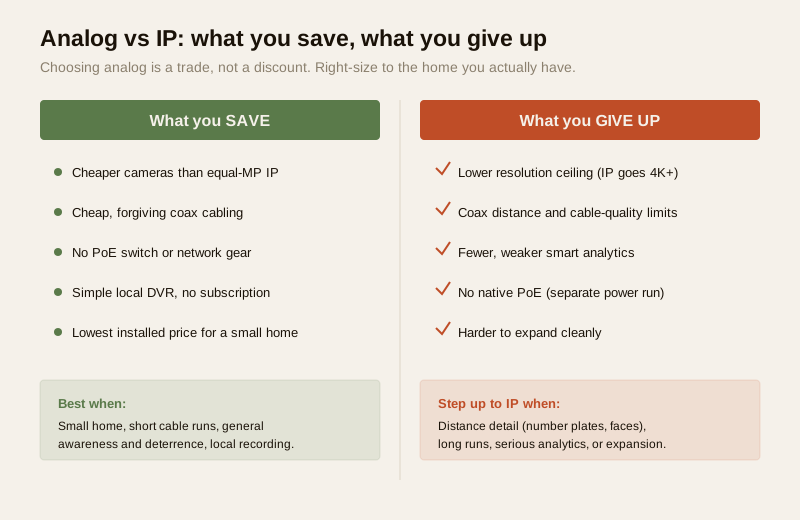
What you save with analog:
- Cheaper cameras. An HD analog camera costs meaningfully less than an equivalent-resolution IP camera.
- Cheap, forgiving cabling. Coax and combined power cable are inexpensive and simple to run; no network switch is needed.
- No PoE switch, no networking gear. An IP system usually adds a PoE switch and network cabling; analog does not.
- Lower total. For a small home, analog is typically the lowest fully-installed price to get real, recognisable coverage.
What you give up:
- A lower resolution ceiling. Analog is excellent at 2MP and available at 5MP, but IP scales far higher (4K and beyond) with better detail for reading a face or a number plate at distance.
- Coax distance and quality limits. The analog signal degrades over long cable runs, and cheap copper-clad-aluminium cable makes it worse — analog suits compact runs, not sprawling sites.
- Fewer smart features. Advanced on-camera analytics, line-crossing and person/vehicle classification are more limited and less accurate than on a good IP camera.
- No native PoE. Cameras need a separate power run to the SMPS; there is no single-cable power-and-data as with PoE IP.
- Harder to expand cleanly. Adding cameras means more coax runs back to the DVR, whereas an IP system can grow on the existing network.
None of these are dealbreakers for the right home. They become dealbreakers for the wrong one.
When analog is fine — and when to step up to IP
Right-sizing is the whole game. Spend where it matters; do not over-buy.
Analog is usually the right call when:
- You are covering a small home — a flat, a compact independent house — where cable runs are short.
- Your goal is general awareness and deterrence — seeing who is at the gate, watching the parking, a record of comings and goings — rather than forensic-grade identification.
- You want the lowest honest entry price for four cameras that actually work.
- You are keeping recordings locally and are comfortable checking the disk occasionally.
Step up to IP when:
- You need to read fine detail at distance — a number plate across a long driveway, a face at a wide gate — where higher resolution earns its cost.
- You have long cable runs or a large plot where coax distance limits bite.
- You want serious smart features — reliable person/vehicle detection, good analytics, integration with a wider system.
- You are building a larger system you expect to expand, where growing on a network is cleaner than pulling more coax.
A common, sensible middle path is a hybrid approach: keep analog for the easy, close, general-coverage positions and add one or two IP cameras only at the spots that genuinely need the detail (the main gate, the cash counter). You pay for resolution only where it pays back.
A worked 4-camera home budget
Here is a realistic, itemised four-camera budget for a small Indian home, using mid-of-band figures. Treat it as a worked example to structure your own quote comparison, not a fixed price.
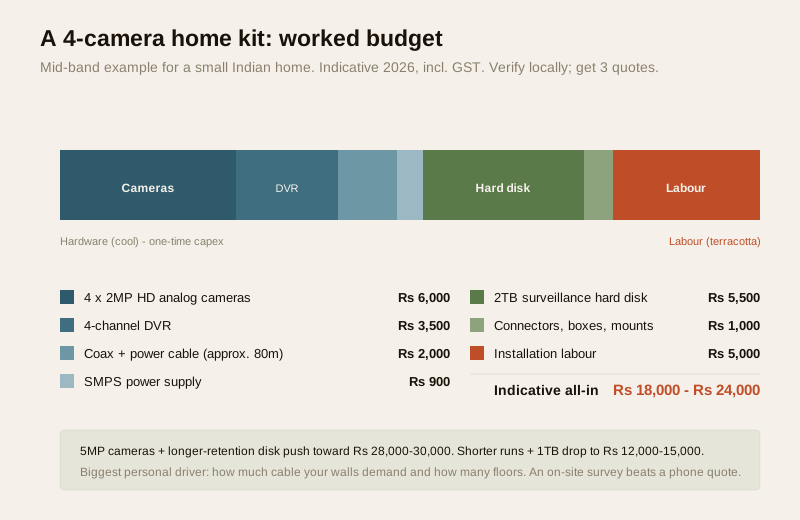
| Line item | Indicative mid-band |
|---|---|
| 4 × 2MP HD analog cameras | Rs 6,000 |
| 4-channel DVR | Rs 3,500 |
| Coax + power cable (approx. 80m) | Rs 2,000 |
| SMPS power supply | Rs 900 |
| 2TB surveillance hard disk | Rs 5,500 |
| Connectors, boxes, mounts | Rs 1,000 |
| Installation labour | Rs 5,000 |
| Indicative all-in (incl. GST) | Rs 18,000 – Rs 24,000 |
Swap the 2MP cameras for 5MP and add a longer retention disk and you drift toward the top of the four-camera band — around Rs 28,000 to Rs 30,000. Trim to shorter runs and a 1TB disk and you land near the bottom, around Rs 12,000 to Rs 15,000. The single biggest personal driver is nearly always how much cable your walls demand and how many floors the installer has to work across, which is why an on-site survey beats a phone quote every time.
Reading a quote and deciding well
To spend the budget-end money well rather than cheaply:
- Make quotes comparable. Insist on separate lines for cameras (with model and resolution), DVR, cable type, hard disk (capacity and surveillance-grade or not), connectors, labour and GST.
- Name the cable. Ask for pure copper coax, not copper-clad aluminium, especially for any run over a short distance — it is the commonest hidden downgrade.
- Size the disk to your retention. Decide how many days of footage you want to keep and let that set the disk, rather than accepting the smallest disk that fits the price.
- Check the app and the brand. A working phone app and a real datasheet are worth the small premium over a no-name box.
- Confirm the warranty and AMC terms in writing — what is covered, for how long, and the cost of a service visit.
When to bring in a professional. You plan where the cameras go, decide analog versus IP, and set the retention and budget. Hand the cable runs, wall chasing, mounting, power and DVR commissioning to a competent installer, and get the quote itemised and the warranty in writing before you sign. For the wider decision of how the whole home is protected and where CCTV sits within it, start from the home-security system cost pillar and browse the security cost hub.
Key takeaways
- Analog is the budget baseline, and modern. HD-over-coax (AHD/HDCVI/TVI) gives a clean 2MP–5MP image on cheap coaxial cable — not the grainy footage its reputation suggests — and is usually the cheapest fully-installed route to cover a small home.
- A four-camera kit runs roughly Rs 12,000 – Rs 30,000 installed, and a single camera roughly Rs 2,000 – Rs 5,000; every figure is an indicative 2026 band that moves with resolution, brand, cable length and city. Get three itemised quotes.
- The opex is small. With local recording there is no subscription — ongoing cost is mostly electricity plus a hard disk every three to five years, which is where analog often wins on five-year total cost against a cloud or wireless camera.
- You buy real limits at the low price: a lower resolution ceiling, coax distance limits, fewer smart features and no native PoE. Those are fine for a small home wanting general coverage, and the reason to step up to IP when you need distance detail, long runs or serious analytics.
- A cheap quote hides its cuts in the cable and the disk — copper-clad-aluminium coax and a small desktop drive. Name the cable, size the disk, and keep footage aimed at your own property under the DPDP Act 2023.
References
- Manufacturer specifications and datasheets — verify camera resolution and format (AHD/HDCVI/TVI), DVR channel count and 5MP support, cable type, and hard-disk capacity and grade on the maker's own datasheet before ordering; prices quoted here are indicative 2026 bands only, not manufacturer rates.
- Digital Personal Data Protection Act, 2023 — CCTV footage is personal data; position cameras to cover your own property and follow the Act's principles. Verify the current text via https://www.meity.gov.in/
- National Building Code of India (SP 7) and Bureau of Indian Standards for any electrical or wiring aspect of an install; verify the current edition via the BIS catalogue at https://www.services.bis.gov.in/
This is an educational overview, not legal or financial advice. All prices are indicative 2026 bands that vary by city, brand, resolution and installer — get at least three written, itemised quotes. Cable runs, mounting, power and commissioning are professional tasks; engage a competent installer and verify any standard's current status via the BIS catalogue before relying on it.
Export this guide
Related Guides — Deep-dive reading
Wireless CCTV Cost in India (2026): Cheap to Buy, Read the Running Costs First
What Wi-Fi and wire-free CCTV really costs an Indian home — a low, DIY-friendly install price that hides a subscription, battery and reliability bill. An honest, capex-versus-opex look at where the money actually goes over three to five years, with indicative bands and the drivers that move them.
SecurityData Storage Cost for CCTV in India (2026): Local Disks vs Cloud, and How to Size It
The running cost people forget when they buy cameras. Where the footage actually lives — a one-time surveillance hard disk in the recorder, or a recurring per-camera cloud plan — and how camera count, resolution, frame rate, recording mode and retention days decide how many terabytes, and how much money, you really need.
SecurityCCTV Storage Maintenance in India (2026): Keeping the Footage There When You Need It
Surveillance storage is a wear item that fails silently. This professional guide covers checking disk health, verifying recordings actually exist for the full retention window, planning drive replacement before failure, keeping a spare, and holding an off-site backup so a dead or stolen recorder is not total loss.
SecurityRelated Tools — Try Free
CCTV Camera Coverage & Count Calculator
Estimate how many CCTV cameras you need, the NVR channels, storage in TB for your retention period, and an indicative all-in cost with GST.
CCTV CalculatorCCTV Cloud vs Local Cost Calculator
Compare cloud CCTV subscription against a local NVR + HDD — upfront, 5-year total, monthly fee and break-even.
Cloud vs LocalCCTV Cable-Length Calculator
Total cable to buy for a CCTV job and a warning when a run exceeds the cable's maximum length.
Cable Length