
IP CCTV Cost in India (2026): What Network Cameras Really Cost and When the Premium Is Worth It
What an IP (network) CCTV system honestly costs in India, why it costs more than analog, and where the extra money goes: higher per-camera price, a PoE NVR and switch, Cat6 cabling, bigger storage, and any licence or analytics fees, all as indicative 2026 ranges.
Walk into any electronics market in India and you can be quoted two wildly different numbers for "a four-camera CCTV system", and both quotes can be honest. One is an analog set — cameras on coaxial cable into a DVR — and the other is an IP set: network cameras on Cat6 cable into an NVR, usually powered over the same wire by a PoE switch. The IP system almost always costs more, and the natural question is the right one: more for what, and is it worth it?
This guide answers that plainly. It explains what an IP (network) CCTV system actually is, walks through exactly where the extra rupees go compared with analog, and gives wide, honest indicative 2026 ranges so you can sanity-check a quote — never a fixed rate to hold anyone to. It is a companion to the direct comparison, the analog CCTV cost guide; read the two together if you are choosing between them, and start budgeting from the home security system cost pillar. For what these cameras are and how they differ technically, the CCTV hub is the place to begin.
Scope & how to read the numbers. This is a budgeting and decision-support guide, not an installation manual. Every figure is an indicative 2026 range that varies with city, brand, camera resolution, cable run and installer — treat it as a way to read a quote, not a price to lock anyone to. Always get at least three written, itemised quotes before you decide. Keep capex (hardware plus installation) separate from opex (storage growth, any cloud or analytics licence, and AMC) — ignoring the running cost is the commonest budgeting mistake. GST applies to equipment and services, so confirm it is shown on the invoice. CCTV records personal data under the DPDP Act 2023 — plan signage, retention and who can view footage. This is educational guidance, not legal or financial advice.
What "IP CCTV" actually means
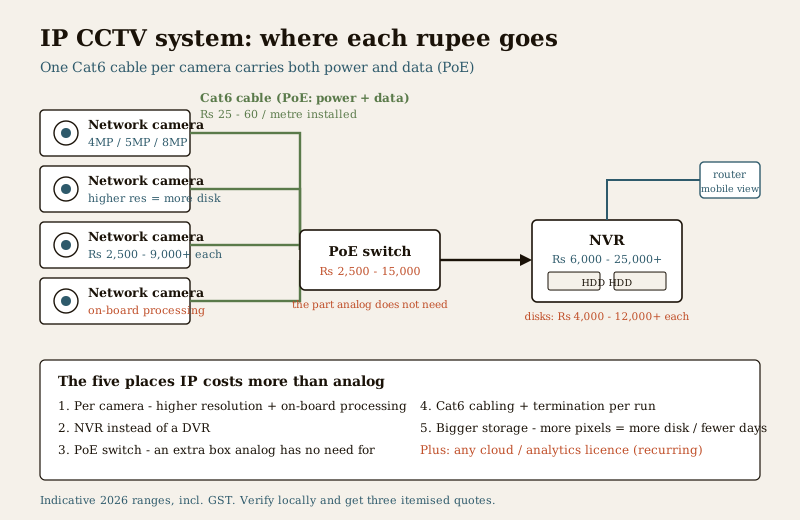
An IP (Internet Protocol) camera is a small networked computer with a lens. Instead of sending an analog video signal down coaxial cable to a DVR, it digitises the image on board and sends it as data over a network cable to a Network Video Recorder (NVR). That single architectural difference is where almost every cost difference comes from. A typical IP system is made of:
- Network cameras, usually at higher resolution than analog — 4MP, 5MP, 8MP (4K) — with the image processing done in the camera itself.
- An NVR that receives, records and manages the camera streams over the network, rather than a DVR that digitises analog feeds.
- A PoE (Power over Ethernet) switch, or an NVR with built-in PoE ports, so a single Cat6 cable carries both data and power to each camera — no separate power adaptor at every camera.
- Cat6 (network) cabling, terminated with connectors, instead of coaxial-plus-power cable.
- Storage — hard disks sized for the stream, which for higher-resolution cameras means bigger, or more, disks.
- Sometimes a licence or analytics fee — for smart features (person/vehicle detection, line-crossing, face or number-plate reading) or a cloud/app plan, depending on the brand.
Analog does much of the same job more cheaply and perfectly well for many homes; the analog CCTV cost guide covers that side. What follows is where IP costs more, item by item, so you can see exactly what the premium buys.
Where the money goes, part by part
An IP quote is higher than an analog one for five specific reasons. Seeing them separately is the whole point — it tells you which parts you are paying more for and whether each one earns its place.
| Component | Why IP costs more than analog | Indicative 2026 range (incl. GST) |
|---|---|---|
| Per camera | Higher resolution and on-board processing; a network camera is a more capable device than an analog one | ₹2,500 – ₹9,000+ each (4MP–8MP; brand and features drive it) |
| Recorder (NVR vs DVR) | An NVR handling several high-res network streams, often with PoE ports built in | ₹6,000 – ₹25,000+ (4–8 channel; more for 16-channel or PoE-integrated) |
| PoE switch | Extra hardware analog does not need — powers cameras over the data cable | ₹2,500 – ₹15,000 (channel count and managed vs unmanaged) |
| Cat6 cabling + termination | Network cable and connectorising per run; long runs cost more | ₹25 – ₹60 per metre installed, plus termination |
| Storage (HDD) | Bigger files mean more disk for the same number of days | ₹4,000 – ₹12,000+ per surveillance-grade drive |
| Licence / analytics (if any) | Smart analytics or cloud plans, per camera or per system, sometimes yearly | ₹0 to a recurring per-camera fee — confirm before buying |
Two of these are the real reason IP feels expensive. The first is the per-camera price: you are buying higher resolution, and resolution is not free either to buy or to store. The second is the storage, which most quotes understate — covered on its own below, because it is where the surprise usually lands.
The PoE switch — the part analog buyers do not expect
In an analog system, every camera needs its own power adaptor near it. IP does something neater: Power over Ethernet sends both the video data and the camera's power down the one Cat6 cable, so there is a single wire to each camera and no scattered adaptors. The trade is one extra box — a PoE switch (or an NVR with PoE ports built in). It is a genuine convenience, especially for cameras far from a power point, but it is a line item analog simply does not have. If you see "PoE switch" on a quote and not on another, that is one honest reason the two differ. For the wiring picture across camera types, see the CCTV hub.
Storage: the cost that grows quietly
This is the part buyers most often miss. A higher-resolution camera produces a bigger video file every second, so the same number of days of recording needs far more disk than an analog system would. Doubling resolution does not merely double storage — more pixels, higher frame rates and colour night video all push the file size up, and the number of days you want to keep footage multiplies it again.
The three levers that set your storage bill are simple, and worth deciding deliberately rather than accepting a default:
- Resolution. 4MP costs more disk than 2MP; 8MP (4K) costs more again. Buy the resolution you actually need for each view, not the highest for every camera.
- Retention (days kept). Seven days, fifteen days, thirty days — each step multiplies the disk. Under the DPDP Act 2023, keeping footage longer than you have a reason to is also a data-minimisation question, not only a cost one.
- Recording mode. Continuous recording eats the most; recording on motion, or at a lower frame rate when nothing moves, stretches the same disk much further.
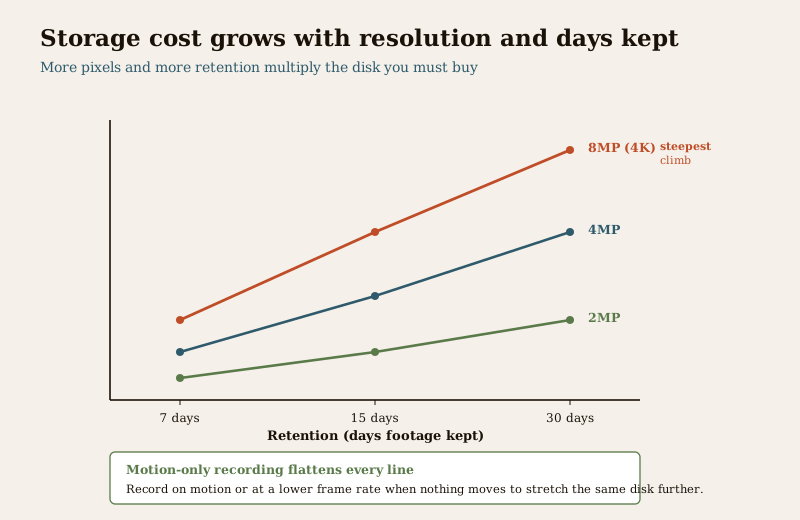
Storage is both a capex item (the disks you buy up front) and an ongoing one: as you add cameras, raise resolution or keep footage longer, you buy more disk over the years. A quote that fits four 8MP cameras but sizes the disk for two weeks when you wanted a month is not wrong so much as under-scoped — and it is exactly the kind of gap three itemised quotes will expose.
Capex vs opex: the split that matters
The honest way to budget any CCTV system is to separate the one-time cost from the yearly one. IP has a little more of both than analog, and lumping them together is how people get surprised at year two.
| What it includes | IP notes | |
|---|---|---|
| Capex (one-time) | Cameras, NVR, PoE switch, Cat6 cabling and termination, hard disks, mounting, configuration, installation labour and GST | Higher than analog mainly through camera resolution, the PoE switch and bigger disks |
| Opex (recurring) | Extra storage as you grow, any cloud or analytics licence, electricity, and the AMC | Analytics or cloud plans, if you choose them, are a yearly line; most local-NVR homes have little opex beyond AMC and power |
Most IP systems that record to a local NVR have modest opex — the AMC, the electricity to run the NVR and switch, and the occasional bigger disk. The opex jumps only if you add a cloud plan or a per-camera analytics licence. Cloud recording is a different cost shape again — largely opex, paid monthly — and if that model interests you, the cloud CCTV cost guide covers it in full. A wireless system trades cabling for a different set of costs and limits, laid out in the wireless CCTV cost guide.
Get three itemised quotes, and read them side by side. Ask every installer to split cameras, NVR, PoE switch, cabling, storage, labour and GST into separate lines, with the camera resolution and disk size stated. Then ask what is recurring: any cloud or analytics licence, the AMC, and when you will next need to add disk. A cheap IP quote usually hides its saving in under-sized storage, a no-name camera, or a missing PoE switch — the itemisation is what makes it visible. Never let a low headline number decide it for you.
When IP earns its premium — and when it does not
IP is not automatically the right choice; it is the right choice for specific needs. Spend up where these apply, and do not feel you must where they do not.
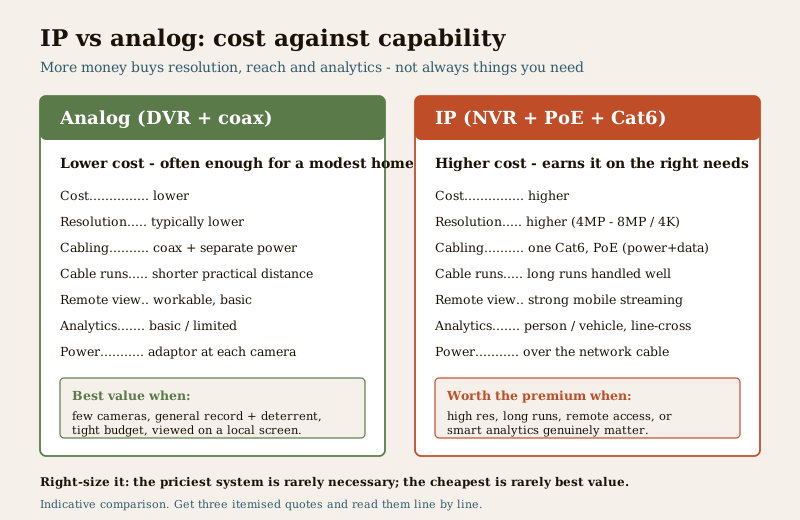
IP is worth the premium when you need:
- High resolution — you want to read a face at a doorway or a number plate at a gate, and 8MP or 4MP clarity genuinely matters for that view.
- Long cable runs — network cable and PoE handle distance and power more gracefully than analog across a large plot or a multi-floor building.
- Reliable remote and mobile access — clean streaming to a phone when you are away, which a network system is built for.
- Smart analytics — person-versus-vehicle detection, line-crossing or intrusion zones that cut through false alerts, where the camera's on-board processing pays off.
A small home on a tight budget may not need it. If you want a handful of cameras over a modest area, mostly for a general record and a deterrent, and you are watching them on a local screen rather than analysing footage, a good analog system does that job for meaningfully less money. Right-sizing is the whole game: the most expensive system is rarely necessary, and the cheapest is rarely the best value. The direct number-for-number comparison lives in the analog CCTV cost guide, and the way IP and analog fit into a whole-home security budget is in the home security system cost pillar.
Typical jobs: what a small and a medium system run to
Putting the parts together, here are wide indicative 2026 all-in ranges (equipment plus cabling, storage and installation labour, incl. GST) for common IP jobs. They are ballparks to frame your quotes, not fixed prices — the drivers underneath them, chiefly camera resolution, cable-run length and retention, move a job anywhere across its band.
| Job | Typical make-up | Indicative all-in IP cost (2026) |
|---|---|---|
| Small home (2–4 cameras) | 4MP cameras, 4-channel PoE NVR, short Cat6 runs, one surveillance disk for ~1–2 weeks | ₹18,000 – ₹55,000 |
| Larger home / villa (6–8 cameras) | 4MP–8MP mix, 8-channel PoE NVR, longer runs across a plot, disk for ~2–4 weeks | ₹45,000 – ₹1,50,000 |
| Small office / shop (8+ cameras) | Higher-res at entries, 8–16 channel NVR, structured cabling, disk for a month, possible analytics licence | ₹80,000 – ₹3,00,000+ |
What moves you up each band is predictable: more cameras, higher resolution, longer cable runs, more days of retention, and any analytics or cloud licence. What can quietly move you down — at a real cost to usefulness — is a cheaper camera than the view needs, or a disk sized for fewer days than you asked for. This is why the itemised quote matters more than the headline: two "eight-camera IP systems" can differ two-fold for reasons you can only see line by line. For the wider hub of cost guides, see the security cost sub-hub; for everything security beyond cost, the main security hub.
Key takeaways
- IP CCTV costs more than analog for specific, nameable reasons — higher-resolution network cameras, an NVR, a PoE switch, Cat6 cabling, bigger storage, and sometimes a licence or analytics fee. Every figure here is an indicative 2026 range, not a fixed rate.
- The two costs people underestimate are the per-camera price and the storage. Higher resolution costs more to buy and much more to store; resolution, retention days and recording mode together set the disk you must buy.
- PoE is the line analog buyers do not expect — one Cat6 cable carries data and power to each camera, at the cost of one extra switch, replacing scattered power adaptors.
- Keep capex and opex separate. Most local-NVR IP systems have modest opex (AMC, power, occasional extra disk); a cloud plan or per-camera analytics licence is where a recurring yearly cost appears.
- IP earns its premium where you need high resolution, long cable runs, reliable remote access or smart analytics — and a small home on a tight budget may be better served by analog. Right-size the system.
- Get at least three written, itemised quotes — cameras, NVR, PoE switch, cabling, storage, labour and GST as separate lines — and remember CCTV holds personal data under the DPDP Act 2023, so plan signage, retention and access.
Where to go next
- Analog CCTV cost guide — the direct number-for-number comparison, and often the right choice for a modest home.
- Wireless CCTV cost guide and cloud CCTV cost guide — the other two cost shapes, where cabling and where storage move to a subscription.
- CCTV installation cost guide — the labour and cabling side of any system in more detail.
- Home security system cost pillar — how CCTV fits a whole-home security budget.
- The CCTV hub, the security cost sub-hub and the main security hub.
References
- Manufacturer specifications and datasheets — verify camera resolution (MP), sensor and lens, PoE class, NVR channel count and supported bitrate, and the exact storage a stream needs, on the maker's own datasheet before ordering; prices quoted here are indicative 2026 ranges only, not manufacturer rates.
- Digital Personal Data Protection Act, 2023 — CCTV footage is personal data; decide retention periods, display signage, and agree in writing who may view and export recordings, keeping only what you have a reason to keep.
- National Building Code of India (SP 7) and the Bureau of Indian Standards — for the electrical and cabling aspects of an install, prefer BIS/ISI-marked equipment and a licensed installer, and verify the current edition (SP 7:2026) via the BIS catalogue: https://www.services.bis.gov.in/
This is an educational overview, not legal or financial advice. All prices are indicative 2026 ranges that vary by city, brand, resolution, cable run and installer — get at least three written, itemised quotes with equipment, storage, labour and GST shown separately. Camera siting, cabling and electrical connection are qualified professional tasks; engage a licensed installer, plan CCTV data handling under the DPDP Act 2023, and verify any standard's current status via the BIS catalogue before relying on it.
Export this guide
Related Guides — Deep-dive reading
Data Storage Cost for CCTV in India (2026): Local Disks vs Cloud, and How to Size It
The running cost people forget when they buy cameras. Where the footage actually lives — a one-time surveillance hard disk in the recorder, or a recurring per-camera cloud plan — and how camera count, resolution, frame rate, recording mode and retention days decide how many terabytes, and how much money, you really need.
SecurityHome Security System Cost in India (2026): The Honest Budgeting Guide
There is no single price for a home security system — it is a stack of choices. This pillar gives you the mental model to budget the whole home: the cost drivers, the split between one-time capex and ongoing opex, wide indicative tier bands, a five-year total-cost lens, and how to read and compare quotes.
SecurityWireless CCTV Cost in India (2026): Cheap to Buy, Read the Running Costs First
What Wi-Fi and wire-free CCTV really costs an Indian home — a low, DIY-friendly install price that hides a subscription, battery and reliability bill. An honest, capex-versus-opex look at where the money actually goes over three to five years, with indicative bands and the drivers that move them.
SecurityRelated Tools — Try Free
CCTV Cloud vs Local Cost Calculator
Compare cloud CCTV subscription against a local NVR + HDD — upfront, 5-year total, monthly fee and break-even.
Cloud vs LocalCCTV Cable-Length Calculator
Total cable to buy for a CCTV job and a warning when a run exceeds the cable's maximum length.
Cable LengthCCTV Camera Coverage & Count Calculator
Estimate how many CCTV cameras you need, the NVR channels, storage in TB for your retention period, and an indicative all-in cost with GST.
CCTV Calculator