

Smart HVAC: Connected Cooling, and What It's Actually Good For
Wi-Fi ACs, app and voice control, scheduling and automation — a clear-eyed guide to smart HVAC: what 'smart' really adds, how it saves energy when used well, the smart-home tie-in, and how to tell genuine value from gimmick.
"Smart" is stamped on every appliance now, air conditioners included — Wi-Fi, apps, Alexa, "AI mode." Some of it genuinely saves money and adds convenience; some is a sticker on a feature you'll never use. Smart HVAC is worth understanding clearly: at its best it makes your cooling use less energy by running only when and where it's needed, and controllable from anywhere. This guide separates what smart HVAC really adds from the marketing, and how to get value from it.
It's the anchor of the smart-HVAC thread in the HVAC Knowledge Hub, and builds on the Smart Thermostat Guide. This is a homeowner guide — most "smart HVAC" is a consumer decision.
Scope. This covers consumer smart HVAC. Building-scale automation is the Building Automation System domain; AI-driven optimisation is covered in the AI HVAC guide.
What "smart" actually adds
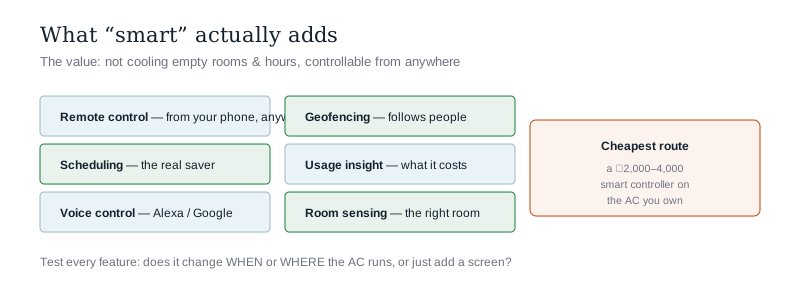
Beyond a normal remote, "smart" HVAC adds some genuinely useful capabilities:
- Remote control — set, check and switch your AC from your phone, anywhere (cool the room before you get home; turn off one you left running).
- Scheduling & automation — the real energy saver: warmer/off when you're out or asleep, cool when you're home — automatically (see smart thermostats).
- Voice control — via Alexa/Google Assistant, part of a smart home.
- Geofencing — cools as you approach, eases off when everyone leaves.
- Usage insights — reports showing what your cooling costs and consumes, nudging better habits.
- Sensors & zoning — react to the actual temperature/occupancy of the right room, not a fixed guess.
The through-line: the value is in not cooling empty rooms and hours and controlling from anywhere — convenience plus real energy saving.
Two ways to get smart HVAC
- A smart AC — a unit with built-in Wi-Fi and an app. Neat, but ties you to that brand's app and features.
- A smart AC controller (retrofit) — a small IR device that learns your existing AC's remote, adding app, voice, scheduling and geofencing to any ordinary split. The cheapest way to make a normal Indian AC smart, and the most popular route here (most homes have plain splits, not ducted systems).
For most Indian homes, a ₹2,000–4,000 smart controller on the AC you already own delivers nearly all the benefit — you rarely need to buy a whole "smart AC."
Where the energy savings really come from
Smart HVAC saves money only if it changes behaviour — and it's the boring features, not the flashy ones, that do it:
- Scheduling — not cooling an empty home or an over-cooled 3 a.m. bedroom is the biggest single saving.
- Geofencing & occupancy — cooling that follows people instead of running regardless.
- Setpoint discipline — many controllers make it easy to hold a sensible 24°C and see the cost of going lower (every degree adds ~3–6%; see running cost).
- Insight → habit — seeing what cooling costs tends to reduce careless use.
A smart controller that just mirrors your remote but changes nothing about when the AC runs saves nothing — the savings are in the automation, used.
Genuine value vs gimmick
- Genuinely useful — remote on/off, scheduling, geofencing, usage insight, voice control, room sensing. These save energy or add real convenience.
- Often gimmick — vague "AI modes" with no explanation, features you set once and forget, connectivity that mainly serves the manufacturer's data. Judge by "does this change when/where my AC runs, or just add an app?"
- Watch-outs — dependence on cloud servers and the manufacturer's app longevity; privacy of usage data; and never let "smart" distract from the basics that matter more (right-sizing, efficiency rating, maintenance).
The one-line answer
Smart HVAC means a connected AC or a retrofit smart controller that adds remote app control, scheduling and automation, voice control, geofencing, usage insight and room sensing on top of an ordinary remote — and its real value is convenience plus energy saving from not cooling empty rooms and hours. For most Indian homes the cheapest route is a ₹2,000–4,000 smart AC controller that learns your existing split's remote, delivering nearly all the benefit without buying a new "smart AC." But the savings come only from the boring features actually used — scheduling, geofencing, and setpoint discipline (holding a sensible 24°C) — not from flashy "AI modes" you set once and forget; a controller that just adds an app without changing when the AC runs saves nothing. So judge every smart feature by one test — does it change when or where my AC runs, or just add a screen? — mind cloud/app dependence and data privacy, and never let "smart" distract from the fundamentals that matter more: right-sizing, efficiency rating and maintenance.
Where to go next
- The control it builds on: Smart Thermostat Guide.
- The intelligent layer: AI in HVAC Guide.
- The sensing layer: HVAC IoT & Sensors Guide.
- The wider home: Smart Home Guide · HVAC Energy Efficiency Guide.
References
- Bureau of Energy Efficiency (BEE) — AC setpoint & efficiency guidance: https://beeindia.gov.in/
- ASHRAE — controls & connected-HVAC guidance; ISHRAE — smart HVAC application notes.
- Manufacturer smart-AC and smart-controller documentation (features, cloud/app dependence, data handling).
A consumer smart-HVAC guide. Fixed installation and building-scale automation are qualified professional work.
Export this guide
Related Guides — Deep-dive reading
Smart Thermostats in India: Do You Actually Need One?
The smart thermostat is the crown jewel of the Western smart home — and in most Indian homes it controls nothing at all. An honest deep-dive into where thermostats fit in a split-AC country, why an IR controller is usually the right answer, and the handful of homes where a real thermostat earns its price.
Smart HomeHVAC Energy Efficiency: Cutting the Biggest Energy Bill in the Building
HVAC often runs half a building's electricity, so trimming it saves the most — the practical measures that cut HVAC energy without cutting comfort: right-sizing, inverter and efficient plant, smart controls and zoning, recovery, good maintenance and sensible set-points.
HVAC & CoolingAI Smart Home India: What's Real in 2026 (and What's Hype)
Behind the word 'AI' on every smart-home box in 2026 sit two very different things — a tiny model running on a chip in your camera, and a giant language model running in a data centre. Knowing which is which tells you what will actually work in your Indian home and what is just marketing.
Smart HomeRelated Tools — Try Free
Smart Curtain ROI Calculator
Estimate the energy savings and payback of motorising and automating curtains on harsh-sun windows.
ROI CalculatorSmart Home Cost Calculator
13 device categories across 5 ecosystems (Apple HomeKit, Alexa, Google Home, Mi, Wipro). Live floor-plan that lights up as you add devices, per-room and per-category breakdown.
Smart Home CalculatorWindow Energy Savings Calculator
Compare standard glazing vs Low-E and DGU windows — annual cooling savings, 10-year savings and payback.
Window Calculator