
Security Asset Register for India (2026): Knowing What You Own and Where It Is
A ready-to-adapt living inventory of every installed security asset — its identity, location, serial, condition and replace-by date — so an owner can maintain, warranty, insure, replace and account for it long after the installer has gone.
When a security system is handed over, the owner receives a working system and, if the project was run well, a folder of paperwork. Six months later the question is no longer "does it work" but "what exactly do we own, where is it, whose warranty covers it, and when does it need replacing." The security asset register answers that. It is the owner's master inventory — one row for every installed asset — and it is the document that maintenance, warranty, insurance and replacement all hang off. Without it, a system is a wall of anonymous black boxes.
This is a resource in Studio Matrx's professional security resources library. It sits at the top of the operate phase: it is built at handover from the equipment schedule, then kept alive for the life of the system. The equipment schedule says what was designed and bought; the asset register says what is actually installed and running right now, and it is the one you update every time something is added, moved or retired.
Scope & how to read this. This is a ready-to-adapt professional template, not authoritative, legal or contractual wording. Expected service lives, warranty terms and maintenance frequencies come from your project, the manufacturer and your own policy — verify them; this template does not set them. An asset register that lists your cameras and sensors reveals your coverage, so treat the document itself as sensitive. Get professional review before relying on it for insurance or contractual purposes.
What it is and where it sits
An asset register is a simple idea done consistently: a numbered inventory in which every physically installed security asset gets exactly one row, and that row carries enough identity, location and lifecycle information that anyone can find the asset, prove it exists, service it, claim on it, or plan its replacement without hunting through invoices.
It is produced at handover, usually by the installer or the project consultant, and received by the owner, facility manager or RWA committee, who then owns and maintains it. It is not a one-time deliverable that goes in a drawer — that is the single most common way it fails. It is a living record: the moment a camera is added, a sensor is moved to a new zone, or a failed lock is swapped out, the register is updated. A register is only worth the day it was last touched.
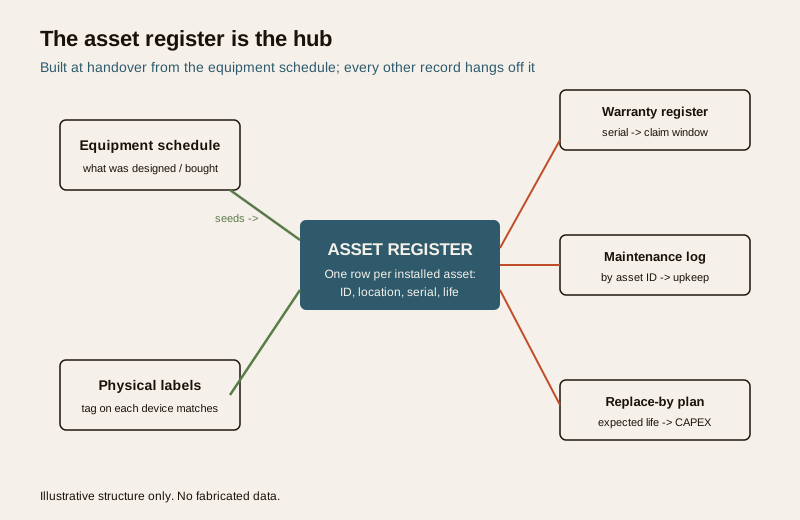
Think of it as the hub in the wheel. The equipment schedule seeds it. Physical labels on each device tie back to it. From it hang the warranty register (serial to claim window), the maintenance log (work done by asset ID), and your replacement budgeting (expected life to CAPEX). Get the register right and those three become easy; get it wrong and they become guesswork.
The columns, and what each one is for
Twelve fields carry almost every register. They fall into three natural groups: what a thing is, where it is and how long it lasts, and what it links to.
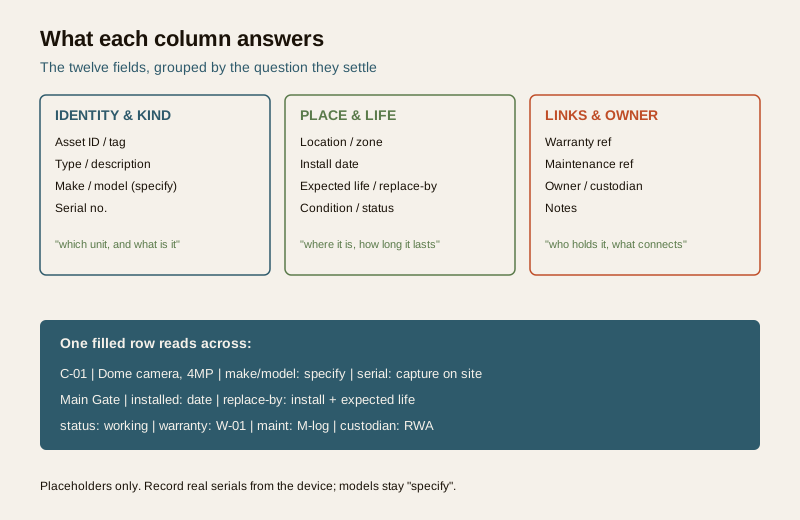
- Asset ID / tag — a short unique code, for example "C-01" for a camera or "DR-03" for a door controller. This is the spine of the whole system. It must match the number on the equipment schedule and the physical label stuck on the device.
- Type / description — plain words: "Dome camera, 4MP", "Network video recorder", "Motion sensor, PIR". Anyone should understand it without a datasheet.
- Make / model — the manufacturer and model. On a template, write "specify" — fill it in from the actual delivered unit, never invent it.
- Serial no. — captured from the physical device at install. This single field does the heavy lifting for warranty claims and for proving ownership after a theft; a register without serials is missing its most valuable data.
- Location / zone — where it physically is: "Main Gate", "Lobby ceiling", "Basement B1 ramp". This is what a technician needs to find it.
- Install date — when it went live. The clock for warranty and expected life starts here.
- Expected life / replace-by — the service life you plan around and the resulting replace-by date. Use the manufacturer guidance and your own experience; these are planning figures, not guarantees.
- Condition / status — working, faulty, under repair, or retired. Updated as things change, this column is your at-a-glance health view.
- Warranty ref — a pointer to the row in your warranty register, for example "W-01". Keeps the two documents in sync without duplicating terms.
- Maintenance ref — a pointer into the maintenance log so the service history of any asset is one lookup away.
- Owner / custodian — who is responsible for this asset: the RWA, a specific department, or a named custodian. Matters in shared premises where people change.
- Notes — anything that does not fit a column: firmware notes, a known quirk, or a cross-reference to another record.
Worked example
Here is a short filled register so you can see how the columns read across. The tags, locations and dates are illustrative placeholders; models are left as "specify" and no serials or prices are invented.
Example only — adapt to your project. These rows show the shape, not real equipment. Fill make/model and serial from the actual delivered devices, and set replace-by from real service-life guidance.
| Asset ID | Type / description | Make / model | Serial no. | Location / zone | Install date | Replace-by | Status | Warranty ref | Maint. ref | Custodian |
|---|---|---|---|---|---|---|---|---|---|---|
| C-01 | Dome camera, 4MP | specify | capture on site | Main Gate | e.g. install date | install + life | Working | W-01 | M-01 | RWA |
| C-02 | Bullet camera, 4MP | specify | capture on site | Perimeter, north | e.g. install date | install + life | Working | W-01 | M-01 | RWA |
| NVR-01 | Network video recorder | specify | capture on site | Guard room rack | e.g. install date | install + life | Working | W-02 | M-02 | RWA |
| DR-01 | Access controller, door | specify | capture on site | Clubhouse entry | e.g. install date | install + life | Working | W-03 | M-03 | Facility |
| SEN-01 | Motion sensor, PIR | specify | capture on site | Basement B1 | e.g. install date | install + life | Faulty | W-03 | M-04 | Facility |
| UPS-01 | UPS / battery backup | specify | capture on site | Guard room rack | e.g. install date | install + life | Working | W-04 | M-05 | Facility |
Read the SEN-01 row across and the value is obvious: a named person can see there is a PIR sensor in Basement B1, that it is currently faulty, which warranty and maintenance rows cover it, and who is responsible for chasing the fix.
Blank copy-ready template
Copy this into a spreadsheet, keep one row per asset, and never reuse a retired tag. Replace the placeholder rows with your own.
| Asset ID | Type / description | Make / model | Serial no. | Location / zone | Install date | Expected life / replace-by | Condition / status | Warranty ref | Maintenance ref | Owner / custodian | Notes |
|---|---|---|---|---|---|---|---|---|---|---|---|
| ... | ... | specify | ... | ... | ... | ... | ... | ... | ... | ... | ... |
| ... | ... | specify | ... | ... | ... | ... | ... | ... | ... | ... | ... |
| ... | ... | specify | ... | ... | ... | ... | ... | ... | ... | ... | ... |
Field guide: how to fill it well
A register lives or dies on a few disciplines. None are hard; all are skipped under time pressure.
- Unique tags that match everywhere. The asset ID on the register, the number on the equipment schedule and the label on the physical device must be the same. When "C-04" on the sheet, "C-04" on the schedule and the sticker on the camera all agree, everyone downstream is fast. When they drift, every task starts with a hunt.
- Capture serials at install. Serials are read once, on site, off the actual unit — and they are painful to collect later off a ceiling-mounted camera. They are the proof a warranty claim or a police report needs, so capture them while the ladder is still up.
- Record location precisely. "Camera 4" means nothing; "Main Gate, over the wicket" means a technician walks straight to it. Precise location is what turns a register into a maintenance tool.
- Set a replace-by, not just an install date. Expected life converts to a replace-by date, and a column of replace-by dates is a CAPEX plan. Failures then arrive as a budget line you saw coming, not a 2 a.m. surprise.
- Keep it living. Update on every add, move and retire — the discipline the whole document depends on.
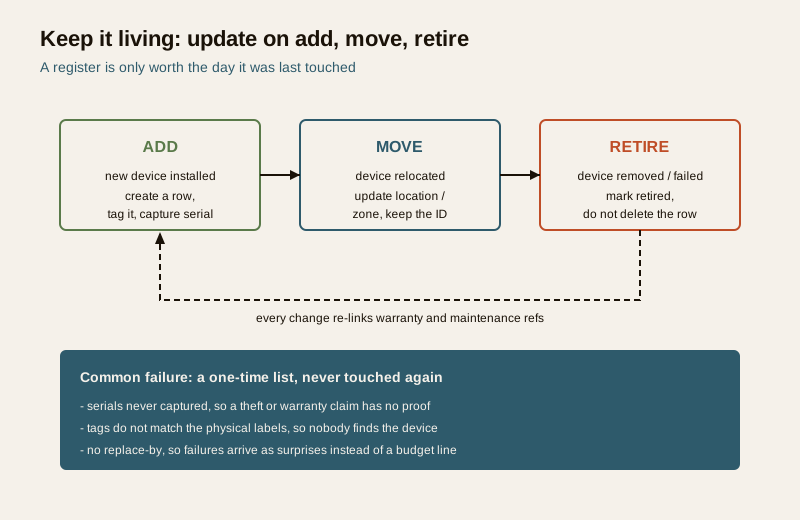
On the last point: when an asset is retired, mark it retired — do not delete the row. The history is useful, and a deleted row can free a tag that then gets reused, which quietly corrupts every reference. Retire, do not erase.
Common mistakes
- A one-time list that is never updated. The register is accurate on handover day and wrong within a quarter. If nobody owns the update discipline, the document dies.
- No serial numbers. The most valuable column left blank. When a warranty claim or theft report needs proof of a specific unit, there is nothing to show.
- Tags that do not match the physical labels. The register says "C-07" but the device wears no label, or a different one. Every service call starts with a guessing game.
- No replace-by planning. Without expected-life dates, replacement is always reactive and always unbudgeted.
- Treating the file as harmless. A list of every camera and its location is a map of your coverage. Store it like the sensitive document it is.
A note on data protection
An asset register of cameras and sensors reveals exactly where you can and cannot see. In the wrong hands that is a gift to anyone planning to defeat the system, and camera-related records sit within the reach of the Digital Personal Data Protection (DPDP) Act, 2023 as part of a wider CCTV data footprint. Control the document: keep it on need-to-know access, share redacted versions where full detail is not required, and log who holds a copy. The register is a working tool, not something to circulate freely.
How it connects to the other documents
The register does not stand alone; it is the join between five records you should keep together:
- Equipment schedule — the security equipment schedule is the source. At handover, the as-installed schedule becomes the first version of the register.
- Handover — the security handover checklist should list the completed register among the deliverables you receive before sign-off.
- Warranty register — the warranty register holds the claim terms; the register's warranty-ref column points into it by serial.
- Maintenance log — the maintenance log records work done, keyed by the same asset IDs.
- Audit — a periodic maintenance and asset audit walks the site against the register to confirm every listed asset is present, tagged and in the stated condition.
For the wider context of how these deliverables fit a professional project, see the professional security resources guide.
Key takeaways
- The security asset register is the owner's master inventory — one row per installed asset — and the hub that maintenance, warranty, insurance and replacement all hang off.
- Build it at handover from the equipment schedule, then keep it living: update on every add, move and retire, and retire rows rather than deleting them.
- Twelve columns carry it: ID, type, make/model, serial, location, install date, replace-by, status, warranty ref, maintenance ref, custodian and notes.
- Get the disciplines right — unique matching tags, serials captured on site, precise locations, and a replace-by date on every row for CAPEX planning.
- The register maps your coverage, so control access to the document; camera records fall within the DPDP Act, 2023 footprint.
References
- Digital Personal Data Protection Act, 2023 — CCTV and related records that identify people are personal data; keep asset documentation on controlled access and share only on need to know.
- Manufacturer documentation for each installed device — the authoritative source for expected service life, warranty terms and serial-number location; follow it over any generic figure.
- Bureau of Indian Standards catalogue for any life-safety or electrical standard referenced in the underlying installation; verify the current edition at https://www.services.bis.gov.in/
This is an educational, ready-to-adapt template, not legal, contractual or insurance advice. Service lives, warranty terms and retention practices come from your project, the manufacturer and your own policy — verify them, and seek professional review before relying on the register for insurance or contractual purposes.
Export this guide
Related Guides — Deep-dive reading
Professional Security Resources for India (2026): The Documents Behind a Secure Project
The overview and map of the whole professional-deliverable toolkit — the brief, schedules, BOQ, checklists, handover pack and logs a consultant, designer, PMC or facility manager produces across a security project, and how each document connects to the next.
SecurityMaintenance-Access Planning for Home Security Systems in India
Design your security system at the drawing-board stage so it can actually be maintained later — cameras mounted where a technician can safely reach them, a serviceable equipment room, labelled cabling, an as-built asset register, and a plan for AMC and vendor access that does not itself become a weakness.
SecuritySecurity Audit Checklist for India (2026): Is the System Actually Working?
A ready-to-adapt, fill-in security audit checklist that walks an installed system subsystem by subsystem — CCTV, access control, intrusion alarm, the fire-safety interface, perimeter and lighting, power and backup, documentation and DPDP, and AMC status — and turns every finding into a scored, prioritised action list.
SecurityRelated Tools — Try Free
Lift Safety Audit Checklist
Interactive checklist that scores your home lift on safety devices, compliance and upkeep.
ChecklistAccess-Control Battery-Backup Calculator
Size the standby battery so an access system keeps running through a power cut, with an egress life-safety note.
Battery BackupCCTV Camera Coverage & Count Calculator
Estimate how many CCTV cameras you need, the NVR channels, storage in TB for your retention period, and an indicative all-in cost with GST.
CCTV Calculator