
Security Equipment Schedule for India (2026): The Master Equipment List
A ready-to-adapt security equipment schedule that rolls every subsystem device schedule into one consolidated procurement-and-tracking view, so what is supplied across CCTV, access, intrusion, fire interface, gates, power, network and the control room lives in a single source of truth.
Every subsystem on a security project keeps its own detailed device schedule: cameras on one sheet, doors on another, sensors on a third, the fire interface, gates, power supplies, the network and the control room each on theirs. That detail is essential, but nobody procures from five separate sheets and nobody hands over five separate registers. What ties them together is the security equipment schedule — the single consolidated master list that rolls every subsystem schedule up into one procurement-and-tracking view, so that "everything being supplied on this project" lives in exactly one place.
This page is a ready-to-adapt professional template inside the Studio Matrx security resources library. It sits above the per-subsystem device schedules and just below the bill of quantities: it is the single source of truth for what is being supplied, the thing an estimator counts against, the checklist the installer works to, and later — marked up as-built — the seed of the asset register the client keeps for the life of the system.
Scope & how to read this. This is a ready-to-adapt professional template, not authoritative or contractual wording. It is a design and coordination aid, not a specification, a tender or a stamped drawing. Get professional and legal review for any contract document (BOQ, specification, tender). Actual requirements — models, ratings, certifications, warranties and prices — come from your project brief, the survey, the manufacturer and the AHJ. Where a real figure belongs, this template says "specify" so you fill it in with a verified value.
What the equipment schedule is, and where it sits
Picture the deliverables as a stack. At the bottom sit the detailed device schedules, one per subsystem, each answering what every device in this subsystem is and where it goes. Above them sits the equipment schedule, which answers a broader question: across all subsystems, what is the complete list of equipment being supplied, in what quantity, by whom, under what warranty, and at what status. Above that sits the BOQ, which takes the same list and attaches money.
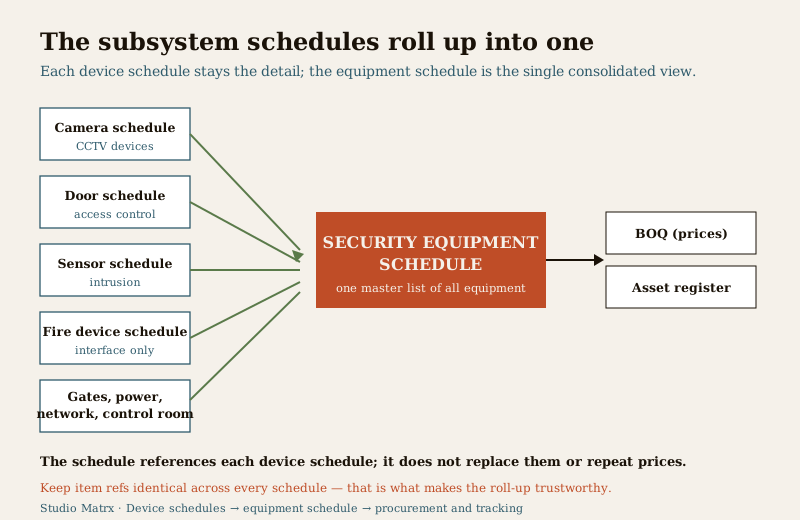
Who produces it: the security consultant or systems designer, often the design lead in an architecture or PMC team, consolidating the subsystem schedules. Who receives it: the estimator and procurement team, the installer and commissioning engineer, and — as the basis of the asset register — the client or facility manager. It is a living document: it begins at design intent, is checked against deliveries and marked up during installation, and is handed over as the definitive record of what was actually supplied.
The equipment schedule earns its place because it does three jobs the subsystem sheets cannot do alone. It consolidates — one list to count, quote and tick off. It bridges — it is the agreed hand-off between the design set and the commercial set, spoken in the same item references at both ends. And it survives — the same table, marked as-built, becomes the asset register long after the project team has moved on.
The columns
Each row is one line item of equipment. Keep the columns lean and consistent; every one earns its place by feeding a downstream document or a tracking decision.
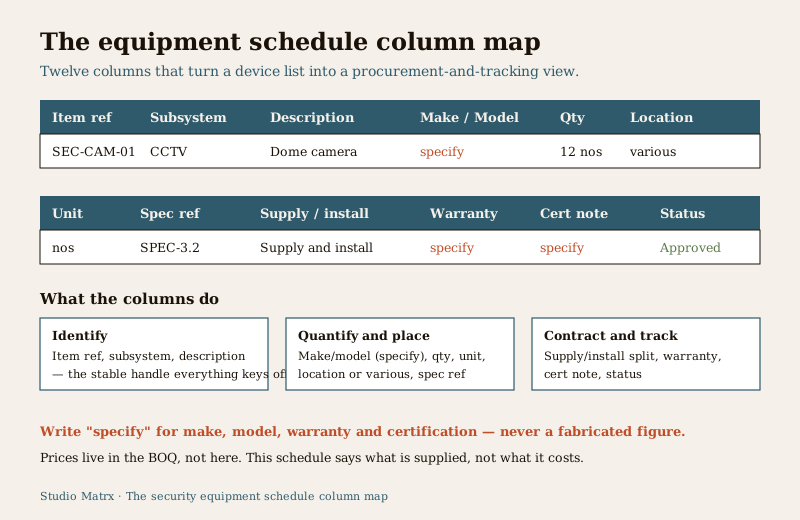
- Item ref — the unique handle, e.g. "SEC-CAM-01" or "SEC-ACS-03". Everything keys off this: the subsystem schedule, the BOQ line, the delivery note, the asset tag. A readable convention is a project prefix, a subsystem code and a number.
- Subsystem — CCTV, Access, Intrusion, Fire interface, Gates and barriers, Power, Network, or Control room. This is what turns a flat list into grouped, checkable sections.
- Description — the plain-language item: "Dome camera", "EM lock", "PIR sensor", "PoE switch". Enough to identify the type, not a full spec.
- Make / Model — write "specify". The real make and model belong in the specification, verified against manufacturer data; the schedule references them, it does not fix them here.
- Qty — how many, as a number. This is the count the estimator and installer live by.
- Unit — nos, sets, metres, lots. Keep it consistent so quantities add up cleanly.
- Location / area — where the items go, or "various" for an item spread across the site (a cable type, a common accessory). Point to a zone or drawing rather than repeating a full address.
- Spec ref — the clause or section in the specification that governs this item, e.g. "SPEC-3.2". This is the link that keeps real requirements in one place.
- Supply / install responsibility — who supplies and who installs: supply-and-install by the security contractor, free-issue supplied by the client, install-only, or by others (say, cabling by the electrical contractor). Getting this split explicit here prevents the classic site gap where each party assumed the other had it.
- Warranty — the warranty period or "specify". The real term comes from the order and the manufacturer; the column exists so warranty is captured against the item and carried into the asset register.
- BIS / certification note — a place to flag where a certification, listing or standard compliance is required (for example fire-related interface equipment, or products that must be certified for their duty). Write "specify" and defer the actual standard, edition and listing to the specification, the manufacturer and the AHJ — the schedule flags the need, it does not set the standard.
- Status — Proposed, Approved, Ordered, Delivered, Installed, Commissioned. The column that turns a design list into a live tracking sheet and, at the end, an as-built record.
Worked example (illustrative)
Here is a short equipment schedule, grouped by subsystem, so you can see the columns doing their job. The values are generic and illustrative — every "specify" is a prompt to insert a verified figure from your survey, specification and orders.
Example only — adapt to your project. The rows below are illustrative. They contain no real model numbers, prices, warranty terms or standard numbers; "specify" marks every value that must come from your own survey, manufacturer data, orders and specification. Quantities shown are placeholders.
| Item ref | Subsystem | Description | Make / Model | Qty | Unit | Location / area | Spec ref | Supply / install | Warranty | Cert note | Status |
|---|---|---|---|---|---|---|---|---|---|---|---|
| SEC-CAM-01 | CCTV | Dome camera | specify | 12 | nos | various | SPEC-3.2 | Supply and install | specify | specify | Approved |
| SEC-CAM-02 | CCTV | Bullet camera | specify | 6 | nos | Perimeter | SPEC-3.2 | Supply and install | specify | specify | Approved |
| SEC-NVR-01 | CCTV | Network video recorder | specify | 1 | no | Control room | SPEC-3.3 | Supply and install | specify | specify | Ordered |
| SEC-ACS-01 | Access | EM lock | specify | 4 | nos | various | SPEC-4.1 | Supply and install | specify | specify | Approved |
| SEC-ACS-02 | Access | Reader / controller | specify | 4 | sets | various | SPEC-4.1 | Supply and install | specify | specify | Proposed |
| SEC-INT-01 | Intrusion | PIR sensor | specify | 10 | nos | various | SPEC-5.2 | Supply and install | specify | specify | Proposed |
| SEC-FIR-01 | Fire interface | Interface relay module | specify | 1 | no | Control room | SPEC-6.1 | By others (fire) | specify | specify | Proposed |
| SEC-GAT-01 | Gates | Boom barrier | specify | 1 | no | Main Gate | SPEC-7.1 | Supply and install | specify | specify | Proposed |
| SEC-PWR-01 | Power | UPS / backup supply | specify | 1 | no | Control room | SPEC-8.1 | Supply and install | specify | specify | Proposed |
| SEC-NET-01 | Network | PoE switch | specify | 2 | nos | Control room | SPEC-9.1 | Supply and install | specify | specify | Ordered |
| SEC-CTR-01 | Control room | Monitor / workstation | specify | 1 | set | Control room | SPEC-10.1 | Supply and install | specify | specify | Proposed |
Read a single row like a sentence: item SEC-ACS-01 is four EM locks for the access subsystem, spread across various doors, governed by specification clause 4.1, supplied and installed by the security contractor, warranty and certification to be confirmed, currently approved. Every downstream document can act on that one line — and note that not one row carries a price. Prices live in the BOQ.
Blank template — copy and adapt
Copy the header row into your own sheet, keep a placeholder row per subsystem to remind you of the grouping, and add one line per item of equipment. This empty register is the core value of the page.
| Item ref | Subsystem | Description | Make / Model | Qty | Unit | Location / area | Spec ref | Supply / install | Warranty | Cert note | Status |
|---|---|---|---|---|---|---|---|---|---|---|---|
| SEC-CAM-01 | CCTV | ... | specify | ... | nos | ... | ... | ... | specify | ... | Proposed |
| SEC-ACS-01 | Access | ... | specify | ... | ... | ... | ... | ... | specify | ... | Proposed |
| SEC-INT-01 | Intrusion | ... | specify | ... | ... | ... | ... | ... | specify | ... | Proposed |
| SEC-FIR-01 | Fire interface | ... | specify | ... | ... | ... | ... | ... | specify | ... | Proposed |
| SEC-GAT-01 | Gates | ... | specify | ... | ... | ... | ... | ... | specify | ... | Proposed |
| SEC-PWR-01 | Power | ... | specify | ... | ... | ... | ... | ... | specify | ... | Proposed |
| SEC-NET-01 | Network | ... | specify | ... | ... | ... | ... | ... | specify | ... | Proposed |
| SEC-CTR-01 | Control room | ... | specify | ... | ... | ... | ... | ... | specify | ... | Proposed |
| ... | ... | ... | ... | ... | ... | ... | ... | ... | ... | ... | ... |
Keep a short notes and legend block beneath the table for anything a column cannot hold: the item-ref convention, spares and consumables, items free-issued by the client, exclusions, and the sheet's own revision and date. Reserve a line or two for spares explicitly — the pack of spare cameras, locks, batteries or fuses is real equipment and belongs on the schedule, not in someone's memory.
Field guide: making the roll-up work
- Roll the device schedules up, do not retype them. Each subsystem schedule is the detail; the equipment schedule is the summary line for each item type or device. Bring the item ref across unchanged so a reader can jump from a schedule line straight to the device schedule that expands it.
- Keep item refs consistent everywhere. The ref on the equipment schedule, the subsystem device schedule, the BOQ line, the drawing tag and the eventual asset tag must all agree. A ref that means one thing here and another on the door schedule quietly corrupts every count and claim.
- Hold qty discipline. One line item, one quantity, one unit; totals that reconcile against the subsystem schedules. If the door schedule lists four EM locks, the equipment schedule says four, and the BOQ prices four — any mismatch is a red flag to resolve before issue, not after delivery.
- Make the supply-versus-install split explicit on every row. The most expensive site arguments come from an item nobody supplied because each party assumed the other would. State it per row: supply-and-install, supply-only, install-only, free-issue, or by others.
- Tie to the spec and BOQ; do not repeat prices here. The equipment schedule points at the specification (via the spec ref) for real requirements and hands its counts to the BOQ for pricing. It says what is supplied; the BOQ says what it costs. Keeping money out of this sheet is what lets the same table become the asset register untouched.
- Use the certification column as a flag, not a claim. Where an item must be certified or standard-compliant, mark the need and defer the actual standard, edition and listing to the specification, the manufacturer and the AHJ. Do not write a standard number you have not verified.
Common mistakes
- Duplicating the BOQ prices. Once a price sits in two documents, the two will disagree and someone will pay for the difference. The equipment schedule carries counts, not prices.
- Inconsistent references. The same device called SEC-CAM-01 here, "C-01" on the camera schedule and "Cam 1" on the drawing means three documents that can never be reconciled. Pick one convention and hold it across every sheet.
- Missing spares and consumables. Cameras and locks get scheduled; the spare units, batteries, fuses and connectors get forgotten, then bought in a panic. Give them lines.
- Blank supply-install and warranty columns. A schedule that does not say who supplies and installs each item, or what its warranty is, forces those decisions onto site and out of the record.
- Letting the sheet go stale. If equipment changes on site and the status and rows are not updated, the "as-built" handover is fiction and the asset register starts life wrong.
How it connects to the other documents
The equipment schedule is the hub between the design set and the commercial set. Below it, the subsystem device schedules hold the detail: the camera schedule for CCTV, the access control door schedule for doors and readers, the intrusion sensor schedule for detection, and the fire alarm device schedule for the fire interface points, each feeding one grouped section of the equipment schedule. Where a row carries a certification flag, a product certification guide explains what to actually ask for and verify — the schedule flags the need, that guidance helps you meet it.
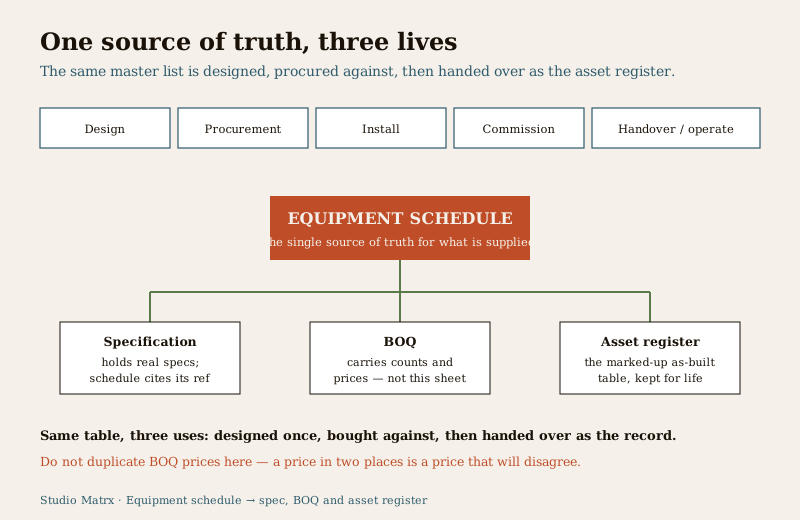
Above it, the specification holds the real requirements the schedule references, and the BOQ attaches the money the schedule deliberately leaves out. At the end, the same table — marked up with delivered and installed status and the final make, model, serial and warranty — becomes the client's asset register: the single record of what is on site, what it is, where it is and how long it is covered.
The schedule is sensitive — control the document. A completed security equipment schedule is a full inventory of a site's protective equipment, its quantities and its locations. Share it on a need-to-know basis, keep it access-controlled, and hand it over to a named custodian rather than leaving it in an open folder. Where the wider system holds footage or personal data, remember that CCTV of identifiable people is personal data under the Digital Personal Data Protection (DPDP) Act, 2023.
Completion checklist
Before you issue or hand over the equipment schedule, confirm each row and the sheet as a whole.
| Check | Confirm |
|---|---|
| One line per item of equipment | Grouped by subsystem, nothing double-counted |
| Item refs consistent everywhere | Match the device schedules, BOQ and drawing tags |
| Quantities reconcile | Totals agree with the subsystem schedules |
| Make and model deferred | "specify" here; real values in the specification |
| Spec ref on every row | Points to the clause that governs the item |
| Supply / install stated per row | No item where responsibility is assumed, not stated |
| Warranty captured | Period or "specify" against each item |
| Certification flagged where needed | Need marked; standard deferred to spec, maker and AHJ |
| No prices on the sheet | Money lives in the BOQ, not here |
| Spares and consumables listed | Not left to memory |
| Status current | Proposed to Commissioned reflects reality |
| Revision and date shown | The sheet carries its own version and issue date |
Use this template as a starting point, adapt the columns to your project, and pass it between the neighbouring documents in the security resources library and the professional security resources guide.
Key takeaways
- One consolidated list, one source of truth — the equipment schedule rolls every subsystem device schedule into a single procurement-and-tracking view of what is supplied.
- It references the spec and hands counts to the BOQ — write "specify" for models, warranty and certification, keep money in the BOQ, and let the same clean table become the asset register.
- Consistency is the whole discipline — one item-ref convention across every sheet, quantities that reconcile, and the supply-versus-install split stated on every row.
- Treat it as sensitive — it is a full inventory of a site's security equipment and locations; share on need-to-know and hand over to a named custodian.
References
- Digital Personal Data Protection Act, 2023 — where the security system holds CCTV of identifiable people, that footage is personal data; a schedule inventorying equipment and locations is sensitive, so control access and custody.
- Manufacturer documentation for each specified device — the authoritative source for models, ratings, warranty terms and any certification or listing; the schedule references these, it does not replace them.
- Bureau of Indian Standards catalogue — verify the current edition and listing of any standard referenced in the specification or install at https://www.services.bis.gov.in/
This is an educational, ready-to-adapt template, not legal, contractual or specification advice. Procurement, cabling, work at height and any electrical or fire-interface connection are qualified professional tasks — engage licensed installers, and consult a professional for legal, certification or data-protection questions.
Export this guide
Related Guides — Deep-dive reading
Professional Security Resources for India (2026): The Documents Behind a Secure Project
The overview and map of the whole professional-deliverable toolkit — the brief, schedules, BOQ, checklists, handover pack and logs a consultant, designer, PMC or facility manager produces across a security project, and how each document connects to the next.
SecuritySecurity Specification Template for India (2026): Defining What Good Looks Like
A ready-to-adapt technical specification template for security systems: the document that sits beside the BOQ in your tender and tells every bidder the required standard, performance and quality, so they quote the right thing and the installer builds to a known bar.
SecurityAccess Control Testing Checklist for India (2026): Every Door Opens and Locks as Designed
A ready-to-adapt per-door and system checklist to verify an access-control installation at commissioning and as a periodic check, with the egress and fire-to-release life-safety tests that must always pass before sign-off.
SecurityRelated Tools — Try Free
Interior Contract Clause Checklist
16 sections and 98 checkboxes covering scope, BOQ, milestones, penalties, warranty, and disputes.
Contract ChecklistSecurity Cabling & PoE Planner
Estimate cable length, drops, PoE power budget, the right switch, conduit and cost for a CCTV/security cabling plan.
Cabling PlannerSecurity System Cost Estimator
Estimate the all-in capex with GST, annual running cost and 5-year total cost of ownership of a home or building security system.
Cost Estimator