

Security Warranty Register for India (2026): Never Lose a Claim to a Missing Date
A ready-to-adapt warranty and AMC register for your security system, so every camera, alarm, lock and fire device stays tracked, nothing lapses unnoticed, and a claim is easy because the invoice, serial and expiry date are already on file.
A security system is a collection of things that are all quietly running down a clock. Every camera, recorder, alarm panel, access controller, electronic lock and fire device came with a warranty period, and several of them are meant to sit under an annual maintenance contract. Miss a date and the cost lands on you: a failed camera that would have been replaced free, or a fire system that has slipped out of cover because nobody renewed the AMC. The security warranty register is the single sheet that stops this. It holds one row per item, records what is covered and until when, and makes a claim easy because the invoice, serial number and claim contact are already sitting in front of you.
This is a practitioner deliverable, not a lecture. You build it once at handover from the equipment schedule and the invoices, then keep it alive with reminders. It is one of the record documents in the wider professional security resources library and sits on the resources hub alongside the asset register, the handover checklist and the maintenance log.
Scope & how to read this. This is a ready-to-adapt professional template, not authoritative, contractual or legal wording. Warranty terms, AMC scope and claim procedures come from your suppliers, OEMs and contracts, and life-safety requirements come from the code and the Authority Having Jurisdiction (AHJ). Read your own documents, verify locally, and get professional or legal review before you rely on any contract. The register is a record and a reminder, not the standard itself.
What it is and where it sits
The warranty register is an owner-side tracking tool. It is created at the handover from the equipment schedule, the as-built asset list and the itemised invoices, then it belongs to whoever operates the building: the facility manager, the RWA, the shop owner or the estate team. Its job runs across the whole operating life of the system, from the day cover starts until the day the item is retired.
Think of the lifecycle as: brief and design, procurement, install, commission, handover, and then operate. The warranty register is born at handover and lives through operate. Where the asset register answers "what do we own and where is it," the warranty register answers "how long is it covered, what do I do before that runs out, and how do I claim." The two share the same Item ref so a reader can jump between them in seconds.
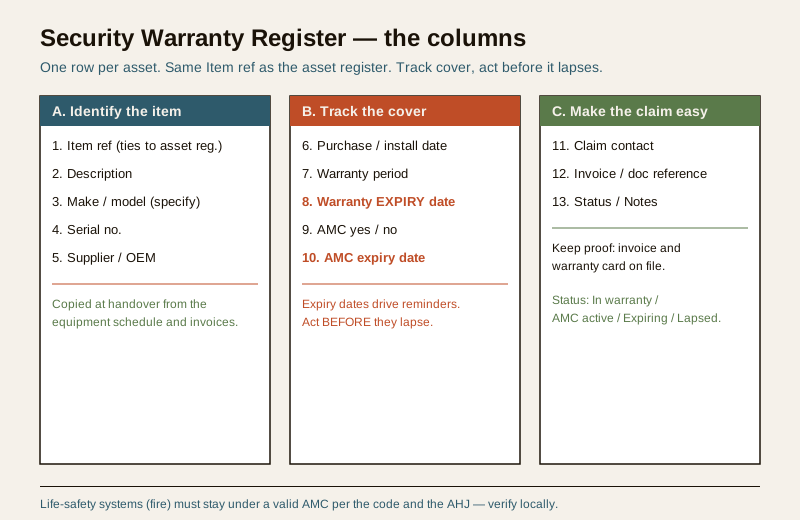
The columns, explained
Keep the register to one row per item and these columns. They fall into three natural groups: identify the item, track the cover, and make a claim easy.
- Item ref — the same reference used in the asset register and equipment schedule, so the three documents line up. This is the anchor; never renumber it casually.
- Description — a plain-words label such as "gate dome camera" or "fire control panel," readable by someone who is not a specialist.
- Make and model — write "specify" until you have the real value from the invoice or nameplate; do not guess.
- Serial no. — the exact serial from the device or its box. Most claims need it, and it proves the specific unit is the one you bought.
- Supplier / OEM — who you bought it from and who makes it. The claim may go to either, so record both where they differ.
- Purchase / install date — the date cover starts. Note which basis your warranty uses, since some run from invoice and some from commissioning.
- Warranty period — the length as stated by the OEM, for example "specify months / years." Record what the paperwork actually says.
- Warranty EXPIRY date — the calculated end date, written out as dd-mmm-yyyy. This is the column that earns its keep; a period alone is easy to ignore, a date is not.
- AMC yes / no — whether this item is under an annual maintenance contract.
- AMC expiry date — when that contract lapses, again as dd-mmm-yyyy. Renewals are booked against this.
- Claim contact — the phone, email or portal for raising a claim or a service call, so nobody hunts for it in an emergency.
- Invoice / doc reference — where the proof lives: the invoice number and the file or folder holding the warranty card. Keep the actual documents; a claim without proof of purchase is often refused.
- Status / Notes — a short state such as In warranty, AMC active, Expiring soon or Lapsed, plus anything unusual (a past claim, an extended warranty, a known quirk).
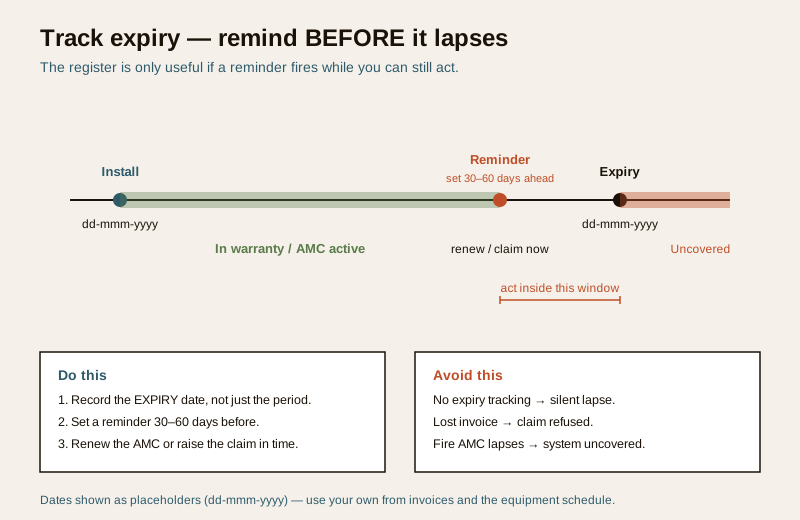
Record the expiry date, not just the period. "Two years from install" is a number people skim past. "Expires dd-mmm-yyyy" is a deadline you can set a reminder against. Always compute and store the actual date, and set the reminder 30 to 60 days ahead so you can renew or claim while there is still time.
Worked example (illustrative)
Below is a filled register showing how the columns work together across a mixed system. The values are generic and illustrative.
Example only — adapt to your project. Dates are placeholders (dd-mmm-yyyy), models are marked "specify," and serials are shown as patterns, not real numbers. Replace every cell with your own verified data from the invoices and equipment schedule. Nothing here is a real product, price or period.
| Item ref | Description | Make / model | Serial no. | Supplier / OEM | Install date | Warranty period | Warranty expiry | AMC | AMC expiry | Claim contact | Invoice ref | Status / Notes |
|---|---|---|---|---|---|---|---|---|---|---|---|---|
| CAM-01 | Gate dome camera | specify | SN-xxxx-01 | specify / OEM-A | dd-mmm-yyyy | specify yrs | dd-mmm-yyyy | Yes | dd-mmm-yyyy | e.g. OEM helpline | INV-nnn | In warranty |
| NVR-01 | Recorder | specify | SN-xxxx-02 | specify / OEM-A | dd-mmm-yyyy | specify yrs | dd-mmm-yyyy | Yes | dd-mmm-yyyy | e.g. supplier | INV-nnn | AMC active |
| ALM-01 | Alarm control panel | specify | SN-xxxx-03 | specify / OEM-B | dd-mmm-yyyy | specify yrs | dd-mmm-yyyy | No | n/a | e.g. supplier | INV-nnn | Expiring soon |
| LCK-01 | Electronic door lock | specify | SN-xxxx-04 | specify / OEM-C | dd-mmm-yyyy | specify yrs | dd-mmm-yyyy | No | n/a | e.g. OEM portal | INV-nnn | In warranty |
| FIR-01 | Fire control panel | specify | SN-xxxx-05 | specify / OEM-D | dd-mmm-yyyy | specify yrs | dd-mmm-yyyy | Yes | dd-mmm-yyyy | e.g. AMC vendor | INV-nnn | AMC active (life-safety) |
Notice how ALM-01 is flagged "Expiring soon" with no AMC — that is exactly the row a reminder should surface for a decision. FIR-01 is a life-safety item and is kept under a live AMC on purpose.
Blank template (copy-ready)
Copy this into your sheet, print it, or paste it into your project records, then add one row per item. Keep the headers as they are so it stays aligned with the asset register.
| Item ref | Description | Make / model | Serial no. | Supplier / OEM | Purchase / install date | Warranty period | Warranty expiry date | AMC (Y/N) | AMC expiry date | Claim contact | Invoice / doc ref | Status / Notes |
|---|---|---|---|---|---|---|---|---|---|---|---|---|
| ... | ... | specify | ... | ... | dd-mmm-yyyy | ... | dd-mmm-yyyy | ... | dd-mmm-yyyy | ... | ... | ... |
| ... | ... | specify | ... | ... | dd-mmm-yyyy | ... | dd-mmm-yyyy | ... | dd-mmm-yyyy | ... | ... | ... |
| ... | ... | specify | ... | ... | dd-mmm-yyyy | ... | dd-mmm-yyyy | ... | dd-mmm-yyyy | ... | ... | ... |
Field guide: keeping it alive
A register is only as good as its upkeep. A few habits make the difference between a document that saves money and one that gathers dust.
- Build it at handover, from source. Populate it from the equipment schedule and the itemised invoices while the installer is still on site, using the security handover checklist so nothing is missed. Chasing serial numbers a year later is painful.
- Record expiry dates and set reminders before they lapse. Compute each warranty and AMC expiry as a real date, then set a calendar reminder 30 to 60 days ahead. The whole point is to act while cover still exists.
- Keep the proof. File the invoice and warranty card against each Item ref. A claim usually needs proof of purchase and the serial; if you cannot find them, the free repair quietly becomes a paid one.
- Know the claim process before you need it. Note the claim contact and, briefly, how each OEM wants claims raised (helpline, portal, dealer). At 2 a.m. after a failure is the wrong time to learn it.
- Distinguish warranty from AMC. They are different instruments and get their own columns — do not let one hide the other.
- Renew the AMC on critical and life-safety systems first. The fire system and other life-safety equipment should never sit uncovered; renew ahead of expiry.
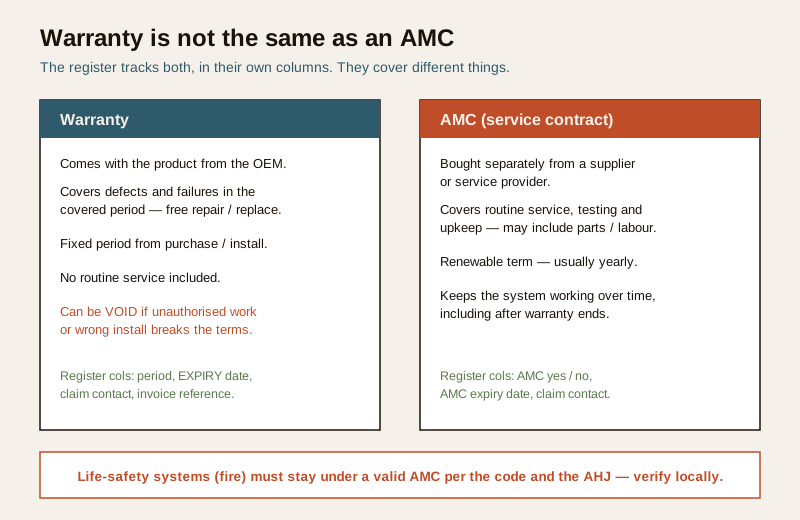
Warranty is not the same as an AMC
These two are easy to blur, and the register keeps them apart on purpose. A warranty comes with the product from the OEM, covers defects for a fixed period from purchase or install, and includes no routine service. It can also be voided if unauthorised or incorrect work breaches its terms. An AMC (annual maintenance contract) is bought separately, covers routine service, testing and upkeep over a renewable term, and keeps the system working — often continuing to protect you after the warranty has ended. One row can carry both: still in warranty and under AMC at the same time.
Life-safety systems must stay under a valid contract. Fire detection, alarm and suppression, emergency lighting and similar life-safety equipment are commonly required to remain under a valid maintenance or AMC arrangement, with records kept, per the applicable code and the AHJ. Treat their AMC expiry as non-negotiable, confirm the exact requirement and testing frequency against the code, the manufacturer and the fire officer, and verify locally. The register flags the date; it does not set the standard.
Common mistakes
- No expiry tracking. Storing only "two-year warranty" and never the end date means the cover lapses silently and the first you hear of it is a repair bill.
- Lost invoices. No proof of purchase, no serial — and the claim is refused even though the item was genuinely in warranty.
- Warranty voided by unauthorised work. A cheap non-approved repair or a wrong install can breach the terms and end the cover; note the constraint against the item.
- AMC lapses on the fire system. The most serious version of the problem: a life-safety system drifts out of contract because nobody watched the date. This is exactly what the register and its reminders exist to prevent.
How it links to the other documents
The warranty register does not stand alone; it is one document in a small, connected set:
- The security asset register is the master list of what you own and where. The warranty register borrows its Item ref and adds the cover and claim layer.
- The security equipment schedule is the source for makes, models and serials when you first build the register.
- The security handover checklist is when you capture warranty cards, invoices and AMC papers — the moment to populate this register.
- The security AMC buying guide helps you decide which systems deserve an AMC and what a good contract covers before you record its expiry here.
- The security maintenance log records the service visits and tests that an AMC delivers, closing the loop between "what is covered" and "what was actually done."
Keep all of these together in one project folder. Read together, they answer every practical question about a security system after the installer has gone: what it is, whether it is covered, and what to do next.
References
- Your own supplier invoices, OEM warranty cards and AMC contracts — the authoritative source for periods, scope, exclusions and claim procedures. Follow them over any generic guidance here.
- Manufacturer documentation for each device — the definitive statement of warranty terms and what can void them.
- The applicable National Building Code provisions and the Authority Having Jurisdiction for any life-safety maintenance or AMC requirement; verify the current edition and local rules at https://www.services.bis.gov.in/
This is an educational template to adapt, not authoritative, contractual or legal advice. Warranty and AMC terms come from your suppliers, OEMs and contracts, and life-safety requirements from the code and the AHJ — verify locally and get professional or legal review before you rely on any contract.
Export this guide
Related Guides — Deep-dive reading
Security Maintenance Log for India (2026): The Record That Keeps the System Alive
A ready-to-adapt running record of every service, test, repair and check on your security and fire systems — with a worked example, a blank copy-ready template, and how it proves upkeep to the owner, the insurer and the fire officer.
SecurityAccess Control Testing Checklist for India (2026): Every Door Opens and Locks as Designed
A ready-to-adapt per-door and system checklist to verify an access-control installation at commissioning and as a periodic check, with the egress and fire-to-release life-safety tests that must always pass before sign-off.
SecuritySecurity Equipment Schedule for India (2026): The Master Equipment List
A ready-to-adapt security equipment schedule that rolls every subsystem device schedule into one consolidated procurement-and-tracking view, so what is supplied across CCTV, access, intrusion, fire interface, gates, power, network and the control room lives in a single source of truth.
SecurityRelated Tools — Try Free
Interior Contract Clause Checklist
16 sections and 98 checkboxes covering scope, BOQ, milestones, penalties, warranty, and disputes.
Contract ChecklistSecurity Vendor Evaluation Scorecard
Rate a CCTV/security installer or guarding agency across eight weighted criteria for a hire / negotiate / walk-away verdict.
Vendor ScorecardAccess-Control Schedule Generator
Build the time schedules that decide when each access group can enter — an editable list for your integrator.
Time Schedules