

Security Handover Checklist for India (2026): From Installer to Owner, Cleanly
A ready-to-adapt handover checklist that confirms a commissioned security system passes from installer to owner with the full documentation set, admin credentials changed and installer access revoked, training done and a formal sign-off recorded.
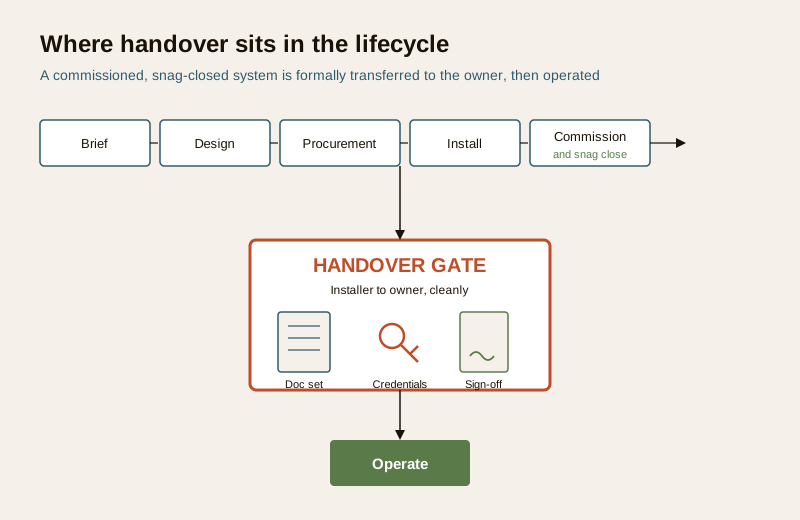
Handover is the moment a security system stops being the installer's project and becomes the owner's responsibility. It comes late in the lifecycle — brief, design, procurement, install, commission, snag closure, then handover, then operate — and it is the point where a working, tested system is formally transferred, with everything the owner needs to run it, prove it and get it repaired. A rushed handover leaves the owner holding a live system they cannot log into, document or maintain. This page gives you a security handover checklist you can adapt, use as an acceptance record and attach to the sign-off.
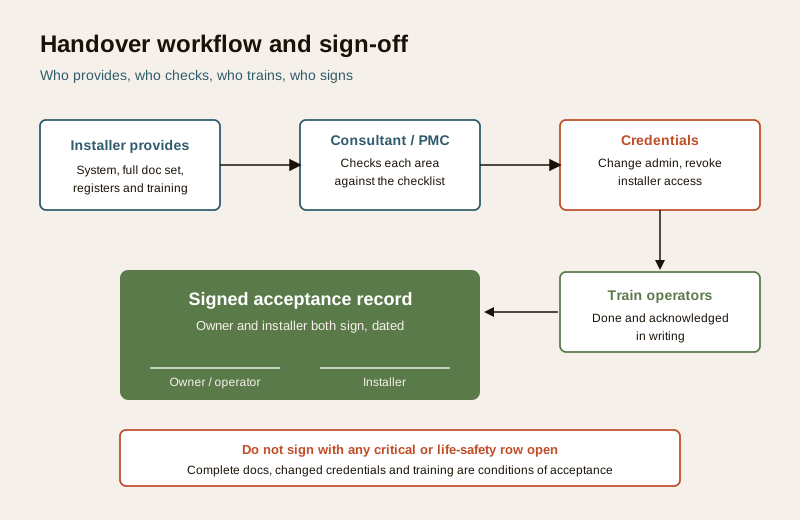
The consultant, PMC or facility manager typically runs the handover; the installer or system integrator provides the system, the documentation and the training; the owner or operator receives and accepts. It sits directly downstream of commissioning and the snag list — you should not reach handover until commissioning has passed and the critical snags are closed.
Scope & how to read this. This is a ready-to-adapt professional template, not authoritative or contractual wording. Warranty, AMC and acceptance terms are set by your contract, and specifics come from your project, the manufacturer, the code (NBC = SP 7:2026 for anything touching fire and life safety) and the AHJ. Get professional and legal review before you rely on any handover or acceptance document in a contract. Where a real figure belongs, this template says "specify".
What handover is, and when it happens
Handover is the formal transfer of a working, documented system from the party that built it to the party that will operate it. It is not the same as commissioning. Commissioning proves the system performs to specification on the day; handover confirms that the owner has received everything needed to keep it performing and can accept it in writing. In practice handover happens after commissioning is signed off and after the critical and life-safety items on the snag list are closed — the open minor snags, if any, carry forward on a tracked list with owner agreement.
Treat handover as a gate, not a formality. The final payment milestone and the start of the warranty and any AMC usually hang off acceptance, so getting the pack complete and the credentials transferred is what protects the owner for years afterwards.
What handover must include
Group the handover around the things the owner needs. Each group below becomes a section of the checklist.
1. System state
- Commissioning passed and its record attached (see the commissioning checklist).
- All critical and life-safety snags closed; any remaining minor snags listed with agreed dates on the carried-forward snag list.
- The as-installed system matches the accepted design and scope.
2. Documentation set
The pack the owner keeps for the life of the system:
- As-built drawings — device layouts and cable routes as actually installed.
- All schedules — the device, cable and IP address schedules.
- The system architecture and network diagrams.
- O and M manuals — operation and maintenance for every product.
- Test and commissioning records, including the acceptance test results.
- The asset register and the warranty register (see the asset register and the warranty register).
3. Credentials and access transfer
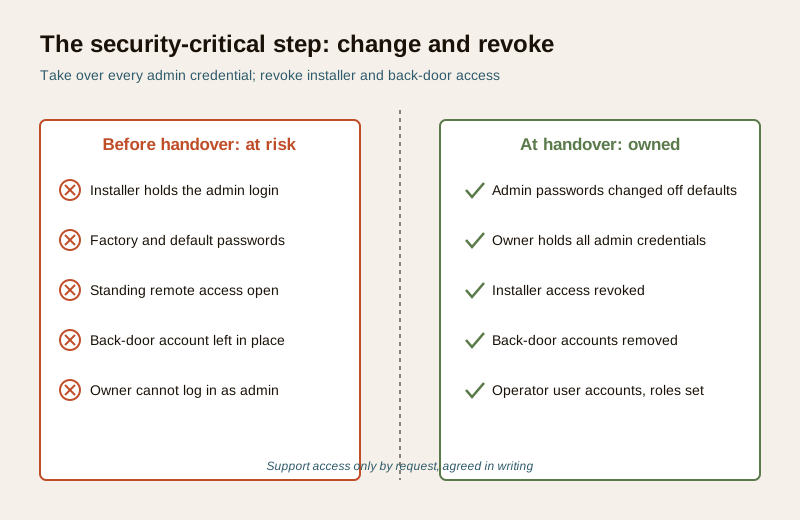
This is the security-critical group and the one most often skipped:
- Admin passwords changed off installer and factory defaults, and handed to the owner.
- Installer and back-door access revoked — no standing remote access unless it is agreed explicitly and in writing, ideally request-based rather than permanent.
- User accounts set up for the operators, at appropriate privilege levels, with the owner holding the administrator role.
4. Training
Operators and users trained and the training acknowledged in writing — day-to-day operation, playback and export, arming and disarming, alarm response, and who to call. If a named operator cannot do the core tasks unaided, training is not complete.
5. Warranty, AMC, spares and contacts
- Warranty terms confirmed per item and recorded in the warranty register.
- AMC terms confirmed — scope, response times, what is and is not covered.
- Spares and consumables handed over as contracted.
- Emergency and support contacts — a single sheet of who to call, for what, and how fast.
6. Formal sign-off
A dated acceptance record signed by both parties, listing what was delivered and any carried-forward items. This is what closes the handover.
Worked example: handover checklist
Example only — adapt to your project. Illustrative rows and generic values. Replace every "specify" with your real project detail; the actual warranty, AMC and acceptance terms come from your contract.
| Area | Item | Provided / Done (Y/N) | Received by | Notes |
|---|---|---|---|---|
| System state | Commissioning record attached, all tests passed | Y | Owner rep | Ref: commissioning sheet, dated |
| System state | Critical and life-safety snags closed | Y | Owner rep | 2 minor snags carried forward, dates agreed |
| Documentation | As-built drawings (layout and cable routes) | Y | FM | PDF and DWG, version specify |
| Documentation | Device, cable and IP schedules | Y | FM | Matches installed system |
| Documentation | Architecture and network diagrams | Y | IT | Held with IT records |
| Documentation | O and M manuals, all products | Y | FM | One folder per subsystem |
| Documentation | Test and commissioning records | Y | Owner rep | Includes acceptance results |
| Documentation | Asset register and warranty register | Y | FM | Serials verified against site |
| Credentials | Admin passwords changed off defaults, handed over | Y | Owner admin | Stored in owner password manager |
| Credentials | Installer and back-door access revoked | Y | Owner admin | No standing remote access; support by request only |
| Credentials | Operator user accounts created, roles set | Y | Owner admin | 3 operators, viewer role; owner holds admin |
| Training | Operators trained and acknowledged | Y | Ops lead | Signed training sheet attached |
| Warranty / AMC | Warranty terms confirmed per item | Y | FM | Recorded in warranty register |
| Warranty / AMC | AMC scope and response times confirmed | Y | FM | Start date = acceptance date |
| Spares | Spares and consumables handed over | Y | Store | Per contract list |
| Contacts | Emergency and support contact sheet issued | Y | Ops lead | On noticeboard and in records |
| Sign-off | Acceptance record signed by both parties | Y | Owner and installer | Dated; copies to both |
Blank template: copy and adapt
Copy this table into your own sheet. Fill Provided / Done as Y or N, record who received each item, and note the reference or exception. Do not sign off with any critical or life-safety row at N.
| Area | Item | Provided / Done (Y/N) | Received by | Notes |
|---|---|---|---|---|
| System state | Commissioning passed, record attached | ... | ... | ... |
| System state | Critical and life-safety snags closed | ... | ... | ... |
| System state | As-installed matches accepted design | ... | ... | ... |
| Documentation | As-built drawings | ... | ... | ... |
| Documentation | Device, cable and IP schedules | ... | ... | ... |
| Documentation | Architecture and network diagrams | ... | ... | ... |
| Documentation | O and M manuals | ... | ... | ... |
| Documentation | Test and commissioning records | ... | ... | ... |
| Documentation | Asset register | ... | ... | ... |
| Documentation | Warranty register | ... | ... | ... |
| Credentials | Admin passwords changed off defaults | ... | ... | ... |
| Credentials | Admin credentials handed to owner | ... | ... | ... |
| Credentials | Installer and back-door access revoked | ... | ... | ... |
| Credentials | Operator user accounts created, roles set | ... | ... | ... |
| Training | Operators and users trained | ... | ... | ... |
| Training | Training acknowledged in writing | ... | ... | ... |
| Warranty / AMC | Warranty terms confirmed per item | ... | ... | ... |
| Warranty / AMC | AMC terms confirmed | ... | ... | ... |
| Spares | Spares and consumables handed over | ... | ... | ... |
| Contacts | Emergency and support contacts issued | ... | ... | ... |
| Sign-off | Acceptance record signed by both parties | ... | ... | ... |
Field guide: filling and using it
Area groups the rows so nothing is missed; keep the six groups even if some rows do not apply — mark those "N/A" rather than deleting them, so a reviewer can see they were considered. Provided / Done is a hard Y or N, not "mostly"; a partial item is an N with a note. Received by names the role that took custody — spread custody across roles rather than one person who may leave. Notes carries the reference document, the exception or the carried-forward date.
Read the checklist top to bottom against the actual system and the actual pack, not against the installer's assurance. A good integrator arrives with the documentation ready; reluctance to produce as-builts, schedules or credentials is itself a reason to withhold sign-off.
DPDP note. On acceptance the owner effectively becomes the party responsible for the personal data the system holds — camera footage and access logs identify people and are personal data under the Digital Personal Data Protection Act, 2023. Handover is the moment to confirm the owner controls access, that retention is set to a sensible cycle, that signage is in place and that no third party keeps standing access to the footage. Record this as part of the credentials and access transfer.
Do not accept handover if
- Any critical or life-safety snag is open — close it first; a life-safety fix is never left open or worked around, and its pass criteria come from the code, the manufacturer and the fire officer.
- The documentation set is incomplete — insist on as-builts, all schedules, diagrams, O and M manuals, the test records and both registers before you sign.
- Admin credentials have not been changed and handed over, or the installer still holds access — change and take over all admin credentials and revoke installer and back-door access as a condition of acceptance.
- Training has not been done or acknowledged, or there is no signed acceptance.
Common mistakes
- Accepting incomplete docs on a promise to send them later — they rarely arrive, and a warranty or AMC dispute a year on becomes your word against theirs.
- The installer keeps admin access by default — a single reused credential across many clients is a standing risk to all of them.
- No training — the system is live but nobody can operate it, run a playback or respond to an alarm.
- No as-builts — a future technician, AMC vendor or auditor has no map of what is where.
How it connects
The security handover checklist is the closing document of the delivery lifecycle. It draws on the commissioning checklist for proof the system works, the snag list for confirmation the critical defects are closed, and the asset register and warranty register as two of the deliverables it transfers. All of these live in the professional security resources library; the wider explainer is the professional security resources guide.
Completion check
- Commissioning passed and attached; all critical and life-safety snags closed.
- Full documentation set received: as-builts, schedules, architecture and network diagrams, O and M manuals, test records, asset and warranty registers.
- Admin credentials changed and handed over; installer and back-door access revoked; operator user accounts created.
- Training done and acknowledged; warranty, AMC, spares and support contacts confirmed.
- Acceptance record signed and dated by both parties, with any carried-forward items listed.
References
- Digital Personal Data Protection Act, 2023 — footage and access logs identifying people are personal data; on handover the owner takes on responsibility for controlled access and sensible retention.
- National Building Code of India (NBC), current edition (SP 7:2026) — the source for pass criteria and requirements on anything touching fire and life safety; verify against the code, the manufacturer and the fire officer.
- Bureau of Indian Standards catalogue — verify the current edition of any standard referenced in the install at https://www.services.bis.gov.in/
- Your project contract, specification and the manufacturer O and M manuals — the authoritative source for warranty, AMC and acceptance terms; follow them over any generic template.
This is an educational, ready-to-adapt template, not legal or contractual advice. Acceptance, warranty and AMC terms are set by your contract and project; engage qualified professionals and get legal review before you rely on any handover or acceptance document.
Export this guide
Related Guides — Deep-dive reading
Professional Security Resources for India (2026): The Documents Behind a Secure Project
The overview and map of the whole professional-deliverable toolkit — the brief, schedules, BOQ, checklists, handover pack and logs a consultant, designer, PMC or facility manager produces across a security project, and how each document connects to the next.
SecurityAccess Control Testing Checklist for India (2026): Every Door Opens and Locks as Designed
A ready-to-adapt per-door and system checklist to verify an access-control installation at commissioning and as a periodic check, with the egress and fire-to-release life-safety tests that must always pass before sign-off.
SecurityCCTV Handover and Documentation in India (2026): What to Receive Before You Sign Off
The as-built layout, recorder and network details, every password, warranties and bills, the app setup and a short playback-and-export training you must receive at CCTV handover — and why you change every password and turn on 2FA before you pay.
SecurityRelated Tools — Try Free
Contract Studio
AI generates professional architecture service agreements with milestones and scope.
ArchitectAIInterior Contract Template — India
Legally-refined contract template with payment milestones, timeline, warranty, and jurisdiction fields.
Contract GeneratorInterior Contract Clause Checklist
16 sections and 98 checkboxes covering scope, BOQ, milestones, penalties, warranty, and disputes.
Contract Checklist