
When to Repair or Replace Security Equipment in India (2026): A Calm Decision Guide
A fault is diagnosed and the question is now simple to ask and hard to answer: mend this camera, lock, alarm or gate motor, or retire it? A calm, value-honest framework built around warranty, age, part cost, support, security updates and life-safety — with the actual prices left to the cost library.
You have done the hard part. The camera that kept dropping off the app, the alarm panel that beeped for no reason, the gate motor that stalled, the smart lock that would not pair — the fault is named, the cause is understood. Now comes the quieter question that every diagnostic ends on: is this thing worth mending, or is it time to let it go? It is an easy question to ask and a genuinely hard one to answer well, because the honest answer is not always the cheap one and not always the new one.
This guide is a calm framework for that single decision. It does not tell you what a repair or a new unit costs in rupees — those numbers belong in the home security system cost guide and the security lifecycle cost guide, and they move too often to pin down here. What it gives you instead is a way to think: the factors that should tip you toward repair, the ones that should tip you toward replacement, and a simple scorecard you can run in five minutes at the kitchen table. This is the closing guide of the security troubleshooting library — once you know what is wrong, this is how you decide what to do about it.
Scope & safety. This is a decision guide, not a repair manual and not a price list. Simple, safe swaps — a plug-in adaptor, an accessible battery, a mounting bracket — a homeowner can handle. Anything inside a mains-powered unit, a gate-motor gearbox, or a fire panel is strictly a job for a qualified technician or your AMC. Life-safety equipment is a special case throughout this guide: never nurse a failing fire or smoke device along — replace it to code. When you retire any connected device, wipe its data before it leaves your hands, because CCTV and smart-home units hold personal data under the DPDP Act 2023. For actual costs, defer to the cost library.
Start by asking one honest question
Before the factors, the frame. A repair-or-replace decision goes wrong most often not because someone did the maths badly but because they never asked what the equipment is really for. A four-year-old camera watching a quiet back gate and a four-year-old camera that is your only view of the front door are the same age and a very different decision. So begin here: what does this device protect, and how much would its absence cost you in risk, not just rupees? Hold that answer in mind while you weigh everything below.
The factors that should decide it
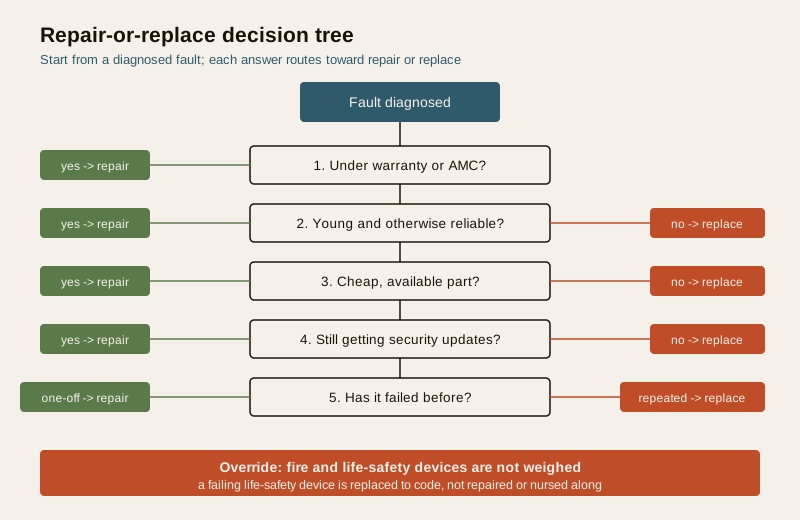
A good decision is really just a handful of factors weighed honestly. None of them decides alone; together they point clearly.
| Factor | Lean toward repair when... | Lean toward replace when... |
|---|---|---|
| Warranty and AMC | Still in warranty or under AMC — the fix may cost you nothing | Warranty long expired and no AMC covers it |
| Age vs expected life | Unit is recent and well within its useful years | Past its useful life; ageing components will keep failing |
| Repair cost vs replacement | The fix is a small fraction of a new unit | Repair cost creeps toward the price of replacing it |
| Parts and support | Spares are common, and installers still service it | Parts are discontinued; nobody stocks or supports it |
| Security-update support | Still receiving firmware and security patches | End-of-life — no more security updates (a real liability) |
| Compatibility | It still fits the rest of your system cleanly | Obsolete or incompatible with your newer devices |
| Reliability history | A first, one-off fault on an otherwise sound unit | It keeps failing — you are throwing good money after bad |
| Technology gap | Current tech is barely different — no real gain in replacing | Technology has genuinely moved on (analog to IP, safer, smarter) |
Read the table as a whole, not a checklist to total up. A single powerful factor can settle it — an end-of-support connected device is a security liability whatever its age — but most decisions are a lean, and the columns show you which way you are leaning.
Age versus expected life
Every device has a useful life, after which the physics catch up: capacitors dry out, image sensors degrade, seals perish, battery packs lose capacity, motors wear. A unit early in that life and otherwise sound is worth mending. A unit near or past the end of it is one where this fault is likely the first of several, and each repair only postpones the next. You do not need a manufacturer's number to sense this — you know roughly how old your kit is, and whether it has started to feel tired.
Warranty, AMC and the cost of the fix
If the device is under warranty or covered by an annual maintenance contract, a repair may cost you nothing or very little — that alone often settles it in favour of repair, provided the underlying unit is otherwise good. Outside warranty, the sharpest test is the ratio: what does the fix cost against what a replacement costs? A cheap, available part on a good unit is an easy repair. When the repair bill climbs toward half or more of a new unit — or when a technician quotes a big job on ageing hardware — the economics have flipped, and replacing is the honest choice, not the extravagant one. For the actual figures behind that ratio, see the security lifecycle cost guide.
Parts, support and security updates
Two kinds of support matter, and people remember only the first. The obvious one is physical: are spare parts still made, and will an installer still service this model? When spares are discontinued and no technician wants to touch it, the decision is effectively made for you.
The one people forget is security-update support, and for any connected device it is the quiet dealbreaker. A camera, smart lock, video doorbell, NVR or hub that has reached end-of-life stops receiving firmware and security patches. It may still switch on and show a picture, but an unpatched, internet-connected security device is a standing liability — the very thing meant to protect you becomes the soft spot an intruder or attacker probes. An end-of-support connected device is a reason to replace even when it still "works." This is not a repair problem at all; no amount of mending restores a security lifeline the maker has abandoned.
Reliability history and the sunk-cost trap
A single fault on a device that has served faithfully for years is a repair. A device that has now failed three times in a year is a message: you are throwing good money after bad, and each fix buys less time than the last. The trap here is the mind's, not the machine's — because you have already spent on two repairs, the third feels justified. It is not. Judge the next repair on the future it buys, never on the money already gone. Repeated failure is one of the clearest replace signals there is.
Compatibility and whether technology has moved on
Sometimes the unit is fine but the world around it changed. An old analog camera that no longer talks cleanly to your new recorder, a lock that will not integrate with the hub you have since added, a panel a newer sensor cannot pair with — these are compatibility replacements, where mending the old part just preserves a mismatch. And occasionally, technology has genuinely moved far enough that replacing is a real upgrade rather than a like-for-like swap: analog to IP, a sharper and smarter camera, a safer lock, a unit with the security-update support the old one never had. Be honest in both directions here — do not replace a perfectly compatible device just because a newer one exists, but do not keep nursing a mismatch out of loyalty. If a broader modernisation is what you are really weighing, the upgrading security in an existing home guide is the right companion.
Life-safety equipment: do not nurse it
Everything above is a weighing of value. Fire and life-safety equipment is not weighed — it is a category apart. A smoke detector at the end of its rated life, a fire panel throwing persistent faults, a heat detector that keeps false-alarming: do not repair-patch or coax these along. A life-safety device that is unreliable is worse than none, because it invites you to trust something that may not answer when it matters. Replace it to code, on schedule, through a competent person, and never silence or disable a fire device permanently to stop it complaining — a persistent fire fault is a signal to call the fire contractor, not to mute the panel. On this one category, "replace" is very often the only responsible answer, and cost is not the deciding factor. Regular attention to these devices is covered in the security-system maintenance guide; the rule when one fails is simple and firm — replace to code.
Life-safety is not a repair-or-replace judgement call. Never nurse a failing fire alarm, smoke or heat detector, or persistently faulting fire panel. Replace to code, on time, via a competent person. Silencing a life-safety device to stop the noise is dangerous — a persistent fault means call the fire contractor and restore the system, not disable it.
Retiring a device responsibly: data and e-waste
When you do decide to replace, the old unit's last job is to leave safely. Two duties come with retirement, and both are easy to overlook in the relief of a working new device.
- Wipe the data first. A camera, NVR, DVR, smart lock or hub can hold footage, logs, recordings, Wi-Fi passwords and account details. Before the device leaves your hands — to a technician, a scrap dealer, a resale buyer or the bin — factory-reset it, remove and destroy or securely erase any storage card or drive, and unlink it from your account and app. This is basic digital hygiene and it is also a DPDP Act 2023 duty where the device holds anyone's personal data, including footage of visitors, staff or neighbours.
- Dispose as e-waste, responsibly. Electronic security equipment is e-waste, not household rubbish. Hand it to an authorised e-waste collector or a take-back channel rather than a general bin. Batteries in particular — alarm backups, sensor cells — must go to proper battery disposal, never the ordinary waste stream.
A five-minute scorecard
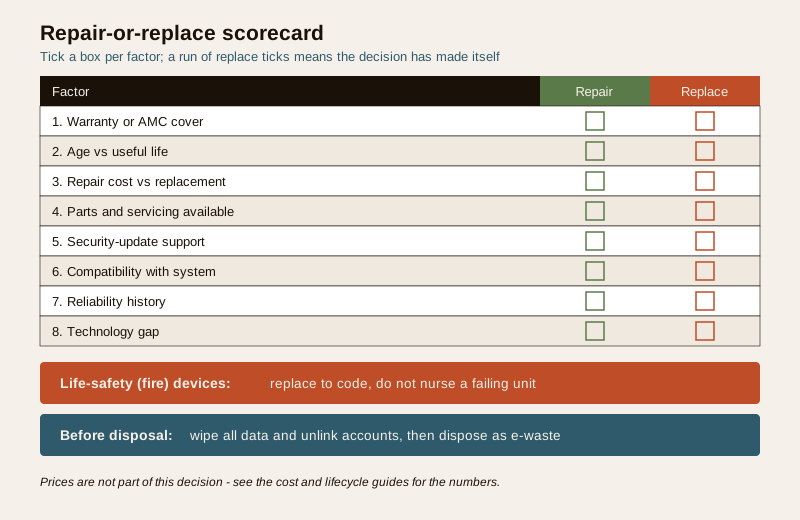
Run the fault you have diagnosed through these eight questions. Each one you answer "yes" is a nudge toward replacing; a run of "no" answers means a repair is the sensible, thrifty call. There is no strict score — this is a lens, not a formula — but if you find yourself saying "yes" to three or four, especially to security-update or repeated-failure, the decision has usually made itself.
1. Is the device out of warranty and off any AMC?
2. Is it near or past its useful life?
3. Does the repair cost approach half or more of a replacement?
4. Are spare parts or servicing hard to get?
5. Has it reached end-of-life for firmware and security updates?
6. Is it obsolete or incompatible with the rest of your system?
7. Has it failed repeatedly rather than this being a one-off?
8. Has technology moved on enough that a new unit is a real gain, not a like-for-like swap?
And two overrides that trump the score entirely:
- If it is a fire or life-safety device that is failing — replace to code. Do not weigh it.
- If it is a connected device past security-update support — replace it, even if it still switches on.
Value-honest, both ways
The whole point of this framework is to keep you honest in both directions, because the pressure runs both ways. There is pressure to replace — a new unit is tempting, a shop would rather sell you one, and "just get a new one" feels decisive. And there is pressure to repair — you have already spent on this system, a repair feels cheaper today, and letting go of working-ish kit feels wasteful. Neither pressure is a reason.
Sometimes a small, in-warranty, cheap-part repair on a young and reliable unit buys you years, and replacing would be the wasteful choice. Sometimes an out-of-support, repeatedly failing, obsolete device is best retired now, and nursing it is the false economy. The honest answer is the one the factors point to, not the one that is cheapest this afternoon or shiniest in the shop. For the full lifecycle-and-total-cost way of thinking — where a slightly dearer decision today saves more across the device's life — the security lifecycle cost guide is where the numbers live.
Key takeaways
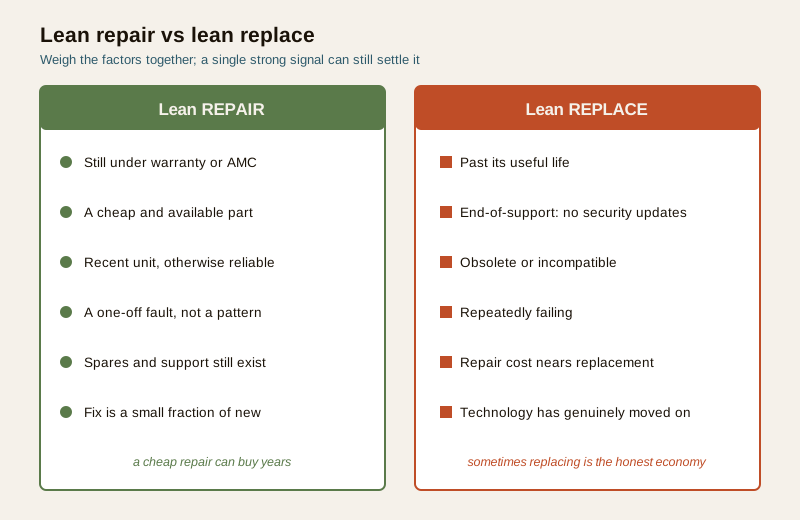
- Lean repair when the device is under warranty or AMC, the fix is a cheap and available part, the unit is recent and otherwise reliable, the fault is a one-off, and spares and support still exist.
- Lean replace when it is past its useful life, at end-of-support with no more security updates, obsolete or incompatible, repeatedly failing, when repair cost approaches replacement, or when technology has genuinely moved on.
- End-of-support connected devices are a security liability — replace them even when they still "work," because an unpatched security device is the soft spot, not the safeguard.
- Do not throw good money after bad — judge the next repair on the future it buys, not on the money already spent.
- Life-safety and fire equipment is a category apart — never nurse a failing fire device; replace to code, on schedule, and never silence a persistent fault instead of fixing it.
- Retire devices responsibly — wipe all data and unlink accounts first (a DPDP duty where footage or personal data is held), then dispose as e-waste, batteries to proper disposal.
- Be value-honest both ways — sometimes a cheap repair buys years; sometimes replacing is the true economy. Prices belong in the cost library, not this decision.
Where to go next
- The security troubleshooting library and the troubleshooting sub-hub — for diagnosing the fault before you decide what to do about it.
- The security lifecycle cost guide and the home security system cost guide, part of the costs sub-hub — for the actual numbers behind the repair-versus-replace ratio.
- The upgrading security in an existing home guide — when replacing turns into a wider modernisation.
- The security-system maintenance guide — the upkeep that makes the repair-or-replace question rarer, and the main security hub.
References
- Digital Personal Data Protection Act, 2023 — CCTV, NVR/DVR, smart locks and hubs hold personal data including footage of identifiable people; before retiring or reselling a device, factory-reset it, securely erase or destroy storage, and unlink accounts so no personal data leaves with the hardware.
- E-Waste (Management) Rules and battery-disposal norms, Ministry of Environment, Forest and Climate Change — retired electronic security equipment and its batteries are e-waste and must go to authorised collection or take-back channels, not general household waste.
- National Building Code of India (SP 7), Bureau of Indian Standards — fire and life-safety provisions governing when detectors and fire equipment must be maintained and replaced to code. Verify the current edition (SP 7:2026) via the BIS catalogue: https://www.services.bis.gov.in/
This is an educational decision framework for homeowners, not a repair manual, a price list, or legal advice. Simple, safe swaps aside, leave mains-powered, gate-motor and fire-panel work to a qualified technician or your AMC. Never nurse a failing life-safety device — replace it to code. Wipe personal data before disposing of any connected device and dispose of it as e-waste. Verify any standard's current status via the BIS catalogue before relying on it.
Export this guide
Related Guides — Deep-dive reading
Secure Device Disposal for Security Systems in India (2026): Wipe Before You Sell, Return or Bin It
The forgotten end-of-life risk: a security camera, NVR or DVR you sell on OLX, return, hand to a repair shop or give the kabadiwala still holds months of footage, saved Wi-Fi and account passwords, and a live link to your cloud account. This homeowner guide is the secure decommissioning checklist to run before any device leaves your hands.
SecurityComplete Guide to Security System Cybersecurity in India (2026): Protecting the Systems That Protect You
The cameras, locks, alarms and door phones you install to feel safer are internet-connected computers that can themselves be attacked, and an insecure one is worse than none. This pillar maps the whole attack surface — devices, network, accounts and data, operations — and points to every guide that hardens it.
SecurityCCTV Recording Failure in India (2026): Live View Works but Nothing Was Saved
You open the recorder to pull footage of an incident and there is nothing there, even though every camera shows a crisp live picture. A calm, ordered guide to why an Indian CCTV system records live but saves nothing, and how to fix it before the next incident.
SecurityRelated Tools — Try Free
CCTV Camera Coverage & Count Calculator
Estimate how many CCTV cameras you need, the NVR channels, storage in TB for your retention period, and an indicative all-in cost with GST.
CCTV CalculatorHome Security Risk Scorecard
Score your home across six security layers — perimeter, entry points, lighting, detection, alarm and habits — and get a prioritised action plan.
Security ScorecardSecurity System Cost Estimator
Estimate the all-in capex with GST, annual running cost and 5-year total cost of ownership of a home or building security system.
Cost Estimator