

PoE vs Wi-Fi Cameras in India (2026): One Cable or Wireless?
A PoE camera carries data and power down a single Ethernet cable to a switch or NVR; a Wi-Fi camera sends video over the air but still needs its own power source. An even-handed, India-grounded head-to-head that ends in a clear which-suits-whom verdict.
You have settled on network (IP) cameras. The next fork quietly shapes the whole install: how does each camera get its data, and where does its power come from? A PoE camera answers both with one wire. A Wi-Fi camera sends its video through the air but still has to be fed power somehow. Both are sold to millions of Indian homes, and neither is simply "better".
The honest one-line answer: it depends on whether you want a permanent, rock-solid, tidy-cabled system, or a fast, wireless install for a spot where running a cable is a nuisance. PoE trades a cable run for dependability and a single tidy wire; Wi-Fi trades a little dependability for speed and reach into places no cable goes. This guide is the even-handed head-to-head, what each one actually is, how they compare across the things that matter in an Indian home, and, most usefully, which one suits which home.
Scope and how to read this. This is a neutral decision guide, not a sales pitch and not a price list. Both PoE and Wi-Fi are valid, each wins in a real context, and this guide gives each its true strengths and true weaknesses so you can match one to your home. It is not a buying or cost guide: for money, see the linked cost library; for detailed camera picking, the choosing guide. This is the close sibling of the broader wired vs wireless CCTV guide, narrowed to the power-and-data question. Any camera records footage, which is personal data under the Digital Personal Data Protection Act, 2023, so keep it to your own property and shared areas, change default passwords, and secure it. Cabling, drilling and any mains-electrical work belong to a licensed installer.
What each one actually is
Both are IP cameras, so the video is digital either way. What differs is the wire, and the power.
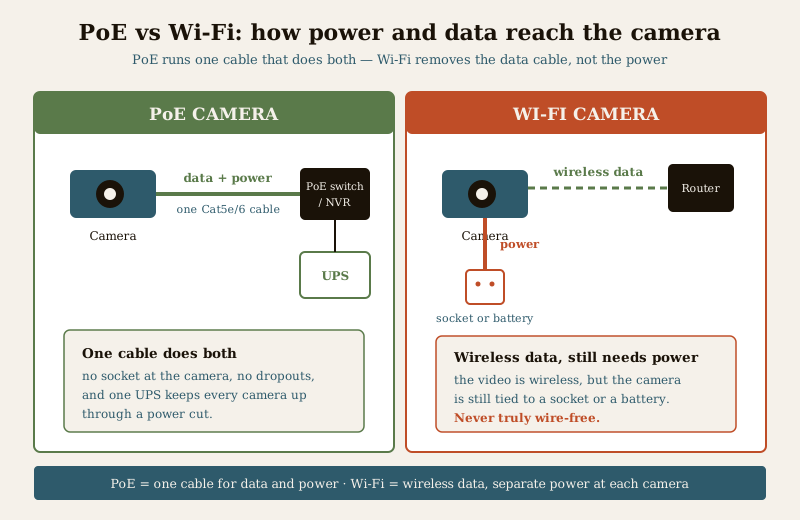
PoE (Power over Ethernet) means one Cat5e or Cat6 Ethernet cable carries the camera's data and its electricity from a PoE switch or a PoE-equipped NVR. That is the whole idea: a single cable per camera does both jobs, so there is no separate power adaptor at the camera end and no socket to find on a wall or a terrace. The switch or NVR sits inside on mains power, and the camera draws its few watts down the same cable that carries its video. Footage records locally to the NVR's hard drive. Once it is up, nothing about it depends on your Wi-Fi being healthy.
Wi-Fi means the camera sends its video over your home Wi-Fi network to the router, and usually on to an app or a cloud service. But wireless refers to the data, not the power. A Wi-Fi camera still needs a power source right at the camera, and that comes in two flavours:
- Mains Wi-Fi cameras plug into a nearby socket with a small adaptor. Video is wireless; power is a cable to the wall.
- Battery "wire-free" cameras run off a rechargeable battery (sometimes with a small solar panel), so for a while there is genuinely no cable at all, until the battery needs recharging.
The single most important thing to carry into the comparison: PoE runs one cable that does everything; Wi-Fi removes the data cable but never removes the need for power. "Wire-free" is a promise about the video link, not about electricity, and that changes the whole picture.
The head-to-head, dimension by dimension
Read this as a balance sheet, not a scoreboard. Most homes will weight these differently.
| Dimension | PoE (one Ethernet cable) | Wi-Fi (wireless data, separate power) |
|---|---|---|
| Reliability | Rock-solid. A physical cable does not drop, congest or get jammed. | Only as steady as your Wi-Fi, can drop, slow under congestion, or be deliberately jammed. |
| Power | One cable carries power too; a single UPS on the switch or NVR keeps every camera up in a cut. | Still needs power at each camera, a socket or a battery, so it is never truly wire-free. |
| Single-point resilience | Back up the one switch or NVR on a UPS and the whole system rides a power cut together. | Each camera's power is separate, and if the router or its power drops, the cameras go with it. |
| Install effort | A data cable run to each camera, then everything is on one tidy wire. Usually a professional job. | Quick, no data cabling, mount, power, connect to Wi-Fi. Often DIY in an afternoon. |
| Reaching awkward spots | Needs a cable route to the spot; hard where you cannot pull a wire. | Reaches a shed, gate pillar or far corner with no data cable, wherever there is power and signal. |
| Video quality / latency | Steady full-resolution recording, continuous, low lag. | Good in strong signal; can compress, stutter or lag when the link is weak. |
| Range / coverage | Up to roughly 100 m of Ethernet cable per camera, comfortably. | Limited by router range; walls, floors and distance weaken Wi-Fi fast. |
| Security exposure | Local storage, closed cabling; still needs passwords changed and firmware updated. | A poorly-secured Wi-Fi camera is a hacking and jamming risk; hardening is essential. |
| Scalability | Scales cleanly, add cameras to switch ports up to its power budget. | Every camera adds load to the same Wi-Fi; large counts strain the network. |
| India-specific | Rides frequent power cuts on one UPS; unaffected by weak Wi-Fi in a big house. | Convenient in a small flat with strong Wi-Fi; strained by thick walls and patchy signal. |
A few of these deserve a plain-language expansion, because they are where regret usually comes from.
Reliability and power are the PoE trump card, together. Because one cable carries both, you get two wins at once. The video link is a cable, so it does not share the crowded air with your phones, the TV, the neighbours' routers and the microwave, so no dropouts, no congestion, no jamming. And the power is centralised: put one UPS or inverter behind the switch or NVR and every camera on it keeps recording through a power cut, which in much of India is not a rare event. With Wi-Fi you would have to keep each camera's own socket, or the router, or a battery alive separately.
Reaching awkward spots is the Wi-Fi trump card. A far gate pillar, a shed across the yard, a rented flat where you cannot chase walls, a spot where pulling a cable means lifting tiles, Wi-Fi simply skips the cabling problem. If there is a socket nearby (or you accept battery upkeep) and the signal reaches, a Wi-Fi camera goes up where a PoE run would be a project.
The honest caveat. Wi-Fi is never truly wire-free, and it trades reliability for convenience. A mains Wi-Fi camera still needs a socket at the camera; a battery camera still needs recharging every few weeks or months, and a camera that is flat is a camera that saw nothing. PoE's single cable is more work to run once, but after that it is one tidy wire per camera, powered and backed up centrally. Go into either with clear eyes about the trade.
Security: a Wi-Fi camera you must actually secure
Every IP camera is a small computer on your network, and this is where Wi-Fi needs an extra beat of care. A poorly-secured Wi-Fi camera is a genuine hacking and privacy risk, left on its default password or unpatched, it can be reached by strangers, and the whole point of the camera is inverted. It can also be jammed, a determined intruder can flood the Wi-Fi band and blind wireless cameras, which a cabled PoE camera shrugs off. The defences are not optional:
- Change every default username and password the moment it is installed, to something long and unique.
- Keep firmware updated, and turn on two-factor authentication on the app if it offers it.
- Prefer local recording or the vendor's secure cloud over exposing the camera directly to the internet.
- For anything security-critical, do not rely on a wireless link alone, this is where PoE's closed cabling earns its keep.
PoE systems are not exempt, the NVR still needs its default password changed and its remote access locked down, but they carry less exposure by default because the video link itself is closed cabling and the storage is local. Either way, footage is personal data under the DPDP Act 2023: keep cameras to your own property and shared spaces, and secure what they record.
Which suits whom, the verdict by scenario
This is the part that actually decides it. Forget the general argument and find the home that looks like yours.
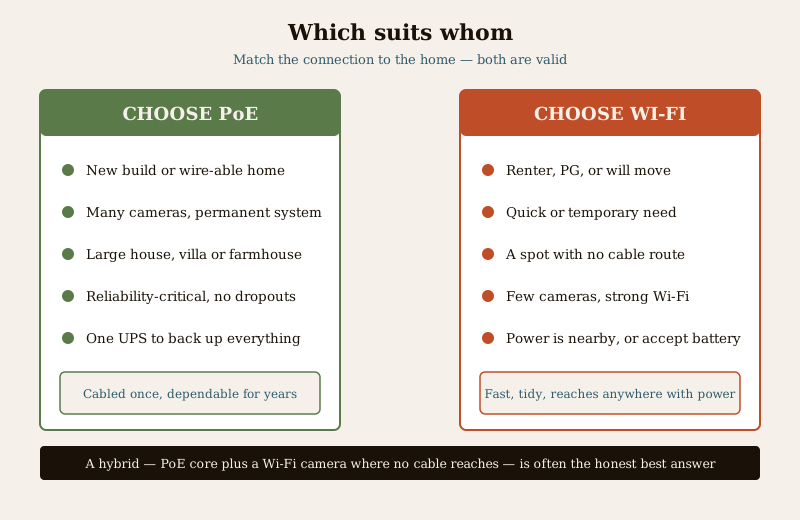
Choose PoE when:
- You are building or renovating, or the home can be wired, so a cable run to each camera is feasible.
- You want a permanent, multi-camera system across gate, porch, sides, terrace and parking, best-practice for a home you are securing for years.
- You have a large house, villa or farmhouse where Wi-Fi would not reach the far camera reliably.
- The system is reliability-critical and must never quietly drop the one clip you needed.
- You want one UPS to back up the whole system, so every camera rides a power cut together.
Choose Wi-Fi when:
- You rent a flat, a PG or a place you will move out of, no data cabling, and it comes with you.
- You want cameras today, temporarily, or to watch one specific spot without a project.
- You need to cover a spot with no cable route, a far shed, a gate pillar, a corner where pulling a wire is a nuisance, as long as there is power and signal.
- You want a few cameras in a small home where the router covers every corner with a strong signal.
The in-between cases are common and fine. A hybrid approach, a PoE core on the gate and perimeter for reliability, plus a Wi-Fi camera or two for a spot no cable reaches, is a perfectly sensible answer. Matching the connection type to each location beats forcing one everywhere.
How to decide, a short framework
There is no universal winner, so decide with three questions in order, and let the answers tip you.
1. Can you run a cable to where the camera needs to go? Yes, and doing it once is fine, tips PoE. No, or it is a real nuisance, tips Wi-Fi.
2. How many cameras, and how much does absolute reliability matter? Many cameras or reliability-critical tips PoE; a handful for a specific spot tips Wi-Fi.
3. Do you own the home long-term, and how good is your Wi-Fi? Owned, large, or weak/congested Wi-Fi tips PoE; renting with strong Wi-Fi and convenience-first tips Wi-Fi.
If two of the three point the same way, you have your answer. Then sanity-check the honest trade one more time.
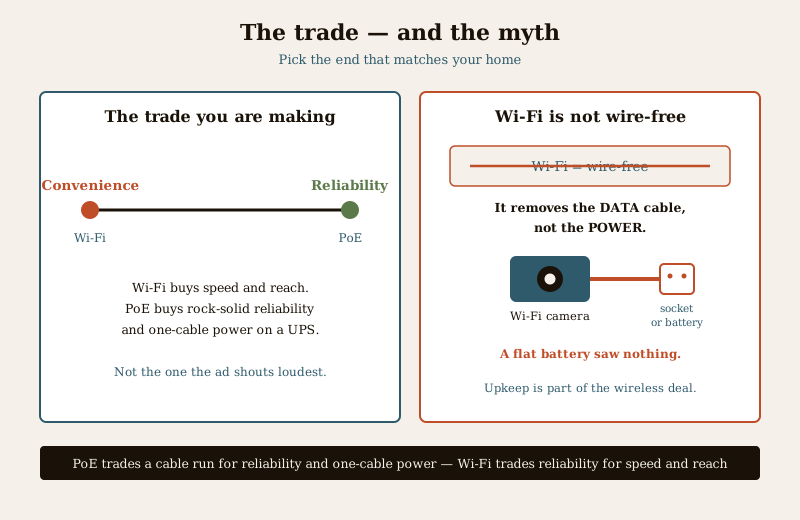
The trade in one image: slide toward convenience and reach and you get Wi-Fi, fast, tidy, portable, reaches anywhere with power and signal, but leaning on your Wi-Fi and on power at each camera. Slide toward reliability and you get PoE, permanent, dependable, one tidy cable that also carries power, backed by a single UPS, but a proper install job. Pick the end that matches your home, not the one the ad shouts loudest, and remember that Wi-Fi is not wire-free.
Where to go next
- The security comparisons pillar frames every "this vs that" security choice, and the analog vs IP CCTV guide is the sibling decision about the camera type itself.
- To turn the choice into a specific camera, see how to choose a CCTV camera.
- For the money side of a wired IP system, the IP CCTV cost guide covers cameras, switches, NVRs and storage.
- For the whole picture, the CCTV hub ties the pieces together.
Key takeaways
- There is no universal winner, PoE trades a cable run for rock-solid reliability and one-cable power; Wi-Fi trades a little reliability for speed and reach into spots no cable goes.
- PoE carries data and power down a single Ethernet cable to a switch or NVR, and is the pick for new builds, wire-able homes, many cameras, large footprints and reliability-critical use, cabled once, backed by one UPS.
- Wi-Fi is the pick for renters, quick or temporary needs, a few cameras, and spots with no cable route where there is power and strong signal.
- Wi-Fi is never truly wire-free, mains cameras need a socket at the camera, battery cameras need recharging; a flat battery saw nothing.
- A poorly-secured Wi-Fi camera is a hacking and jamming risk, change defaults, update firmware, use 2FA; footage is personal data under the DPDP Act 2023.
- A hybrid, a PoE core plus a Wi-Fi camera where no cable reaches, is often the honest best answer.
References
- Digital Personal Data Protection Act, 2023, CCTV footage, whether stored locally on an NVR or in a cloud service, is personal data; keep cameras to your own property and shared areas, secure access, and limit retention to a legitimate purpose.
- Manufacturer specification sheets, verify a camera's power method (PoE class and wattage, or mains adaptor, or battery), the PoE switch or NVR power budget, cable category and maximum run length, and security features before buying; "wire-free" refers to the data link, not the power.
- National Building Code of India (SP 7), Bureau of Indian Standards, and local municipal bye-laws for any structural, electrical or life-safety aspect of an install; verify the current edition (SP 7:2026) via the BIS catalogue: https://www.services.bis.gov.in/
This is an educational, even-handed overview to help you choose, not legal advice, a buying guide or a price list. Both PoE and Wi-Fi cameras are valid choices that win in different homes. Structured cabling, PoE, mounting, drilling and any mains-electrical work are qualified professional tasks, engage a licensed installer, secure any camera you fit, and verify any standard's current status via the BIS catalogue before relying on it.
Export this guide
Related Guides — Deep-dive reading
Wired vs Wireless CCTV in India (2026): Which One Should You Choose?
A cabled system on an NVR or DVR is rock-solid but needs drilling and runs; a Wi-Fi system goes up in an afternoon and is renter-friendly but leans on your router and power. An even-handed, India-grounded head-to-head that ends in a clear which-suits-whom verdict.
SecurityPoE vs Wi-Fi CCTV: Which Home Security Cameras Are Better?
One camera type runs power and video down a single Cat6 cable to an NVR and almost never drops out; the other clips to a wall in minutes and streams over your home Wi-Fi. This guide settles PoE vs Wi-Fi CCTV for Indian homes — reliability, video quality and bandwidth, cabling and power, retrofit versus new-build effort, NVR versus SD and cloud storage, hacking risk, real rupee costs, scalability and outdoor use — and gives a clear verdict for each kind of home.
Smart HomeCCTV Remote Access in India (2026): Watch From Your Phone, Safely
How to view your own cameras from anywhere without leaving the front door open to the internet — change the defaults, use strong credentials and 2FA, keep firmware current, prefer the vendor's secure cloud relay or a VPN, segment the camera network, and treat footage as personal data.
SecurityRelated Tools — Try Free
CCTV Camera Coverage & Count Calculator
Estimate how many CCTV cameras you need, the NVR channels, storage in TB for your retention period, and an indicative all-in cost with GST.
CCTV CalculatorCCTV Cloud vs Local Cost Calculator
Compare cloud CCTV subscription against a local NVR + HDD — upfront, 5-year total, monthly fee and break-even.
Cloud vs LocalPoE Power-Budget Calculator
Whether a PoE switch can power the connected cameras with cable-loss headroom, and how many devices it supports.
PoE Budget