
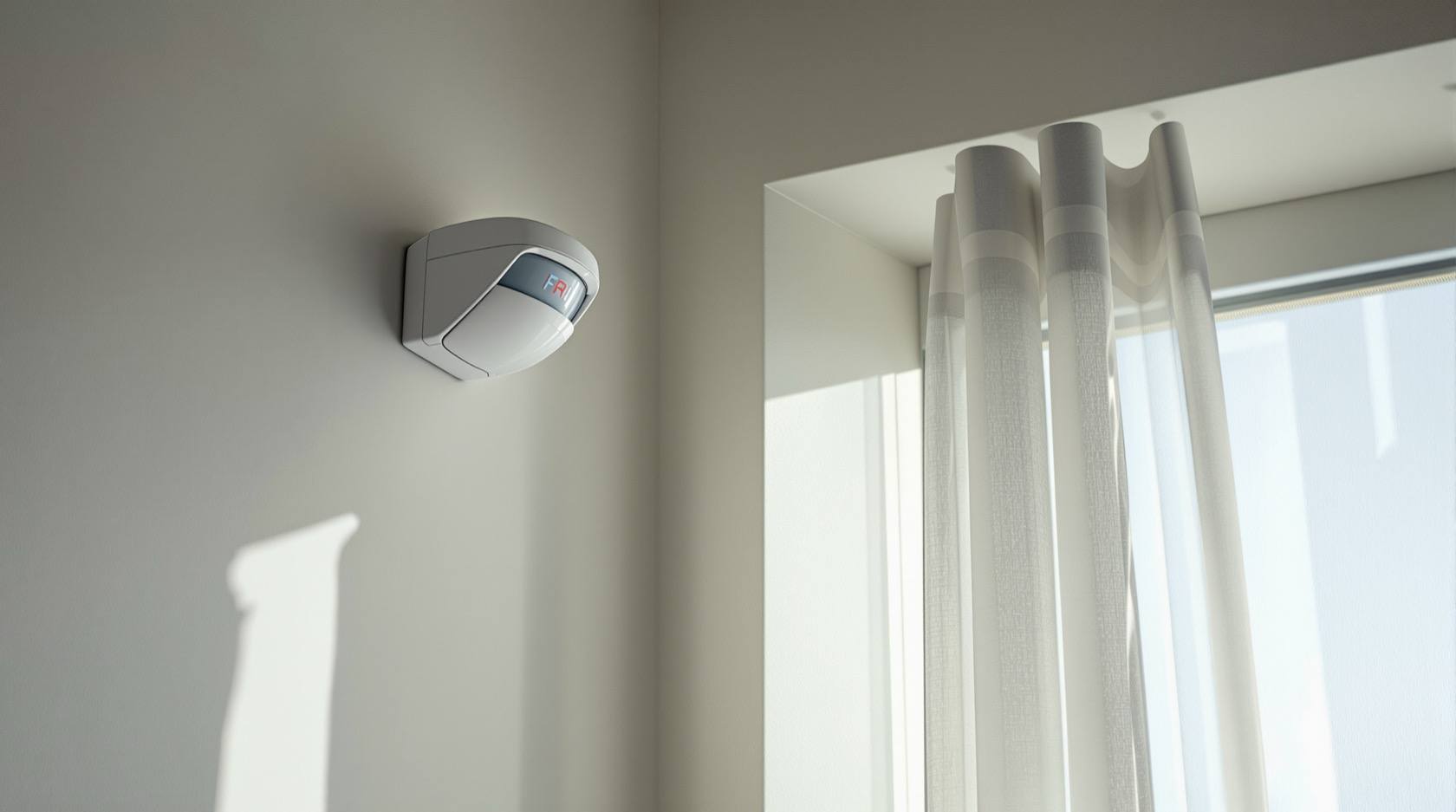
Motion Sensor False Triggers (2026): Why Your PIR Fires When Nothing Is There
A calm, ordered diagnosis for the Indian home whose PIR motion sensor keeps false-triggering — from pets and airflow on an AC vent to sunlight, heat, insects on the lens and low batteries — with the safe DIY fixes, the pet-immune upgrade, and the point where you call an installer.
Your motion sensor keeps going off when the room is empty. The alarm chirps, the app pings, the light snaps on at 2am, and every time you look, there is nothing there. It is one of the most common and most maddening security-system complaints in an Indian home, and the good news is this: it is almost never a "haunted" sensor or a broken one. A passive infrared (PIR) motion sensor does not see shapes or movement the way your eyes do. It detects a moving source of heat. So when it fires with no person present, the cause is almost always some other warm, moving thing in its field of view — a pet, a curtain fluttering in front of an AC vent, a shaft of sunlight sweeping the wall, a heater, or an insect walking across the lens.
That single fact — a PIR triggers on moving heat, not on people — turns a frustrating mystery into a short, orderly diagnosis. Once you know when it fires and where it is aimed, you can usually name the cause and fix it yourself in a few minutes. This guide walks that path from the most common cause to the rarest, separates the safe DIY fixes from the jobs that need an installer, and shows how to stop it recurring.
Scope and safety. This is a diagnostic guide for a home PIR motion sensor that false-triggers, not a price guide or a buying guide. The fixes here are deliberately simple and safe — re-aiming a sensor, adjusting a setting, swapping an accessible battery, wiping a lens, moving a heat source. Anything involving mains wiring, working at height on a ladder you are not steady on, or opening a hardwired panel is an installer's job — say so and call one. If your whole alarm is false-alarming across many sensors, or a life-safety device such as a smoke detector is sounding, do not simply disable it: that is a different problem covered in the security-system troubleshooting pillar and the false burglar alarms guide.
First, understand what a PIR actually senses
A PIR sensor is split into zones by the faceted lens on its front. It watches for a rapid change in infrared heat moving from one zone to the next — that is what "motion" means to it. A person walking across the room moves warm skin across those zones and trips it. But so does anything else that is both warm (or warm-against-a-cooler-background, or cool-against-a-warmer-one) and moving across the field:
- A pet, which is warm and moves at floor level.
- A curtain, plant leaf or hanging that flutters when air moves across it, especially in front of a warm or cool draught.
- A patch of sunlight or a car headlight beam sweeping across a wall as the sun moves or a vehicle turns.
- A heat source that flickers or changes — a heater, a hot appliance, a sun-baked wall the sensor faces.
- An insect crawling directly on the lens, which is huge and warm at that range.
Every false trigger you have is one of these. The whole diagnosis is figuring out which. For how PIRs work in more depth and how they differ from other detectors, see the motion sensors guide.
Likely causes, most common to rarest
Work down this list roughly in order — the top causes are both the commonest and the easiest to fix.
| Cause | Why a PIR fires on it | The fix |
|---|---|---|
| Pets (the number one cause) | A dog or cat is a warm mass moving across the floor — exactly what a PIR is built to catch | Use a pet-immune or pet-friendly PIR, or raise and angle the sensor so the pet stays below its beams |
| Moving air on a heat/cold source | A curtain, plant or hanging fluttering in front of an AC vent, fan, or warm window creates a moving temperature change | Re-aim away from vents and curtains; still the moving object; move the sensor |
| Sunlight or headlights sweeping the field | A bright, warm beam moving across a wall or floor reads as moving heat | Re-aim away from windows and the sun's path; block direct sun on the lens |
| A heat source in view | A heater, hot appliance, or sun-baked wall that heats and cools is a changing infrared source | Do not point the sensor at heaters, ovens, geysers, or a wall in direct sun |
| Insects or spiders on the lens | At lens range a warm insect fills the whole field; many are drawn to any glowing indicator LED at night | Keep insects off, wipe the lens, use a light dab of repellent nearby (not on the lens) |
| Placement facing a window, door or vent | The sensor is aimed straight at the hottest, draughtiest, busiest part of the room | Re-site so it looks across the room, not at the trouble spot |
| Sensitivity set too high | An over-sensitive sensor trips on tiny heat changes that a person never would | Turn sensitivity down a step; test |
| Low battery (wireless sensors) | A weak battery makes a wireless PIR behave erratically and send false or dropped signals | Swap the battery; note when you last changed it |
| Dirty or fogged lens | Dust, cobwebs or condensation on the lens scatter the infrared reading | Gently wipe the lens clean |
| A genuinely faulty sensor | Rare — but a sensor that fires constantly after everything above is ruled out may have failed | Have an installer test and, if needed, replace it |
The diagnostic path: when, then where
You do not need to guess. Two questions almost always find the cause.
Step 1 — Ask WHEN it triggers
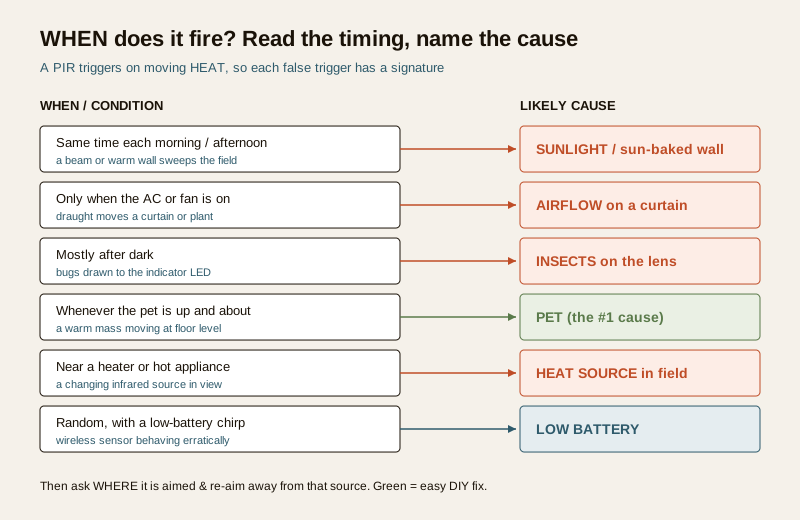
The timing is the single biggest clue, because each cause has a signature:
- Same time every morning or afternoon? That is the sun. As the sun tracks across the sky, a beam of light — or the warming and cooling of a wall the sensor faces — sweeps its field at a predictable hour. Sunrise and mid-afternoon are the classic windows.
- Only when the AC or fan is running? That is airflow. Moving air is setting a curtain, plant, blind or hanging in motion in front of the sensor, and the temperature difference of the draught makes that movement visible to the PIR.
- Mostly after dark, often with the indoor light off? That is insects. Moths, mosquitoes and spiders are drawn to the sensor's indicator LED and walk across the lens; at that range a single insect looks like a person.
- Whenever the pet is up and about, and quiet when it is shut out or asleep? That is the pet — by far the most common cause in homes with a dog or cat.
- Near a heater, geyser, kitchen appliance or a wall in direct sun? That is a heat source in the field of view.
- Random, with an occasional chirp or a low-battery flag in the app? Suspect the battery first.
Step 2 — Ask WHERE it is aimed
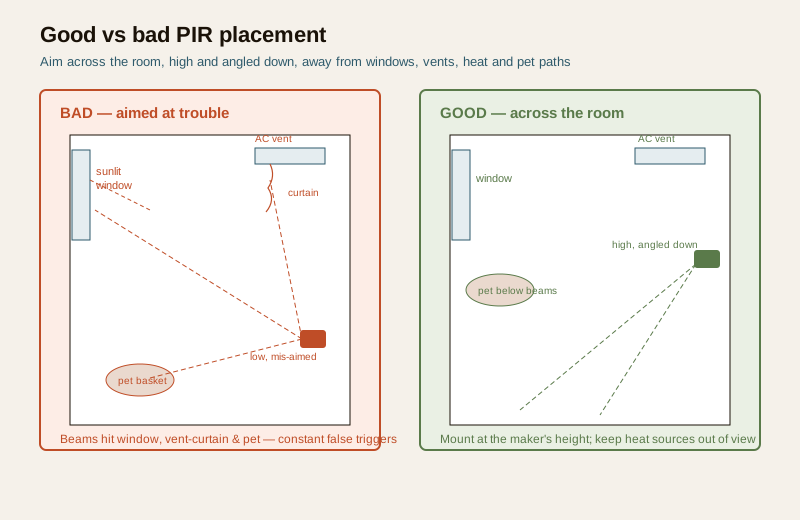
Now stand where the sensor is and look along its line of sight. A PIR should look across a room at a gentle downward angle, not straight at a window, a glass door, an AC vent, a ceiling fan, a heater, or the spot where your pet sleeps. If it is pointed at any of those, you have very likely found your cause without needing anything else. Testing the sensor deliberately — walking the room, watching what sets it off — is the fastest confirmation; the security sensor testing guide covers doing a proper walk-test.
Safe DIY fixes you can do today
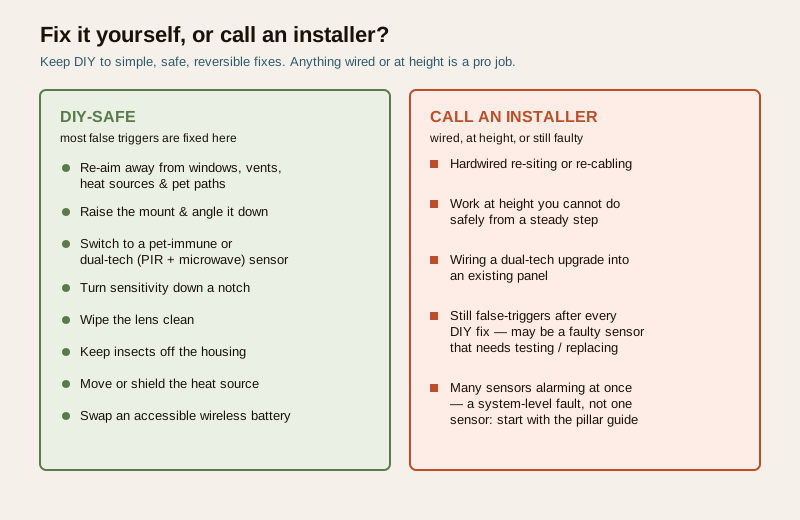
These are all low, safe, reversible fixes. If any step means climbing an unsteady ladder or touching mains wiring, stop and read the professional section below.
- Re-aim the sensor away from the trouble. The biggest win. Turn or tilt it so it looks across the room and away from windows, glass doors, AC vents, fans, heaters and your pet's usual paths and resting spots. Many sensors sit on a small swivel bracket you can adjust by hand.
- Raise the mounting height and angle it down. Mounting higher and tilting the sensor downward keeps a pet below the beams while still catching a standing person. Follow the height your sensor's maker specifies — this is the single most effective pet fix short of changing the sensor.
- Switch to a pet-immune or pet-friendly PIR. These are designed to ignore a mass below a certain weight moving at floor level while still detecting a person. If you have a dog or cat and re-aiming is not enough, this is the proper answer — see the pet-friendly motion sensors guide for how they work and how to set the pet-weight tolerance.
- Consider a dual-technology sensor for a tough spot. A dual-tech sensor combines PIR with microwave (or ultrasonic) detection and only alarms when both agree, which rejects most heat-only false triggers from sun, airflow and heat sources. It is a good upgrade for a sunroom, a draughty hall or any location that keeps false-triggering after re-aiming.
- Turn the sensitivity down a notch. If your sensor or app has a sensitivity or pulse-count setting, lower it one step and re-test. Higher pulse-count settings require more sustained movement before alarming, which filters out brief flickers.
- Clean the lens gently. Wipe dust, cobwebs and any condensation off the lens with a soft, dry cloth. A fogged or dusty lens scatters the reading.
- Keep insects off. Clear cobwebs around the housing, and if moths and mosquitoes are the night-time culprit, a light dab of insect repellent on the wall near the sensor (never on the lens itself) discourages them from crawling over it.
- Move or shield the heat source. Relocate a portable heater, close a blind that lets direct sun onto the sensor, or reposition a plant or curtain that flutters in the draught.
- Swap the battery (wireless sensors only). If it is a wireless sensor with an accessible battery compartment, replace the battery and note the date. A weak battery is a common cause of erratic wireless behaviour.
When to call an installer
Call a qualified installer or your alarm company — do not force it — if:
- The sensor is hardwired and re-siting it means running or re-terminating cable, or it sits on a panel you would have to open.
- It is mounted somewhere that needs work at height you cannot do safely from a steady step.
- You want to upgrade to a pet-immune or dual-technology sensor that has to be wired into an existing panel, or you are not sure the new sensor is compatible with your system.
- You have worked through every cause above — re-aimed it, changed the battery, cleaned the lens, moved the heat sources, lowered sensitivity — and it still false-triggers. At that point the sensor may genuinely be faulty and needs testing and, if confirmed, replacement.
- Several sensors are false-alarming at once, or the alarm keeps tripping with no obvious per-sensor cause — that points to a system-level fault rather than one sensor. Start with the security-system troubleshooting pillar and, for cutting nuisance alarms across the whole system, the false-alarm prevention guide.
Prevention: get it right so it does not come back
Most repeat false triggers trace back to the sensor being in the wrong place or being the wrong type for the room. Fix that once and the problem stays gone.
- Choose the right sensor for the room. A room with a pet needs a pet-immune PIR. A sunroom, a draughty hall, or a spot near a heater is better served by a dual-technology sensor that ignores heat-only events.
- Aim it across the room, not at trouble. Mount it in a corner looking across the space, away from windows, glass doors, AC vents, fans, heaters and any wall that catches direct sun.
- Mount at the maker's height and tilt it down. The right height and downward angle is what keeps pets below the beams and cuts the sun and airflow that live higher and to the sides.
- Keep the field of view clear and clean. No fluttering curtains, plants or hangings directly in front of it; a lens wiped clean; the housing free of cobwebs.
- Maintain it. Change wireless batteries on a schedule rather than waiting for erratic behaviour, and re-walk-test after any furniture move, new AC, or seasonal change in the sun's angle.
Quick checklist
- Note when it fires — time of day, AC or fan on, night, or when the pet moves — to name the cause.
- Look where it is aimed — re-aim away from windows, vents, fans, heaters and pet zones.
- Raise and angle it down; switch to a pet-immune or dual-tech sensor if needed.
- Lower sensitivity, wipe the lens, keep insects off, move heat sources.
- Swap the battery on wireless sensors.
- Still false-triggering after all that, or hardwired or at height? Call an installer — it may be faulty.
A PIR that keeps crying wolf is not broken magic — it is a sensor doing exactly what it was built to do, catching moving heat, just pointed at the wrong heat. Name the when, fix the where, and it goes quiet.
Where to go next
- Security-system troubleshooting — the pillar for any home security fault, including whole-system false alarms.
- False burglar alarms and false-alarm prevention — cutting nuisance alarms across the whole system.
- Motion sensors and pet-friendly motion sensors — how PIRs work and how to choose the right one for a home with pets.
- Security sensor testing — how to walk-test a sensor to confirm what sets it off.
- The troubleshooting sub-hub, the burglar-alarms sub-hub and the main security hub.
References
- Passive infrared (PIR) detection principle — a PIR responds to a moving change in infrared heat across its lens zones, which is why warm, moving non-human sources (pets, sunlight, airflow on curtains, heaters, insects) cause false triggers. Consult your sensor's installation sheet for its specified mounting height, coverage pattern, pet-immunity rating and sensitivity or pulse-count settings.
- Manufacturer installation guidance — mounting height, downward tilt, keeping windows, vents, fans and heat sources out of the field of view, and pet-immune weight tolerance are set by the maker; follow the sheet for your model.
This is an educational troubleshooting guide for a home PIR motion sensor, not an installation manual. Keep DIY to the simple, safe fixes described here; anything involving mains wiring, work at height you cannot do safely, or opening a hardwired panel is a qualified installer's job. If a life-safety device such as a smoke detector is sounding, do not disable it — have it diagnosed and fixed.
Export this guide
Related Guides — Deep-dive reading
False Alarm Prevention for Burglar Alarms in India: Causes & Fixes (2026)
Why home alarms cry wolf — ceiling fans, pets, heat, insects, weak batteries, power blips and poor door alignment — and how correct placement, the right sensors and simple upkeep keep the system trusted and armed.
SecurityFalse Burglar Alarms in India (2026): Why It Keeps Going Off, and How to Stop It
Your burglar alarm keeps crying wolf at nothing, annoying the neighbours and training everyone to ignore it. This calm, symptom-to-cause guide finds the culprit sensor or setting, orders the likely causes common to rare, and separates the safe home fixes from the installer's job.
SecurityAlarm Siren Not Working (2026): Why It Triggers but Stays Silent in India
Your burglar alarm detects and the panel reacts, but the siren does not sound, or sounds weak and thin. A calm, ordered diagnostic for Indian homes: the settings, power, backup battery, wiring and hardware faults that leave an alarm that cannot be heard, what you can safely check yourself, and when to call your installer.
SecurityRelated Tools — Try Free
Cross-Ventilation Analyzer
Estimate airflow and air changes per hour (ACH) from room size, window areas, layout, and local wind — with NBC 2016 Part 8 compliance check.
Ventilation CalculatorCCTV Mounting Height & Angle Calculator
Height, target distance and lens angle to the downward tilt, the blind dead-zone below and where coverage begins and ends.
Height & AngleBurglar Alarm System Selector
Answer a few questions about your property, cabling, coverage, monitoring and power and get the right burglar alarm — wired / wireless / hybrid, self or professionally monitored — with the design non-negotiables.
Alarm Selector