
False Burglar Alarms in India (2026): Why It Keeps Going Off, and How to Stop It
Your burglar alarm keeps crying wolf at nothing, annoying the neighbours and training everyone to ignore it. This calm, symptom-to-cause guide finds the culprit sensor or setting, orders the likely causes common to rare, and separates the safe home fixes from the installer's job.
There are few things more corrosive to home security than an alarm that cries wolf. It goes off at two in the morning at nothing, again the next afternoon while the house is empty, and within a fortnight the whole family and every neighbour has learned to ignore it. That is the real danger of a false alarm: not the noise, not even the annoyed neighbours or the risk of a nuisance penalty, but that it quietly trains everyone to switch off precisely when a genuine break-in needs them to react. An alarm nobody trusts is worse than no alarm at all.
The good news is that false burglar alarms almost always have a plain, findable cause — and most causes are cheap and safe to fix yourself. The single most useful fact in this whole guide is that the problem is nearly always ONE thing: one sensor, one dying battery, one rattling door, one wrong setting. Your job is to find which one. This guide gives you the order to look in, from the common causes to the rare ones, and a diagnostic path that starts where the answer usually already is: the panel's own event log. It is the troubleshooting companion to the false-alarm prevention guide, which stops them recurring; here we diagnose the one that is happening now.
Scope & safety. This is a diagnosis-and-fix guide for a homeowner with a common wireless or hybrid burglar alarm. The safe home fixes are reading the event log, swapping an accessible sensor battery, re-aiming or cleaning a sensor, securing a rattling contact and correcting an arming setting. Anything behind mains power, a panel that needs opening, fixed wiring, a sensor mounted at height on a ladder, or a fault that will not clear is a licensed installer's job — stop and call your installer or AMC. This is not a price or a buying guide; for repair-versus-replace and costs, defer to the cost and lifecycle guides. Alarm and camera logs can hold personal data under the Digital Personal Data Protection Act, 2023. Educational guidance, not legal advice.
The golden rule: do not just disable it
Before anything else, one thing this guide will never tell you to do: do not simply pull the batteries, mute it forever, or unplug the panel to make the noise stop. That is not a fix — it is disarming your home and leaving it defenceless against the real intruder the system exists to catch. Silencing the siren for the moment is fine while you diagnose; permanently killing a nuisance alarm instead of finding its cause is how a family ends up unprotected. A false alarm is a fault to be diagnosed and fixed, and then the system put back on guard. If, after everything here, it still trips at nothing, that is the point to call your installer, not the point to give up on the alarm.
Start at the panel: what does the event log say?
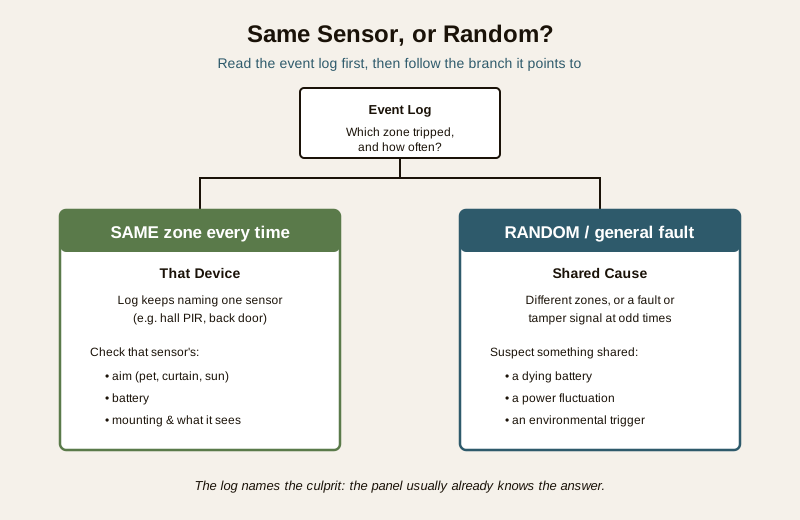
Almost every burglar alarm keeps an event log — a memory of what tripped it, when, and crucially WHICH zone or sensor. This is the fingerprint at the scene, and reading it turns a mystery into a name. Before you touch a single sensor, open the log on the keypad, the app, or the panel display and look at the last few alarm events.
The one question that splits the whole diagnosis in two:
- Is it always the SAME zone or sensor? If the log keeps naming "Zone 3 - hall PIR" or "back door contact", your problem is almost certainly THAT specific device — its aim, its battery, its mounting, or the object it keeps seeing. You now know exactly where to go.
- Or is it RANDOM — different zones, or a general fault or tamper signal, at odd times? Scattered, system-wide trips point away from any one sensor and toward something shared: a dying battery somewhere sending fault signals, a power fluctuation, or an environmental trigger like a thunderstorm or electrical interference.
If your panel does not log zones, treat any repeatable pattern — same time of day, same weather, same room — as the log talking to you in another language. Testing each sensor one at a time (see security sensor testing) then reproduces what a log would have told you.
The likely causes, common to rare
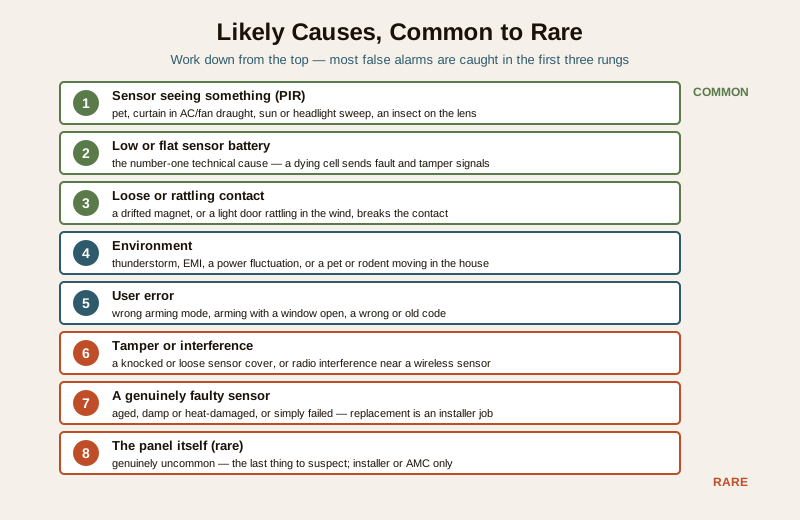
Here is the order to suspect things in — the top of the table catches most false alarms, the bottom is genuinely rare. Work down it.
| Cause | Why it trips a false alarm | Safe home fix |
|---|---|---|
| A sensor seeing something (PIR) | A motion sensor triggered by a pet, a curtain moving in AC or fan airflow, hot sunlight or a car headlight sweep, or an insect crawling on the lens. Very common in India. | Re-aim the PIR away from pets, curtains and heat; clean the lens; use a pet-immune sensor. See motion-sensor false triggers. |
| Low or flat sensor battery | The number-one technical cause. A wireless sensor with a dying cell sends low-battery, fault or tamper signals that read as an alarm or a supervision fault. | Replace the battery in the named sensor, or all sensor batteries as a set if none is named. |
| A loose or rattling contact | A door or window contact that has drifted, or a light door rattling in the wind, breaks the magnetic contact for a moment and trips the zone. | Re-seat or re-align the contact; stop the door rattling; secure a loose magnet. |
| Environment | A thunderstorm, electrical interference (EMI), a power fluctuation or brown-out, or a pet, rodent or large insect moving in the house. | Fit the router and panel behind stable power; keep pets out of armed zones; seal against rodents. |
| User error | Arming in the wrong mode, arming with a window already open, a wrong or old code, or someone forgetting the alarm is set. | Use the right arming mode (Stay vs Away); shut everything before arming; tidy the code list. |
| Tamper or interference | A tamper switch tripped by a knocked or loose sensor cover, or radio interference near a wireless sensor. | Re-seat the sensor cover firmly; move sources of interference; note it if it persists. |
| A genuinely faulty sensor | A sensor that has aged, taken damp or heat, or simply failed and now trips on its own. | Testing isolates it; replacement is usually an installer job. |
| The panel itself (rare) | A panel fault or corrupt configuration — genuinely uncommon, and the last thing to suspect. | Installer or AMC only. |
The diagnostic path, step by step
Follow this in order and stop as soon as it clears.
1. Read the event log. Which zone or sensor is named? Is it the same one every time, or random? This alone usually points you at the cause. If it names one sensor, go to step 3 with that sensor. If it is random or a general fault, weight steps 4 and 5.
2. Silence, do not disable. Acknowledge and silence the current siren at the keypad so you can think — but leave the system able to be re-armed. You are diagnosing, not switching the house off.
3. Go to the named sensor and look at it physically. For a motion sensor (PIR): what is in its field of view? A pet that can now reach a sofa-back, a curtain lifting in the draught from an AC or ceiling fan, a patch of afternoon sun or a headlight beam that sweeps a window, or an insect or gecko on the warm lens. Re-aim it away from those, clean the lens gently, and if pets set it off, ask your installer about a pet-immune sensor. The detail is in motion-sensor false triggers. For a door or window contact: is the door rattling in the wind, or has the magnet drifted out of line? Re-seat it so the two halves sit close and square.
4. Suspect the battery — especially if it is random. A wireless sensor with a dying battery is the classic random-fault and tamper generator. If the log named a sensor, replace THAT sensor's battery first; if the trips are scattered with a low-battery or fault warning, replace the batteries across your wireless sensors as a set. Fresh cells of the right type clear a surprising number of "no reason" alarms. Burglar-alarm maintenance covers the replacement routine.
5. Consider the environment and yourself. Did it trip during a thunderstorm, a power cut or a voltage swing? Put the panel and router on stable power. Have you changed anything — moved furniture, got a pet, opened a window before arming, changed the AC or fan? And check the human side: were you arming in Away mode when someone was still home, or arming with a window open? Correcting the arming mode fixes a great many "false" alarms that were the system working correctly on a wrong instruction.
6. Re-arm and test. Once you have a suspect fixed, re-arm and, if you can, walk-test the sensor safely to confirm it behaves. Security sensor testing shows how to test a zone without a full call-out.
7. Still tripping at nothing? Now, and only now, is it a persistently faulty sensor, wiring, tamper or a panel fault — the installer's territory below.
Safe home fixes versus the installer's job
The split matters: most false-alarm cures are genuinely DIY, but a few are not, and knowing where the line sits keeps you both safe and effective.
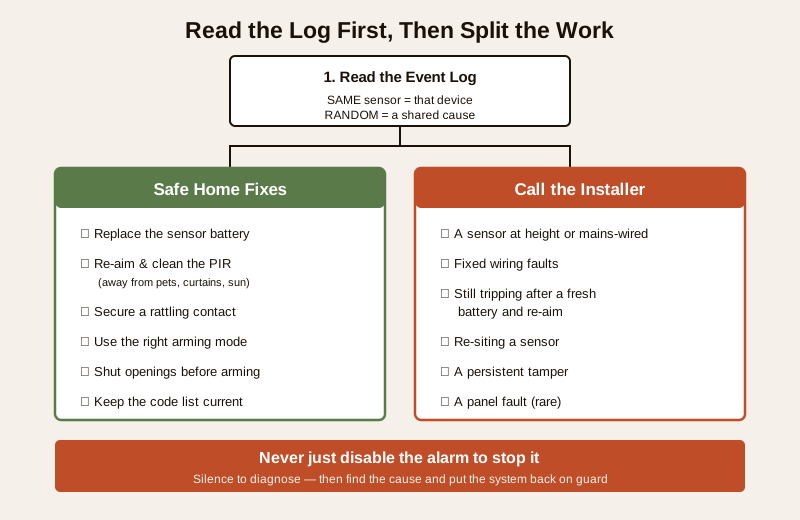
Safe to do yourself:
- Read the event log to find the culprit zone.
- Replace an accessible sensor's battery — the single highest-value fix.
- Re-aim or adjust a PIR away from pets, curtains, heat and headlight sweep, and switch to a pet-immune sensor where pets roam.
- Clean a sensor lens gently with a soft dry cloth.
- Secure a rattling door or window contact and re-align a drifted magnet.
- Use the correct arming mode (Stay when people are home, Away when out) and shut all openings before arming.
- Keep the code list current so nobody trips it with a wrong or stale code.
When to call your installer or AMC. Stop and call a professional for: a sensor mounted at height that needs a ladder; any sensor or panel that is mains-wired or needs its cover opened; fixed cabling faults; a sensor that keeps tripping after a fresh battery, a clean and a re-aim (a genuinely faulty unit needing replacement or re-siting); a persistent tamper you cannot clear; or any suspicion of a panel fault. Re-siting a sensor properly — the real cure for a PIR that can never avoid the ceiling fan or the sunny window — is also best done by the installer who knows the system. If your alarm links to a monitoring service, tell them you are testing so a diagnostic trip is not treated as a real event. For a siren that is stuck on or will not sound at all, see alarm siren not working.
Prevention so it does not come back
Most false alarms are preventable, and the same handful of habits stop the vast majority:
- Change sensor batteries on the first low-battery warning, not when they die — and note the date. This alone removes the commonest technical cause.
- Site and aim motion sensors thoughtfully — away from curtains, AC and fan draughts, direct sun, headlight-swept windows and pet zones — and use pet-immune sensors if you have animals. The prevention guide and motion-sensor false triggers go deep on this.
- Keep lenses and contacts clean and firmly mounted, and stop doors and windows rattling in the wind.
- Learn the arming modes and make shutting every opening part of the arming routine.
- Service the system regularly — a periodic walk-test and battery check via burglar-alarm maintenance and security sensor testing catches the dying sensor before it cries wolf.
Key takeaways
- A false alarm is dangerous because it trains everyone to ignore the real one — treat it as a fault to find and fix, and never simply disable the alarm to stop the noise.
- Read the event log first. It names the culprit zone and answers the one question that splits the diagnosis: is it always the SAME sensor (that device) or RANDOM (a shared cause like a battery, power or the environment)?
- Work the causes common to rare — a PIR seeing a pet, curtain, heat or insect; then a low or flat sensor battery (the top technical cause); then a loose or rattling contact; then environment, user error, tamper, a faulty sensor and, rarely, the panel.
- Most cures are safe DIY — replace the battery, re-aim and clean the sensor, secure the contact, use the right arming mode. Call the installer for anything at height, mains-wired, re-sited, persistently faulty or a panel fault.
- Prevent recurrence with early battery changes, thoughtful sensor siting, clean firmly-mounted devices, learned arming modes and regular servicing.
Where to go next
- Motion-sensor false triggers and the false-alarm prevention guide — the deep dives on the two biggest causes and stopping them for good.
- Burglar-alarm maintenance and security sensor testing — the servicing and walk-test routines that catch a dying sensor early.
- Alarm siren not working — for the related "siren stuck on or silent" problem.
- The security-system troubleshooting pillar and the troubleshooting sub-hub, the burglar alarms sub-hub, and the main security hub.
References
- Manufacturer specifications and the user manual for your own alarm panel and sensors — confirm how to read the event log, the exact low-battery and tamper behaviour, the arming modes, the battery type, and any pet-immune or sensitivity settings before acting.
- Digital Personal Data Protection Act, 2023 — alarm event logs and any linked camera footage can hold personal data; agree who may view them, and how long they are kept, if a monitoring service or AMC is involved.
- National Building Code of India (SP 7), Bureau of Indian Standards, and local fire and municipal bye-laws for any mains-wired, fire-linked or escape-route aspect of an alarm; verify the current edition via the BIS catalogue: https://www.services.bis.gov.in/
This is an educational overview, not legal advice. Mains wiring, work at height, opening a panel, sensor re-siting and any fault that will not clear are qualified professional tasks — engage a licensed installer or your AMC, never simply disable a burglar alarm to stop a false alarm, and verify any standard's current status via the BIS catalogue before relying on it.
Export this guide
Related Guides — Deep-dive reading
Alarm Siren Not Working (2026): Why It Triggers but Stays Silent in India
Your burglar alarm detects and the panel reacts, but the siren does not sound, or sounds weak and thin. A calm, ordered diagnostic for Indian homes: the settings, power, backup battery, wiring and hardware faults that leave an alarm that cannot be heard, what you can safely check yourself, and when to call your installer.
SecurityDoor Sensor Not Responding (2026): Fix a Contact That Won't Report in India
Your door or window contact sensor stops telling the alarm when it opens and closes, or shows offline, open-fault or tamper. A calm, ordered diagnostic for Indian homes: a magnetic reed contact is a simple device, so the causes are simple. The flat battery, the misaligned halves, the lost pairing, the loose wire and the zone setting, what you can safely fix yourself, and when to call your installer.
SecurityFalse Alarm Prevention for Burglar Alarms in India: Causes & Fixes (2026)
Why home alarms cry wolf — ceiling fans, pets, heat, insects, weak batteries, power blips and poor door alignment — and how correct placement, the right sensors and simple upkeep keep the system trusted and armed.
SecurityRelated Tools — Try Free
Acoustic Privacy (STC) Visualizer
Indian healthcare acoustic visualizer — compare wall assemblies and noise sources, see received SPL after STC attenuation, and check FGI 2018 / IS 1950 / NABH speech-privacy compliance with live dual-canvas waveform.
Acoustic ToolWindow Cleaning Cost Calculator
Estimate professional window cleaning cost per visit and per year by access and frequency.
Window CalculatorBurglar Alarm System Selector
Answer a few questions about your property, cabling, coverage, monitoring and power and get the right burglar alarm — wired / wireless / hybrid, self or professionally monitored — with the design non-negotiables.
Alarm Selector