
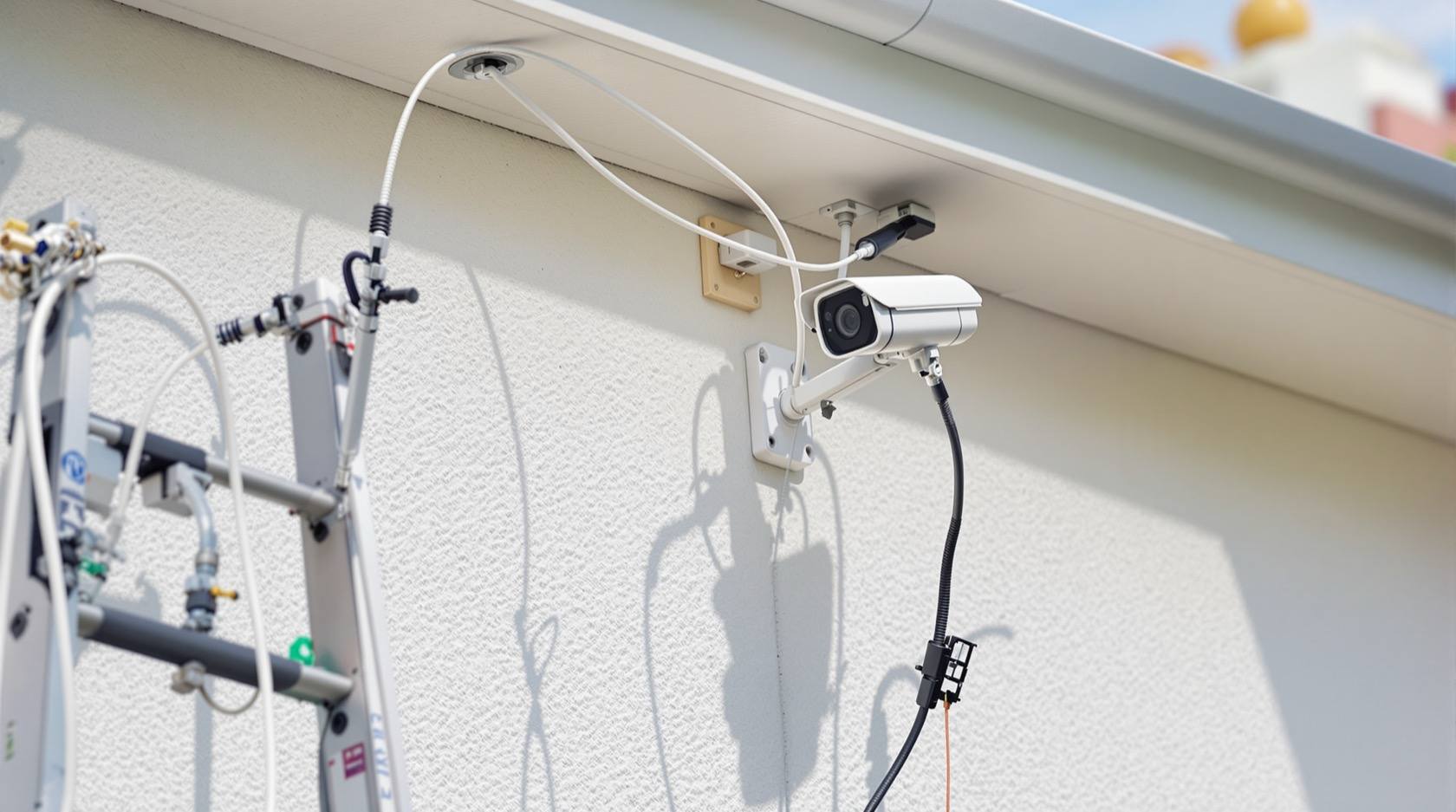
CCTV Installation Cost in India (2026): Reading the Whole Quote, Not Just the Camera Price
What a CCTV installation actually costs in India once you count cameras, the recorder, storage, cabling, power, a monitor, mounting and labour, and the ongoing costs after handover, all as honest, indicative 2026 bands you sanity-check against three itemised quotes.
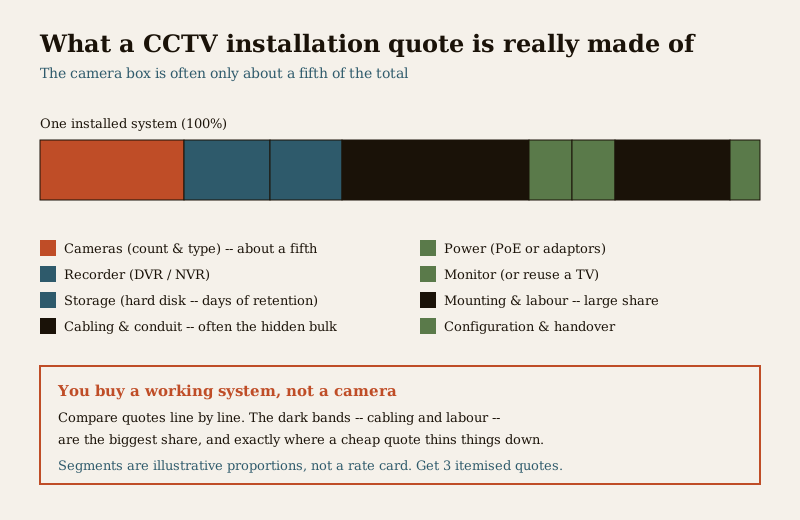
Ask what a CCTV camera costs and someone will quote you the price of the box. Ask what a CCTV installation costs and the honest answer is a different, larger, and far more useful number, because the camera on the wall is often the smallest line on the bill. A working system is cameras plus a recorder plus a hard disk plus the cable that connects it all plus power plus a monitor plus the labour to mount, run, terminate and configure the lot. The camera might be a fifth of the total. The cable, the mounting and the labour are frequently the hidden bulk of the job — and they are exactly what a suspiciously cheap quote quietly thins down.
This guide breaks a CCTV quote into its real parts so you can read one, compare one, and know where the money genuinely goes. Every figure here is an indicative 2026 band, not a rate card — CCTV pricing moves with city, brand, cable runs, wall type and how many floors the cable has to climb. The single decision that moves your bill the most is not the brand of camera; it is which type of system you choose, and that is why this guide sits alongside the IP CCTV cost guide, the analog CCTV cost guide, the wireless CCTV cost guide and the cloud CCTV cost guide. For the whole-home budget this sits within, see the home security system cost pillar; for how CCTV actually works and where cameras go, the CCTV hub.
Scope & how to read the numbers. This is a budgeting and quote-reading guide, not a fitting manual. Every rupee figure here is an indicative 2026 band that varies with your city, the brand, the length and difficulty of the cable runs, your wall type and the number of floors — treat them as a way to sanity-check a quote, never as a rate to hold an installer to. Prices are typically quoted before GST, which is extra. The one rule that protects you: get at least three written, itemised quotes that list every part and its quantity, and read capex (the one-time install) separately from opex (the running cost). Drilling, wiring, mains power and ladder work at height belong to a licensed installer; you plan the coverage, decide the system and budget honestly. Point cameras only at your own property — the DPDP Act 2023 and basic decency mean you do not aim a lens into a neighbour's window or a shared private space. This is educational guidance, not legal advice.
The camera price is not the installation cost
The most expensive mistake a homeowner makes is comparing two quotes by their per-camera number. A quote that says "₹1,200 per camera" and a quote that says "₹3,500 per camera" may be pricing completely different things — one is the bare box, the other bundles the recorder, cable, mounting and labour spread across the cameras. You are not buying cameras; you are buying a working, recording, viewable system, and that is the number to compare.
A complete home CCTV installation has, at minimum, these parts:
- Cameras — the count and type (indoor dome, outdoor bullet, a wider or night-focused unit) drive both the hardware and the labour.
- The recorder — a DVR for analog cameras or an NVR for IP cameras, sized for the number of channels.
- Storage — one or more hard disks, sized for how many days of footage you want to keep.
- Cabling and conduit — coaxial or network cable, plus conduit, clips and routing, from every camera back to the recorder. Often the hidden bulk of the job.
- Power — either PoE (power over the network cable, IP systems) or individual adaptors and a power cable run (analog).
- A monitor — a screen to view and set up the system, unless you reuse an existing TV.
- Mounting and labour — brackets, drilling, ladder work at height, cable pulling, termination and clean routing.
- Configuration and handover — setting recording schedules, remote app access, and showing you how to use and export footage.
What each line costs, honestly
The bands below are wide on purpose. A camera can be a budget indoor unit or a good outdoor night-vision one; a cable run can be three metres in the same room or thirty metres up two floors and around a parapet. Read every band together with its drivers — the things that move you up or down it — and never accept a band without them.
| Line item | Indicative 2026 band | What moves it up the band |
|---|---|---|
| Camera (per unit) | roughly ₹1,200 to ₹6,000+ | outdoor vs indoor, night/low-light quality, wider lens, IP vs analog, brand and warranty |
| Recorder (DVR/NVR) | roughly ₹4,000 to ₹15,000+ | number of channels, IP vs analog, PoE built in, brand |
| Storage (hard disk) | roughly ₹3,500 to ₹9,000+ | capacity in TB, surveillance-grade vs desktop drive, days of retention |
| Cabling and conduit | roughly ₹40 to ₹120 per metre installed | cable quality, concealed vs surface conduit, run length, floors climbed |
| Power (PoE or adaptors) | folded into recorder or roughly ₹300 to ₹800 per camera | PoE switch/injector vs individual adaptors, cable run for power |
| Monitor | roughly ₹6,000 to ₹12,000, or reuse a TV | dedicated screen vs existing TV |
| Mounting and labour | roughly ₹400 to ₹1,500 per camera | wall type (brick vs RCC vs stone), height and access, indoor vs outdoor |
| Configuration and handover | often bundled, sometimes ₹500 to ₹2,000 | remote-access setup, number of users, walkthrough |
Two things stand out when you total this. First, the camera box is often only about a fifth of a proper installed price. Second, cabling plus mounting plus labour are frequently the single largest share — which is exactly why the cheapest quotes attack those lines, not the camera. A ₹1,200 camera on ₹40-per-metre thin cable with a ten-minute mount is a real quote; it is also the one that fails in two monsoons.
Why per-camera install cost varies so wildly
Two homes buying the identical camera can pay very different amounts to get it working, because the install, not the box, is what varies. The per-camera labour and cabling cost is driven by:
- Cable run length. A camera three metres from the recorder is cheap; one at the far corner of the plot, thirty metres away, costs metres of cable, conduit and pulling time.
- Floors and height. Cable that climbs from a ground-floor recorder to a second-floor camera, or a camera mounted high for reach and tamper-resistance, means ladder work, more cable and more time.
- Wall and surface type. Drilling and anchoring into RCC or stone is slower and dearer than brick or block; concealed conduit inside a finished wall costs far more than surface routing.
- Indoor versus outdoor. An outdoor camera needs a weatherproof-rated unit, a sealed junction, surge-aware wiring and a mount that survives sun and rain — all of which cost more than a simple indoor dome.
- Access and obstacles. A clear soffit is easy; routing around a parapet, through a false ceiling, or across a compound wall to a gate camera adds real labour.
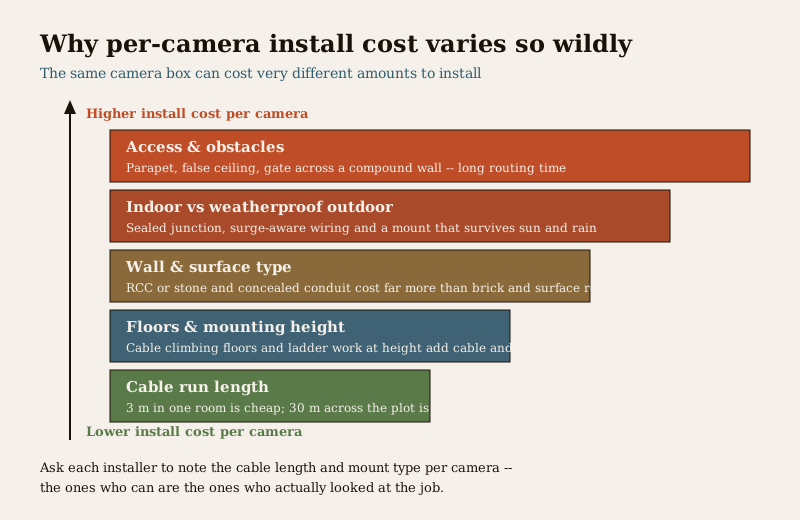
This is why a single per-camera figure is almost meaningless without knowing the runs. When you take quotes, ask each installer to note the approximate cable length and mount type per camera — the ones who can are the ones who have actually looked at the job.
Ballpark bands for typical home jobs
With all of that framed, here are wide, honest ballparks for common home installations — total installed, before GST, assuming a mix of indoor and outdoor cameras, a recorder, a hard disk sized for one to two weeks of retention, cabling, mounting and configuration. These are sanity-check bands, not quotes. Your real number depends on the drivers above and, most of all, on which system type you pick.
| Typical job | Rough scope | Indicative installed band (before GST) |
|---|---|---|
| Small home / entrance and gate | 2 to 4 cameras, 4-channel recorder, one hard disk | roughly ₹15,000 to ₹40,000 |
| Medium home / independent house | 4 to 8 cameras, 8-channel recorder, one to two disks, longer runs | roughly ₹35,000 to ₹90,000 |
| Large home / villa with outbuildings | 8 to 16 cameras, 16-channel recorder, multiple disks, long outdoor runs | roughly ₹80,000 to ₹2,00,000+ |
The spread inside each row is real, not vagueness: the low end is analog cameras on short surface runs; the high end is good IP cameras on concealed conduit across multiple floors and outdoor faces. The choice between analog, IP, wireless and cloud is what moves you across that spread more than any other decision — read the IP CCTV cost, analog CCTV cost, wireless CCTV cost and cloud CCTV cost guides before you lock a number, because they explain the trade-offs behind these bands.
One-time cost versus ongoing cost
The install is the capex — the one-time spend to get a working system. But a camera system is not a buy-once appliance; it has an opex tail that most cheap quotes never mention. Separate the two honestly.
| One-time (capex) | Ongoing (opex) |
|---|---|
| Cameras, recorder, hard disk | Hard-disk replacement every few years (a surveillance disk running continuously wears out) |
| Cabling, conduit, power, mounting | Annual maintenance / AMC if you take one (cleaning lenses, checking recording, re-aiming, firmware) |
| Monitor, configuration, labour | Cloud storage or remote-viewing subscription, if your system uses cloud recording |
| Electricity — a small but constant 24/7 draw for the recorder and cameras | |
| Occasional call-outs after storms, power surges or a failed adaptor |
The two running costs people forget are the hard disk and, if you chose it, cloud storage. A drive recording continuously does not last forever, and its replacement is a real future cost. Cloud recording removes the local-disk worry but adds a monthly or yearly fee that, over five years, can quietly exceed the hardware — which is precisely the trade-off the cloud CCTV cost guide exists to lay out. Budget for the tail before you sign, not after the first disk dies.
What a cheap quote quietly leaves out
A quote that undercuts every other by a wide margin has usually found the savings in places you cannot see on day one but will feel later. The camera model is rarely where a cheap quote cuts; the install quality is. Watch for:
- Thin, low-grade cable. The commonest cut. Poor coaxial or unbranded network cable degrades the image, drops signal on long runs and corrodes outdoors. Cable is cheap to skimp on and expensive to replace once it is buried in conduit.
- No surge protection. In much of India, power fluctuation and lightning-season surges kill cameras and recorders. A quote with no surge or proper earthing consideration is buying you a repair bill.
- Sloppy mounting. A camera hung on a plastic plug in a soft wall, or aimed once and never adjusted, drifts, sags and gives you a view of the sky. Proper anchoring and a sealed outdoor junction cost a little and last for years.
- Undersized storage. A disk that only holds three days means the footage you need is gone by the time you look. Ask how many days the quoted disk actually retains at the quoted resolution.
- No configuration or handover. A system that records but is never set up for remote viewing, correct time-stamps or clean coverage is half-installed. If nobody shows you how to export footage for the police, you own a box, not a system.
- No weatherproofing for outdoor units. An indoor-grade camera or an unsealed joint outdoors fails in the first monsoon.
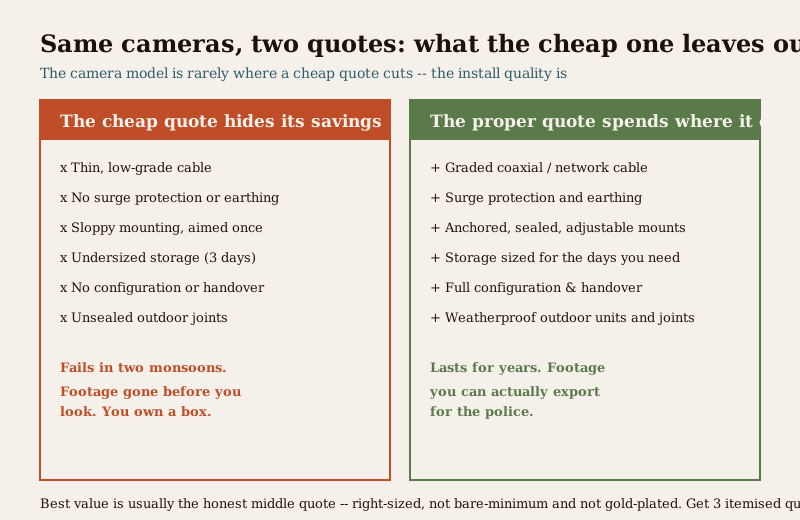
None of this means the most expensive quote is the right one. It means you compare quotes on what is in them, line by line, not on the bottom figure. The right value is usually the middle quote that names good cable, surge protection, properly sized storage and a real handover — right-sized to your home, neither a bare-minimum box nor gold-plated overkill.
How to read and compare three quotes
The single most protective thing you can do is insist on three written, itemised quotes and lay them side by side. A good quote lists every camera by type and location, the recorder and its channel count, the hard-disk capacity and the days of retention it gives, the cable type and approximate metres, whether power is PoE or adaptor, the mounting approach, and what configuration and handover are included. A quote that is a single line — "CCTV system, X cameras, ₹Y" — cannot be compared to anything and hides everything discussed above.
Ask each installer the same questions: How many days does this disk actually store at this resolution? Is there surge protection and earthing? Is the outdoor cable and each outdoor joint weatherproof? Is remote-app viewing set up and shown to me? What is covered if a camera fails in six months? The installer who answers cleanly is usually the one who priced the job honestly.
Remember the placement rule while you plan coverage: aim cameras at your own doors, gate, boundary and parking — the points that matter — and never into a neighbour's home or a shared private space. Under the DPDP Act 2023 the footage you record is personal data you are responsible for; good coverage of your property is the goal, not surveillance of anyone else's.
Key takeaways
- You are buying a working system, not a camera — cameras, recorder, storage, cabling, power, monitor, mounting, labour and handover are all real lines, and the camera box is often only about a fifth of the total.
- Cabling, mounting and labour are frequently the largest share — and exactly what a cheap quote thins down, so compare quotes line by line, not on the bottom figure.
- Per-camera install cost varies wildly with cable-run length, floors and height, wall type, indoor versus weatherproof outdoor, and access — a single per-camera number is meaningless without the runs.
- The bands are wide and indicative — roughly ₹15,000 to ₹40,000 for a small home, ₹35,000 to ₹90,000 for a medium one, and more for a villa, before GST, and always to be verified with three itemised quotes.
- Separate one-time from ongoing — budget for hard-disk replacement, any AMC, cloud fees if used, and electricity, not just the install.
- A cheap quote hides its savings in thin cable, no surge protection, sloppy mounting, undersized storage and no handover — the middle, honest quote is usually the best value.
- Point cameras only at your own property — the DPDP Act 2023 makes the footage your responsibility, and the system type you choose moves your bill more than the brand.
Where to go next
- IP CCTV cost, analog CCTV cost, wireless CCTV cost and cloud CCTV cost — the choice that moves your bill the most.
- The home security system cost pillar and the security cost sub-hub — where CCTV fits in the whole-home budget.
- The CCTV hub and the main security hub — how cameras work, where they go and how CCTV sits in a layered home.
References
- Digital Personal Data Protection Act, 2023 (DPDP) — CCTV footage of identifiable people is personal data; aim cameras at your own property only, avoid neighbours' and shared private spaces, and be responsible for how recordings are stored and shared.
- Goods and Services Tax (GST) — CCTV equipment and installation services attract GST; most installer figures are quoted before tax, so confirm whether a quote is inclusive or exclusive before comparing.
- Bureau of Indian Standards (BIS/ISI) — prefer ISI-marked cameras, recorders and cable where marked; verify a product's current standard status via the BIS catalogue: https://www.services.bis.gov.in/
This is an educational, budgeting overview for homeowners planning a CCTV installation — not legal advice or an installation manual. Every price is an indicative 2026 band that varies by city, brand, cable runs, wall type and floors; get at least three written, itemised quotes before deciding, and engage a licensed installer for drilling, wiring and work at height.
Export this guide
Related Guides — Deep-dive reading
Data Storage Cost for CCTV in India (2026): Local Disks vs Cloud, and How to Size It
The running cost people forget when they buy cameras. Where the footage actually lives — a one-time surveillance hard disk in the recorder, or a recurring per-camera cloud plan — and how camera count, resolution, frame rate, recording mode and retention days decide how many terabytes, and how much money, you really need.
SecurityWireless CCTV Cost in India (2026): Cheap to Buy, Read the Running Costs First
What Wi-Fi and wire-free CCTV really costs an Indian home — a low, DIY-friendly install price that hides a subscription, battery and reliability bill. An honest, capex-versus-opex look at where the money actually goes over three to five years, with indicative bands and the drivers that move them.
SecurityHome Security System Cost in India (2026): The Honest Budgeting Guide
There is no single price for a home security system — it is a stack of choices. This pillar gives you the mental model to budget the whole home: the cost drivers, the split between one-time capex and ongoing opex, wide indicative tier bands, a five-year total-cost lens, and how to read and compare quotes.
SecurityRelated Tools — Try Free
CCTV Camera Coverage & Count Calculator
Estimate how many CCTV cameras you need, the NVR channels, storage in TB for your retention period, and an indicative all-in cost with GST.
CCTV CalculatorCCTV Cloud vs Local Cost Calculator
Compare cloud CCTV subscription against a local NVR + HDD — upfront, 5-year total, monthly fee and break-even.
Cloud vs LocalCCTV Cable-Length Calculator
Total cable to buy for a CCTV job and a warning when a run exceeds the cable's maximum length.
Cable Length