
Cloud Recording Failure in India (2026): Your Footage Never Reached the Cloud
You open the app to pull the clip you were sure was safely saved off-site, and there is a gap where the footage should be. A calm, ordered guide to why cloud CCTV and doorbell recordings go missing in India, subscription first, then internet and settings, and why a local copy is the backstop that never lets you down.
You set up a cloud camera or a smart doorbell for exactly one reason: so the footage would be safe somewhere other than the house. Not on a card a thief could pocket, not on a box that could burn, but up in the cloud, out of reach, always there. Then something happens, a parcel goes missing, a scooter is scraped, someone leans on the gate, and you open the app to pull the clip, calm in the knowledge that it was saved off-site. The live view is perfect. And the timeline for the moment you need is empty. A gap. "No recordings for this period." The footage you counted on being in the cloud was never saved there at all.
Take a breath, because this is one of the most common and most fixable faults in a home cloud camera, and it is almost never the camera being broken. Cloud recording is not one thing; it is a chain. A live picture reaching your phone tells you the camera and your connection are alive right now, but saving a clip to the cloud needs three separate things to be true at once: an active subscription, an internet link steady enough to upload, and the recording actually switched on and in the right mode. Break any one link and the live view still looks flawless while nothing is being kept. This guide walks the causes in the order you should really check them, from the most common and free to fix to the rarest, and it ends with the one honest truth about cloud recording that changes how you should set the whole thing up.
Scope and safety. This is a diagnostic guide for a homeowner with an ordinary cloud camera or smart video doorbell. Everything here is app-and-settings work you can safely do yourself: checking your subscription, confirming the device is online, turning cloud recording on, choosing the right mode, and testing your upload speed. There is no mains electrical work and nothing to open. This is not a price or a buying guide, so where a plan must be renewed or upgraded, the numbers belong in the cost library, not here. Your footage lives on the vendor's server, which makes it personal data under the DPDP Act 2023, so it is worth knowing where it is stored and how it is secured.
First, the one truth that explains everything
Before you chase causes, understand what cloud recording actually depends on, because it makes every fault below obvious:
A cloud recording only happens if the subscription is active, the internet can carry the upload, AND recording is switched on. All three, every time.
A local recorder writes to a disk a metre away and asks almost nothing of the world. Cloud recording asks a great deal: you must be paying for the storage, your broadband must push the video up steadily, and the vendor's servers must be up to receive it. Live view riding to your phone proves only that the link is alive at this instant, not that a clip was written and kept minutes or hours ago. That is why a system can look perfectly healthy and still have saved nothing. Hold that idea, and the ordered causes below fall straight into place.
The likely causes, in the order to check them
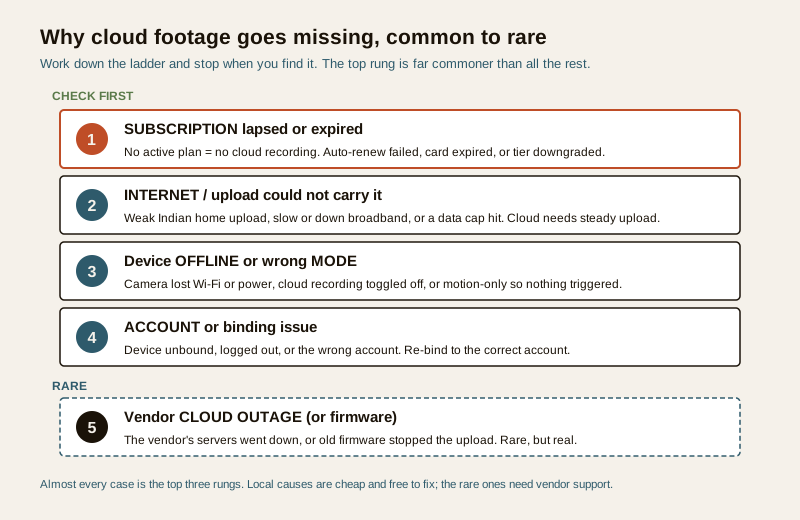
The causes line up in a reliable order for Indian homes, and the first one is far more common than all the rest put together. Work down this list and stop when you find your problem.
| Cause | Why it stops the cloud recording | The fix |
|---|---|---|
| Subscription lapsed or expired | No active cloud plan means no cloud recording, full stop. The commonest cause by far | Renew or reactivate the plan |
| Auto-renew failed | The card expired or the payment bounced, so the plan quietly ended | Update the card and turn auto-renew back on |
| Plan downgraded or wrong tier | A cheaper or free tier records less, keeps footage fewer days, or covers fewer cameras | Check what the tier actually includes; upgrade if needed |
| Slow or weak upload | Indian home broadband often has weak upload; the video cannot get up in time | Check upload speed; improve Wi-Fi or connection |
| Broadband down or data cap hit | The link dropped or the data allowance ran out, so nothing uploaded | Restore the connection; check the data plan |
| Device offline | The camera lost Wi-Fi or power, so there was nothing to upload | Bring the device back online |
| Cloud recording toggled off | The cloud-record switch is simply off for that camera | Turn cloud recording on |
| Wrong mode, motion-only | Set to record on motion, but nothing triggered, so the moment was never captured | Check motion settings or switch to continuous |
| Account or binding issue | The device was unbound, you are logged into the wrong account, or the session dropped | Re-bind the device to the correct account |
| Vendor cloud outage | The vendor's servers had an outage. Rare, but real | Check the vendor's status; wait and verify |
| Firmware fault | Old or buggy firmware stopped the upload | Update firmware; contact vendor support |
The diagnostic path, step by step
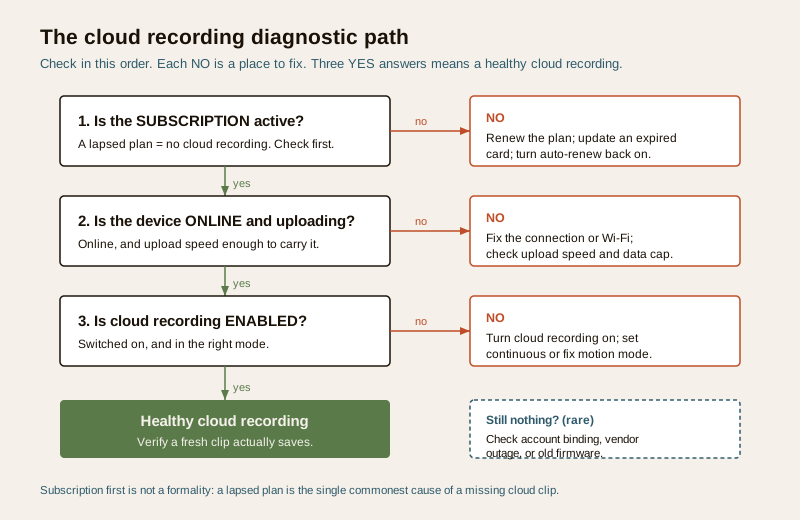
Follow this in order. Each step tells you where to go next.
Step 1 — Check the subscription first, always
This is the single most common cause, so start here every time. Open the app and find the subscription, plan, or cloud storage page. This one screen answers most cases.
- If the plan shows expired, lapsed, or inactive, you have found it. No active cloud plan means no cloud recording, and there is nothing more to diagnose until it is back. Renew or reactivate it. Very often the underlying reason is a failed auto-renew: an expired debit or credit card, or a payment that bounced, quietly ended the plan without a loud warning. Update the card and turn auto-renew back on so it does not recur.
- If the plan is active but a lower or free tier than you remember, check exactly what that tier includes. A downgrade can mean fewer days of retention, only motion clips instead of continuous, or fewer cameras covered, so the footage you wanted was outside what the plan keeps. If you recently changed plans, this is a likely culprit. For what the tiers actually buy, the cloud CCTV cost guide lays out how plans and retention are structured.
- If the plan is active and the right tier, move to Step 2.
Step 2 — Confirm the device is online and able to upload
Cloud recording needs the video to physically get up to the server, and that is where Indian home connections often quietly fail.
- Is the device shown as online in the app? A camera that is offline, has lost Wi-Fi, or lost power was never sending anything to record. If it is offline, that is a connection fault in its own right; the security system network failure guide walks through bringing a device back onto the network.
- Is your upload speed enough? This is the quiet Indian problem. Many home broadband and mobile plans give generous download but weak upload, and cloud video needs steady upload to keep up. Run a quick speed test on the phone near the camera and look at the upload figure, not the download one. If upload is low, or the Wi-Fi signal at the camera is weak, clips may fail to reach the cloud even though live view, which needs far less, still works.
- Is the broadband down, or has a data cap been hit? A dropped connection or a monthly data allowance that ran out both stop uploads cold. A camera uploading all day uses real data; on a capped or metered plan that matters.
Step 3 — Confirm cloud recording is on and in the right mode
A device that is paid up and online still saves nothing if it was simply told not to.
- Is cloud recording switched on for the camera you care about? It is easy for the cloud-record toggle to be off, especially after an app update, a reset, or a change of plan, so the device happily shows live but keeps nothing.
- Is it set to continuous, or to motion only? Motion-only recording is efficient and common on cloud plans, but if the sensitivity is too low, the detection zone is wrong, or the camera watches a still scene, it may almost never trigger, and you get gaps that look like a total failure. If you are unsure, set the important camera to continuous, or the most sensitive motion setting your plan allows, and see if clips appear.
- Is the retention long enough? If clips exist but only for the last day or two when you expected a week, that is your plan's retention window, not a fault. Know your real retention in days.
Step 4 — Rule out the account and the vendor
If the subscription, the connection, and the settings are all correct and clips still do not save, the cause is deeper.
- Check the account and binding. Make sure the device is still bound to your account, that you are logged into the correct account and not a second one made by mistake, and that the session has not silently logged out. Re-binding the device to the right account fixes a surprising number of "it just stopped" cases. If the app itself will not connect, the security mobile app not connecting guide covers that separately.
- Check for a vendor cloud outage. This is rare but real. If everything on your side is right, look at the vendor's status page or support channels for a reported outage, and check the device firmware is up to date, since an old build can stop uploads. A persistent problem with nothing wrong at your end is a case for vendor support.
Safe DIY versus when to get help
The good news is that almost everything on the cloud side is safe to do yourself, because it is all in the app.
Safe to do yourself:
- Check and renew the subscription, and fix a failed auto-renew or expired card.
- Confirm the device is online, and test your upload speed near the camera.
- Turn cloud recording on and choose the right mode and sensitivity.
- Improve the Wi-Fi signal at the camera and check for a data cap.
- Re-bind the device to the correct account and update firmware.
- Verify a fresh clip actually saves after any change.
Get vendor or professional help for:
- Persistent upload failures where the subscription is active, the device is online, and settings are right, but clips still will not save, which points to a connection, account, or server issue you cannot see.
- Account or binding problems you cannot resolve, and any suspicion the device was bound to someone else's account, which is a matter for vendor support.
- A suspected device fault, where a camera that used to upload reliably no longer does after everything else checks out.
The honest truth about cloud recording
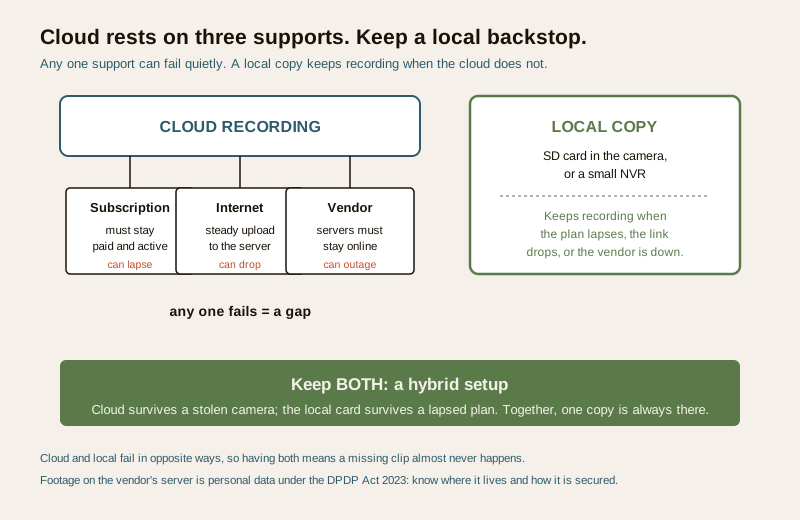
Here is the trade-off no cloud camera box prints in big letters. Cloud recording depends on three things you do not fully control: a subscription that must stay paid, an internet link steady enough to upload, and the vendor staying online. Any of the three can fail quietly, and when it does, the footage you were counting on simply is not there. That is not a reason to abandon cloud recording, which is genuinely valuable because it survives the camera itself being stolen or smashed. It is a reason not to rely on it alone.
The resilient answer is hybrid: keep a local copy as well as the cloud one. A camera or doorbell that also records to a local SD card, or a system with a small NVR, keeps writing footage even when the plan has lapsed, the broadband is down, or the vendor is having a bad day. The two failure modes are almost opposite: a local card can be stolen with the device, while the cloud copy survives that; the cloud can vanish with a lapsed plan or a dead link, while the local card keeps going. Having both means one is nearly always there. If cloud is your only copy, understand exactly where that footage is stored and how it is secured, which the cloud storage security guide covers, because it is personal data under the DPDP Act 2023.
Prevention: never find a gap again
The whole sting of a cloud gap is that you discover it at the worst moment, long after it started. A few habits close it for good.
- Set auto-renew with a valid card, and check it. The commonest cause of a cloud gap is a lapsed plan from a failed payment. Keep the card current and glance at the plan status now and then.
- Keep a local backup. An SD card in the camera or a small NVR is the backstop that records through a lapsed plan, a downed link, or a vendor outage. This one step defeats most of this guide.
- Make sure your upload can carry it. Know your real upload speed and keep the Wi-Fi strong where the camera sits, so clips actually reach the cloud.
- Verify recording every month. Once a month, open the app and confirm that yesterday's footage is genuinely saved in the cloud for each camera. This thirty-second check is the most valuable habit here.
- Know your retention. Be clear how many days your plan keeps, and make sure it comfortably exceeds how long an incident might take to come to light.
The two-minute cloud health check
- Open the app and confirm the subscription is active and on the tier you expect.
- Confirm every camera shows online, and that the upload speed where it sits is healthy.
- Confirm cloud recording is switched on and in the mode you want for each camera.
- Open the cloud timeline and confirm yesterday's footage is actually there.
- Confirm a local copy exists as a backstop, on an SD card or NVR.
A cloud recording failure is frightening precisely because you find it too late, but on a home camera it is one of the most fixable faults there is, and usually a free one. Work down the causes in order, subscription first, then internet, then the device and its mode, and keep a local copy so that no lapsed plan or dropped link ever leaves you with an empty timeline again.
For the closely related case where a local recorder shows live but saves nothing, see the CCTV recording failure guide. For the wider set of surveillance faults, the security system troubleshooting pillar collects the related guides.
Export this guide
Related Guides — Deep-dive reading
CCTV Recording Failure in India (2026): Live View Works but Nothing Was Saved
You open the recorder to pull footage of an incident and there is nothing there, even though every camera shows a crisp live picture. A calm, ordered guide to why an Indian CCTV system records live but saves nothing, and how to fix it before the next incident.
SecurityCCTV Storage Maintenance in India (2026): Keeping the Footage There When You Need It
Surveillance storage is a wear item that fails silently. This professional guide covers checking disk health, verifying recordings actually exist for the full retention window, planning drive replacement before failure, keeping a spare, and holding an off-site backup so a dead or stolen recorder is not total loss.
SecurityLocal Storage vs Cloud CCTV in India (2026): Where Your Footage Should Live
A homeowner's honest head-to-head on where CCTV footage is kept — on a hard disk in the recorder at home, or uploaded to a per-camera cloud plan — across cost, theft resilience, internet dependence, retention, remote access and DPDP privacy, ending in a clear which-suits-whom, with hybrid usually the smartest answer.
SecurityRelated Tools — Try Free
CCTV Camera Coverage & Count Calculator
Estimate how many CCTV cameras you need, the NVR channels, storage in TB for your retention period, and an indicative all-in cost with GST.
CCTV CalculatorCCTV Cloud vs Local Cost Calculator
Compare cloud CCTV subscription against a local NVR + HDD — upfront, 5-year total, monthly fee and break-even.
Cloud vs LocalCCTV Recording-Duration Calculator
How many days of footage your storage holds, from cameras, bitrate, hours per day and recording mode.
Retention Days