
Cloud CCTV Data Protection in India (2026): Your Footage on Someone Else's Computer
The moment your camera footage goes to the cloud, it lives on a company's servers instead of a box in your home. That is convenient and, done carefully, safe. This guide shows how to protect it, DPDP-style, and what to ask before you subscribe.
"The cloud" is a comforting word for something quite specific: cloud cctv data protection starts with accepting that your footage is not floating in the sky, it is sitting on a company's computers in a building somewhere, reachable over the internet. When your camera streams to an app instead of a hard disk in your cupboard, you gain remote access and an off-site backup, and you take on a new set of risks. This guide is about keeping that trade fair and safe.
The reassuring part first: cloud cameras can be a perfectly sensible choice for a home. They survive a burglar walking off with your recorder, they let you check in while travelling, and a good provider often secures data better than an unpatched box under your TV ever could. The honest part second: once footage leaves your home, you are trusting a third party with recordings of your family, your visitors and possibly your neighbours. That trust should be earned, not assumed.
Scope & how to read this. This is practical guidance grounded in the Digital Personal Data Protection Act, 2023 (DPDP Act), not legal advice. For anything with legal weight — a real breach, a workplace scheme, a dispute — take professional advice from a qualified lawyer or your Data Protection Officer. Throughout, choose the least-intrusive option, and treat "trust the provider, but verify" as the rule.
What actually changes when footage goes to the cloud
With local storage, your footage sits on an NVR or SD card you physically control. With cloud storage, three things change at once, and it is worth naming them plainly.
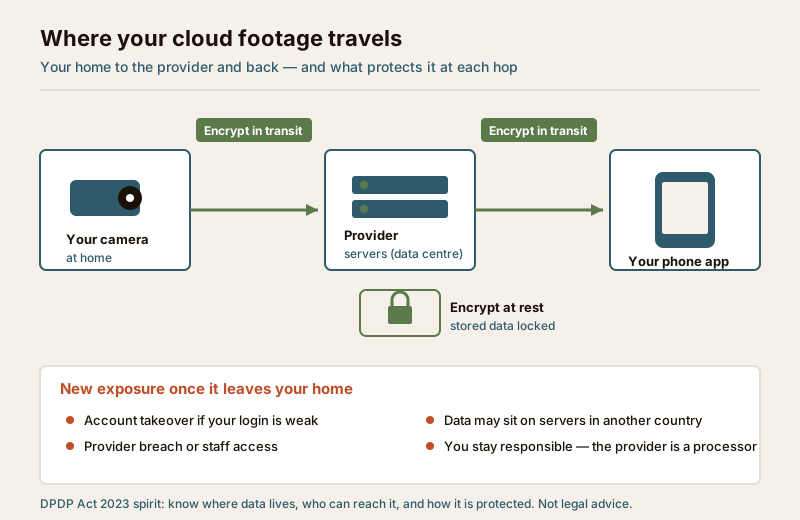
- You add a third party. A cloud provider that stores and processes your footage is, in DPDP language, a data processor acting for you. You are still the one who decided to collect the footage, so you remain accountable for it — the person whose face is recorded looks to you first, not to a data centre they have never heard of.
- Your footage travels and rests elsewhere. It crosses the internet to reach the provider and then sits on their servers, which may be in another city or another country entirely. Data crossing borders is not automatically wrong, but you should know it is happening.
- The attack surface moves. A thief can no longer just grab the box, but a stranger with your password can now watch from anywhere, and a breach at the provider can expose many customers at once.
None of this means "avoid the cloud". It means go in with your eyes open. The clean comparison of the two models — what each is genuinely better and worse at — lives in the local storage versus cloud CCTV guide; this guide assumes you have chosen, or are leaning toward, cloud and want to do it responsibly.
Your DPDP duties do not move to the cloud
A tempting misreading is that once a professional company holds the data, the responsibility is theirs. It is not. Under the DPDP Act 2023, if you decide the purpose and means of collecting footage, you carry the duties — even a household running a couple of cameras should treat these as the ethical floor. A processor helps you meet them; it does not replace you.
Here is how the Act's principles land on a cloud-camera setup, in plain language.
| DPDP principle | What it means for cloud footage |
|---|---|
| Lawful, defined purpose | Have a real reason (deterrence, evidence) — not "record everything because storage is cheap". |
| Notice | Tell the people you record, with a visible sign; cloud does not remove this. |
| Data minimisation | Fewest cameras, narrowest views, mask what you must not see; less footage in the cloud is less to lose. |
| Storage limitation | Set the shortest retention that meets your need, not the longest the plan offers. |
| Security safeguards | Encryption in transit and at rest, a strong account, limited access — the heart of this guide. |
| Accountability | You can explain why you collect, where it is stored, who can see it, and when it is deleted. |
Two of those deserve their own paragraph. Where the data lives and who can reach it is something you are entitled to know — a serious provider can tell you which country hosts your footage and whether provider staff can view clips. And storage limitation is easy to get wrong in the cloud, because plans nudge you toward keeping more for longer; decide your retention on need, not on what the subscription includes. For how to think about retention periods, see the CCTV footage retention guide.
Dignity and rights callout. Cloud convenience makes over-collection frictionless — endless retention, cameras everywhere, clips shared to a dozen phones. Resist it. The people in your footage — family, domestic staff, delivery workers, neighbours who stray into frame — have a reasonable expectation of privacy and rights as data principals to know, and in appropriate cases to seek erasure. Uploading their images to a distant server does not dilute that; if anything it raises the stakes. Collect less, keep it shorter, share it narrower.
Securing your account is most of the job
For a home user, the single biggest cloud risk is not an exotic provider hack — it is a weak or reused login letting a stranger walk straight into your camera. Account security is the part fully in your hands, and it is where your effort pays off most.
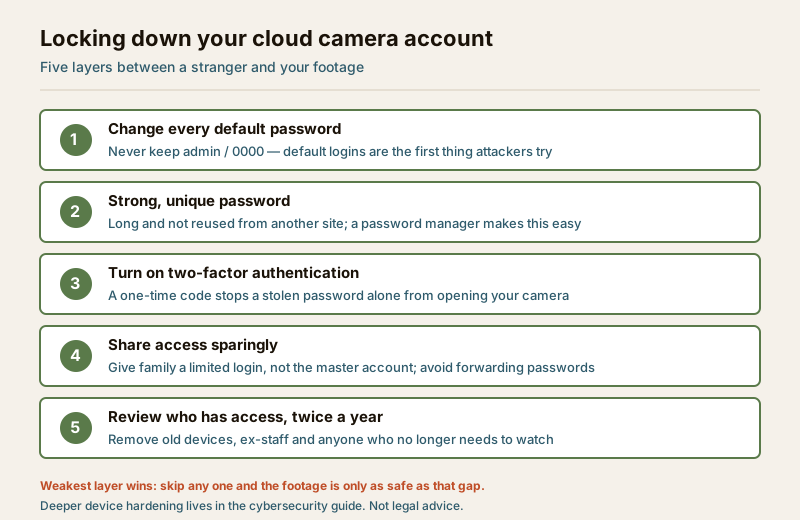
- Kill every default credential. Cameras and apps that ship with "admin" or "0000" are the first thing an attacker tries. Change them before the camera ever faces a room.
- Use a strong, unique password. Long, and never reused from another site — a breach elsewhere should not hand over your cameras. A password manager makes this painless.
- Turn on two-factor authentication. A one-time code means a stolen password alone is not enough. If your provider offers it and you switch on nothing else, switch on this.
- Share access sparingly. Give family members their own limited login rather than the master account; never forward the password over chat. Fewer keys, fewer ways in.
- Review access on a schedule. Twice a year, remove old phones, former staff and anyone who no longer needs to watch. Access granted once tends to linger forever unless you prune it.
This is the account layer. Hardening the camera and your home network more deeply — firmware updates, network segmentation, disabling risky remote features — is its own subject, covered in the security system cybersecurity guide. Do both: a locked account on an unpatched camera, or a patched camera behind a guessable password, each leaves a door open.
Questions to ask a provider before you subscribe
You would not hand your house keys to a stranger without a word. A cloud provider holds something just as personal, so ask before you commit. A confident, specific answer is a good sign; evasion or "it's all secure, don't worry" is a reason to look elsewhere.
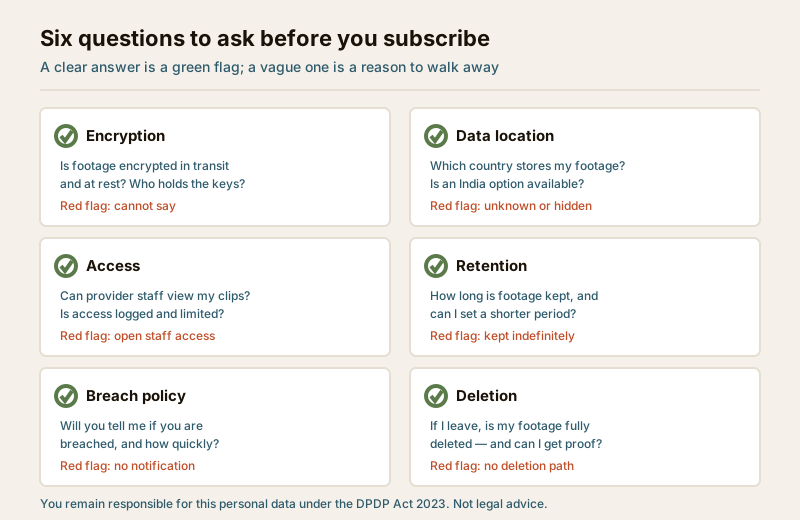
- Encryption. Is footage encrypted in transit and at rest? Ideally, can it be encrypted so that even the provider cannot casually view it?
- Data location. Which country stores my footage, and is there an option to keep it in India?
- Access. Can provider staff view my clips? Is such access limited, logged and only for support with my involvement?
- Retention. How long is footage kept by default, and can I set a shorter period or delete on demand?
- Breach policy. If you suffer a breach affecting my data, will you tell me, and how quickly?
- Deletion. When I close my account, is my footage fully and permanently deleted, and can I get confirmation?
A note on breach notification. India's framework — the DPDP Act 2023 together with CERT-In directions on incident reporting — expects personal-data breaches to be handled and, in appropriate cases, notified. A provider that commits in writing to telling you promptly if your footage is exposed is showing you it takes that seriously. If you ever face a real incident, follow the steps in the data breach response guide and take professional advice — do not rely on a checklist alone.
The honest trade-off, and choosing well
Cloud is not automatically safer or riskier than local — it moves the risk around. Local storage keeps your footage physically in your hands but can be stolen, corrupted or lost with the device, and it offers no remote view. Cloud gives you off-site resilience and access from anywhere, at the cost of trusting a third party and depending on your internet and their security. Many homes sensibly run both: local recording as the base, cloud as backup for the most important cameras.
| Concern | Cloud footage | Local footage |
|---|---|---|
| Survives device theft/damage | Yes, off-site copy | No, lost with the box |
| Remote access | Yes, by design | Only if you expose it (risky) |
| Third party can access | Possible — depends on provider | No third party involved |
| Ongoing cost | Subscription | One-time hardware |
| Your responsibility | Still yours — provider is a processor | Entirely yours |
The full head-to-head is in the local storage versus cloud CCTV guide, and if you are still weighing whether cloud cameras suit your home at all, start with the cloud CCTV overview.
Your cloud footage protection checklist
- Pick a provider you can question. One that answers the six questions above clearly and in writing.
- Prefer an India or named data-location option where offered, and confirm encryption in transit and at rest.
- Set the shortest sensible retention and turn on any auto-delete; do not hoard footage because the plan lets you.
- Lock the account: unique strong password, two-factor authentication, no defaults, minimal sharing.
- Post a clear CCTV notice where you record people, cloud or not.
- Review access and devices twice a year; remove anyone who no longer needs it.
- Know your exit: how to export what you need and get everything deleted when you leave.
Red flags in a provider
- No clear answer on encryption or data location — or a breezy "everything is secure" with no detail.
- No two-factor authentication offered on the account.
- Footage kept indefinitely with no way to shorten retention or delete on demand.
- Unlimited or unlogged staff access to customer clips.
- No breach-notification commitment in the terms.
- No deletion path when you close the account, or no confirmation that data is gone.
- Vague, missing or contradictory terms about what is done with your footage.
When to get legal or professional advice
Most of this you can do yourself. Bring in help when the stakes rise: a real or suspected breach of your footage (follow due process and consult a professional), a workplace or tenancy scheme where you record staff or tenants (a lawyer, not a camera app, should shape that), or any request from police or a court for cloud footage (follow lawful process; ask the provider and, if needed, a lawyer). For the broader ethics of watching people at all, the CCTV privacy guide is the right next read.
Key takeaways
- The cloud is someone else's computer. Your footage lives on a provider's servers, and under the DPDP Act 2023 you remain responsible for it — the provider is a processor, not a replacement for your duty.
- Convenience buys new exposure. Remote access and off-site backup come with account-takeover, provider-breach and cross-border-storage risks; go in knowing them.
- Securing your account is most of the win. Unique strong password, two-factor authentication, no defaults, minimal sharing, regular access reviews.
- Interrogate the provider first. Encryption, data location, access, retention, breach policy and deletion — clear answers are a green flag, vagueness is a red one.
- Collect less, keep it shorter, share it narrower — cloud makes over-collection easy, so apply minimisation deliberately.
- This is guidance, not law. For a breach, a workplace scheme or a legal request, take professional advice.
References
- Digital Personal Data Protection Act, 2023 — governs personal data including identifiable footage; the person who decides to collect it remains accountable, with duties of notice, purpose limitation, minimisation, storage limitation and security safeguards. Verify current text and rules before relying on it.
- CERT-In directions on incident reporting — set expectations for handling and reporting cyber incidents and data breaches in India; confirm the current directions and timelines applicable to you.
- Provider terms of service and privacy policy — read your specific provider's commitments on encryption, data location, staff access, retention, breach notification and deletion before subscribing.
This is an educational overview, not legal advice. How the DPDP Act 2023 and related rules apply to your cloud-camera setup depends on your exact facts — consult a qualified lawyer or your Data Protection Officer for any decision with legal weight.
Export this guide
Related Guides — Deep-dive reading
Complete Guide to Security System Cybersecurity in India (2026): Protecting the Systems That Protect You
The cameras, locks, alarms and door phones you install to feel safer are internet-connected computers that can themselves be attacked, and an insecure one is worse than none. This pillar maps the whole attack surface — devices, network, accounts and data, operations — and points to every guide that hardens it.
SecurityCCTV Remote Access in India (2026): Watch From Your Phone, Safely
How to view your own cameras from anywhere without leaving the front door open to the internet — change the defaults, use strong credentials and 2FA, keep firmware current, prefer the vendor's secure cloud relay or a VPN, segment the camera network, and treat footage as personal data.
SecuritySmart Security Privacy in India: The System That Watches You More Than Any Burglar
A smart security system spends every hour of every day watching your family, your staff and your routines — and that footage and data, not a burglar, is the long-term risk most buyers never think about. Where cameras belong and where they must never go, where your video actually goes, what a smart home learns about you, your rights under the DPDP Act 2023, and the honest practice for keeping it all yours.
SecurityRelated Tools — Try Free
CCTV Cloud vs Local Cost Calculator
Compare cloud CCTV subscription against a local NVR + HDD — upfront, 5-year total, monthly fee and break-even.
Cloud vs LocalCCTV Camera Coverage & Count Calculator
Estimate how many CCTV cameras you need, the NVR channels, storage in TB for your retention period, and an indicative all-in cost with GST.
CCTV CalculatorCCTV Placement Compliance Checker
A quick DPDP-grounded privacy and safety self-check for where a camera is pointed — flags the items to fix.
Compliance