
Data Breach Response in India (2026): When Your Security System Is the Leak
Your cameras, cloud account and access logs hold personal data about real people. If that data is hacked, exposed or stolen, here is a calm, step-by-step plan: contain, assess, notify and remediate, and what you must never do.
A security system exists to protect people. But the very system you installed to keep a family safe also holds some of the most intimate data about them: the faces of everyone who lives there, a timeline of when the house is empty, who visits, what time the children come home, and sometimes a biometric template of a fingerprint or a face. When that data leaks, the tool of safety becomes the source of harm. A good data breach response is how you turn a frightening moment into a controlled, honest, recoverable one.
This is the closing guide of Studio Matrx's privacy dossier, and it is written for the moment you hope never comes: a camera found streaming to the open internet, a cloud account someone else has logged into, a DVR carried off in a burglary, or an RWA database of residents' details turning up where it should not. The goal here is not to alarm you. It is to give you a plan calm enough to follow when your heart is racing.
Scope & how to read this. This is practical, educational guidance grounded in the spirit of the Digital Personal Data Protection Act, 2023 (DPDP Act) and CERT-In's role in cyber-incident reporting. It is not legal advice. A serious breach, especially one involving many people or sensitive data, needs a lawyer, your Data Protection Officer if you have one, and where relevant a qualified security professional. Cite the Acts by name, follow due process, and when in doubt, get help.
What counts as a security-system data breach
A breach is not only a dramatic hack. It is any moment when personal data your system holds is accessed, exposed, altered or lost in a way it should not be. For a home or a resident welfare association, that usually means one of these:
- Footage that identifies people streaming or copied where it should not be, because a camera was left on default credentials or exposed to the internet.
- A cloud account logged into by someone who is not you, exposing live views, recordings and settings.
- A stolen or lost recorder (DVR or NVR) or memory card carrying days or weeks of video.
- Access logs and movement data leaking, which quietly reveal patterns of life and who was where and when.
- Biometric templates (a fingerprint, a face signature) exposed from a smart lock, an attendance reader or a controller.
- An RWA or society database of residents' names, flat numbers, vehicle numbers, phone numbers or entry records being emailed around, left on a shared drive, or taken by a departing office-bearer.
Why does this matter so much more than an ordinary password leak? Because you cannot change your face, and a child cannot change theirs. Movement logs cannot be recalled once someone knows the household's routine. This is exactly the sensitive personal data the privacy dossier exists to protect, and losing control of it can enable stalking, theft, or intimidation. Treat every such incident seriously, even a small one.
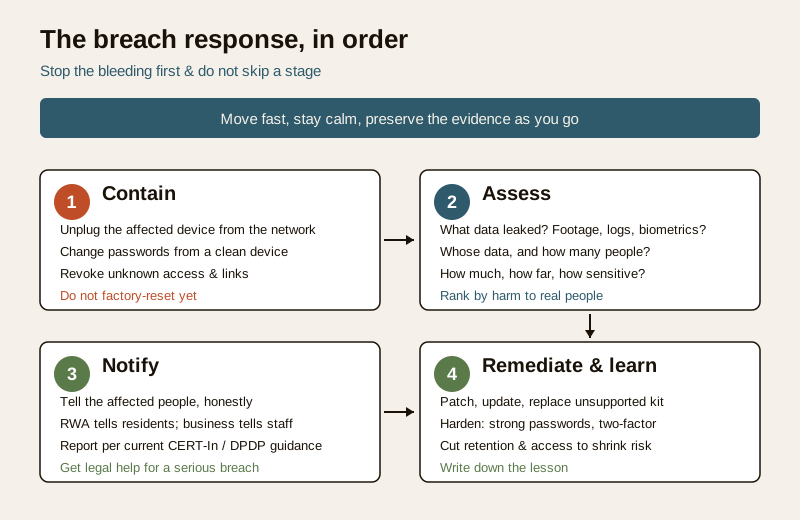
The response plan: contain, assess, notify, remediate
When you realise something is wrong, work through four stages in order. Do not skip to notifying people before you have stopped the leak, and do not spend days assessing while the door is still open.
1. Contain — stop the bleeding
The first job is to stop more data escaping. Move fast but do not destroy evidence in a panic.
- Isolate the device. Unplug the affected camera, recorder or hub from the network (pull the Ethernet cable, or disconnect it from Wi-Fi). If a single device is compromised, taking it off the network cuts the attacker's live access without wiping what happened.
- Change the passwords on the account and the device, from a clean device you trust. Change the email password too if the same one guarded the account.
- Revoke access you no longer recognise: unknown users, shared links, old app sessions, guest logins. Turn off remote viewing until you understand the scope.
- Preserve, do not scrub. Resist the urge to factory-reset everything immediately. Logs, unfamiliar user accounts and access records are the evidence that tells you what happened. Note the date and time you noticed the problem.
If the breach is a stolen recorder or card, containment is different: you cannot recall the device, so containment means changing every credential it might expose, telling the people whose footage it held, and reporting the theft.
2. Assess — understand what, whose and how bad
Once the bleeding is stopped, work out the shape of the harm. Write it down plainly:
- What data was exposed: live view only, recorded footage, access logs, biometric templates, resident records?
- Whose data: your household, visitors, domestic staff, neighbours caught in frame, an entire society?
- How much and how far: minutes or months of footage? One account or a public link anyone could find?
- How sensitive: faces of children, a woman's private routine, and biometrics rank as the highest-harm categories.
The honest severity of a breach is not the size of the file but the harm it can do to a real person. A single clip that reveals when a vulnerable resident is home alone can matter more than a week of empty-corridor footage.
3. Notify — tell the people affected, honestly
This is the step people most want to avoid, and the one that matters most for trust. Under the DPDP Act's approach to personal data, the people whose data you hold are entitled to be treated with honesty, and telling them promptly is both decent and expected.
- Tell the affected people plainly: what happened, what data was involved, what you have done, and what they can do to protect themselves (change a shared passcode, watch for suspicious contact).
- An RWA or small business should inform its residents or staff, not bury it. A departing secretary who leaked a resident list, or a hacked society camera, is a matter the whole community deserves to hear about calmly and factually.
- Reportable cyber incidents: India's CERT-In (the national computer emergency response team) receives reports of certain cyber-security incidents, and the DPDP Act sets an expectation that significant personal-data breaches are notified to the affected people and the authorities. At a general level, a serious breach may need to be reported. Do not guess the exact timelines, thresholds or forms from memory. Confirm the current requirement with a professional and follow the official CERT-In and DPDP guidance rather than any figure you half-remember.
- Do not minimise or spin. A short, honest message ages far better than a discovered cover-up.
When to get legal and professional help. For any breach involving many people, biometric data, children, or a real risk of harm, get proper help early: a lawyer, your Data Protection Officer if your organisation has one, and a security professional to examine the system. This guide helps you act sensibly in the first hours; it does not replace advice on your specific facts or the current legal duties.
4. Remediate and learn — close the hole for good
Reconnecting a compromised device without fixing the cause just invites the next breach. Before anything goes back online:
- Patch and update the firmware on cameras, recorders and hubs, and replace anything too old to receive security updates.
- Harden the system properly: unique strong passwords, two-factor authentication, no port-forwarding to the open internet, a segregated network for cameras. Work through the security system cybersecurity guide step by step.
- Reduce what you keep so the next incident is smaller by design. Shorter retention and tighter access shrink the blast radius, which is the whole idea behind privacy by design for security systems and sensible footage retention.
- Review and record what happened and what you changed, so the lesson is not lost when the panic fades.
Two special cases: biometrics and the cloud
When biometrics leak
A leaked password is an inconvenience; a leaked biometric is different, because a fingerprint or face signature cannot be reissued. You cannot give someone a new face. If a smart lock, attendance reader or controller exposes biometric templates, treat it as high-severity: contain immediately, tell the affected people, and stop using biometric access on that device until it is proven secure or replaced. The specific handling, and why minimisation matters so much here, is covered in the biometric data protection guide.
When it is a cloud provider's breach
If the leak is on your camera company's servers rather than your own device, the responsibility shifts. Your provider is the one who must tell you, honestly and promptly, what was exposed and what they are doing. You still act on your side (change passwords, enable two-factor, revoke sessions), but you are also entitled to answers. The cloud CCTV data protection guide explains what a trustworthy provider owes you and how to hold them to it.
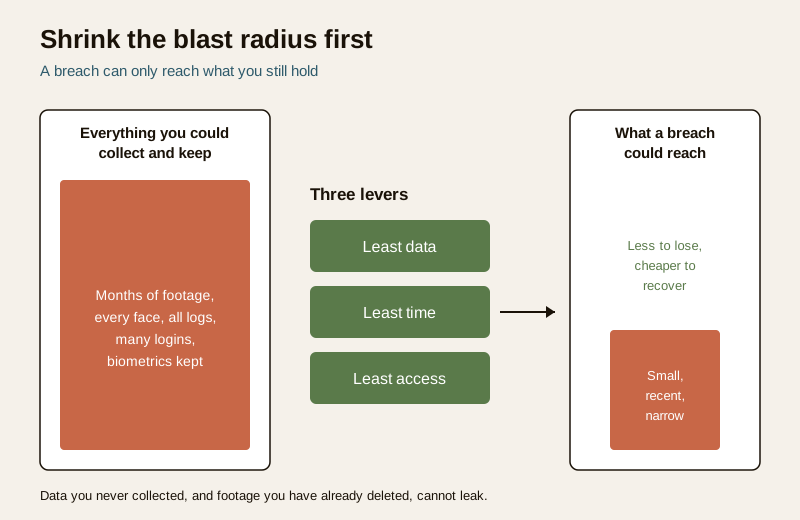
Prepare before it happens
The best breach response is the work you do while nothing is wrong. A minimised system is not just more private day to day; it is far cheaper to recover when something goes wrong, because there is simply less to lose.
- Least data. Point cameras only where you need them, mask what you must not see, and switch off audio and analytics you do not use. Data you never collected cannot leak. The CCTV privacy guide walks through this.
- Least time. Keep footage for the shortest sensible period. A month of recordings stolen is a smaller wound than a year's.
- Least access. Fewer accounts, unique passwords, two-factor on, and a quick review of who can log in.
- A named incident contact. Decide now who acts if there is a breach: for a home, which family member; for an RWA, which office-bearer, and how residents will be told.
- Backups you can trust. A secure backup means a stolen or wiped recorder is a data-loss inconvenience, not a catastrophe.
The breach-response checklist
| Stage | Do this first | Then |
|---|---|---|
| Contain | Disconnect the affected device from the network | Change passwords from a clean device; revoke unknown access |
| Preserve | Note date and time you noticed; keep logs | Do not factory-reset before you understand it |
| Assess | List what data, whose, how much, how sensitive | Rank by harm to real people, not file size |
| Notify | Tell the affected people honestly | Report reportable incidents per current CERT-In / DPDP guidance; get legal help |
| Remediate | Patch, harden, replace unsupported kit | Reduce retention and access; write down the lesson |
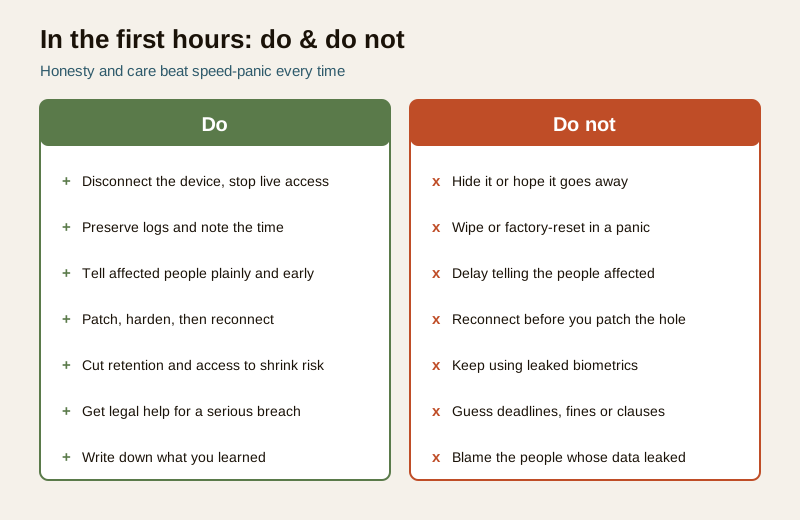
What NOT to do
| Do not | Because |
|---|---|
| Hide it or hope it goes away | A cover-up discovered later destroys trust and worsens the harm; honesty is the whole point |
| Wipe or reset in a panic | You destroy the evidence of what happened and how far it reached |
| Delay telling the affected people | Every hour of silence is an hour they cannot protect themselves |
| Reconnect without patching | The same open door lets the next intruder walk straight back in |
| Keep using leaked biometrics | A fingerprint or face cannot be reissued; stop until it is proven safe |
| Guess the legal duties | Do not invent reporting deadlines, penalties or clause numbers; check current CERT-In / DPDP guidance and take advice |
A quiet word to close the dossier
This is the last guide in the privacy dossier, so let it also be the gentlest. Watching over a home responsibly is not a switch you flip once at installation; it is a continuous, quiet duty. Every camera you point, every recording you keep, every login you grant is a small promise to the people it touches: your family, your visitors, the person who cleans your stairs, the neighbour whose window falls in frame.
The whole dossier reduces to four calm habits. Least data you can manage with. Least time you can keep it. Least access you can grant. And most honesty when something goes wrong. Security technology is powerful, and power asks for restraint: because you can watch does not mean you should, and because you can record everything does not mean you must. Keep only what protects people, protect what you keep, and if it ever leaks, respond with the honesty you would want shown to you.
That is not just good security. It is simple decency, held steady over time.
A final reminder (not legal advice). Everything here is practical guidance, not a legal ruling. For a serious breach, or anything involving many people, biometrics, children or real risk of harm, get a lawyer and, where relevant, your Data Protection Officer and a security professional involved early, and follow the official DPDP Act and CERT-In guidance current at the time.
Key takeaways
- A security-system breach leaks unusually sensitive data — faces, movement patterns and biometrics — so treat even a small incident seriously.
- Follow four stages in order: contain (stop the leak, preserve evidence), assess (what, whose, how bad), notify (tell people honestly), remediate (patch, harden, learn).
- Biometrics cannot be reissued, and a cloud breach is partly your provider's duty to disclose — route to the biometric and cloud guides.
- Minimise before trouble: least data, least time, least access shrink the blast radius and make recovery cheap.
- Never hide it, wipe it in a panic, or delay telling people — and never guess the legal duties. Get professional and legal help for a serious breach.
References
- Digital Personal Data Protection Act, 2023 — governs personal data (including identifiable footage, access logs and biometrics), with an expectation of security safeguards and breach notification to affected people and authorities; verify current text and rules before relying on it.
- CERT-In (Indian Computer Emergency Response Team) — receives reports of specified cyber-security incidents; consult the current official directions for what is reportable, how and by when, rather than any remembered figure.
- Reasonable expectation of privacy and dignity — leaked footage, logs and biometrics can enable real harm; seek qualified legal advice for a serious breach affecting your specific situation.
This is an educational overview, not legal advice. How you must handle a breach depends on your exact facts and the current law. For any serious incident, consult a qualified lawyer, involve your Data Protection Officer where you have one, engage a security professional, and follow the official DPDP Act and CERT-In guidance in force at the time.
Export this guide
Related Guides — Deep-dive reading
CCTV Remote Access in India (2026): Watch From Your Phone, Safely
How to view your own cameras from anywhere without leaving the front door open to the internet — change the defaults, use strong credentials and 2FA, keep firmware current, prefer the vendor's secure cloud relay or a VPN, segment the camera network, and treat footage as personal data.
SecurityComplete Guide to Security System Cybersecurity in India (2026): Protecting the Systems That Protect You
The cameras, locks, alarms and door phones you install to feel safer are internet-connected computers that can themselves be attacked, and an insecure one is worse than none. This pillar maps the whole attack surface — devices, network, accounts and data, operations — and points to every guide that hardens it.
SecuritySecurity Device Hacked (2026): A Calm, Defensive Response Playbook
Think your CCTV camera, video doorbell, smart lock or NVR has been compromised? A calm, strictly defensive incident guide for Indian homeowners: read the real signs, then isolate, secure, update, reset, check, review and report — in that order.
SecurityRelated Tools — Try Free
Privacy Audit Tool
Is your CCTV setup privacy-respecting? Tick what is true — signage, no bedroom or bathroom cameras, masked public views, restricted access, limited retention, consent, secured storage, a lawful purpose — for a DPDP-aligned privacy score and the gaps to close. Indicative, not legal advice.
Privacy ScoreSmart Lock Finder
Find the right smart lock — access methods, tier and must-haves like a mechanical override — for your door and budget.
Door ToolCCTV Camera Coverage & Count Calculator
Estimate how many CCTV cameras you need, the NVR channels, storage in TB for your retention period, and an indicative all-in cost with GST.
CCTV Calculator