
CCTV Night Vision Failure in India (2026): Dark Footage, No IR or White-Out Glare, Fixed
Your CCTV looks fine by day but fails at night — pitch-black footage, no infrared, or a blinding white-out glare. A calm, ordered diagnostic path for homeowners, from the dirty dome and wrong day-night setting most people hit, down to the rare failed IR LED or sensor.
Your camera looks perfect in daylight. Then night falls, you open the app, and the picture is either a black void, a grey murk with nothing in it, or a blinding white haze that hides everything it is supposed to show. It is one of the most common CCTV complaints in Indian homes, and here is the reassuring part: the cause is usually simple, cheap and something you can fix yourself in a few minutes. A wiped dome, a corrected setting, a moved obstruction — most "night vision failure" is not a broken camera at all.
The single most useful thing you can do before touching anything is to name the symptom precisely, because a dark image and a whited-out image are almost opposite problems. A dark image means little or no infrared (IR) is reaching the scene. A whited-out image usually means there is plenty of IR — it is just bouncing straight back into the lens off something too close. This guide walks the likely causes in order, from the ones that catch almost everyone down to the rare hardware fault, then splits clearly what is safe to do yourself from what needs a technician.
Scope and safety. This is a diagnostic guide for homeowners, not an installation manual. Safe do-it-yourself here means wiping a reachable dome, moving an obstruction, checking a setting in the app, and adding a little ambient light. Anything at height on a ladder, any mains wiring, and opening a sealed camera to touch the IR board is strictly a job for a qualified technician or your AMC. This is not a price or a buying guide — for repair-versus-replace decisions or picking a better night camera, follow the cross-links. Your footage is personal data under the DPDP Act 2023, so keep app logins and passwords to yourself.
First, read the symptom: dark or whited-out?
Everything downstream depends on this one split, so look carefully at the night image before you decide anything.
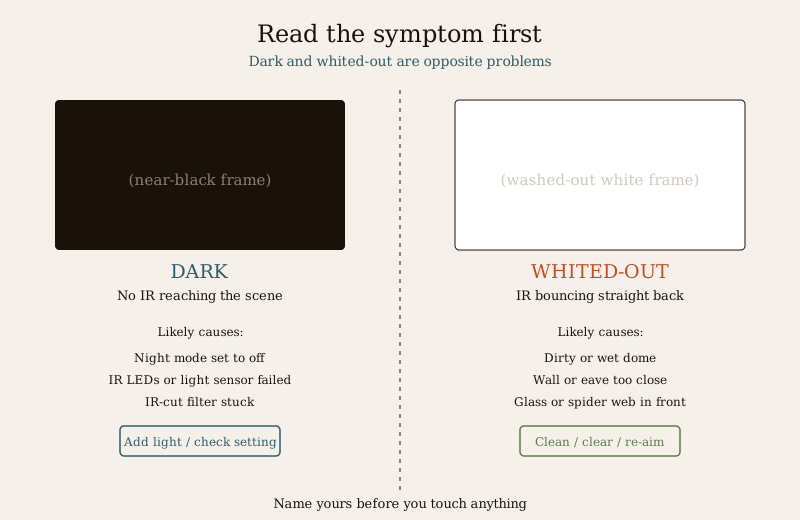
- Dark / black / grey murk — the scene is unlit. Either the IR is not turning on, or it is failing, or the camera has not switched into night mode. This is a "no light" problem.
- Whited-out / hazy / glowing — the IR is clearly working, but it is reflecting back into the lens off something right in front of the camera before it ever reaches the scene. This is a "too much bounce-back" problem, and it is very common.
- A middle case — the centre glows white but the edges are black, or a bright halo sits in one corner. That is a partial glare, almost always from a nearby wall, eave or dome edge catching the IR.
Hold that answer. Also note two more things while you are looking: is this one camera or all of them (one camera points at a hardware or siting fault; all cameras at once points at a shared setting or the recorder), and is the camera shooting through a window or glass (a classic and self-inflicted cause of white-out).
Likely causes, most common first
| # | Likely cause | Why it happens | The fix |
|---|---|---|---|
| 1 | IR glare off a dirty or wet dome | Dust, oily film, cobwebs, rain droplets or hard-water spots on the dome scatter the camera's own IR straight back into the lens, whiting out the image. | Clean the dome gently (see cleaning guide). The most common fix of all. |
| 2 | Wall, eave or object too close in front | A nearby wall, pillar, railing, plant or the camera's own housing lip reflects IR back — a glowing halo or white haze. | Re-aim or move the camera so nothing sits within a metre or so of the lens. |
| 3 | Wrong day-night setting | Night mode set to "off", or "auto" behaving badly, or the IR left disabled in the app. | Set day-night mode to auto (or a scheduled night) and switch IR on. |
| 4 | Shooting through glass | A camera behind a window reflects its own IR off the glass — a bright white sheet. | Never mount a night camera behind glass; put it outside. |
| 5 | Spider web or insect on the lens | Spiders and insects are drawn to the warm IR glow at night; a web across the dome flares white and also triggers endless false motion alerts. | Clear the web; deter with placement and the cleaning routine. |
| 6 | Too little ambient light for a colour-night camera | "Full-colour night vision" cameras need some ambient light; in a truly dark spot they show noisy black. | Add a little steady ambient light, or use a camera with real IR. |
| 7 | IR LEDs failing or a failed light sensor | The IR array has failed, or the photocell that tells the camera "it is dark now, switch to night" has failed, so it never switches. | Technician job — do not open a sealed camera yourself. |
| 8 | IR-cut filter stuck | The tiny mechanical filter that flips for day/night is stuck, so night vision never engages (you may hear no faint "click" at dusk). | Technician job — internal mechanism. |
| 9 | Hardware or power fault (rare) | Aged camera, insufficient power to drive IR LEDs, or a board fault. | Technician or AMC; see repair-versus-replace. |
Notice the shape: the top of the list is dirt, aim and a setting — cheap, safe, do-it-yourself. Only the bottom is hardware, and only the bottom needs a professional.
The IR-glare problem, illustrated
Because bounce-back glare catches so many people, it is worth seeing exactly what happens. The camera floods the scene with invisible IR. If anything sits right in front of the lens — a filmed-over dome, a rain drop, a spider web, a wall, a pane of glass — that surface reflects the IR straight back before it can travel out to the scene. The lens sees its own light, blows out, and you get a white fog with the real scene hidden behind it.
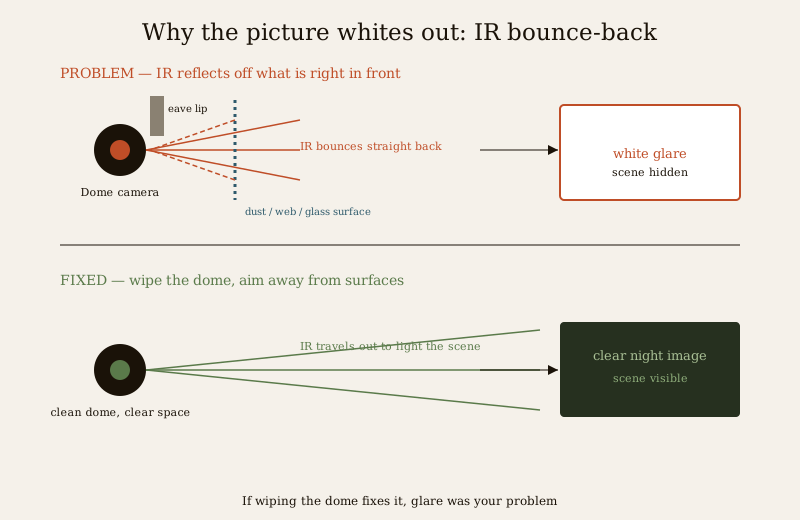
The tell-tale signs of glare rather than a genuine "no IR" fault: the image is bright not dark, it often glows more in the centre or one corner, it is worse in rain or after a dusty week, and clearing or re-aiming makes it snap back to normal. If wiping the dome fixes it, you have your answer.
The diagnostic path, step by step
Work through this in order and stop at the first thing that fixes it.
1. Is the image dark, or whited-out? Dark goes to step 5. Whited-out (or glowing) goes to step 2.
2. Is the dome clean and dry? Look closely for film, spots, cobwebs or droplets. If in doubt, clean it gently and check again at night — this alone resolves a large share of white-out cases. See the CCTV camera cleaning guide.
3. Is anything within about a metre in front of the lens? A wall, eave lip, pillar, railing, plant or the housing itself. Re-aim or reposition so the IR has clear space to travel. A web counts — clear it.
4. Is the camera shooting through glass? If it sits behind a window, that is your white-out. Night cameras belong outside the glass, full stop. Then jump to prevention.
5. (Dark image) Is night mode actually on? Open the app and check the day-night setting: set it to auto (or a night schedule) and confirm IR or "night vision" is enabled, not switched off. A quick way to test: cover the camera's little light sensor with your finger in daylight — a healthy camera should switch to night mode and you should see the faint red IR glow.
6. Is it one camera or all of them? If every camera went dark at once, suspect a shared setting, a recorder or a power issue rather than each camera failing together. If it is one camera, it is that unit.
7. Is there simply no ambient light, on a colour-night camera? If it is a "full-colour" model in a pitch-dark spot, it needs a little steady light — add some, or accept it needs a real-IR camera. See how to choose a CCTV camera.
8. Still dark with night mode on, IR not glowing, or blurry as well as dim? That points to failed IR LEDs, a failed light sensor or a stuck IR-cut filter — a technician job. If the picture is also soft or smeared, check the blurry CCTV image guide too.
What you can safely fix yourself
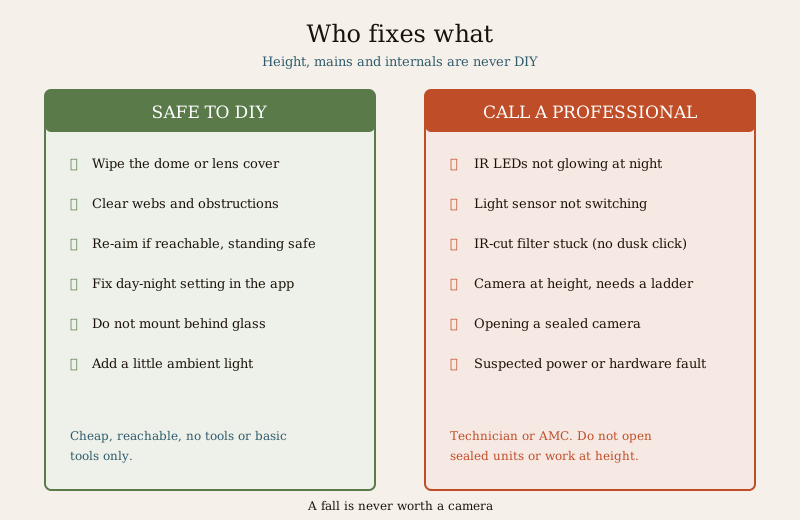
These are all low, reachable, no-tools-or-basic-tools jobs. If the camera is high up or needs a ladder, treat even these as a professional call — a fall is never worth a camera.
- Clean the dome or lens cover. Gently, with the right cloth and no harsh solvents, following the cleaning guide. Do this first for any white-out.
- Clear obstructions and webs. Remove anything within roughly a metre in front — cobwebs, a grown-out plant, a stacked object — and knock down spider webs, which both glare and spam motion alerts.
- Re-aim the camera so no wall, eave or railing sits right in the beam, if the mount is reachable and you can do it standing safely.
- Fix the day-night setting in the app: auto or night schedule on, IR on. Free, and the fix for a surprising number of "dark at night" complaints.
- Never mount behind glass — if a camera is indoors looking out through a window, move it outside; that removes the reflection entirely.
- Add a little ambient light — a low porch or wall light gives a colour-night camera what it needs and helps every camera see, without wasteful over-lighting.
When to call a professional
Hand these over — do not open sealed equipment or work at height yourself:
- IR LEDs do not glow at all at night (check by covering the sensor in daylight, or with a phone camera that can see IR). A failed IR array is an internal repair.
- The camera never switches to night mode even with the setting correct — a failed light sensor or a stuck IR-cut filter (you may notice the faint "click" at dusk is gone).
- The camera is at height — any diagnosis or cleaning that needs a ladder. Height work is a technician job.
- A suspected power or wiring fault, especially if several cameras dimmed together, or an aged camera you think may need replacing — take the repair-versus-replace decision to your installer or AMC rather than guessing.
- The camera is opened, sealed housing broken, or IP-rated seal disturbed — leave the internals to a professional, or you will let in moisture and make it worse.
Prevention — so it does not come back
- Keep the dome clean on a schedule. A quick wipe every few weeks, and after dusty spells or heavy rain, prevents most glare before it starts.
- Site cameras with clear space in front — no wall, eave lip, railing or plant within about a metre of the lens, and never behind glass.
- Set day-night mode once, correctly — auto or a sensible night schedule with IR on — and leave it.
- Deter spiders and dust — the cleaning routine plus good placement keeps webs (and their false alerts) down.
- Give colour-night cameras a little light to work with, placed to avoid shining back into the lens.
- Check night footage occasionally, not just the daytime view — many people only discover a night fault when they need the footage.
Quick checklist
- Is the image dark, or whited-out? Name it first.
- White-out: clean the dome, clear webs and obstructions, re-aim, never behind glass.
- Dark: check the day-night setting and that IR is on; confirm the IR glow.
- One camera or all? All at once points at a setting, recorder or power.
- No IR glow, no night switch, height, mains or internals: call a technician.
For the bigger picture, this fits inside the CCTV troubleshooting hub and the wider security-system troubleshooting pillar and troubleshooting sub-hub. When a camera really has reached the end of its life, take repair-versus-replace and any new purchase to the buying guides rather than guessing. And the whole home-security picture lives in the main security hub.
Key takeaways
- Name the symptom first: a dark image (no IR reaching the scene) and a whited-out image (IR bouncing back) are almost opposite problems with opposite fixes.
- The single most common cause is IR glare off a dirty or wet dome — clean it before anything else.
- A wrong day-night setting, a nearby wall, a spider web, or shooting through glass cover most of the rest — all safe, cheap, do-it-yourself fixes.
- One camera versus all tells you whether it is a unit fault or a shared setting, recorder or power issue.
- Failed IR LEDs, a failed light sensor or a stuck IR-cut filter are the rare hardware causes — a technician job, never opened at home.
- Never work at height, on mains, or inside a sealed camera yourself — call a qualified technician or your AMC.
Where to go next
- CCTV camera cleaning — the dome-wipe routine that fixes most glare.
- Blurry CCTV image — if the picture is soft as well as dim.
- How to choose a CCTV camera — for real-IR versus colour-night, and repair-versus-replace.
- CCTV troubleshooting and the troubleshooting sub-hub — related symptom guides.
- The security-system troubleshooting pillar and the main security hub.
References
- Digital Personal Data Protection Act, 2023 — home CCTV footage is personal data; keep app credentials private, restrict who can view the recordings, and do not point cameras to capture a neighbour's private space.
- National Building Code of India (SP 7), Bureau of Indian Standards — general reference for domestic external lighting and safe access; verify the current edition (SP 7:2026) via the BIS catalogue: https://www.services.bis.gov.in/
- Manufacturer installation and user manuals — the authoritative source for your specific camera's day-night, IR and light-sensor settings; follow them and your AMC terms before opening any sealed unit.
This is an educational, self-help troubleshooting overview for homeowners — not an installation manual, a price guide or legal advice. Do the safe, reachable checks yourself; hand anything at height, on mains wiring, or inside a sealed camera to a qualified technician or your AMC. Verify any standard's current status via the BIS catalogue before relying on it.
Export this guide
Related Guides — Deep-dive reading
CCTV Recording Failure in India (2026): Live View Works but Nothing Was Saved
You open the recorder to pull footage of an incident and there is nothing there, even though every camera shows a crisp live picture. A calm, ordered guide to why an Indian CCTV system records live but saves nothing, and how to fix it before the next incident.
SecurityCCTV Image Is Blurry in India (2026): Why the Picture Is Not Sharp and How to Fix It
A calm, ordered diagnosis for when your CCTV picture looks soft, hazy or out of focus — starting with the dirty dome that causes it nine times out of ten, then focus, the protective film, night-only IR glare, resolution and the rare hardware fault.
SecurityParking Security Lighting in India (2026): Lighting Basement, Stilt and Open Parking So Nothing Hides in the Dark
How to light apartment and commercial parking so vehicles, people and number plates are clearly seen, cameras can actually read the scene, and the space stops being a soft spot for theft and lurking, without ever compromising the emergency lighting on the escape route.
SecurityRelated Tools — Try Free
Cross-Ventilation Analyzer
Estimate airflow and air changes per hour (ACH) from room size, window areas, layout, and local wind — with NBC 2016 Part 8 compliance check.
Ventilation CalculatorCCTV Night-Vision Selector
Answer five questions and get the right night technology — infrared, low-light, colour night vision or thermal — with reasons.
Night-VisionCCTV Placement Compliance Checker
A quick DPDP-grounded privacy and safety self-check for where a camera is pointed — flags the items to fix.
Compliance