
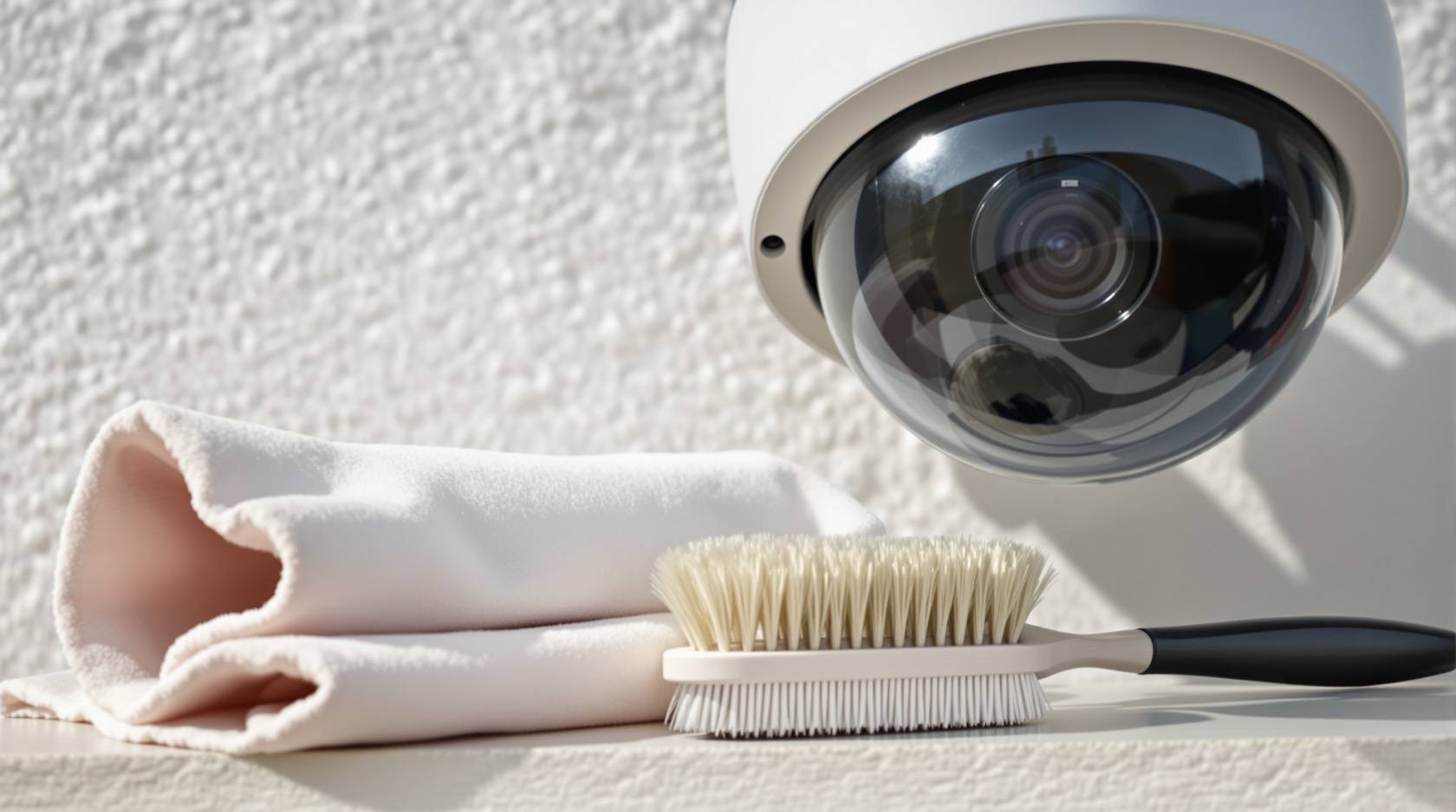
CCTV Camera Cleaning in India (2026): The Two-Minute Job That Keeps Your Footage Usable
A dirty camera is a blind camera. How dust, cobwebs, monsoon grime, salt haze and bird droppings quietly ruin your footage, and the safe way a homeowner cleans a ground-level camera in two minutes, where the professional and the AMC take over.
The commonest reason home CCTV footage is useless on the night it mattered is not a broken camera, a failed hard disk or a clever burglar. It is dirt. A film of dust, a monsoon smear, a cobweb strung across the lens, a splash of bird droppings, a haze of salt near the coast. The camera is working perfectly; it simply cannot see. And the cruel part is that a dirty camera looks fine by day and betrays you at night, exactly when you most need it.
Cleaning a camera is the cheapest, highest-impact maintenance you can do. No parts, no technician, no cost beyond a soft cloth and two minutes. A neglected expensive camera behind a grimy dome is worth less than a cheap one kept clean. This guide is about doing that clean safely and correctly: what makes cameras dirty in India, how often to wipe them, the exact gentle method that will not scratch the dome, and, just as important, the cameras you must never climb up to and should hand to your technician or AMC instead.
Scope and safety. This is an upkeep guide for homeowners, not an installation or electrical manual. There is a firm split running through it: the cameras you can reach standing on the ground you may safely clean yourself; anything needing a ladder, a roof, a pole or any contact with mains wiring is a job for a qualified technician or your AMC provider. Do not risk a fall for a clean dome. This is not a price guide (budgeting and AMC costs live in the cost and AMC libraries) and not a buying guide. CCTV footage is personal data under the Digital Personal Data Protection Act 2023, so handle any live feed or recordings responsibly while you work.
Why cameras get dirty so fast in India
Indian conditions are hard on an outdoor lens, and the reasons stack up through the year.
- Dust and pollution. Road dust, construction dust and a general urban haze settle on the dome as a fine film. In the dry pre-monsoon months this builds quickly, softening the whole picture into a milky blur.
- Monsoon grime. Rain does not clean a camera; it streaks it. Splashback throws mud up onto low cameras, droplets dry into hard water spots and mineral rings, and the constant damp lets a greasy film cling to the glass.
- Insects, cobwebs and nests. Warmth and the camera's own infrared (IR) lamps attract insects at night. Spiders string webs across the housing lip because it is a convenient anchor; wasps and birds tuck nests behind the sunshade. A single strand of web across the lens is enough to wreck the frame.
- Bird droppings and tree debris. A camera under an eave, a wire or a branch collects droppings and falling leaves. Droppings are acidic and bake hard in the sun, so they are far easier to remove fresh than a week later.
- Salt haze near the coast. In coastal homes, salt-laden air leaves a fine haze on the dome and, over time, corrodes the housing and screws too.
Every one of these sits between the scene and the sensor. The camera dutifully records the dirt in perfect focus and the intruder as a smear.
The safety split: which cameras you clean, and which you never touch
Before any cloth comes out, decide honestly whether the camera is safe for you to reach. This single judgement matters more than technique.
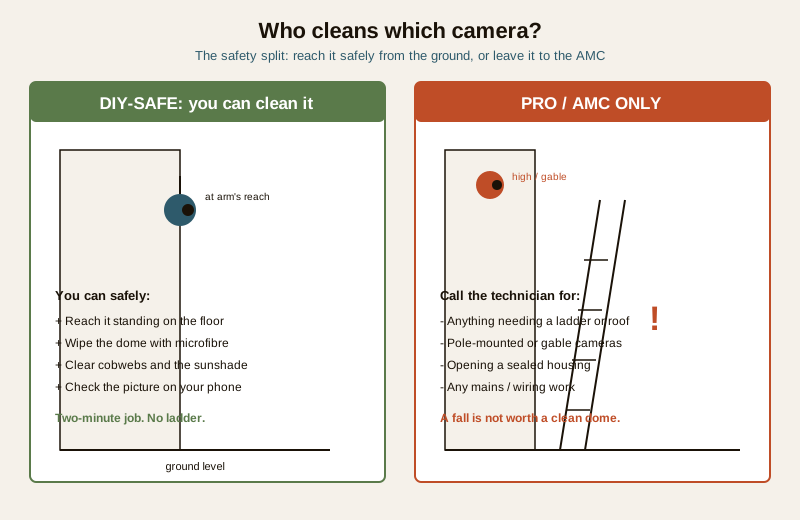
You can safely clean it yourself when the camera is at or near arm's reach from the ground or a stable, low step: a porch camera, a gate camera, a camera by the front door or on a low boundary wall. Standing flat on the floor, you can wipe the dome and clear the housing with no risk. This is genuinely a two-minute job.
Leave it to a professional or your AMC when reaching the camera means a ladder, a parapet, a roof, a first-floor sill or a pole, or when it is mounted high on a gable. Working at height is the single most dangerous thing in home maintenance, and a moment of over-reach from a ladder causes serious falls every year. No footage is worth that. High and pole-mounted cameras are exactly what an annual technician visit or an AMC schedule is for; fold their cleaning into that service. Likewise, anything that involves opening a sealed housing, touching connectors under power, or any mains wiring is strictly a technician's job, not a cleaning task.
Do not risk a fall. If you cannot clean a camera with both feet on the ground, it is not your job. Note it down and let your technician or AMC handle it on their next visit. This is the same principle that runs through the whole security system maintenance guide: homeowners do the safe, simple upkeep; professionals do anything at height or on mains.
How often to clean
There is no single figure that fits every home, so match the frequency to your exposure. A camera on a quiet, sheltered porch stays clean far longer than one facing a dusty road or the sea.
| Situation | Sensible cleaning frequency | Who |
|---|---|---|
| Sheltered, low-dust location (covered porch, indoor-facing) | Every 2 to 3 months, plus a quick look monthly | Homeowner |
| Typical outdoor camera (gate, boundary, door) | Roughly monthly | Homeowner |
| Dusty roadside, near construction, or coastal salt air | Every 2 to 3 weeks | Homeowner |
| During and just after the monsoon | Check every couple of weeks for spots and cobwebs | Homeowner |
| High or pole-mounted cameras (any height needing a ladder) | At each technician visit or AMC service | Professional / AMC |
The honest rule is simpler than the table: glance at your camera feeds regularly, and clean whenever the picture looks hazy or a web appears. The look at the live view is the real trigger; the schedule is just a reminder so a camera does not quietly go blind for months. This dovetails with a wider routine, which the security maintenance calendar lays out across the whole system.
Signs a camera needs cleaning
You will usually spot a dirty camera from the footage before you spot it on the wall. Watch for these.
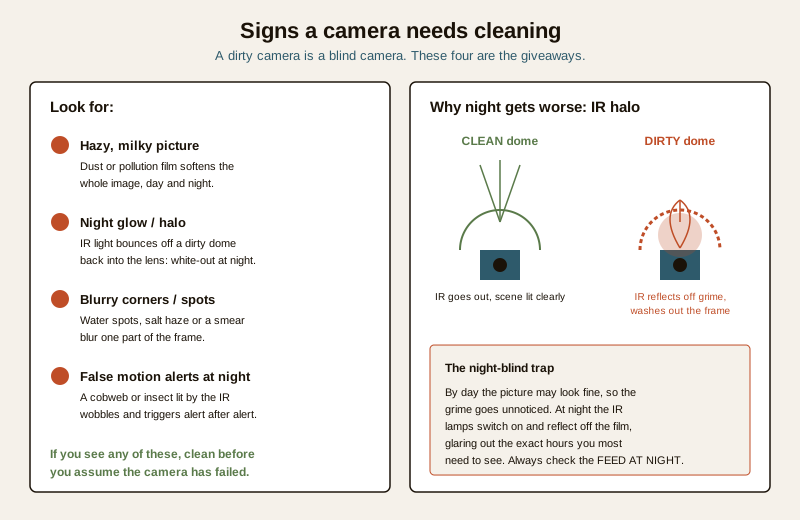
- A hazy, milky picture by day and night. A general softness or loss of contrast across the whole frame is almost always a dust or pollution film on the dome, not a fault.
- Glare or a bright halo at night. This is the classic and most damaging sign. The camera's IR lamps light up the scene in the dark, and if the dome is dirty, that IR reflects off the film straight back into the lens, washing the image into a white glow. A camera that looks fine by day but glares out after dark almost always has a dirty dome.
- Blurry patches or spots in one part of the frame, from dried water spots, salt haze, a smear or a splash of droppings sitting over that region of the glass.
- A sudden rise in false motion alerts, especially at night. A cobweb or an insect strung in front of the lens, lit and wobbling in the IR, triggers motion alert after motion alert. If your phone is buzzing all night with nothing on screen, check the lens for a web before you blame the software.
The safe cleaning method, step by step
For a ground-level camera you can reach comfortably, here is the whole procedure. Treat the dome as what it is: a scratchable optical surface, closer to spectacle glass than to a windowpane.
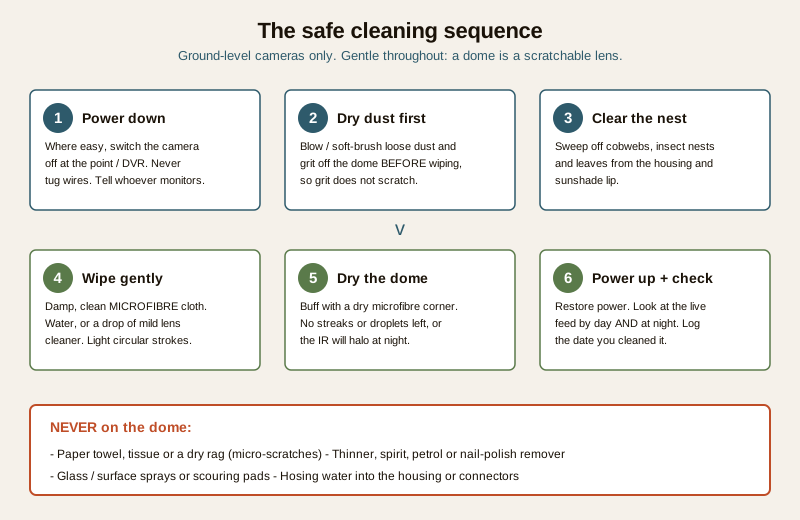
1. Power it down where that is easy and sensible. If you can switch the camera off at an accessible point or through the recorder, do so, mainly so you are not staring into a bright IR lamp and so you can wipe without a live feed being disturbed. Never yank a cable to kill power, and if switching it off means touching wiring, skip this step and just clean it live. If anyone monitors the feed remotely, let them know it will drop briefly.
2. Remove loose dust and grit first, dry. Gently blow or use a soft, clean brush to lift loose dust, sand and grit off the dome before any cloth touches it. This is the step people skip, and it is the one that prevents scratches: wiping dry grit across the glass is how domes get scuffed.
3. Clear the housing, sunshade and cobwebs. Sweep away cobwebs, insect nests, leaves and debris from the camera body, the sunshade lip and the bracket. This alone often fixes night-time false alerts.
4. Wipe the dome with a damp microfibre cloth. Use a clean, soft microfibre cloth, lightly dampened with clean water or a drop of proper lens or eyeglass cleaner. Wipe in gentle circular strokes. For stubborn dried droppings or water spots, hold the damp cloth on the spot for a few seconds to soften it, then wipe; never scrape.
5. Dry the dome fully. Buff the glass with a dry corner of the microfibre until no streaks, smears or droplets remain. This matters more than it sounds: a leftover water film or streak is exactly what makes the IR halo at night, so a badly dried dome can look worse after cleaning than before.
6. Restore power and check, by day and at night. Switch the camera back on and look at the live view. Then, crucially, check it again after dark once the IR has kicked in, because a dome that looks perfect by day can still glare at night. Note the date you cleaned it in your logbook.
The dome and lens versus the housing: different care
A camera has two very different surfaces, and they must not be treated the same.
- The dome or lens is optical and delicate. It is a clear plastic or glass cover, often with a thin coating, sitting directly in front of the sensor. Any scratch, swirl or residue on it degrades every frame forever. So the dome gets only the gentle treatment above: soft microfibre, clean water or mild lens cleaner, light pressure. Never a paper towel, tissue or dry rag (they leave micro-scratches), never a scouring pad, and never a harsh chemical.
- The housing and bracket are rugged and can take more. The metal or plastic body, the sunshade and the mount can be wiped with a slightly damp cloth to remove dust, droppings and grime, and you can be firmer here. Just keep water away from cable entries and connectors, and never hose or pressure-wash any camera, sealed or not.
Never use solvents or abrasives on a dome. Thinner, spirit, petrol, acetone, nail-polish remover, ammonia glass sprays and surface cleaners can cloud, craze or strip the dome's coating permanently, turning a two-minute wipe into a camera replacement. Water or a purpose-made lens cleaner is all a dome ever needs. When a dome is scratched, hazed or yellowed beyond cleaning, that is a replacement, and the deeper optical and focus care sits in the CCTV lens maintenance guide.
A quick cleaning checklist
Keep this by your logbook and run it whenever you clean.
- Camera is at safe, ground-level reach. (If not, it goes to the technician or AMC.)
- Powered down where easy and safe; monitor informed if remote.
- Loose dust and grit brushed or blown off dry, first.
- Cobwebs, nests, leaves cleared from housing and sunshade.
- Dome wiped with a damp microfibre cloth and clean water or mild lens cleaner only.
- No solvents, tissues, paper towels or abrasives used on the dome.
- Dome buffed fully dry, no streaks or droplets.
- Housing wiped, connectors and cable entries kept dry.
- Power restored; live view checked by day.
- Feed checked again at night for IR glare.
- Date logged; any high camera noted for the professional.
A note on the footage and your data
While you clean, you may glance at recordings or a live feed. Remember that CCTV footage of people is personal data under the Digital Personal Data Protection Act 2023. Keep the feed to those who are meant to see it, do not share clips casually, and if a technician or AMC crew is handling your cameras and recorder, be mindful that they can access footage too, so use a provider you trust and agree who may view recordings. Good upkeep and good data hygiene sit side by side; the wider handling picture runs through the security maintenance sub-hub.
Where cleaning fits in the bigger routine
Cleaning is the single easiest win, but it is one item in a larger upkeep rhythm: testing that recording actually works, checking storage and retention, inspecting cables and power, and servicing the parts you cannot safely reach. Folding camera cleaning into a professional visit for the high cameras is exactly what an annual contract is for; the CCTV maintenance and AMC guide covers what a good service includes and how the DIY and professional halves divide. For the full system view, see the security system maintenance guide.
Key takeaways
- A dirty camera is a blind camera, and cleaning is the cheapest, highest-impact maintenance there is: two minutes, a soft cloth, no cost.
- India makes cameras dirty fast through dust, pollution, monsoon grime, cobwebs and nests, bird droppings and coastal salt, and the dirt hits hardest at night.
- The night IR halo is the classic warning sign: a camera that looks fine by day but glares white after dark almost always has a dirty dome reflecting its own infrared.
- Clean only what you can reach standing on the ground. Anything needing a ladder, roof, pole or mains contact goes to a technician or AMC. Do not risk a fall.
- Be gentle with the dome: dry-dust first, then a damp microfibre cloth with water or mild lens cleaner, and dry it fully. Never solvents, tissues or abrasives.
- Look at your feeds regularly and clean whenever the picture hazes or a web appears; the schedule is only a backstop.
- Footage is personal data under the DPDP Act 2023; handle live feeds and recordings responsibly while you work.
Where to go next
- The security system maintenance guide and the security maintenance calendar place cleaning inside the full upkeep routine.
- The CCTV lens maintenance guide covers optical care, focus and when a hazed dome is a replacement, not a clean.
- The CCTV maintenance and AMC guide explains what a professional service covers, including the high cameras you should not climb to.
- The main security hub links the wider maintenance and CCTV libraries.
References
- Digital Personal Data Protection Act, 2023 (DPDP) — CCTV footage and live feeds of identifiable people are personal data; handle recordings responsibly during maintenance and agree who may view them.
- Manufacturer maintenance guidance — most CCTV makers advise cleaning dome and lens surfaces only with a soft microfibre cloth and water or a mild lens cleaner, and warn against solvents, abrasives and pressure washing. Follow your specific camera's manual.
This is an educational upkeep overview for homeowners, not an installation, electrical or legal manual. Clean only cameras you can reach safely from the ground; for anything at height, on a pole, or involving mains wiring, engage a qualified technician or your AMC provider. Never use solvents or abrasives on a camera dome, and handle footage in line with the DPDP Act 2023.
Export this guide
Related Guides — Deep-dive reading
CCTV Maintenance and AMC in India (2026): Keeping the System Alive
How to keep a CCTV system actually working after install: clean lenses and housings, check every camera still records, watch drive health and retention, update firmware, and decide whether an Annual Maintenance Contract (AMC) is worth it.
SecurityCCTV Recording Failure in India (2026): Live View Works but Nothing Was Saved
You open the recorder to pull footage of an incident and there is nothing there, even though every camera shows a crisp live picture. A calm, ordered guide to why an Indian CCTV system records live but saves nothing, and how to fix it before the next incident.
SecurityNVR and DVR Maintenance in India (2026): Keeping the Recorder Alive, Cool and Secure
The recorder is the brain of a CCTV system, and a neglected one quietly loses footage, drops cameras or gets hacked. A practical upkeep routine for NVRs and DVRs in Indian conditions — heat and dust, clean power, firmware and security patches, network hygiene, time sync and the disk — with a clear split between what a facility person can safely do and what belongs to a technician.
SecurityRelated Tools — Try Free
Window Cleaning Cost Calculator
Estimate professional window cleaning cost per visit and per year by access and frequency.
Window CalculatorWindow Maintenance Cost Calculator
Estimate annual window upkeep by frame material — yearly, per-window and 5-year cost.
Window CalculatorCCTV Camera Coverage & Count Calculator
Estimate how many CCTV cameras you need, the NVR channels, storage in TB for your retention period, and an indicative all-in cost with GST.
CCTV Calculator