
CCTV Image Is Blurry in India (2026): Why the Picture Is Not Sharp and How to Fix It
A calm, ordered diagnosis for when your CCTV picture looks soft, hazy or out of focus — starting with the dirty dome that causes it nine times out of ten, then focus, the protective film, night-only IR glare, resolution and the rare hardware fault.
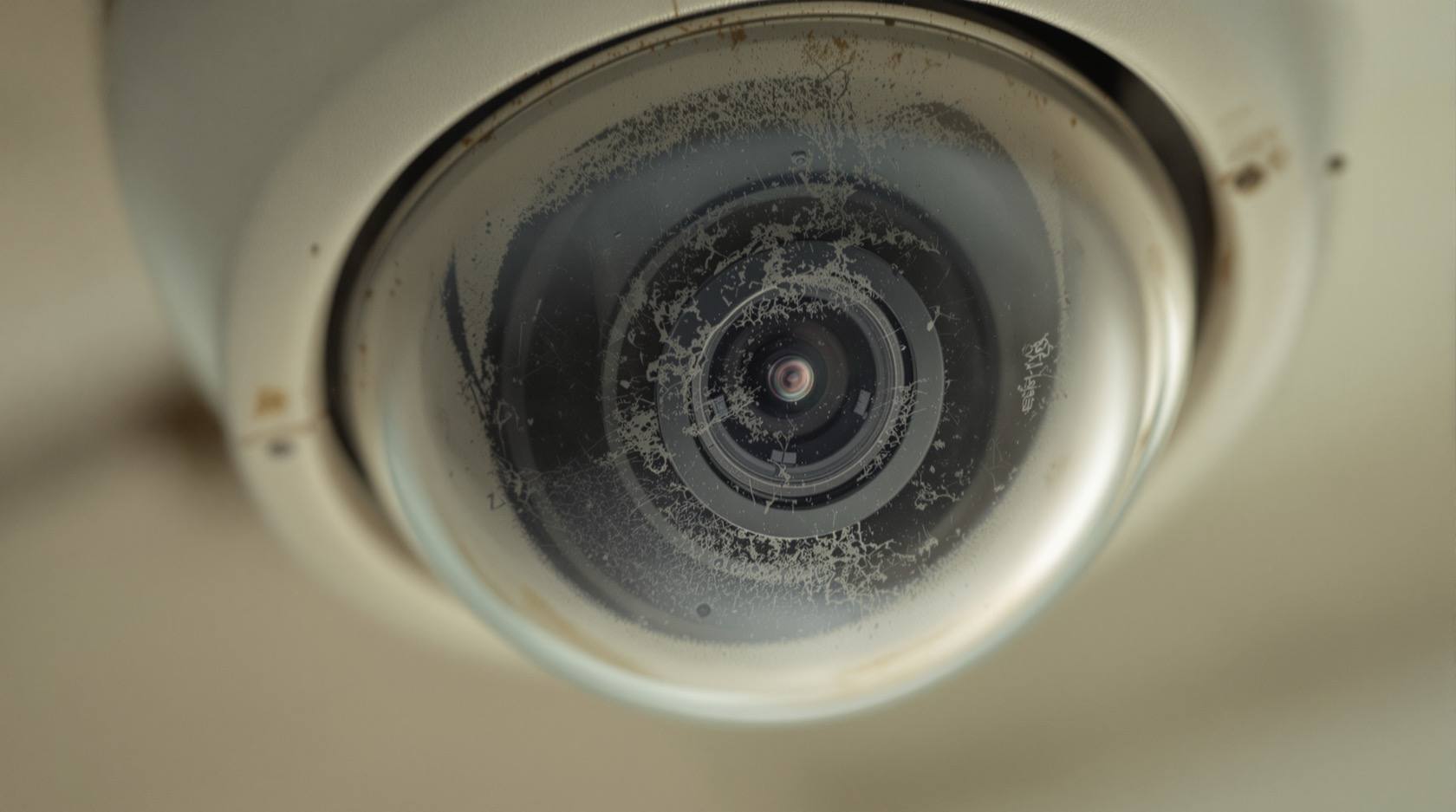
You open the app to check a delivery or a number plate and the picture is soft. Faces are smudges, text is unreadable, the whole frame looks like it is behind a sheet of tracing paper. It is a familiar sinking feeling, because CCTV only earns its keep when it is sharp — a blurry recording of an incident is almost as useless as no recording at all. The good news is the one worth leading with: a blurry camera is almost never a broken camera. Nine times out of ten the cause is a dirty piece of plastic, a focus that has drifted, or a setting turned down too low, and every one of those is cheap and quick to put right.
The wrong move is to assume the sensor has failed and start pricing a replacement. The right move is to work through the causes in order, from the most common and easiest to the rarest and hardest, and let the picture itself tell you which one you have. This guide gives you that order. It sits inside Studio Matrx's CCTV hub and the wider security troubleshooting hub; for faults across the whole system rather than just the picture, start at the security system troubleshooting pillar.
Scope & safety. This is a diagnostic guide for your own CCTV, worked from the ground up: cleaning a reachable dome, removing a film, checking a setting, and looking at focus on a camera you can safely reach. The safe-DIY line stops where the ladder starts. Refocusing a varifocal lens at height, opening a sealed housing to chase internal condensation, replacing a scratched dome or a failed sensor, and any work at height or near mains wiring belong to your installer or AMC technician — do not climb to a roof-edge camera to fix a picture. Recorded footage is personal data under the Digital Personal Data Protection Act, 2023, so keep app and recorder access private. This is not a price or buying guide; for those decisions, cross-links point the way. This is educational guidance, not legal advice.
First, the reassurance: what "blurry" usually means
"Blurry" is a single word for several different faults, and separating them is most of the battle. A picture can be soft because the light never reaches the sensor cleanly (a dirty or fogged or filmed cover), because the lens is not focused on the right distance (focus drift), because there simply is not enough detail being recorded (low resolution or bitrate), or, rarely, because the glass is scratched or the sensor is dying. Each of those looks a little different, and the two questions that split them fastest are when it is blurry and which cameras are affected.
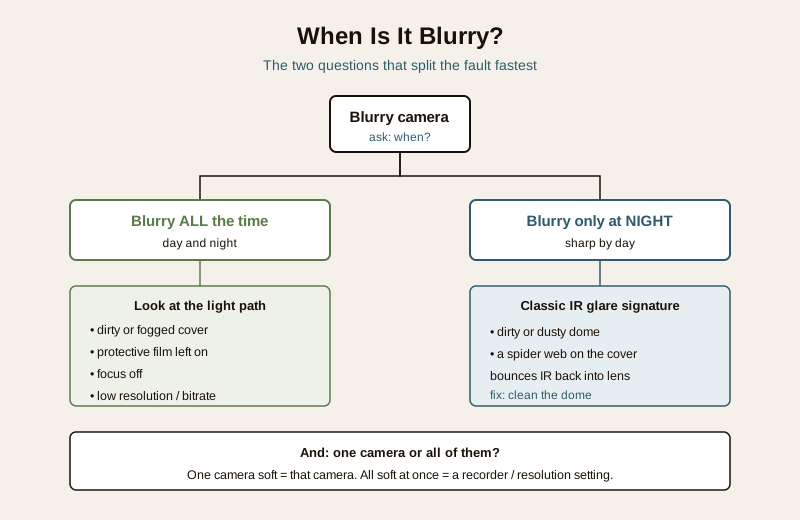
- Blurry all the time, day and night? The problem is the light path or the recording itself — a dirty or scratched cover, the protective film, focus, or resolution. Work the list below in order.
- Blurry, smeared or hazy only at night, but crisp by day? This is the classic infrared (IR) signature: a dirty or dusty dome, or a spider web across it, scatters the camera's own night-time IR light back into the lens as glare and halo. The daytime picture is fine because sunlight overpowers the scatter. This one has a specific fix — see the night section and the night-vision failure guide.
- One camera or all of them? If a single camera is soft, the fault is at that camera — its cover, its lens, its film. If every camera went soft at once, suspect the recorder's global resolution or quality setting, or a display or app problem rather than the cameras themselves.
The likely causes, in order
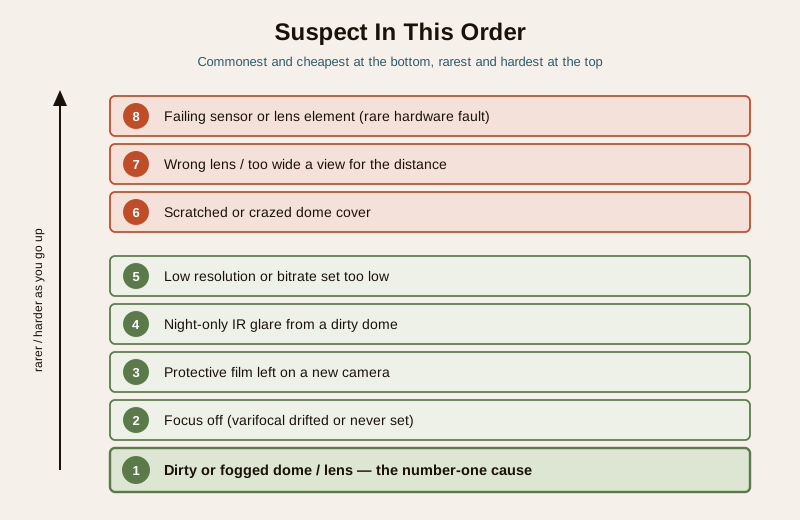
Here is the order to suspect, from the commonest and cheapest to the rarest and hardest. Resist the urge to jump to the bottom of the table.
| # | Cause | Why it blurs the picture | The fix |
|---|---|---|---|
| 1 | Dirty or fogged dome/lens (the number-one cause) | Dust, monsoon grime, cobwebs, salt haze, or condensation on the cover scatters light before it reaches the lens | Clean the cover and lens correctly — see below |
| 2 | Focus off | A varifocal lens has drifted, or a manual-focus camera was never set sharp on install | Re-set the focus (reachable camera = DIY; at height = pro) |
| 3 | Protective film left on | A new camera ships with a peel-off film over the dome; left on, everything is permanently hazy | Peel the film off |
| 4 | Night-only IR glare | A dirty or dusty dome bounces the camera's own IR back into the lens after dark | Clean the dome; sharp by day confirms it |
| 5 | Low resolution or bitrate | The stream is set to a low resolution or a heavily compressed low bitrate, so detail is thrown away | Raise resolution and bitrate in the recorder/app settings |
| 6 | Scratched or crazed dome | Wiper grit, a cheap cleaner, sun-crazing or hail leaves the plastic permanently marred | Replace the dome cover (usually a pro job) |
| 7 | Wrong lens / too wide a view | A wide lens spreads too few pixels over too much distance, so distant subjects are never sharp | Re-aim, zoom, or fit a longer lens for the distance |
| 8 | Failing sensor or lens element (rare) | Genuine hardware degradation — a dying sensor or a lens fault | Repair or replace the camera |
Notice how far down the list "the camera is broken" sits. Most blurry cameras are cured somewhere in the top five.
The diagnostic path — step by step
Work these in order and stop at the first one that clears the picture.
1. Is there still a protective film on the dome? On a newly installed or recently replaced camera, look closely at the cover for a peel tab or a slightly loose plastic skin. A film left on is an instant, total haze on that one camera. Peel it off. If the camera was fine for months and only just went soft, skip this and move on.
2. Is it dirty? Look at the actual cover, in person if you can safely reach it, or with a torch. Dust film, monsoon water-spots, salt haze near the coast, bird mess, or a cobweb across the dome are the single most common cause. If the cover is dirty, clean it (next section) before suspecting anything else — this alone fixes most cases.
3. Blurry all the time, or only at night? Check the same camera in daylight and after dark. Sharp by day, hazy or haloed by night points squarely at IR glare from a dirty or dusty dome, or a web catching the IR — clean it and re-check after dark. If it is blurry in both, the light path is not the whole story; continue.
4. One camera or all of them? If every camera went soft together, leave the cameras alone and check the recorder's resolution and quality settings, and whether the blur is only on the phone app (try the recorder's own monitor). If it is one camera, the fault is at that camera.
5. Is the resolution or bitrate set low? In the recorder or app, check the stream settings for that camera. A camera set to a low sub-stream resolution, or a low bitrate that compresses detail into mush, looks soft no matter how clean it is. Raise it (settings section below) and re-check.
6. Is it a focus problem? If the cover is clean, the film is off, the resolution is high, and it is still soft in daylight — especially if near objects are sharp but far ones are not, or the whole frame is uniformly soft — the lens is out of focus. On a reachable fixed camera this may be a gentle adjustment; on a varifocal or a camera at height it is a technician's job.
7. Still soft after all of that? Now, and only now, suspect the hardware: a scratched or crazed dome (look for marks catching the light), a lens too wide for the distance you need, or, rarely, a failing sensor. These are where a professional and, possibly, the choosing-a-camera guide come in — because a camera that is simply the wrong lens for the view is a buying decision, not a repair.
Safe fixes you can do yourself
These are the jobs a homeowner can safely handle on a reachable camera, without a ladder to a roof edge and without opening anything sealed.
Clean the dome and lens correctly
Cleaning is the highest-value fix, and doing it wrong is how a soft dome becomes a scratched one. In brief: blow or brush loose grit away first, then wipe gently with a microfibre cloth slightly damp with clean water or a lens-safe cleaner, never a dry dusty cloth, a paper towel, a nail or a harsh solvent that can craze the plastic. Do the outer cover and, where you can reach it safely, the lens glass behind it. Let it dry before judging the result. The full method — what to use, what never to use, and how often — is in the CCTV camera cleaning guide, and lens-specific care is in the lens maintenance guide. If the camera is above comfortable reach, this becomes a professional or AMC task, not a stretch off a wobbly chair.
Remove the protective film
If a new or newly swapped camera has a peel-off film on the dome, find the tab and remove it. Everything sharpens instantly. It sounds trivial, but a filmed dome is a genuinely common "the installer left it on" cause of a permanently hazy new camera.
Raise the resolution and bitrate
If the picture is soft because too little detail is being recorded, the fix is in software, not on the pole. In the recorder or app, open the encoding or stream settings for the camera and set the main stream to the camera's full resolution and a healthy bitrate; make sure the app is showing the main stream, not a low sub-stream preview. Be aware that higher resolution and bitrate use more storage and network, so if you raise them, keep an eye on recording days. Matching resolution and lens to the view is really a design decision, covered in how to choose a CCTV camera.
Check focus on a reachable camera
On a camera you can safely reach on the ground or a low stable mount, a gentle focus correction may be within reach: some fixed cameras have a small focus adjustment, and many varifocals have focus and zoom rings or a software autofocus button in the app. Adjust slowly while watching the live view, and stop if it means climbing. Anything at height is a technician's job — a blurry camera is never worth a fall.
When to call a professional
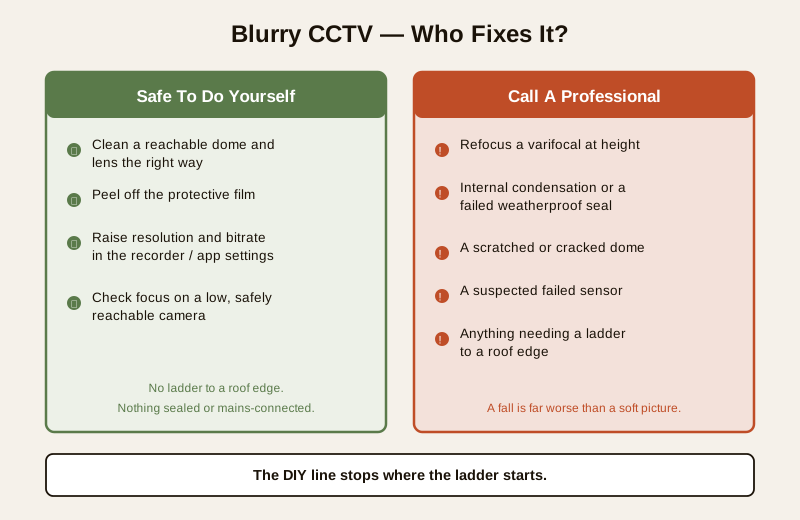
Stop and call your installer or AMC technician for any of these:
- The camera is at height — a roof edge, a high wall, a pole. Working at height to clean or refocus is not a DIY job; a fall is a far worse outcome than a soft picture.
- A varifocal needs refocusing on a mounted camera, especially one you cannot reach safely — precise focus-and-zoom on a ladder is a technician's task.
- Internal condensation or fogging inside the dome that cleaning the outside does not fix. Moisture behind the glass means a failed seal or gasket; opening and re-sealing a weatherproof housing correctly is skilled work, and doing it wrong lets in more water. See the weatherproofing behind this in the lens maintenance guide.
- A scratched, crazed or cracked dome — the cover needs replacing with the correct part, and often the camera must come down to do it.
- It is still soft after cleaning, film-check, resolution and focus — a suspected failing sensor or lens fault is a diagnose-and-repair-or-replace decision for a technician.
Do not chase a picture up a ladder. The commonest "professional" trigger here is simply height. A dirty dome on a first-floor eave is a five-minute clean from a safe platform; the same dome on a third-floor edge is a job for someone with the right access equipment. No camera image is worth a fall — when the fix needs a ladder to a roof edge or mains work, it is a technician's job, not yours.
Prevention — so it does not go soft again
Most blurry-camera call-outs are avoidable with a little rhythm.
- Clean on a schedule. Set a routine — quarterly for most sites, more often near dusty roads, the coast, or through the monsoon — so grime never builds to a haze. A domed camera in a cobwebbed corner will fog with IR glare within weeks.
- Choose sealed, weatherproof housings for outdoor cameras so moisture stays out and internal fogging never starts. The rating that governs this belongs to the buying stage.
- Set the right resolution from day one and confirm the app shows the main stream, so no camera is quietly running soft.
- Peel every film and confirm focus at handover. When a camera is installed or replaced, check on the spot that the film is off and the picture is sharp at the distance that matters — the driveway gate, the shopfront, the lobby.
- Right-size the lens to the view. A camera asked to cover too wide an area will never render a distant face sharply; that is a design choice made when you choose the camera, not a fault to be cleaned away.
A quick checklist
- Is there a protective film still on a new camera? Peel it.
- Is the dome dirty, dusty, cobwebbed or water-spotted? Clean it correctly — this fixes most cases.
- Sharp by day, hazy by night? That is IR glare from a dirty dome — clean and re-check after dark.
- All cameras soft at once? Check the recorder's resolution and bitrate, not the cameras.
- Clean and still soft in daylight? Check focus — reachable camera only; at height, call a technician.
- Scratched dome, internal fogging, or still soft after everything? That is a professional job.
- Keep a cleaning schedule so it never builds up again.
Where to go next
- The CCTV camera cleaning guide and the lens maintenance guide — the correct way to clean a dome and lens, and why a dirty cover is the number-one cause of a soft picture.
- The night-vision failure guide — for a picture that is sharp by day but hazy, haloed or blind only after dark.
- How to choose a CCTV camera — resolution, bitrate and matching the lens to the view, so a camera is sharp by design.
- The security system troubleshooting pillar, the troubleshooting hub, the CCTV hub and the main security hub.
References
- Digital Personal Data Protection Act, 2023 — recorded CCTV footage and recorder or app access hold personal data; keep credentials private and agree who may view footage and for how long.
- Bureau of Indian Standards catalogue — for the ingress-protection and equipment standards relevant to weatherproof camera housings, verify current status via the BIS catalogue: https://www.services.bis.gov.in/
This is an educational, diagnostic overview for homeowners and facility managers — not an installation manual, a price guide or legal advice. Work only within the safe-DIY line: clean and check what you can safely reach, and engage a licensed installer or your AMC technician for any work at height, any sealed or mains-connected equipment, or any fault that persists after the simple checks.
Export this guide
Related Guides — Deep-dive reading
CCTV Recording Failure in India (2026): Live View Works but Nothing Was Saved
You open the recorder to pull footage of an incident and there is nothing there, even though every camera shows a crisp live picture. A calm, ordered guide to why an Indian CCTV system records live but saves nothing, and how to fix it before the next incident.
SecurityCCTV Camera Cleaning in India (2026): The Two-Minute Job That Keeps Your Footage Usable
A dirty camera is a blind camera. How dust, cobwebs, monsoon grime, salt haze and bird droppings quietly ruin your footage, and the safe way a homeowner cleans a ground-level camera in two minutes, where the professional and the AMC take over.
SecurityCCTV Night Vision Failure in India (2026): Dark Footage, No IR or White-Out Glare, Fixed
Your CCTV looks fine by day but fails at night — pitch-black footage, no infrared, or a blinding white-out glare. A calm, ordered diagnostic path for homeowners, from the dirty dome and wrong day-night setting most people hit, down to the rare failed IR LED or sensor.
SecurityRelated Tools — Try Free
Before & After Studio
Generate AI before-and-after renders to preview how your redesign could look.
DesignAICCTV Identification-Distance Calculator
How far a camera can still identify a face or number plate (DORI 250 px/m), from resolution, lens and sensor.
Identify DistanceCCTV Recording-Duration Calculator
How many days of footage your storage holds, from cameras, bitrate, hours per day and recording mode.
Retention Days