

CCTV Lens Maintenance in India (2026): Keeping the Optics and Focus Sharp
Beyond wiping the dome — how to keep a camera's lens, focus and image quality sharp: the difference between the outer window and the real lens, fixing monsoon fog inside the dome, avoiding scratches, and knowing which checks are safe DIY and which are a professional or AMC job.
Most people think camera maintenance means wiping the dust off the dome. That helps, but it is only half the story — and often not the half that is actually failing the picture. The dome or clear window is not the lens. Behind it sits the real optical assembly: the lens elements that focus light onto the sensor. A camera can have a spotless dome and still deliver a soft, blurry, glaring or fogged-up image, because the problem lives deeper — in the focus, in the seal, or in moisture that got inside.
This matters most on the night it matters. A camera that looks fine on a bright afternoon can be useless after dark if the lens has drifted out of focus, if the dome has fogged from the inside during the monsoon, or if a scratched window is bouncing the infrared (IR) glow straight back into the sensor. The commonest reason a security camera fails to identify a face or a number-plate is not a broken camera — it is a dirty, fogged, scratched or out-of-focus lens that nobody checked. This guide is about keeping the optics and the focus sharp, which is a different and more careful job than cleaning the dome.
Think of it as two layers of care. The outer window you can gently keep clean yourself. The optics, the focus and the seal are precision and pressure-and-height work — some of it genuinely a professional or annual-maintenance-contract (AMC) task. Knowing which is which is the whole point, because the wrong DIY move here does not just fail to help; it can scratch a lens coating, break a weather seal, or void a warranty.
Scope & safety. This is an upkeep guide for homeowners, not an installation or repair manual. It draws a clear line between what you can safely do yourself — gentle external cleaning and a regular visual focus-and-aim check — and what belongs to a qualified technician or your AMC provider: opening a sealed camera, cleaning internal optics, re-focusing a varifocal lens (especially at height), or fixing a broken seal or gasket. Opening a sealed camera can void its ingress-protection (IP) weather rating and its warranty, so it is not a casual DIY job. This is not a price guide or a buying guide — for costs and contracts see the CCTV maintenance and AMC guide, and for choosing a camera in the first place see how to choose a CCTV camera. Footage you handle during any maintenance is still personal data under the Digital Personal Data Protection (DPDP) Act 2023 — treat it with care.
Dome, lens and focus — what "lens maintenance" actually covers
The single most useful idea in this guide is to stop treating the camera as one glassy thing. There are three distinct layers, and each needs different care.
- The outer dome or window. On a dome or turret camera this is the clear plastic or glass cover; on a bullet camera it is the small front window and its little sun-shade hood. This is the only surface you should ever touch. It collects dust, rain-spots, oily film, cobwebs and lizard smears. Cleaning it is safe, gentle DIY.
- The lens itself. Behind the window sit the actual lens elements. In a sealed camera you should not be touching these at all. They can gather internal dust or, in humid India, a haze of fungus — but getting to them means opening a sealed body, which is a technician's job.
- The focus. Even a perfectly clean lens gives a soft picture if it is not focused on the right distance. Focus is not dirt — it is an adjustment. On many cameras it is factory-set and fixed; on others (varifocal cameras) it can be tuned, and therefore can drift or may never have been set correctly at handover.
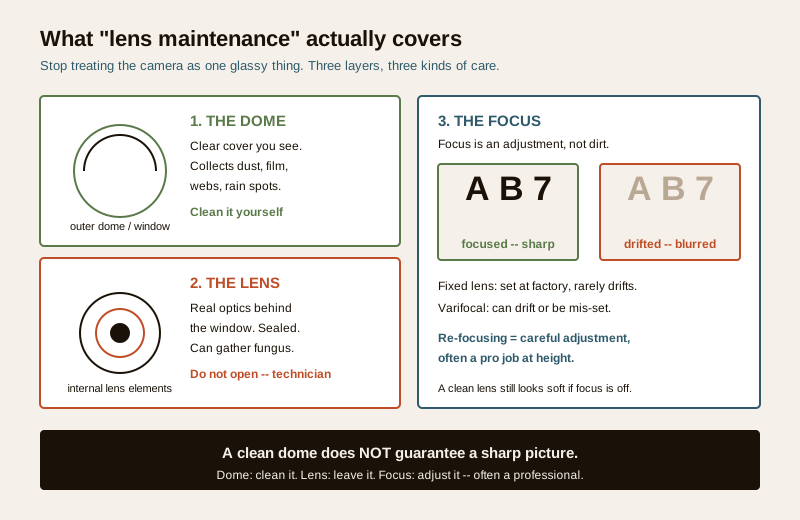
Fixed versus varifocal focus
A fixed-lens camera has its field of view and focus set at the factory. There is nothing for you to adjust and, usually, nothing that drifts — if a fixed-lens picture goes soft, the cause is almost always dirt, fog, a scratch, or a genuine fault, not the focus setting.
A varifocal camera lets the installer set both the zoom (how wide or tight the view is) and the focus, usually with two small rings or, on motorised models, from the recorder's menu. This flexibility is useful, but it introduces two failure modes: the focus can drift over time (vibration, temperature swings, a knock), or it was never set right at installation — a camera zoomed to frame a gate but left focused on the middle distance will look permanently soft. Re-focusing a varifocal is a careful, patient adjustment best done live on a good monitor, and when the camera is mounted high on a wall it becomes work-at-height that belongs to a technician. If your soft camera is a varifocal, this is a common and fixable cause — and knowing which lens type you have is part of choosing a CCTV camera in the first place.
Condensation and fogging inside the dome — the India monsoon problem
This is the fault that catches the most people in India, and the one most often "cleaned" the wrong way. You look at the camera on a humid morning and the dome is milky, misted, sometimes with actual droplets running inside the glass. You wipe the outside — and nothing changes, because the fog is on the inside.
Internal fogging is not a cleaning problem. It is a moisture problem, and moisture inside a supposedly sealed camera almost always means the seal has failed. During the monsoon and through humid coastal and riverine weather, warm damp air finds its way past a tired gasket, an un-tightened cover, or a cable-entry point that was never properly sealed with the supplied gland or putty. Then every cool night, that trapped humid air condenses on the inside of the dome. Left alone it does three bad things: it blurs the picture, it can drip onto the electronics, and it feeds fungus growth on the internal optics.
Wiping the outside does nothing. The real fixes are about sealing and drying, and most of them are a technician's job:
- Replace the desiccant. Many outdoor cameras ship with a small silica-gel desiccant pack inside precisely to absorb this moisture. Over a couple of humid years it saturates and stops working. A technician can open the camera, fit a fresh pack and reseal — a routine part of a good AMC visit.
- Restore the seal. A perished rubber gasket, a cover not tightened evenly, or an unsealed cable entry is the actual leak. It must be fixed at source — a new gasket, correct tightening, proper cable-gland sealing — not papered over. This is skilled work; done wrong it makes the IP rating worse.
- Check the IP-rating integrity. The camera's IP rating (for example IP66 or IP67) is only real while the body is properly closed and sealed. Once fog appears inside, treat the weatherproofing as compromised until a technician confirms it is sound again.
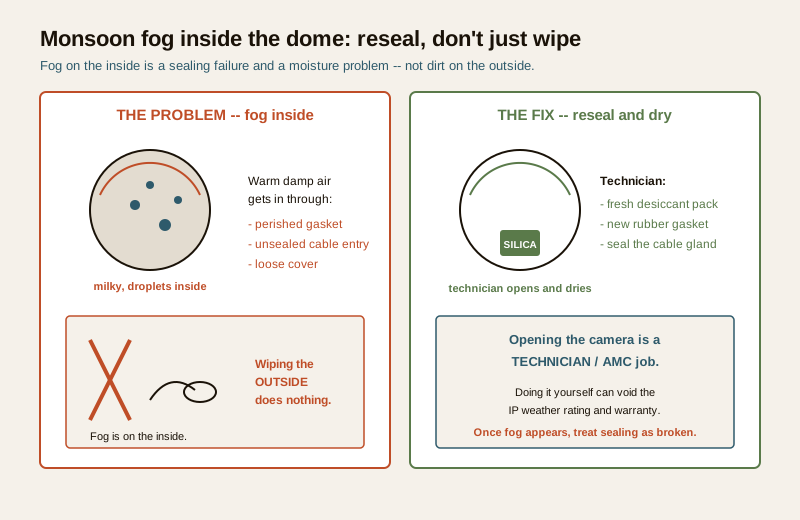
Do not open a sealed camera to "dry it out" yourself. It is tempting, but cracking the housing open on a ladder, wiping the inside and clicking it shut almost never restores the seal — and it can void both the IP rating and the warranty, leaving you worse off next monsoon. Persistent internal fog is a call-a-technician job.
IR reflection and glare from a smudged or scratched dome
At night, most cameras switch on built-in infrared (IR) LEDs to light the scene. This is where a dirty or damaged dome bites hardest. By day the picture looks acceptable; after dark the IR light hits any smudge, greasy film, dust layer, spider-web or scratch on the dome and bounces straight back into the lens, washing the whole image out in a foggy white glare. You lose exactly the night-time detail — the face, the plate — that the camera exists to capture.
- A greasy or dusty film scatters IR into a soft haze. This is the case a gentle clean genuinely fixes.
- A cobweb or insect across the dome reflects IR as bright blobs or streaks and often triggers false motion alerts too.
- A scratched dome scatters IR permanently — no amount of cleaning removes it, because the damage is in the plastic. A badly scratched or crazed dome usually needs replacing.
The lesson is that night-glare is often a lens-surface problem, not a camera fault. Before assuming a camera has failed at night, clean the dome properly and look again.
Scratches — why you must never rub grit
Here is the mistake that turns a small problem into a permanent one. Outdoor domes collect gritty dust. If you wipe a dry, dusty dome hard with a rough cloth — or worse, a paper towel or your shirt — you drag that grit across the surface and scratch the dome and its coating. Every scratch then scatters light and IR forever. You have traded a five-minute clean for a dome replacement.
The safe method is gentle and patient:
- Rinse or blow off loose grit first. Clean water, or a gentle puff of air, so you are not grinding dust into the surface.
- Use a soft microfibre cloth, damp with clean water or a little mild soapy water — never a dry rough cloth, never a paper towel, never a fingernail or a scraper.
- No harsh solvents. Thinner, spirit, acetone and strong cleaners can cloud or craze the dome plastic and strip anti-reflective coatings. Water and mild soap are enough.
- Dab, do not scrub. Wipe softly in straight strokes; let the water do the work rather than pressure.
- Never rub a scratch to "polish it out." You cannot, and you will make it worse.
Spiders, insects and lizards — the living lens problem
In Indian conditions the commonest thing on a lens is not dust — it is wildlife. The warmth of the camera and the glow of the IR LEDs attract insects at night; spiders spin webs right across the dome because that is where the bugs gather; lizards leave smears. A web across the dome scatters IR, blurs the view and sets off false alerts all night. This is genuine, safe DIY: a gentle wipe or a soft brush clears it, and it is one of the best reasons to actually look at your cameras regularly. If a particular camera webs up every few days, that is a sign to check its siting and lighting rather than just wiping it forever.
Check the image regularly — the five-minute habit
The whole point of lens maintenance is that the picture is still doing its job. A camera can degrade slowly and silently — you only discover the blur, fog or wandered aim the day you go back to the footage and it is useless. Build a simple habit of actually looking at each camera's live view and asking four questions:
1. Is it sharp? Can you make out detail — a face at the gate, characters on a plate — or has it gone soft and mushy?
2. Is it aimed right? Is the camera still pointing where it should, or has wind, a knock or a loose bracket nudged it off? A perfect image of the wrong spot is worthless.
3. Is it in focus? Especially on varifocals — soft everywhere usually means focus, not dirt.
4. How is the night image? Switch to the after-dark view: any white-out glare, fog or haze that the day view hid?
Do this monthly, and always after heavy rain, a storm or any work near the camera. For the broader routine your whole system needs, see the security system maintenance guide and the wider maintenance library.
The maintenance schedule
A simple, honest schedule. The "who" column is the important one — it is where the safe-DIY line is drawn.
| Task | How often | Who |
|---|---|---|
| Look at each camera's live view — sharp, aimed right, in focus? | Monthly, and after storms | You (DIY) |
| Check the night/IR image for glare, fog or haze | Monthly, after dark | You (DIY) |
| Gently clean the outer dome or window (grit off first, soft damp microfibre) | Every 1 to 3 months, or when dirty | You (DIY) |
| Clear cobwebs, insects and lizard smears | As seen | You (DIY) |
| Inspect the dome for scratches, cracks or crazing | Quarterly | You (DIY), replace via technician |
| Investigate internal fog or condensation | On sight (monsoon especially) | Technician / AMC |
| Replace saturated silica-gel desiccant pack | Annually, or when fog appears | Technician / AMC |
| Replace a perished gasket, reseal cable entry, restore IP rating | When leaking | Technician / AMC |
| Re-focus a drifted or mis-set varifocal lens (often at height) | When soft; at annual service | Technician / AMC |
| Clean internal optics or clear lens fungus | Only when needed | Technician / AMC |
DIY-safe versus professional-only — the split
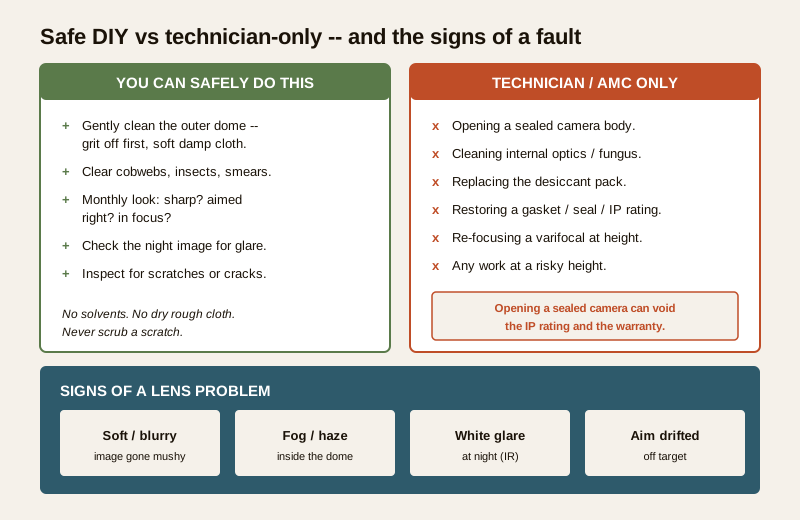
Safe for you to do yourself:
- Gently clean the outer dome or window — grit off first, soft damp microfibre, mild soap at most, no solvents.
- Clear cobwebs, insects and lizard smears with a gentle wipe or soft brush.
- Do the monthly look: is the image sharp, correctly aimed and in focus, day and night?
- Inspect the dome for scratches, cracks or crazing (then call a technician to replace a damaged dome).
Strictly for a qualified technician or your AMC provider:
- Opening any sealed camera body — this is the line that can void the IP rating and the warranty.
- Cleaning internal lens optics or clearing lens fungus.
- Replacing a saturated desiccant pack, a perished gasket, or resealing a cable entry to restore weatherproofing.
- Re-focusing a varifocal lens, particularly when the camera is mounted high — this combines a delicate adjustment with work at height.
- Any work that means climbing to a height you are not equipped to reach safely. Never balance on a wobbly ladder to reach a camera — a fall is a far bigger risk than a soft image.
When you are unsure which side of the line a task sits on, treat it as professional and call your installer or AMC provider. Folding lens checks into a regular AMC visit is the cleanest way to keep the optics honest — see the CCTV maintenance and AMC guide.
Signs of a lens problem
Learn to read these, because they tell you the picture is degrading before you actually need it:
- Soft or blurry image — detail you could once read (a face, a number-plate) has gone mushy. Suspect focus drift on a varifocal, or a dirty or fogged lens.
- Fog or haze inside the dome — milky glass, sometimes droplets, that does not clear when you wipe the outside. A sealing failure and moisture problem — a technician job.
- White glare or wash-out at night — the day view looks fine but the IR view blooms into fog. Usually a smudged, dusty, cobwebbed or scratched dome bouncing IR back.
- Bright blobs or streaks after dark — a cobweb or insect across the dome catching the IR.
- Aim drifted off target — the camera is sharp but pointing at the wrong place after wind, a knock or a loose bracket.
- Persistent softness after a clean — if a proper clean does not fix it, the cause is deeper: focus, an internal problem, or a scratched dome.
Checklist
- Remember the three layers: dome (clean it), lens (leave it), focus (adjust it — often a pro).
- Clean the outer dome gently — grit off first, soft damp microfibre, no dry rough cloths, no solvents, no scrubbing a scratch.
- Look at every camera's live view monthly — sharp? aimed right? in focus? — and always check the night image for glare and fog.
- Treat internal fog as a sealing failure, not a cleaning job — desiccant, gasket and seal work is for a technician.
- Never open a sealed camera yourself — you can void the IP rating and warranty.
- If a varifocal is soft everywhere, suspect focus drift — a careful, sometimes at-height, professional adjustment.
- Never climb a risky height to reach a camera; a soft image is not worth a fall.
- Fold lens checks and internal servicing into your AMC; keep a short log of what you cleaned and checked and when.
For the day-to-day surface routine, this guide is the companion to CCTV camera cleaning — that one is about keeping the outside clean, this one is about keeping the optics and focus sharp. For the whole system, start at the security system maintenance guide, the maintenance library, the CCTV library and the main security hub.
References
- Digital Personal Data Protection Act, 2023 — CCTV footage and images viewed or handled during any maintenance are personal data; view only what you need, and keep footage secure.
- Ingress Protection (IP) ratings — the two-digit IP code (for example IP66, IP67) describes a camera's sealing against dust and water; it holds only while the housing is correctly closed and sealed, which is why opening a sealed camera compromises it.
- Bureau of Indian Standards catalogue — for the current status of any Indian Standard referenced by installers, verify via the BIS catalogue: https://www.services.bis.gov.in/
This is an educational upkeep overview for homeowners, not an installation, electrical or repair manual. Gentle external cleaning and visual checks are safe to do yourself; opening a sealed camera, internal cleaning, re-focusing a varifocal, sealing work and any work at height are for a qualified technician or your AMC provider. When in doubt, call a professional.
Export this guide
Related Guides — Deep-dive reading
CCTV Recording Failure in India (2026): Live View Works but Nothing Was Saved
You open the recorder to pull footage of an incident and there is nothing there, even though every camera shows a crisp live picture. A calm, ordered guide to why an Indian CCTV system records live but saves nothing, and how to fix it before the next incident.
SecuritySecurity Lighting Maintenance in India (2026): Keeping the Whole Scheme Alive, Because a Dark Patch Is a Security Hole
The best-designed security lighting is worthless the day the lamp fuses, the sensor clogs with cobwebs, the solar panel dusts over or the fitting fills with monsoon water. This guide gives a homeowner and a society the simple maintenance routine that keeps every part of the scheme working, so no dark patch quietly opens up on a wall nobody looks at after dark.
SecurityCCTV Cable Inspection in India (2026): The Invisible Failure Point Behind a Dark Camera
The cabling is the quiet weak link in every CCTV system — a rodent-chewed coax, a sun-perished sheath, water in a junction box or a corroded connector kills a camera. A professional guide to inspecting the run, spotting a cabling fault, and knowing which checks are safe to do yourself.
SecurityRelated Tools — Try Free
Monsoon-Readiness Checklist
Pre-rain home audit across 9 categories — terrace, drains, waterproofing, electrical, HVAC, pest, vehicles, documents.
Seasonal AuditWindow Cleaning Cost Calculator
Estimate professional window cleaning cost per visit and per year by access and frequency.
Window CalculatorWindow Maintenance Cost Calculator
Estimate annual window upkeep by frame material — yearly, per-window and 5-year cost.
Window Calculator