

AI and the Future of Residential Design
How artificial intelligence is changing the way Indian homes are designed, what it does brilliantly, where it still needs a human, and how you can use it today.
A few years ago, if you wanted to see what your future home might look like, you had two choices: squint at a flat 2D floor plan and try to imagine it, or wait weeks for an architect to prepare hand-drawn or 3D views. Today, an architect can show you ten different living-room layouts before lunch, turn a rough sketch into a photo-like image in minutes, and re-colour your whole home in three styles while you watch. The engine behind this speed is artificial intelligence (AI).
This guide is about AI as a design tool, the part that helps you and your architect imagine, explore, and visualise a home before a single brick is laid. It is deliberately separate from our companion guide on smart home design in India, which covers the automation gadgets that live inside a finished house (lights, sensors, voice assistants). Here we are talking about the design process itself, not the technology you switch on afterwards.
We will keep this honest. AI is genuinely useful for some parts of designing a home and genuinely weak, even risky, at others. Knowing the difference is what turns you from a passive buyer into a confident client.
1. What "AI in design" actually means
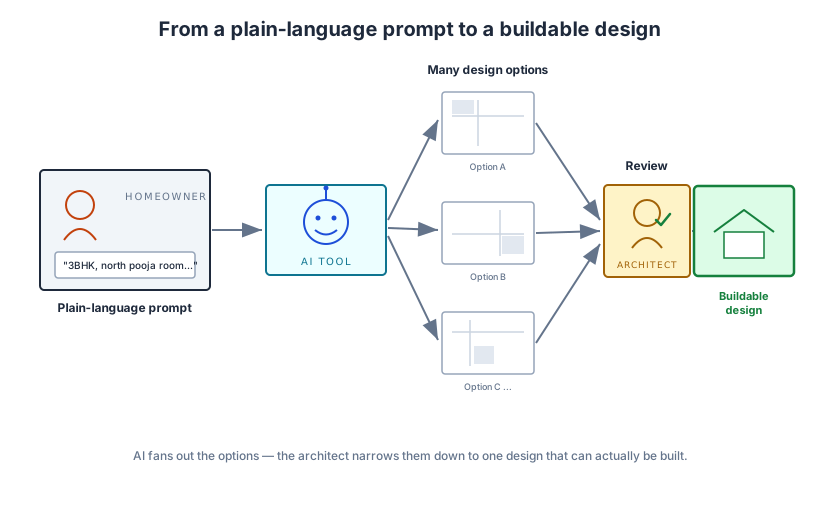
When people say AI is changing home design, they usually mean a family of tools called generative AI, software that creates new images, layouts, or text from a short instruction (a "prompt") you type in plain language. You describe what you want ("a 3BHK with a north-facing pooja room and a large kitchen"), and the tool produces options.
This is different from the calculators and CAD software architects have used for decades. Older software did exactly what you told it. Generative AI proposes things you did not explicitly ask for, drawing on patterns it learned from millions of existing designs. That is its superpower and, as you will see, also the source of its biggest flaws.
You do not need to understand the maths. You only need to know that these tools are very good at producing many plausible-looking options fast, and that "plausible-looking" is not the same as "correct" or "buildable".
2. Generative ideation and moodboards
The earliest, safest, and most enjoyable place AI helps is at the very start, when nothing is fixed and you are just dreaming.
Tell a tool "warm modern Indian home, lots of natural light, jaali screens, terracotta and white" and within seconds you get a wall of moodboard images and atmospheric renders. You can react to them, this feels too cold, I love that arch, more greenery, and steer the next batch. Designers have done this with image tools like Midjourney for a while now; the difference is the speed and the number of directions you can try.
For a homeowner, this is genuinely empowering. Instead of struggling to put a feeling into words for your architect, you can show pictures that match the mood in your head. It collapses the awkward early gap where you and your designer are not yet speaking the same visual language.
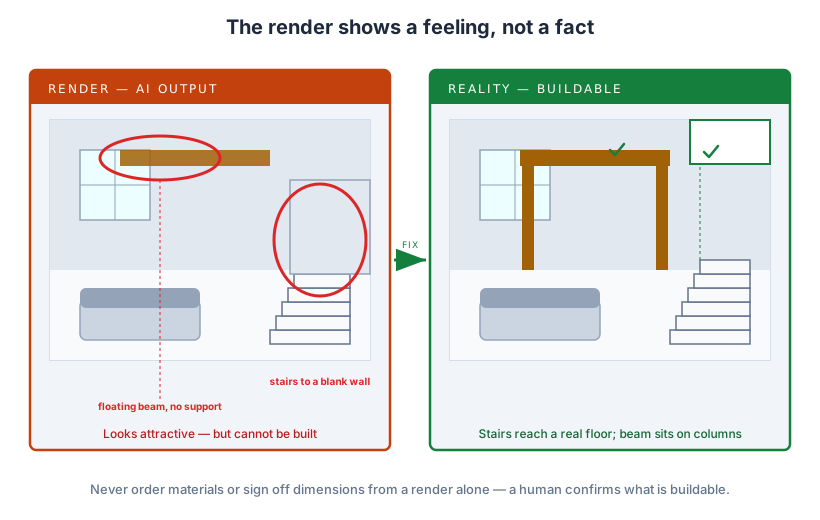
The honest caveat: these images are inspiration, not instructions. A dreamy AI render may show a window where a load-bearing wall must go, or furniture at impossible sizes. Treat moodboards as a mood, the colours, materials, and feeling, not as a plan to be copied.
3. Instant floor-plan options
This is where AI starts doing real design work. Several tools now generate residential floor plans from your requirements: number of bedrooms, plot size, orientation, must-have rooms. They can produce 5, 10, or 20 layout variations in the time it once took to draw a single one by hand.
For an Indian context this matters, because so much of our planning is about juggling constraints, plot setbacks, Vastu preferences, ventilation, a separate pooja space, joint-family privacy. Seeing many configurations quickly helps you and your architect spot a clever arrangement you might never have reached by drawing one careful plan at a time.
But this is also where the risks sharpen. AI floor plans are usually produced as images first and geometry second, which means dimensions can be approximate, wall thicknesses unrealistic, and the plan may quietly ignore the National Building Code or your local development control rules. Researchers studying AI floor-plan generation note that most tools optimise for shape and arrangement while neglecting the performance and code checks that make a plan actually buildable. A layout that looks balanced on screen can be structurally or legally impossible.
The right use: AI floor plans are a brilliant brainstorming device. They are not a substitute for a licensed architect drawing the real, code-compliant, structurally sound plan.
4. Renders and visualisation from sketches or text
Perhaps the most magical-feeling tool: you give the AI a rough hand sketch, a basic 3D massing model, or even just a sentence, and it returns a photorealistic image of the finished space.
The benefit is communication. Most people cannot read technical drawings. A realistic render lets you actually see the proposed home, the light at 4 pm, the colour of the flooring, how the kitchen island sits, and react honestly before money is committed. The RIBA AI Report 2025 found that early-design visualisation is by far the most common professional use of AI, precisely because the payoff is so immediate.
Studio Matrx puts this in your hands directly: tools like Studio Matrx DesignAI let you upload a photo of your own room and instantly see it restyled, no waiting, no rendering queue.
The caveat is the famous problem of "hallucination". Image AI will happily invent details that cannot exist: a staircase that leads nowhere, a beam floating in air, reflections that do not match the room, or text and signage that is gibberish. The render shows a feeling, not a measured fact. Never order materials or sign off dimensions based on a render alone.
5. Cost estimation, climate and energy simulation, and Vastu suggestions
Beyond pictures, AI is creeping into the technical back-room of design, and this is where it can save you real money and real comfort.
Cost and BOQ estimation. Some tools now produce rough bills of quantities (BOQ) and cost ranges from a design, giving you an early ballpark long before a detailed estimate. For a homeowner, even a rough number early on prevents the painful surprise of falling in love with a design you cannot afford.
Climate, daylight, and energy simulation. Studies are now using AI to predict and improve the daylight performance of generated floor plans, the kind of analysis (how much sun a room gets, whether it will overheat) that used to need specialist consultants and days of computation. Faster simulation means your architect can test a south-west bedroom for harsh afternoon sun and fix it on the drawing board, not after you have suffered a summer in it.
Material and Vastu suggestions. Tools increasingly suggest materials, palettes, and even Vastu-aligned arrangements. These are useful prompts for discussion, but treat them as a starting point. AI suggestions reflect patterns in their training data, which may be generic, foreign, or simply wrong for your climate, budget, or beliefs.
The pattern is consistent: AI makes the first pass faster. It does not make the human judgement on the final call unnecessary.
6. What AI does well versus where a human is essential
If you remember one thing from this guide, make it this table. It maps the real design tasks to where AI genuinely helps and where a qualified professional is non-negotiable.
| Design task | Where AI helps today | Where a human is essential |
|---|---|---|
| Early concept and mood | Generates dozens of styles and moodboards fast | Reading your actual life, family, and habits |
| Floor-plan options | Brainstorms many layout variations | Code-compliant, structurally sound final plan |
| Visualisation | Turns sketches or text into vivid renders | Confirming what is actually buildable and to scale |
| Cost and BOQ | Rough early ballpark figures | Accurate, market-rate, site-specific estimate |
| Daylight and energy | Fast first-pass simulation | Interpreting results and engineering the fix |
| Materials and Vastu | Suggests palettes and arrangements | Judging fit for your climate, budget, and beliefs |
| Detailing and joints | Very limited and often wrong | All construction detailing and specifications |
| Regulatory approval | None, cannot certify anything | Licensed architect or engineer signs and is liable |
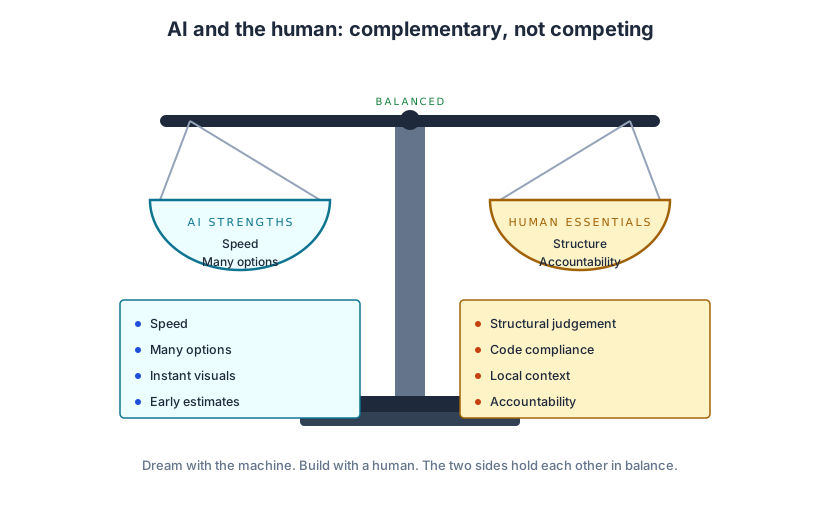
The pattern across the table is clear. AI is strong at the fuzzy front end, exploring, imagining, communicating, and weak at the precise, accountable end, detailing, structure, regulation, and legal responsibility.
7. The risks, in plain language
Let us name the dangers directly so you can guard against them.
Hallucinated dimensions and details. AI confidently produces measurements and details that are simply wrong. It does not "know" it is wrong; it has no concept of gravity, building codes, or your municipal bye-laws.
Generic, placeless output. Because these tools learn from global data, their default taste drifts towards a generic international look. Left unguided, AI can quietly strip out exactly what makes an Indian home work, the courtyard, the cross-ventilation, the shaded verandah, the regional material, in favour of glossy sameness.
No accountability. When a wall cracks or a plan is rejected by the corporation, you cannot sue an AI. Only a registered professional carries that responsibility. AI output is, legally and practically, a draft.
Hype. Marketing will tell you AI can "design your dream home" by itself. It cannot. The most credible voices in the profession, including the RIBA, conclude that AI will radically augment the architect's role but not replace it. Treat any "no architect needed" claim with suspicion.
8. How you can use AI today, sensibly
You do not need to be technical to benefit right now. Here is a grounded way for an Indian homeowner to use AI in their own project.
1. Explore freely at the start. Use AI moodboard and restyle tools, including Studio Matrx DesignAI, to gather a visual brief. Save the images that feel right.
2. Bring the images, not the orders. Hand your architect a moodboard and say "this feeling", not "build exactly this render".
3. Use AI plans as conversation starters. If you generate floor-plan options, present them as questions ("could something like this work?") rather than finished decisions.
4. Ask for the human checks explicitly. Ask your architect: is this structurally sound? Does it meet local rules? Is the estimate realistic? Those are the questions AI cannot answer.
5. Never skip the professional. Whatever AI produces, a qualified, registered architect or engineer must review, correct, and take responsibility for the buildable design.
Used this way, AI does not put a barrier between you and your designer, it gives you a shared, visual vocabulary and gets you to a good design faster and with fewer misunderstandings.
9. The near future: co-designing, not replacing
Where is this heading over the next few years? Towards collaboration, not replacement.
The realistic picture is an architect sitting with you, steering AI live, generating twenty options, killing nineteen, refining the twentieth, while applying the judgement, local knowledge, and responsibility the machine lacks. This connects to the bigger shifts we cover in our siblings on digital twins in residential design (living, simulated models of your home), what will homes look like in 2050, and robotics and 3D printing in construction, where AI designs and machines increasingly build.
The honest forecast is undramatic and reassuring: AI gets faster and more useful at the front of the process, humans stay firmly in charge of the parts where lives, money, and the law are at stake.
What this means for you
AI has genuinely changed home design, mostly for the better, and mostly at the beginning. It lets you see your ideas, compare many options, and reach a clearer brief faster than ever before, and platforms like Studio Matrx DesignAI put that power directly in your hands.
But it is a brilliant assistant, not an architect. It imagines; it does not certify. It produces drafts; it does not take responsibility. The smart homeowner uses AI to explore boldly and then insists that a qualified professional checks, corrects, and signs off everything that will actually be built.
Dream with the machine. Build with a human. That balance is the future of residential design, and you can start using it today.
Sources
- RIBA, RIBA AI Report 2025 (Royal Institute of British Architects) — https://www.architecture.com/knowledge-and-resources/resources-landing-page/riba-ai-report-2025
- RIBA AI Report 2025 summary, Beale & Co — https://beale-law.com/article/riba-ai-report-2025-reveals-how-artificial-intelligence-is-transforming-architecture-and-construction/
- ArchDaily, "How 2025 Turned Architectural Visuals Into Disputed Media" — https://www.archdaily.com/1036773/how-2025-turned-architectural-visuals-into-disputed-media
- ArchDaily, "This Is Not Architecture: Resisting the Illusion of AI Design" — https://www.archdaily.com/1029469/this-is-not-architecture-resisting-the-illusion-of-ai-design
- "A State-of-Art Survey on Generative AI Techniques for Floor Planning" (2025) — https://generativeaiandhci.github.io/papers/2025/genaichi2025_6.pdf
- "Prediction and optimization of daylight performance of AI-generated residential floor plans", ScienceDirect — https://www.sciencedirect.com/science/article/abs/pii/S0360132325005359
- Chaos, "Top AI Tools for Architects" — https://blog.chaos.com/ai-tools-for-architects
- Architizer Journal, "Top AI Tools for Architects and Designers" — https://architizer.com/blog/practice/tools/top-ai-tools-for-architects-and-designers/
Export this guide
Related Guides — Deep-dive reading
Orientation, Light & Views: Designing With Your Space, Not Against It
How reading your plot's sun, breeze and views — and placing each room on the right face — gives an Indian home that is cooler, brighter and quietly right, instead of one that fights its site forever.
Design PrinciplesAI Render Generator — Photoreal AI Rendering for Indian Architects + Designers (2026)
Sketch/photo/white-box → photoreal · 12 min vs V-Ray 4 hr · Studio Matrx + Lumion + D5 + Twinmotion + Enscape
Design StylesHow to Plan a Functional House Layout
A Workflow Guide — From Brief to Construction Drawings
Room PlanningRelated Tools — Try Free
Cross-Ventilation Analyzer
Estimate airflow and air changes per hour (ACH) from room size, window areas, layout, and local wind — with NBC 2016 Part 8 compliance check.
Ventilation CalculatorVastu Window Planner
Vastu guidance for window placement and size by wall direction and room — rating and remedies.
VastuBefore vs After — Cost Reality Check
Compare what you expected to pay vs what you actually paid, category by category.
Reality Check