
2MP vs 4MP vs 8MP Camera (2026): Choosing CCTV Resolution for an Indian Home
1080p, 4MP or 4K? A neutral, homeowner-friendly head-to-head on what megapixels really buy you in detail, what they cost you every single day in storage, and the honest truth that sensor quality and lighting matter as much as the number on the box.
Walk into any camera shop or scroll any listing and the first number thrown at you is the megapixel count: 2MP, 4MP, 8MP, sometimes higher. It is presented as the one figure that separates a good camera from a poor one, and bigger always looks better. The honest answer is quieter than the sales pitch: more megapixels give you more detail, but they cost you more storage every single day, and they do nothing for a badly lit scene or a cheap sensor. The right resolution for your home is a balance, not a maximum.
This guide is a neutral head-to-head between the three resolutions almost every Indian home is choosing between: 2MP (1080p Full HD), 4MP, and 8MP (4K UHD). We will explain what each actually means, compare them across the things that matter to you — detail, storage and bandwidth, low-light behaviour, lens and cost — and then say plainly which suits which home. The theme running through all of it: megapixels are not everything.
Scope and how to read this. This is a neutral homeowner explainer, not a buying guide, a price list or a brand recommendation. All three resolutions are legitimate and each wins in a real situation — the "best" one depends on your scene, your budget and how much storage you are willing to feed. We give general "cheaper/dearer, more/less storage" framing, not fabricated prices or specs. For the money side see the data storage cost guide; for the deeper technical picture see the CCTV resolution guide. Any camera recording people captures personal data under the DPDP Act 2023 — point cameras at your own property, not a neighbour's window or the public road, whatever the resolution.
What the numbers actually mean
A camera's resolution is simply how many tiny dots (pixels) make up each image. "MP" is megapixels — millions of those dots. More dots means a finer, more detailed picture, the same way a higher-resolution photo lets you zoom in further before it turns blocky.
- 2MP = 1080p Full HD — roughly 1920 x 1080 pixels, about two million of them. This is the long-standing standard for home CCTV, the same resolution as a Full HD TV.
- 4MP = roughly 1440p — about four million pixels, a clear step up from 2MP without the full jump to 4K. It has become the popular middle ground.
- 8MP = 4K Ultra HD — roughly 3840 x 2160, about eight million pixels, four times the detail of 2MP. This is the sharpest tier a normal home would consider.
There is a crucial idea hidden in those numbers. More pixels can be used in two ways: to capture the same scene in finer detail, or to cover a wider scene at the same detail. An 8MP camera can watch your whole front yard and still let you zoom into the gate afterward — something a 2MP camera watching the same wide view could not resolve. That "cover wide, zoom in later" ability is the real reason to reach for higher resolution, more than raw sharpness of a narrow view.
The head-to-head
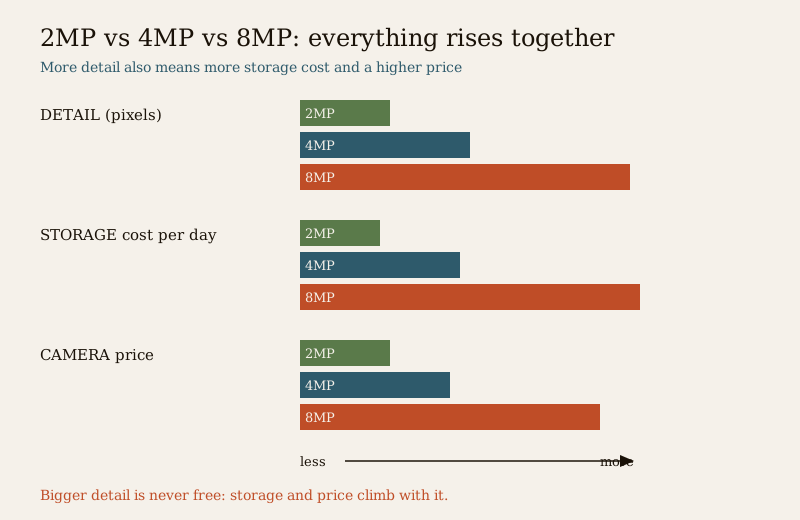
Here is where each resolution genuinely stands. Read it even-handedly — no tier is "bad", they are simply tuned for different jobs.
| Dimension | 2MP (1080p) | 4MP | 8MP (4K) |
|---|---|---|---|
| Detail / sharpness | Good; identifies faces and plates at close-to-medium range | Noticeably sharper; more usable zoom | Highest; wide coverage with zoom-in later |
| Storage and bandwidth | Lightest — cheapest to keep, longest retention | Roughly double 2MP | Heaviest — several times 2MP; fills disks fast |
| Low-light behaviour | Often strong (larger pixels gather more light) | Balanced, if the sensor is decent | Can struggle unless the sensor is genuinely good |
| Lens and processing | Modest needs; forgiving | Middle | Needs a good lens and recorder to be worth it |
| Recorder / NVR load | Easy on any DVR/NVR | Moderate | Demands a capable 4K-rated recorder |
| Upfront cost | Cheapest | Moderate | Dearest |
| Best used for | Most rooms, doors, close range | The all-round sweet spot | Wide yards, large frontages, "zoom later" |
Three rows in that table deserve a closer look, because they are where the sales pitch usually goes quiet.
Detail: how far can you identify someone?
Detail is not just "sharpness" — it is how many pixels land on the thing you care about. A face across a narrow doorway is covered by plenty of pixels even at 2MP, so 2MP identifies well at close-to-medium range. Spread that same 2MP across a wide driveway and each face gets very few pixels, so it blurs. Higher resolution helps most when the scene is wide or the subject is far — that is when 4MP and especially 8MP let you still make out a face or a number plate. For a tight entryway, 2MP is often plenty. The CCTV resolution guide goes deeper into identify-versus-recognise distances.
Storage: the cost you pay every single day
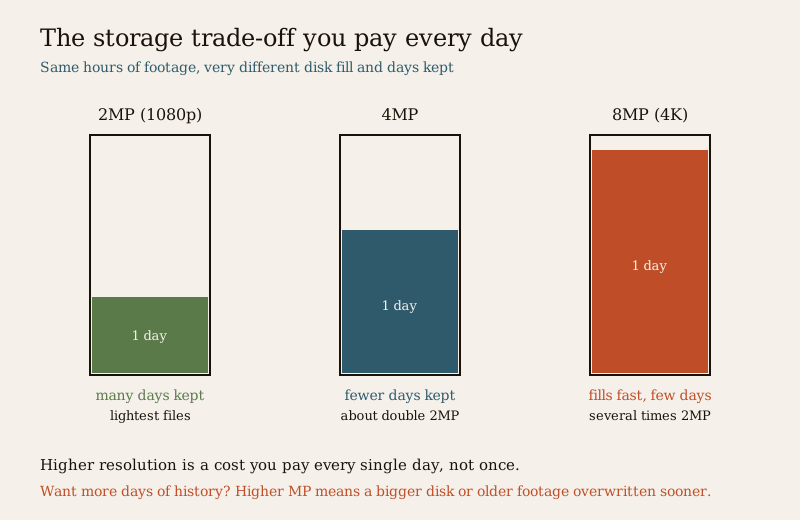
This is the trade-off the megapixel number hides. More pixels means bigger video files, and bigger files means more disk, shorter retention, and — for cloud cameras — much more upload. Roughly, 4MP produces about double the data of 2MP, and 8MP several times as much, for the same hours of footage. That is not a one-time cost; it is paid every day the camera records. Want 30 days of history instead of 7? On 4K that can mean a far larger, dearer hard disk, or accepting that older footage is overwritten sooner. This daily tax is exactly why the highest resolution is not automatically the smart choice — work through the numbers in the data storage cost guide before you commit.
Low light: more megapixels is not automatically better at night
Here is the honest nuance most listings skip. To fit more pixels onto the same small sensor, each pixel has to be smaller — and smaller pixels gather less light. So on a cheap 8MP camera with a small sensor, night footage can actually be noisier and worse than a good 2MP camera whose larger pixels soak up more light. Higher resolution only wins at night if the sensor, lens and low-light processing are genuinely good. The megapixel number tells you nothing about night performance on its own. Most homes are caught out here, not on daytime detail.
The one honest message to carry away. Megapixels are not everything. A great picture also needs a good sensor, a decent lens, and — above all — enough light on the scene. A well-lit 2MP camera beats a poorly-lit 8MP one every time. Buy resolution for the coverage you need, then spend the rest of your attention on lighting, sensor quality and camera placement. See how to choose a CCTV camera for the full checklist beyond the number.
Which suits whom
There is no universal winner — the right tier depends on the scene and your storage appetite. Here is the plain verdict by situation.
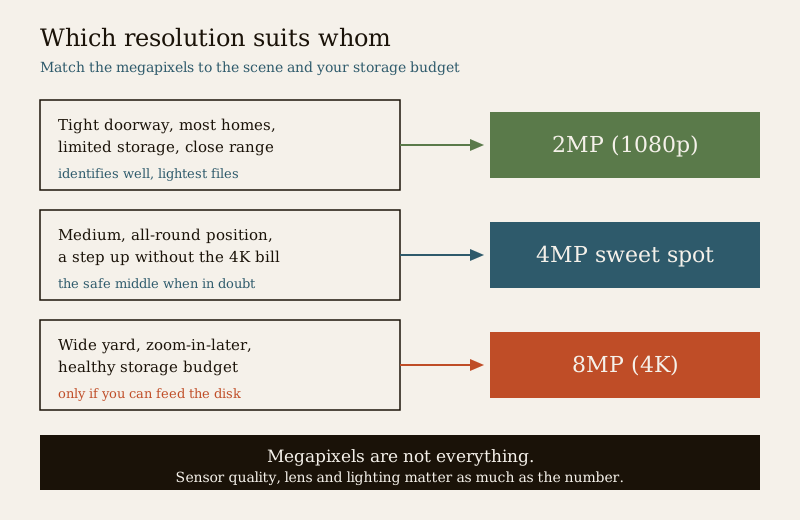
- Most homes, tight budget, limited storage: 2MP (1080p). For doors, close entrances, rooms, staircases and any tight-to-medium view, 2MP identifies people well, keeps files small, records for many days on a modest disk, and is easy on any recorder. It is not a compromise — for the majority of home camera positions it is the sensible default.
- The all-round sweet spot: 4MP. If you want a clear step up in detail and a little zoom headroom without the storage bill of 4K, 4MP is the balanced choice many homes land on. It covers medium areas well and gives usable detail when you review footage, at a moderate cost. When in doubt between the extremes, 4MP is the safe middle.
- Wide areas you will want to zoom into later: 8MP (4K). A large yard, a long compound frontage, a driveway or an approach you want to watch with one camera and still zoom into a face or plate afterward — this is where 4K earns its keep. Choose it only when you genuinely need that wide "capture everything, zoom later" coverage and you are willing to pay for the storage, a 4K-capable recorder, and ideally a good sensor for the night.
How to decide
You do not have to pick one resolution for the whole house. The smart approach is to match the resolution to each camera's job:
1. Start from the scene, not the spec. How wide is the view, how far away is the subject, and will you ever need to zoom in afterward? A tight door and a wide yard have different answers.
2. Then check your storage appetite. How many days of history do you want to keep? Higher resolution shortens retention or demands a bigger disk. Decide this before, not after — the data storage cost guide makes it concrete.
3. Mix and match. Put a modest 2MP camera on the front door and a 4MP or 8MP on the wide driveway. Paying for 4K on a doorway that a 2MP camera already covers perfectly is money spent on storage you did not need.
4. Do not stop at the number. Remember the picture also depends on the sensor, the lens, and the light. A 2MP camera over a well-lit gate will out-perform an 8MP one squinting into the dark.
5. Match the recorder and the pipe. 4K needs a 4K-capable NVR and, for cloud, real upload bandwidth. Buying an 8MP camera your recorder or internet cannot feed wastes the resolution.
For the broader decision — resolution is only one of several choices — the how to choose a CCTV camera guide covers the rest, and if you are still weighing camera types, the analog vs IP camera comparison sits alongside this one. Both are part of the wider security comparison guide.
Key takeaways
- 2MP = 1080p, 4MP = about 1440p, 8MP = 4K — more megapixels means more detail, used either as finer detail on the same view or the same detail over a wider view.
- Higher resolution costs storage every single day — 4MP roughly doubles 2MP's files, 8MP is several times as much; it shortens retention or forces a bigger disk and more cloud upload.
- More megapixels is not automatically better at night — smaller pixels gather less light, so a cheap 8MP can lose to a good 2MP after dark unless the sensor is genuinely good.
- Megapixels are not everything — sensor quality, lens and lighting matter as much as the number on the box.
- 2MP suits most homes and tight-storage setups and close-to-medium views; 4MP is the sensible sweet spot; 8MP/4K is for wide areas you want to zoom into later — if you can afford the storage.
- Mix resolutions by camera job rather than buying the highest number for everything.
Where to go next
- CCTV resolution guide — the deeper technical picture on pixels, detail and identify-versus-recognise distance.
- Data storage cost for CCTV — work out exactly what each resolution costs you in disk and retention.
- How to choose a CCTV camera — resolution is one of several choices; here is the whole checklist.
- Analog vs IP CCTV — the camera-type comparison that sits beside this one.
- The security comparison guide, the compare sub-hub, the CCTV sub-hub and the main security hub.
References
- Digital Personal Data Protection Act, 2023 — home CCTV captures personal data at every resolution; point cameras at your own property, avoid a neighbour's private space or the public street, and be mindful of who can view stored footage.
- Bureau of Indian Standards catalogue — verify the current status of any CCTV or electronic-security standard before relying on it: https://www.services.bis.gov.in/
This is an educational, neutral overview for homeowners, not a buying guide, price list or brand recommendation. All three resolutions are legitimate and each suits a different scene and storage budget; match the resolution to the camera's job, remember that sensor quality, lens and lighting matter as much as megapixels, and consult a licensed installer for a full system design.
Export this guide
Related Guides — Deep-dive reading
How to Choose a CCTV Camera (2026): The Homeowner's Decision Guide for India
Cut through the spec-sheet noise and choose the right CCTV camera for each spot around an Indian home. What actually matters — sensor and low-light performance, lens and field of view, form factor, IP and IK ratings, honest smart features — and the marketing claims to ignore.
SecurityCCTV vs Video Door Phone: Which Does Your Home Need?
They look similar and get confused constantly, but a CCTV camera and a video door phone do different jobs — one watches the whole property and records, the other answers your door and controls who comes in. This guide settles CCTV vs video door phone for Indian homes: what each is for, where they overlap, real rupee costs, apartment versus villa relevance, and why most homes end up wanting both.
Smart HomeLocal Storage vs Cloud CCTV in India (2026): Where Your Footage Should Live
A homeowner's honest head-to-head on where CCTV footage is kept — on a hard disk in the recorder at home, or uploaded to a per-camera cloud plan — across cost, theft resilience, internet dependence, retention, remote access and DPDP privacy, ending in a clear which-suits-whom, with hybrid usually the smartest answer.
SecurityRelated Tools — Try Free
CCTV Camera Coverage & Count Calculator
Estimate how many CCTV cameras you need, the NVR channels, storage in TB for your retention period, and an indicative all-in cost with GST.
CCTV CalculatorCCTV Cloud vs Local Cost Calculator
Compare cloud CCTV subscription against a local NVR + HDD — upfront, 5-year total, monthly fee and break-even.
Cloud vs LocalCCTV Identification-Distance Calculator
How far a camera can still identify a face or number plate (DORI 250 px/m), from resolution, lens and sensor.
Identify Distance