

UPS Systems: Protecting Electronics When Power Fails or Blinks
The backup that switches over with zero interruption — how a UPS keeps a computer, router or critical equipment running through a cut or a dip, the offline, line-interactive and online types explained, how a UPS differs from a home inverter, and when you need each.
A home inverter switches over so fast you barely notice — but "barely" can still crash a running computer or reboot a router. A UPS (uninterruptible power supply) is built for the loads that must never blink at all: it bridges the gap with zero interruption, cleans up the power, and keeps a computer, router or critical device alive through a cut or a dip long enough to save your work or ride out a brief outage. This guide explains how a UPS works, the types, and — the question people most often confuse — how it differs from a home inverter.
It sits under the home backup power guide.
The safety line. Plug-in UPS units for a computer are ordinary consumer equipment; larger or hard-wired UPS installations are for qualified people. UPS systems conform to IS 16242 (Uninterruptible Power Systems). This guide helps you choose; installation of anything beyond a plug-in unit is professional work.
What a UPS does that an inverter doesn't
Both a UPS and an inverter provide backup from a battery — but they are tuned for different jobs:
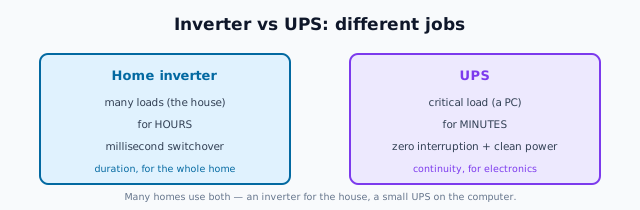
- A home inverter is built to back up many loads (lights, fans, home) for hours, switching over in a few milliseconds — fast enough that lights and fans don't care, but occasionally enough to disturb a sensitive device.
- A UPS is built to back up a small, critical load (a computer, router, equipment) for a short time (minutes), switching over with effectively zero interruption and often conditioning the power (correcting dips, spikes and noise) continuously.
In short: the inverter is about duration for the house; the UPS is about instantaneous continuity and clean power for electronics. Many homes sensibly use both — an inverter for the house and a small UPS on the desktop or home-office equipment.
The three UPS types
UPS units come in three topologies, increasing in protection and cost:
| Type | How it works | Protection | Best for |
|---|---|---|---|
| Offline / standby | Runs on mains; switches to battery on failure | Basic — brief switchover | Home PCs, routers, light electronics |
| Line-interactive | Regulates voltage (dips/surges) and switches to battery | Better — handles brownouts | Home office, better protection, small servers |
| Online / double-conversion | Always runs the load from the battery/inverter, continuously | Best — truly zero transfer, full conditioning | Servers, medical, critical equipment |
- Offline (standby) is the cheap, common desktop UPS — fine for a home PC and router, with a very brief switchover most electronics tolerate.
- Line-interactive adds automatic voltage regulation, useful where the supply sags and surges (common in India) — a good step up for a home office.
- Online (double-conversion) continuously regenerates the power, giving no transfer time at all and full conditioning, for critical loads that justify the cost.
For most homes, an offline or line-interactive UPS on the computer and networking gear is plenty; online is for genuinely critical equipment.
Sizing and runtime
A UPS is rated in VA (like an inverter) and gives short runtime by design:
- Size the VA to the connected equipment (a PC + monitor + router is modest; add margin).
- Understand the runtime is minutes, not hours — enough to save work and shut down, or to ride out a very short cut, or to bridge until a generator/inverter takes over. For long backup, that's the inverter's job, not the UPS's.
- For a router/Wi-Fi, a small UPS (or a mini-UPS) keeps your internet alive through short cuts — increasingly worthwhile for home working.
When you need a UPS
- A desktop computer or home-office setup: yes — an offline or line-interactive UPS prevents crashes and data loss, and protects against surges and dips.
- A router/Wi-Fi you rely on: a small UPS keeps you online through short cuts.
- Critical or medical equipment: an appropriate (often online) UPS, professionally specified.
- Just lights and fans through long cuts: no — that's the inverter-battery's job; a UPS's short runtime doesn't suit it.
The one-line answer
A UPS keeps critical electronics — a computer, router or equipment — running with zero interruption and clean power through a cut or a dip, for minutes (long enough to save work, ride out a short outage, or bridge to other backup), which is different from a home inverter that backs up the whole house for hours with a brief switchover. Choose offline or line-interactive for a home PC and router (line-interactive if your supply sags and surges), reserve online double-conversion for genuinely critical loads, and remember many homes use a UPS and an inverter for their different jobs.
Where to go next
- The whole strategy: Home Backup Power Guide.
- The house backup: Inverters & Batteries Guide.
- Surge protection for electronics: Surge Protection & SPDs.
- The safety switch: Automatic Transfer Switch.
References
- IS 16242 (Parts 1–5), Uninterruptible Power Systems (UPS), Bureau of Indian Standards.
- IS 15549 : 2005, Stationary Regulated Lead Acid Batteries, BIS.
- Bureau of Energy Efficiency, Standards & Labelling programme: https://beeindia.gov.in/
- National Electrical Code of India, SP 30 : 2023, BIS: https://www.bis.gov.in/
UPS types, sizing and runtime are indicative; larger or hard-wired UPS installations must be specified and installed by qualified professionals. Verify any standard's status via the BIS catalogue before relying on it.
Export this guide
Related Guides — Deep-dive reading
Smart Home Maintenance & Troubleshooting for Indian Homes
A smart home is not a one-time purchase — it is a small fleet of computers that needs firmware updates, fresh batteries, occasional reboots and a plan for the day a manufacturer switches off the cloud. This guide gives you a maintenance calendar, a troubleshooting flow for the failures Indian homes actually see, and the UPS and security hygiene that keep it all running through power cuts and voltage swings.
Smart HomeResidential Electrical Systems: The Complete Guide for Indian Homes
How the electricity in an Indian home actually works — from the utility supply and meter through the distribution board, circuits, wiring, earthing and protection, to lighting, safety, energy efficiency, smart controls, solar and backup — written so a homeowner can understand, plan and judge it, and know exactly where a licensed electrician must take over.
Electrical & WiringHybrid Solar System Guide for Indian Homes: Solar Plus Battery Backup (2026)
A design and specification guide to the hybrid solar system -- grid-connected solar with a battery that keeps critical loads running through a cut. How it works, how it differs from pure on-grid and off-grid, the components, sizing the battery, the trade-offs, and when hybrid beats an on-grid system with a separate inverter.
Solar & EnergyRelated Tools — Try Free
Inverter & Battery Calculator
Size a home inverter (VA) and battery (Ah) for the load you want to back up and the hours of backup you need.
Backup PowerAccess-Control Battery-Backup Calculator
Size the standby battery so an access system keeps running through a power cut, with an egress life-safety note.
Battery BackupElectrical Safety & Load Audit
Home electrical audit — 10 categories, 65+ checkpoints across earthing, RCCB, MCB, wiring, switchboards, appliance circuits, DG/inverter backup.
Safety Audit