
Security System Power Failure (2026): Why It Dies in a Power Cut and How to Fix It
A calm, ordered troubleshooting path for when your CCTV, NVR, alarm or gate has no power, dies the moment the mains drops, or keeps restarting — with the safe checks a homeowner can do and the electrical faults that belong to a professional.
Your security system has no power. Maybe the NVR screen is black, maybe a single camera has gone dark, maybe the whole thing was fine until the mains blinked and now it will not stay on — or it keeps restarting in a loop. It is an unsettling fault, because a security system that dies the moment the power does is not protecting you at the very moment you might need it most, and power cuts in India are common enough that this is not a rare edge case. It is the quiet enemy of home security.
Here is the reassuring part. Power faults are, more often than not, the simplest and cheapest kind to fix. The usual culprit is not a fried circuit board — it is a tripped breaker, an aged backup battery that no longer holds, or a small power adaptor that has quietly given up. This guide walks you calmly from the most common cause to the rarest, tells you exactly what is safe to check yourself, and draws a firm line at the electrical work that belongs to a qualified electrician.
Scope and safety. This is a diagnostic guide for homeowners, not an installation or rewiring manual. The safe DIY checks here are limited to the breaker board, accessible plug-in adaptors and UPS units, seating a plug, and reducing obvious overload. Anything involving opening mains-wired supplies, hard-wired power boards, earthing or the consumer unit internals is strictly for a licensed electrician — mains electricity can kill. If your security system includes a fire-alarm panel showing a power fault, that fault must be diagnosed and restored by a competent person, never simply muted or disconnected to make it quiet. This is not a price or a buying guide; for the numbers on repair-versus-replace, and for sizing a backup supply, follow the cross-links.
Start here: is it the whole system, or one device?
Before you change anything, make one observation. It splits the whole problem in half and saves you an hour.
Look at how much has gone dark. If the NVR, every camera, the monitor and the alarm have all lost power together, the fault is upstream — at the mains, the breaker, or a shared backup battery or UPS that feeds them all. If instead one single camera is offline while everything else runs happily, the fault is local to that device — its own small adaptor, its cable, or its PoE port on the recorder.
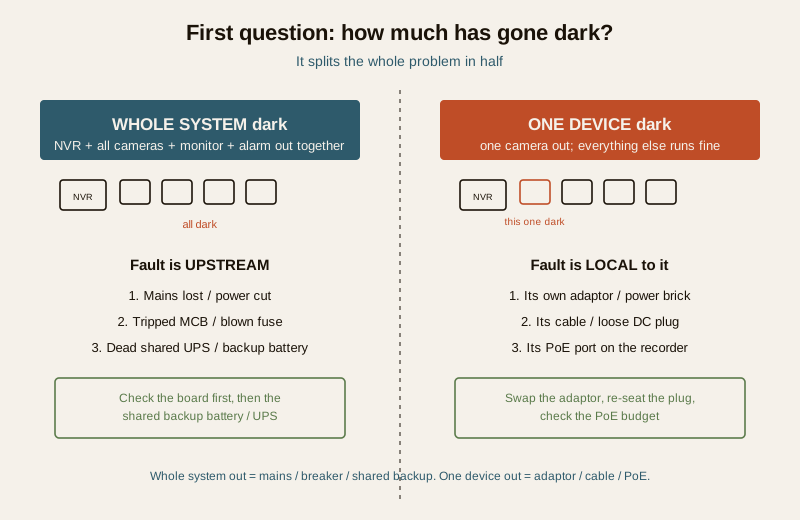
This single split tells you where to point your attention. A whole-system blackout is a mains, breaker or backup-battery problem. A one-device blackout is an adaptor, cable or PoE problem. Everything below is organised around that fork.
The likely causes, most common first
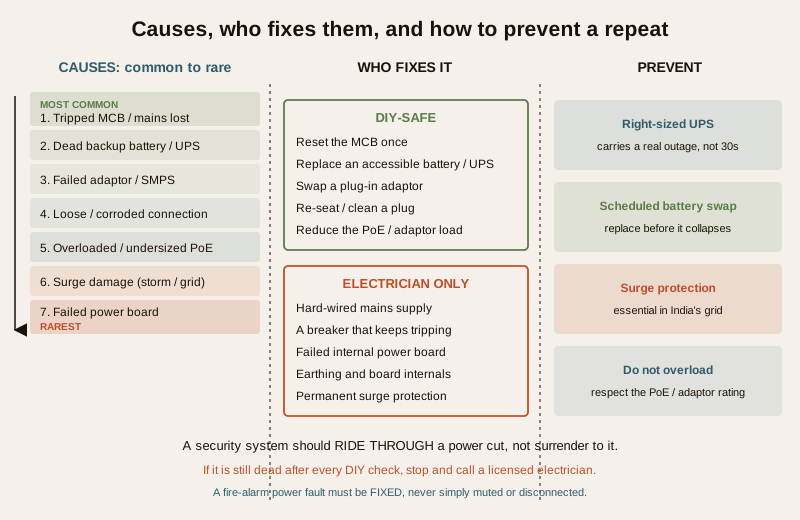
Work down this list in order. The ones at the top are common, cheap and often safe to fix yourself; the ones at the bottom are rarer and belong to an electrician.
| Cause | Why it happens | Typical fix |
|---|---|---|
| Mains lost or a tripped MCB / blown fuse | A power cut, or the breaker feeding the security circuit tripped. Always check the board first. | Restore mains or reset the tripped MCB. If it trips again, stop and call an electrician. |
| Dead or weak backup battery / UPS | The classic. Backup batteries are consumables; an aged one no longer holds charge and dies instantly in a cut. | Test and replace the accessible backup battery or UPS. |
| Failed power adaptor / SMPS | A single camera's power brick, or the NVR's adaptor, has failed. | Swap in a known-good matching adaptor. |
| Loose or corroded power connection | A plug worked loose, a DC barrel jack backed out, or a terminal corroded in humidity. | Re-seat and clean the connection. |
| Overloaded or undersized supply | Too many cameras on one PoE budget or one adaptor; the supply browns out under load. | Reduce the load or move to a larger-rated supply. |
| Surge damage from a storm or fluctuation | India-common. A spike from a storm or an unstable grid damages a power supply or board. | Replace the damaged supply; add surge protection to prevent a repeat. |
| Failed power board | Rare. The internal power distribution board or the device's own power circuit has failed. | Professional repair or replacement. |
The diagnostic path, step by step
Follow this as a decision tree. At each step, if it fixes the fault, stop.
Step 1 — Check the board first
Go to your distribution board and look at the MCBs. Has the one feeding the security circuit (or the socket the NVR and UPS plug into) tripped to the off position? A power cut or a momentary overload can trip it. Reset it once. If it holds, you are done. If it trips again immediately, do not keep resetting it — that is a fault asking for an electrician, not a switch that wants flipping. Also confirm the mains itself is actually on; a neighbourhood cut or a blown fuse in the meter can look like an equipment failure.
Step 2 — Does it die the instant the power drops?
This is the single most telling symptom. If your system runs perfectly on mains but dies the moment the power cuts — no ride-through at all — the backup battery or UPS is the near-certain culprit. A backup that works gives you minutes; a backup that is dead gives you nothing. Aged batteries fail this way: they read fine on the charger but collapse the instant they have to carry the load. This is so common it deserves its own diagram.
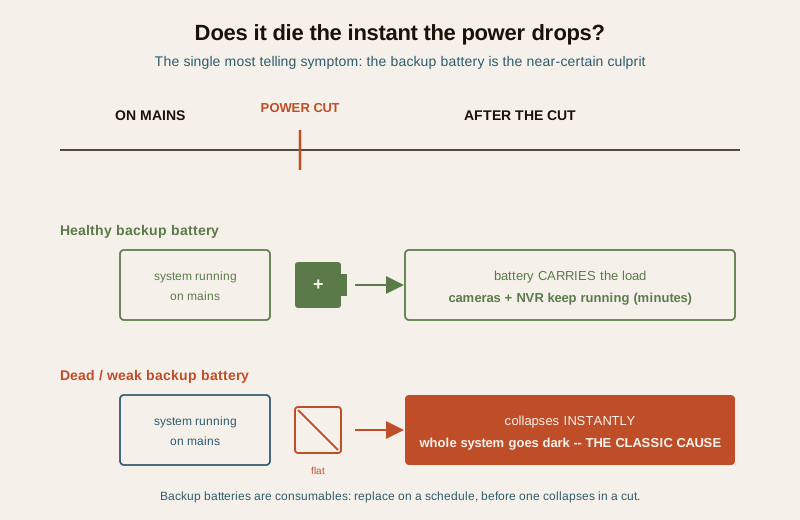
If this is your symptom, the fix is to test and replace the backup battery or UPS. A plug-in UPS or an accessible sealed backup battery in an alarm or NVR enclosure that you can reach without touching mains wiring is a safe homeowner replacement — match the voltage and rating exactly. If the battery is inside a sealed, mains-wired panel, hand it to a technician.
Step 3 — Whole system, or one device?
Use the split from the top of this guide. If everything is dark and the mains and breaker are fine, suspect the shared supply or UPS (Step 2). If only one camera is dark, go to Step 4.
Step 4 — For a single dead device: adaptor, cable, PoE
A single camera or the NVR that has lost power on its own points at its individual supply.
- Swap the adaptor. If it is a plug-in power brick (an SMPS adaptor), try a known-good one of the exact same voltage and current rating. A failed adaptor is one of the most common single-device faults and one of the safest to fix.
- Re-seat the plug and the DC connector. A barrel jack that has worked loose, or a plug half out of the socket, will drop a device. Push it home firmly. In humid or coastal homes, check for green corrosion on the contacts and clean it.
- Check the PoE port and budget. If the camera draws power over its network cable (PoE) from the recorder or a switch, the recorder has a total power budget shared across all ports. Add one camera too many and the last one browns out. Try the camera on a different port, and count how many cameras your recorder is really rated to power at once. Overloading a PoE budget is a classic cause of the "one camera keeps dropping" complaint — the network failure guide and the camera offline guide cover the network side of the same symptom.
Step 5 — Recent storm or a big fluctuation?
If the fault appeared right after a thunderstorm or a visible voltage swing, suspect surge damage. India's grid delivers spikes that quietly kill power supplies. A surge-damaged adaptor or board will not recover on its own and needs replacing — and, crucially, you should add surge protection so the next storm does not do the same thing again. Sizing and protecting the supply properly is the subject of the CCTV power supply and UPS guide.
Step 6 — Still dead? It is likely the power board or wiring
If the mains is on, the breaker holds, the backup is fresh, the adaptor is known-good, the connections are firm and there was no surge — and it is still dead — you are into the rarer territory of a failed internal power board or a wiring fault. This is where a homeowner should stop and call a professional.
The safe DIY versus call-a-professional split
Keep this line firm. It is the difference between a five-minute fix and a serious injury.
Safe for a homeowner:
- Checking the mains is on and resetting a tripped MCB once.
- Testing and replacing an accessible, plug-in or clearly reachable backup battery or UPS (matching the rating).
- Swapping a suspect plug-in power adaptor for a known-good identical one.
- Re-seating a loose plug or DC barrel connector and cleaning corroded contacts.
- Reducing an obvious overload — moving a camera off an overloaded PoE recorder or adaptor.
- Adding a plug-in surge protector.
Call a qualified electrician or your AMC for anything mains. A breaker that trips again the moment you reset it, any hard-wired power supply, a failed internal power board, the consumer unit or distribution board internals, earthing, and permanent surge protection at the board all involve mains voltage that can kill. Do not open sealed or mains-wired equipment. When in doubt, call a licensed electrician or your annual-maintenance-contract technician.
A fire-alarm or life-safety panel power fault is special. If part of your security system is a fire-alarm panel and it is showing a power or battery fault, that fault must be diagnosed and the system restored to full working order by a competent person. Never simply mute it permanently, pull its battery, or disconnect it to stop the beeping — a silenced life-safety device is a life-safety device that will not warn you. Silencing is temporary only; a persistent fault means call your fire-system contractor. This is the national building-safety expectation (NBC, SP 7:2026).
Prevention: so it does not die in the next cut
A security system should ride through a power cut, not surrender to it. A little discipline makes power a non-event.
- Fit a right-sized UPS or backup. Size the backup to carry your NVR and cameras for a realistic outage, not thirty seconds. The CCTV power supply and UPS guide and the electrical backup assessment for security walk through matching the backup to your real load and your area's outage pattern.
- Replace backup batteries on a schedule. Batteries are consumables. Do not wait for one to fail in a cut — replace it on a calendar, before it collapses.
- Add surge protection. In India's grid conditions, surge protection on the security supply is not optional. It is the cheapest insurance against a storm wiping out your cameras.
- Do not overload the supply. Respect the PoE budget and the adaptor rating. Adding "just one more camera" to a maxed supply is how a stable system starts browning out.
A quick checklist
- Check the board first: is the mains on, and did the MCB trip? Reset once only.
- Does it die the instant the power drops? Suspect a dead backup battery or UPS.
- Whole system dark, or one device? That tells you shared-supply versus single-adaptor.
- One camera dark: swap its adaptor, re-seat the plug, check the PoE budget.
- Recent storm? Suspect surge damage; replace the supply and add surge protection.
- Still dead after all of the above? Stop — call an electrician for the power board or wiring.
- Prevent a repeat: right-sized UPS, scheduled battery replacement, surge protection, no overloading.
Where to go next
- Security system troubleshooting — the pillar that maps every "it is not working" symptom, of which power is the most common root.
- Security system network failure and camera offline — when the symptom looks like a dropout but the root is the network or PoE, not the mains.
- CCTV power supply and UPS and electrical backup assessment for security — sizing the backup and surge protection so a cut is a non-event.
- The security troubleshooting sub-hub and the main security hub.
References
- National Building Code of India (SP 7), Bureau of Indian Standards — the expectation that fire-alarm and life-safety systems, including their power and battery-backup provisions, be maintained in working order and faults rectified by a competent person rather than disabled. Verify the current edition (SP 7:2026) via the BIS catalogue: https://www.services.bis.gov.in/
- General electrical-safety practice — mains electrical work, distribution-board internals, earthing and permanent surge protection are for a licensed electrician; do not open mains-wired or sealed equipment.
This is an educational troubleshooting overview for homeowners, not electrical, legal or installation advice. Mains electrical work, hard-wired supplies, failed power boards, earthing and consumer-unit internals are strictly for a licensed electrician. Life-safety and fire-alarm faults must be diagnosed and restored by a competent person and never simply disabled; verify any standard's current status via the BIS catalogue before relying on it.
Export this guide
Related Guides — Deep-dive reading
Electrical Safety for Security Systems in India (2026): Powering It Without Peril
A homeowner's guide to the power side of home and RWA security systems, CCTV, alarms, gates, access control and NVRs, done so it protects you instead of quietly becoming a shock or fire hazard. What makes a supply safe, what to insist on, and why the mains work belongs to a licensed electrician.
SecurityCCTV Camera Not Working (2026): A Calm, Step-by-Step Fix for Indian Homes
A black screen, no feed or a dead camera almost always traces back to power or a loose connection long before the camera itself has failed. This guide walks a homeowner through diagnosing the cause in order, the safe fixes you can do yourself, and exactly when to call a technician.
SecuritySecurity System Troubleshooting in India (2026): The Calm Diagnostic Method
When a camera goes dark, an alarm keeps crying wolf, or the app says offline, most faults are simple and cheap to fix. This master guide teaches the ordered diagnostic method that ties the whole troubleshooting library together, plus the safe reset ladder and the line between a two-minute DIY fix and a call to a professional.
SecurityRelated Tools — Try Free
Electrical Safety & Load Audit
Home electrical audit — 10 categories, 65+ checkpoints across earthing, RCCB, MCB, wiring, switchboards, appliance circuits, DG/inverter backup.
Safety AuditSecurity Backup Power Calculator
Size a UPS/inverter and battery to keep CCTV, NVR, router and alarm running through a power cut — load, Ah, VA and cost.
Backup PowerPoE Power-Budget Calculator
Whether a PoE switch can power the connected cameras with cable-loss headroom, and how many devices it supports.
PoE Budget