
CCTV Camera Not Working (2026): A Calm, Step-by-Step Fix for Indian Homes
A black screen, no feed or a dead camera almost always traces back to power or a loose connection long before the camera itself has failed. This guide walks a homeowner through diagnosing the cause in order, the safe fixes you can do yourself, and exactly when to call a technician.
Your CCTV camera has stopped working. Maybe one tile on the monitor has gone black, maybe the whole screen is dead, or maybe a camera outside just sits there lifeless. It feels like the security you paid for has quietly failed, and it always seems to happen the week you need it most. Take a breath. In the overwhelming majority of cases the camera itself is perfectly fine, and the real culprit is something simple and cheap: a power adaptor that has given up, a plug that has worked loose, a connector nudged out of its socket, or a channel set wrong on the recorder. A genuinely dead, surge-fried camera is the rarest outcome, not the first.
The trick is to not panic and start unscrewing things at height. A CCTV fault rewards a calm, ordered approach far more than effort. Work from the most common and easiest causes toward the rarest and hardest, ask one clarifying question early (is it one camera or all of them?), and you will usually land on the answer in a few minutes without a ladder or a technician.
Scope and safety. This is a diagnostic guide for homeowners, not an installation manual. The fixes here are the safe ones: power-cycling, checking a plug, reseating an accessible connector, checking the app or a channel setting. Anything involving a camera at height, mains or electrical wiring, a re-cabling job, a suspected fried camera, or a PoE switch fault belongs to a qualified technician or your AMC, not to you on a ladder. This is not a price or a buying guide; for "repair or replace" and what a part costs, defer to the cost and lifecycle guides. Your camera footage is personal data under the DPDP Act 2023, so treat any recordings and the app login with care.
First, the one question that halves the problem
Before touching anything, look at your monitor or app and answer a single question: is one camera down, or are all of them?
The answer immediately tells you where to look, because the two cases have completely different causes.
- All cameras down points at something shared: the recorder (the DVR or NVR) itself, the main power to it, or the network. If everything the recorder feeds has gone dark at once, the fault is almost never in every individual camera simultaneously. It is upstream.
- One camera down while the others are fine points at that single camera's own chain: its power adaptor or PoE port, its cable and connectors, or that specific channel on the recorder. The shared parts are clearly working, because the other cameras prove it.
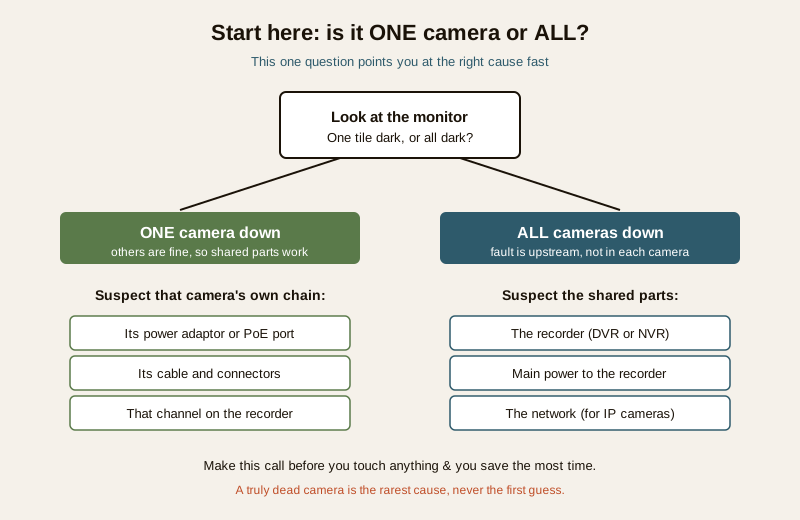
This one split saves you the most time of anything in this guide, so make the call before you do anything else.
The likely causes, most common first
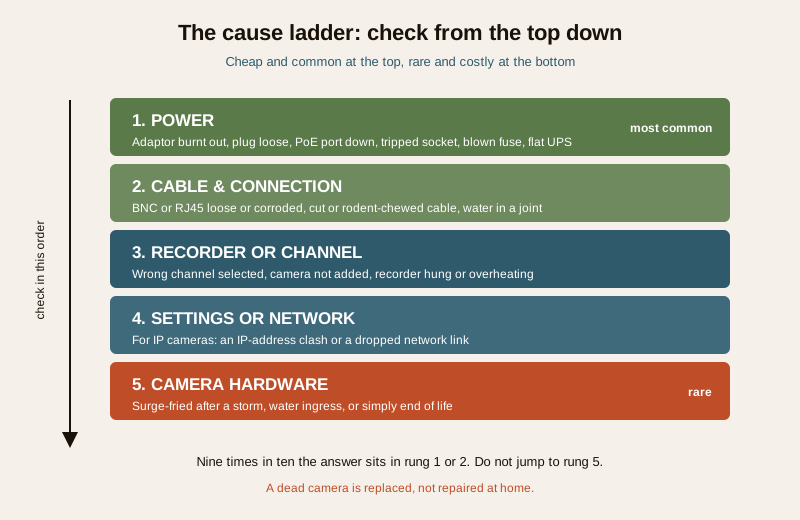
CCTV faults follow a very reliable order. The cheap, simple things fail far more often than the camera hardware. Here is that order, from the cause you should suspect first to the one you should suspect last.
| Cause (common to rare) | Why it happens | The fix |
|---|---|---|
| Power | Adaptor burnt out, plug loose, PoE port or switch down, tripped socket, blown fuse, UPS/inverter flat | Check the power LED, reseat or swap the adaptor, try another socket or PoE port |
| Cable and connection | BNC or RJ45 loose, corroded or water-logged; cable cut or rodent-chewed; a wet outdoor joint | Reseat the connector at the accessible end; a damaged run needs a technician |
| Recorder or channel | Wrong channel selected, camera not added, recorder hung or overheating | Select the right channel, power-cycle the recorder, re-add the camera |
| Settings or network | For IP cameras, an IP-address clash or dropped network link | Restart the router and camera; a clash needs settings care |
| Camera hardware | Surge-fried after a storm, water ingress, or simply end of life | A dead camera is replaced, not repaired at home |
The single most important habit is to resist jumping to the bottom row. People assume the worst ("the camera is dead") when nine times out of ten the answer is in the top two rows. Work down the ladder, not up it.
The step-by-step diagnostic path
Now walk the path. Follow it in order and stop the moment the picture comes back.
If ALL cameras are down
1. Check the recorder itself. Is the DVR or NVR powered on? Look for its lights. If it is dead, check its power adaptor and the socket it sits in, exactly as you would a camera adaptor below. A recorder that runs very hot can also hang; if it is boiling to the touch and in a closed cupboard, it may have overheated.
2. Power-cycle the recorder. Switch it off at the socket, wait a full thirty seconds, and switch it back on. This one step clears a surprising share of "everything is frozen" faults. Let it fully boot before judging.
3. Check the shared power. If the recorder and a PoE switch sit on the same board or inverter, confirm that supply is live. A tripped socket, a flat inverter after a long cut, or a blown fuse can take the whole system down together.
4. For IP systems, check the network. If your cameras run over a PoE switch or the home router and the whole lot has dropped, restart the switch and the router. If all cameras vanished right after a power cut, the network gear often just needs to come back up in order.
If the whole system stays dark after the recorder and its power check out, that is the point to call your installer.
If ONE camera is down
1. Look at the camera's power LED. Most cameras show a small light when powered. No light usually means no power reaching it: suspect the adaptor or the PoE port first.
2. Check and swap the adaptor. For a camera on its own plug-pack, confirm the adaptor is plugged in and the socket is on. If you have a spare identical adaptor, or you can borrow a working camera's adaptor to test, swapping it is the single most telling check. If the camera wakes on a different adaptor, the old adaptor was the fault. This is a common, cheap failure.
3. Reseat the connector, if you can reach it safely. At the recorder end, gently unplug and firmly re-seat the BNC or RJ45 connector for that channel. A connector that has crept loose, or an RJ45 that never quite clicked home, is a classic "one camera gone" cause. Only do this for connectors you can reach standing on the floor. Do not climb to the camera end.
4. Swap the port or channel to test. Move that camera's cable to a known-good channel or PoE port on the recorder. If the picture appears on the new port, the fault is the port, not the camera. If the camera stays dark on a port that works for others, the fault is in that camera or its cable run.
5. Check the channel on the recorder. Make sure you are actually viewing the right channel and that the camera has not been dropped from the recorder's list. On an IP system a camera sometimes needs to be re-added.
If the camera stays dead after a known-good adaptor and a known-good port, the problem is either the cable run or the camera itself, and both point you toward a technician.
Safe fixes you can do yourself
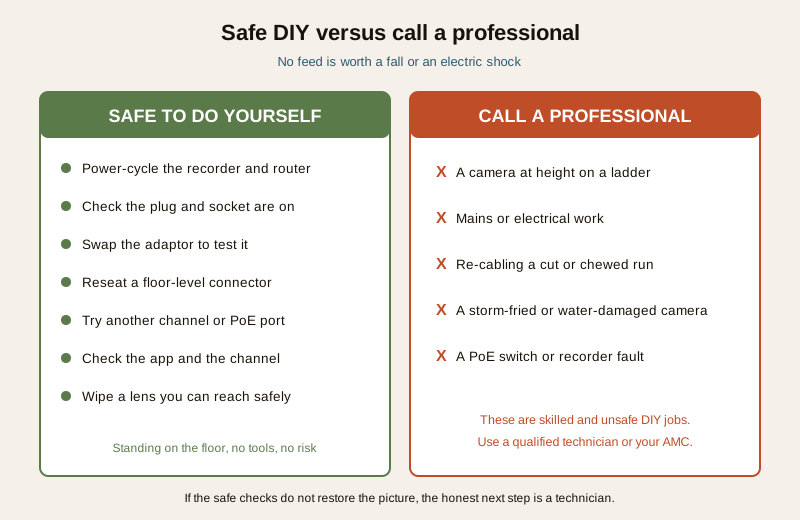
These are the checks any homeowner can carry out from the floor, with no tools and no risk:
- Power-cycle the recorder, and the router or PoE switch for IP systems, and let them fully reboot.
- Check the plug and socket for the camera adaptor and the recorder: firmly seated, socket switched on, no tripped point on that circuit.
- Swap the adaptor with a spare or a borrowed identical one to test whether the adaptor is the fault.
- Reseat an accessible connector at the recorder end only, pushing the BNC or RJ45 firmly home until it clicks.
- Try another channel or PoE port on the recorder to prove whether the fault is the port or the camera.
- Check the channel and the app to be sure you are viewing the right feed and the camera is still added.
- Wipe a dirty or fogged lens you can reach safely, if the picture is present but murky rather than black.
That is the full extent of safe DIY. If none of it restores the picture, the honest next step is a technician, not more improvisation.
When to call a professional
Some parts of a CCTV system are simply not homeowner territory, and forcing them is how people get hurt or make the fault worse. Call a qualified technician or your AMC for any of these:
- Cameras at height. A camera mounted on a wall, eave or pole is a ladder job. Working at height to reach a connector or a housing is a professional task, full stop. No picture is worth a fall.
- Mains or electrical work. Anything beyond plugging and unplugging an adaptor, any opening of an electrical point, any hard-wired supply, is electrical work for a competent person.
- Re-cabling. A cut, corroded, water-logged or rodent-chewed cable run has to be traced and replaced properly. This is skilled work, not a splice with tape.
- A suspected fried camera. If a camera died during or just after a storm, or shows scorching or water inside the housing, treat it as failed hardware for a technician to confirm and replace.
- PoE switch or recorder faults. A faulty PoE switch, a recorder that will not boot, or a hard drive fault inside the recorder needs proper diagnosis, not guesswork.
Preventing the next failure
Most repeat CCTV faults in Indian homes come from two enemies: power surges and weather. A little prevention keeps the camera working for years.
- Surge protection. India's grid delivers spikes, and a nearby lightning strike can travel down the cabling and fry a camera or recorder. A good surge protector on the recorder and, where fitted, the PoE switch is cheap insurance against the one failure mode that actually kills hardware.
- Weatherproof the outdoor joints. Water in a cable joint is a slow killer. Outdoor connections should sit in a sealed junction box, not dangle exposed to the monsoon. A dry joint lasts; a wet one corrodes and drops the camera months later.
- Back the system with a UPS or inverter. A recorder and cameras on a small UPS or the home inverter keep watching through the power cuts that would otherwise blind them, and they avoid the hard power-off that can corrupt a recorder's hard drive.
- Keep spare adaptors. Because a failed adaptor is the single most common cause, one matching spare adaptor in a drawer turns a multi-day outage into a two-minute swap.
A quick recurring-fault checklist
- Is the recorder on a surge protector and a UPS or inverter?
- Are all outdoor cable joints in sealed boxes, dry and rodent-proof?
- Do you keep one spare camera adaptor at home?
- After every power cut, do you glance at the monitor to confirm all tiles came back?
Where to go next
If you have worked through this and want to dig deeper into a specific symptom, these companion guides go further:
- The security-system troubleshooting pillar is the parent guide covering faults across cameras, alarms, locks and more.
- If the camera shows as offline in the app, that network-and-connectivity guide takes over where this one ends.
- If the live view works but you have gaps or a CCTV recording failure, that is a recorder-and-storage problem, covered separately.
- To inspect the wiring properly, see CCTV cable inspection.
- If your recorder is not detecting a camera, the NVR-specific guide walks that through.
- For the full picture, browse the CCTV hub.
Key takeaways
- Stay calm and work in order. Most "camera not working" faults are cheap power or connection problems, not a dead camera.
- Ask one question first: one camera or all? All down points at the recorder, main power or network; one down points at that camera's own power, cable or channel.
- Follow the cause ladder from the top. Power, then cable and connection, then recorder and channel, then settings and network, and only last the camera hardware.
- Do the safe checks only. Power-cycle, check and swap the adaptor, reseat an accessible connector, try another port, check the channel and app.
- Call a professional for height, mains, re-cabling, a fried camera or a PoE switch fault. No feed is worth a fall or an electric shock.
- Prevent the repeat. Surge protection, weatherproof joints, a UPS or inverter, and a spare adaptor keep the system alive.
Export this guide
Related Guides — Deep-dive reading
CCTV Recording Failure in India (2026): Live View Works but Nothing Was Saved
You open the recorder to pull footage of an incident and there is nothing there, even though every camera shows a crisp live picture. A calm, ordered guide to why an Indian CCTV system records live but saves nothing, and how to fix it before the next incident.
SecurityNVR Not Detecting Camera (2026): The Installer's Ordered Fix for India
An IP camera that will not show up on the recorder is almost always a power, network or add-step problem long before the camera itself has failed. This professional guide walks the diagnosis in order, the accessible checks a facility person can do, and the skilled work a technician must handle.
SecuritySecurity System Network Failure (2026): When Everything Goes Offline at Once, and How to Get It Back
When your whole security system drops offline together, the fault is almost never in the cameras. It is in the shared network they all lean on. This guide helps an Indian homeowner tell an internet outage from a router, switch or cabling fault, power-cycle things in the right order, and know when to call a professional.
SecurityRelated Tools — Try Free
Security Cabling & PoE Planner
Estimate cable length, drops, PoE power budget, the right switch, conduit and cost for a CCTV/security cabling plan.
Cabling PlannerCCTV Camera Coverage & Count Calculator
Estimate how many CCTV cameras you need, the NVR channels, storage in TB for your retention period, and an indicative all-in cost with GST.
CCTV CalculatorSecurity Backup Power Calculator
Size a UPS/inverter and battery to keep CCTV, NVR, router and alarm running through a power cut — load, Ah, VA and cost.
Backup Power