
Gate Motor Failure (2026): Why Your Automatic Gate Won't Move and How to Fix It
Your automatic sliding or swing gate stopped, hums but won't move, or opens but won't close. A calm, ordered diagnostic path for Indian homes — the safe checks you can do yourself, the manual release that keeps you from ever being stuck, and exactly when to call the technician.
You press the remote and nothing happens. Or the gate jerks, hums, and sits there. Or it opens fine but refuses to close. An automatic gate that stops working is one of the more stressful faults in a home, because it sits between you and getting in or out — but take a breath, because most causes are simple, cheap and nothing to do with the motor itself. A dead remote battery, a spider web across a sensor, a tripped switch, or a manual release someone left disengaged account for a large share of "my gate motor failed" calls. The real motor failures are the minority, and even those follow a recognisable pattern once you know what to look at.
This guide walks you calmly down that path in order — from the common and cheap to the rare and technical — for both sliding gates (the ones that roll sideways on a track) and swing gates (the ones that swing open on hinged arms). The single most important thing to know before anything else is where your manual release is, so that a stuck gate never traps you.
Scope and safety. This is a diagnostic guide for homeowners, not a repair manual. An automatic gate is heavy and mains-powered: the safe do-it-yourself checks here are limited to power, remotes, cleaning a sensor, clearing an obstruction and using the manual release. Anything inside the motor, controller or mains wiring — capacitors, gearboxes, limit switches, board faults, a derailed heavy gate — is a qualified technician's job, because there is stored electrical charge, mains voltage and a heavy moving mass involved. Know your manual release before you need it. This is not a price or a buying guide; for what to replace and how gate automation is built, see the linked guides.
Know your manual release first
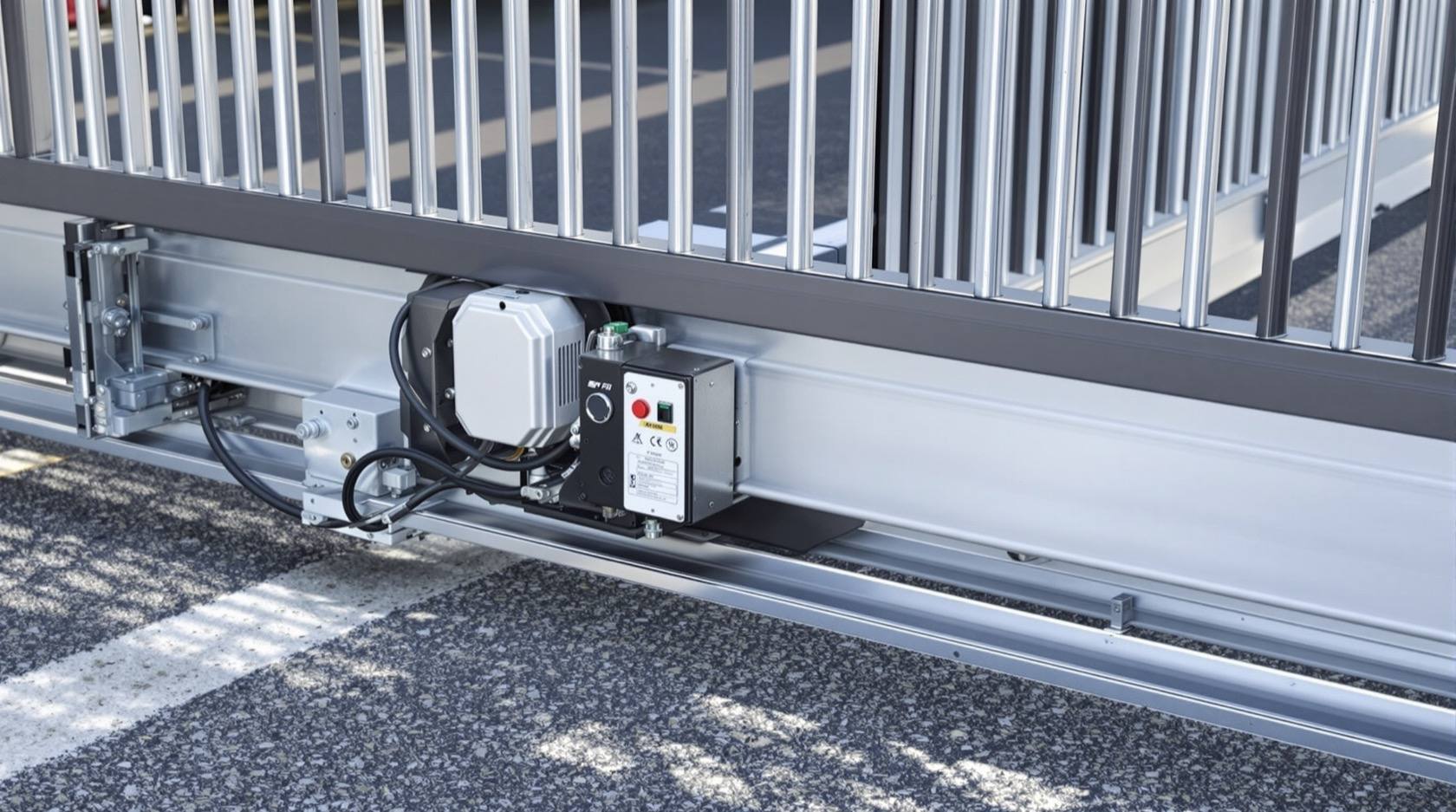
Every automatic gate has a manual release — a clutch key, a lever, or a keyed lock on the motor that disengages the motor from the gate so you can push it by hand. Find it now, while the gate works, and learn how to use it. It exists for exactly two moments: a power cut, and a motor fault. When the gate is dead and you need to get the car out, the manual release is the answer, not force.
Two things worth knowing about it:
- A disengaged manual release is itself a common "fault". If someone opened the gate by hand during a power cut and left the release in the manual position, the motor will run, hum or click but the gate will not move, because the motor is no longer connected to it. Re-engaging the release fixes this in seconds.
- Re-engage it only when the gate is stopped and safe, following your unit's method (usually turn the key or lever back and let the gate settle onto the drive). If you are unsure, that is fine — leave it and call your installer.
Likely causes, most common to rarest
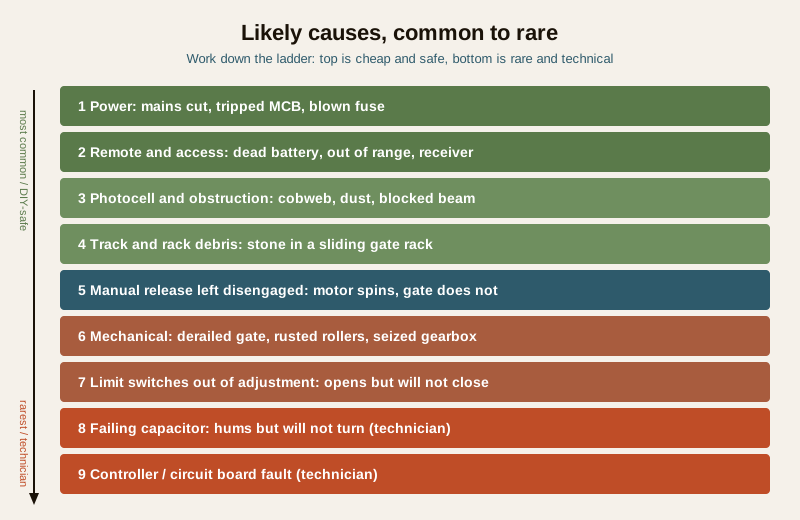
Work down this list roughly in order. The top items are the ones that catch most people, and the ones you can safely check yourself.
| Cause | Why it stops the gate | Who fixes it |
|---|---|---|
| No mains power (cut, tripped MCB, blown fuse) | Motor gets no supply; a dead controller backup battery means it stayed stopped after a cut | You (check power); technician if wiring |
| Remote or access issue (dead remote battery, out of range, receiver, keypad/app) | The gate is fine — the signal never reaches it. Very common | You (swap battery, try wall button) |
| Obstruction or safety sensor (dirty/misaligned photocell, edge sensor, debris) | Photocells stop the gate for safety if the beam is broken — often just a cobweb or dust | You (clean, realign, clear) |
| Track or rack debris (stone in a sliding gate rack, jammed roller) | The gate physically cannot move; the motor may strain or trip | You (clear); technician if bent |
| Manual release left disengaged | Motor spins but is disconnected from the gate | You (re-engage) |
| Mechanical — derailed gate, rusted rollers/hinges, seized gearbox, snapped chain/belt | The drive cannot move the gate, or the gate binds | Technician |
| Limit switches out of adjustment | Gate opens but won't close, closes short, or slams | Technician |
| Failing capacitor | Motor hums or buzzes but won't turn — a classic symptom | Technician |
| Controller / circuit board fault | Erratic behaviour, no response, error lights | Technician |
The diagnostic path — narrow it down
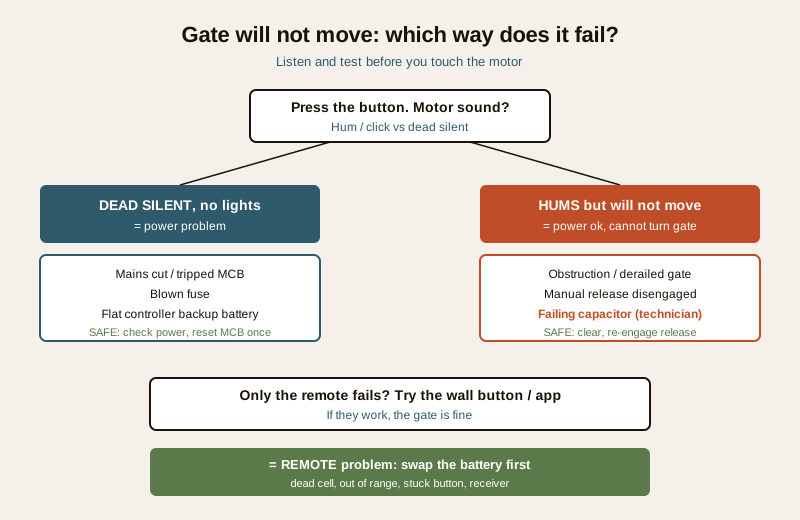
Instead of guessing, answer three questions in order. Each one cuts the problem in half.
1. Is the motor dead-silent, or does it hum and try?
Press the button and listen closely.
- Dead silent, no lights, no click. This points to power — a mains cut, a tripped MCB in your board, a blown fuse, or a controller whose backup battery is flat so it never came back after a cut. Check power first (below).
- It hums, buzzes or clicks but the gate does not move. The motor has power but cannot turn the gate. This points to an obstruction, a mechanical bind (a derailed or rusted gate), a disengaged manual release, or a failing capacitor. Clear the easy causes; the capacitor is a technician's job.
2. Is it only the remote, or the gate itself?
If the gate has a wall button, a keypad or an app, try that.
- The wall button or app works, only the remote fails. The gate and motor are fine. It is a remote problem — nearly always a dead remote battery, sometimes range, a stuck button, or the receiver. Swap the remote battery first; it is the single most common "the gate won't open" that is really the remote.
- Nothing works from any control. The problem is at the gate — power, sensors or mechanics — not the remote.
3. Is something blocking or breaking the safety beam?
Automatic gates have photocells (a beam across the opening) and sometimes a safety edge. If the beam is broken or the sensor is confused, the gate refuses to move — by design, so it never crushes anything.
- Look for a physical obstruction in the gate's path, and for debris in a sliding gate's track or rack (a stone lodged in the toothed rack is a classic).
- Look at the photocells on the pillars: a cobweb, dust, dirt, or a knocked-out-of-alignment lens is one of the most common and most annoying causes. A quick wipe often brings the gate straight back to life.
The safe fixes you can do yourself
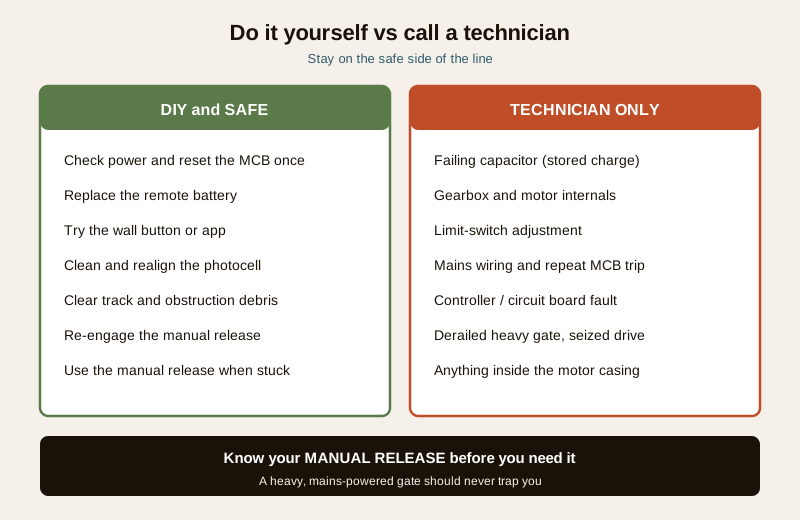
These are safe, no-tools-or-basic-tools checks. If any of them brings the gate back, you are done.
- Check power. Look at your distribution board for a tripped MCB and reset it once. Check that the gate motor's own switch or plug has supply and that no household fuse has blown. If it trips again immediately, stop and call an electrician — a repeat trip signals a fault, not a nuisance.
- Replace the remote battery. Open the remote, swap in a fresh cell of the same type, and try again from close up. If a second remote works, the first one is the problem.
- Try the wall button or app to confirm whether it is the remote or the gate.
- Clean and realign the photocells. Wipe both sensor lenses (transmitter and receiver) with a dry cloth, clear any cobweb, and check they face each other squarely. Many gates show a fault light when the beam is broken.
- Clear obstructions and track debris. Remove anything in the gate's path, and sweep out the sliding gate's floor track and rack — a lodged stone or packed dirt will stop it.
- Re-engage the manual release if you find it in the manual (disengaged) position and the gate is stopped and safe.
- Use the manual release to open the gate whenever you are stuck, so you are never trapped waiting on a repair. This is what it is for.
When to call a technician. If the motor hums but the gate will not move after you have cleared obstructions and re-engaged the release, that classic symptom often means a failing capacitor — which stores charge and is a technician's job, never a DIY one. Also call for: a gate that has derailed or dropped off its track (heavy and dangerous to lift), a seized gearbox or snapped chain/belt, a gate that opens but won't close or slams (limit-switch adjustment), any mains wiring work, a repeatedly tripping MCB, or a controller showing error lights. Do not open the motor casing yourself.
Sliding gate versus swing gate — a few specifics
- Sliding gates ride on a bottom track and are driven by a toothed rack meshed with a motor pinion. Their common faults are debris in the track or rack, a derailment where the gate jumps its guide rollers, and worn rollers. Keep the track swept.
- Swing gates open on hinged arms or underground rams. Their common faults are rusted or sagging hinges that make the gate bind, and a swing arm that has lost adjustment. A sagging leaf that scrapes the ground makes the motor strain and can trip it.
For the wider picture of how these systems are built and specified, see the automatic gate systems guide; if your gate is integrated with an intercom, alarm or access system that may itself be blocking operation, see security gate automation integration. If yours is a boom barrier rather than a gate, the closely related boom barrier not operating guide covers that symptom by symptom.
Prevention — so it does not recur
Most gate faults are the slow result of neglect, and a few minutes now and then prevents most of them.
- Sweep and lubricate the track and rollers on a sliding gate, and oil the hinges on a swing gate, so the motor never has to strain against grit and rust.
- Wipe the photocells every few weeks — they are the single most common nuisance fault, and dust and cobwebs are free to remove.
- Keep the sliding gate's rack clear of stones and dirt.
- Keep a spare remote battery at home, and know which cell it takes.
- Check the controller's backup battery periodically (or have your installer do it at service) so a power cut does not leave the gate dead when supply returns.
- Have the gate serviced on a schedule by your installer; capacitor, gearbox and limit-switch wear are caught early there rather than as a breakdown.
Quick checklist when the gate won't move
1. Does the motor hum, or is it dead silent? (Power versus mechanical/capacitor.)
2. Does the wall button or app work? (Rules the remote in or out.)
3. Any tripped MCB or blown fuse? Reset once.
4. Fresh remote battery tried?
5. Photocells clean and aligned? Any obstruction or track debris?
6. Is the manual release engaged?
7. Still stuck? Use the manual release to open, and call the technician.
Where to go next
- The security system troubleshooting pillar and the troubleshooting sub-hub — the ordered fix-it approach across every security device.
- Automatic gate systems and security gate automation integration — how gate automation is built and wired.
- The boom barrier not operating guide — the same diagnostic logic for a boom barrier.
- Perimeter security and the main security hub — where the gate sits in your home's overall protection.
Key takeaways
- Most "gate motor failures" are not the motor. A dead remote battery, a dirty photocell, a tripped MCB, or a manual release left disengaged cause a large share of them — all cheap and safe to fix.
- Ask three questions in order: is the motor dead-silent or humming, does the wall button work, and is a sensor blocked or dirty. Each narrows the cause fast.
- Safe DIY is power, remotes, cleaning a sensor, clearing debris and the manual release. Capacitor, gearbox, limit switches, mains wiring and a derailed heavy gate are strictly for a technician.
- A humming motor that won't move often means a failing capacitor — do not open the casing; call a professional.
- Know your manual release before you need it, so a stuck gate never traps you, and lubricate and clean the gate so faults do not recur.
References
- Manufacturer's installation and user manual for your specific gate motor — the authoritative source for your unit's manual release method, backup battery, limit-switch and photocell details. Keep it with your home documents.
- Bureau of Indian Standards catalogue for the current status of relevant electrical safety standards: https://www.services.bis.gov.in/
This is an educational diagnostic overview for homeowners, not a repair manual or electrical advice. An automatic gate is heavy and mains-powered: limit yourself to the safe checks described, know and use your manual release, and engage a qualified technician or your installer for anything inside the motor, controller or mains wiring.
Export this guide
Related Guides — Deep-dive reading
Gate Automation Maintenance in India (2026): Keep a Sliding or Swing Gate Working and Safe
A homeowner's upkeep guide for an automatic sliding or swing gate — clearing the track, lubricating rollers and hinges, testing the safety photocells and manual release, caring for the controller and its backup battery, and knowing exactly where the DIY line stops and a qualified technician begins.
SecurityBoom Barrier Not Operating (2026): Diagnose a Stuck or Dead Parking Gate Arm
A calm, ordered diagnostic path for a facility or security team when an apartment, office or parking boom barrier will not raise or lower, is stuck up or down, or will not respond — starting with the manual release so a jammed arm never traps a vehicle or blocks a fire lane, then power, trigger, safety loop and mechanical causes, and a clear line between safe checks and technician-only work.
SecuritySecurity System Power Failure (2026): Why It Dies in a Power Cut and How to Fix It
A calm, ordered troubleshooting path for when your CCTV, NVR, alarm or gate has no power, dies the moment the mains drops, or keeps restarting — with the safe checks a homeowner can do and the electrical faults that belong to a professional.
SecurityRelated Tools — Try Free
Access-Control Battery-Backup Calculator
Size the standby battery so an access system keeps running through a power cut, with an egress life-safety note.
Battery BackupElectrical Safety & Load Audit
Home electrical audit — 10 categories, 65+ checkpoints across earthing, RCCB, MCB, wiring, switchboards, appliance circuits, DG/inverter backup.
Safety AuditLift Safety Audit Checklist
Interactive checklist that scores your home lift on safety devices, compliance and upkeep.
Checklist