

CCTV Storage Schedule for India (2026): Sizing Recording to Retention
A ready-to-adapt design document that records, per camera or camera group, the recording settings and the retention target that together drive how much NVR, server or cloud storage the system needs.
The cctv storage schedule is the small design document that decides how much storage a project has to buy. For every camera or camera group it records the recording settings and, crucially, the retention target: how many days of footage the owner wants to keep. Those two things, multiplied across the whole system, are what a recorder or cloud plan is sized to hold. Skip the schedule and you are guessing at drive capacity; build it well and the recorder spec and the bill of quantities almost write themselves.
This page is the design companion to the storage sizing explainer. Where the CCTV storage and HDD sizing guide explains how bitrate, retention and capacity relate, this schedule is the sheet you actually fill in to capture those decisions for your project. It sits alongside the other design deliverables in the professional security resources library.
Scope & how to read this. This is a ready-to-adapt professional template, not authoritative or contractual wording. Storage figures depend on your equipment, so treat any number here as illustrative and estimate the real capacity with a proper sizing tool or the manufacturer calculator. Get professional and legal review for tender, specification and BOQ documents. CCTV footage of identifiable people is personal data under the Digital Personal Data Protection (DPDP) Act, 2023, so set retention deliberately.
What it is and where it sits
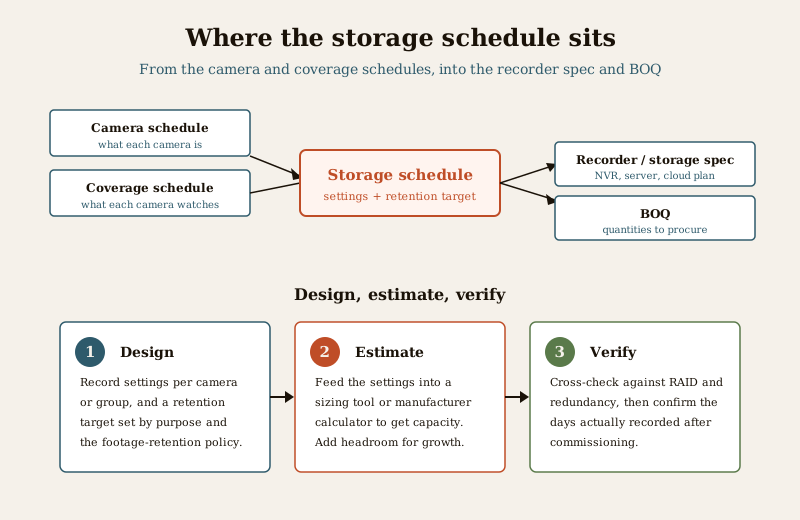
A storage schedule is a design artefact. It is produced during design, drawn from the camera schedule and the coverage schedule, and it feeds forward into the recorder and storage specification and then the BOQ. The camera schedule tells you what each camera is; the coverage schedule tells you what it watches and for how many hours; the storage schedule turns those facts into recording settings and a retention target, which a sizing calculator then converts into a capacity figure.
Who produces it: the security consultant, designer or PMC. Who receives it: whoever specifies the recorder and prices the storage, and later the client, whose footage retention policy it must respect. It matters because storage is one of the few line items that scales silently with every design choice, and because retention is not just a technical setting. It is a privacy decision.
The drivers, in plain terms
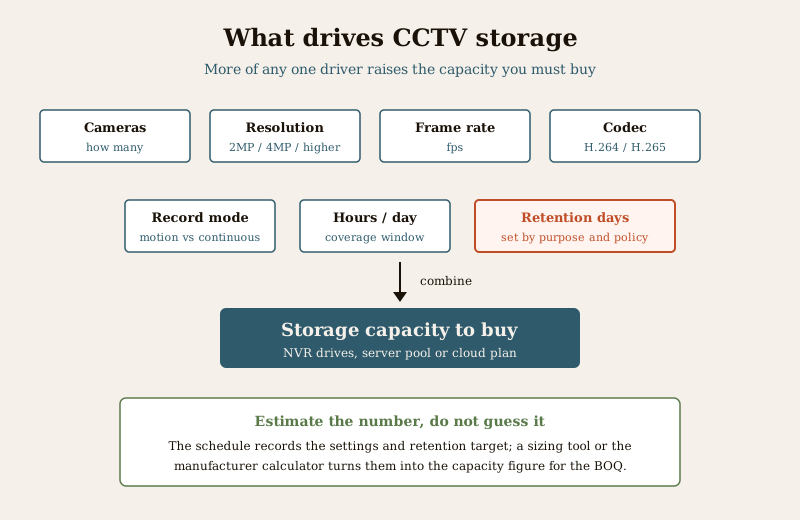
Storage is not one number you look up. It is the product of several choices, and increasing any one of them raises the capacity you must buy:
- Number of cameras. More cameras, more streams to record. The most direct driver.
- Resolution. A 4MP camera writes more data than a 2MP one for the same scene. Higher resolution buys detail and costs storage.
- Frame rate. More frames per second means smoother motion and more data. Many fixed-scene cameras run comfortably at a modest frame rate; reserve high rates for where motion detail truly matters.
- Codec. A modern codec such as H.265 packs the same picture into far less data than an older one such as H.264. Choosing the codec is a storage decision.
- Record mode. Continuous recording captures everything; motion or event recording only writes when something happens, which can cut storage sharply on quiet scenes but risks missing footage if tuned poorly.
- Hours per day. A camera that records around the clock stores more than one that only records during operating hours.
- Retention days. The multiplier that ties it all together. Keeping footage for a longer window multiplies every other choice. This is the number people most often pluck from the air, and the one the DPDP Act asks you to justify.
The schedule does not compute the gigabytes. It captures these settings and the retention target cleanly so that a sizing tool or the manufacturer calculator can produce a defensible capacity figure for the recorder spec and the BOQ.
Worked example storage schedule
Example only, adapt to your project. The values below are illustrative. Note the retention and storage columns say "specify" and "estimate with the sizing tool", not fabricated gigabyte figures. Never state a per-camera capacity as fact in a schedule. Estimate it with a proper calculator and confirm it after commissioning.
| Camera / group | Resolution | Frame rate | Codec | Record mode | Hours/day | Retention target (days) | Est. storage note | Recorder / pool |
|---|---|---|---|---|---|---|---|---|
| Main Gate C-01 | 4MP | specify | H.265 | Continuous | 24 | specify per policy | Estimate with sizing tool | NVR-1 pool |
| Perimeter cams C-02 to C-05 | 4MP | specify | H.265 | Continuous | 24 | specify per policy | Estimate with sizing tool | NVR-1 pool |
| Lobby C-06 | 2MP | specify | H.265 | Continuous | 24 | specify per policy | Estimate with sizing tool | NVR-1 pool |
| Corridors C-07 to C-10 | 2MP | specify | H.265 | Motion / event | e.g. business hours | specify per policy | Estimate with sizing tool | NVR-2 pool |
| Store room C-11 | 2MP | specify | H.265 | Motion / event | 24 | specify per policy | Estimate with sizing tool | NVR-2 pool |
| Cloud-backed critical group | 4MP | specify | H.265 | Event clips | 24 | specify per policy | Estimate with provider calculator | Cloud plan |
Read the table as a set of design decisions, not a storage report. Every camera has a purpose that justifies its settings, and the retention target on each row is something you can point to in the footage retention policy. The estimate column is deliberately a pointer to a calculator, not a number.
Blank copy-ready template
Copy this into your project sheet and fill a row per camera or per sensible group. Group cameras only when they genuinely share settings and retention; split them out the moment they differ.
| Camera / group | Resolution | Frame rate | Codec | Record mode | Hours/day | Retention target (days) | Est. storage note | Recorder / pool |
|---|---|---|---|---|---|---|---|---|
| ... | ... | ... | ... | ... | ... | ... | Estimate with sizing tool | ... |
| ... | ... | ... | ... | ... | ... | ... | Estimate with sizing tool | ... |
| ... | ... | ... | ... | ... | ... | ... | Estimate with sizing tool | ... |
| Totals / headroom | Add RAID and growth headroom |
Field and column guide
- Camera / group. Match the camera number to the camera schedule so the two documents reconcile. Group only where settings and retention are identical.
- Resolution and frame rate. Set them to the task, not the maximum the camera supports. Reading number plates or faces needs more; a wide contextual view often needs less.
- Codec. Prefer a modern codec where the whole chain supports it. Record which one, because it changes the estimate.
- Record mode. State continuous, motion or event, and be honest that motion recording saves storage only if it is tuned to catch what matters.
- Hours/day. The realistic recording window, not an aspiration.
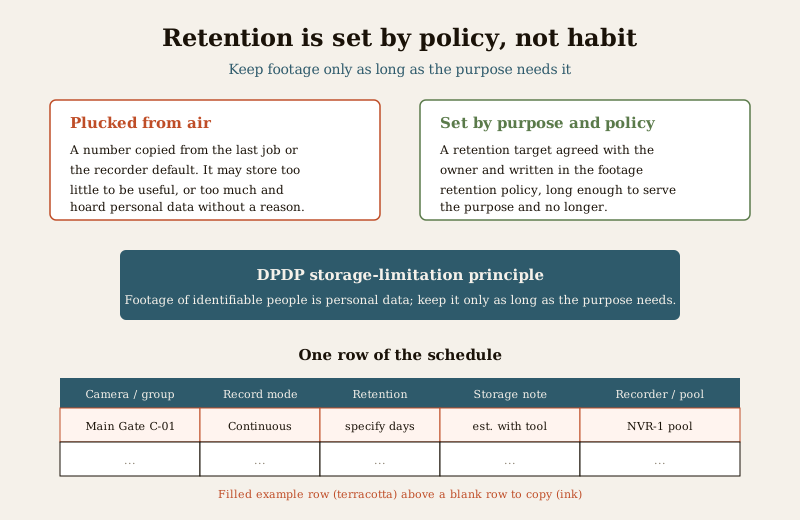
- Retention target (days). Set by purpose and by the footage retention policy, never by habit or by the recorder default. This is the DPDP-sensitive field.
- Est. storage note. A pointer, not a number. Say which tool or manufacturer calculator will produce the figure. Confirm the days actually recorded after the system is commissioned.
- Recorder / pool. Which recorder, server volume or cloud plan holds this stream. This is what carries into the recorder spec and the BOQ.
How to use it well
- Set retention by purpose, then policy, then check the law. Decide why footage is kept and for how long that purpose needs it, write that into the footage retention policy, and keep the schedule aligned with it. A longer window is not automatically better.
- Design for redundancy and headroom. If the storage uses RAID or any redundancy, that reduces usable capacity, so the raw capacity in the BOQ must exceed the recorded footage. Add headroom for future cameras and for retention that tends to creep upward.
- Choose cloud or local deliberately. Cloud shifts capacity into a recurring plan and changes how you estimate and budget; local puts it in the drives and the recorder spec. Weigh the trade-off with the local storage vs cloud comparison and the data storage cost guide.
- Verify the estimate with a proper calculator. The schedule holds the settings; a sizing tool or the manufacturer calculator turns them into capacity. Then confirm the real recording days on the commissioned system, because sites rarely match the estimate exactly.
Retention is personal-data handling. Under the DPDP Act, 2023 the storage-limitation principle says personal data should be kept only as long as the purpose needs. Footage of identifiable people is personal data, so a retention target you can justify is not just good design; it is the lawful position. Record the reason for the retention figure, not just the figure.
Common mistakes
- Retention plucked from the air. A number copied from the last job or left at the recorder default. Set it from purpose and policy and write down why.
- No headroom. Sizing to exactly the estimate, then losing days to RAID overhead, a new camera or a bitrate that ran higher than assumed. Always leave margin.
- Ignoring frame rate and codec. Two of the biggest levers on storage, often left unstated. Record both, because they change the estimate as much as retention does.
- Fabricating the capacity. Writing a confident gigabyte or terabyte figure into the schedule as fact. Estimate it with a tool and confirm it on site.
How it connects to the other documents
The storage schedule does not stand alone. It reconciles with the camera schedule on camera numbers and models, and with the coverage schedule on hours and purpose. It feeds the recorder and storage specification and the BOQ with the capacity and pool allocation. And its retention column must match the footage retention policy that governs the whole system. Keep all of these in step, and a change to any one, an added camera, a longer retention target, a codec switch, is easy to trace through to the storage you must procure. Browse the full set in the professional security resources library.
Key takeaways
- The storage schedule records recording settings and a retention target per camera or group; those decisions drive the storage capacity to buy.
- It is a design document drawn from the camera and coverage schedules, feeding the recorder spec and the BOQ.
- Estimate capacity with a proper sizing tool or the manufacturer calculator; never fabricate gigabyte figures in the schedule.
- Set retention by purpose and policy, respecting the DPDP storage-limitation principle, and leave headroom for RAID and growth.
References
- Digital Personal Data Protection Act, 2023 — the storage-limitation principle: personal data, including footage identifying people, should be retained only as long as the purpose requires.
- Manufacturer storage and bitrate documentation for your specific recorder and cameras — the authoritative source for turning settings and retention into a capacity estimate.
- Bureau of Indian Standards catalogue — verify the current edition of any standard referenced in the wider design at https://www.services.bis.gov.in/
This is an educational template to adapt, not legal or contractual advice. Storage figures depend on your equipment and must be estimated with a proper sizing tool; engage qualified professionals and consult a professional for legal or data-protection questions.
Export this guide
Related Guides — Deep-dive reading
CCTV Footage Retention in India (2026): How Long to Keep It, and When to Delete
Footage of identifiable people is personal data, and the honest answer to how long to keep it is almost never forever. Here is how to set a sensible retention window for a home, an RWA or a small office, delete on schedule, and preserve only what a real incident needs.
SecurityProfessional Security Resources for India (2026): The Documents Behind a Secure Project
The overview and map of the whole professional-deliverable toolkit — the brief, schedules, BOQ, checklists, handover pack and logs a consultant, designer, PMC or facility manager produces across a security project, and how each document connects to the next.
SecurityData Storage Cost for CCTV in India (2026): Local Disks vs Cloud, and How to Size It
The running cost people forget when they buy cameras. Where the footage actually lives — a one-time surveillance hard disk in the recorder, or a recurring per-camera cloud plan — and how camera count, resolution, frame rate, recording mode and retention days decide how many terabytes, and how much money, you really need.
SecurityRelated Tools — Try Free
CCTV Camera Coverage & Count Calculator
Estimate how many CCTV cameras you need, the NVR channels, storage in TB for your retention period, and an indicative all-in cost with GST.
CCTV CalculatorCCTV Cloud vs Local Cost Calculator
Compare cloud CCTV subscription against a local NVR + HDD — upfront, 5-year total, monthly fee and break-even.
Cloud vs LocalCCTV Recording-Duration Calculator
How many days of footage your storage holds, from cameras, bitrate, hours per day and recording mode.
Retention Days