
Camera Schedule for India (2026): One Row per Camera, No Surprises
A ready-to-adapt CCTV camera schedule — the master device register that gives every camera one row, capturing purpose, type, mounting, power, cabling and recorder channel so nothing is missed between the coverage plan, the BOQ and the handover.
Somewhere between the coverage plan that says "we need to see the main gate" and the invoice that lists forty cameras, one document does the quiet, unglamorous work of keeping every camera accounted for: the camera schedule. It is the master device register — a single table where every camera on the project gets exactly one row, and that row carries everything you need to design it, buy it, mount it, wire it, power it, commission it and hand it over. Miss a row and you miss a camera; miss a column and you miss a cable, a bracket or a channel on the recorder.
This page is a ready-to-adapt professional template that sits inside the Studio Matrx security resources library. It is the device-level list that flows out of the CCTV coverage schedule — where you decided each area needs to be watched and to what standard — and feeds forward into the bill of quantities, the cabling and power plans, the storage sizing and, finally, the asset register the client keeps for the life of the system.
Scope & how to read this. This is a ready-to-adapt professional template, not authoritative or contractual wording. It is a design and coordination aid, not a substitute for a specification, a tender or a stamped drawing. Get professional and legal review for any contract document (BOQ, specification, tender). Actual requirements — resolutions, lux, IP ratings, wattages, model numbers and prices — come from your project brief, the site survey, the manufacturer and the AHJ. Where a real figure belongs, this template says "specify" so you fill it in with a verified value.
What the camera schedule is, and where it sits
Think of the deliverables as a chain. The coverage schedule answers what must be watched and how well. The camera schedule answers which physical camera does that, and everything true about it. From there the numbers fan out: the BOQ counts and prices the devices, the cabling and power schedules route and energise them, the storage plan sizes the recorder and drives, and the field-of-view schedule records exactly where each one points once it is on the wall.
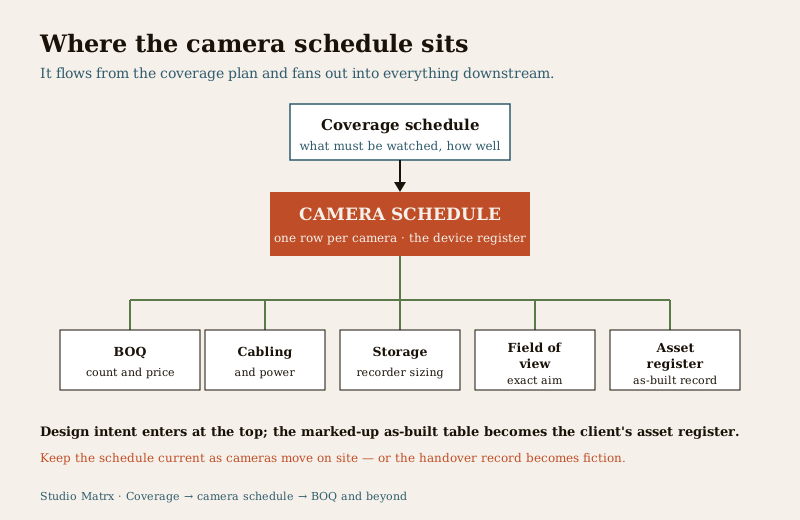
Who produces it: the security consultant, systems designer or the design lead in an architecture or PMC team. Who receives it: the estimator or procurement team, the installer, the commissioning engineer and — as the seed of the asset register — the client or facility manager. It is a living document: it starts at design intent, gets marked up "as-built" during installation, and is handed over as the definitive record of what was actually put in.
The single discipline that makes it work is the rule in the title: one row per camera. Not one row per model, not one row per area — one row per physical device with a unique reference. That is what lets you count, cost, trace a fault and prove what was installed.
What one row must capture
Each row is a small contract describing a single camera. The columns below are the ones that matter on an India project; add or drop columns to suit, but keep every column that another document downstream depends on.
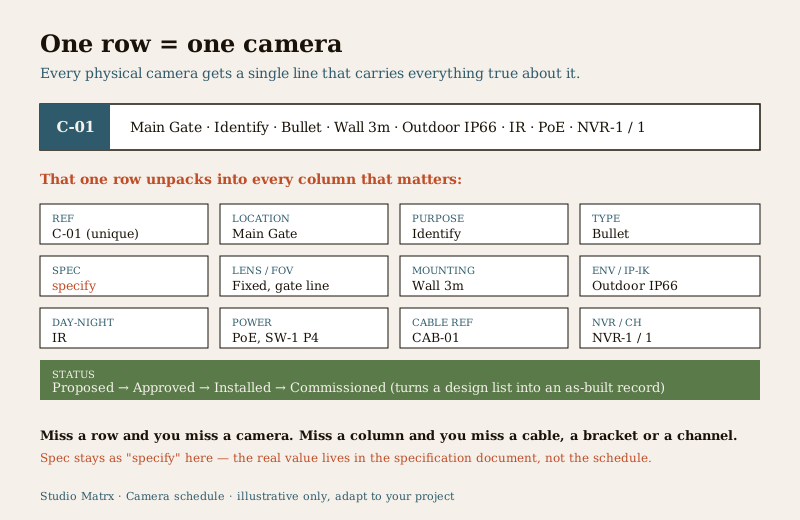
- Camera ref / ID — the unique handle, e.g. "C-01". Everything else keys off this: the drawing tag, the cable label, the recorder channel, the warranty record.
- Location / Zone — where it is, in plain words the client understands: "Main Gate", "Lobby", "Basement Ramp".
- Purpose — carried straight from the coverage schedule: Detect, Observe, Recognise or Identify (the "DORI" intent). This is what justifies the spec.
- Type — the form factor: dome, bullet, turret or PTZ. Drives bracket, look and deterrence.
- Resolution / spec — write "specify" here and pin the real number in the specification document, not the schedule (see the pitfall below).
- Lens / FOV note — fixed or varifocal, and the intended field of view in words ("wide, whole forecourt" or "narrow, gate line"); the exact angle lives in the field-of-view schedule.
- Mounting — surface and height: "Wall 3m", "Ceiling", "Pole 4m". Feeds the bracket schedule and the working-at-height plan.
- Indoor / Outdoor + IP / IK — environment and the protection needed; outdoor and semi-outdoor cameras need weather and, in exposed or public spots, impact ratings — specify the class.
- Day-Night / IR — whether it needs IR, white-light or is a day-only internal camera; drives lens and power draw.
- Power — how it is fed: PoE (and the switch/port it lands on) or a local adaptor. This must reconcile with the network switch and PoE budget.
- Cable route ref — the cable ID and route back to the recorder or IDF, so the cabling schedule and the schedule agree.
- NVR / channel — which recorder and which channel or logical input the camera lands on.
- Status — Proposed, Approved, Installed, Commissioned; the column that turns a design list into an as-built record.
Worked example (illustrative)
Here is a short, filled camera schedule so you can see the columns doing their job. The values are generic and illustrative — treat every "specify" as a prompt to insert a verified figure from your survey and specification.
Example only — adapt to your project. The rows below are illustrative. They contain no real model numbers, prices or fixed resolutions; "specify" marks every value that must come from your own survey, manufacturer data and specification document.
| Ref | Location / Zone | Purpose | Type | Spec | Lens / FOV | Mounting | Env / IP-IK | Day-Night | Power | Cable ref | NVR / Ch | Status |
|---|---|---|---|---|---|---|---|---|---|---|---|---|
| C-01 | Main Gate | Identify | Bullet | specify | Fixed, narrow gate line | Wall 3m | Outdoor, specify IP66 | IR | PoE, SW-1 P4 | CAB-01 | NVR-1 / 1 | Installed |
| C-02 | Gate Forecourt | Recognise | Turret | specify | Wide, whole forecourt | Wall 3.5m | Outdoor, specify IP66 | IR | PoE, SW-1 P5 | CAB-02 | NVR-1 / 2 | Installed |
| C-03 | Lobby | Observe | Dome | specify | Wide | Ceiling | Indoor | Day-Night | PoE, SW-1 P6 | CAB-03 | NVR-1 / 3 | Approved |
| C-04 | Basement Ramp | Recognise | Bullet | specify | Fixed, ramp line | Wall 2.8m | Semi-outdoor, specify IP | IR | PoE, SW-2 P2 | CAB-04 | NVR-1 / 4 | Proposed |
| C-05 | Perimeter NE | Detect | PTZ | specify | Varifocal, wide sweep | Pole 4m | Outdoor, specify IP66/IK | IR / white-light | Adaptor, local | CAB-05 | NVR-1 / 5 | Proposed |
Read a single row like a sentence: camera C-01 identifies people at the Main Gate, it is a bullet with a narrow fixed lens on the gate line, wall-mounted at 3 metres, weatherproofed for outdoors, IR for night, powered over Ethernet from switch SW-1 port 4, running on cable CAB-01 to channel 1 of recorder NVR-1, and it is installed. Every downstream document can act on that one line.
Blank template — copy and adapt
Copy the header row into your own sheet, keep the placeholder rows to remind you of the format, and add one row per camera. This is the core value of the page — the empty register you fill in.
| Ref | Location / Zone | Purpose | Type | Spec | Lens / FOV | Mounting | Env / IP-IK | Day-Night | Power | Cable ref | NVR / Ch | Status |
|---|---|---|---|---|---|---|---|---|---|---|---|---|
| C-01 | ... | ... | ... | specify | ... | ... | ... | ... | ... | ... | ... | Proposed |
| C-02 | ... | ... | ... | specify | ... | ... | ... | ... | ... | ... | ... | Proposed |
| C-03 | ... | ... | ... | specify | ... | ... | ... | ... | ... | ... | ... | Proposed |
| ... | ... | ... | ... | ... | ... | ... | ... | ... | ... | ... | ... | ... |
Keep a short notes / legend block beneath the table for anything a column cannot hold: assumptions, exclusions, spare channels reserved for a future phase, and the date and revision of the schedule.
Column and field guide
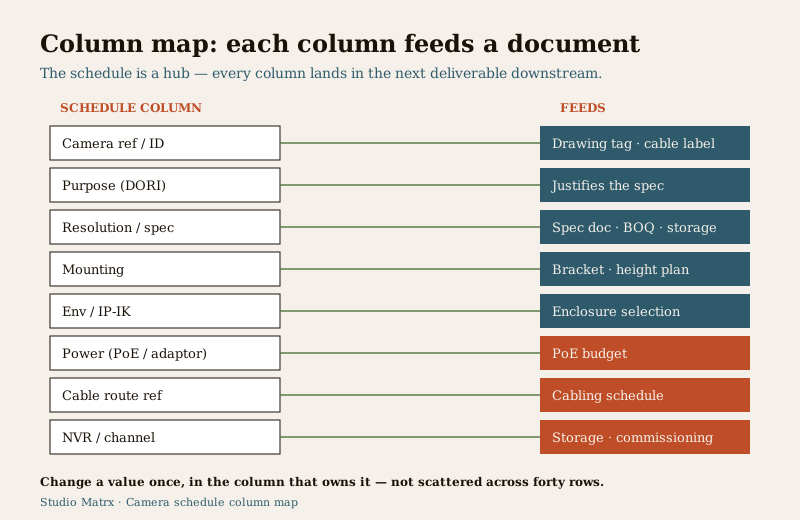
A quick guide to what each column is really for, and where it lands next:
| Column | What goes in it | Feeds |
|---|---|---|
| Camera ref / ID | Unique handle, e.g. "C-01" | Drawing tag, cable label, channel, asset record |
| Location / Zone | Plain-language place | Layout drawing, handover, patrol logic |
| Purpose | Detect / Observe / Recognise / Identify | Justifies the spec; from coverage schedule |
| Type | Dome / bullet / turret / PTZ | Bracket, look, deterrence |
| Resolution / spec | "specify" here; real value in spec doc | Specification, BOQ, storage sizing |
| Lens / FOV note | Fixed or varifocal; intent in words | Field-of-view schedule, focus at commissioning |
| Mounting | Surface and height | Bracket schedule, working-at-height plan |
| Indoor/Outdoor + IP/IK | Environment and protection class | Enclosure and mount selection, BOQ |
| Day-Night / IR | IR / white-light / day-only | Lens choice, power draw, night testing |
| Power | PoE (switch/port) or adaptor | PoE budget, electrical schedule |
| Cable route ref | Cable ID and route | Cabling schedule, containment, labelling |
| NVR / channel | Recorder and channel | Storage sizing, commissioning map |
| Status | Proposed to Commissioned | Project tracking, as-built record |
Numbering conventions that scale
A camera reference is only useful if it is unique, stable and readable at a glance. A sensible scheme:
- Simple prefix and number for a small site: "C-01", "C-02" upward, zero-padded so they sort correctly.
- Zone or building prefix for a larger campus: "A-01" for Block A, "B-01" for Block B, or "EXT-01" for perimeter and "BST-01" for basement. Keep the prefix short and obvious.
- Never renumber a live camera. Once C-07 is installed and labelled, it stays C-07 even if you delete C-06; gaps are fine, reuse is not. The ref must match the physical label, the drawing tag and the recorder channel for the life of the system.
- Match the recorder. If the channel and the ref agree wherever possible (C-01 on channel 1), fault-finding at 2 a.m. is far easier.
Common mistakes
- No unique IDs. Two cameras both called "Gate camera" and neither with a stable ref — now the cable label, the channel and the warranty claim all point at nothing. Give every camera one ref and put it on the device.
- Missing power or cable columns. A schedule that lists cameras but not how each is powered or routed forces the installer to improvise, and the PoE switch is sized by guesswork. Reconcile every PoE row against the PoE budget.
- Specifying in the schedule instead of the spec. Do not scatter exact resolutions, lux figures and model names across the schedule. Write "specify" and hold the real specification in one place — the specification document — so a change is made once, not chased through forty rows. The schedule references the spec; it does not duplicate it.
- Forgetting the environment column for exposed cameras. An outdoor or gate camera missing its IP/IK intent gets bought as an indoor unit and fails in the first monsoon. See outdoor CCTV for what "outdoor" actually demands.
- Letting design and as-built drift apart. If cameras move on site and the schedule is not marked up, the handover record is fiction. Update the Status column and any changed row as you go.
How it connects to the other documents
The camera schedule is the hub of the CCTV design set. Upstream, the coverage schedule sets the purpose and the standard for each area, and the choice of device on each row leans on how to choose a CCTV camera. Downstream, the schedule seeds the BOQ (counts and prices), the cabling and containment schedule (via the cable ref), the network switch and PoE budget (via the power column), the storage plan (via the channel and spec), and the field-of-view schedule (which records the exact aim once installed). At the end, the same table — marked as-built — becomes the client's asset register.
The schedule locates every camera — control the document. A completed camera schedule is a map of exactly where every camera watches, on what network, feeding which recorder. Under the Digital Personal Data Protection (DPDP) Act, 2023, CCTV of identifiable people is personal data, and a document that pinpoints coverage is sensitive in its own right. Share it on a need-to-know basis, keep the as-built and password material separate and access-controlled, and hand it over to a named custodian, not left in a shared folder.
Completion checklist
Before you issue or hand over the schedule, confirm each row and the document as a whole:
| Check | Confirm |
|---|---|
| One row per physical camera | No area-rows or model-rows; every device has its own line |
| Unique, stable ref on every row | Matches the drawing tag, cable label and channel |
| Purpose carried from coverage | Each row states Detect / Observe / Recognise / Identify |
| Power and cable filled | Every camera has a power method and a cable ref |
| Environment set for outdoor/exposed | IP/IK intent specified, not left blank |
| Spec deferred correctly | "specify" in the schedule; real values in the spec doc |
| Channel and recorder assigned | Every camera maps to an NVR channel |
| Status current | Proposed to Commissioned reflects reality |
| Revision and date shown | The sheet carries its own version and issue date |
Use this template as a starting point, adapt the columns to your project, and pass it into the neighbouring documents in the security resources library and the professional security resources guide.
Key takeaways
- One row per camera, one unique ref per row — the whole discipline of the schedule is that nothing gets counted twice or missed once.
- The schedule references the spec, it does not become the spec — write "specify" and keep real resolutions, lux, IP ratings, wattages, models and prices in the specification, verified from survey and manufacturer.
- Every downstream document keys off a column — power to the PoE budget, cable to the cabling schedule, channel to storage and commissioning, and the whole marked-up table to the asset register.
- Treat the document as sensitive — it locates every camera; share on need-to-know and hand over to a named custodian under the DPDP Act, 2023.
References
- Digital Personal Data Protection Act, 2023 — CCTV of identifiable people is personal data; a schedule locating cameras is sensitive, so control access and retention.
- Manufacturer documentation for your chosen recorder and cameras — the authoritative source for resolutions, lux, IP/IK ratings, power draw and mounting; the schedule references these, it does not replace them.
- Bureau of Indian Standards catalogue — verify the current edition of any electrical, structural or life-safety standard referenced in the install at https://www.services.bis.gov.in/
This is an educational, ready-to-adapt template, not legal, contractual or specification advice. Cabling, work at height and any electrical connection are qualified professional tasks — engage licensed installers, and consult a professional for legal or data-protection questions.
Export this guide
Related Guides — Deep-dive reading
Professional Security Resources for India (2026): The Documents Behind a Secure Project
The overview and map of the whole professional-deliverable toolkit — the brief, schedules, BOQ, checklists, handover pack and logs a consultant, designer, PMC or facility manager produces across a security project, and how each document connects to the next.
SecurityCCTV Coverage Schedule for India (2026): Mapping Every Camera to a Purpose
A ready-to-adapt design-stage schedule that lists every zone to be covered, ties each one to a camera reference and a coverage purpose, and makes gaps and overlaps visible before you write the camera schedule and BOQ.
SecuritySecurity Equipment Schedule for India (2026): The Master Equipment List
A ready-to-adapt security equipment schedule that rolls every subsystem device schedule into one consolidated procurement-and-tracking view, so what is supplied across CCTV, access, intrusion, fire interface, gates, power, network and the control room lives in a single source of truth.
SecurityRelated Tools — Try Free
CCTV Camera Coverage & Count Calculator
Estimate how many CCTV cameras you need, the NVR channels, storage in TB for your retention period, and an indicative all-in cost with GST.
CCTV CalculatorCCTV Camera Type Selector
Answer five questions and get the right camera form factor — dome, vandal dome, bullet, turret or PTZ — with reasons.
Camera SelectorCCTV Lens & Field-of-View Calculator
Focal length, sensor and resolution to field-of-view angle, scene width and DORI detect/observe/recognise/identify distances.
Lens & FoV