
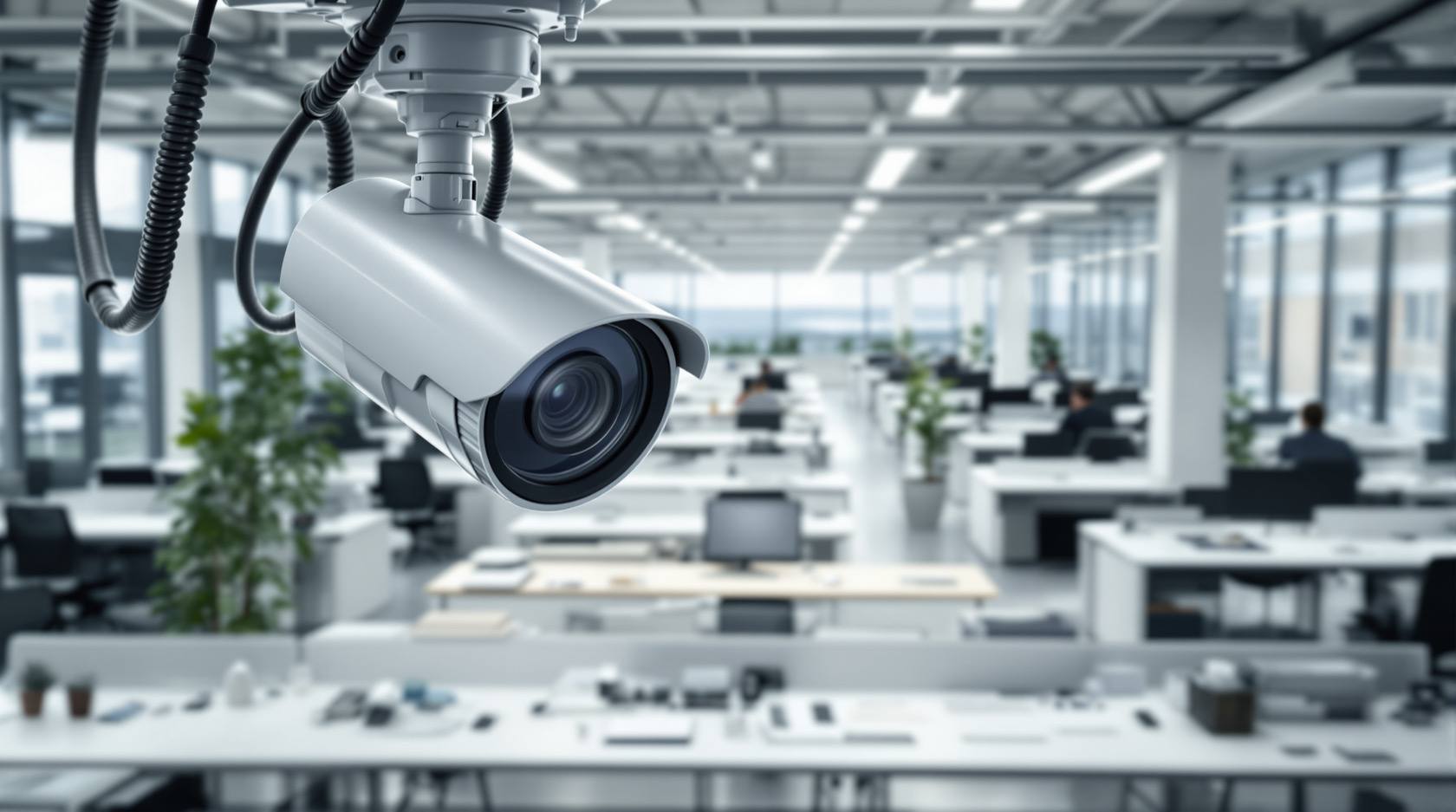
CCTV in Workplaces in India (2026): Security Without Surveilling Staff
A small employer can lawfully protect a shop, office, clinic or workshop with cameras — but staff keep their dignity and privacy. This guide separates legitimate security from staff surveillance, and gives you a workplace CCTV policy checklist.
There is a real, honest reason to put cameras in a workplace. A shop loses stock, a clinic keeps controlled drugs, a workshop has hazardous machinery, a cash till gets short at the end of the day, and someone has to be able to see who came in and out of the back door at 9pm. An employer has a genuine, defensible interest in security. That interest is not in dispute.
What is in dispute — and where small employers most often go wrong — is the quiet slide from securing the premises into watching the people who work there. A camera fixed on one person's desk, footage pulled up to see who took a long lunch, a screen the owner watches all day to catch staff standing idle: that is no longer security. That is cctv in workplaces turning into staff surveillance, and it costs you trust, morale and, increasingly, legal exposure. This guide sits inside the Security Hub's privacy and ethics section and is firm on one point: protect the workplace, keep the worker's dignity.
Scope & how to read this. This is practical guidance grounded in the Digital Personal Data Protection Act, 2023 (DPDP Act) and general principles of dignity and privacy — it is not legal advice. A formal employee-monitoring policy has legal and HR weight; for that, take advice from a lawyer, your HR function or a Data Protection Officer. Throughout, choose the least-intrusive option that still meets a real security need.
The line: securing a place vs watching a person
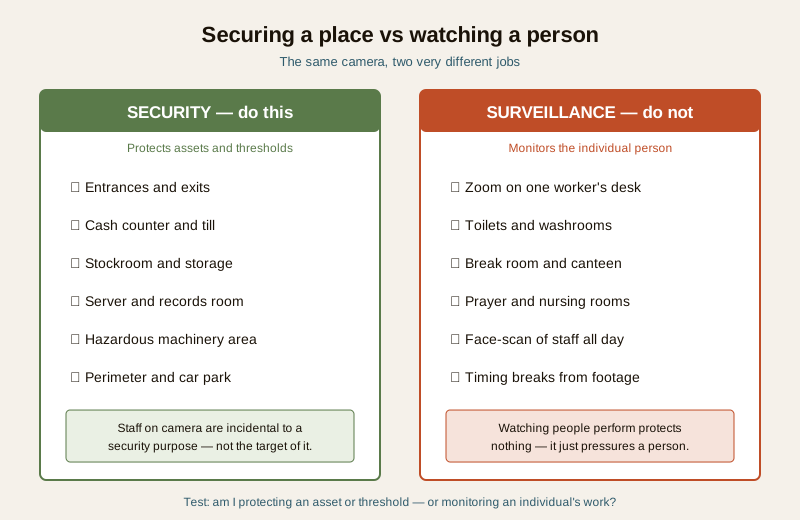
The single test that keeps you on the right side of this is simple. Ask: am I protecting an asset, an entrance or a hazard — or am I monitoring an individual's work? Security watches things and thresholds. Surveillance watches people performing.
Footage of who enters the stockroom protects the stock. A camera trained on a data-entry clerk to count keystrokes protects nothing — it just pressures a person. The first is proportionate; the second is intrusive, corrosive and hard to justify under any principle of data minimisation.
Where cameras legitimately belong
For a small premises, a proportionate camera scheme covers the places where a security incident actually happens — not the places where people simply exist.
- Entrances and exits. The front door, the back door, the loading bay, the gate. Knowing who came and went, and when, is core security and rarely intrudes on anyone's dignity.
- Cash points and tills. A counter, a till, a cashier's window. A camera here settles genuine disputes over transactions and deters till theft. Point it at the till and the transaction, not up into the cashier's face all day.
- Stockrooms and high-value storage. Where the inventory, the tools, the electronics or the controlled stock live.
- Server rooms and records stores. Where data and confidential files are physically kept.
- Hazardous areas. A workshop floor, a plant room, a chemical store — here a camera also serves safety, not just security.
- The perimeter and car park. External approaches, boundary walls, parking. Keep the field of view on your own property, not overshooting into the street or a neighbour's plot.
The common thread: these cover spaces and thresholds, and any staff caught on camera are incidental to a security purpose — not the target of it.
Where cameras must never go
Some spaces are off-limits, full stop. No security argument justifies a camera here, and installing one is a serious breach of dignity — and, for footage that identifies people, a serious data-protection problem.
- Toilets, washrooms and changing rooms. Absolute no-go. Never, under any framing.
- Nursing and feeding rooms. A space provided for a mother's dignity cannot be watched.
- Prayer and meditation rooms.
- Rest areas, break rooms and staff canteens. These exist precisely so people can step out of the watched, working part of the day. A camera here defeats their purpose and reads as surveillance of private moments.
- Close-up, continuous recording of an individual workstation to watch a specific person work. Even in an open office, a camera should not be positioned and zoomed to monitor one worker's screen, hands or minute-to-minute activity.
The where-not-to-install-CCTV guide covers these no-go zones across all settings. If you are ever unsure, the safe default is: leave it out.
| Area | Camera? | Why |
|---|---|---|
| Entrance / exit / loading bay | Yes | Who enters and leaves; core security, low intrusion |
| Till / cash counter | Yes, aimed at the till | Deters theft, settles transaction disputes |
| Stockroom / server / records | Yes | Protects assets and data |
| Hazardous / machinery area | Yes | Security and safety together |
| Perimeter / car park | Yes, on your own land | Boundary security; do not overshoot into the street |
| Open workspace, wide view | Sometimes | General security only; never zoomed on one person |
| One worker's desk, close-up | No | Monitors the person, not the premises |
| Break room / canteen / rest area | No | Private downtime; reads as surveillance |
| Toilet / washroom / changing room | Never | Absolute no-go |
| Nursing / prayer room | Never | Dignity space; never watched |
What the DPDP Act asks of an employer, in plain terms
Footage that identifies a worker is that person's personal data, and an employer handling it is a custodian of it. You do not need to memorise the statute to act well — you need to apply a few principles honestly, building privacy into the scheme by design rather than bolting it on later.
- Lawful, specific purpose. Decide why each camera exists — theft, safety, entry control — and write it down. "To keep an eye on staff" is not a lawful, specific purpose.
- Notice, not covert recording. Staff must be told. Cameras in a workplace should be open and signposted, never hidden to catch people out. Put up clear CCTV signage and tell employees in writing where cameras are and why.
- Purpose limitation. Footage collected for security is for security. Using it to police performance, count breaks, or make wage or disciplinary decisions is a different purpose the person never agreed to — and a classic overreach.
- Data minimisation. Fewest cameras, narrowest field of view, aimed at assets and thresholds. If a wide view does the job, do not zoom on faces.
- Storage limitation. Keep footage only as long as a real security need requires, then let it delete on a rolling cycle. Do not hoard months of recordings "just in case".
- Security safeguards. Lock the recorder away, restrict who can view footage to a named few, use passwords, log access. Leaked workplace footage is its own harm.
- The worker's rights. A data principal has rights to be informed, and generally to seek access, correction, grievance redress and, where appropriate, erasure. Have a simple route for a staff member to raise a concern.
Dignity and rights callout. A worker does not surrender their dignity at the office door. Cameras must never be used to bust toilet breaks, monitor how long someone prays or eats, track union or association activity, single out a particular employee, or pressure and intimidate. Footage is not a tool for wage-docking or informal punishment. If you find yourself reaching for the recordings to manage a person rather than to investigate a genuine security incident, stop — you have crossed the line this whole guide is about.
The proportionality and minimisation test
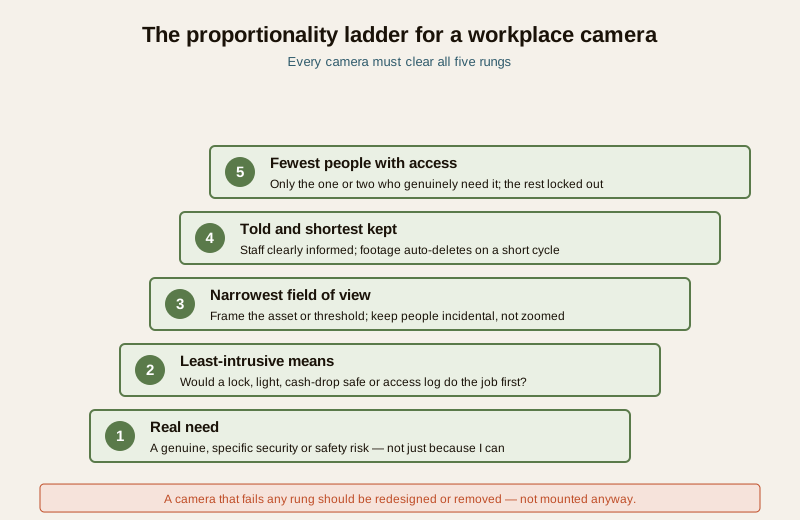
Before you mount any camera, run it through five questions. If it fails, redesign or drop it.
1. Real need. Is there a genuine, specific security or safety risk here — or am I just watching because I can?
2. Least-intrusive means. Could a lock, better lighting, a cash-drop safe or an access log solve this without a camera? Use that first.
3. Narrowest view. Can I frame this on the asset or threshold and keep people incidental, rather than in frame all day?
4. Told and shortest kept. Are staff clearly informed, and is footage set to auto-delete on the shortest sensible cycle?
5. Fewest eyes. Is access limited to the one or two people who genuinely need it, with the rest locked out?
Audio: usually off
Recording sound is a bigger step than recording video, and in a workplace it captures colleagues' private conversations. For almost every small premises the microphone should be off. If you believe there is a narrow case — a specific counter, under clear notice — treat it as a separate, deliberate decision with its own consent questions, and read the CCTV audio recording guide before you switch anything on. Do not record staff conversations by default.
AI, face recognition and analytics on staff
A product that offers face recognition, "attention detection", heat-mapping or behaviour analytics does not mean you should point it at your workers. These tools carry real error and bias risk, and using them to profile, score or take automated action against staff is exactly the overreach to avoid. The honest default is to leave AI analytics off on people who work for you, keep any decision that affects a person under meaningful human review, and never let an algorithm quietly discipline someone. The ethical AI surveillance guide and the facial recognition and privacy guide go deeper — read them before deploying anything that recognises faces on staff.
Extra care with contract, domestic, gig and vulnerable workers
Contract cleaners, security guards, delivery and gig workers, domestic staff and anyone in a weaker bargaining position deserve more care, not less. They are least able to object, so the duty falls on you: same notice, same no-go spaces, same restraint, and never a camera used to squeeze or intimidate someone who cannot push back. Dignity does not scale with someone's contract type.
A workplace CCTV policy checklist
Write a short, plain policy and share it with staff. At minimum, it should record:
- Purpose of each camera or zone, in one line each.
- Locations covered — and an explicit list of the no-go areas that are not covered (toilets, break rooms, prayer and nursing rooms).
- What is not used for. State plainly that footage is for security and safety, not for performance-policing, break-timing, or routine discipline.
- Notice. Confirm signage is up and staff have been informed in writing.
- Retention. How long footage is kept before automatic deletion, on a rolling cycle.
- Access. Who may view footage, how requests are logged, and how the recorder is secured.
- Audio and AI. State that audio is off (or the narrow exception) and that face/behaviour analytics are not run on staff.
- Worker rights and grievance. How an employee raises a concern or asks about footage.
- Review date. When the policy and the camera scheme will be re-checked for proportionality.
Have this policy reviewed by a lawyer, HR professional or Data Protection Officer before you rely on it — the checklist gets you a good draft, not a finished legal document.
Do NOT do this to staff
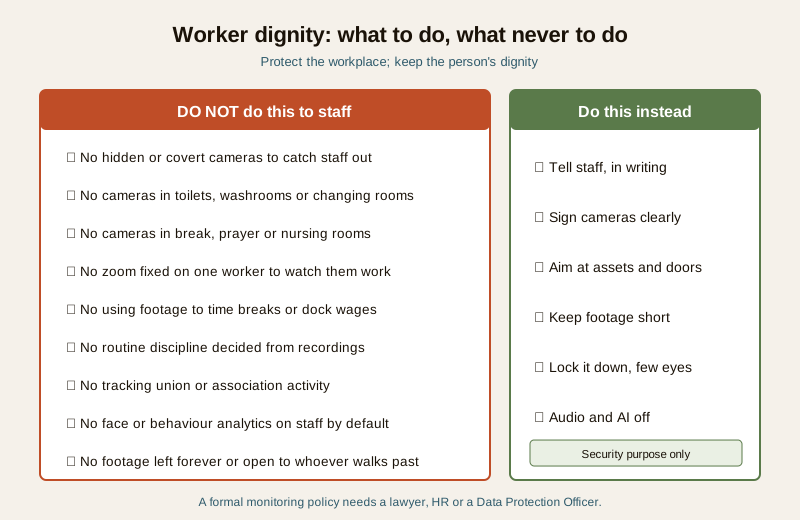
- Do not install hidden or covert cameras to catch staff out.
- Do not place any camera in a toilet, washroom, changing, break, prayer or nursing room.
- Do not zoom or fix a camera on one worker to monitor how they work.
- Do not use security footage to time breaks, police productivity, or make wage and disciplinary decisions.
- Do not track union, association or protected activity.
- Do not run face recognition or behaviour analytics on employees by default.
- Do not let footage sit forever, or leave the recorder open to whoever walks past.
When to get legal or professional advice
Treat everything above as a starting point, not a ruling. Bring in a professional when it counts:
- A formal monitoring policy — anything you will rely on to discipline, dismiss or defend a decision — should be drafted or reviewed by a lawyer, HR professional or Data Protection Officer.
- A worker complaint, a data request, or a suspected footage breach — follow due process and take advice; do not improvise.
- Face recognition, biometrics or AI analytics on staff — get advice before deploying, given the legal and dignity stakes.
- Wiring, mains and mounting — a licensed installer and electrician; cameras must never block a fire exit or egress route.
Legal and ethics caution (not legal advice). Workplace monitoring engages the DPDP Act 2023, employee dignity and privacy, and labour and evidence considerations that turn on your exact facts. The safe posture is: legitimate security purpose only, staff clearly told, no cameras in private spaces, footage minimised and secured, audio and AI off by default, and a real person deciding — never a camera used to control or punish. Confirm your specific situation with a qualified professional.
Key takeaways
- Security is legitimate; surveillance is not. Cameras protect assets, entrances and hazards — they do not exist to watch people work.
- Cover thresholds and assets, never private spaces. Entrances, tills, stockrooms, hazards and the perimeter — yes. Toilets, break rooms, prayer and nursing rooms, and one-worker close-ups — never.
- Apply the DPDP principles honestly. Specific purpose, notice not covert recording, purpose limitation, minimisation, short retention, tight access, and respect for the worker's rights.
- Keep audio and AI off by default on staff, and take extra care with contract, gig and vulnerable workers.
- Write a short, fair CCTV policy and have a lawyer, HR or a Data Protection Officer review it before you rely on it.
- Never use footage to punish. No break-timing, no wage-docking, no intimidation, no tracking association or union activity.
References
- Digital Personal Data Protection Act, 2023 — handle personal data (including workplace footage that identifies a person) only for a specific, lawful purpose, with notice, minimisation, storage limitation and security safeguards, respecting the data principal's rights; verify the current text and rules before relying on it.
- Constitutional right to privacy and employee dignity — general principles that a worker retains privacy and dignity at work; seek qualified legal and HR advice for a real monitoring decision.
- A qualified lawyer, HR professional or Data Protection Officer — for any formal employee-monitoring policy, worker complaint, data request or suspected breach.
This is an educational overview, not legal advice. Whether and how you may lawfully operate workplace cameras depends on your exact facts — consult a qualified lawyer, HR professional or Data Protection Officer, and engage licensed professionals for wiring and mounting.
Export this guide
Related Guides — Deep-dive reading
Security Privacy Assessment for Indian Homes
Getting the privacy side of home security right: camera placement ethics and limits, notice and consent, the extra caution audio demands, and treating footage as personal data you store, retain and delete responsibly under India's DPDP Act 2023 direction.
SecurityEthical AI Surveillance in India (2026): Restraint, Oversight and Dignity
Modern cameras ship with face recognition, behaviour analytics and automatic alerts. This guide is about using that power with restraint — most homes should leave the clever AI features off, and treat any that stay on as a decision about people, not a toggle.
SecuritySmart Security Privacy in India: The System That Watches You More Than Any Burglar
A smart security system spends every hour of every day watching your family, your staff and your routines — and that footage and data, not a burglar, is the long-term risk most buyers never think about. Where cameras belong and where they must never go, where your video actually goes, what a smart home learns about you, your rights under the DPDP Act 2023, and the honest practice for keeping it all yours.
SecurityRelated Tools — Try Free
CCTV Camera Coverage & Count Calculator
Estimate how many CCTV cameras you need, the NVR channels, storage in TB for your retention period, and an indicative all-in cost with GST.
CCTV CalculatorCCTV Placement Compliance Checker
A quick DPDP-grounded privacy and safety self-check for where a camera is pointed — flags the items to fix.
ComplianceCircadian Light Meter
Patient-centric circadian lighting visualizer for Indian healthcare design — time-of-day × intensity → CCT, melanopic lux (EML / mEDI), melatonin suppression, and an alertness curve. Calibrated against WELL v2 L03 Circadian Lighting Design, CIE S 026:2018, Brainard 2001, and Lucas et al. 2014.
Circadian Tool