
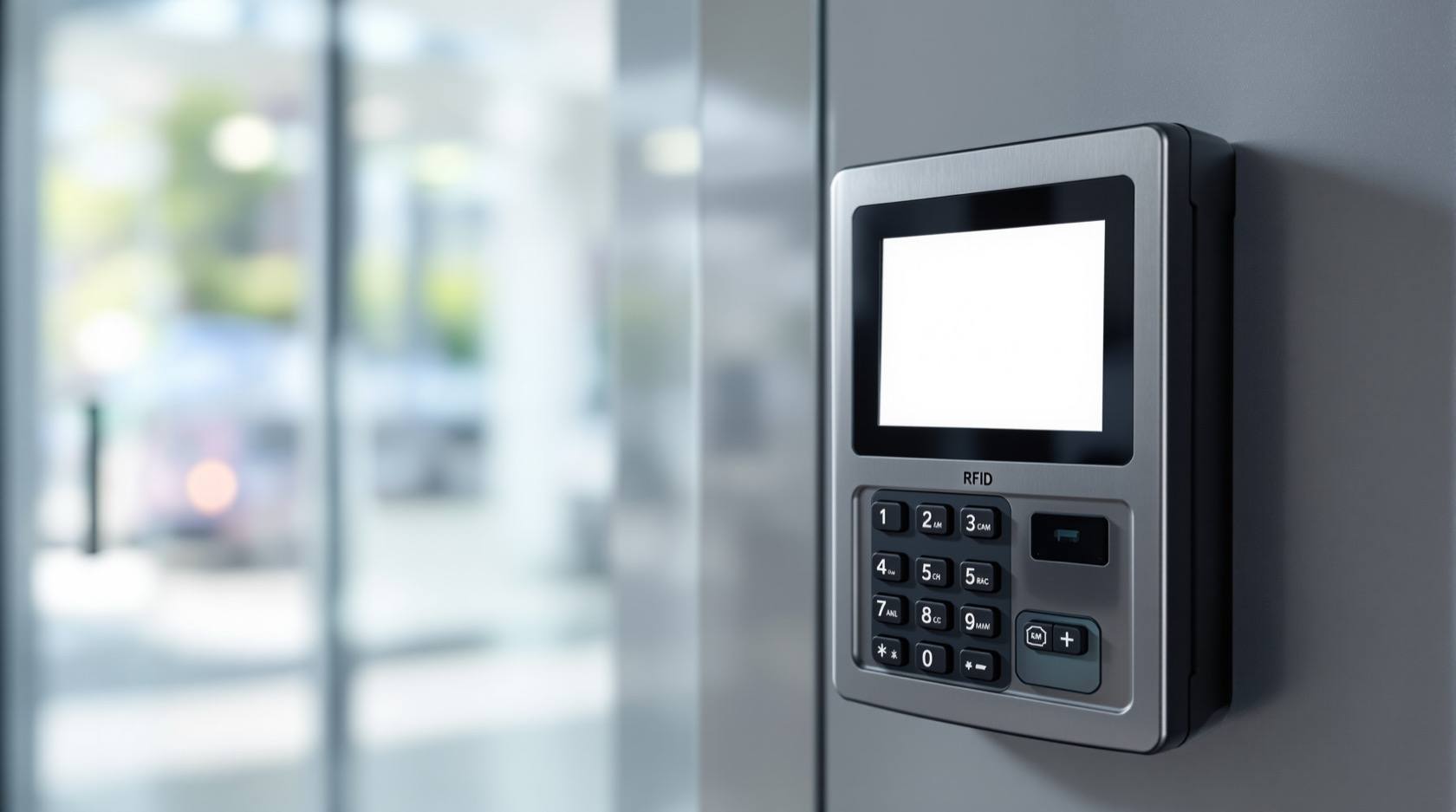
Access Control Data Privacy in India (2026): What the Entry Logs Reveal
Every card swipe, PIN entry and finger scan writes a line in a log — and that log is a movement diary. This guide shows homeowners, RWAs and small offices how to keep access-control data lawfully, proportionately and decently under the DPDP Act 2023.
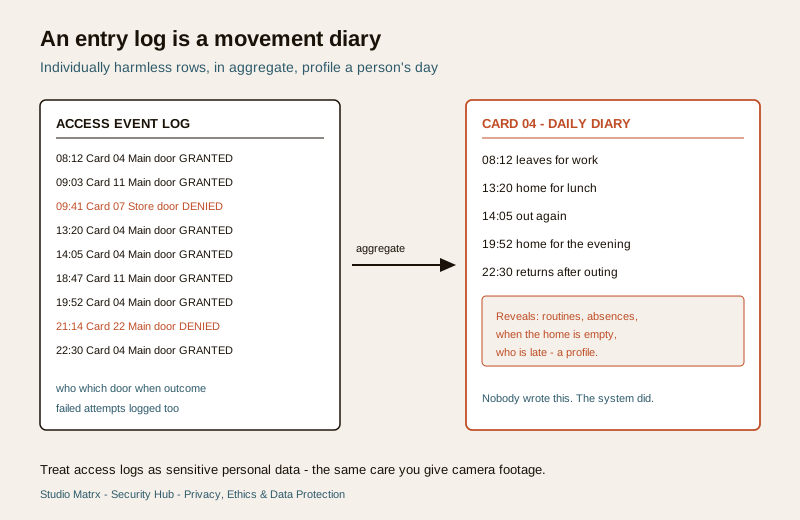
A door that reads a card, a PIN or a fingerprint feels like a simple convenience: the right person gets in, the wrong person does not. But behind that click, the system is writing something down. Every time someone presents a credential, it records who, which door, and when — and a week of those lines is not a security feature any more. It is a movement diary. It shows when a resident leaves for work, when a domestic worker arrives, when a teenager gets home, when an employee steps out for lunch. Nobody sat down to write that diary, yet the system keeps it faithfully.
That is the heart of access control data privacy: the log is far more revealing than it looks, and reading it as a record of people's lives — rather than a record of security events — is exactly where a well-meaning household, RWA or office quietly slides into surveillance. This guide is about keeping that data lawfully, proportionately and decently, and about the line between a legitimate audit trail and monitoring people who never agreed to be monitored. It sits inside the Security Hub's privacy and data-protection section.
Scope & how to read this. This is practical guidance grounded in the Digital Personal Data Protection Act, 2023 (DPDP Act), not legal advice. Access logs and credential records are personal data. For anything with legal weight — a real breach, a workplace-monitoring policy, an employee or tenant dispute — take professional advice and follow due process. Throughout, choose the least-intrusive option that still meets a genuine security need.
What an access-control system actually records
It helps to be concrete about the data, because people rarely realise how much a small system holds. Broadly there are two stores.
- The credential database. This is the list of who is enrolled: names, flat or department, a card or fob number, a PIN, or a biometric template. It maps a person to the token that opens a door. Biometric enrolment is a heightened category with its own duties — the templates, storage and consent rules are covered separately in the biometric access control guide and the biometric data protection guide; route any fingerprint or face question there.
- The event log. Every read produces a timestamped row: identity (or card number), door, direction if the reader knows it, and outcome — granted or denied. Denied and failed attempts are logged too, which quietly captures people fumbling a PIN, trying an expired card, or arriving somewhere they no longer have access.
Individually, a single row is harmless. In aggregate, the log profiles a life: patterns of presence and absence, routines, who is home when the house is empty, how often a worker is late. That aggregation is precisely why entry and exit data is sensitive personal data and deserves the same care you would give footage from a camera.
Security and audit, not monitoring and control
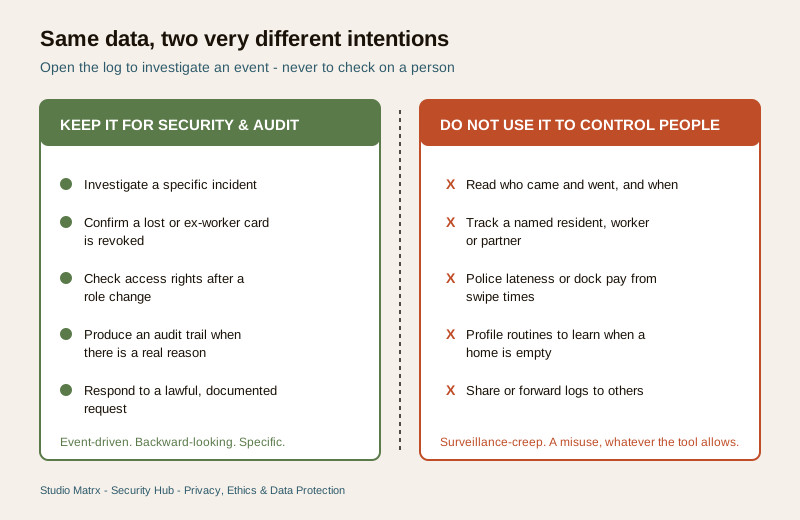
Here is the single most important distinction in this topic. An access log exists to answer security and audit questions: was this door forced, who entered the store room the night the stock went missing, is a lost card still active? Those are event-driven, backward-looking, specific. The moment the same log answers is my maid arriving on time, when did my husband get home, is that employee taking long breaks?, it has become a monitoring tool — a misuse, whatever the system permits.
The stakes are highest for the people with the least power to object. Using entry logs to police a domestic worker's comings and goings, dock wages for a late swipe, track a resident, or keep a running tab on an employee turns a safety device into an instrument of control. It damages trust, and is hard to square with the DPDP Act's rule that data be used only for the purpose it was collected for.
Dignity and rights first. The people logged by your system — workers, residents, employees, visitors — are data principals, not suspects. They have a reasonable expectation that a security system is used for security, not to surveil their daily lives. Never repurpose an access log to monitor, profile, discipline or intimidate. If you find yourself opening the log to check on a person rather than investigate an event, stop.
| Legitimate use (security and audit) | Misuse (surveillance and control) |
|---|---|
| Investigating a specific incident or forced door | Routinely reading who came and went, and when |
| Confirming a lost or ex-employee card is revoked | Tracking a named resident, worker or partner |
| Checking access rights are correct after a role change | Policing lateness or docking pay from swipe times |
| Producing an audit trail when there is a real reason | Profiling routines to know when a home is empty |
| Responding to a lawful, documented request | Sharing logs on a WhatsApp group or with a landlord |
The DPDP duties, in plain language
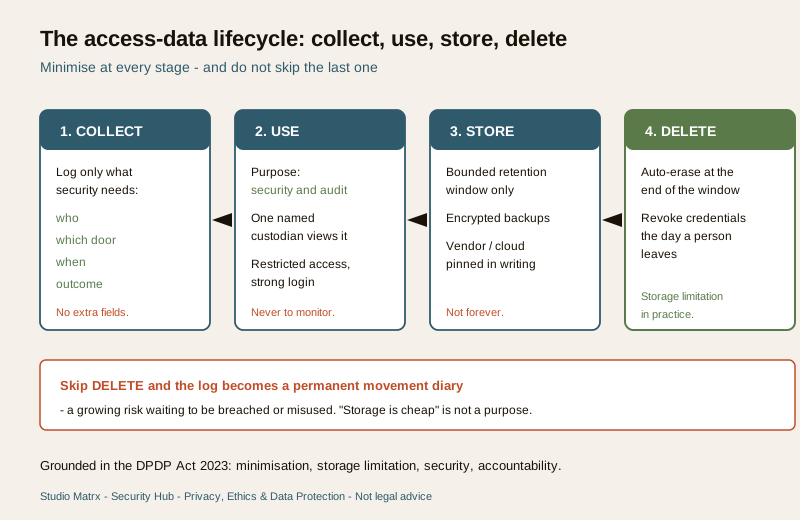
You do not need to be a lawyer to apply the spirit of the DPDP Act 2023 to a small access system. Six practical duties do most of the work.
Purpose limitation
Decide, in one sentence, why the system exists — for example, to control and audit entry to the building for security. That is the only purpose the data may serve. Anything outside it, including staff monitoring or curiosity, is off the table. Write the purpose down; it is your test for every later decision.
Data minimisation
Log only what security genuinely needs. If door-level events meet the need, you do not also need to feed the log into an attendance system, cross-reference it with cameras, or retain the exact second of every movement forever. Fewer fields, fewer copies, fewer joins. The narrowest data set that still lets you investigate a real incident is the right one.
Storage limitation
An access log should not live forever. Set a retention window that matches a genuine security or audit need, and then delete automatically. "We keep everything because storage is cheap" is not a purpose — it is a growing movement diary waiting to be misused or breached. Because lawful retention periods depend on your context, agree the window with your committee or advisor rather than inventing a number here; the principle is as short as the security purpose allows, then erased.
Security safeguards
The credential database and the log are attractive targets: together they reveal identities and movements. Protect them with access restricted to a single named custodian, strong authentication on the admin console, no shared passwords, no exporting logs to personal phones, and encrypted backups. If a cloud or vendor platform holds the data, that is a processor relationship you are responsible for — more on that below. Designing these controls in from the start is far easier than retrofitting them; the privacy-by-design guide walks through it.
Accountability and a named custodian
Someone must own this data. In a home it may be the head of household; in an RWA, a specific committee member; in an office, a named administrator. That custodian decides who may view the log, keeps a short record of any access, and is answerable if it is misused. Diffuse "everyone on the committee can log in" arrangements are how logs leak.
Rights of the logged person
The people in the log can ask what is held about them, why, and for how long, and can raise a grievance if it is being misused. Be ready to answer plainly. A worker who asks "is my entry time being used to judge me?" deserves an honest, documented answer — and the honest answer should be that it is not.
Domestic and personal use. A single household running one keypad purely for its own security may fall outside some formal DPDP obligations. The ethical duties do not evaporate: minimise, do not surveil your worker, do not keep endless logs, and do not share them. Restraint is the rule even where the paperwork is not.
Securing credentials and revoking on exit
Access privacy is not only about the log; it is also about the keys themselves. Cards, fobs and PINs are personal data that grant entry, so they need a lifecycle.
- Issue deliberately. Record who holds which card, and keep that list as tightly as the log.
- Revoke immediately on exit. When a worker leaves, a tenant moves out, or an employee resigns, deactivate their credential the same day. A live card belonging to someone who has left is both a security hole and a privacy problem — the system keeps logging a person who should no longer be in your data at all.
- Avoid shared PINs. A PIN everyone uses defeats both security and any honest audit, and tempts people to treat the log as a proxy for individuals it cannot actually identify.
- Handle biometrics with extra care. If you use fingerprint or face readers, the template is especially sensitive; follow the dedicated biometric data protection guide, and weigh whether a card would meet the need with less risk, as the RFID versus biometric comparison explains.
RWAs and small offices: who owns the log, and the vendor question
Shared buildings raise the questions that catch people out. Three are worth settling in writing.
Who owns and controls the data? In a gated society or an office, the entity — the RWA or the company — is the data controller, not the individual guard, admin or committee member who happens to have the password. That means a policy, a named custodian, and a rule that the log is not personal property to browse or forward.
What about the vendor or cloud platform? Most modern access systems run on a vendor's app or cloud. That vendor is your processor: they hold identities and movement data on your behalf. You are entitled to know where it is stored, who at the vendor can see it, how long they keep it, and what happens on contract termination. A handshake install with an unnamed cloud is a privacy liability. Insist on a written data-handling agreement.
Do not share the logs. Entry data must not be circulated to residents' WhatsApp groups, handed to a landlord to check on a tenant, shown to a curious neighbour, or used to answer a nosy query about "who visited flat 4B". Visitor entries specifically carry their own duties — see the visitor data protection guide. Where a system offers face recognition or automated analytics on residents and staff, treat that with real restraint and human oversight rather than switching it on because the product allows it.
The access-log privacy checklist
Work through this for any card, PIN or access system you run.
- Write one purpose sentence — security and audit — and hold every use to it.
- Minimise the fields you log and the copies you keep.
- Set a retention window appropriate to your context and delete automatically after it.
- Name one custodian and restrict who can view or export the log.
- Secure the console with strong, individual authentication and encrypted backups.
- Revoke credentials the day a person leaves.
- Pin down the vendor in writing: where data lives, who sees it, retention, and exit.
- Be ready to answer a logged person's question about what is held and why.
- Route biometrics to the dedicated biometric guides and prefer the least-intrusive credential that works.
Do NOT use entry logs for this
An explicit list, because these are the traps.
- Do not monitor a domestic worker's, resident's or employee's daily comings and goings.
- Do not police lateness or dock wages from swipe times.
- Do not track a specific person — a partner, a teenager, a tenant — through the log.
- Do not profile routines to learn when a home or unit is empty.
- Do not share or forward logs on chat groups, to landlords, or to neighbours.
- Do not keep logs indefinitely "just in case".
- Do not bolt the log onto attendance, performance or other purposes it was not collected for.
- Do not deploy face recognition or behaviour analytics on residents and staff just because the product offers it.
When to get legal or professional advice
Some situations need a professional. Bring in a lawyer or your data-protection adviser before you use access data in any employment, tenancy or disciplinary matter, if you receive a police or court request, if there is a real data breach, or if you are drafting a staff-monitoring policy. Bring in a qualified installer to configure retention, access roles and secure storage correctly, and to confirm what your kit and its cloud actually do with the data. Treat everything here as a starting point for those conversations, not a substitute for them.
Legal and ethics caution (not legal advice). Access-control logs and credentials are personal data under the DPDP Act 2023. Collect the minimum, keep it briefly, secure it, restrict access to a named custodian, and use it only for security and audit — never to monitor or control people. For anything with legal weight, take professional advice and follow due process.
Key takeaways
- An entry log is a movement diary. Who, which door and when, in aggregate, profiles a person's life — treat it as sensitive personal data.
- Security and audit, never monitoring. Open the log to investigate an event, not to check on a person. Using it to control workers, residents or staff is a misuse.
- Apply the DPDP duties plainly — purpose limitation, minimisation, storage limitation, security, a named custodian, and the logged person's rights.
- Manage the credentials too — revoke on exit, avoid shared PINs, and route biometrics to the dedicated guides.
- Settle ownership and the vendor in RWAs and offices, and never share or forward logs.
- This is not legal advice — for any decision with legal weight, consult a lawyer or your data-protection adviser and follow due process.
References
- Digital Personal Data Protection Act, 2023 — process personal data, including access logs and credential records, only for a clear, lawful purpose, with minimisation, storage limitation, security safeguards and the rights of the data principal; verify the current text and rules before relying on it.
- Right to privacy (Constitution Article 21, as affirmed in K. S. Puttaswamy) — informational privacy protects individuals against disproportionate tracking of their movements; seek qualified legal advice for your specific situation.
- Manufacturer and vendor documentation — confirm what your access system and its cloud store, for how long, and who can access it, before you buy or renew.
This is an educational overview, not legal advice. How you may lawfully keep and use access-control data depends on your exact facts — consult a qualified lawyer or your data-protection adviser, and engage licensed professionals for configuration and secure storage.
Export this guide
Related Guides — Deep-dive reading
Domestic Worker Privacy in India (2026): Security With Dignity
Maids, cooks, drivers, nannies and live-in help are people with rights, not permanent suspects to be watched. Use home cameras for real security, and never as a tool to monitor, control, shame or pressure the person who works in your home.
SecuritySecurity Privacy Assessment for Indian Homes
Getting the privacy side of home security right: camera placement ethics and limits, notice and consent, the extra caution audio demands, and treating footage as personal data you store, retain and delete responsibly under India's DPDP Act 2023 direction.
SecurityBiometric Data Protection in India (2026): Guarding What You Cannot Change
Fingerprints, faces and iris scans are permanent. If a home lock, an office attendance reader or an RWA gate collects them, they demand more care than any password. Here is how to hold biometric data lawfully, minimally and decently.
SecurityRelated Tools — Try Free
Biometric-Capacity Calculator
Whether a biometric reader can hold all the enrolments and how many devices you need, with a 1:N speed note.
Biometric CapacityAccess-Card Quantity Calculator
How many access cards or fobs to order and re-order, from users, spare stock, a visitor pool and annual loss.
Card CountContract Studio
AI generates professional architecture service agreements with milestones and scope.
ArchitectAI