
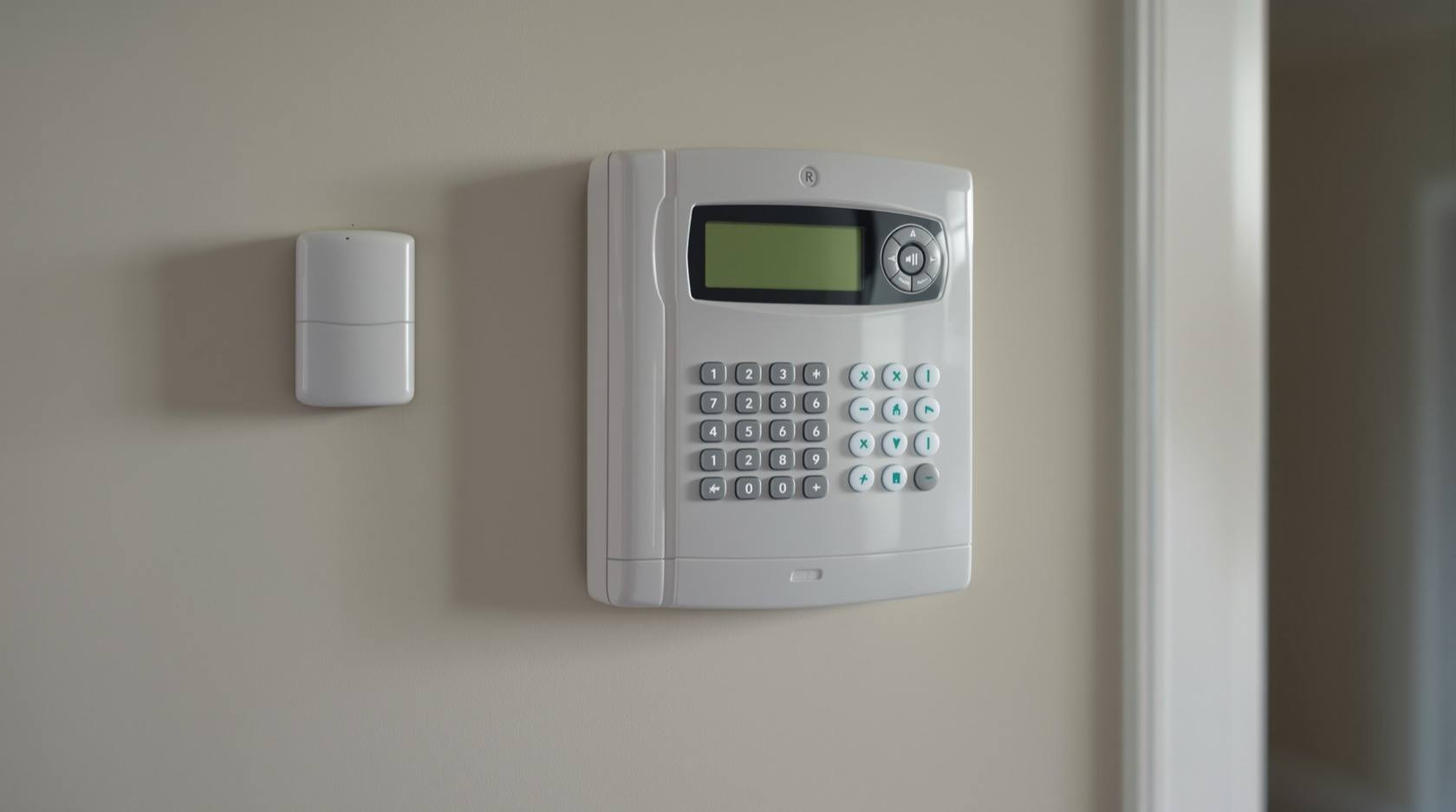
Wired vs Wireless Burglar Alarm in India (2026): Which Should You Choose?
A wired alarm cables every sensor back to the panel and needs no batteries in the sensors; a wireless (RF) alarm uses battery sensors that talk to the panel by radio and go up in an afternoon. An even-handed, India-grounded head-to-head that ends in a clear which-suits-whom verdict.
You have decided you want an intruder alarm. The next question an installer or shop will ask quietly shapes everything else: wired or wireless? One runs a thin cable from every door contact, window sensor and motion detector back to a central panel; the other fits battery-powered sensors that talk to the panel over radio, with nothing to cable at all. Both are genuinely good. Both protect millions of homes. Neither is simply "better".
The honest one-line answer: it depends on whether you value rock-solid reliability and zero sensor upkeep, or a fast, tidy, move-with-you install. Wired trades effort for dependability and no batteries; wireless trades a little dependability and some battery upkeep for speed and flexibility. This guide is the even-handed head-to-head — what each one actually is, how they compare across the things that matter in an Indian home, and, most usefully, which one suits which kind of home. It is the burglar-alarm sibling of the wired vs wireless CCTV guide; the logic rhymes, but the trade-offs differ.
Scope and how to read this. This is a neutral decision guide, not a sales pitch and not a price list. Both wired and wireless alarms are valid — each wins in a real context, and this guide gives each its true strengths and true weaknesses so you can match one to your home. It is not a buying or cost guide: for money, see the burglar alarm cost guide; for picking a specific system, see how to choose a burglar alarm. Fitting, drilling, cabling and any mains-electrical work belong to a competent installer.
What each one actually is
The words "wired" and "wireless" get used loosely, so pin down what each really means before comparing them.
Wired burglar alarm. Every sensor — a magnetic door or window contact, a passive-infrared (PIR) motion detector, a glass-break or vibration sensor — is joined to the central control panel by a physical cable. That cable both carries the sensor's signal and, in most systems, powers the sensor, so there is nothing to charge or replace at the sensor itself. The panel sits centrally, usually with a backup battery of its own, and drives the siren and keypad. Once it is wired and commissioned, nothing about a sensor's day-to-day working depends on radio or on a battery you must remember.
Wireless (RF) burglar alarm. Each sensor is a small self-contained unit with its own battery that reports to the panel over a radio (RF) link instead of a cable. There is genuinely no wiring to run to the sensor — you stick or screw it in place, pair it to the panel, and it is live. The panel still needs mains power (with a backup battery), but the sensors are cordless. This is what makes a wireless system quick to fit, easy to extend, and simple to unmount and take with you.
The single most important thing to grasp up front: wireless refers to the sensor's link and power, not the panel. The convenience is real, but it comes attached to two facts you must design around — the sensors run on batteries that deplete, and the radio link can, in a cheap system, be interfered with or jammed. Good wireless systems answer both, and we come back to how. For a deeper look at the wireless route on its own, see the wireless burglar alarms guide.
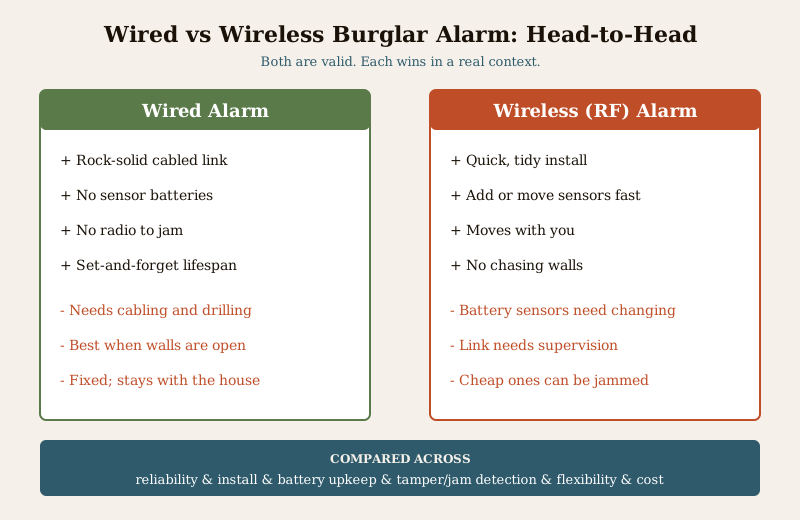
The head-to-head, dimension by dimension
This is where each side earns its keep. Read it as a balance sheet, not a scoreboard — most homes will weight these differently.
| Dimension | Wired alarm | Wireless (RF) alarm |
|---|---|---|
| Reliability | Rock-solid. A cabled sensor has no battery to die and no radio to jam or drop. | Very capable if supervised; a cheap system can be jammed and a flat battery is a blind sensor. |
| Install effort and mess | Higher. Cabling, chasing walls and neat runs; best done during construction or renovation. | Low. Stick or screw sensors, pair them, done in an afternoon; great for a finished or rented home. |
| Battery maintenance | None at the sensors — the cable powers them; only the panel's backup battery is periodic. | Every sensor has a battery that needs changing periodically; this is the number-one upkeep and false-fault cause. |
| Tamper and jam detection | Cabled links are inherently hard to jam; cut a wire and a good panel flags the tamper. | A good system supervises each sensor and detects low battery and RF jamming; a cheap one may not — buy the one that does. |
| Scalability and moving | Fixed. Adding a sensor means a new cable run; it stays with the house. | Easy. Add or relocate a sensor in minutes and take the whole kit when you move. |
| Wiring survivability | A determined intruder who finds and cuts a cable can disable a zone unless it is monitored. | No cable to cut, but the radio path itself must be supervised against jamming. |
| Lifespan | Long. With no sensor batteries, a wired system can run for many years untouched. | Long panel life, but sensor batteries are a recurring, planned replacement. |
| Ongoing cost | Mostly one-time; little sensor upkeep. | Batteries are a small recurring cost and a maintenance habit you must keep. |
| India-specific | Ideal for a new build or full renovation when walls are open; rides power cuts on the panel battery. | Ideal for an already-finished flat or a rental where you cannot chase walls, and to carry between homes. |
A few of these deserve a plain-language expansion, because they are where regret usually comes from.
Reliability and zero battery upkeep are the wired trump cards. A cabled sensor has nothing to run flat and no radio band to share or jam. There is no "did I change that battery?" and no window sensor quietly dead for a month. For pure dependability with the least ongoing attention, wired is the benchmark, which is exactly why large and high-security properties lean on it.
Install and flexibility are the wireless trump cards. No chasing walls, no conduit, no dust, no re-cabling if you move a sensor. In a home that is already finished and painted, or a rented flat where drilling is not allowed and you will move again, this is decisive. And a wireless kit unmounts and comes with you — a wired one stays behind.
The honest caveat: batteries and jamming are the wireless trade. Wireless sensors run on batteries, and a flat battery is a blind sensor — battery upkeep is the single biggest maintenance job and the most common cause of false faults. And a cheap wireless system can, in principle, be jammed by flooding its radio band. The answer is not to avoid wireless; it is to buy a good one that supervises every sensor and detects both low battery and jamming, so the panel warns you the moment a sensor stops reporting or the band is being flooded. A supervised, jam-aware wireless system is genuinely capable; an unsupervised bargain one is a gamble.
Tamper, jamming and supervision — the detail that decides a good wireless system
Every alarm can be attacked, and this is where the two technologies differ in kind. A wired system is hard to jam — there is no radio to flood — but a hidden cable can be cut, so a good panel treats a broken circuit as a tamper alarm rather than silence. A wireless system has no cable to cut, but its radio path can be interfered with, so the equivalent defence is supervision: the panel expects a regular check-in from every sensor, and raises a fault if one goes quiet, its battery drops, or the band is being jammed.
The practical rule for anyone leaning wireless is simple and worth insisting on at the shop:
- Insist on sensor supervision — the panel actively monitors that each sensor is alive and reporting, not just waiting to hear a trip.
- Insist on jam (RF interference) detection — the panel warns you if something is flooding the radio band.
- Insist on low-battery warnings per sensor, so a fading battery is flagged long before it dies.
- Change the panel and app default passwords, and keep firmware updated, exactly as you would any connected device.
A wireless system with all three is a serious piece of security. A wireless system with none of them is the "cheap alarm that got jammed" story people tell — so this is the one place not to economise.
Which suits whom — the verdict by scenario
This is the part that actually decides it. Forget the general "which is better" argument and find the home that looks like yours.
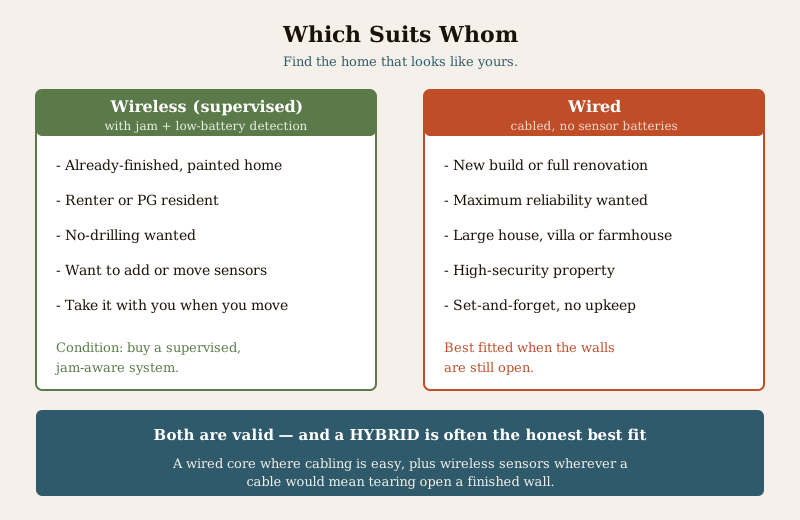
Choose wireless (RF, supervised) when:
- Your home is already finished and painted, and you do not want to chase walls or make a mess.
- You rent a flat, a PG or a place you will move out of — no drilling, and it comes with you.
- You value flexibility — adding a sensor to a new room or relocating one should take minutes, not a cable run.
- You are comfortable with a little planned upkeep — changing sensor batteries on schedule and heeding the panel's low-battery and jam warnings.
- Crucially, you buy a supervised, jam-aware system — this is the condition that makes the wireless choice sound.
Choose wired when:
- You are building a new house or doing a full renovation, with walls open and cabling easy and cheap to run now.
- You want maximum reliability with the least ongoing attention — no sensor batteries to ever think about.
- You have a large house, villa or farmhouse with many sensors, where a cabled backbone is the dependable answer.
- It is a high-security property where the alarm must be as hard to defeat as possible.
- You prefer set-and-forget — commissioned once, running for years with only the panel battery as periodic upkeep.
The in-between cases are common and fine. Many real installations are hybrid — a wired core through the parts of the house where cabling was easy (during a build or where conduit exists), plus wireless sensors wherever a cable would mean tearing open a finished wall. A hybrid lets you have wired reliability where it is cheap to get and wireless convenience where cabling is a pain. Matching the connection type to each location beats forcing one everywhere.
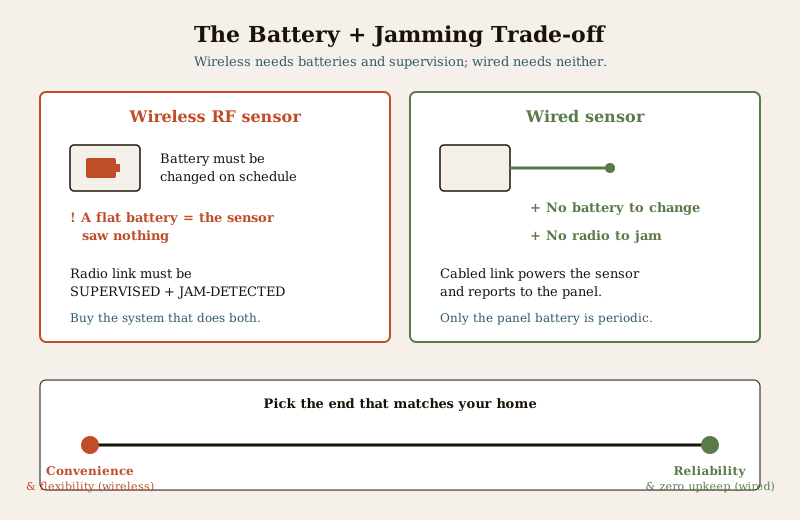
The trade in one image: slide toward convenience and flexibility and you get wireless — fast, tidy, portable, extendable, but leaning on sensor batteries and needing supervision and jam detection to be sound. Slide toward reliability and zero upkeep and you get wired — permanent, dependable, jam-proof, no sensor batteries, but a proper install job best done when walls are open. Pick the end that matches your home, not the one the ad shouts loudest.
How to decide — a short framework
There is no universal winner, so decide with four questions in order, and let the answers tip you.
1. Are your walls open, or is the home already finished? A new build or full renovation tips wired; a finished or rented home tips wireless.
2. How much does absolute reliability and being jam-proof matter? Reliability-critical or high-security tips wired; ordinary home protection is well served by a supervised wireless system.
3. Do you want zero sensor upkeep, or is planned battery-changing fine? No-upkeep tips wired; happy to change batteries on schedule tips wireless.
4. Might you move, or want to add and relocate sensors freely? Likely to move or extend tips wireless; a fixed, long-term home tips wired.
If most of the four point the same way, you have your answer — and if they split, a hybrid is very often the honest best fit. Whichever way you lean, sanity-check the trade one more time, and if you go wireless, do not leave the shop without supervision and jam detection.
Where to go next
- The security comparisons pillar and the comparisons sub-hub frame every "this vs that" security choice, and the wired vs wireless CCTV guide is the closely related camera-side decision.
- To turn the choice into a specific system, see how to choose a burglar alarm; for a deeper look at the wireless route, the wireless burglar alarms guide.
- For the money side, the burglar alarm cost guide covers panels, sensors and what recurring upkeep really costs.
- For the whole picture, the burglar alarms hub and the main security hub tie the pieces together.
Key takeaways
- There is no universal winner — wired trades install effort for rock-solid reliability and zero sensor batteries; wireless trades a little of that for a fast, tidy, move-with-you install. Match one to your home.
- Wired is the pick for a new build or renovation, maximum reliability, large or high-security properties, and set-and-forget homes — cabled once, no sensor batteries, hard to jam.
- Wireless (RF) is the pick for finished or rented homes, quick installs, flexibility and DIY-friendliness — but only when it supervises sensors and detects jamming and low batteries.
- Battery upkeep is the wireless job — a flat sensor battery saw nothing, and it is the number-one maintenance task and false-fault cause; change them on schedule and heed the warnings.
- A cheap unsupervised wireless system can be jammed — insist on sensor supervision, RF jam detection and per-sensor low-battery warnings; this is the one place not to economise.
- A hybrid — a wired core plus wireless sensors where cabling is hard — is often the honest best answer.
References
- Manufacturer specification sheets — before buying a wireless alarm, verify that the system provides per-sensor supervision, RF jam (interference) detection and low-battery warnings, and confirm the sensor battery type and expected replacement interval; "wire-free" refers to the sensor link and its own battery, not the panel's mains supply.
- Bureau of Indian Standards — for the current status of any Indian Standard referenced by an installer for intruder alarm equipment or wiring, verify via the BIS catalogue: https://www.services.bis.gov.in/
- Digital Personal Data Protection Act, 2023 — where an alarm system is app-connected or paired with cameras, any footage or personal data it handles is covered; change default passwords, secure the app, and limit access to a legitimate purpose.
This is an educational, even-handed overview to help you choose, not legal advice, a buying guide or a price list. Both wired and wireless burglar alarms are valid choices that win in different homes. Fitting, drilling, cabling and any mains-electrical work are qualified tasks — engage a competent installer, insist on supervision and jam detection for any wireless system, and verify any standard's current status via the BIS catalogue before relying on it.
Export this guide
Related Guides — Deep-dive reading
Wired vs Wireless CCTV in India (2026): Which One Should You Choose?
A cabled system on an NVR or DVR is rock-solid but needs drilling and runs; a Wi-Fi system goes up in an afternoon and is renter-friendly but leans on your router and power. An even-handed, India-grounded head-to-head that ends in a clear which-suits-whom verdict.
SecurityWired Burglar Alarms in India (2026): The Reliability Benchmark
Why a hardwired alarm — every sensor on a cable back to the panel — is the set-and-forget benchmark for reliability, when it is the right call, and the honest trade-offs of running it in an Indian home.
SecurityHow to Choose a Burglar Alarm in India (2026): Sensors, Alerts and What Actually Matters
A homeowner's guide to selecting an intruder alarm that fits your flat, villa or shop and alerts you the way you want — matching the sensor mix, control panel and the big siren-versus-monitored decision to your real risk, and dodging the false-alarm traps that make people switch systems off.
SecurityRelated Tools — Try Free
Renovation vs New Build Calculator
Compare renovating vs building new interiors city-wise across 13 work scopes with GST and per-sqft rates.
Cost ComparisonBurglar Alarm System Selector
Answer a few questions about your property, cabling, coverage, monitoring and power and get the right burglar alarm — wired / wireless / hybrid, self or professionally monitored — with the design non-negotiables.
Alarm SelectorCCTV System Type Selector
Answer five questions and get the right CCTV setup — analog / IP / hybrid, wired / wireless, local / cloud — with reasons.
CCTV Selector