
UPS and Battery Schedule for India (2026): Keeping the System Alive Through a Cut
A ready-to-adapt schedule that lists each backup unit, what it protects and the autonomy it must deliver, so cameras, panels, controllers and the recorder ride through India's frequent power cuts.
Power cuts are a fact of life across much of India, and a security system that goes dark during one is worse than no system at all, because everyone assumes it is watching. The ups and battery schedule is the document that stops that happening. It lists each backup unit in the system, names exactly what that unit protects, and states the autonomy it must deliver, that is, how long it has to keep those devices alive when the mains fails. Get it right and the recorder keeps recording, the alarm panel stays armed and the gate keeps reading cards through a cut. Skip it and you learn, at the worst possible moment, that the one thing you needed was never on backup.
This resource sits in Studio Matrx's professional security resources library as a practitioner deliverable. It completes the power side of the design: it follows directly from the security power schedule, which decides which devices need backup, and it turns those decisions into sized, testable backup units. Its outputs feed the BOQ and, crucially, the commissioning runtime tests where the backup is proven rather than assumed.
Scope & how to read this. This is a ready-to-adapt professional template, not authoritative or contractual wording. The actual VA, amp-hours and backup hours come from your project, your equipment data sheets and your electrical designer; nothing here fixes a number for you. Any mains-side work must be designed and carried out by a licensed electrician, and lithium batteries must be selected, installed and handled per the maker's safety guidance. Get professional and legal review for contract documents, and defer specifics to your manufacturers and the authority having jurisdiction.
What the UPS and battery schedule is and where it sits
A UPS and battery schedule is a table with one row per backup unit, not per device. Where the power schedule asks "does this device need backup", this schedule asks the next questions: which unit provides that backup, what does it protect, how big a load does it carry, how long must it last, what kind of battery, when was it installed, when must it be replaced, and has its runtime actually been tested. It is the register that turns a scatter of UPS boxes, panel standby batteries and PSU batteries into a managed, provable system.
In the project lifecycle it appears at design, once the power schedule has grouped the critical devices, is firmed up during procurement as real units and batteries are chosen, and is finalised at commissioning when the runtime of each unit is tested on site. The security consultant or designer produces it; the electrical designer, installer, commissioning engineer and, later, the maintenance team all receive it. It matters because it is the single place where "how long does the system survive a cut" is answered on purpose, unit by unit, and then checked.
The concept in plain terms
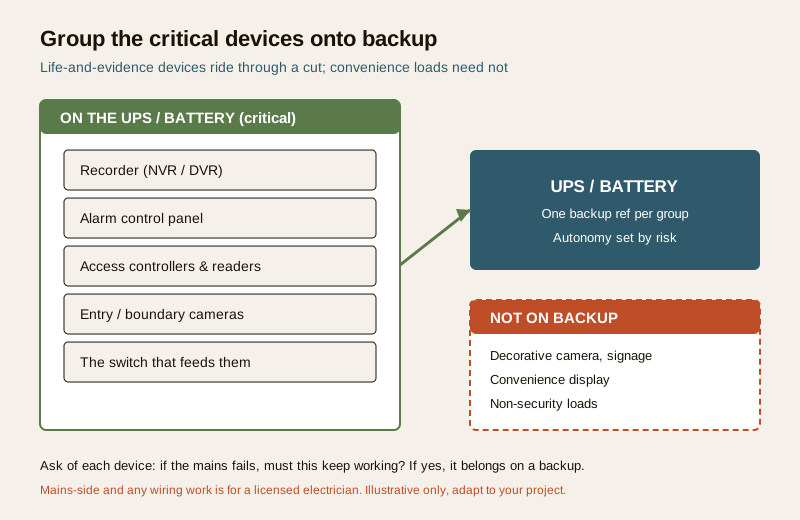
Start from the power schedule. It has already marked which devices must ride through a cut: typically the recorder, the alarm control panel, the access controllers and readers, the cameras at entries and the boundary, and the switch that feeds those cameras. You group those critical devices onto a backup unit. That unit might be a UPS protecting the recorder and switch, a standby battery inside the alarm panel, the battery on an access control PSU, or an inverter and battery bank covering a larger low-voltage load. Each backup unit becomes one row.
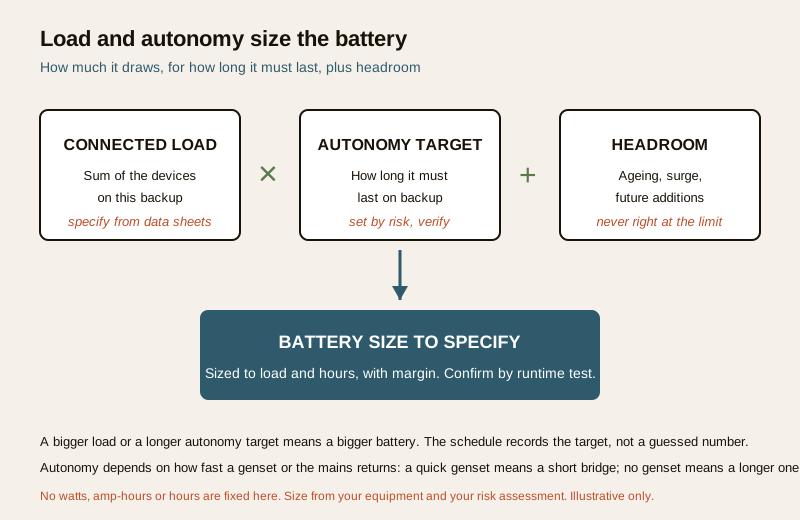
For each unit, two things size the battery: the connected load (the sum of what the unit carries) and the required autonomy (how long it must hold that load). A larger load or a longer autonomy target means a bigger battery. On top of that you add headroom, because batteries lose capacity as they age, because there is start-up surge, and because loads tend to grow. You never size right at the limit. And because batteries age, every unit needs an install date and a replace-by date, so the battery is swapped before it can no longer hold the autonomy, not after it has already failed silently during a cut.
Worked example UPS and battery schedule
Here is a realistic, illustrative schedule for a small mixed system. It shows how the columns work together. The loads and autonomy targets are written as "specify" and "size to load" on purpose, because those numbers belong to your actual equipment and your risk assessment, not to a template.
Example only, adapt to your project. The backup references, devices and battery types below are generic illustrations. Do not copy the loads, hours or dates as facts; each load says "specify" because you fill it from the data sheet and the sizing calculation, and the dates are placeholders.
| Backup ref | Protects (devices / panel) | Backup type | Connected load | Autonomy target | Battery type | Install / replace-by | Runtime tested | Status |
|---|---|---|---|---|---|---|---|---|
| UPS-01 | Recorder / NVR and PoE switch SW-01 | Online / line-interactive UPS | specify VA / W | set by risk, verify | specify (e.g. lead-acid or lithium) | dd-mm-yy / specify | Y | Commissioned |
| UPS-02 | Entry cameras C-01 to C-04 (via SW-01) | UPS (shared with SW-01) | size to load | set by risk, verify | specify | dd-mm-yy / specify | Y | Commissioned |
| BAT-P1 | Alarm control panel | Panel standby battery | per panel spec | per panel spec, verify | as panel requires | dd-mm-yy / specify | Y | Commissioned |
| BAT-A1 | Access controller AC-01 and readers | PSU battery | specify Ah | set by risk, verify | specify | dd-mm-yy / specify | N | Install |
| BAT-A2 | Electric lock, Main Gate (fail-safe check) | PSU battery | specify Ah | set by risk, verify | specify | dd-mm-yy / specify | N | Install |
| INV-01 | Low-voltage security load, Block B | Inverter and battery bank | size to load | set by risk, verify | specify | dd-mm-yy / specify | N | Design |
| (none) | Decorative camera C-05 (lobby) | Not on backup | not required | not required | not applicable | not applicable | not applicable | Design |
Read across one row: BAT-P1 is the standby battery inside the alarm panel; it protects the panel; its capacity and autonomy come from the panel specification; it was installed on a recorded date with a replace-by date; and its runtime has been tested. Every backup unit in the system should be one such row.
Blank UPS and battery schedule template
Copy this, delete the placeholders, and add one row per backup unit. Keep the "specify" cells as "specify" until you have a real figure from the data sheet or the sizing calculation.
| Backup ref | Protects (devices / panel) | Backup type | Connected load | Autonomy target | Battery type | Install / replace-by | Runtime tested | Status |
|---|---|---|---|---|---|---|---|---|
| ... | ... | ... | specify | set by risk | ... | dd-mm-yy / dd-mm-yy | Y / N | Design / Install / Commissioned |
| ... | ... | ... | specify | set by risk | ... | dd-mm-yy / dd-mm-yy | Y / N | Design / Install / Commissioned |
| ... | ... | ... | specify | set by risk | ... | dd-mm-yy / dd-mm-yy | Y / N | Design / Install / Commissioned |
Field and column guide
- Backup ref. A short unique tag for each backup unit, for example UPS-01, BAT-P1, INV-01. This is what the BOQ, the maintenance log and the runtime test record all point back to.
- Protects. The devices or panel this unit keeps alive. Name them, do not write "cameras" alone; the point of the schedule is that nothing critical is left off a backup by accident. Cross-check this against the power schedule.
- Backup type. UPS, panel standby battery, PSU battery, or inverter and battery bank. A recorder and switch usually want a UPS; a panel uses its own standby battery; controllers and locks often run off a PSU battery.
- Connected load. The sum of what the unit carries, written as "specify" or "size to load" until you have the real figure. Do not guess a number into the schedule; it comes from the device data sheets.
- Autonomy target. How long the unit must hold its load in a cut. Set it by risk and by how fast backup power returns: a site with a quick-starting genset needs only a short bridge, while a site with no genset needs a much longer one. Write "set by risk, verify", then fix the number in your sizing calculation.
- Battery type. Lead-acid or lithium, or "as the panel requires". Lead-acid is familiar and lower-cost but heavier and shorter-lived; lithium is lighter and longer-lived but costs more and demands correct selection, charging and handling. Whichever you choose, follow the UPS and battery maintenance guidance for lithium safety and upkeep.
- Install / replace-by. The date the battery went in and the date it must be swapped by. This single pair of dates is what stops a battery quietly dying to the point where it can no longer carry the autonomy.
- Runtime tested. Y or N, with the date and measured result held in the commissioning and maintenance records. A backup that has never had its runtime tested is a guess, not a backup.
- Status. Design, Install or Commissioned, so a reviewer can see at a glance which units are still on paper and which are proven on site.
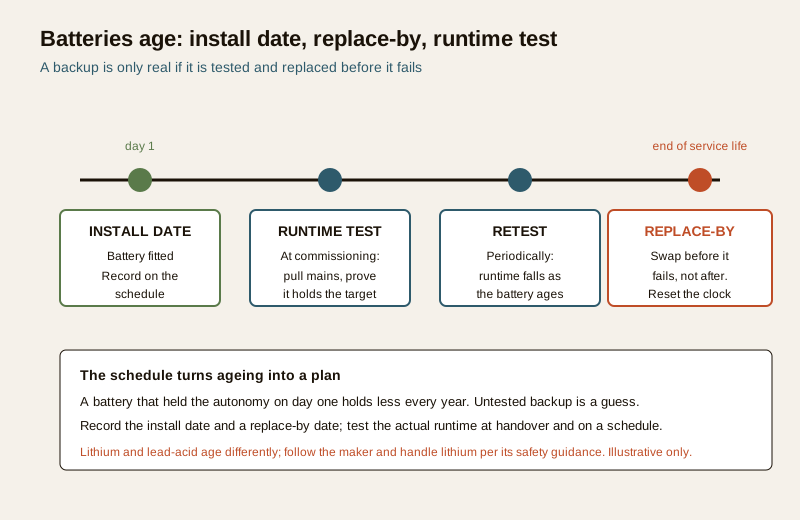
The two habits that make this schedule real: replace-by and runtime test
A UPS and battery schedule earns its keep only if two things actually happen.
Runtime testing. At commissioning, prove each unit: drop the mains and confirm the protected devices stay up for the autonomy target, then record the measured result. Do the same on a periodic cycle afterwards, because a battery that held the target on day one holds less every year. This ties straight into what happens during an outage, covered in the power failure behaviour guide, and into ongoing checks in UPS and battery maintenance.
Replace-by dates. Every backup battery has a service life. Record the install date and a replace-by date on the schedule, and swap the battery before that date rather than waiting for it to fail during a cut. When you replace it, reset both dates. Untested, never-replaced batteries are the single most common reason a system that "has a UPS" still goes dark.
A backup you have not tested is not a backup. Runtime testing at commissioning, and again periodically, is what converts an assumption into a fact. Record the measured runtime, not just a tick.
Common mistakes
- No autonomy target. A unit is fitted with "a battery" but nobody wrote how long it must last, so nobody can tell whether it is big enough. Always set an autonomy target, informed by how fast a genset or the mains returns.
- Batteries never replaced. The system is installed, the batteries age, and years pass with no replace-by date and no swap, until a cut finds an exhausted battery. Record install and replace-by dates and act on them.
- Untested runtime. The UPS box is present, so everyone assumes it works, but its runtime was never measured. Test it at commissioning and periodically, and record the result.
- A critical device not on backup. The recorder is protected but the switch that feeds the cameras is not, so the cameras still go dark. Cross-check every critical device from the power schedule against a backup ref in this schedule.
- No headroom. The battery is sized right at the calculated load, leaving nothing for ageing or growth, so real-world runtime falls short of the target within a year.
How it connects to the neighbouring documents
This schedule does not stand alone; it is one link in the power chain.
- From the security power schedule it inherits which devices need backup. That decision is made there; here you provide and size the backup.
- With the CCTV power supply and UPS guide it shares the detail of how cameras, PoE switches and recorders are actually powered and backed up.
- Against the camera schedule you check that every camera that must stay live in a cut is traceable to a backup ref here.
- Into the BOQ each backup ref becomes a priced line: the UPS or inverter, the battery, and its future replacement.
- Into commissioning and maintenance each row carries a runtime test and a replace-by date, so the power failure behaviour and UPS and battery maintenance guides have something concrete to test and service against.
Key takeaways
- One row per backup unit, naming what it protects, so no critical device is left off a backup by accident.
- Load and autonomy size the battery, with headroom for ageing and growth; write "specify" and "set by risk" until you have real figures, never a guessed number.
- Autonomy is set by risk and by how fast backup power returns — a quick genset needs only a short bridge, no genset needs a long one.
- Record an install date and a replace-by date for every battery, and swap before the date, not after a failure.
- Test the runtime at commissioning and periodically, and record the measured result — an untested backup is a guess.
- This is a template to adapt, not contractual or authoritative wording; sizing comes from your equipment, your electrical designer and your risk assessment, and mains-side work is for a licensed electrician.
References
- Manufacturer documentation for your specific UPS, inverter, alarm panel, PSU and batteries — the authoritative source for VA and amp-hour ratings, autonomy, charging, battery service life and lithium handling; follow it over any generic guidance.
- Your project electrical designer for load totals, backup sizing and any mains-side design, which must be carried out by a licensed electrician.
- Bureau of Indian Standards catalogue for any electrical, battery or life-safety standard referenced in your installation; verify the current edition at https://www.services.bis.gov.in/
This is an educational template, not legal, electrical or contractual advice. Backup sizing, mains connections and lithium battery handling are qualified professional tasks — engage licensed professionals and follow the manufacturer and the authority having jurisdiction.
Export this guide
Related Guides — Deep-dive reading
Security Power Schedule for India (2026): Every Device, Its Supply and Its Backup
A ready-to-adapt schedule that lists every security device, how it is powered and how it is backed up, so nothing goes dark unexpectedly during a power cut.
SecurityUPS and Battery Maintenance in India (2026): Keep Security Alive Through a Power Cut
How to look after the UPS units and backup batteries that keep your cameras, NVR, alarm panel and gate controller running when the mains fails — treating batteries as consumables you replace on schedule, and proving it with a regular pull-the-mains backup test.
SecurityAccess Control Testing Checklist for India (2026): Every Door Opens and Locks as Designed
A ready-to-adapt per-door and system checklist to verify an access-control installation at commissioning and as a periodic check, with the egress and fire-to-release life-safety tests that must always pass before sign-off.
SecurityRelated Tools — Try Free
Access-Control Battery-Backup Calculator
Size the standby battery so an access system keeps running through a power cut, with an egress life-safety note.
Battery BackupSecurity Backup Power Calculator
Size a UPS/inverter and battery to keep CCTV, NVR, router and alarm running through a power cut — load, Ah, VA and cost.
Backup PowerAccess-Control Power Calculator
Total current and power an access system draws, to size the power supply — locks, readers and controllers.
AC Power