
Smart-Lock Schedule for India (2026): Every Lock, Its Power and Its Fallback
A ready-to-adapt smart-lock schedule for homes, apartments and small offices — one row per lock capturing type, credentials, connectivity, battery and low-battery alert, and the mechanical fallback that keeps nobody locked out on a dead battery, plus clean credential and admin handover.
A smart lock is only as reliable as the plan behind it. On the day it is fitted everything works — the fingerprint reads, the app opens the door, the batteries are fresh. The trouble arrives quietly months later: a flat battery on a Sunday night, an installer who still holds admin, a tenant who moved out with a code that was never revoked. A smart-lock schedule is the one-page deliverable that stops all of this. It lists every smart lock on the project as a single row, and it forces the two things people forget — the mechanical or offline fallback for a dead battery, and disciplined credential and admin management at handover.
This schedule sits in the design, procurement and handover of standalone or retrofit smart locks — the kind you bolt onto an existing door in a home, apartment or small office. It is produced by the consultant, integrator or facility manager and received by the owner, the RWA or the office admin. It is deliberately different from the access-control door schedule, which covers full access-control doors wired to a controller with readers, REX and door position sensors. If your locks are wired into a system, use that. If each lock is a self-contained battery unit on its own door, use this.
Scope & how to read this. This is a ready-to-adapt professional template, not authoritative, legal or contractual wording. The actual battery life, ratings, warranty terms and fallback method for a given lock come from the manufacturer, your project and the site — verify each against the datasheet and the installed unit. Get professional or legal review for contract documents. Smart-lock logs record who came and went, which is personal data — handle access to them per the DPDP Act, 2023.
Where the schedule sits in a smart-lock deployment
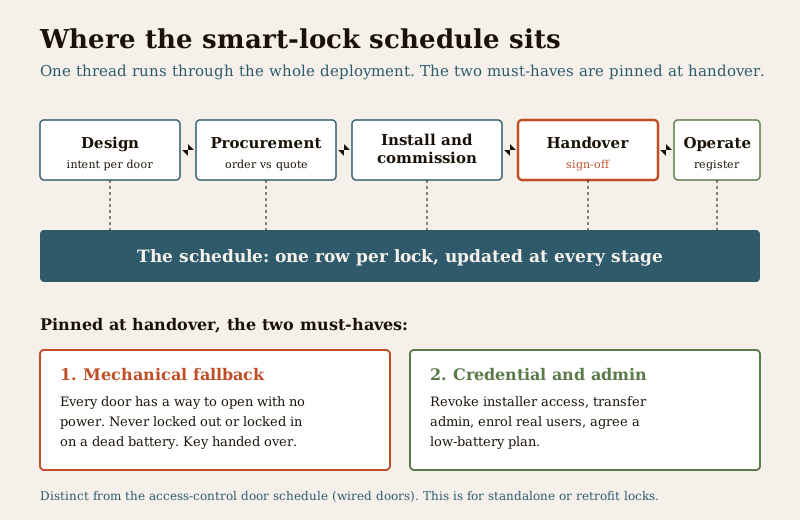
Think of the lifecycle as brief, then design, then procurement, then install and commission, then handover, then operate. The schedule is the thread that runs through all of it:
- At design, it captures intent — which door gets which lock type, what credentials it must accept, whether it needs a weather rating outdoors.
- At procurement, it becomes the shopping list and the check against what was quoted versus delivered.
- At handover, it is the sign-off record: batteries fresh, mechanical fallback confirmed, installer access revoked, admin transferred, users enrolled.
- During operate, it is the living register the owner or office admin keeps — updated when a battery is changed, a user leaves, or a lock is swapped.
If you are choosing between fitting a smart lock at all versus keeping a keyed lock, settle that first with smart lock versus traditional lock; this schedule assumes the decision to deploy is made.
The columns, explained
One row per lock. The columns below are the full set; drop any that do not apply to your project (weather rating is only for outdoor or exposed doors, for example). Keep the mechanical-fallback and admin columns no matter what.
- Lock ref / ID — a short unique tag such as "SL-01". This is how every other document, the app label and the maintenance log will refer to this lock. Number them in a sensible walking order.
- Location / door — the door in plain words: "Main entrance", "Rear service door", "Store room". Anyone should be able to find it.
- Lock type — deadbolt, mortise, rim or padlock. This drives door compatibility; confirm the door and cutout match before ordering.
- Credentials — how the lock is opened: fingerprint, PIN, card or fob, app, and physical key. List all that apply. More methods means more convenience and more to manage.
- Connectivity — Wi-Fi, Bluetooth, Zigbee or fully offline. This decides whether the lock can send alerts and be managed remotely, or must be managed at the door.
- Power — the battery type it takes and, crucially, whether it raises a low-battery alert and where that alert goes. Fill the expected life from the datasheet, not from memory; write "specify per datasheet" if you do not have it.
- Mechanical key / fallback — the single most important column. What opens this door if the battery is dead or the electronics fail. See the panel below.
- Auto-lock / schedule — does it re-lock automatically after a set time, and does it follow any time schedule (for example, an office door on auto-unlock during working hours).
- Admin / user management — who holds admin, how users are added and removed, and where. This is where handover discipline lives.
- Weather rating — for outdoor or exposed doors only, the ingress or weather rating stated by the maker; leave blank indoors.
- Warranty — the warranty period and the support contact, from the invoice and card.
- Status — where the row stands: specified, ordered, installed, commissioned, handed over.
Worked example (identity and hardware)
Example only — adapt to your project. The values below are illustrative and generic. They are not real prices, model numbers or battery-life figures. Replace every cell with what the datasheet and the installed lock actually say.
| Lock ref | Location / door | Type | Credentials | Connectivity | Weather |
|---|---|---|---|---|---|
| SL-01 | Main door | Deadbolt | Fingerprint + PIN + app + key | Wi-Fi + Bluetooth | Indoor (sheltered) |
| SL-02 | Rear service door | Rim | PIN + key | Bluetooth | Sheltered; specify rating |
| SL-03 | Terrace / outdoor gate | Padlock (smart) | Fingerprint + app + key | Bluetooth | Outdoor; specify weather rating |
| SL-04 | Office store room | Mortise | Card + PIN + key | Offline | Indoor |
Worked example (power, fallback and management)
Example only — adapt to your project. "Yes - mechanical key" and similar are the illustrative intent. Confirm the actual fallback on the installed unit; never assume a lock has a key override.
| Lock ref | Power and low-battery alert | Mechanical fallback | Auto-lock / schedule | Admin / users | Warranty | Status |
|---|---|---|---|---|---|---|
| SL-01 | AA battery; app low-battery alert on | Yes - mechanical key + external terminal jump | Auto-lock after set delay | App admin (owner); users by owner | Specify per invoice | Handed over |
| SL-02 | AA battery; on-lock beep alert | Yes - mechanical key | Manual lock | Admin at door (owner) | Specify | Installed |
| SL-03 | Rechargeable; app alert on | Yes - mechanical key override | Auto-lock on | App admin (owner) | Specify | Commissioned |
| SL-04 | AA battery; app + door alert | Yes - mechanical key; specify offline fallback | Schedule: unlock in office hours | Office admin; users logged | Specify | Ordered |
Blank template (copy-ready)
Copy this into your sheet, add one row per lock, and fill it as the project moves from specified to handed over. Keep the two starred columns filled for every single lock.
| Lock ref | Location / door | Type | Credentials | Connectivity | Power and low-battery alert | Mechanical fallback | Auto-lock / schedule | Admin / users | Weather | Warranty | Status |
|---|---|---|---|---|---|---|---|---|---|---|---|
| SL-01 | ... | ... | ... | ... | ... | ... | ... | ... | ... | ... | ... |
| SL-02 | ... | ... | ... | ... | ... | ... | ... | ... | ... | ... | ... |
| SL-03 | ... | ... | ... | ... | ... | ... | ... | ... | ... | ... | ... |
| ... | ... | ... | ... | ... | ... | ... | ... | ... | ... | ... | ... |
The two must-haves
Everything else on the schedule is useful. Two columns are non-negotiable, and if you only ever enforce two things, enforce these.
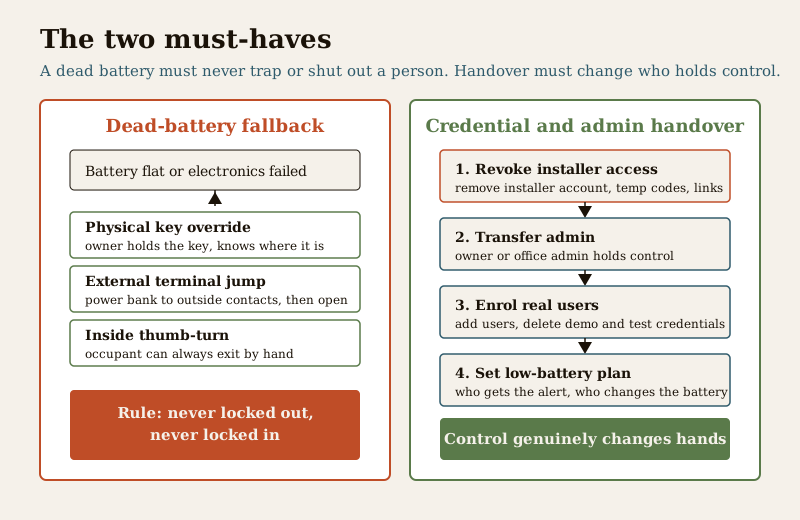
1. Always a mechanical or offline fallback. Never leave a person able to be locked out — or locked in — because a battery died. Every smart lock on a door people pass through must have a way to open it without power: a physical key override, an external battery-terminal jump, or a mechanical thumb-turn on the inside. Confirm the fallback exists on the installed unit, confirm the owner holds the physical key and knows where it is, and record it in the schedule. A lock with no fallback is not acceptable on an occupied door. This is doubly true for any door on an escape route — a lock must never trap someone inside, and life-safety egress rules come from the code and the fire officer, not from the lock. For the deeper power planning behind this column, see smart lock power and battery planning.
2. Disciplined credential and admin handover. On the day of handover, three things must happen and be recorded: revoke the installer's access (remove any installer account, temporary code or app link), transfer admin to the owner or office admin so control genuinely changes hands, and enrol the real users while removing any demo or test credentials. Then agree a low-battery plan — who gets the alert and who changes the battery. Without this, the person who fitted the lock can still open your door months later, and nobody owns the day the battery dies.
Field guide and common mistakes
A few tips that separate a schedule that protects the client from one that just looks tidy:
- One ID, everywhere. The lock ref on this schedule is the same label used in the app, on the maintenance log and in any incident note. Consistency is what makes the register usable a year later.
- Fill power from the datasheet, not from memory. Battery type and expected life belong to the manufacturer. If you do not have the figure, write "specify per datasheet" rather than guessing a number.
- Confirm the fallback physically. Do not tick the mechanical-fallback column from the brochure. Try the key or the override on the installed lock during commissioning, and hand the physical key to the owner.
The mistakes that recur, in order of how often they bite:
- No fallback recorded, or none present. A lock chosen on features alone, with no key override and no jump terminal, becomes a lockout waiting to happen. Catch it at design, not on a dead-battery night.
- The installer keeps admin. Handover happens, payment is released, but the installer account was never removed and admin was never transferred. Control never actually changed hands.
- No low-battery plan. The lock beeps or alerts for weeks and nobody is responsible for acting, until it dies. Name a person and a channel in the schedule.
- Stale credentials. A staff member or tenant leaves and their code lives on. The admin column and a simple review habit prevent this.
How this connects to the other documents
The smart-lock schedule does not stand alone:
- For doors wired into a controller with readers and sensors, use the access-control door schedule instead — this schedule is for standalone or retrofit locks.
- For gate and boundary locks specifically, pair it with the guidance in smart gate locks.
- Where the credential is a fingerprint or face, the enrolment and privacy handling detail sits in biometric locks.
- This page is one of the practitioner deliverables collected in the security resources library and framed by the professional security resources guide.
Privacy: a lock knows who came and went
A smart lock is not just hardware — it is a quiet log of comings and goings. Every fingerprint, code and app unlock can be recorded with a name and a time. Under the DPDP Act, 2023, that log and the enrolled biometrics or user identities are personal data. Link privacy through the schedule the same way you link power and fallback:
- Note in the admin column who can see the access log and keep that list short.
- Keep enrolled credentials current — remove people who have left, which is both a security and a privacy duty.
- Do not retain access logs longer than you have a reason to; agree a sensible retention with the owner.
- For biometrics specifically, follow the enrolment and consent handling in biometric locks.
Treating the schedule as the place where power, fallback, admin and privacy are all pinned down is what turns a box of gadgets into a deployment someone can actually run and stand behind.
Completion checklist
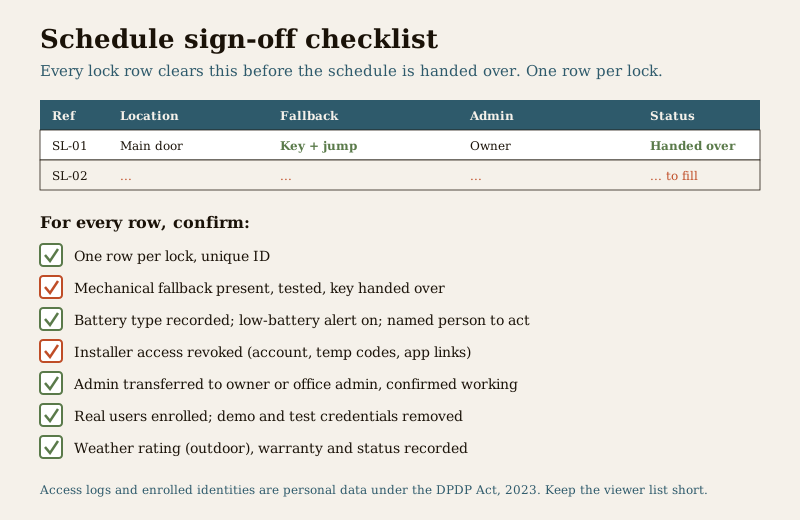
Before you sign the schedule off at handover, every lock row should clear this:
| Check | Confirm |
|---|---|
| One row per lock, unique ID | Every installed lock is listed |
| Mechanical / offline fallback | Present, tested, and key handed to owner |
| Power and low-battery alert | Battery type recorded; alert on; a named person to act |
| Installer access revoked | Installer account, temp codes and app links removed |
| Admin transferred | Owner or office admin holds admin, confirmed working |
| Users enrolled, demo removed | Real users added; test and demo credentials deleted |
| Weather rating (outdoor) | Recorded for exposed doors |
| Warranty and status | Period, support contact and status filled |
References
- Manufacturer datasheet and user manual for each specific lock — the authoritative source for battery type, expected life, the low-battery alert, the mechanical or emergency fallback method, and warranty terms; follow it over any generic figure.
- Digital Personal Data Protection Act, 2023 — smart-lock access logs, enrolled biometrics and user identities are personal data; keep access controlled, credentials current and retention limited.
- National Building Code of India (SP 7:2026) and the local fire officer — the authority on egress and that a lock on an escape route must never trap an occupant; verify the current requirement for your building, this template does not set it.
- Bureau of Indian Standards catalogue for any lock, ingress-protection or electrical standard referenced in a specification; verify the current edition at https://www.services.bis.gov.in/
This is an educational template to adapt, not legal, contractual or life-safety advice. Fitting, any mains-electrical work and any door on an escape route are qualified professional tasks — engage licensed installers and defer egress and code specifics to the manufacturer, your project and the AHJ.
Export this guide
Related Guides — Deep-dive reading
Access Control Maintenance in India (2026): Readers, Locks and Fail-Safe Egress
How to keep a card, keypad, fingerprint or face access-control system reading reliably and locking securely — and, above everything, how to test that its doors still release on a fire alarm and on power loss, so an access-controlled door never becomes a life-safety trap.
SecurityAccess Control Testing Checklist for India (2026): Every Door Opens and Locks as Designed
A ready-to-adapt per-door and system checklist to verify an access-control installation at commissioning and as a periodic check, with the egress and fire-to-release life-safety tests that must always pass before sign-off.
SecurityAccess Control Door Schedule for India (2026): Every Door, Every Rule
A ready-to-adapt access control door schedule with one row per door — reader side, credential, lock type, fail-safe versus fail-secure, request-to-exit, monitoring and emergency override — so every opening is secured, released and, crucially, safe in a fire.
SecurityRelated Tools — Try Free
Interior Contract Clause Checklist
16 sections and 98 checkboxes covering scope, BOQ, milestones, penalties, warranty, and disputes.
Contract ChecklistSmart Lock Door Compatibility Checker
Tell us your door build, existing lock or prep, thickness and location and find out which smart-lock form factor fits — mortise, deadbolt, rim, gate or a special case — plus the measurements to take.
CompatibilityDoor Security Rating Calculator
Score your main door out of 100 across leaf, frame, lock and hardware — and see the top upgrades.
Security Tool