
Security Cable Schedule for India (2026): Every Run, End to End
A ready-to-adapt security cable schedule with one row per cable run: where it starts, where it ends, the cable type, route and length, terminated and tested. Includes a worked example, a blank template and a field guide so your cabling is buildable, testable and traceable.
Every camera, sensor, reader and sounder is only as good as the wire that reaches it. A security cable schedule is the single sheet that turns "run cables everywhere" into a countable, buildable list: one row per cable run, recording where each cable starts, where it ends, what type it is, how it is routed and roughly how long it is. It sits downstream of the device schedules and upstream of the bill of quantities (BOQ), the containment design, the install and the testing. Get it right and the cabling is buildable, testable and traceable; get it wrong and you are back on site with a torch trying to work out which unlabelled cable feeds which camera.
This is the cabling-side companion in the Studio Matrx professional security resources guide and part of the wider security resources library. It is a template to adapt, not a specification you copy blind.
Scope & how to read this. This is a ready-to-adapt professional template, not authoritative, contractual or legal wording. Cable types, ratings, segregation distances and test pass-criteria come from your project design, the manufacturer, the relevant standards and the authority having jurisdiction (AHJ) — verify them; this schedule records decisions, it does not set them. Get professional and legal review before it forms part of a tender or BOQ. Any cable carrying footage or personal data should be handled with the same care as the data itself under the DPDP Act, 2023.
What a cable schedule is and where it sits
A cable schedule is a register of cable runs. Each row is one continuous cable between two points — a camera to a switch, a sensor to a panel, a sounder to a fire-alarm loop. It answers, for every run: what is this cable called, where does it go from and to, what type is it, how is it routed, how long is it, is it terminated, and has it been tested.
It draws its endpoints from the device schedules (the camera schedule, the door and access schedule, the alarm device schedule) and from the security power schedule, which tells you which devices need power at which end. It feeds the BOQ (cable metres by type, connectors, containment) and the containment design (how many cables share which tray or conduit). On site it becomes the install worklist and, once as-built, the basis of the test and handover records.
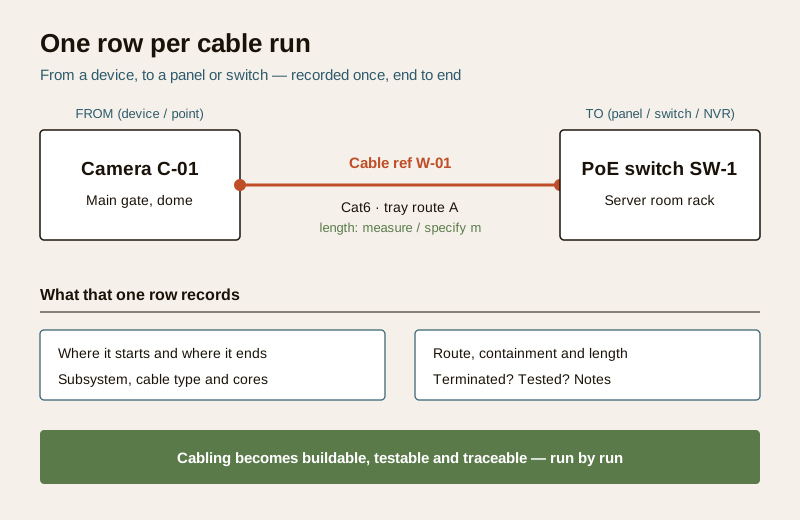
Where it fits the lifecycle:
- Design — you draft the schedule from the device layout and the security cabling requirements, naming every run and choosing a cable type per run.
- Procurement — the schedule totals feed the BOQ so cable, connectors and containment are ordered by type and quantity, not guessed.
- Install — the installer works run by run, labelling both ends and recording the actual as-built length.
- Test and handover — each run is terminated, tested and signed off, and the completed schedule becomes a traceable record.
The columns, explained
Keep the columns tight and consistent. These are the ones that earn their place; add project-specific columns (drawing reference, cable drum number) only if they are used.
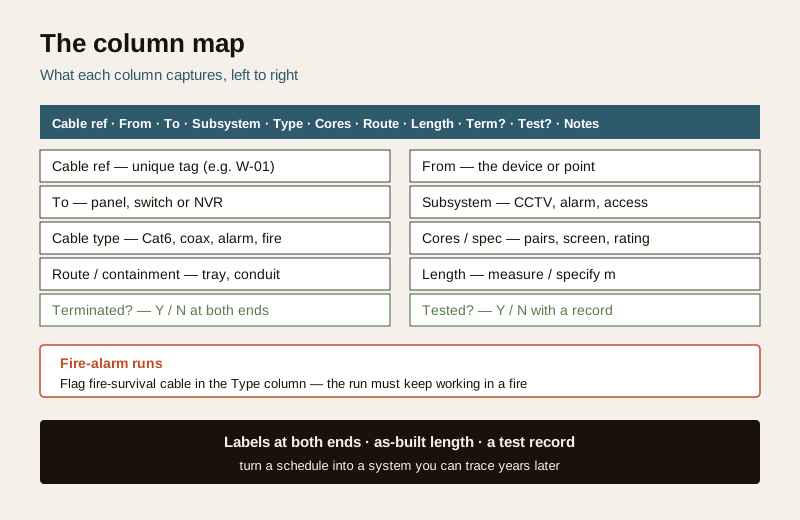
- Cable ref — a unique tag for the run (e.g. "W-01"). This is the label that goes on both physical ends. No two runs share a ref.
- From (device / point) — where the cable starts, using the same device IDs as your device schedules ("Camera C-01").
- To (panel / switch / NVR) — where it terminates ("PoE switch SW-1", "alarm panel", "NVR").
- Subsystem — CCTV, intruder alarm, access control, fire alarm, intercom. This lets you filter and total by system.
- Cable type — Cat6, coax, alarm/signal, fire-survival, and so on. For any fire-alarm run, specify fire-survival cable and check the cable fire-performance requirements; the run must keep working through a fire.
- Cores / spec — pairs, cores, screen/shield, conductor size, rating — enough that procurement orders the right cable.
- Route / containment — the path and what carries it (tray route A, conduit, direct-buried duct). This drives segregation and the containment fill.
- Approx length — write "measure" or "specify m" at design stage and replace with the as-built length once installed. Never fabricate a length.
- Terminated (Y/N) — connected and dressed at both ends.
- Tested (Y/N) — tested with a record kept (continuity, and for data a link/certification test to the manufacturer and design criteria).
- Notes — spare cores, service loop left, drum number, anything the next person needs.
Worked example (illustrative)
Example only — adapt to your project. The values below are generic and illustrative. Lengths are shown as "specify m" and cable types as categories, not products. Do not treat any figure here as a fact; measure, specify and verify against your own design, the manufacturer and the AHJ.
| Cable ref | From (device) | To (panel/switch) | Subsystem | Cable type | Cores / spec | Route / containment | Approx length | Term? | Test? | Notes |
|---|---|---|---|---|---|---|---|---|---|---|
| W-01 | Camera C-01 (main gate) | PoE switch SW-1 | CCTV | Cat6 | 4-pair, specify rating | Tray route A | specify m | Y | Y | PoE; label both ends |
| W-02 | Camera C-02 (lobby) | PoE switch SW-1 | CCTV | Cat6 | 4-pair, specify rating | Tray route A | specify m | Y | N | Test pending |
| W-03 | Door reader D-01 | Access panel AC-1 | Access | Alarm/signal | specify cores, screened | Conduit run B | specify m | N | N | Leave service loop |
| W-04 | PIR sensor S-01 | Alarm panel AL-1 | Intruder alarm | Alarm/signal | specify cores | Conduit run B | specify m | Y | Y | Keep clear of mains |
| W-05 | Sounder F-01 | Fire panel FP-1 | Fire alarm | Fire-survival | specify to code | Dedicated route C | specify m | N | N | Fire-survival; separate route — verify to AHJ |
| W-06 | Spare (gate zone) | SW-1 | CCTV | Cat6 | 4-pair | Tray route A | specify m | N | N | Spare run for future camera |
Notice: every run has a unique ref, endpoints match the device IDs, the fire-alarm run (W-05) is flagged fire-survival on its own route, and a spare run (W-06) is planned in.
Blank template (copy-ready)
Copy the header row and placeholder rows into your own sheet and fill one row per run. Keep the columns in this order so it reads left to right, from-device to to-panel.
| Cable ref | From (device / point) | To (panel / switch / NVR) | Subsystem | Cable type | Cores / spec | Route / containment | Approx length | Terminated? | Tested? | Notes |
|---|---|---|---|---|---|---|---|---|---|---|
| ... | ... | ... | ... | ... | ... | ... | specify m | Y / N | Y / N | ... |
| ... | ... | ... | ... | ... | ... | ... | specify m | Y / N | Y / N | ... |
| ... | ... | ... | ... | ... | ... | ... | specify m | Y / N | Y / N | ... |
Tip. Add a small totals block below the table — metres by cable type and a count of runs by subsystem. Those totals are what flow into the BOQ, so keep them driven off the rows rather than typed in separately.
Field guide: filling it well
- Unique cable refs. One ref per run, on both physical ends. A duplicated or missing ref is the mistake that costs the most later.
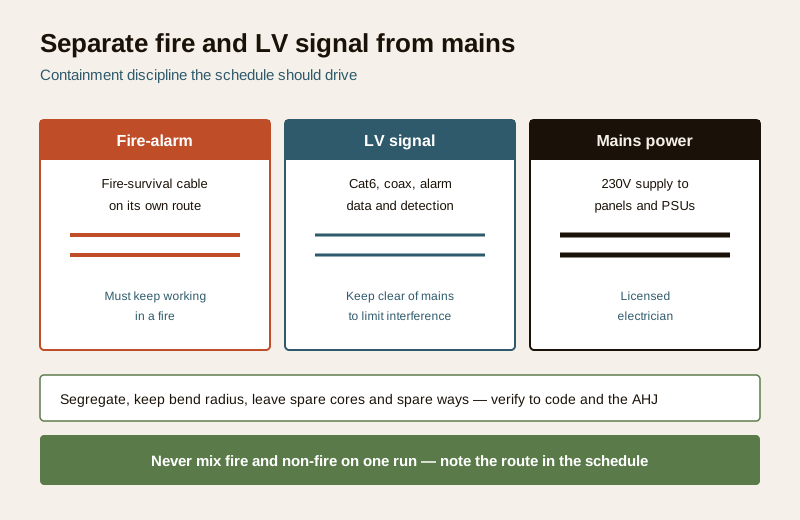
- Separate LV signal from mains. Security signal and data cables are low-voltage; keep them segregated from 230V mains to limit interference and for safety — the mains side is a licensed electrician's work. Record the route so segregation is visible.
- Containment, bend radius and segregation. Note the tray or conduit each run uses, respect the cable bend radius, and keep enough spare capacity in the containment. The schedule should make it obvious how many cables share a route.
- Fire-survival cable on fire-alarm runs. Fire-alarm cabling must keep working during a fire, so it uses fire-survival cable, usually on its own route. Flag it in the Type column and verify the requirement against the code and the AHJ; see the cable fire-performance requirements.
- Spare cores and spare ways. Plan a few spare runs and spare capacity in trays and conduits so a future camera or reader does not mean chasing new containment. Show spares as their own rows.
- Label both ends. The cable ref on the schedule must physically appear at each end. Unlabelled cable is untraceable cable.
- Record as-built lengths. Replace "specify m" with the measured length once the run is in. As-built lengths make the next BOQ, fault-find and extension honest.
- Keep test records. Terminated is not tested. For data runs, keep the link or certification test result; for signal and fire runs, keep the continuity and functional test records. Both columns are only "Y" when there is a record behind them.
Common mistakes
| Mistake | Why it hurts | Fix |
|---|---|---|
| No labels on the cable | Nobody can trace a run on site | Ref on the schedule and on both ends |
| Guessed lengths in the BOQ | Over- or under-ordered cable, wrong cost | "specify" at design, as-built after install |
| Mixing fire and non-fire on one run | Fire cabling must survive a fire; non-fire does not | Fire-survival cable, separate route, verify to AHJ |
| No spare cores or ways | Every future device means new containment | Plan spare runs and spare capacity as rows |
| "Tested" ticked with no record | No proof at handover or dispute | Only "Y" when a test record exists |
How it connects to the other documents
The cable schedule is the hinge between the device design and the physical install:
- Device schedules give you the endpoints — every "From" and "To" should match a device ID already on the camera, access or alarm schedules.
- Security power schedule tells you which end needs power and whether a run is PoE-powered or separately fed, which shapes the cable type and cores.
- Cabling and BOQ — the schedule totals (metres by type, connectors, containment) feed the BOQ; the routes feed the containment design. See the CCTV cabling and wiring guide for the practical cabling detail behind the rows.
- Testing and handover — the Terminated and Tested columns, completed with records, become the commissioning and handover evidence for the cabling.
Completion checklist
| Check | Confirm |
|---|---|
| Every run has a unique cable ref | Yes / No |
| From and To match device schedule IDs | Yes / No |
| Cable type set per run; fire runs flagged fire-survival | Yes / No |
| Route / containment recorded; LV separated from mains | Yes / No |
| Spare runs and spare ways planned | Yes / No |
| Lengths marked "specify" at design, as-built after install | Yes / No |
| Both ends physically labelled with the ref | Yes / No |
| Terminated and Tested only "Y" with a record | Yes / No |
| Totals by type and subsystem carried to the BOQ | Yes / No |
Key takeaways
- A security cable schedule is one row per cable run — from, to, type, route, length, terminated and tested — and it makes cabling buildable, testable and traceable.
- It sits between the device schedules and the BOQ, install and testing; keep endpoints, IDs and totals consistent with those documents.
- Give every run a unique ref, label both ends, separate LV signal from mains, and use fire-survival cable on fire-alarm runs (verify to the code and AHJ).
- Write lengths as "specify" at design and replace them with as-built lengths; only tick Terminated and Tested when there is a record.
- Plan spare cores and spare ways so future devices do not mean new containment.
References
- Manufacturer documentation for your specific cameras, panels, switches and cable — the authoritative source for cable type, cores, ratings and test criteria; follow it over any generic guidance.
- Relevant fire and life-safety code and the authority having jurisdiction (AHJ) — the source for fire-survival cable requirements, segregation and pass-criteria; verify the current edition and defer to the fire officer.
- Bureau of Indian Standards catalogue for any cabling, fire or electrical standard referenced on your project; verify the current edition at https://www.services.bis.gov.in/
This is an educational template to adapt, not legal, contractual or authoritative wording. Cabling, containment and any mains-electrical connection are qualified professional tasks — engage licensed installers and a licensed electrician, and consult a professional for code, fire-safety or legal questions.
Export this guide
Related Guides — Deep-dive reading
Security Specification Template for India (2026): Defining What Good Looks Like
A ready-to-adapt technical specification template for security systems: the document that sits beside the BOQ in your tender and tells every bidder the required standard, performance and quality, so they quote the right thing and the installer builds to a known bar.
SecurityAccess Control Testing Checklist for India (2026): Every Door Opens and Locks as Designed
A ready-to-adapt per-door and system checklist to verify an access-control installation at commissioning and as a periodic check, with the egress and fire-to-release life-safety tests that must always pass before sign-off.
SecuritySecurity Audit Checklist for India (2026): Is the System Actually Working?
A ready-to-adapt, fill-in security audit checklist that walks an installed system subsystem by subsystem — CCTV, access control, intrusion alarm, the fire-safety interface, perimeter and lighting, power and backup, documentation and DPDP, and AMC status — and turns every finding into a scored, prioritised action list.
SecurityRelated Tools — Try Free
CCTV Cable-Length Calculator
Total cable to buy for a CCTV job and a warning when a run exceeds the cable's maximum length.
Cable LengthSecurity Cabling & PoE Planner
Estimate cable length, drops, PoE power budget, the right switch, conduit and cost for a CCTV/security cabling plan.
Cabling PlannerCCTV Commissioning & Handover Checklist
An interactive go/no-go checklist to run at handover — cameras day and night, recording, alerts, passwords and documents — before you clear the final bill.
Handover Checklist