
CCTV Testing Checklist for India (2026): Checking Every Camera Delivers
The ready-to-adapt per-camera and system checklist that verifies a CCTV installation actually works and meets the design at commissioning, and again as a periodic health check, covering field of view, focus, day and night imaging, recording, storage, retention, remote access, time sync and documentation.
Every camera can be powered up, showing a picture, and the system can still fail the only test that matters: does it deliver what the design promised. A camera that is "on" but aimed a metre high, out of focus, recording at the wrong channel, or blind the moment the IR cuts in, has passed nobody's real requirement. The cctv testing checklist is the document that closes that gap. It takes the installation, camera by camera and then system-wide, and proves each one against the schedules and the design, not against "the picture looks fine".
This is one of the practitioner deliverables in the professional security resources library. It sits under the overarching security commissioning checklist as the CCTV-specific test sheet, and it is used both at acceptance and, later, as a repeatable periodic health check on a system already in service.
Scope & how to read this. This is a ready-to-adapt professional template, not authoritative, legal or contractual wording. It is a record and an aid, and it does not set the standard. The pass criteria you test against come from your own design, the camera and coverage schedules, the manufacturer specifications and, where life-safety or code applies, the relevant standards and the Authority Having Jurisdiction (AHJ), so verify against those, not against this page. Do not treat any number written here as a pass threshold. Footage of identifiable people is personal data under the Digital Personal Data Protection (DPDP) Act, 2023, so masking and access are part of the test, not an afterthought.
What it is and when it is used
A CCTV testing checklist is a structured proof that the installed system matches its design intent. It is produced by the commissioning engineer or CCTV installer and witnessed by the client, consultant or project manager. You run it against three things above all: the camera schedule, which says what each camera is and where; the field of view schedule, which says what each camera must actually see and at what purpose (detect, recognise, identify); and the storage schedule, which says what must be recorded, at what quality, and for how many days.
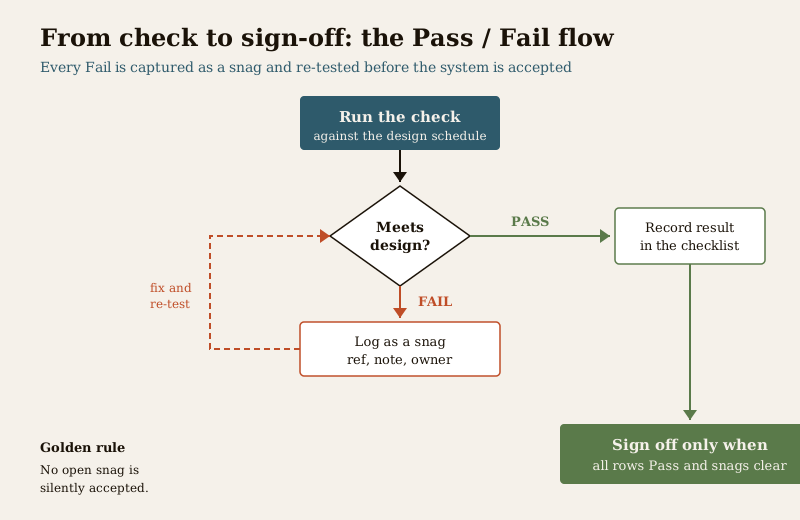
It is used at two points. First, at commissioning, before handover, as the acceptance test that proves the system is complete and correct. Second, as a periodic health check on a live system, run monthly or quarterly, because cameras drift, lenses fog, drives fill and firmware falls behind. The same sheet serves both jobs. Anything that fails becomes a numbered snag, and the rule is the same as for any commissioning: you do not accept a system with open critical snags.
The checks, grouped
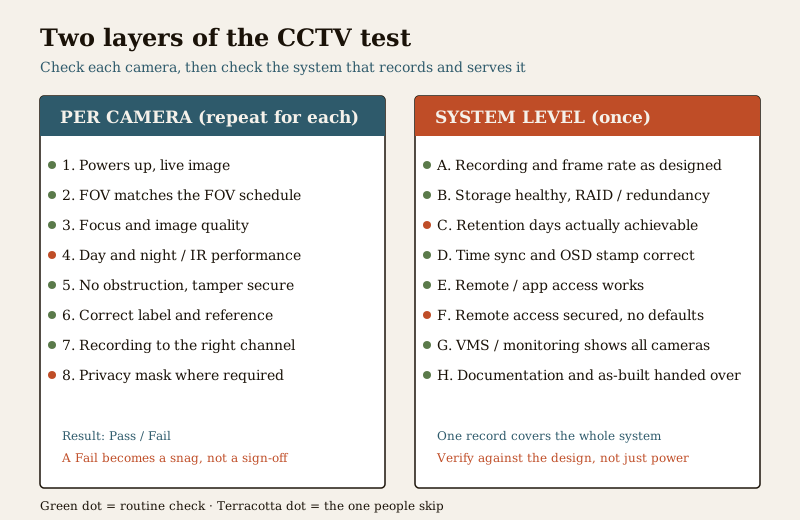
A good test sheet is grouped so nothing is forgotten. The groups below are the standard spine. Adapt the exact rows to your scope, and always test the value against the design, never against a number invented on site.
Per camera
Repeat these for every camera in the schedule, one row each:
- Powers up and streams. The camera is live, addressed correctly, and its channel is not a frozen or black frame.
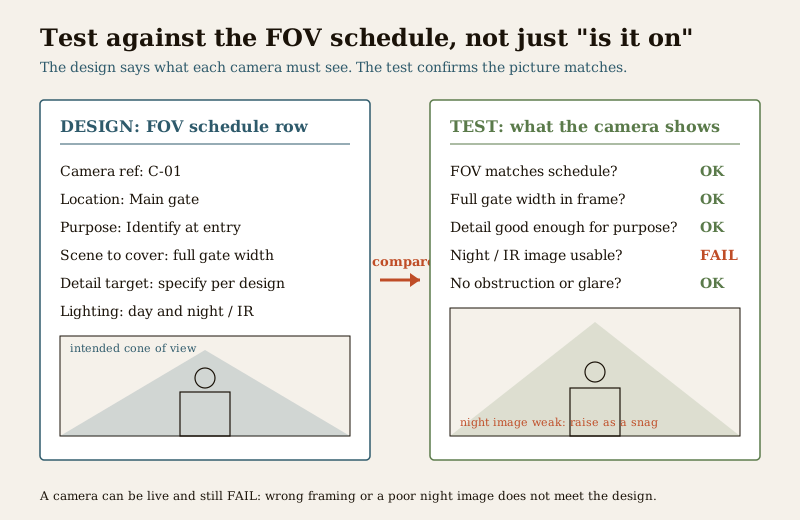
- Field of view matches the FOV schedule. This is the check most often skipped and most important. The installed view must frame the same scene, at the same purpose grade, as the field of view schedule. A camera aimed too high, too wide, or the wrong way fails even with a crisp picture.
- Focus and image quality. Sharp across the area of interest, exposure and white balance sensible, no smearing or heavy compression artefacts.
- Day and night imaging. Check the scene in daylight and again after dark with the IR or low-light mode active. Confirm the night image is genuinely usable for its stated purpose and that IR is not washing out or blinding on a nearby wall. Verify against the manufacturer specification and your design, not a fabricated lux figure.
- No obstruction. Nothing in frame blocks the target, and foreseeable obstruction, a growing plant, a parked vehicle, a swinging gate, is noted.
- Tamper and mounting. Mount secure and aligned, tamper response present if specified, cable entry sealed.
- Correct label. The physical camera, the channel and the schedule reference all agree. A mislabelled camera makes every later record unreliable.
Recording
- Recording to the recorder. Each camera is actually recording to the NVR or DVR, not just displaying live.
- Correct channel. The stream maps to the channel and camera reference the schedule expects.
- Frame rate and resolution as designed. Recorded quality matches the storage schedule, including any continuous versus event or motion recording rule.
- Retention set. The recording schedule and overwrite policy are configured as designed.
Storage
- Drives healthy. Storage reports healthy status, no failing or missing disk.
- Redundancy as designed. Any RAID or redundancy specified is present and in a healthy state.
- Retention actually achievable. Confirm the configured settings genuinely deliver the required recording days, verified against the storage schedule and the recorder, not assumed from a headline drive size.
Remote access, time, monitoring and documentation
- Remote and app access work and are secured. Live view and playback work through the intended path, default passwords are changed, and access is not left standing on installer credentials.
- Time sync and OSD. The system clock is synchronised and correct across recorder and cameras, and any on-screen date, time or camera-name overlay is right. A wrong timestamp weakens footage as evidence.
- VMS and monitoring. Any video management system, video wall or control-room integration shows the correct cameras with the correct names and any call-up or alarm links work.
- Privacy masking and documentation. Privacy zones are masked where required under the DPDP Act, 2023, and the as-built schedule, test records and settings are captured.
Worked example - CCTV testing checklist (extract)
Example only, adapt to your project. Illustrative rows and generic values. The real pass criteria come from your design, the FOV, camera and storage schedules and the manufacturer, so verify against those, never against a number on this page.
| Camera ref | Check | Result (Pass / Fail / NA) | Notes |
|---|---|---|---|
| C-01 Main Gate | Powers up and streams | Pass | Channel live, addressed per schedule |
| C-01 Main Gate | FOV matches FOV schedule (identify at gate line) | Fail | Aimed high, missing plate line, snag S-03 |
| C-01 Main Gate | Day and night image usable for stated purpose | Pass | Night image checked with IR, verified vs spec |
| C-04 Lobby | Focus and image quality | Pass | Sharp across counter area |
| C-04 Lobby | Correct label (camera, channel, schedule agree) | Fail | Swapped with C-05 on recorder, snag S-06 |
| C-07 Parking | No obstruction | Pass | Note: hedge to be trimmed, flagged |
| C-09 Rear | Recording to recorder, correct channel | Pass | Verified clip retained |
| C-09 Rear | Frame rate and resolution as designed | Pass | Matches storage schedule |
| System | Retention days actually achievable per storage schedule | Pass | Confirmed on recorder, not assumed |
| System | Storage healthy, redundancy as designed | Pass | Array status healthy |
| System | Remote and app access work and secured | Fail | Still on default password, snag S-08 |
| System | Time sync correct across recorder and cameras | Pass | OSD timestamp verified |
| System | Privacy zones masked where required (DPDP) | Fail | Neighbour window in frame, snag S-09 |
The four "Fail" rows are the whole point of the sheet. Each is captured, numbered, pushed onto the snag list and blocks acceptance until closed or formally agreed.
Blank template - copy and adapt
Copy this into your own sheet. Keep one row per check, repeat the per-camera block for every camera in the schedule, and add system-level rows once. Add a header block for project name, date, recorder, tester and witnessing party.
| Camera ref | Check | Result (Pass / Fail / NA) | Notes |
|---|---|---|---|
| ... | Powers up and streams | ... | ... |
| ... | FOV matches FOV schedule (state purpose grade) | ... | ... |
| ... | Focus and image quality | ... | ... |
| ... | Day and night image usable (verify vs spec) | ... | ... |
| ... | No obstruction; tamper and mount secure | ... | ... |
| ... | Correct label (camera, channel, schedule agree) | ... | ... |
| ... | Recording to recorder, correct channel | ... | ... |
| ... | Frame rate and resolution as designed | ... | ... |
| System | Retention days actually achievable | ... | ... |
| System | Storage healthy, redundancy as designed | ... | ... |
| System | Remote and app access work and secured | ... | ... |
| System | Time sync and OSD correct | ... | ... |
| System | VMS or monitoring shows correct cameras and links | ... | ... |
| System | Privacy zones masked where required (DPDP) | ... | ... |
| System | As-built and test records captured | ... | ... |
Field and column guide
- Camera ref - the schedule reference and plain location, so a row ties back to the camera schedule and to a physical device. Never test a camera you cannot name.
- Check - one clear, testable statement. Write it so the only answers are pass, fail or not-applicable. Avoid vague checks like "camera works".
- Result - Pass, Fail or NA. Use NA honestly for scope that does not apply, and say why. A blank is not a result.
- Notes - the detail that makes a row traceable: the snag number raised, the value observed and verified against the design, the follow-up date, or the agreed exception.
How to run it - a field guide
- Test against the schedules, not "is it on". The camera and FOV schedules define what each camera must see and at what purpose. A live picture that does not frame the scene the schedule demands is a fail, not a pass.
- Verify night and IR performance. Come back after dark, or shroud the scene, and confirm the low-light image is genuinely usable for its stated purpose. Do not accept a daytime check as proof of a system that must work at night.
- Confirm retention is actually achievable. Prove the configured recording days against the storage schedule and the recorder, rather than assuming a headline drive size delivers them.
- Secure the remote access as part of the test. Change default passwords, confirm access runs through the intended path, and do not leave standing installer credentials. An open feed is a failed test.
- Mask the privacy areas. Under the DPDP Act, 2023, apply privacy masking where the camera can see spaces it should not, and record it. This is a test line, not a nicety.
- Snag every failure. Each fail becomes a numbered line on the snag list with an owner and a date, and the sheet cannot close until the critical snags do.
Common mistakes
- Only checking power. Confirming a camera streams and calling it done, without verifying it frames the right scene.
- Not verifying FOV or retention. Accepting the picture without comparing it to the FOV schedule, or assuming retention without proving the days on the recorder.
- Remote access left on defaults. Handing over a system reachable on the installer credentials or a factory password.
- Privacy areas not masked. Leaving a camera seeing a neighbour window or private space with no mask and no record, contrary to the DPDP Act, 2023.
- Daytime-only night checks. Never returning after dark to prove the IR or low-light image is usable.
How it connects to the other documents
The CCTV testing checklist is one node in a connected set:
- It tests against the camera schedule, the field of view schedule and the storage schedule, which define what each camera and the storage must deliver.
- It rolls up into the overarching security commissioning checklist, which records that this CCTV sheet is complete, passed and attached.
- It feeds handover and acceptance, covered in the CCTV commissioning and testing guide, and every failure feeds the snag list that must close before sign-off.
- For where all of these deliverables sit together, see the wider security resources library.
Key takeaways
- The CCTV testing checklist proves the system meets the design, camera by camera and system-wide, at commissioning and again as a periodic health check.
- Test against the schedules, especially the field of view schedule, not against "is it on". A crisp picture aimed at the wrong scene is a fail.
- Verify night and IR imaging, confirm retention is actually achievable, and secure the remote access as part of the test, not as trust in the installer.
- Mask privacy areas under the DPDP Act, 2023, and snag every failure so no critical item is open at acceptance.
- Pass criteria come from your design, the schedules, the manufacturer and, where code applies, the AHJ. This template is a record and an aid, not the standard, so do not treat any number on it as a threshold.
References
- Digital Personal Data Protection Act, 2023 - CCTV footage identifying people is personal data; apply privacy masking, control access and limit retention, and treat these as test items.
- Manufacturer documentation for your specific cameras, recorder and storage - the authoritative source for image, low-light and IR performance, recording configuration and firmware; follow it over any generic instruction.
- Bureau of Indian Standards catalogue - verify the current edition of any Indian Standard referenced in your specification at https://www.services.bis.gov.in/
- Your own project design and the camera, field of view and storage schedules - the actual source of every pass criterion this checklist is tested against; verify each result against them, not against this page.
This is an educational template to adapt, not legal, contractual or life-safety advice. CCTV installation, cabling and any electrical connection are qualified professional tasks - engage licensed professionals, witness the tests, and defer all pass criteria to your design, the schedules, the manufacturer and, where code applies, the Authority Having Jurisdiction.
Export this guide
Related Guides — Deep-dive reading
Access Control Testing Checklist for India (2026): Every Door Opens and Locks as Designed
A ready-to-adapt per-door and system checklist to verify an access-control installation at commissioning and as a periodic check, with the egress and fire-to-release life-safety tests that must always pass before sign-off.
SecurityCamera Field-of-View Schedule for India (2026): Proving Each Camera Sees What It Should
A ready-to-adapt professional schedule that records, per camera, the scene it must cover and to what purpose level - monitor, detect, recognise or identify - so coverage intent is stated at design and proven at commissioning.
SecurityCCTV Recording Failure in India (2026): Live View Works but Nothing Was Saved
You open the recorder to pull footage of an incident and there is nothing there, even though every camera shows a crisp live picture. A calm, ordered guide to why an Indian CCTV system records live but saves nothing, and how to fix it before the next incident.
SecurityRelated Tools — Try Free
CCTV Camera Coverage & Count Calculator
Estimate how many CCTV cameras you need, the NVR channels, storage in TB for your retention period, and an indicative all-in cost with GST.
CCTV CalculatorCCTV Commissioning & Handover Checklist
An interactive go/no-go checklist to run at handover — cameras day and night, recording, alerts, passwords and documents — before you clear the final bill.
Handover ChecklistCCTV Lens & Field-of-View Calculator
Focal length, sensor and resolution to field-of-view angle, scene width and DORI detect/observe/recognise/identify distances.
Lens & FoV