

Structured Cabling & Home Networking: The Wired Backbone
Why a wired network beats Wi-Fi alone — the Ethernet backbone that gives a home fast, reliable, secure connectivity: Cat6 cabling, a central patch point, Wi-Fi access points instead of one router, and the low-voltage design that makes a smart home solid.
Ask why a smart home feels flaky — cameras dropping, video buffering, devices going offline — and the answer is almost always the same: it relies entirely on Wi-Fi, stretched thin across a whole house. The fix is a wired backbone: structured Ethernet cabling that carries data reliably to every important point, with Wi-Fi layered on top as coverage, not the sole connection. This is the low-voltage foundation of a solid smart home and a fast, dependable network. This guide explains structured cabling and home networking for an Indian home.
It is the data companion to the smart home wiring guide.
The safety line. Structured cabling is low-voltage data wiring, separate from mains power, installed by a cabling professional (often alongside the electrician) — and it must be kept separated from mains cables to avoid interference and for safety. Cabling follows IS/ISO/IEC 11801 (Part 4 covers single-tenant homes). This guide helps you plan; the install is professional.
Why wired beats Wi-Fi alone
Wi-Fi is convenient but shared, interference-prone and range-limited; a wired connection is fast, consistent, secure and unaffected by walls and neighbours. The best home networks use both, correctly:
- Wire the things that stay put and matter — TVs, work desks, gaming, cameras, the hub, and crucially the Wi-Fi access points themselves.
- Use Wi-Fi for mobility — phones, tablets, laptops, roaming devices.
The key insight most people miss: good Wi-Fi comes from wired access points, not from one router fighting to cover the whole house. Structured cabling is what makes strong, whole-home Wi-Fi possible.
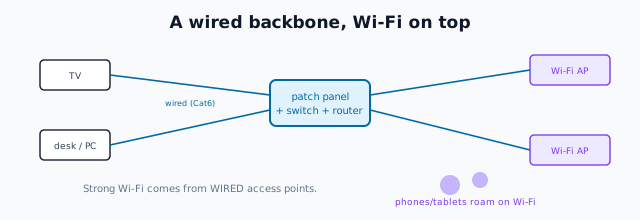
The components of structured cabling
- Cable — Cat6 (or better) — the twisted-pair Ethernet cable that carries data. Cat6 is the sensible current standard for a home (gigabit and beyond); Cat6A for future headroom. Run it in conduit, separated from mains.
- A central patch point / network cabinet — where all cables terminate on a patch panel, connect to a network switch, and meet the router. This is the home's data "heart" — the same ventilated, powered niche as the smart-home hub.
- Outlets (RJ45 keystone points) at each wired location — behind TVs, at desks, at AP positions.
- A network switch — distributes the wired connections.
- Wi-Fi access points (APs) — wired back to the switch, mounted for coverage (ceiling/wall), giving strong Wi-Fi throughout, rather than one router in a corner.
- The router / ONT from your ISP, connecting the home network to the internet.
Planning the runs
Structured cabling, like mains wiring, must be planned before the walls close:
- Decide the wired points — TVs, work areas, gaming, cameras, and Wi-Fi AP locations (usually ceiling-mounted, one per floor/zone for good coverage).
- Run every cable back to the central point in a star topology (home runs), so each outlet has its own dedicated cable — the structured-cabling principle.
- Use conduit with spare capacity, separated from mains cables, so cables can be replaced or added.
- Locate the network cabinet centrally, ventilated, powered and accessible.
- Terminate professionally — good terminations at the patch panel and outlets are what make the network reliable; poor ones cause the very dropouts you're trying to avoid.
For a home being built or rewired, adding this backbone is inexpensive; retrofitting it into finished walls is disruptive — the same lesson as the smart home wiring guide.
What it enables
A structured-cabled home gets:
- Fast, reliable internet at every wired point, unaffected by Wi-Fi congestion.
- Strong whole-home Wi-Fi from wired access points.
- A dependable smart-home foundation — cameras, hubs and devices on solid connections.
- Easy future upgrades — new devices, faster internet, more APs all slot into the backbone.
- Higher property value — a genuinely networked home is a real amenity.
The one-line answer
A smart, connected home needs a wired backbone, not Wi-Fi alone: structured Cat6 Ethernet cabling run in a star topology from a central patch panel and switch to every important point — TVs, desks, cameras, and especially the Wi-Fi access points that give strong whole-home coverage. Plan the runs, the AP locations and a central network cabinet before the walls close (to IS/ISO/IEC 11801), keep the data cabling separated from mains, and you get fast reliable internet, solid Wi-Fi and a dependable foundation for any smart devices — installed by a cabling professional.
Where to go next
- The smart-home electrical foundation: Smart Home Wiring Guide.
- Security cabling: CCTV & Video Door Phones.
- The automation layer: Smart Home Hub.
- Plan it in: Home Electrical Planning.
References
- IS/ISO/IEC 11801 (Parts 1–6), Information Technology — Generic Cabling for Customer Premises (Part 4: Single-Tenant Homes), Bureau of Indian Standards.
- IS 732 : 2019, Code of Practice for Electrical Wiring Installations (separation of services); National Electrical Code SP 30 : 2023, BIS: https://www.bis.gov.in/
Cabling categories and network design evolve; structured cabling must be installed and terminated by a cabling professional, separated from mains wiring. Verify any standard's status via the BIS catalogue before relying on it.
Export this guide
Related Guides — Deep-dive reading
Smart Home Planning Guide India: New Build & Existing Homes
The decisions that make or break a smart home are taken at the plan stage — before a wall goes up or a switch box is chased. Here is how to plan conduits, neutrals, network backbone and device points for an Indian home that stays smart for a decade.
Smart HomeSecurity Cabling Requirements for Indian Homes
How to plan the wiring behind a home security system - which cable feeds which device, the 90-metre ethernet rule and the interference rules, and why laying conduit at construction stage beats surface trunking every time.
SecuritySmart Home Wiring: The Electrical Foundation of an Automated Home
Automation runs on infrastructure, not gadgets — the wiring decisions that make a home smart-ready: a neutral at every switch, deeper boxes, a structured cabling backbone, a network and hub location, and power provision, all planned before the walls close.
Electrical & WiringRelated Tools — Try Free
Security Cabling & PoE Planner
Estimate cable length, drops, PoE power budget, the right switch, conduit and cost for a CCTV/security cabling plan.
Cabling PlannerCCTV Cable-Length Calculator
Total cable to buy for a CCTV job and a warning when a run exceeds the cable's maximum length.
Cable LengthCCTV Camera Coverage & Count Calculator
Estimate how many CCTV cameras you need, the NVR channels, storage in TB for your retention period, and an indicative all-in cost with GST.
CCTV Calculator