

Security BOQ Template for India (2026): Pricing the System Line by Line
A ready-to-adapt security Bill of Quantities: the priced, itemised list of everything to be supplied and installed, used to tender the job, hold bidders to a like-for-like comparison and set the contract sum — with a worked example and a blank copy-ready template.
A security boq template is the priced, itemised backbone of the procurement stage — the Bill of Quantities that lists every item to be supplied and installed, so that a security system can be tendered, compared and awarded on a like-for-like basis. It is not the design and it is not the specification. It is the counting-and-pricing document: one line per item, a quantity, a unit, and two empty rate columns the bidder fills in. Add the rates up and you have the contract sum.
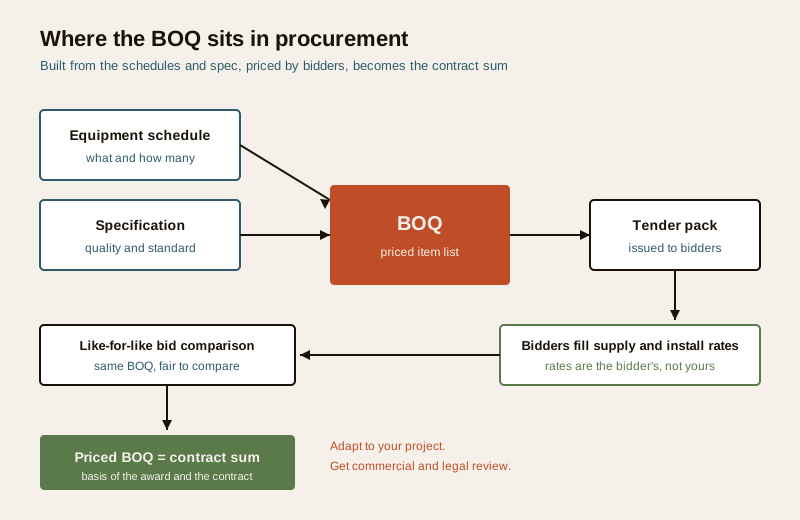
The BOQ is built downstream of the equipment and device schedule (which fixes what and how many) and the specification (which fixes the required quality and standard). It is then issued inside the tender pack for bidders to price. Because every bidder receives the identical BOQ, their totals can be compared row by row — that comparability is the whole point.
Scope & how to read this. This is a ready-to-adapt professional template, not authoritative, contractual or legal wording. The BOQ becomes part of a commercial contract, so get proper commercial, procurement and legal review before you issue or award. Quantities come from your project and your schedules; rates come from the bidder; taxes follow your commercial terms. Do not copy this page into a live tender unchanged.
Where the BOQ sits in procurement
Read left to right across the project. The schedule answers "what and how many." The specification answers "to what quality and standard." The BOQ turns those into a priceable list. The tender wraps the BOQ in the commercial and legal terms and issues it. Bidders return the BOQ with rates entered; you total and compare; the winning priced BOQ becomes the contract sum and the yardstick for measuring the work as it is built and for valuing any change.
That lineage matters because it tells you what belongs in the BOQ and what does not. Descriptions in the BOQ point back to the spec rather than repeating it. Quantities trace to the schedule and must match it exactly. Rates are the one thing the BOQ leaves blank — they are the bidder's commercial offer, and you never fill them in for them.
The columns
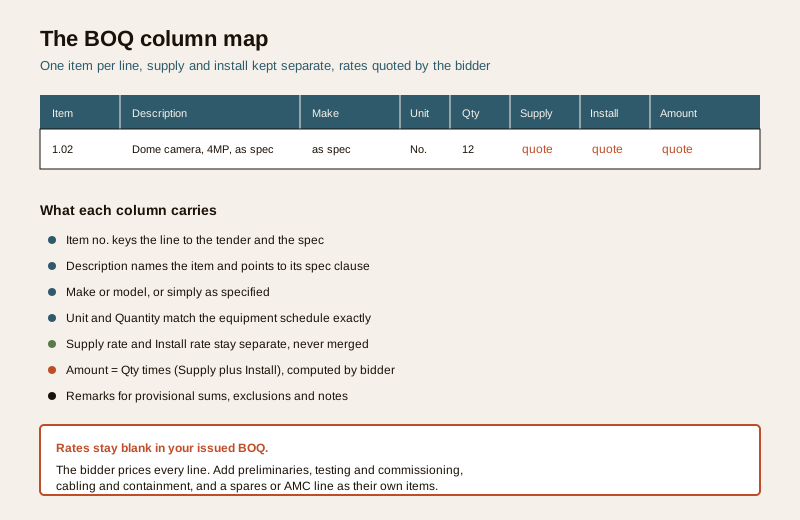
A workable security BOQ is a table with a small, disciplined set of columns. Keep them stable across every subsystem so the sheet reads the same all the way down.
| Column | What it holds | Notes |
|---|---|---|
| Item no. | A stable code, e.g. 1.02 | Keys the line to the tender and the spec clause |
| Description | The item in plain words | Tied to the spec; enough to price, not a re-write of the spec |
| Make / model | A named make, or "as specified" | Use "as specified" when the spec fixes the standard |
| Unit | No., m, set, lot | The unit the rate is quoted against |
| Quantity | The count or length | Must match the equipment schedule |
| Supply rate | Price to supply one unit | Blank in your issued BOQ; bidder quotes |
| Install rate | Price to install one unit | Kept separate from supply, never merged |
| Amount | Qty x (Supply + Install) | Computed by the bidder |
| Remarks | Provisional sum, exclusions, notes | Where you flag anything unusual |
Beyond the equipment lines, a complete BOQ carries a few item groups that are easy to forget and expensive to omit:
- Preliminaries / general items — site establishment, supervision, safety, as-built documentation, warranties and training. Real cost that hides if you leave it out.
- Cabling and containment — cable by type and length, conduit, trunking, trays and glands, as their own measured items rather than buried inside each device.
- Testing and commissioning — a distinct line for proving the system, not an assumed freebie.
- Spares and AMC — a spares holding and an annual maintenance line (or a provisional sum) so support is priced up front, not negotiated later.
Worked example BOQ (illustrative)
Below is a short, illustrative BOQ grouped by subsystem to show the shape. Note that every rate is left as "quote" — in a real issued BOQ these cells are blank for the bidder to price. The descriptions, makes, quantities and figures here are generic placeholders to show format only.
Example only — adapt to your project. Values below are illustrative. Do not treat any quantity, make or grouping as a recommendation; derive yours from your own schedule, spec and site.
| Item | Description | Make / model | Unit | Qty | Supply | Install | Amount |
|---|---|---|---|---|---|---|---|
| 1 | Preliminaries and general items | ||||||
| 1.01 | Site establishment, supervision and safety | as specified | Lot | 1 | quote | quote | quote |
| 1.02 | As-built drawings, O and M manuals, warranties | as specified | Lot | 1 | quote | quote | quote |
| 2 | CCTV subsystem | ||||||
| 2.01 | Fixed dome camera, e.g. 4MP, as spec | as specified | No. | 12 | quote | quote | quote |
| 2.02 | Bullet camera, e.g. 4MP, as spec | as specified | No. | 6 | quote | quote | quote |
| 2.03 | Network video recorder, channels as spec | as specified | No. | 1 | quote | quote | quote |
| 2.04 | Storage drive, capacity as spec | as specified | No. | 2 | quote | quote | quote |
| 3 | Access control | ||||||
| 3.01 | Controller, doors as spec | as specified | No. | 1 | quote | quote | quote |
| 3.02 | Reader at entry, type as spec | as specified | No. | 4 | quote | quote | quote |
| 4 | Cabling and containment | ||||||
| 4.01 | Data cable, category as spec | as specified | m | 900 | quote | quote | quote |
| 4.02 | Conduit / trunking, size as spec | as specified | m | 600 | quote | quote | quote |
| 5 | Testing, commissioning and support | ||||||
| 5.01 | Testing and commissioning of full system | as specified | Lot | 1 | quote | quote | quote |
| 5.02 | Recommended spares holding | as specified | Set | 1 | quote | quote | quote |
| 5.03 | Annual maintenance (AMC), first year | as specified | Year | 1 | quote | quote | quote |
| Sub-total (ex taxes) | quote | ||||||
| Taxes (GST) per commercial terms | quote | ||||||
| Total | quote |
Two things to read from that table. First, supply and install stay in separate columns for every device — that lets you sanity-check a bid where the supply looks cheap but the install is padded, or vice versa. Second, the sub-total, taxes and total sit at the foot; GST is handled per your commercial terms, not baked into each rate, so the comparison stays clean.
Blank copy-ready template
Copy this into your sheet, keep the columns, and replace the placeholder rows. Group your own subsystems the same way (preliminaries, each subsystem, cabling and containment, testing and commissioning, spares and AMC). Leave every rate blank — the bidder prices it.
| Item | Description | Make / model | Unit | Qty | Supply rate | Install rate | Amount | Remarks |
|---|---|---|---|---|---|---|---|---|
| 1.00 | [Subsystem or group heading] | |||||||
| 1.01 | [Item, tied to spec clause ...] | [as specified] | [No.] | [ ] | ||||
| 1.02 | [Item, tied to spec clause ...] | [as specified] | [m] | [ ] | ||||
| 2.00 | [Next subsystem heading] | |||||||
| 2.01 | [Item ...] | [as specified] | [ ] | [ ] | ||||
| ... | ... | ... | ... | ... | ||||
| [Sub-total (ex taxes)] | ||||||||
| [Taxes per commercial terms] | ||||||||
| [Total] |
Field guide: getting the BOQ right
A BOQ is only as fair as its discipline. A few habits separate a clean tender from a dispute waiting to happen:
- One item per line. Each distinct thing gets its own row. Bundling "cameras and cabling" into a single line hides scope and makes bids incomparable.
- Clear units and quantities. State the unit the rate is quoted against, and make quantities trace back to the equipment schedule cell for cell. If the schedule says 18 cameras, the BOQ says 18.
- Separate supply and install. Two columns, always. It exposes padding and makes valuing part-complete work possible.
- Avoid lump sums that hide scope. A single "security system — lump sum" line tells you nothing and cannot be compared. Break it down.
- Use provisional sums where scope is genuinely unclear. When something cannot yet be quantified, carry a clearly labelled provisional sum in Remarks rather than a fake precise quantity — and say it will be re-measured.
- Handle taxes per your commercial terms. Decide once whether rates are exclusive or inclusive of GST, state it, and keep it consistent. Show taxes as their own line.
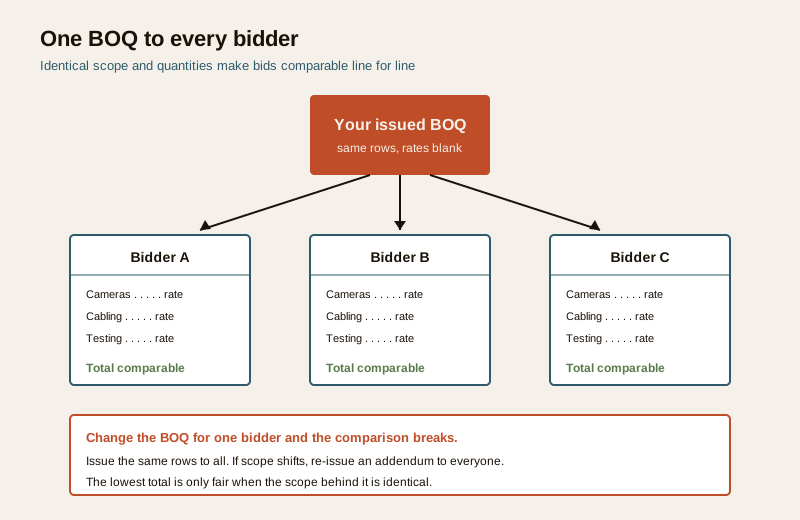
- Issue the same BOQ to every bidder. Identical rows and quantities to all. If scope changes mid-tender, issue an addendum to everyone, not a quiet change to one.
Common mistakes
- Vague descriptions. "CCTV camera" with no reference to the spec invites the cheapest, weakest option. Point the description at the spec clause.
- Quantities that do not match the schedules. The commonest cause of a mid-project claim. Reconcile the BOQ against the equipment schedule before issue.
- Hidden scope. Cabling, containment, testing, documentation and spares left out of the BOQ reappear as extras. Give each its own line.
- Mixing the spec into the BOQ. The BOQ prices; the spec sets quality. Re-writing the spec into descriptions makes both documents drift and contradict each other. Reference, do not repeat.
- Pricing the rates yourself. The rates are the bidder's offer. Filling them in defeats the tender and the comparison.
How it links to the other documents
The BOQ never stands alone. It is one document in a set that must agree:
- The equipment and device schedule is the source of the BOQ quantities — reconcile the two before issue.
- The specification sets the quality behind each description; the BOQ references its clauses rather than repeating them.
- The tender template issues the BOQ with the commercial and legal terms and the instructions to bidders.
- The cost planning guide helps you form an internal estimate before tender so you can read the returned bids with judgement, and shows what drives supply and install rates.
For the full set of professional deliverables and how they fit together, see the security resources library and the professional security resources guide.
Completion checklist
Run this before you issue the BOQ:
| Check | Confirm |
|---|---|
| Every item traced to the equipment schedule | Quantities reconciled cell for cell |
| Descriptions reference the spec, not repeat it | No spec drift |
| Supply and install kept in separate columns | Yes |
| Preliminaries, cabling, testing, spares and AMC each lined | None buried |
| No lump sums that hide scope | Broken down |
| Provisional sums labelled where scope is unclear | Flagged in Remarks |
| Tax treatment stated and consistent | Per commercial terms |
| Identical BOQ prepared for all bidders | One version issued |
| Commercial and legal review done | Before issue |
Key takeaways
- The BOQ is the priced, itemised list that lets you tender a security system, compare bids like-for-like and set the contract sum. It sits between the schedules and spec upstream and the tender downstream.
- Keep the columns disciplined — item, description, make, unit, quantity, supply rate, install rate, amount, remarks — and add preliminaries, cabling and containment, testing and commissioning, and a spares or AMC line.
- Leave the rates blank. They are the bidder's offer; you fill quantities, they fill prices.
- Issue one identical BOQ to every bidder so the comparison is fair, and re-issue an addendum to all if scope changes.
- This is a template to adapt, not contractual wording — get commercial and legal review, and never publish fabricated prices, makes or standards. The rates are the bidder's.
References
- Your project's own equipment schedule and specification — the authoritative source for the BOQ quantities and the quality behind each description; reconcile against them before issue.
- Your organisation's procurement and commercial terms — the authoritative source for tax treatment, provisional sums, measurement rules and how the priced BOQ becomes the contract sum; get commercial and legal review.
- Bureau of Indian Standards catalogue for any standard referenced by your specification; verify the current edition at https://www.services.bis.gov.in/
This is an educational, ready-to-adapt template, not contractual, commercial or legal advice. A BOQ forms part of a procurement contract — engage qualified commercial, procurement and legal professionals before issuing or awarding, and defer specifics to your project and terms.
Export this guide
Related Guides — Deep-dive reading
Security Specification Template for India (2026): Defining What Good Looks Like
A ready-to-adapt technical specification template for security systems: the document that sits beside the BOQ in your tender and tells every bidder the required standard, performance and quality, so they quote the right thing and the installer builds to a known bar.
SecuritySmart Home BOQ & Specification: A Practitioner's Guide (India)
A vague scope is the reason smart-home projects overrun. Here is how to build a tender-ready Bill of Quantities and technical specification — itemised by category, quantified from drawings, written to make, model and standard — so that vendor quotes can be compared fairly and scope gaps never surface on site.
Smart HomeHow to Compare Security Quotations in India (2026): Read Three Quotes Like an Expert
Three quotes for the same home security job will name different amounts, different equipment and different scope. This homeowner guide shows how to make them truly like-for-like first, read every line item, spot what a cheap quote hides, and pick on total value rather than the lowest number.
SecurityRelated Tools — Try Free
Interior Contract Clause Checklist
16 sections and 98 checkboxes covering scope, BOQ, milestones, penalties, warranty, and disputes.
Contract ChecklistCCTV Cable-Length Calculator
Total cable to buy for a CCTV job and a warning when a run exceeds the cable's maximum length.
Cable LengthCCTV Camera Coverage & Count Calculator
Estimate how many CCTV cameras you need, the NVR channels, storage in TB for your retention period, and an indicative all-in cost with GST.
CCTV Calculator