

Security Bid Comparison Sheet for India (2026): Comparing Apples with Apples
A ready-to-adapt scoring matrix that lays received security bids side by side, evaluates them on the criteria and weights set in your tender, normalises everyone to a common scope, and produces a fair, documented award recommendation — not just the lowest price.
The bids are in. Three or four envelopes, each a fat document with its own layout, its own assumptions and its own quiet exclusions — and someone now has to decide who gets the work. Reach for the lowest number and you may be buying a different, smaller job than the one you tendered. The security bid comparison sheet is the tool that stops that mistake: a single matrix that lines the bidders up in columns, the evaluation criteria down the rows, applies the weights you fixed in the tender, and turns a pile of unlike documents into one defensible, side-by-side comparison.
This page is the evaluation step in Studio Matrx's professional security resources library and its parent guide to professional security resources. It sits in procurement, after bids are received against your security tender and its bill of quantities, and it feeds directly into the award recommendation. It is not the tender and not the contract — it is the working paper that shows, on one page, why one bid won.
Scope & how to read this. This is a ready-to-adapt professional template, not authoritative, contractual or legal wording. Use it to structure a fair evaluation; do not treat any score or figure shown here as a real quotation. Get commercial and legal review before any significant award, and keep the completed sheet on file as your audit trail. Specifics — the criteria, the weights, the pass or fail thresholds — come from your own tender, your organisation and the project.
What it is and where it sits
A bid comparison sheet (also called a comparative statement or bid tabulation) is the evaluator's working paper. Its job is narrow and important: take bids that arrived in different shapes and make them comparable, then score them against the criteria the tender already announced. It sits squarely in procurement:
- Before it: the tender sets the scope, the evaluation criteria and the weights; the BOQ fixes the priced line items; and prequalification has already filtered out bidders who do not meet the minimum bar.
- The sheet itself: normalises every bid to the same scope, records deviations and qualifications, and computes a weighted score for each bidder.
- After it: the highest-scoring compliant bid becomes the basis of the award recommendation, with the sheet attached as the rationale.
Who produces it? The consultant, PMC or procurement lead who ran the tender — usually with a technical evaluator and a commercial evaluator working on their own parts. Who receives it? The owner, committee or approving authority who signs the award. Why it matters: it is the single document that proves the decision was fair, followed the published rules, and can survive a challenge from a losing bidder.
How it works
The mechanics are simple; the discipline is everything.
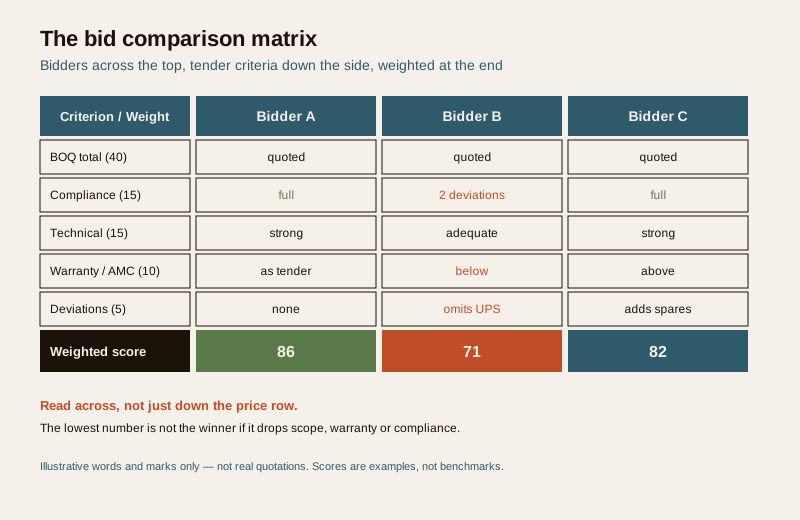
1. Bidders across the top, criteria down the side. One column per bidder, one row per evaluation criterion — exactly the criteria named in the tender.
2. Bring the weights over from the tender. A weight column holds the agreed split between technical and commercial merit and between individual criteria. You do not invent weights now; you copy the ones the tender published before bids were opened.
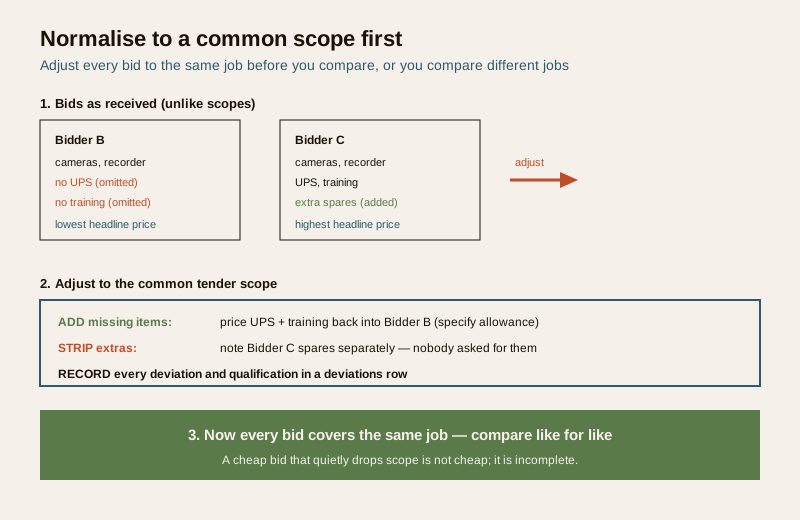
3. Normalise to a common scope. Adjust every bid to the same BOQ scope before you compare. If Bidder B left out a UPS the tender required, add a "specify" allowance so you are comparing the same job; if Bidder C included an extra year of AMC nobody asked for, note it separately rather than letting it flatter the score.
4. Flag deviations and qualifications. Every exclusion, substitution or condition goes in a deviations row. A cheap bid that quietly drops cabling, warranty or training is not cheap — it is incomplete.
5. Score each criterion, then weight it. Score the normalised bids against each row, multiply by the weight, and total. Keep the technical and commercial evaluations separate until the end so price does not colour the technical marks.
Separate technical from commercial. Good practice is a two-envelope habit even on a small job: settle the technical scores first, on merit, and only then open and weigh price. It stops a low number from quietly lifting a weak technical bid — and it is far easier to defend.
A worked example
Illustrative only — the words and marks below are made up to show how the sheet reads. No figure here is a real quotation, and the scores are examples, not benchmarks.
Example only — adapt to your project. Prices are shown as "quoted" or "-" on purpose; substitute your own tender criteria, weights and normalised figures. Do not reuse these numbers.
| Criterion | Weight | Bidder A | Bidder B | Bidder C |
|---|---|---|---|---|
| BOQ total (commercial) | 40 | Quoted (mid) | Quoted (lowest) | Quoted (highest) |
| Compliance with specification | 15 | Fully compliant | Two deviations | Fully compliant |
| Technical merit (design, products) | 15 | Strong | Adequate | Strong |
| Experience and references | 10 | Good, checked | Limited | Good, checked |
| Warranty and AMC | 10 | As tender | Below tender | Above tender |
| Delivery time | 5 | As required | Faster | Slower |
| Deviations and exclusions | 5 | None material | Omits UPS, training | Adds spares |
| Illustrative weighted score (0-100) | 100 | 86 | 71 | 82 |
| Recommendation | - | Recommended | Lowest but non-compliant | Compliant, higher cost |
Read across, not just down the price row. Bidder B is cheapest on the BOQ line, but the deviations row shows why: two spec deviations, a below-tender warranty, and omitted UPS and training. Once those are priced back in to reach a common scope, the gap narrows and the compliance risk remains. Bidder A carries the strongest weighted score because it is compliant, well-referenced and complete. Bidder C is a genuine, compliant alternative at a higher price. The sheet does not make the decision — it makes the trade-offs visible and the recommendation defensible.
A blank, copy-ready template
Copy this into your own sheet, set the rows to your tender's criteria, and fill the weight column from the tender before bids are opened.
| Criterion | Weight | Bidder A | Bidder B | Bidder C |
|---|---|---|---|---|
| BOQ total (normalised to common scope) | ... | ... | ... | ... |
| Compliance with specification | ... | ... | ... | ... |
| Technical merit | ... | ... | ... | ... |
| Experience and references | ... | ... | ... | ... |
| Warranty and AMC | ... | ... | ... | ... |
| Delivery / programme | ... | ... | ... | ... |
| Deviations and exclusions | ... | ... | ... | ... |
| ... (add tender-specific rows) | ... | ... | ... | ... |
| Weighted score | 100 | ... | ... | ... |
| Rank | - | ... | ... | ... |
| Recommendation and rationale | - | ... | ... | ... |
A short companion table keeps the deviations honest — one row per material exclusion or qualification, so nothing hides in a footnote:
| Bidder | Deviation / exclusion | Effect on scope | Adjustment to common scope |
|---|---|---|---|
| ... | ... | ... | Add / strip / note (specify) |
Field and column guide
- Criterion. Use the SAME criteria the tender published — no more, no fewer. Adding a criterion after bids are opened is the fastest way to lose a challenge.
- Weight. Copy the tender's weights exactly; they are fixed before opening. If the tender split, say, technical and commercial by an agreed ratio, that ratio drives this column.
- Bidder columns. One per bidder. Enter the normalised figure or the marked assessment, not the raw bid.
- BOQ total. Always the figure adjusted to the common scope, not the headline number. Note the raw quote in brackets if useful, but score the normalised one.
- Compliance. Compliant, minor deviation or material deviation — cross-referenced to the security specification. Material non-compliance can be a fail regardless of price.
- Deviations and exclusions. The most-read row on the sheet. Capture every omission, substitution and condition, and carry the priced ones into the normalisation.
- Weighted score and rank. Score times weight, totalled; then rank. Show the arithmetic so anyone can retrace it.
- Recommendation and rationale. One or two sentences per bidder, in writing, on the sheet. This is your audit trail.
Watch for abnormally low bids. A price far below the field and below your own estimate is a flag, not a bargain — it usually means missing scope, an error, or a plan to claim it back through variations. Ask the bidder to confirm and justify before you rely on it, and record their answer.
Common mistakes
- Lowest-price-only. Awarding on the BOQ line alone ignores compliance, warranty, references and completeness — the very things the weights exist to protect. Score the whole matrix.
- Changing the criteria after bids open. Introducing a new criterion, or re-weighting, once bids are in is unfair and indefensible. Fix criteria and weights in the tender; do not touch them afterwards.
- Comparing different scopes. Two bids at different numbers may simply be two different jobs. Normalise to a common scope first, every time.
- No record. A decision with no written rationale cannot be defended. Keep the completed sheet, the deviations table and the evaluators' notes on file.
- Letting price colour the technical marks. Score technical merit before opening price. Keep the two evaluations separate until the weighted total.
How it links to the other documents
The comparison sheet is a hinge between the tender and the award, and it only works if it stays faithful to what came before:
- The security tender template sets the criteria and weights this sheet must use unchanged.
- The security BOQ template gives the priced scope you normalise every bid against.
- The vendor prequalification form has already screened bidders on capacity and standing, so this sheet compares only qualified bids.
- The security specification template is the yardstick for the compliance row.
- After the award, the vendor and installer evaluation closes the loop by checking whether the winner actually performed as their bid promised.
Completion checklist
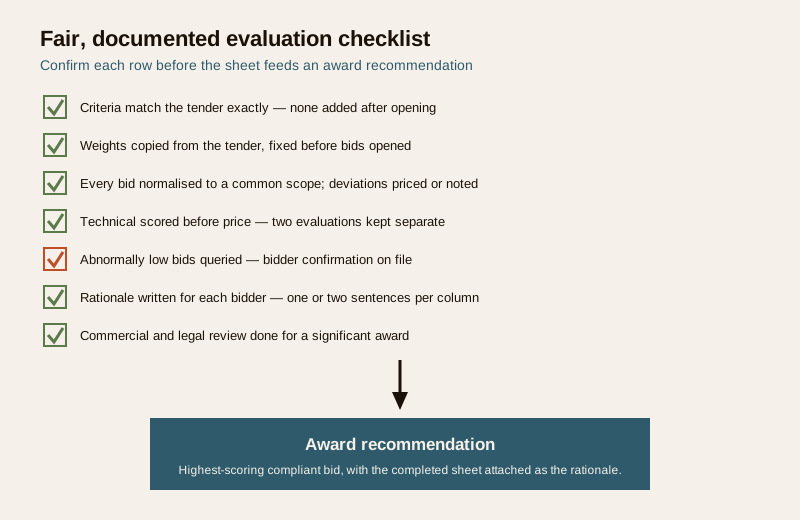
Before you attach the sheet to an award recommendation, confirm each row is a genuine yes.
| Check | Confirmed when |
|---|---|
| Criteria match the tender exactly | No criterion added or removed after opening |
| Weights copied from the tender | Set before bids were opened, unchanged since |
| Every bid normalised to a common scope | Deviations priced or noted; like-for-like |
| Technical scored before price | Two evaluations kept separate until the total |
| Abnormally low bids queried | Bidder confirmation on file |
| Rationale written for each bidder | One or two sentences per column |
| Commercial and legal review done | Signed off for a significant award |
Key takeaways
- The sheet turns unlike bids into one comparison — bidders in columns, tender criteria in rows, weighted and totalled.
- Use the same criteria and weights as the tender, fixed before opening; never change them after bids are in.
- Normalise to a common scope first — price the deviations and exclusions so you compare the same job.
- Separate technical from commercial, watch for abnormally low bids, and never award on price alone.
- Record the rationale. The completed, documented sheet is what makes the award fair and defensible — and get commercial and legal review before any significant award.
References
- Your own tender documents — the authoritative source for the evaluation criteria, weights and pass or fail thresholds this sheet must apply; the template does not set them.
- General Financial Rules and your organisation's procurement policy — for public or institutional buyers, the governing rules on competitive evaluation, record-keeping and award; verify the current edition and follow them over any generic guidance.
- Bureau of Indian Standards catalogue for any product or life-safety standard referenced in the tender; verify the current edition at https://www.services.bis.gov.in/
This is an educational template to adapt, not legal or contractual advice. Evaluation criteria, weights and award decisions are project-specific — engage qualified procurement, commercial and legal advisers for any significant award.
Export this guide
Related Guides — Deep-dive reading
How to Compare Security Quotations in India (2026): Read Three Quotes Like an Expert
Three quotes for the same home security job will name different amounts, different equipment and different scope. This homeowner guide shows how to make them truly like-for-like first, read every line item, spot what a cheap quote hides, and pick on total value rather than the lowest number.
SecuritySTP Tender Preparation Guide: How to Write a Scope That Gets Comparable Bids
A practical guide to preparing an STP tender for Indian projects — how to define scope, fix the capacity and quality specification, set fair evaluation criteria, and structure the bid so the quotes you get back are genuinely comparable instead of a pile of apples and oranges.
Sewage Treatment PlantsSTP Vendor Evaluation Matrix: A Weighted Scoring System to Pick the Right Supplier
How to turn a pile of STP quotations into a defensible decision — the criteria that actually matter, how to weight them for your project, and how to score vendors on a single comparable scale instead of chasing the lowest price.
Sewage Treatment PlantsRelated Tools — Try Free
Security Vendor Evaluation Scorecard
Rate a CCTV/security installer or guarding agency across eight weighted criteria for a hire / negotiate / walk-away verdict.
Vendor ScorecardInterior Contract Clause Checklist
16 sections and 98 checkboxes covering scope, BOQ, milestones, penalties, warranty, and disputes.
Contract ChecklistLift Safety Audit Checklist
Interactive checklist that scores your home lift on safety devices, compliance and upkeep.
Checklist