
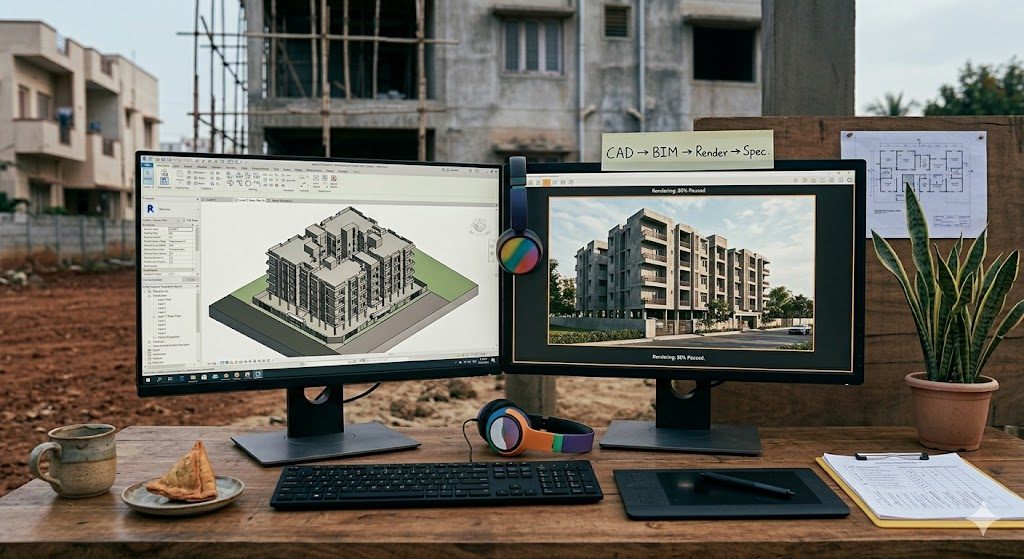
Essential Digital Skills for Architects & Interior Designers
Complete Roadmap — CAD, BIM, 3D, AI, Graphics, Marketing & Emerging Tools
The architecture and interior design profession has undergone a digital revolution in the last decade. Hand-drafting has given way to BIM. Physical mood boards have been replaced by digital collages. Client presentations have moved from printed sheets to immersive 3D walkthroughs. And in 2025, AI is transforming concept generation, compliance checking, and even construction documentation.
Yet a significant skills gap persists in the Indian design industry. The Council of Architecture (COA) curriculum is only now incorporating BIM and digital tools. Most architecture colleges still teach AutoCAD as the primary digital skill. Interior design institutes vary wildly in their technology coverage. The result: graduates enter the workforce underprepared for a digitally driven profession.
This guide provides a complete digital skills roadmap for architects, interior designers, and students — covering every essential tool, what it does, why it matters, where to learn it, and how to build a progressive skill stack from student to principal.
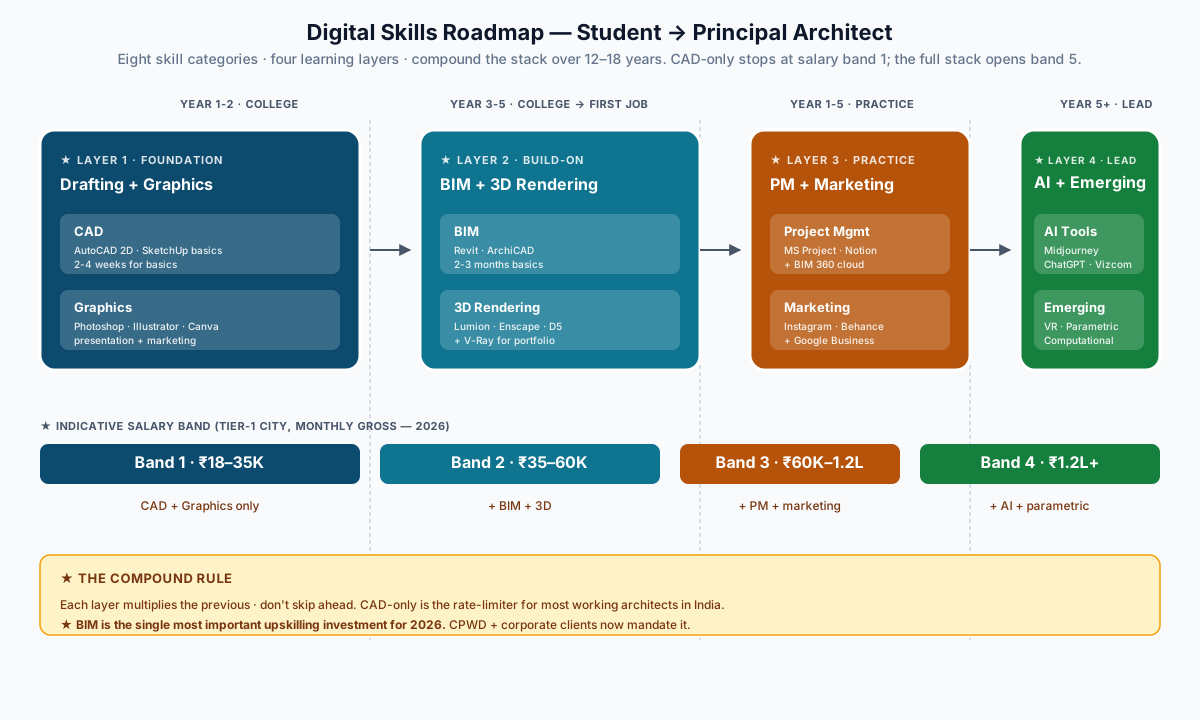
The Digital Skills Landscape — 2025
1. CAD — Computer-Aided Drafting
CAD remains the foundational digital skill. Every architectural drawing — plan, section, elevation, detail — starts here.
AutoCAD (Autodesk)
| Aspect | Detail |
|---|---|
| What it does | 2D drafting, dimensioning, annotation, plotting |
| Why essential | Industry standard for construction drawings. Every contractor, consultant, and approval authority reads AutoCAD files (.dwg) |
| Who needs it | Everyone — students, architects, interior designers, civil engineers |
| Proficiency needed | 2D drafting: Essential. 3D modelling: Useful but not primary |
| License cost | ₹28,000/year (commercial), Free for students (3 years) |
| Learning time | 2-4 weeks for basics, 3-6 months for proficiency |
| COA relevance | Mandatory in most B.Arch curricula |
Key skills to master:
- Layer management (critical for large projects)
- Block creation and dynamic blocks
- Xrefs (external references) for collaborative work
- Sheet sets and plotting to PDF
- Annotation scaling for multiple plot scales
- Template creation (.dwt) for firm standards
Where to learn: Autodesk Learning (free), LinkedIn Learning, YouTube (SourceCAD, CADWishList)
SketchUp (Trimble)
| Aspect | Detail |
|---|---|
| What it does | Quick 3D modelling, massing studies, conceptual design |
| Why essential | Fastest tool for 3D concept exploration. Intuitive push-pull interface |
| Who needs it | Architects, interior designers, students |
| License cost | Free (web), ₹25,000/year (Pro) |
| Learning time | 1-2 weeks for basics |
Best for: Early-stage design, client presentations, quick 3D studies
AutoCAD for Interior Designers
Interior designers use AutoCAD differently from architects:
- Furniture layouts with manufacturer blocks
- Electrical layout plans (switch, socket, light points)
- False ceiling plans with detail sections
- Kitchen and wardrobe internal detail drawings
- Tile layout plans with cutting patterns
2. BIM — Building Information Modelling
BIM is the single biggest shift in architectural practice since CAD. It's not just 3D — it's a database of the entire building: geometry, materials, costs, schedules, and performance data in one model.
Revit (Autodesk)
| Aspect | Detail |
|---|---|
| What it does | Full building modelling — architecture, structure, MEP in one coordinated model |
| Why essential | Global BIM standard. Mandatory for government projects in many countries. Increasingly required in Indian corporate and institutional projects |
| Who needs it | Architects (essential for practice), Interior designers (useful for large projects) |
| License cost | ₹33,000/year (commercial), Free for students |
| Learning time | 2-3 months for basics, 6-12 months for proficiency |
| India adoption | Growing fast — CPWD, smart city projects, and large private firms now mandate BIM |
Key BIM skills:
- Family creation (doors, windows, furniture)
- Clash detection (architectural vs structural vs MEP)
- Scheduling (door schedule, window schedule, room finish schedule)
- Sheet production from model
- Worksets for multi-user collaboration
- 4D scheduling (model + time) and 5D costing (model + cost)
ArchiCAD (Graphisoft)
| Aspect | Detail |
|---|---|
| What it does | BIM modelling with strong architectural focus |
| Why popular | More architect-friendly than Revit, better Mac support |
| License cost | Free for students (BIM Student License) |
| Best for | Small to medium firms that want BIM without the Revit complexity |
BIM in the Indian Context
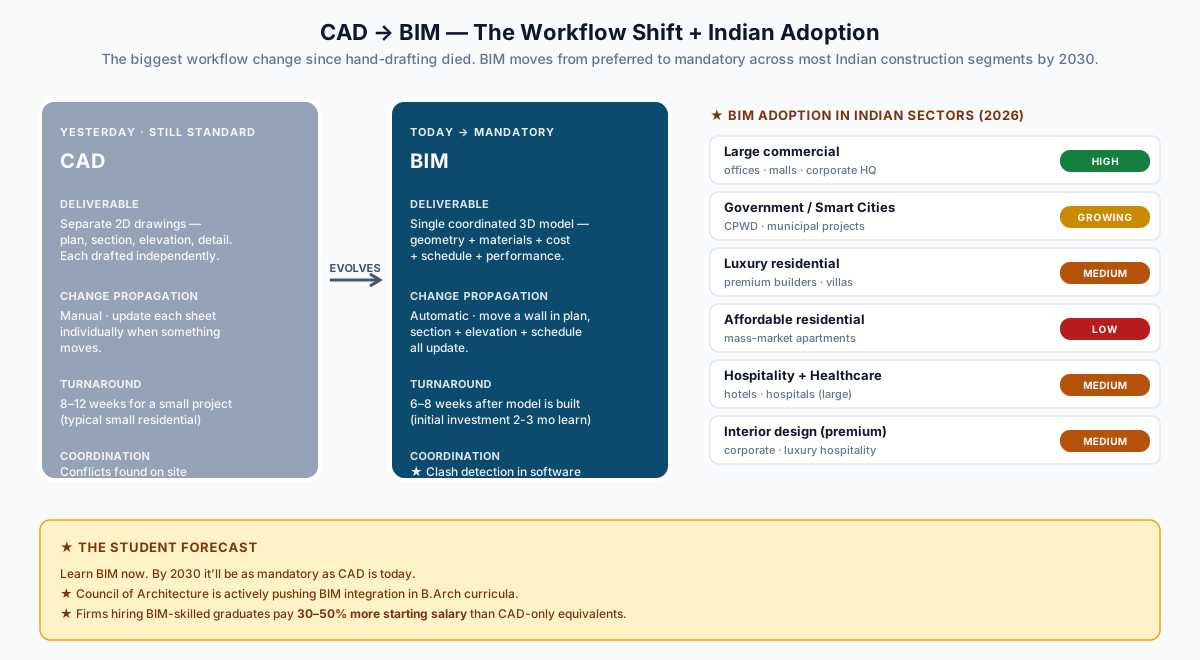
| Sector | BIM Adoption | Status |
|---|---|---|
| Large commercial (offices, malls) | High | Mandated by most corporate clients |
| Government (smart cities, CPWD) | Growing | CPWD has issued BIM guidelines |
| Residential (luxury) | Medium | Premium builders adopting for marketing advantage |
| Residential (affordable) | Low | Cost barrier, but growing through mandate |
| Interior design | Low-Medium | Large hospitality and corporate interiors use BIM |
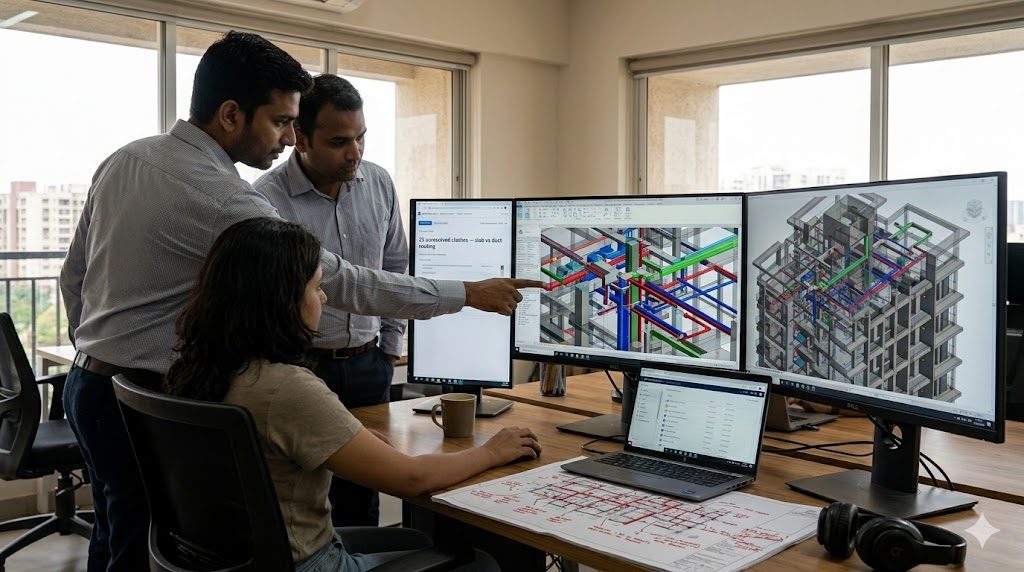
For students: Learn BIM now. In 5 years, BIM will be as mandatory as CAD is today. The COA is actively pushing BIM integration in architecture curricula. Firms that hire BIM-skilled graduates pay 30-50% more starting salary.
3. 3D Visualisation & Rendering
Clients cannot read architectural drawings. They understand images. Photorealistic renders and walkthroughs have become the primary medium for client communication and design approval.
3ds Max (Autodesk)
| Aspect | Detail |
|---|---|
| What it does | Advanced 3D modelling and rendering (with V-Ray or Corona) |
| Why essential | Industry standard for photorealistic architectural visualisation |
| Who needs it | Visualisation specialists, interior designers, architecture firms with in-house viz |
| License cost | ₹28,000/year (commercial), Free for students |
| Learning time | 3-6 months for basic renders, 12+ months for mastery |
V-Ray (Chaos Group)
| Aspect | Detail |
|---|---|
| What it does | Physically accurate rendering engine (plugin for 3ds Max, SketchUp, Revit, Rhino) |
| Why essential | Produces the most photorealistic output. Industry gold standard |
| License cost | ₹30,000/year |
| Key skills | Material creation, HDRI lighting, camera settings, render optimisation |
Enscape (Chaos Group)
| Aspect | Detail |
|---|---|
| What it does | Real-time rendering directly inside Revit, SketchUp, or Rhino |
| Why popular | Instant walkthrough during design — no separate rendering step |
| Best for | Design development, quick client presentations |
| License cost | ₹35,000/year |
Lumion
| Aspect | Detail |
|---|---|
| What it does | Real-time 3D rendering with massive asset library (trees, people, furniture, vehicles) |
| Why popular | Easiest to learn. Drag-and-drop environment. Beautiful output in hours, not days |
| Best for | Architectural exterior renders, landscape, urban design |
| License cost | ₹1,20,000/year (Pro) or ₹60,000/year (Standard) |
| Learning time | 1-2 weeks for good output |
Blender (Free & Open Source)
| Aspect | Detail |
|---|---|
| What it does | Full 3D modelling, rendering, animation — entirely free |
| Why it matters | Zero-cost alternative to 3ds Max. Growing fast in architecture |
| Learning time | Steeper learning curve than commercial tools, but massive community support |
| Best for | Students, freelancers, anyone who cannot afford commercial licenses |
D5 Render
| Aspect | Detail |
|---|---|
| What it does | Real-time rendering with ray tracing |
| Why growing | Free for personal use, excellent quality, GPU-based speed |
| Best for | Students and small firms wanting Lumion-quality output at zero cost |
Render Tool Comparison
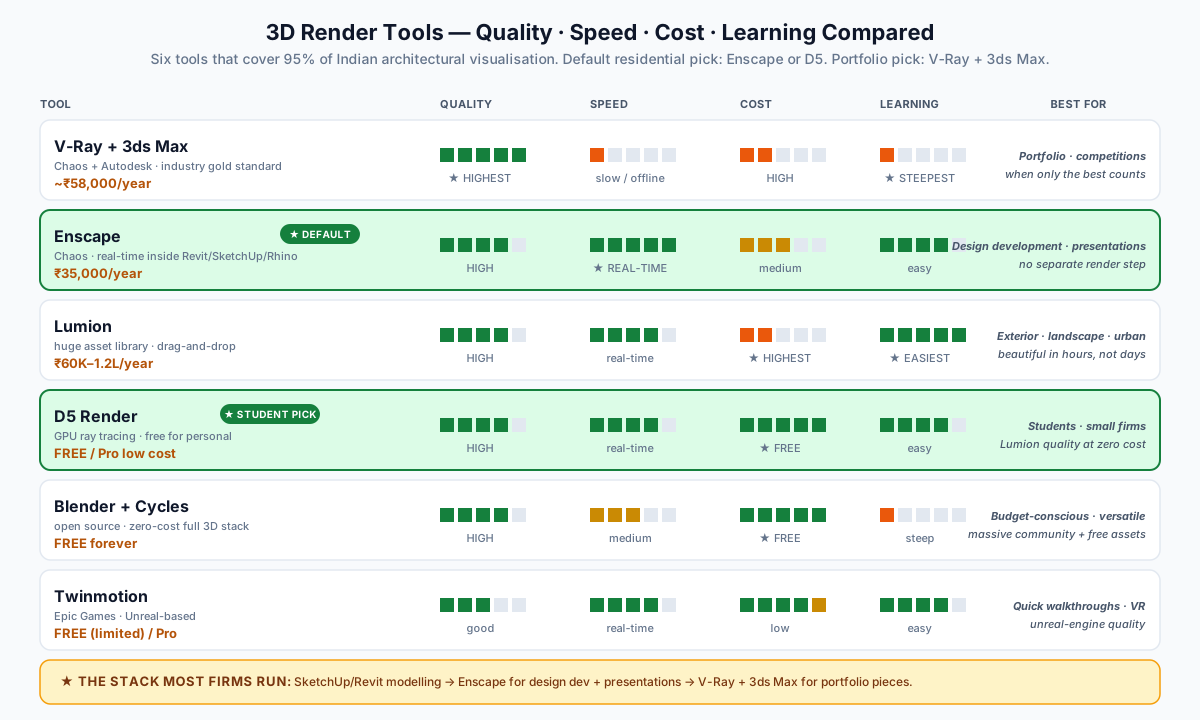
| Tool | Quality | Speed | Cost | Learning Curve | Best For |
|---|---|---|---|---|---|
| V-Ray + 3ds Max | Highest | Slow (offline) | High | Steep | Portfolio, competitions |
| Enscape | High | Real-time | Medium | Easy | Design development |
| Lumion | High | Real-time | High | Very easy | Presentations |
| D5 Render | High | Real-time | Free/Low | Easy | Students, small firms |
| Blender + Cycles | High | Medium | Free | Steep | Budget-conscious, versatile |
| Twinmotion | Good | Real-time | Free (limited) | Easy | Quick walkthroughs |
4. Graphic Design & Presentation
Architecture is a visual profession. The ability to communicate design through compelling graphics is as important as the design itself.
Adobe Photoshop
| Aspect | Detail |
|---|---|
| What it does | Image editing, post-processing renders, creating presentation sheets |
| Why essential | Every architect uses Photoshop for render post-production and sheet layouts |
| Key skills | Layer compositing, colour correction, render cleanup, adding people/trees, creating section perspectives |
| License cost | ₹2,700/month (Photography plan) |
| Learning time | 2-4 weeks for architectural use |
Adobe Illustrator
| Aspect | Detail |
|---|---|
| What it does | Vector graphics — diagrams, site plans, concept diagrams, infographics |
| Why essential | Site analysis diagrams, concept diagrams, competition boards |
| Key skills | Pen tool, pathfinder, gradient meshes, exporting for print |
| License cost | ₹2,700/month |
Adobe InDesign
| Aspect | Detail |
|---|---|
| What it does | Multi-page layouts — portfolios, design reports, competition submissions |
| Why essential | The only proper tool for professional multi-page documents |
| Key skills | Master pages, paragraph styles, image placement, PDF export |
| License cost | ₹2,700/month |
Canva
| Aspect | Detail |
|---|---|
| What it does | Quick graphic design — social media posts, presentations, mood boards |
| Why useful | No learning curve. Templates for everything. Excellent for marketing |
| License cost | Free (basic), ₹3,999/year (Pro) |
| Best for | Social media marketing, quick client presentations, mood boards |
Figma
| Aspect | Detail |
|---|---|
| What it does | Collaborative design — UI design, presentation design, interactive prototyping |
| Why growing | Free, browser-based, real-time collaboration, excellent for design sheets |
| Best for | Collaborative presentations, interactive client portals, design portfolios |
Presentation Best Practices
- Portfolio: Use InDesign (print) or Behance (digital). Maximum 30 pages. Lead with your strongest project.
- Client presentations: Use high-quality renders + clear plans. Avoid jargon. Show materials physically alongside digital.
- Competition boards: Use Illustrator for diagrams + Photoshop for images + InDesign for layout. 300 DPI minimum.
- Social media: Use Canva for Instagram, LinkedIn. Post consistently (3-5 times/week for growth).
5. AI Tools — The New Essential
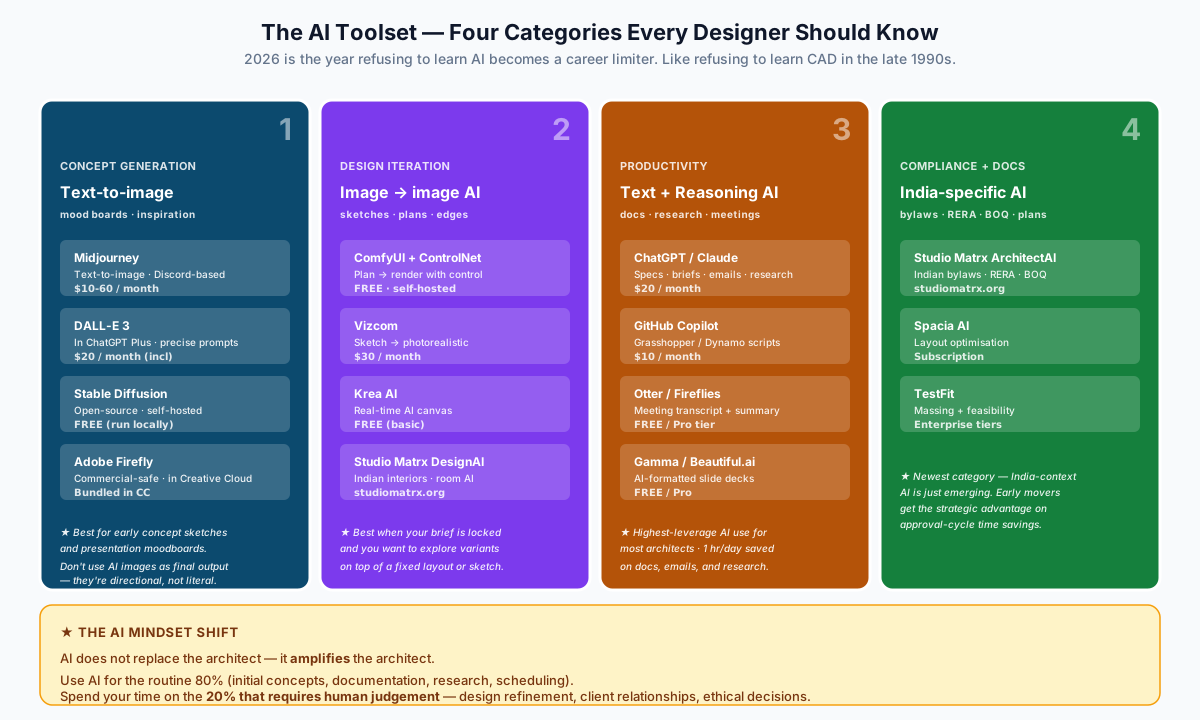
AI is the fastest-growing skill area in architecture and interior design. Professionals who learn AI tools now will have a significant competitive advantage.
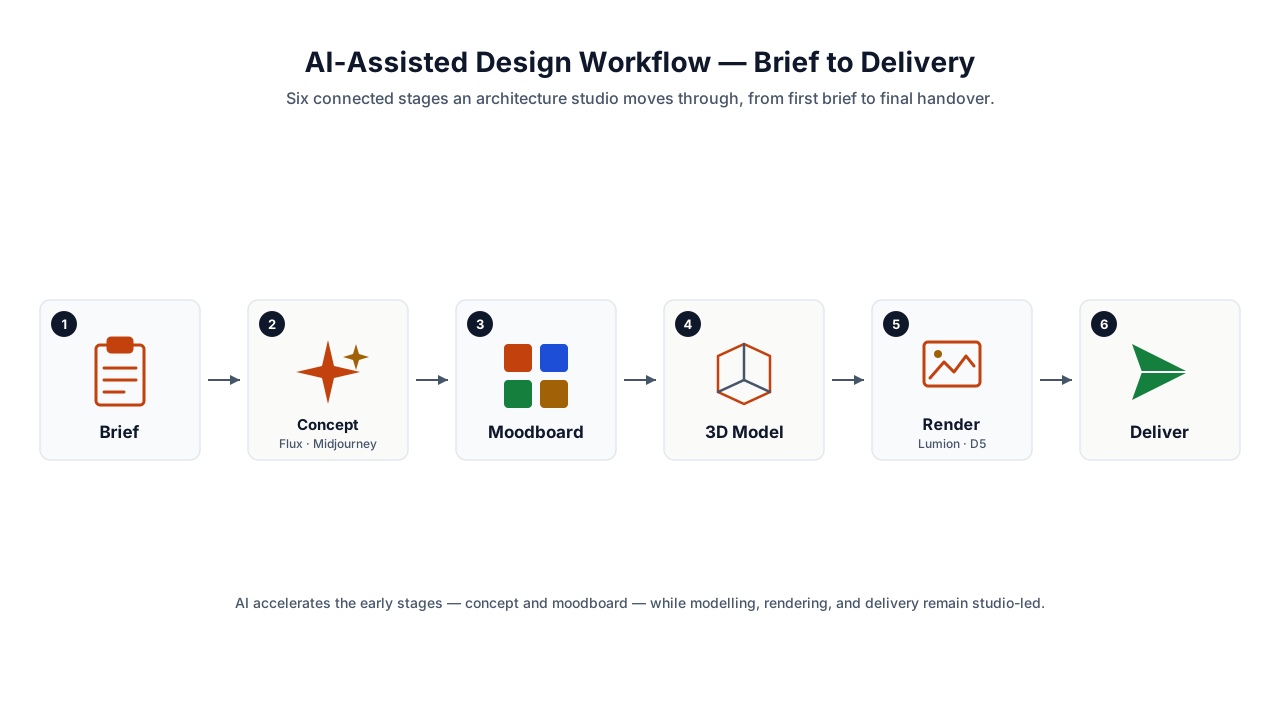
AI for Design Concept Generation
| Tool | What It Does | Best For | Cost |
|---|---|---|---|
| Midjourney | Text-to-image generation via Discord | Concept exploration, mood boards, design inspiration | $10-60/month |
| DALL-E 3 (OpenAI) | Text-to-image with precise prompt following | Quick concept visuals, client presentations | Included in ChatGPT Plus ($20/month) |
| Stable Diffusion | Open-source image generation (local or cloud) | Privacy-sensitive projects, custom training | Free (self-hosted) |
| Adobe Firefly | AI image generation integrated with Creative Cloud | Seamless Adobe workflow, commercially safe images | Included in CC subscription |
AI for Design Iteration
| Tool | What It Does | Best For | Cost |
|---|---|---|---|
| ComfyUI + ControlNet | AI image generation with architectural control (plans, edges) | Generating design options from floor plans | Free (self-hosted) |
| Vizcom | Sketch-to-render AI | Converting hand sketches to photorealistic renders | $30/month |
| Krea AI | Real-time AI canvas for design exploration | Quick concept iteration | Free (basic) |
| Studio Matrx DesignAI | AI interior design concepts for Indian homes | Moodboards, room visualisation, material selection | studiomatrx.org |
AI for Productivity
| Tool | What It Does | Best For |
|---|---|---|
| ChatGPT / Claude | Text generation, research, code generation, document drafting | Specifications writing, design briefs, client emails, code reviews, compliance research |
| GitHub Copilot | AI code completion | Computational design scripts (Grasshopper, Dynamo) |
| Otter.ai / Fireflies | Meeting transcription and summarisation | Client meeting notes, action items |
| Gamma | AI-powered presentations | Quick pitch decks, design presentations |
| Beautiful.ai | AI-formatted presentations | Professional slide decks |
AI for Compliance & Documentation
| Tool | What It Does | Best For |
|---|---|---|
| Studio Matrx ArchitectAI | AI compliance checking, contract drafting, BOQ generation | Indian building bylaws, RERA, NBC compliance |
| Spacia AI | AI space planning | Optimising layouts from client requirements |
| TestFit | AI site planning | Feasibility studies, massing optimisation |
The AI mindset shift: AI does not replace the architect — it amplifies the architect. Use AI for the 80% that is routine (initial concepts, documentation, research). Spend your time on the 20% that requires human judgement (design refinement, client relationships, ethical decisions).
6. Project Management & Collaboration
Architecture is a team sport. Managing timelines, budgets, and multi-disciplinary coordination requires digital project management skills.
Project Management Tools
| Tool | What It Does | Best For | Cost |
|---|---|---|---|
| Microsoft Project | Gantt charts, task management, resource allocation | Large projects, construction scheduling | ₹700/month |
| Primavera P6 | Enterprise project scheduling | Infrastructure, large-scale construction | Enterprise pricing |
| Trello | Visual kanban boards | Small team task management | Free (basic) |
| Asana | Team task management with timelines | Medium firms, multi-project management | Free (basic) |
| Monday.com | Customisable project management | Design firms wanting visual workflows | $8/user/month |
| Notion | All-in-one workspace | Design briefs, meeting notes, project wikis | Free (personal) |
Cloud Collaboration
| Tool | What It Does | Why Important |
|---|---|---|
| BIM 360 / Autodesk Construction Cloud | Cloud BIM collaboration | Multi-office projects, consultant coordination |
| Google Workspace | Docs, Sheets, Drive, Meet | Daily communication, document sharing |
| Microsoft 365 | Word, Excel, Teams, OneDrive | Client communication, proposals, contracts |
| Dropbox / Google Drive | Cloud storage | File sharing with clients and contractors |
| WhatsApp Business | Client communication | Indian construction industry runs on WhatsApp |
Advanced Excel for Architects
Excel is often underestimated but is critical for:
- BOQ preparation — quantity take-off, rate analysis
- Cost estimation — material and labour costing
- Project scheduling — simple Gantt charts
- Fee calculation — COA fee guidelines, payment milestones
- Cash flow projection — income vs expense tracking
- Vendor comparison — material rate comparison sheets
Key Excel skills: VLOOKUP/INDEX-MATCH, Pivot Tables, Conditional Formatting, Data Validation, Charts, Named Ranges
7. Digital Marketing & Online Presence
In 2025, your online presence IS your portfolio. Clients search online before they call. A strong digital presence directly impacts lead generation.
Portfolio Platforms
| Platform | Best For | Cost |
|---|---|---|
| Behance | Design portfolio (visual, project-based) | Free |
| Archinect | Architecture-specific portfolio and job board | Free |
| Issuu | Publishing portfolio as flipbook | Free (basic) |
| Personal website | Full control, SEO, professionalism | ₹5,000-20,000/year (domain + hosting) |
Social Media for Designers
| Platform | Content Type | Posting Frequency | Best For |
|---|---|---|---|
| Project images, reels, behind-the-scenes | 3-5 posts/week | Visual portfolio, client acquisition | |
| Professional insights, project updates, articles | 2-3 posts/week | B2B networking, corporate clients | |
| Mood boards, design inspiration | 5-10 pins/week | SEO, driving website traffic | |
| YouTube | Walkthroughs, design process, tutorials | 1-2 videos/month | Authority building, education |
| Behance | Detailed project case studies | 1-2 projects/month | Professional credibility |
Website Essentials
Every architecture/interior design firm needs:
- Professional domain (firmname.com, not free subdomain)
- Portfolio with high-quality project images and descriptions
- Services page clearly listing what you offer
- Contact form with phone number and email
- Google Business Profile (critical for local search)
- Mobile responsive design (70%+ traffic is mobile in India)
- Blog with design insights (helps with SEO)
SEO Basics for Design Firms
| Action | Why | How |
|---|---|---|
| Google Business Profile | Appear in "interior designer near me" searches | Claim and verify at business.google.com |
| Local keywords | Rank for city-specific searches | Include city name in page titles, headings, content |
| Project pages | Each project is an SEO opportunity | Create detailed project pages with location, scope, materials |
| Blog content | Builds authority and drives organic traffic | Write about design trends, material guides, project diaries |
| Google reviews | Social proof drives conversions | Ask happy clients for reviews |
8. Emerging & Specialised Skills
Parametric Design
| Tool | What It Does | Best For |
|---|---|---|
| Grasshopper (Rhino plugin) | Visual programming for complex geometry | Facades, pavilions, parametric patterns |
| Dynamo (Revit plugin) | Visual programming for BIM automation | Automating repetitive Revit tasks, data-driven design |
| Processing | Creative coding | Generative art, interactive installations |
VR / AR for Architecture
| Tool | What It Does | Cost |
|---|---|---|
| Enscape VR | VR walkthrough directly from Revit/SketchUp | Included in Enscape license |
| Prospect (IrisVR) | VR meetings with clients | $60/month |
| AR in SketchUp Viewer | AR overlay of model on real site | Included in SketchUp subscription |
| Pair (by Sketchfab) | AR furniture placement | Free |
Computational Design
- Rhino + Grasshopper — parametric facades, form-finding, environmental analysis
- Dynamo + Revit — automated BIM workflows, data-driven design
- Python scripting — custom tools, data processing, API integrations
- GIS (QGIS/ArcGIS) — site analysis, urban planning, environmental mapping
Drone & Scanning Technology
| Tool | What It Does | Best For |
|---|---|---|
| DJI drones | Aerial photography, site surveys | Site documentation, marketing |
| LiDAR scanning | 3D point cloud of existing buildings | Renovation projects, heritage documentation |
| Matterport | 3D virtual tours of existing spaces | Interior design, real estate marketing |
| iPhone/iPad LiDAR | Quick room scanning | Preliminary measurements, existing conditions |
Learning Roadmap — By Career Stage
For Architecture Students (B.Arch Years 1-5)
| Year | Focus | Tools | Priority |
|---|---|---|---|
| 1st Year | Hand skills + basic digital | AutoCAD 2D, Photoshop basics, SketchUp | High |
| 2nd Year | 3D modelling + presentation | SketchUp Pro, Illustrator, basic rendering | High |
| 3rd Year | BIM + advanced rendering | Revit basics, Lumion/Enscape, InDesign | High |
| 4th Year | Specialisation + portfolio | V-Ray/3ds Max or BIM deep dive, portfolio building | High |
| 5th Year | Thesis tools + job prep | AI tools, advanced BIM, parametric (optional), portfolio polishing | High |
For Interior Design Students (B.Des / Diploma)
| Semester | Focus | Tools |
|---|---|---|
| 1-2 | Drafting + visualization basics | AutoCAD 2D, SketchUp, Photoshop |
| 3-4 | Material library + rendering | 3ds Max or SketchUp + V-Ray, Illustrator |
| 5-6 | Client presentation + portfolio | Lumion/Enscape, InDesign, Canva |
| 7-8 | Specialisation + professional prep | AI tools, Excel (BOQ), portfolio, social media |
For Working Professionals — Upskilling Priority
| Current Skill Level | Learn Next | Impact |
|---|---|---|
| AutoCAD only | SketchUp + basic rendering | Medium-High |
| AutoCAD + SketchUp | Revit or 3ds Max + V-Ray | High |
| AutoCAD + 3ds Max | BIM (Revit) + AI tools | Very High |
| Full traditional stack | AI tools + digital marketing | Transformative |
| BIM proficient | AI + parametric + project management | Leadership-ready |
Indian Learning Resources
Free Resources
| Resource | What It Offers |
|---|---|
| Autodesk Education | Free licenses for AutoCAD, Revit, 3ds Max (3-year student license) |
| Blender Foundation | Completely free 3D modelling and rendering |
| D5 Render | Free real-time rendering for students |
| YouTube | Thousands of architecture-specific tutorials (SourceCAD, Balkan Architect, SketchUp School) |
| NPTEL | Free IIT courses on building technology, structures, planning |
| Skillshare | Free trial with architecture-specific courses |
Paid Learning Platforms
| Platform | Best For | Cost |
|---|---|---|
| LinkedIn Learning | Structured professional courses | ₹1,500/month |
| Udemy | Affordable individual courses | ₹399-999/course (sale price) |
| Coursera | University-level courses with certificates | ₹3,000-5,000/course |
| CADD Centre | In-person training across India | ₹15,000-50,000/course |
| Arena Animation | In-person 3D visualization training | ₹30,000-80,000/course |
Indian YouTube Channels for Architects
- BIM & CAD: SourceCAD, CAD in Black, Learn Revit
- Visualization: Arch Viz Camp, CG Cookie, Grant Abbitt (Blender)
- Design: Architecture Social, 30X40 Design Workshop
- Indian context: Civil Engineering by Civilology, Learning Technology
Software Cost Planning
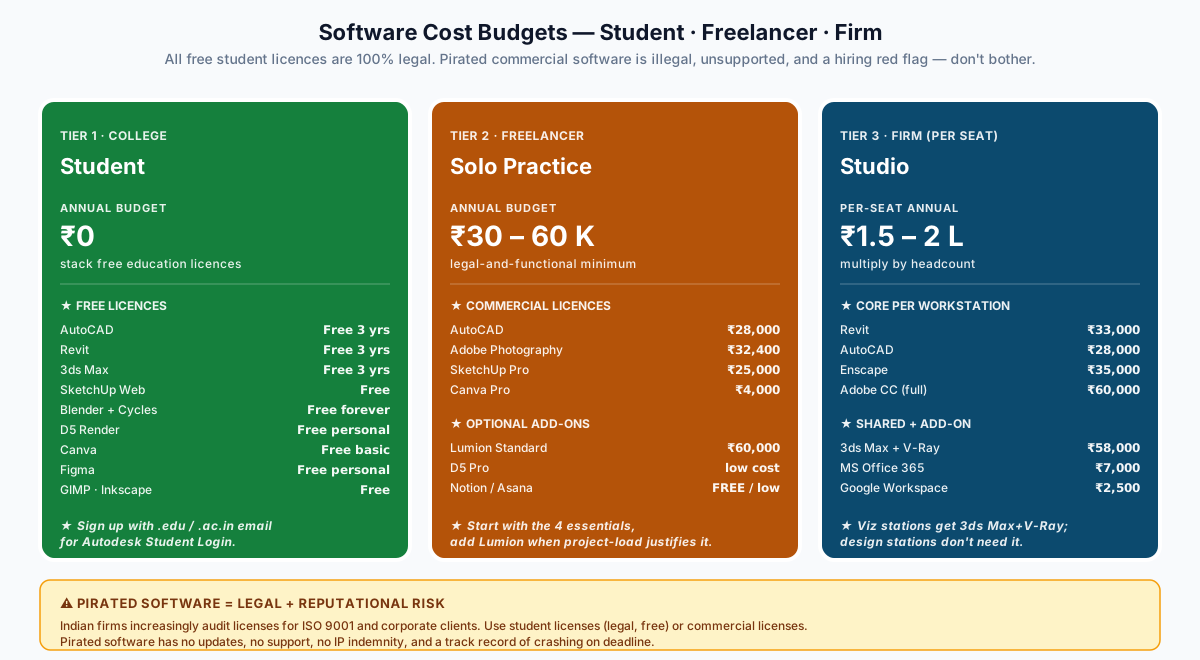
Student Budget (₹0 - Minimal)
| Tool | Cost | Notes |
|---|---|---|
| AutoCAD | Free | Autodesk Student License (3 years) |
| Revit | Free | Autodesk Student License |
| 3ds Max | Free | Autodesk Student License |
| SketchUp (Web) | Free | Browser-based version |
| Blender | Free | Open source, forever free |
| D5 Render | Free | Personal use license |
| Canva | Free | Basic plan |
| Figma | Free | Personal plan |
| GIMP | Free | Photoshop alternative |
| Inkscape | Free | Illustrator alternative |
Freelancer Budget (₹30,000 - 60,000/year)
| Tool | Cost/Year | Priority |
|---|---|---|
| AutoCAD | ₹28,000 | Essential |
| Adobe Photography (Photoshop + Lightroom) | ₹32,400 | Essential |
| SketchUp Pro | ₹25,000 | High |
| Lumion (Standard) | ₹60,000 | Medium-High |
| Canva Pro | ₹3,999 | Useful |
Firm Budget (Per Seat, Annual)
| Tool | Cost/Year | Notes |
|---|---|---|
| Revit | ₹33,000 | Essential for BIM firms |
| AutoCAD | ₹28,000 | Every workstation |
| 3ds Max + V-Ray | ₹58,000 | Visualization stations |
| Enscape | ₹35,000 | Per-seat license |
| Adobe Creative Cloud | ₹60,000 | Full suite |
| MS Office 365 | ₹7,000 | Per user |
| Google Workspace | ₹2,500 | Per user |
Common Mistakes to Avoid
1. Learning too many tools superficially — Master 4-5 core tools deeply rather than 15 tools at surface level
2. Ignoring BIM — "I'll learn it later" is a career risk. BIM is becoming mandatory, not optional
3. Neglecting graphic skills — A great design poorly presented loses to an average design beautifully presented
4. Skipping Excel — It's not glamorous, but BOQ, costing, and fee calculation require solid Excel skills
5. No online presence — If you don't exist online, you don't exist for clients searching "architect near me"
6. Fear of AI — AI tools multiply your output. Refusing to learn them is like refusing to learn CAD in the 1990s
7. Not building a portfolio — Start documenting projects from Year 1 of college. Don't wait until job hunting
8. Pirated software — Use student licenses (free and legal). Pirated software has no updates, no support, and creates legal risk for firms
9. Only learning software, not design thinking — Tools are means, not ends. Design judgement comes from studying precedents, theory, and practice
10. Ignoring soft skills — Client communication, presentation skills, and negotiation are digital skills too (email, video calls, proposals)
Key Takeaways
- AutoCAD + Photoshop + SketchUp is the minimum digital toolkit for any design professional in India
- BIM (Revit/ArchiCAD) is the single most important upskilling investment for architects in 2025
- AI tools are not optional — they are rapidly becoming essential for competitive practice
- Rendering skills (Lumion, Enscape, V-Ray) directly impact client acquisition and project approval rates
- Digital marketing (Instagram, Google Business, website) is now a core business skill, not a luxury
- Students get most tools free — Autodesk, Blender, D5, Canva, Figma all offer free student/personal licenses
- The best time to learn was 5 years ago. The second-best time is now.
References:
- Council of Architecture (COA) — Minimum Standards of Architectural Education, 2020
- National Building Code of India (NBC) 2016
- Autodesk Education Community — autodesk.com/education
- BIS IS 15883:2009 — BIM Standard for Indian Construction
- CPWD BIM Guidelines 2022
- NASSCOM Digital Skills Report 2024 — Architecture & Construction Sector
- World Economic Forum — Future of Jobs Report 2025
- ArchDaily — Technology in Practice Survey 2024
Export this guide
Related Guides — Deep-dive reading
AI Render Generator — Photoreal AI Rendering for Indian Architects + Designers (2026)
Sketch/photo/white-box → photoreal · 12 min vs V-Ray 4 hr · Studio Matrx + Lumion + D5 + Twinmotion + Enscape
Design StylesThe Software Stack — A Working Learning Path
Module 2 of the Student Foundations Track — AutoCAD to Revit to Rhino to V-Ray, the Five-Tier Learning Path, Indian Licensing Discipline, Hardware Requirements, File-Format Ecosystem, Generative-AI Architecture Tools in 2026, and the Pitfalls Every B.Arch and B.Des Student Must Avoid
Student FoundationsHow to Plan a Functional House Layout
A Workflow Guide — From Brief to Construction Drawings
Room PlanningRelated Tools — Try Free
False Ceiling Cost Estimator
Live ₹/sqft across 8 ceiling types — POP, gypsum, designer, metal, PVC, wooden — with cove and spot lighting for 20 Indian cities.
Cost CalculatorHealing View Impact Calculator
Evidence-Based Design dashboard quantifying the recovery impact of nature view + daylight factor on analgesic use, length of stay, and HCAHPS patient-experience uplift. Calibrated against Ulrich 1984 (Science), Park & Mattson 2008, and the CHD EBD evidence base.
EBD CalculatorRoom Programming Worksheet
Add every space, size it to feel right and rank it A/B/C — then generate an architect-ready design brief.
Design Tool